Fire Button Shoots
Read the fire button and launch a bullet sprite using zero-page variables — the first step toward a shooting game.
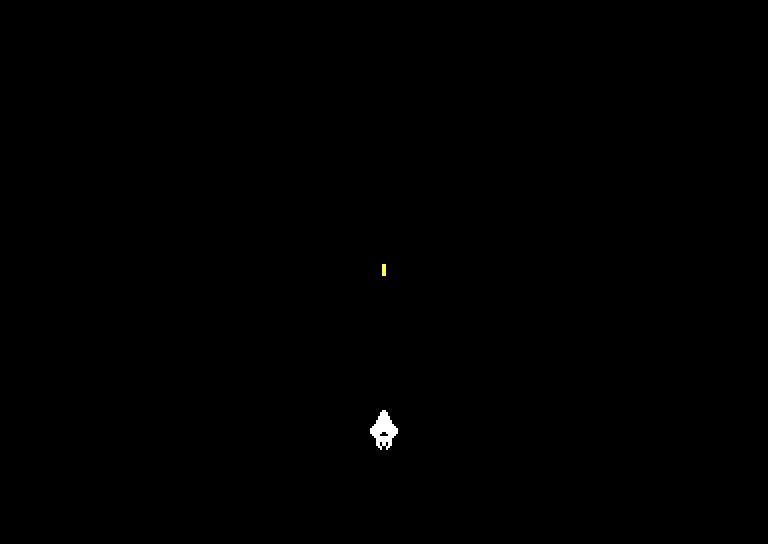
Press fire. A yellow bullet appears at the ship and streaks upward. Let go — only one bullet at a time. When it flies off the top, you can fire again.
One button, one new sprite, and a pair of zero-page variables to track the bullet’s state. This is the foundation of every shooting game: spawn a projectile, move it each frame, remove it when it’s done.
Zero Page
The 6510 has a special region of memory called the zero page — addresses $00 to $FF. Instructions that access zero page are one byte shorter and one cycle faster than instructions that access the rest of memory:
| Instruction | Cycles | Bytes |
|---|---|---|
LDA $03 (zero page) | 3 | 2 |
LDA $0400 (absolute) | 4 | 3 |
That might not sound like much, but in a game loop running 50 times per second, those saved cycles add up. The zero page is where you put variables that get read and written constantly.
Addresses $00 and $01 are reserved by the C64’s hardware. We start our variables at $02:
; Zero-page variables
bullet_active = $02     ; 0 = no bullet, 1 = active
bullet_y      = $03     ; Bullet Y position

; ... (inside initialisation)

        ; Sprite 1 setup (bullet)
        lda #129
        sta $07f9           ; Data pointer (block 129 = $2040)
        lda #$07
        sta $d028           ; Colour (yellow)

        ; Enable sprite 0 only (bullet starts disabled)
        lda #%00000001
        sta $d015

        ; Bullet starts inactive
        lda #$00
        sta bullet_active
bullet_active is a flag: 0 means no bullet on screen, 1 means there is one. bullet_y tracks the bullet’s Y position so we can move it each frame. We also set up sprite 1 during initialisation — its data pointer ($07F9) points to block 129 ($2040), and its colour is yellow ($07). But we don’t enable it yet. The bullet only appears when you press fire.
Reading the Fire Button
You already know $DC00 — the joystick register. Bits 0–3 are directions. Bit 4 is the fire button, and it follows the same active-low pattern: 0 means pressed, 1 means released.
The check works exactly like the direction checks from Unit 2:
        lda $dc00
        and #%00010000      ; Isolate bit 4
        bne no_fire         ; Bit is 1 = NOT pressed
If the result is zero, fire is pressed.
Spawning the Bullet
Pressing fire isn’t enough — we also need to check that there isn’t already a bullet on screen. Without this guard, holding fire would reset the bullet’s position every frame:
When we spawn the bullet:
- Copy the ship’s X position (
$D000) to the bullet’s X position ($D002) — the bullet launches from where the ship is - Copy the ship’s Y position (
$D001) tobullet_y— this is our zero-page variable, not the sprite register directly - Enable sprite 1 by OR-ing bit 1 into
$D015— this turns on the bullet without affecting sprite 0 - Set
bullet_activeto 1 — so we won’t spawn another bullet until this one is gone
The ORA #%00000010 instruction sets bit 1 of the sprite enable register. It’s the opposite of the AND masking you learnt in Unit 2 — AND clears bits, ORA sets them.
Moving the Bullet
Each frame, if the bullet is active, we subtract 4 from its Y position. When Y drops below 30 (above the visible screen area), we deactivate it:
; --- Update bullet ---
lda bullet_active
beq no_bullet ; Not active, skip
; Move bullet up (4 pixels per frame)
lda bullet_y
sec
sbc #$04
sta bullet_y
sta $d003 ; Update sprite 1 Y position
; Check if bullet has left the screen (Y < 30)
cmp #$1e
bcs no_bullet ; Y >= 30, still on screen
; Deactivate bullet
lda #$00
sta bullet_active
; Disable sprite 1 (keep sprite 0 enabled)
lda $d015
and #%11111101
sta $d015
no_bullet:
A new instruction here: SBC (SuBtract with Carry). It subtracts a value from the accumulator. The SEC beforehand sets the carry flag — SBC needs this to subtract correctly (it’s the opposite of how ADC needs a clear carry to add).
The CMP #$1E / BCS no_bullet pair checks if Y is still 30 or above. BCS (Branch if Carry Set) branches when the value is greater than or equal to the comparison value. If the bullet has gone above line 30, we clear bullet_active and disable sprite 1 with AND #%11111101 — clearing bit 1 while keeping bit 0 (the ship) enabled.
The Bullet Sprite
The bullet is a simple vertical line — 2 pixels wide, 6 pixels tall, centred in the 24×21 sprite frame:
; Sprite data at $2040 (block 129) — bullet
*= $2040
!byte $00,$00,$00 ;
!byte $00,$00,$00 ;
!byte $00,$00,$00 ;
!byte $00,$00,$00 ;
!byte $00,$00,$00 ;
!byte $00,$00,$00 ;
!byte $00,$00,$00 ;
!byte $00,$18,$00 ; ##
!byte $00,$18,$00 ; ##
!byte $00,$18,$00 ; ##
!byte $00,$18,$00 ; ##
!byte $00,$18,$00 ; ##
!byte $00,$18,$00 ; ##
!byte $00,$00,$00 ;
!byte $00,$00,$00 ;
!byte $00,$00,$00 ;
!byte $00,$00,$00 ;
!byte $00,$00,$00 ;
!byte $00,$00,$00 ;
!byte $00,$00,$00 ;
!byte $00,$00,$00 ;
The bullet data lives at $2040 — that’s block 129 (the next 64-byte block after the ship at $2000). The sprite pointer at $07F9 tells the VIC-II where to find sprite 1’s data, just as $07F8 does for sprite 0.
The Complete Code
; Starfield - Unit 3: Fire Button Shoots
; Assemble with: acme -f cbm -o starfield.prg starfield.asm
; ------------------------------------------------
; Zero-page variables
; ------------------------------------------------
bullet_active = $02 ; 0 = no bullet, 1 = active
bullet_y = $03 ; Bullet Y position
; ------------------------------------------------
; BASIC stub
; ------------------------------------------------
*= $0801
!byte $0c,$08,$0a,$00,$9e,$32,$30,$36,$31,$00,$00,$00
; ------------------------------------------------
; Initialisation
; ------------------------------------------------
*= $080d
; Black screen
lda #$00
sta $d020 ; Border colour
sta $d021 ; Background colour
; Clear the screen
ldx #$00
- lda #$20
sta $0400,x
sta $0500,x
sta $0600,x
sta $0700,x
inx
bne -
; Sprite 0 setup (ship)
lda #128
sta $07f8 ; Data pointer (block 128 = $2000)
lda #172
sta $d000 ; X position
lda #220
sta $d001 ; Y position
lda #$01
sta $d027 ; Colour (white)
; Sprite 1 setup (bullet)
lda #129
sta $07f9 ; Data pointer (block 129 = $2040)
lda #$07
sta $d028 ; Colour (yellow)
; Enable sprite 0 only (bullet starts disabled)
lda #%00000001
sta $d015
; Bullet starts inactive
lda #$00
sta bullet_active
!ifdef SCREENSHOT_MODE {
; Place a static bullet for screenshot capture
; Set sprite registers directly but leave bullet_active = 0
; so the game loop won't move or deactivate it
lda $d000
sta $d002 ; Bullet X = ship X
lda #140
sta $d003 ; Bullet Y mid-screen
lda #%00000011
sta $d015 ; Enable both sprites
}
; ------------------------------------------------
; Game loop — runs once per frame
; ------------------------------------------------
game_loop:
; Wait for the raster beam to reach line 255
- lda $d012
cmp #$ff
bne -
; --- Read joystick and move ship ---
; UP (bit 0)
lda $dc00
and #%00000001
bne not_up
dec $d001
dec $d001
not_up:
; DOWN (bit 1)
lda $dc00
and #%00000010
bne not_down
inc $d001
inc $d001
not_down:
; LEFT (bit 2)
lda $dc00
and #%00000100
bne not_left
dec $d000
dec $d000
not_left:
; RIGHT (bit 3)
lda $dc00
and #%00001000
bne not_right
inc $d000
inc $d000
not_right:
        ; --- Fire button (bit 4) ---
        lda $dc00
        and #%00010000
        bne no_fire         ; Bit is 1 = NOT pressed

        ; Fire is pressed — only spawn if no bullet active
        lda bullet_active
        bne no_fire         ; Already active, skip

        ; Spawn bullet at ship position
        lda $d000           ; Ship X → bullet X
        sta $d002
        lda $d001           ; Ship Y → bullet Y
        sta bullet_y

        ; Enable sprite 1 (keep sprite 0 enabled)
        lda $d015
        ora #%00000010
        sta $d015

        ; Mark bullet active
        lda #$01
        sta bullet_active

no_fire:
        ; --- Update bullet ---
        lda bullet_active
        beq no_bullet       ; Not active, skip

        ; Move bullet up (4 pixels per frame)
        lda bullet_y
        sec
        sbc #$04
        sta bullet_y
        sta $d003           ; Update sprite 1 Y position

        ; Check if bullet has left the screen (Y < 30)
        cmp #$1e
        bcs no_bullet       ; Y >= 30, still on screen

        ; Deactivate bullet
        lda #$00
        sta bullet_active

        ; Disable sprite 1 (keep sprite 0 enabled)
        lda $d015
        and #%11111101
        sta $d015

no_bullet:
jmp game_loop
; ------------------------------------------------
; Sprite data at $2000 (block 128) — ship
; ------------------------------------------------
*= $2000
!byte $00,$18,$00 ; ##
!byte $00,$3c,$00 ; ####
!byte $00,$3c,$00 ; ####
!byte $00,$7e,$00 ; ######
!byte $00,$7e,$00 ; ######
!byte $00,$ff,$00 ; ########
!byte $00,$ff,$00 ; ########
!byte $01,$ff,$80 ; ##########
!byte $03,$ff,$c0 ; ############
!byte $07,$ff,$e0 ; ##############
!byte $07,$ff,$e0 ; ##############
!byte $07,$e7,$e0 ; ###..####..###
!byte $03,$c3,$c0 ; ##....##....##
!byte $01,$ff,$80 ; ##########
!byte $00,$ff,$00 ; ########
!byte $00,$ff,$00 ; ########
!byte $00,$db,$00 ; ##.##.##
!byte $00,$db,$00 ; ##.##.##
!byte $00,$66,$00 ; ##..##
!byte $00,$24,$00 ; #..#
!byte $00,$00,$00 ;
; ------------------------------------------------
; Sprite data at $2040 (block 129) — bullet
; ------------------------------------------------
*= $2040
!byte $00,$00,$00 ;
!byte $00,$00,$00 ;
!byte $00,$00,$00 ;
!byte $00,$00,$00 ;
!byte $00,$00,$00 ;
!byte $00,$00,$00 ;
!byte $00,$00,$00 ;
!byte $00,$18,$00 ; ##
!byte $00,$18,$00 ; ##
!byte $00,$18,$00 ; ##
!byte $00,$18,$00 ; ##
!byte $00,$18,$00 ; ##
!byte $00,$18,$00 ; ##
!byte $00,$00,$00 ;
!byte $00,$00,$00 ;
!byte $00,$00,$00 ;
!byte $00,$00,$00 ;
!byte $00,$00,$00 ;
!byte $00,$00,$00 ;
!byte $00,$00,$00 ;
!byte $00,$00,$00 ;
If It Doesn’t Work
- No bullet appears? Check that
$D015has bit 1 set when firing, that$07F9points to block 129, and thatbullet_activeis being set to 1. - Bullet stuck in place? Make sure
bullet_yis being decremented and that you’re storing the result to$D003(sprite 1 Y register). - Bullet fires continuously? The
bullet_activeguard is missing or broken. TheLDA bullet_active/BNE no_firepair should prevent respawning while a bullet is on screen. - Bullet appears in the wrong position? The bullet’s X should be copied from
$D000(ship X) to$D002(bullet X). The Y comes from$D001viabullet_y. - Bullet never disappears? Check the
CMP #$1E/BCSlogic. The comparison should deactivate the bullet when Y drops below 30.
Try This: Change Bullet Speed
The bullet moves 4 pixels per frame. Change the SBC #$04 value:
SBC #$02— Slow, deliberate shots. Easier to see what’s happening.SBC #$04— The default. A brisk, arcade-like speed.SBC #$06— Fast. The bullet zips across the screen in about a second.
Try This: Fire Downward
Replace the bullet update section to make it fire downward:
        ; Move bullet down instead of up
        lda bullet_y
        clc
        adc #$04
        sta bullet_y
        sta $d003

        ; Deactivate when Y > 250
        cmp #$fa
        bcc no_bullet       ; Y < 250, still on screen
ADC (ADd with Carry) adds to the accumulator — the opposite of SBC. CLC clears the carry before adding, just as SEC sets it before subtracting. BCC (Branch if Carry Clear) is the counterpart to BCS.
What You’ve Learnt
- Zero page (
$02–$FF) — Fast variable storage. One byte shorter, one cycle faster than absolute addressing. Put your most-used variables here. - Fire button (bit 4 of
$DC00) — Same active-low pattern as directions. 0 = pressed, 1 = released. - Sprite 1 — A second hardware sprite with its own position registers (
$D002/$D003), colour ($D028), and data pointer ($07F9). - Bullet state — An active flag prevents multiple bullets on screen. Check the flag before spawning, clear it when the bullet leaves the screen.
- Conditional spawning — Two checks in sequence: is fire pressed? Is the bullet inactive? Both must pass to spawn.
- SBC for movement — Subtract with carry moves the bullet upward. SEC before SBC, just as CLC before ADC.
What’s Next
The bullet fires silently. In Unit 4, you’ll make the SID chip produce a laser sound when the fire button is pressed — your first taste of the C64’s legendary sound hardware.