Copper Landscape
A Copper list paints a landscape on screen — sky gradient, grass, terrain layers, underground. No CPU rendering. The custom chipset does it all.
Blue sky. Green grass. Brown earth fading to black. A landscape painted entirely by the Amiga’s custom chipset — the CPU barely lifts a finger.
The Amiga has a coprocessor called the Copper that runs in sync with the video beam. As the beam sweeps down the screen, the Copper changes the background colour at specific lines. No bitmaps. No pixels. Just a list of instructions that says “when the beam reaches here, switch to this colour.” The result is a landscape cross-section: sky above, terrain below, darkness underneath.
This is Unit 1 of Exodus — a terrain puzzle where creatures walk across a bitmap landscape. In later units, the terrain becomes real bitmap data that the Blitter can dig through and build upon. For now, the Copper paints the backdrop. By the end of this unit, you’ll have a coloured display running from a bootable Amiga disk.
The Display
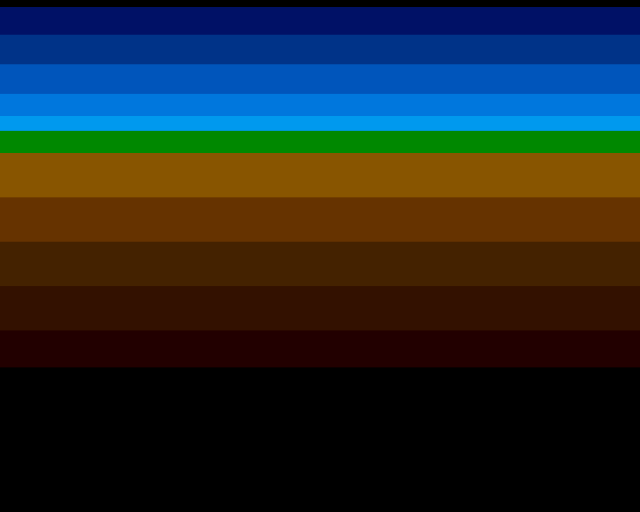
Five zones, twelve colour changes:
- Sky — a five-band gradient from deep navy to pale cyan. The Copper changes
COLOR00at lines$34,$44,$54, and$60. Each change is one instruction. - Grass — a single green band at line
$68. The ground surface where creatures will walk. - Terrain — three earth tones at lines
$74,$8C, and$A4. This is the cross-section that the Blitter will later modify — digging tunnels, building bridges. - Rock — two dark bands at lines
$BCand$D4. Deep underground. - Void — black from line
$E8onward.
All of this costs zero CPU time. The Copper runs on its own DMA channel, reading instructions from memory in parallel with the 68000.
Run It First
Step 1: Build the Executable
vasmm68k_mot -Fhunkexe -kick1hunks -nosym -o exodus exodus.asmThis produces exodus — an AmigaDOS executable. The -kick1hunks flag ensures compatibility with Kickstart 1.x.
Step 2: Create a Bootable Disk
The Amiga boots from floppy disks. Create an ADF image using xdftool (from the amitools package):
xdftool exodus.adf create + format "Exodus" ofs + boot install boot1x
xdftool exodus.adf + makedir s
echo "exodus" > startup-sequence
xdftool exodus.adf + write startup-sequence s/startup-sequence
xdftool exodus.adf + write exodus + protect exodus +e
rm startup-sequence
Step 3: Run in an Emulator
Use FS-UAE or WinUAE with:
- Kickstart 1.3 ROM (the A500’s operating system)
- A500 configuration
- exodus.adf in drive DF0:
The emulator boots from the disk and runs the program automatically. You should see coloured horizontal bands — a landscape cross-section.
To exit: Click the left mouse button, then reset the emulator.
The Amiga’s Custom Chipset
Three custom chips work together inside the Amiga:
Agnus is the DMA controller. It manages all memory access for graphics, sound, and the Copper. The Blitter (inside Agnus) copies and modifies rectangular memory regions at hardware speed — this will become the core game mechanic in later units.
Denise draws the display. It reads bitplane data from memory, combines it into pixel colours, and overlays hardware sprites. In this unit, we use zero bitplanes — just COLOR00 changes.
Paula handles audio and disk I/O. Four channels of 8-bit sampled sound. We’ll use Paula starting in Unit 9.
The 68000 CPU orchestrates everything. It sets up the Copper list, enables DMA, then loops. The custom chips do the rendering work.
The Copper
The Copper is a coprocessor that executes a stream of instructions in sync with the video beam. It has only two instructions:
WAIT — pause until the beam reaches a specific screen position:
dc.w $3401,$fffe ; Wait for line $34, horizontal position $01MOVE — write a value to any custom chip register:
dc.w COLOR00,$005B ; Set background colour to medium blueEach Copper instruction is two words (4 bytes). A WAIT followed by a MOVE changes a register at a specific screen line. Chain them together and you get a display program:
copperlist:
            ; --- Display setup ---
            dc.w    BPLCON0,$0200       ; 0 bitplanes, colour burst on

            ; --- SKY GRADIENT (5 bands, deep to pale) ---
            dc.w    COLOR00,COLOUR_SKY_DEEP     ; Deep navy from top of frame

            dc.w    $3401,$fffe                 ; Wait for line $34
            dc.w    COLOR00,COLOUR_SKY_UPPER    ; Dark blue

            dc.w    $4401,$fffe                 ; Wait for line $44
            dc.w    COLOR00,COLOUR_SKY_MID      ; Medium blue

            dc.w    $5401,$fffe                 ; Wait for line $54
            dc.w    COLOR00,COLOUR_SKY_LOWER    ; Light blue

            dc.w    $6001,$fffe                 ; Wait for line $60
            dc.w    COLOR00,COLOUR_SKY_HORIZON  ; Pale horizon

            ; --- GROUND SURFACE ---
            dc.w    $6801,$fffe                 ; Wait for line $68
            dc.w    COLOR00,COLOUR_GRASS        ; Green grass

            ; --- TERRAIN CROSS-SECTION ---
            dc.w    $7401,$fffe                 ; Wait for line $74
            dc.w    COLOR00,COLOUR_EARTH_TOP    ; Light brown

            dc.w    $8c01,$fffe                 ; Wait for line $8C
            dc.w    COLOR00,COLOUR_EARTH_MID    ; Medium brown

            dc.w    $a401,$fffe                 ; Wait for line $A4
            dc.w    COLOR00,COLOUR_EARTH_DEEP   ; Dark brown

            ; --- UNDERGROUND ---
            dc.w    $bc01,$fffe                 ; Wait for line $BC
            dc.w    COLOR00,COLOUR_ROCK         ; Rock

            dc.w    $d401,$fffe                 ; Wait for line $D4
            dc.w    COLOR00,COLOUR_ROCK_DEEP    ; Deep rock

            dc.w    $e801,$fffe                 ; Wait for line $E8
            dc.w    COLOR00,COLOUR_VOID         ; Black void

            ; --- END OF COPPER LIST ---
            dc.w    $ffff,$fffe                 ; Wait for impossible position
The first MOVE sets BPLCON0 to $0200 — zero bitplanes with colour burst enabled. This means the display shows only COLOR00 (the background colour). No bitmap data, no sprites. Pure colour.
Then the pattern repeats: WAIT for a line, MOVE a new colour to COLOR00. The beam sweeps down, the Copper changes the colour at each waypoint, and the display shows horizontal bands.
The list ends with dc.w $ffff,$fffe — a WAIT for an impossible position (line 255, position 254). The Copper halts here until the next frame, when Agnus automatically restarts it from COP1LC.
Taking Over the Machine
Before installing the Copper list, the program disables all interrupts and DMA:
move.w  #$7fff,INTENA(a5)   ; Disable all interrupts
move.w  #$7fff,INTREQ(a5)   ; Clear pending interrupts
move.w  #$7fff,DMACON(a5)   ; Disable all DMA
Writing $7FFF clears bits 0-14 of each control register (bit 15 is the SET/CLR flag — 0 means clear). This shuts down AmigaOS completely. The program now owns the hardware.
Then the Copper list is installed:
lea     copperlist,a0       ; A0 = address of our Copper list
move.l  a0,COP1LC(a5)       ; Tell Agnus where the list is
move.w  d0,COPJMP1(a5)      ; Strobe: restart Copper from COP1LC
COP1LC is the Copper list pointer — Agnus reads instructions from this address. Writing any value to COPJMP1 (the strobe register) forces the Copper to restart immediately.
Finally, DMA is enabled:
move.w #$8280,DMACON(a5) ; SET + DMAEN + COPENBit 15 = 1 (SET mode — turn bits on). Bit 9 = DMAEN (master DMA enable). Bit 7 = COPEN (Copper DMA). The Copper starts executing its list.
Experiment: Change the Colours
Open exodus.asm and find the TWEAKABLE VALUES section at the top:
COLOUR_SKY_DEEP     equ $0016       ; Deep navy at the top
COLOUR_GRASS        equ $0080       ; Green surface
COLOUR_EARTH_TOP    equ $0850       ; Light brown earth
Colours are $0RGB — one hex digit each for red, green, blue. Values 0-F (0-15).
Try these:
COLOUR_SKY_DEEP equ $0000— start with black sky (night scene)COLOUR_GRASS equ $00F0— neon green grassCOLOUR_EARTH_TOP equ $0F80— red mars terrainCOLOUR_SKY_HORIZON equ $0FFF— white-hot horizon
Rebuild after each change. The entire visual mood shifts with just a few numbers.
The Complete Code
;──────────────────────────────────────────────────────────────
; EXODUS - A terrain puzzle for the Commodore Amiga
; Unit 1: Copper Landscape
;
; A Copper list paints a landscape on screen: sky gradient,
; grass, terrain layers, underground. No CPU rendering —
; the custom chipset does it all.
;──────────────────────────────────────────────────────────────

;══════════════════════════════════════════════════════════════
; TWEAKABLE VALUES — Change these and see what happens!
;══════════════════════════════════════════════════════════════

; Colours are $0RGB (4 bits per component, values 0-F)
COLOUR_SKY_DEEP     equ $0016       ; Deep navy at the top
COLOUR_SKY_UPPER    equ $0038       ; Dark blue
COLOUR_SKY_MID      equ $005B       ; Medium blue
COLOUR_SKY_LOWER    equ $007D       ; Light blue
COLOUR_SKY_HORIZON  equ $009E       ; Pale horizon

COLOUR_GRASS        equ $0080       ; Green surface

COLOUR_EARTH_TOP    equ $0850       ; Light brown earth
COLOUR_EARTH_MID    equ $0630       ; Medium brown
COLOUR_EARTH_DEEP   equ $0420       ; Dark brown

COLOUR_ROCK         equ $0310       ; Deep rock
COLOUR_ROCK_DEEP    equ $0200       ; Near-black

COLOUR_VOID         equ $0000       ; The void

;══════════════════════════════════════════════════════════════
; HARDWARE REGISTERS
;══════════════════════════════════════════════════════════════

CUSTOM      equ $dff000

; Custom chip register offsets
DMACON      equ $096        ; DMA control (write)
INTENA      equ $09a        ; Interrupt enable (write)
INTREQ      equ $09c        ; Interrupt request (write)
COP1LC      equ $080        ; Copper list pointer
COPJMP1     equ $088        ; Copper restart strobe
BPLCON0     equ $100        ; Bitplane control
COLOR00     equ $180        ; Background colour
VPOSR       equ $004        ; Beam position

;══════════════════════════════════════════════════════════════
; CODE (must be in Chip RAM — the Copper reads from here)
;══════════════════════════════════════════════════════════════

            section code,code_c

start:
            lea     CUSTOM,a5           ; A5 = custom chip base ($DFF000)

            ; --- Take over the machine ---
            move.w  #$7fff,INTENA(a5)   ; Disable all interrupts
            move.w  #$7fff,INTREQ(a5)   ; Clear pending interrupts
            move.w  #$7fff,DMACON(a5)   ; Disable all DMA

            ; --- Install Copper list ---
            lea     copperlist,a0       ; A0 = address of our Copper list
            move.l  a0,COP1LC(a5)       ; Tell Agnus where the list is
            move.w  d0,COPJMP1(a5)      ; Strobe: restart Copper from COP1LC

            ; --- Enable DMA ---
            move.w  #$8280,DMACON(a5)   ; SET + DMAEN + COPEN
                                        ;  bit 15 = SET (turn bits ON)
                                        ;  bit  9 = DMAEN (master enable)
                                        ;  bit  7 = COPEN (Copper DMA)

            ; === Main Loop ===
mainloop:
            ; Wait for vertical blank (beam reaches line 0)
            move.l  #$1ff00,d1          ; Mask: bits 8-16 of beam position
.vbwait:
            move.l  VPOSR(a5),d0        ; Read beam position
            and.l   d1,d0               ; Isolate line number
            bne.s   .vbwait             ; Loop until line 0

            ; Check left mouse button (active low at CIAA)
            btst    #6,$bfe001          ; CIAA Port A, bit 6
            bne.s   mainloop            ; Not pressed — keep going

            ; Button pressed — halt
.halt:
            bra.s   .halt

;══════════════════════════════════════════════════════════════
; COPPER LIST — Landscape
;
; The Copper is a coprocessor inside Agnus. It executes its
; own instruction stream in sync with the video beam.
; Two instructions:
;   WAIT  — pause until the beam reaches a position
;   MOVE  — write a value to a custom chip register
;
; Format:
;   WAIT: dc.w $VVHH,$FFFE   (VV=line, HH=position)
;   MOVE: dc.w register,value
;══════════════════════════════════════════════════════════════

copperlist:
            ; --- Display setup ---
            dc.w    BPLCON0,$0200       ; 0 bitplanes, colour burst on

            ; --- SKY GRADIENT (5 bands, deep to pale) ---
            dc.w    COLOR00,COLOUR_SKY_DEEP     ; Deep navy from top of frame

            dc.w    $3401,$fffe                 ; Wait for line $34
            dc.w    COLOR00,COLOUR_SKY_UPPER    ; Dark blue

            dc.w    $4401,$fffe                 ; Wait for line $44
            dc.w    COLOR00,COLOUR_SKY_MID      ; Medium blue

            dc.w    $5401,$fffe                 ; Wait for line $54
            dc.w    COLOR00,COLOUR_SKY_LOWER    ; Light blue

            dc.w    $6001,$fffe                 ; Wait for line $60
            dc.w    COLOR00,COLOUR_SKY_HORIZON  ; Pale horizon

            ; --- GROUND SURFACE ---
            dc.w    $6801,$fffe                 ; Wait for line $68
            dc.w    COLOR00,COLOUR_GRASS        ; Green grass

            ; --- TERRAIN CROSS-SECTION ---
            dc.w    $7401,$fffe                 ; Wait for line $74
            dc.w    COLOR00,COLOUR_EARTH_TOP    ; Light brown

            dc.w    $8c01,$fffe                 ; Wait for line $8C
            dc.w    COLOR00,COLOUR_EARTH_MID    ; Medium brown

            dc.w    $a401,$fffe                 ; Wait for line $A4
            dc.w    COLOR00,COLOUR_EARTH_DEEP   ; Dark brown

            ; --- UNDERGROUND ---
            dc.w    $bc01,$fffe                 ; Wait for line $BC
            dc.w    COLOR00,COLOUR_ROCK         ; Rock

            dc.w    $d401,$fffe                 ; Wait for line $D4
            dc.w    COLOR00,COLOUR_ROCK_DEEP    ; Deep rock

            dc.w    $e801,$fffe                 ; Wait for line $E8
            dc.w    COLOR00,COLOUR_VOID         ; Black void

            ; --- END OF COPPER LIST ---
            dc.w    $ffff,$fffe                 ; Wait for impossible position
If It Doesn’t Work
- Black screen? Check that DMA is enabled:
$8280toDMACON. If the Copper DMA bit isn’t set, the Copper list never executes. Also verify the Copper list is in Chip RAM — usesection code,code_c(the_csuffix means Chip RAM). - Wrong colours or garbage? The Copper list must end with
$FFFF,$FFFE. Without it, the Copper reads past the list into whatever follows in memory — random colours or a crash. - Nothing boots? The ADF must have a bootblock (
boot install boot1x) and a startup-sequence in thes/directory that names the executable. Check spelling — AmigaDOS is case-sensitive. - Colours don’t change? Each WAIT instruction must have a line number higher than the previous one. The Copper can only wait forward — it can’t go backwards. If two WAITs have the same line, the second is skipped.
What You’ve Learnt
- The Copper — a coprocessor inside Agnus that executes WAIT and MOVE instructions in sync with the video beam. It changes display registers at specific screen positions, creating colour effects with zero CPU cost.
COLOR00— the background colour register. With zero bitplanes, the entire display shows this colour. Changing it at different lines creates horizontal bands.- DMACON — the DMA control register. SET/CLR bit (15) determines whether you’re turning bits on or off. DMAEN (bit 9) is the master switch. COPEN (bit 7) enables the Copper.
- Machine takeover — Amiga programs can shut down the OS and control hardware directly. Disable interrupts and DMA, install your own Copper list, re-enable what you need.
- Bootable ADF — a floppy disk image with a bootblock and startup-sequence. The Amiga boots from it automatically.
What’s Next
In Unit 2, the landscape becomes real bitmap data — a bitplane that the Copper displays as actual pixels. The terrain you’ll later dig through and build upon starts as a filled rectangle of memory. The transition from colour bands to a rendered world.