Bitplane Display
One bitplane turns colour bands into a real landscape. Where bits are 0, sky shows through. Where bits are 1, terrain appears. The bitmap is the world.
In Unit 1, the Copper painted colour bands. Now those bands become a real landscape — sky above, earth below. One bitplane turns the entire lower portion of the screen into solid terrain.
The Amiga uses bitplanes for graphics. Each bitplane is a block of memory where every bit maps to one pixel. With one bitplane, each pixel is either 0 (background — COLOR00) or 1 (foreground — COLOR01). Where the terrain bits are 1, the earthy brown of COLOR01 appears. Where they’re 0, the sky gradient of COLOR00 shows through.
This bitmap is the world. In later units, creatures will walk on it, and the Blitter will dig through it. Every pixel of terrain is a bit in memory.
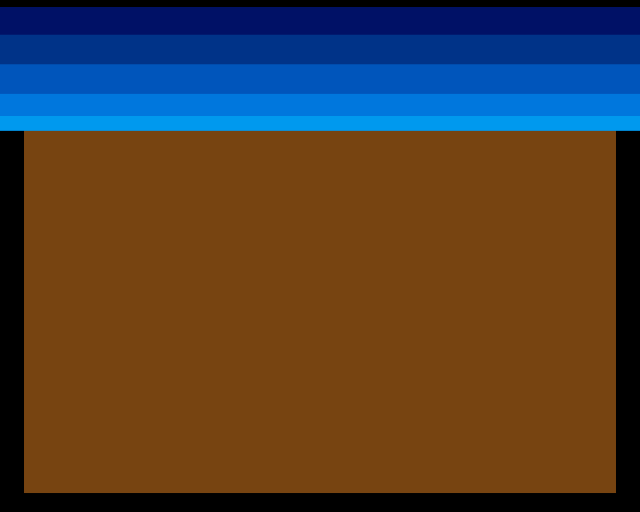
Sky gradient above. Solid earth below. The Copper still paints the sky — five colour changes from navy to cyan. But now the transition from sky to terrain is real: at row 60 of the bitplane, the bits flip from 0 to 1. The display switches from sky to earth.
Bitplane Basics
The Amiga’s low-res mode is 320 pixels wide and 256 lines tall (PAL). Each pixel in a single bitplane is one bit:
- 320 pixels = 40 bytes per row (320 ÷ 8)
- 256 rows × 40 bytes = 10,240 bytes per bitplane
All of this must live in Chip RAM — the first 512KB of memory that the custom chips can access via DMA. The CPU writes to this memory; Agnus reads it automatically every frame.
With 1 bitplane, each pixel indexes into colours 0 or 1:
- Bit = 0 →
COLOR00(the background — our sky gradient) - Bit = 1 →
COLOR01(the foreground — our terrain brown)
More bitplanes give more colours: 2 planes = 4 colours, 3 = 8, up to 6 planes = 64 colours (HAM mode goes further). For now, 1 plane and 2 colours is all we need.
Display Setup
The Copper list gained new registers. These tell the display hardware where the visible area is and when to fetch bitplane data:
copperlist:
            ; --- Display window (standard PAL low-res) ---
            dc.w    DIWSTRT,$2c81       ; Window start: line $2C, column $81
            dc.w    DIWSTOP,$2cc1       ; Window stop: line $12C, column $C1
            dc.w    DDFSTRT,$0038       ; Data fetch start
            dc.w    DDFSTOP,$00d0       ; Data fetch stop

            ; --- Bitplane configuration ---
            dc.w    BPLCON0,$1200       ; 1 bitplane + colour burst
            dc.w    BPLCON1,$0000       ; No scroll
            dc.w    BPLCON2,$0000       ; Default priority
            dc.w    BPL1MOD,$0000       ; No modulo

            ; --- Bitplane pointer (patched by CPU at startup) ---
            dc.w    BPL1PTH
bpl1pth_val:
            dc.w    $0000               ; High word of bitplane address
            dc.w    BPL1PTL
bpl1ptl_val:
            dc.w    $0000               ; Low word of bitplane address

            ; --- Colours ---
            dc.w    COLOR00,COLOUR_SKY_DEEP     ; Background: sky
            dc.w    COLOR01,COLOUR_TERRAIN      ; Foreground: terrain
DIWSTRT and DIWSTOP define the display window — the rectangle of screen where graphics appear. $2C81 means start at line $2C, column $81. $2CC1 means stop at line $12C, column $C1. These are the standard PAL values for a 320×256 display.
DDFSTRT and DDFSTOP control data fetch timing — when Agnus reads bitplane data from memory on each line. $0038 to $00D0 is the standard low-res fetch window, matching 320 pixels.
BPLCON0 changed from $0200 (zero bitplanes) to $1200 (one bitplane). Bits 14-12 hold the bitplane count: 001 = 1 plane. The colour burst bit stays on.
BPL1PTH/BPL1PTL tell Agnus where the bitplane data lives. These are patched by the CPU at startup — the actual address isn’t known until the program loads:
            lea     bitplane,a0
            move.l  a0,d0
            swap    d0                  ; High word first
            lea     bpl1pth_val,a1
            move.w  d0,(a1)
            swap    d0                  ; Low word
            lea     bpl1ptl_val,a1
            move.w  d0,(a1)
The swap instruction exchanges the high and low words of D0. The Amiga stores 32-bit addresses as two 16-bit writes: high word to BPL1PTH, low word to BPL1PTL.
Filling the Terrain
The bitplane starts as 10,240 bytes of zeros — all sky. The fill loop writes $FFFFFFFF (all bits set) from row 60 downward:
            ; --- Fill terrain into bitplane ---
            ; Sky area is already 0 (transparent — shows COLOR00)
            ; Fill from TERRAIN_START to bottom with $FF (solid — shows COLOR01)
            lea     bitplane,a0
            add.l   #TERRAIN_START*BYTES_PER_ROW,a0
            move.w  #(SCREEN_HEIGHT-TERRAIN_START)*BYTES_PER_ROW/4-1,d0
.fill:
            move.l  #$ffffffff,(a0)+
            dbra    d0,.fill
LEA bitplane,a0 loads the bitplane address into A0. ADD.L advances the pointer to the start of the terrain area: row 60 × 40 bytes per row = 2,400 bytes in.
MOVE.W #count,d0 loads the loop counter. DBRA (Decrement and Branch) subtracts 1 from D0 and branches if the result isn’t -1. This means a count of N-1 loops N times. The fill writes 1,960 longwords (7,840 bytes) — 196 rows of solid terrain.
(A0)+ is auto-increment addressing. After each MOVE.L, A0 advances by 4 bytes. The CPU writes, the pointer moves, DBRA loops. No separate increment instruction needed.
DMA Changes
Unit 1 enabled only Copper DMA ($8280). Now bitplane DMA is needed too:
move.w #$8380,DMACON(a5) ; SET + DMAEN + COPEN + BPLENBit 8 = BPLEN (bitplane DMA enable). Without it, Agnus doesn’t read the bitplane — the screen shows only COLOR00 as if no bitmap exists.
Experiment: Move the Terrain Line
Change TERRAIN_START at the top of the file:
TERRAIN_START equ 60 ; Try 20, 60, 120, 20020— terrain nearly fills the screen (thin sky)120— terrain in the lower half (wide sky)200— thin strip of terrain at the bottom
The number is the bitplane row where terrain begins. Rows above are 0 (sky). Rows below are filled with 1s (terrain).
Experiment: Change the Terrain Colour
COLOUR_TERRAIN equ $0741 ; Try $0F00, $00F0, $0FFF$0F00— red terrain (volcanic)$00F0— green terrain (lush)$0FFF— white terrain (snow)
The entire terrain mass changes with one number because every set bit in the bitplane references COLOR01.
The Complete Code
;──────────────────────────────────────────────────────────────
; EXODUS - A terrain puzzle for the Commodore Amiga
; Unit 2: Bitplane Display
;
; One bitplane turns colour bands into a real landscape.
; Where bits are 0: sky shows through (COLOR00).
; Where bits are 1: terrain appears (COLOR01).
;──────────────────────────────────────────────────────────────

;══════════════════════════════════════════════════════════════
; TWEAKABLE VALUES
;══════════════════════════════════════════════════════════════

; Colours ($0RGB)
COLOUR_SKY_DEEP     equ $0016       ; Deep navy
COLOUR_SKY_UPPER    equ $0038       ; Dark blue
COLOUR_SKY_MID      equ $005B       ; Medium blue
COLOUR_SKY_LOWER    equ $007D       ; Light blue
COLOUR_SKY_HORIZON  equ $009E       ; Pale horizon

COLOUR_TERRAIN      equ $0741       ; Earth brown (where bits = 1)

; Terrain starts at this bitplane row (try 40-120)
TERRAIN_START       equ 60

;══════════════════════════════════════════════════════════════
; DISPLAY CONSTANTS
;══════════════════════════════════════════════════════════════

SCREEN_WIDTH    equ 320
SCREEN_HEIGHT   equ 256
BYTES_PER_ROW   equ SCREEN_WIDTH/8      ; 40
BITPLANE_SIZE   equ BYTES_PER_ROW*SCREEN_HEIGHT  ; 10240

;══════════════════════════════════════════════════════════════
; HARDWARE REGISTERS
;══════════════════════════════════════════════════════════════

CUSTOM      equ $dff000

DMACON      equ $096
INTENA      equ $09a
INTREQ      equ $09c
COP1LC      equ $080
COPJMP1     equ $088
BPLCON0     equ $100
BPLCON1     equ $102
BPLCON2     equ $104
BPL1MOD     equ $108
DIWSTRT     equ $08e
DIWSTOP     equ $090
DDFSTRT     equ $092
DDFSTOP     equ $094
BPL1PTH     equ $0e0
BPL1PTL     equ $0e2
COLOR00     equ $180
COLOR01     equ $182
VPOSR       equ $004

;══════════════════════════════════════════════════════════════
; CODE (Chip RAM)
;══════════════════════════════════════════════════════════════

            section code,code_c

start:
            lea     CUSTOM,a5

            ; --- Take over the machine ---
            move.w  #$7fff,INTENA(a5)
            move.w  #$7fff,INTREQ(a5)
            move.w  #$7fff,DMACON(a5)

            ; --- Fill terrain into bitplane ---
            ; Sky area is already 0 (transparent — shows COLOR00)
            ; Fill from TERRAIN_START to bottom with $FF (solid — shows COLOR01)
            lea     bitplane,a0
            add.l   #TERRAIN_START*BYTES_PER_ROW,a0
            move.w  #(SCREEN_HEIGHT-TERRAIN_START)*BYTES_PER_ROW/4-1,d0
.fill:
            move.l  #$ffffffff,(a0)+
            dbra    d0,.fill

            ; --- Patch bitplane pointer into Copper list ---
            lea     bitplane,a0
            move.l  a0,d0
            swap    d0                  ; High word first
            lea     bpl1pth_val,a1
            move.w  d0,(a1)
            swap    d0                  ; Low word
            lea     bpl1ptl_val,a1
            move.w  d0,(a1)

            ; --- Install Copper list ---
            lea     copperlist,a0
            move.l  a0,COP1LC(a5)
            move.w  d0,COPJMP1(a5)

            ; --- Enable DMA ---
            move.w  #$8380,DMACON(a5)   ; SET + DMAEN + COPEN + BPLEN

            ; === Main Loop ===
mainloop:
            move.l  #$1ff00,d1
.vbwait:
            move.l  VPOSR(a5),d0
            and.l   d1,d0
            bne.s   .vbwait

            btst    #6,$bfe001
            bne.s   mainloop

.halt:
            bra.s   .halt

;══════════════════════════════════════════════════════════════
; COPPER LIST
;══════════════════════════════════════════════════════════════

copperlist:
            ; --- Display window (standard PAL low-res) ---
            dc.w    DIWSTRT,$2c81       ; Window start: line $2C, column $81
            dc.w    DIWSTOP,$2cc1       ; Window stop: line $12C, column $C1
            dc.w    DDFSTRT,$0038       ; Data fetch start
            dc.w    DDFSTOP,$00d0       ; Data fetch stop

            ; --- Bitplane configuration ---
            dc.w    BPLCON0,$1200       ; 1 bitplane + colour burst
            dc.w    BPLCON1,$0000       ; No scroll
            dc.w    BPLCON2,$0000       ; Default priority
            dc.w    BPL1MOD,$0000       ; No modulo

            ; --- Bitplane pointer (patched by CPU at startup) ---
            dc.w    BPL1PTH
bpl1pth_val:
            dc.w    $0000               ; High word of bitplane address
            dc.w    BPL1PTL
bpl1ptl_val:
            dc.w    $0000               ; Low word of bitplane address

            ; --- Colours ---
            dc.w    COLOR00,COLOUR_SKY_DEEP     ; Background: sky
            dc.w    COLOR01,COLOUR_TERRAIN      ; Foreground: terrain

            ; --- SKY GRADIENT ---
            dc.w    $3401,$fffe
            dc.w    COLOR00,COLOUR_SKY_UPPER

            dc.w    $4401,$fffe
            dc.w    COLOR00,COLOUR_SKY_MID

            dc.w    $5401,$fffe
            dc.w    COLOR00,COLOUR_SKY_LOWER

            dc.w    $6001,$fffe
            dc.w    COLOR00,COLOUR_SKY_HORIZON

            ; Below the sky, set background to black
            ; (visible in overscan border where bitplane doesn't reach)
            dc.w    $6801,$fffe
            dc.w    COLOR00,$0000

            ; --- END ---
            dc.w    $ffff,$fffe

;══════════════════════════════════════════════════════════════
; BITPLANE DATA (10,240 bytes — Chip RAM)
;══════════════════════════════════════════════════════════════

            even
bitplane:
            dcb.b   BITPLANE_SIZE,0
If It Doesn’t Work
- No terrain visible? Check
BPLCON0is$1200(not$0200). The bitplane count must be 1. Also check DMA:$8380(not$8280) — bit 8 enables bitplane DMA. - Screen is all one colour? The bitplane pointer might not be patched correctly. The
bpl1pth_valandbpl1ptl_vallabels must be placed immediately after their register words in the Copper list — they hold the address values that the CPU patches. - Garbage on screen? The bitplane data must be in Chip RAM. The
section code,code_cdirective (note the_csuffix) ensures this. Without_c, the data could end up in Fast RAM where Agnus can’t read it. - Fill doesn’t appear? Check the
ADD.Loffset.TERRAIN_START*BYTES_PER_ROWmust equal the byte offset into the bitplane. If TERRAIN_START is 60 and BYTES_PER_ROW is 40, the offset is 2,400. - Terrain is in the wrong position? Remember that bitplane row 0 corresponds to the top of the display window (line
$2C), not line 0 of the video beam.
What You’ve Learnt
- Bitplanes — memory blocks where each bit is one pixel. The Amiga can display 1-6 bitplanes, giving 2-64 colours. One bitplane gives 2 colours:
COLOR00andCOLOR01. - Display registers — DIWSTRT/DIWSTOP define the visible area, DDFSTRT/DDFSTOP control data fetch timing, BPLCON0 sets the bitplane count.
- Pointer patching — the CPU writes the bitplane address into the Copper list at startup.
SWAPsplits a 32-bit address into two 16-bit words. - DBRA loops — Decrement and Branch. Count-1 in the register, the instruction subtracts 1 and branches until -1. Combined with
(A0)+auto-increment, it fills memory efficiently. - Chip RAM — all DMA-accessible data (bitplanes, Copper lists, sprites, audio) must live in Chip RAM. The
_csection suffix ensures this.
What’s Next
The terrain is a solid block — a flat horizon with no features. In Unit 3, the CPU draws a terrain shape directly into the bitplane: hills, gaps, and ledges. Direct memory writes turn a flat bitmap into a landscape that creatures can walk across.