Creature Count Display
A Copper screen split creates a status panel at the bottom. The Copper switches bitplane pointers mid-frame, giving the panel its own graphics memory. An 8x8 font draws the saved count.
Creatures reach the exit and vanish, but there’s no visible feedback. How many have been saved? In this unit, a Copper screen split divides the display into a game area and a status panel. The panel has its own bitplane and shows the saved count as a digit.
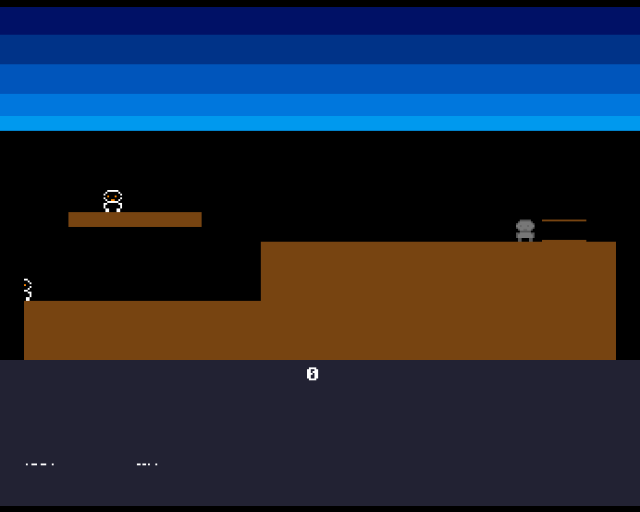
The dark blue panel sits below the game area. A “0” is drawn in the centre — when a creature reaches the exit, the digit updates. The Copper handles the split automatically every frame.
The Copper Screen Split
The Copper can change any display register mid-frame. By switching the bitplane pointer at a specific scanline, we get two independent display regions — each with its own graphics memory and colours:
            ; --- Panel screen split ---
            ; Wait for panel scanline ($2c + 200 = $E4)
            dc.w    $e401,$fffe
            dc.w    COLOR00,COLOUR_PANEL_BG     ; New background colour
            dc.w    COLOR01,COLOUR_PANEL_FG     ; New foreground colour
            dc.w    BPL1PTH                     ; Switch bitplane pointer
panel_bpl1pth_val:
            dc.w    $0000
            dc.w    BPL1PTL
panel_bpl1ptl_val:
            dc.w    $0000

            dc.w    $ffff,$fffe                 ; End of Copper list
At scanline $E4 (line 200 of the display), the Copper:
- Changes
COLOR00to the panel background colour - Changes
COLOR01to the panel foreground colour (white) - Switches
BPL1PTH/BPL1PTLto point at the panel bitplane
From this point down, the display reads from panel_bitplane instead of bitplane. The game area and panel are completely independent — drawing in one doesn’t affect the other.
This is the Copper’s defining trick. No CPU effort, no interrupts, no timing code. The Copper just executes its program, synchronised to the beam, every single frame.
Two Bitplanes, One Display
The display now has two separate memory regions:
SCREEN_HEIGHT   equ 200            ; Game area only
BITPLANE_SIZE   equ BYTES_PER_ROW*SCREEN_HEIGHT

PANEL_HEIGHT    equ 56
PANEL_SIZE      equ BYTES_PER_ROW*PANEL_HEIGHT
The game bitplane is 200 lines (8,000 bytes). The panel bitplane is 56 lines (2,240 bytes). They’re allocated separately and patched into the Copper list independently.
The terrain and creatures only interact with the game bitplane. The digit only writes to the panel bitplane. No overlap, no conflicts.
Drawing a Digit
The saved count is drawn as an 8x8 pixel character from a simple font:
;──────────────────────────────────────────────────────────────
; draw_saved_count — Draw the saved count digit in the panel
;──────────────────────────────────────────────────────────────
draw_saved_count:
            ; Clear the digit area first (8x8 pixels = 1 byte x 8 rows)
            lea     panel_bitplane,a0
            add.w   #PANEL_DIGIT_Y*BYTES_PER_ROW,a0
            add.w   #PANEL_DIGIT_X/8,a0
            moveq   #7,d3
.clear:
            move.b  #0,(a0)
            add.w   #BYTES_PER_ROW,a0
            dbra    d3,.clear

            ; Get digit font data
            move.w  saved_count,d0
            cmp.w   #9,d0
            ble.s   .ok
            move.w  #9,d0           ; Clamp to single digit
.ok:
            lsl.w   #3,d0           ; * 8 bytes per glyph
            lea     font_digits,a1
            add.w   d0,a1

            ; Draw the digit
            lea     panel_bitplane,a0
            add.w   #PANEL_DIGIT_Y*BYTES_PER_ROW,a0
            add.w   #PANEL_DIGIT_X/8,a0
            moveq   #7,d3
.draw:
            move.b  (a1)+,(a0)
            add.w   #BYTES_PER_ROW,a0
            dbra    d3,.draw
            rts
The font is a table of 10 glyphs (digits 0-9), each 8 bytes — one byte per row, one bit per pixel. To draw a digit: calculate the glyph offset (digit * 8), then copy 8 bytes into the panel bitplane at the digit position.
Before drawing, the old digit is cleared by writing zeros. This prevents leftover pixels when the count changes from, say, 1 to 2.
The font data is defined directly in the assembly:
font_digits:
            ; 0
            dc.b    %00111100
            dc.b    %01100110
            dc.b    %01101110
            ; ...8 bytes per glyph...
Each byte is one row of 8 pixels. %00111100 draws the top of a “0” — bits 5-2 are set, creating the rounded top. This is the simplest possible bitmap font.
Redrawing on Change
The digit only needs redrawing when the count changes. The main loop tracks the previous count:
            move.w  saved_count,d6      ; Remember count before update
            ; ...process creatures...
            move.w  saved_count,d0
            cmp.w   d6,d0
            beq.s   .no_redraw
            bsr     draw_saved_count
.no_redraw:
Comparing the count before and after the creature loop avoids unnecessary redraws. Drawing is cheap, but this pattern scales — when there are more display elements to update, only redrawing what changed matters.
Experiment: Panel Colours
COLOUR_PANEL_BG     equ $0000       ; Black panel
COLOUR_PANEL_FG     equ $0F00       ; Red digits
The panel colours are independent of the game colours. Try a bright panel to make it stand out, or a subtle one that blends with the scene.
The Complete Code
;──────────────────────────────────────────────────────────────
; EXODUS - A terrain puzzle for the Commodore Amiga
; Unit 12: Creature Count Display
;
; A Copper screen split creates a status panel at the bottom.
; The saved count is drawn as a digit in the panel bitplane.
;──────────────────────────────────────────────────────────────
;══════════════════════════════════════════════════════════════
; TWEAKABLE VALUES
;══════════════════════════════════════════════════════════════
COLOUR_SKY_DEEP equ $0016
COLOUR_SKY_UPPER equ $0038
COLOUR_SKY_MID equ $005B
COLOUR_SKY_LOWER equ $007D
COLOUR_SKY_HORIZON equ $009E
COLOUR_TERRAIN equ $0741
COLOUR_PANEL_BG equ $0223
COLOUR_PANEL_FG equ $0FFF
COLOUR_SPR0_1 equ $0FFF
COLOUR_SPR0_2 equ $0F80
COLOUR_SPR0_3 equ $0000
CREATURE_SPEED equ 1
FALL_SPEED equ 2
FOOT_OFFSET_X equ 8
FOOT_OFFSET_Y equ 12
STEP_PERIOD equ 400
STEP_VOLUME equ 48
NUM_CREATURES equ 3
; Creature data table offsets
CR_X equ 0
CR_Y equ 2
CR_DX equ 4
CR_STATE equ 6
CR_STEP equ 8
CR_SIZE equ 10
STATE_WALKING equ 0
STATE_FALLING equ 1
STATE_SAVED equ 2
; Exit zone
EXIT_X equ 280
EXIT_Y equ 108
EXIT_W equ 24
EXIT_H equ 12
; Panel
PANEL_Y equ 200 ; Scanline where panel starts
PANEL_DIGIT_X equ 152 ; X position for digit (byte-aligned: 152/8=19)
PANEL_DIGIT_Y equ 4 ; Y offset within panel bitplane
; Terrain
GROUND_L_X equ 0
GROUND_L_Y equ 152
GROUND_L_W equ 128
GROUND_L_H equ 48
GROUND_R_X equ 128
GROUND_R_Y equ 120
GROUND_R_W equ 192
GROUND_R_H equ 80
PLATFORM_X equ 24
PLATFORM_Y equ 104
PLATFORM_W equ 72
PLATFORM_H equ 8
;══════════════════════════════════════════════════════════════
; DISPLAY CONSTANTS
;══════════════════════════════════════════════════════════════
SCREEN_WIDTH equ 320
SCREEN_HEIGHT equ 200 ; Game area only (panel below)
BYTES_PER_ROW equ SCREEN_WIDTH/8
BITPLANE_SIZE equ BYTES_PER_ROW*SCREEN_HEIGHT
PANEL_HEIGHT equ 56
PANEL_SIZE equ BYTES_PER_ROW*PANEL_HEIGHT
SPRITE_HEIGHT equ 12
STEP_INTERVAL equ 8
;══════════════════════════════════════════════════════════════
; HARDWARE REGISTERS
;══════════════════════════════════════════════════════════════
CUSTOM equ $dff000
DMACON equ $096
INTENA equ $09a
INTREQ equ $09c
COP1LC equ $080
COPJMP1 equ $088
BPLCON0 equ $100
BPLCON1 equ $102
BPLCON2 equ $104
BPL1MOD equ $108
DIWSTRT equ $08e
DIWSTOP equ $090
DDFSTRT equ $092
DDFSTOP equ $094
BPL1PTH equ $0e0
BPL1PTL equ $0e2
SPR0PTH equ $120
SPR0PTL equ $122
SPR1PTH equ $124
SPR1PTL equ $126
SPR2PTH equ $128
SPR2PTL equ $12a
COLOR00 equ $180
COLOR01 equ $182
COLOR17 equ $1a2
COLOR18 equ $1a4
COLOR19 equ $1a6
VPOSR equ $004
AUD0LC equ $0a0
AUD0LEN equ $0a4
AUD0PER equ $0a6
AUD0VOL equ $0a8
;══════════════════════════════════════════════════════════════
; CODE (Chip RAM)
;══════════════════════════════════════════════════════════════
section code,code_c
start:
lea CUSTOM,a5
move.w #$7fff,INTENA(a5)
move.w #$7fff,INTREQ(a5)
move.w #$7fff,DMACON(a5)
; --- Initialise creatures ---
lea creatures,a0
move.w #80,CR_X(a0)
move.w #92,CR_Y(a0)
move.w #CREATURE_SPEED,CR_DX(a0)
move.w #STATE_WALKING,CR_STATE(a0)
move.w #0,CR_STEP(a0)
move.w #16,CR_X+CR_SIZE(a0)
move.w #140,CR_Y+CR_SIZE(a0)
move.w #CREATURE_SPEED,CR_DX+CR_SIZE(a0)
move.w #STATE_WALKING,CR_STATE+CR_SIZE(a0)
move.w #4,CR_STEP+CR_SIZE(a0)
move.w #160,CR_X+CR_SIZE*2(a0)
move.w #108,CR_Y+CR_SIZE*2(a0)
move.w #CREATURE_SPEED,CR_DX+CR_SIZE*2(a0)
move.w #STATE_WALKING,CR_STATE+CR_SIZE*2(a0)
move.w #2,CR_STEP+CR_SIZE*2(a0)
move.w #0,saved_count
; --- Draw terrain ---
move.w #GROUND_L_X,d0
move.w #GROUND_L_Y,d1
move.w #GROUND_L_W,d2
move.w #GROUND_L_H,d3
bsr draw_rect
move.w #GROUND_R_X,d0
move.w #GROUND_R_Y,d1
move.w #GROUND_R_W,d2
move.w #GROUND_R_H,d3
bsr draw_rect
move.w #PLATFORM_X,d0
move.w #PLATFORM_Y,d1
move.w #PLATFORM_W,d2
move.w #PLATFORM_H,d3
bsr draw_rect
; Exit marker
move.w #EXIT_X,d0
move.w #EXIT_Y,d1
move.w #EXIT_W,d2
move.w #1,d3
bsr draw_rect
move.w #EXIT_X,d0
move.w #EXIT_Y+EXIT_H-1,d1
move.w #EXIT_W,d2
move.w #1,d3
bsr draw_rect
; --- Draw initial digit in panel ---
bsr draw_saved_count
; --- Patch bitplane pointer ---
lea bitplane,a0
move.l a0,d0
swap d0
lea bpl1pth_val,a1
move.w d0,(a1)
swap d0
lea bpl1ptl_val,a1
move.w d0,(a1)
; --- Patch panel bitplane pointer ---
lea panel_bitplane,a0
move.l a0,d0
swap d0
lea panel_bpl1pth_val,a1
move.w d0,(a1)
swap d0
lea panel_bpl1ptl_val,a1
move.w d0,(a1)
; --- Patch sprite pointers ---
lea sprite0_data,a0
move.l a0,d0
swap d0
lea spr0pth_val,a1
move.w d0,(a1)
swap d0
lea spr0ptl_val,a1
move.w d0,(a1)
lea sprite1_data,a0
move.l a0,d0
swap d0
lea spr1pth_val,a1
move.w d0,(a1)
swap d0
lea spr1ptl_val,a1
move.w d0,(a1)
lea sprite2_data,a0
move.l a0,d0
swap d0
lea spr2pth_val,a1
move.w d0,(a1)
swap d0
lea spr2ptl_val,a1
move.w d0,(a1)
; --- Install Copper list ---
lea copperlist,a0
move.l a0,COP1LC(a5)
move.w d0,COPJMP1(a5)
; --- Enable DMA ---
move.w #$83a1,DMACON(a5)
; === Main Loop ===
mainloop:
move.l #$1ff00,d1
.vbwait:
move.l VPOSR(a5),d0
and.l d1,d0
bne.s .vbwait
; --- Process all creatures ---
lea creatures,a2
moveq #NUM_CREATURES-1,d7
.creature_loop:
move.w saved_count,d6 ; Remember count before update
bsr update_creature
add.w #CR_SIZE,a2
dbra d7,.creature_loop
; --- Redraw count if changed ---
move.w saved_count,d0
cmp.w d6,d0
beq.s .no_redraw
bsr draw_saved_count
.no_redraw:
; --- Update sprites ---
lea creatures,a2
lea sprite0_data,a0
bsr write_sprite_pos
lea creatures+CR_SIZE,a2
lea sprite1_data,a0
bsr write_sprite_pos
lea creatures+CR_SIZE*2,a2
lea sprite2_data,a0
bsr write_sprite_pos
btst #6,$bfe001
bne mainloop
.halt:
bra.s .halt
;──────────────────────────────────────────────────────────────
; update_creature — Update one creature (A2 = creature data)
;──────────────────────────────────────────────────────────────
update_creature:
move.w CR_STATE(a2),d0
cmp.w #STATE_SAVED,d0
beq .done
cmp.w #STATE_FALLING,d0
beq .do_fall
; --- Walking ---
move.w CR_X(a2),d0
add.w CR_DX(a2),d0
add.w #FOOT_OFFSET_X,d0
move.w CR_Y(a2),d1
add.w #FOOT_OFFSET_Y,d1
bsr check_pixel
tst.b d0
beq.s .walk_no_floor
move.w CR_X(a2),d0
add.w CR_DX(a2),d0
move.w d0,CR_X(a2)
bsr check_exit
move.w CR_STEP(a2),d0
subq.w #1,d0
bgt.s .no_step
bsr play_step
move.w #STEP_INTERVAL,d0
.no_step:
move.w d0,CR_STEP(a2)
move.w CR_X(a2),d0
add.w #FOOT_OFFSET_X,d0
move.w CR_Y(a2),d1
add.w #FOOT_OFFSET_Y,d1
bsr check_pixel
tst.b d0
bne.s .done
move.w #STATE_FALLING,CR_STATE(a2)
bra.s .done
.walk_no_floor:
neg.w CR_DX(a2)
bra.s .done
; --- Falling ---
.do_fall:
move.w CR_Y(a2),d0
add.w #FALL_SPEED,d0
cmp.w #SCREEN_HEIGHT-SPRITE_HEIGHT,d0
blt.s .fall_ok
move.w #SCREEN_HEIGHT-SPRITE_HEIGHT,d0
move.w d0,CR_Y(a2)
move.w #STATE_WALKING,CR_STATE(a2)
bra.s .done
.fall_ok:
move.w d0,CR_Y(a2)
move.w CR_X(a2),d0
add.w #FOOT_OFFSET_X,d0
move.w CR_Y(a2),d1
add.w #FOOT_OFFSET_Y,d1
bsr check_pixel
tst.b d0
beq.s .done
move.w #STATE_WALKING,CR_STATE(a2)
.done:
rts
;──────────────────────────────────────────────────────────────
; check_exit — Test if creature is inside the exit zone
;──────────────────────────────────────────────────────────────
check_exit:
move.w CR_X(a2),d0
add.w #FOOT_OFFSET_X,d0
cmp.w #EXIT_X,d0
blt.s .not_in
cmp.w #EXIT_X+EXIT_W,d0
bge.s .not_in
move.w CR_Y(a2),d1
add.w #FOOT_OFFSET_Y,d1
cmp.w #EXIT_Y,d1
blt.s .not_in
cmp.w #EXIT_Y+EXIT_H,d1
bge.s .not_in
move.w #STATE_SAVED,CR_STATE(a2)
addq.w #1,saved_count
move.w #0,CR_Y(a2)
.not_in:
rts
;──────────────────────────────────────────────────────────────
; draw_saved_count — Draw the saved count digit in the panel
;──────────────────────────────────────────────────────────────
draw_saved_count:
; Clear the digit area first (8x8 pixels = 1 byte x 8 rows)
lea panel_bitplane,a0
add.w #PANEL_DIGIT_Y*BYTES_PER_ROW,a0
add.w #PANEL_DIGIT_X/8,a0
moveq #7,d3
.clear:
move.b #0,(a0)
add.w #BYTES_PER_ROW,a0
dbra d3,.clear
; Get digit font data
move.w saved_count,d0
cmp.w #9,d0
ble.s .ok
move.w #9,d0 ; Clamp to single digit
.ok:
lsl.w #3,d0 ; * 8 bytes per glyph
lea font_digits,a1
add.w d0,a1
; Draw the digit
lea panel_bitplane,a0
add.w #PANEL_DIGIT_Y*BYTES_PER_ROW,a0
add.w #PANEL_DIGIT_X/8,a0
moveq #7,d3
.draw:
move.b (a1)+,(a0)
add.w #BYTES_PER_ROW,a0
dbra d3,.draw
rts
;──────────────────────────────────────────────────────────────
; write_sprite_pos — Write position from creature data to sprite
;──────────────────────────────────────────────────────────────
write_sprite_pos:
move.w CR_STATE(a2),d0
cmp.w #STATE_SAVED,d0
beq.s .hide
move.w CR_Y(a2),d0
add.w #$2c,d0
move.w d0,d1
add.w #SPRITE_HEIGHT,d1
move.w CR_X(a2),d2
add.w #$80,d2
move.b d0,d3
lsl.w #8,d3
move.w d2,d4
lsr.w #1,d4
or.b d4,d3
move.w d3,(a0)+
move.b d1,d3
lsl.w #8,d3
moveq #0,d4
btst #8,d0
beq.s .no_vs8
bset #2,d4
.no_vs8:
btst #8,d1
beq.s .no_ve8
bset #1,d4
.no_ve8:
btst #0,d2
beq.s .no_h0
bset #0,d4
.no_h0:
or.b d4,d3
move.w d3,(a0)
rts
.hide:
move.w #0,(a0)+
move.w #0,(a0)
rts
;──────────────────────────────────────────────────────────────
; play_step — Trigger the footstep sample on Paula channel 0
;──────────────────────────────────────────────────────────────
play_step:
lea CUSTOM,a6
lea step_sample,a0
move.l a0,AUD0LC(a6)
move.w #STEP_SAMPLE_LEN/2,AUD0LEN(a6)
move.w #STEP_PERIOD,AUD0PER(a6)
move.w #STEP_VOLUME,AUD0VOL(a6)
move.w #$8201,DMACON(a6)
rts
;──────────────────────────────────────────────────────────────
; check_pixel — Test a single pixel in the bitplane
;──────────────────────────────────────────────────────────────
check_pixel:
lea bitplane,a0
mulu #BYTES_PER_ROW,d1
add.l d1,a0
move.w d0,d2
lsr.w #3,d2
add.w d2,a0
not.w d0
and.w #7,d0
btst d0,(a0)
sne d0
and.b #1,d0
rts
;──────────────────────────────────────────────────────────────
; draw_rect — Fill a byte-aligned rectangle in the bitplane
;──────────────────────────────────────────────────────────────
draw_rect:
lea bitplane,a0
mulu #BYTES_PER_ROW,d1
add.l d1,a0
lsr.w #3,d0
add.w d0,a0
lsr.w #3,d2
subq.w #1,d3
.row:
move.w d2,d5
subq.w #1,d5
move.l a0,a1
.col:
move.b #$ff,(a1)+
dbra d5,.col
add.w #BYTES_PER_ROW,a0
dbra d3,.row
rts
;══════════════════════════════════════════════════════════════
; FONT — 8x8 digit glyphs (0-9)
;══════════════════════════════════════════════════════════════
font_digits:
; 0
dc.b %00111100
dc.b %01100110
dc.b %01101110
dc.b %01110110
dc.b %01100110
dc.b %01100110
dc.b %00111100
dc.b %00000000
; 1
dc.b %00011000
dc.b %00111000
dc.b %00011000
dc.b %00011000
dc.b %00011000
dc.b %00011000
dc.b %01111110
dc.b %00000000
; 2
dc.b %00111100
dc.b %01100110
dc.b %00000110
dc.b %00001100
dc.b %00110000
dc.b %01100000
dc.b %01111110
dc.b %00000000
; 3
dc.b %00111100
dc.b %01100110
dc.b %00000110
dc.b %00011100
dc.b %00000110
dc.b %01100110
dc.b %00111100
dc.b %00000000
; 4
dc.b %00001100
dc.b %00011100
dc.b %00101100
dc.b %01001100
dc.b %01111110
dc.b %00001100
dc.b %00001100
dc.b %00000000
; 5
dc.b %01111110
dc.b %01100000
dc.b %01111100
dc.b %00000110
dc.b %00000110
dc.b %01100110
dc.b %00111100
dc.b %00000000
; 6
dc.b %00111100
dc.b %01100110
dc.b %01100000
dc.b %01111100
dc.b %01100110
dc.b %01100110
dc.b %00111100
dc.b %00000000
; 7
dc.b %01111110
dc.b %01100110
dc.b %00001100
dc.b %00011000
dc.b %00011000
dc.b %00011000
dc.b %00011000
dc.b %00000000
; 8
dc.b %00111100
dc.b %01100110
dc.b %01100110
dc.b %00111100
dc.b %01100110
dc.b %01100110
dc.b %00111100
dc.b %00000000
; 9
dc.b %00111100
dc.b %01100110
dc.b %01100110
dc.b %00111110
dc.b %00000110
dc.b %01100110
dc.b %00111100
dc.b %00000000
;══════════════════════════════════════════════════════════════
; COPPER LIST
;══════════════════════════════════════════════════════════════
copperlist:
dc.w DIWSTRT,$2c81
dc.w DIWSTOP,$2cc1
dc.w DDFSTRT,$0038
dc.w DDFSTOP,$00d0
dc.w BPLCON0,$1200
dc.w BPLCON1,$0000
dc.w BPLCON2,$0000
dc.w BPL1MOD,$0000
dc.w BPL1PTH
bpl1pth_val:
dc.w $0000
dc.w BPL1PTL
bpl1ptl_val:
dc.w $0000
dc.w SPR0PTH
spr0pth_val:
dc.w $0000
dc.w SPR0PTL
spr0ptl_val:
dc.w $0000
dc.w SPR1PTH
spr1pth_val:
dc.w $0000
dc.w SPR1PTL
spr1ptl_val:
dc.w $0000
dc.w SPR2PTH
spr2pth_val:
dc.w $0000
dc.w SPR2PTL
spr2ptl_val:
dc.w $0000
dc.w COLOR00,COLOUR_SKY_DEEP
dc.w COLOR01,COLOUR_TERRAIN
dc.w COLOR17,COLOUR_SPR0_1
dc.w COLOR18,COLOUR_SPR0_2
dc.w COLOR19,COLOUR_SPR0_3
dc.w $3401,$fffe
dc.w COLOR00,COLOUR_SKY_UPPER
dc.w $4401,$fffe
dc.w COLOR00,COLOUR_SKY_MID
dc.w $5401,$fffe
dc.w COLOR00,COLOUR_SKY_LOWER
dc.w $6001,$fffe
dc.w COLOR00,COLOUR_SKY_HORIZON
dc.w $6801,$fffe
dc.w COLOR00,$0000
; --- Panel screen split ---
; Wait for panel scanline ($2c + 200 = $E4)
dc.w $e401,$fffe
dc.w COLOR00,COLOUR_PANEL_BG
dc.w COLOR01,COLOUR_PANEL_FG
dc.w BPL1PTH
panel_bpl1pth_val:
dc.w $0000
dc.w BPL1PTL
panel_bpl1ptl_val:
dc.w $0000
dc.w $ffff,$fffe
;══════════════════════════════════════════════════════════════
; SPRITE DATA
;══════════════════════════════════════════════════════════════
even
sprite0_data:
dc.w $0000,$0000
dc.w %0000011111100000,%0000000000000000
dc.w %0000111111110000,%0000011111100000
dc.w %0001111111111000,%0000111111110000
dc.w %0001101110111000,%0001111111111000
dc.w %0001111111111000,%0000111111110000
dc.w %0000111001110000,%0000011111100000
dc.w %0000011111100000,%0000000000000000
dc.w %0001111111111000,%0000011111100000
dc.w %0001111111111000,%0000111111110000
dc.w %0001111111111000,%0000111111110000
dc.w %0000110000110000,%0000000000000000
dc.w %0000110000110000,%0000000000000000
dc.w $0000,$0000
even
sprite1_data:
dc.w $0000,$0000
dc.w %0000011111100000,%0000000000000000
dc.w %0000111111110000,%0000011111100000
dc.w %0001111111111000,%0000111111110000
dc.w %0001101110111000,%0001111111111000
dc.w %0001111111111000,%0000111111110000
dc.w %0000111001110000,%0000011111100000
dc.w %0000011111100000,%0000000000000000
dc.w %0001111111111000,%0000011111100000
dc.w %0001111111111000,%0000111111110000
dc.w %0001111111111000,%0000111111110000
dc.w %0000110000110000,%0000000000000000
dc.w %0000110000110000,%0000000000000000
dc.w $0000,$0000
even
sprite2_data:
dc.w $0000,$0000
dc.w %0000011111100000,%0000000000000000
dc.w %0000111111110000,%0000011111100000
dc.w %0001111111111000,%0000111111110000
dc.w %0001101110111000,%0001111111111000
dc.w %0001111111111000,%0000111111110000
dc.w %0000111001110000,%0000011111100000
dc.w %0000011111100000,%0000000000000000
dc.w %0001111111111000,%0000011111100000
dc.w %0001111111111000,%0000111111110000
dc.w %0001111111111000,%0000111111110000
dc.w %0000110000110000,%0000000000000000
dc.w %0000110000110000,%0000000000000000
dc.w $0000,$0000
;══════════════════════════════════════════════════════════════
; STEP SAMPLE
;══════════════════════════════════════════════════════════════
even
step_sample:
dc.b $60,$40,$20,$10,$08,$04,$02,$01
dc.b $fe,$fc,$f8,$f0,$e0,$d0,$c0,$b0
dc.b $50,$30,$18,$0c,$06,$03,$01,$00
dc.b $ff,$fd,$fa,$f4,$e8,$d8,$c8,$b8
STEP_SAMPLE_LEN equ *-step_sample
;══════════════════════════════════════════════════════════════
; VARIABLES
;══════════════════════════════════════════════════════════════
even
creatures:
dcb.b CR_SIZE*NUM_CREATURES,0
saved_count:
dc.w 0
;══════════════════════════════════════════════════════════════
; BITPLANE DATA
;══════════════════════════════════════════════════════════════
even
bitplane:
dcb.b BITPLANE_SIZE,0
even
panel_bitplane:
dcb.b PANEL_SIZE,0
If It Doesn’t Work
- No panel visible? Check the Copper WAIT value. For the panel at line 200, the wait position is
$E4(display offset$2C+ 200). The wait word is$E401. - Panel shows game graphics? The panel bitplane pointer isn’t being patched. Make sure
panel_bpl1pth_valandpanel_bpl1ptl_vallabels are inside the Copper list, after the WAIT. - Digit doesn’t appear? Check that
PANEL_DIGIT_Xis byte-aligned (divisible by 8). The font draw routine writes whole bytes, so non-aligned positions shift the digit. - Digit doesn’t update? Make sure
draw_saved_countreadssaved_countand is called when the count changes.
What You’ve Learnt
- Copper screen splits — the Copper can change display registers mid-frame. By switching bitplane pointers at a specific scanline, different screen regions show different graphics.
- Dual bitplanes — separate memory regions for separate display areas. Each can be drawn to independently with no conflicts.
- Bitmap fonts — character data stored as byte arrays (one byte per row). Drawing is a simple byte-copy loop.
- Conditional redraw — comparing state before and after processing to decide whether display updates are needed. Avoids unnecessary work.
What’s Next
The digit shows how many creatures have been saved, but there’s no goal number. In Unit 13, we’ll add a score display showing “saved / total” — and the count updates live as creatures reach the exit.