Exit Zone
A target area marks where creatures need to go. Four comparisons check if a creature's foot position is inside the rectangle. Saved creatures are removed from play and counted.
The creatures walk and fall, but there’s no goal. A terrain puzzle needs somewhere to go — an exit that creatures walk into and are counted as saved. In this unit, we add an exit zone on the right side of the high ground. Creatures that reach it disappear and increment the saved count.
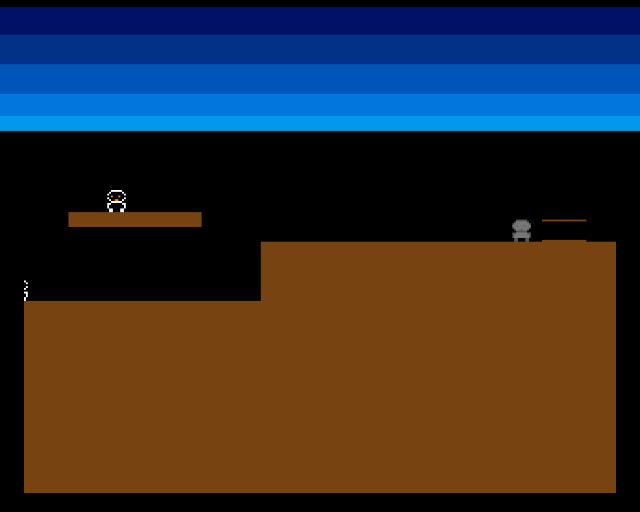
The exit zone is marked by thin horizontal lines on the right side of the high ground. One creature approaches it. When it walks inside, it vanishes — saved. The other creatures keep walking.
Bounding Box Test
The exit zone is a rectangle defined by position and size:
EXIT_X              equ 280
EXIT_Y              equ 108
EXIT_W              equ 24
EXIT_H              equ 12
To test if a creature is inside, check all four edges. If the foot position is within the rectangle on every axis, the creature has arrived:
;──────────────────────────────────────────────────────────────
; check_exit — Test if creature is inside the exit zone
;   A2 = creature data. Sets STATE_SAVED if inside.
;──────────────────────────────────────────────────────────────
check_exit:
            move.w  CR_X(a2),d0
            add.w   #FOOT_OFFSET_X,d0       ; Centre of sprite
            cmp.w   #EXIT_X,d0
            blt.s   .not_in
            cmp.w   #EXIT_X+EXIT_W,d0
            bge.s   .not_in

            move.w  CR_Y(a2),d1
            add.w   #FOOT_OFFSET_Y,d1       ; Below feet
            cmp.w   #EXIT_Y,d1
            blt.s   .not_in
            cmp.w   #EXIT_Y+EXIT_H,d1
            bge.s   .not_in

            ; Inside exit zone — save this creature
            move.w  #STATE_SAVED,CR_STATE(a2)
            addq.w  #1,saved_count

            ; Move sprite off screen
            move.w  #0,CR_Y(a2)

.not_in:
            rts
Four CMP.W + branch instructions test the bounds. If any comparison fails, the creature isn’t inside and we branch to .not_in. Only if all four pass does the creature get saved.
This is a bounding box collision test — the simplest form of rectangular collision detection. It works because both the creature’s check point and the exit zone are defined as coordinates. No pixel reading, no bitplane access — pure arithmetic.
A Third State
The creature now has three possible states:
STATE_WALKING       equ 0
STATE_FALLING       equ 1
STATE_SAVED         equ 2
When check_exit detects the creature inside the exit zone, it sets STATE_SAVED. The update loop skips saved creatures entirely — they don’t walk, fall, or interact with anything. They’re done.
The saved count increments with ADDQ.W #1,saved_count. This is the first piece of game state that tracks progress rather than physics.
Hiding Saved Creatures
A saved creature shouldn’t be visible. The write_sprite_pos subroutine checks the state before writing position data:
write_sprite_pos:
            move.w  CR_STATE(a2),d0
            cmp.w   #STATE_SAVED,d0
            beq.s   .hide

            ; ...normal position packing...

.hide:
            ; Saved creature — hide sprite (VSTART=VSTOP=0)
            move.w  #0,(a0)+
            move.w  #0,(a0)
            rts
Setting both control words to zero makes the sprite invisible — VSTART and VSTOP are both 0, so the sprite has zero height and Denise never draws it.
The Exit Marker
The exit zone needs to be visible so the learner can see where creatures go. Two thin rectangles draw the top and bottom edges:
            ; Top edge
            move.w  #EXIT_X,d0
            move.w  #EXIT_Y,d1
            move.w  #EXIT_W,d2
            move.w  #1,d3
            bsr     draw_rect
            ; Bottom edge
            move.w  #EXIT_X,d0
            move.w  #EXIT_Y+EXIT_H-1,d1
            move.w  #EXIT_W,d2
            move.w  #1,d3
            bsr     draw_rect
This creates a simple bracket shape — just enough to show where the exit is without filling it solid.
Experiment: Move the Exit
EXIT_X              equ 40
EXIT_Y              equ 140
Move the exit to the low ground. Now creatures need to fall from the platform, land, and walk to the left to reach it. The terrain shape and exit placement together define the puzzle.
EXIT_H equ 24 ; Taller detection zoneA taller exit is easier to reach — creatures can enter at different heights. A shorter exit (like 4 pixels) requires precise landing.
The Complete Code
;──────────────────────────────────────────────────────────────
; EXODUS - A terrain puzzle for the Commodore Amiga
; Unit 11: Exit Zone
;
; An exit area on the right side of the terrain.
; Creatures that reach the exit are removed from play.
;──────────────────────────────────────────────────────────────
;══════════════════════════════════════════════════════════════
; TWEAKABLE VALUES
;══════════════════════════════════════════════════════════════
COLOUR_SKY_DEEP equ $0016
COLOUR_SKY_UPPER equ $0038
COLOUR_SKY_MID equ $005B
COLOUR_SKY_LOWER equ $007D
COLOUR_SKY_HORIZON equ $009E
COLOUR_TERRAIN equ $0741
COLOUR_SPR0_1 equ $0FFF
COLOUR_SPR0_2 equ $0F80
COLOUR_SPR0_3 equ $0000
CREATURE_SPEED equ 1
FALL_SPEED equ 2
FOOT_OFFSET_X equ 8
FOOT_OFFSET_Y equ 12
STEP_PERIOD equ 400
STEP_VOLUME equ 48
NUM_CREATURES equ 3
; Creature data table offsets
CR_X equ 0
CR_Y equ 2
CR_DX equ 4
CR_STATE equ 6
CR_STEP equ 8
CR_SIZE equ 10
; Creature states
STATE_WALKING equ 0
STATE_FALLING equ 1
STATE_SAVED equ 2 ; Reached the exit
; Exit zone
EXIT_X equ 280
EXIT_Y equ 108
EXIT_W equ 24
EXIT_H equ 12
; Terrain
GROUND_L_X equ 0
GROUND_L_Y equ 152
GROUND_L_W equ 128
GROUND_L_H equ 104
GROUND_R_X equ 128
GROUND_R_Y equ 120
GROUND_R_W equ 192
GROUND_R_H equ 136
PLATFORM_X equ 24
PLATFORM_Y equ 104
PLATFORM_W equ 72
PLATFORM_H equ 8
;══════════════════════════════════════════════════════════════
; DISPLAY CONSTANTS
;══════════════════════════════════════════════════════════════
SCREEN_WIDTH equ 320
SCREEN_HEIGHT equ 256
BYTES_PER_ROW equ SCREEN_WIDTH/8
BITPLANE_SIZE equ BYTES_PER_ROW*SCREEN_HEIGHT
SPRITE_HEIGHT equ 12
STEP_INTERVAL equ 8
;══════════════════════════════════════════════════════════════
; HARDWARE REGISTERS
;══════════════════════════════════════════════════════════════
CUSTOM equ $dff000
DMACON equ $096
INTENA equ $09a
INTREQ equ $09c
COP1LC equ $080
COPJMP1 equ $088
BPLCON0 equ $100
BPLCON1 equ $102
BPLCON2 equ $104
BPL1MOD equ $108
DIWSTRT equ $08e
DIWSTOP equ $090
DDFSTRT equ $092
DDFSTOP equ $094
BPL1PTH equ $0e0
BPL1PTL equ $0e2
SPR0PTH equ $120
SPR0PTL equ $122
SPR1PTH equ $124
SPR1PTL equ $126
SPR2PTH equ $128
SPR2PTL equ $12a
COLOR00 equ $180
COLOR01 equ $182
COLOR17 equ $1a2
COLOR18 equ $1a4
COLOR19 equ $1a6
VPOSR equ $004
AUD0LC equ $0a0
AUD0LEN equ $0a4
AUD0PER equ $0a6
AUD0VOL equ $0a8
;══════════════════════════════════════════════════════════════
; CODE (Chip RAM)
;══════════════════════════════════════════════════════════════
section code,code_c
start:
lea CUSTOM,a5
move.w #$7fff,INTENA(a5)
move.w #$7fff,INTREQ(a5)
move.w #$7fff,DMACON(a5)
; --- Initialise creatures ---
lea creatures,a0
; Creature 0: on platform
move.w #80,CR_X(a0)
move.w #92,CR_Y(a0)
move.w #CREATURE_SPEED,CR_DX(a0)
move.w #STATE_WALKING,CR_STATE(a0)
move.w #0,CR_STEP(a0)
; Creature 1: on low ground
move.w #16,CR_X+CR_SIZE(a0)
move.w #140,CR_Y+CR_SIZE(a0)
move.w #CREATURE_SPEED,CR_DX+CR_SIZE(a0)
move.w #STATE_WALKING,CR_STATE+CR_SIZE(a0)
move.w #4,CR_STEP+CR_SIZE(a0)
; Creature 2: on high ground, walking right toward exit
move.w #160,CR_X+CR_SIZE*2(a0)
move.w #108,CR_Y+CR_SIZE*2(a0)
move.w #CREATURE_SPEED,CR_DX+CR_SIZE*2(a0)
move.w #STATE_WALKING,CR_STATE+CR_SIZE*2(a0)
move.w #2,CR_STEP+CR_SIZE*2(a0)
; --- Initialise saved count ---
move.w #0,saved_count
; --- Draw terrain ---
move.w #GROUND_L_X,d0
move.w #GROUND_L_Y,d1
move.w #GROUND_L_W,d2
move.w #GROUND_L_H,d3
bsr draw_rect
move.w #GROUND_R_X,d0
move.w #GROUND_R_Y,d1
move.w #GROUND_R_W,d2
move.w #GROUND_R_H,d3
bsr draw_rect
move.w #PLATFORM_X,d0
move.w #PLATFORM_Y,d1
move.w #PLATFORM_W,d2
move.w #PLATFORM_H,d3
bsr draw_rect
; --- Draw exit zone marker (hollow rectangle outline) ---
; Top edge
move.w #EXIT_X,d0
move.w #EXIT_Y,d1
move.w #EXIT_W,d2
move.w #1,d3
bsr draw_rect
; Bottom edge
move.w #EXIT_X,d0
move.w #EXIT_Y+EXIT_H-1,d1
move.w #EXIT_W,d2
move.w #1,d3
bsr draw_rect
; --- Patch bitplane pointer ---
lea bitplane,a0
move.l a0,d0
swap d0
lea bpl1pth_val,a1
move.w d0,(a1)
swap d0
lea bpl1ptl_val,a1
move.w d0,(a1)
; --- Patch sprite pointers ---
lea sprite0_data,a0
move.l a0,d0
swap d0
lea spr0pth_val,a1
move.w d0,(a1)
swap d0
lea spr0ptl_val,a1
move.w d0,(a1)
lea sprite1_data,a0
move.l a0,d0
swap d0
lea spr1pth_val,a1
move.w d0,(a1)
swap d0
lea spr1ptl_val,a1
move.w d0,(a1)
lea sprite2_data,a0
move.l a0,d0
swap d0
lea spr2pth_val,a1
move.w d0,(a1)
swap d0
lea spr2ptl_val,a1
move.w d0,(a1)
; --- Install Copper list ---
lea copperlist,a0
move.l a0,COP1LC(a5)
move.w d0,COPJMP1(a5)
; --- Enable DMA ---
move.w #$83a1,DMACON(a5)
; === Main Loop ===
mainloop:
move.l #$1ff00,d1
.vbwait:
move.l VPOSR(a5),d0
and.l d1,d0
bne.s .vbwait
; --- Process all creatures ---
lea creatures,a2
moveq #NUM_CREATURES-1,d7
.creature_loop:
bsr update_creature
add.w #CR_SIZE,a2
dbra d7,.creature_loop
; --- Update sprites ---
lea creatures,a2
lea sprite0_data,a0
bsr write_sprite_pos
lea creatures+CR_SIZE,a2
lea sprite1_data,a0
bsr write_sprite_pos
lea creatures+CR_SIZE*2,a2
lea sprite2_data,a0
bsr write_sprite_pos
btst #6,$bfe001
bne mainloop
.halt:
bra.s .halt
;──────────────────────────────────────────────────────────────
; update_creature — Update one creature (A2 = creature data)
;──────────────────────────────────────────────────────────────
update_creature:
move.w CR_STATE(a2),d0
cmp.w #STATE_SAVED,d0
beq .done ; Skip saved creatures
cmp.w #STATE_FALLING,d0
beq .do_fall
; --- Walking ---
move.w CR_X(a2),d0
add.w CR_DX(a2),d0
add.w #FOOT_OFFSET_X,d0
move.w CR_Y(a2),d1
add.w #FOOT_OFFSET_Y,d1
bsr check_pixel
tst.b d0
beq.s .walk_no_floor
; Floor ahead — move forward
move.w CR_X(a2),d0
add.w CR_DX(a2),d0
move.w d0,CR_X(a2)
; Check exit zone
bsr check_exit
; Footstep sound
move.w CR_STEP(a2),d0
subq.w #1,d0
bgt.s .no_step
bsr play_step
move.w #STEP_INTERVAL,d0
.no_step:
move.w d0,CR_STEP(a2)
; Check floor under current position
move.w CR_X(a2),d0
add.w #FOOT_OFFSET_X,d0
move.w CR_Y(a2),d1
add.w #FOOT_OFFSET_Y,d1
bsr check_pixel
tst.b d0
bne.s .done
move.w #STATE_FALLING,CR_STATE(a2)
bra.s .done
.walk_no_floor:
neg.w CR_DX(a2)
bra.s .done
; --- Falling ---
.do_fall:
move.w CR_Y(a2),d0
add.w #FALL_SPEED,d0
cmp.w #SCREEN_HEIGHT-SPRITE_HEIGHT,d0
blt.s .fall_ok
move.w #SCREEN_HEIGHT-SPRITE_HEIGHT,d0
move.w d0,CR_Y(a2)
move.w #STATE_WALKING,CR_STATE(a2)
bra.s .done
.fall_ok:
move.w d0,CR_Y(a2)
move.w CR_X(a2),d0
add.w #FOOT_OFFSET_X,d0
move.w CR_Y(a2),d1
add.w #FOOT_OFFSET_Y,d1
bsr check_pixel
tst.b d0
beq.s .done
move.w #STATE_WALKING,CR_STATE(a2)
.done:
rts
;──────────────────────────────────────────────────────────────
; check_exit — Test if creature is inside the exit zone
; A2 = creature data. Sets STATE_SAVED if inside.
;──────────────────────────────────────────────────────────────
check_exit:
move.w CR_X(a2),d0
add.w #FOOT_OFFSET_X,d0
cmp.w #EXIT_X,d0
blt.s .not_in
cmp.w #EXIT_X+EXIT_W,d0
bge.s .not_in
move.w CR_Y(a2),d1
add.w #FOOT_OFFSET_Y,d1
cmp.w #EXIT_Y,d1
blt.s .not_in
cmp.w #EXIT_Y+EXIT_H,d1
bge.s .not_in
; Inside exit zone — save this creature
move.w #STATE_SAVED,CR_STATE(a2)
addq.w #1,saved_count
; Move sprite off screen
move.w #0,CR_Y(a2)
.not_in:
rts
;──────────────────────────────────────────────────────────────
; write_sprite_pos — Write position from creature data to sprite
;──────────────────────────────────────────────────────────────
write_sprite_pos:
move.w CR_STATE(a2),d0
cmp.w #STATE_SAVED,d0
beq.s .hide
move.w CR_Y(a2),d0
add.w #$2c,d0
move.w d0,d1
add.w #SPRITE_HEIGHT,d1
move.w CR_X(a2),d2
add.w #$80,d2
move.b d0,d3
lsl.w #8,d3
move.w d2,d4
lsr.w #1,d4
or.b d4,d3
move.w d3,(a0)+
move.b d1,d3
lsl.w #8,d3
moveq #0,d4
btst #8,d0
beq.s .no_vs8
bset #2,d4
.no_vs8:
btst #8,d1
beq.s .no_ve8
bset #1,d4
.no_ve8:
btst #0,d2
beq.s .no_h0
bset #0,d4
.no_h0:
or.b d4,d3
move.w d3,(a0)
rts
.hide:
; Saved creature — hide sprite (VSTART=VSTOP=0)
move.w #0,(a0)+
move.w #0,(a0)
rts
;──────────────────────────────────────────────────────────────
; play_step — Trigger the footstep sample on Paula channel 0
;──────────────────────────────────────────────────────────────
play_step:
lea CUSTOM,a6
lea step_sample,a0
move.l a0,AUD0LC(a6)
move.w #STEP_SAMPLE_LEN/2,AUD0LEN(a6)
move.w #STEP_PERIOD,AUD0PER(a6)
move.w #STEP_VOLUME,AUD0VOL(a6)
move.w #$8201,DMACON(a6)
rts
;──────────────────────────────────────────────────────────────
; check_pixel — Test a single pixel in the bitplane
;──────────────────────────────────────────────────────────────
check_pixel:
lea bitplane,a0
mulu #BYTES_PER_ROW,d1
add.l d1,a0
move.w d0,d2
lsr.w #3,d2
add.w d2,a0
not.w d0
and.w #7,d0
btst d0,(a0)
sne d0
and.b #1,d0
rts
;──────────────────────────────────────────────────────────────
; draw_rect — Fill a byte-aligned rectangle in the bitplane
;──────────────────────────────────────────────────────────────
draw_rect:
lea bitplane,a0
mulu #BYTES_PER_ROW,d1
add.l d1,a0
lsr.w #3,d0
add.w d0,a0
lsr.w #3,d2
subq.w #1,d3
.row:
move.w d2,d5
subq.w #1,d5
move.l a0,a1
.col:
move.b #$ff,(a1)+
dbra d5,.col
add.w #BYTES_PER_ROW,a0
dbra d3,.row
rts
;══════════════════════════════════════════════════════════════
; COPPER LIST
;══════════════════════════════════════════════════════════════
copperlist:
dc.w DIWSTRT,$2c81
dc.w DIWSTOP,$2cc1
dc.w DDFSTRT,$0038
dc.w DDFSTOP,$00d0
dc.w BPLCON0,$1200
dc.w BPLCON1,$0000
dc.w BPLCON2,$0000
dc.w BPL1MOD,$0000
dc.w BPL1PTH
bpl1pth_val:
dc.w $0000
dc.w BPL1PTL
bpl1ptl_val:
dc.w $0000
dc.w SPR0PTH
spr0pth_val:
dc.w $0000
dc.w SPR0PTL
spr0ptl_val:
dc.w $0000
dc.w SPR1PTH
spr1pth_val:
dc.w $0000
dc.w SPR1PTL
spr1ptl_val:
dc.w $0000
dc.w SPR2PTH
spr2pth_val:
dc.w $0000
dc.w SPR2PTL
spr2ptl_val:
dc.w $0000
dc.w COLOR00,COLOUR_SKY_DEEP
dc.w COLOR01,COLOUR_TERRAIN
dc.w COLOR17,COLOUR_SPR0_1
dc.w COLOR18,COLOUR_SPR0_2
dc.w COLOR19,COLOUR_SPR0_3
dc.w $3401,$fffe
dc.w COLOR00,COLOUR_SKY_UPPER
dc.w $4401,$fffe
dc.w COLOR00,COLOUR_SKY_MID
dc.w $5401,$fffe
dc.w COLOR00,COLOUR_SKY_LOWER
dc.w $6001,$fffe
dc.w COLOR00,COLOUR_SKY_HORIZON
dc.w $6801,$fffe
dc.w COLOR00,$0000
dc.w $ffff,$fffe
;══════════════════════════════════════════════════════════════
; SPRITE DATA
;══════════════════════════════════════════════════════════════
even
sprite0_data:
dc.w $0000,$0000
dc.w %0000011111100000,%0000000000000000
dc.w %0000111111110000,%0000011111100000
dc.w %0001111111111000,%0000111111110000
dc.w %0001101110111000,%0001111111111000
dc.w %0001111111111000,%0000111111110000
dc.w %0000111001110000,%0000011111100000
dc.w %0000011111100000,%0000000000000000
dc.w %0001111111111000,%0000011111100000
dc.w %0001111111111000,%0000111111110000
dc.w %0001111111111000,%0000111111110000
dc.w %0000110000110000,%0000000000000000
dc.w %0000110000110000,%0000000000000000
dc.w $0000,$0000
even
sprite1_data:
dc.w $0000,$0000
dc.w %0000011111100000,%0000000000000000
dc.w %0000111111110000,%0000011111100000
dc.w %0001111111111000,%0000111111110000
dc.w %0001101110111000,%0001111111111000
dc.w %0001111111111000,%0000111111110000
dc.w %0000111001110000,%0000011111100000
dc.w %0000011111100000,%0000000000000000
dc.w %0001111111111000,%0000011111100000
dc.w %0001111111111000,%0000111111110000
dc.w %0001111111111000,%0000111111110000
dc.w %0000110000110000,%0000000000000000
dc.w %0000110000110000,%0000000000000000
dc.w $0000,$0000
even
sprite2_data:
dc.w $0000,$0000
dc.w %0000011111100000,%0000000000000000
dc.w %0000111111110000,%0000011111100000
dc.w %0001111111111000,%0000111111110000
dc.w %0001101110111000,%0001111111111000
dc.w %0001111111111000,%0000111111110000
dc.w %0000111001110000,%0000011111100000
dc.w %0000011111100000,%0000000000000000
dc.w %0001111111111000,%0000011111100000
dc.w %0001111111111000,%0000111111110000
dc.w %0001111111111000,%0000111111110000
dc.w %0000110000110000,%0000000000000000
dc.w %0000110000110000,%0000000000000000
dc.w $0000,$0000
;══════════════════════════════════════════════════════════════
; STEP SAMPLE
;══════════════════════════════════════════════════════════════
even
step_sample:
dc.b $60,$40,$20,$10,$08,$04,$02,$01
dc.b $fe,$fc,$f8,$f0,$e0,$d0,$c0,$b0
dc.b $50,$30,$18,$0c,$06,$03,$01,$00
dc.b $ff,$fd,$fa,$f4,$e8,$d8,$c8,$b8
STEP_SAMPLE_LEN equ *-step_sample
;══════════════════════════════════════════════════════════════
; VARIABLES
;══════════════════════════════════════════════════════════════
even
creatures:
dcb.b CR_SIZE*NUM_CREATURES,0
saved_count:
dc.w 0
;══════════════════════════════════════════════════════════════
; BITPLANE DATA
;══════════════════════════════════════════════════════════════
even
bitplane:
dcb.b BITPLANE_SIZE,0
If It Doesn’t Work
- Creature walks through the exit? Check the exit coordinates match the terrain. The exit zone must overlap with where the creature’s feet actually are. If
EXIT_Yis wrong, the foot check point misses the zone. - Creature saved but still visible? The
write_sprite_posmust check forSTATE_SAVEDand write zeros. Make sure the check happens before the normal position code. - Exit zone not visible? The marker rectangles need to be drawn before the bitplane pointer is patched. The
draw_rectcalls should be in the initialisation section. - Saved count not incrementing? Verify that
check_exitis called during the walking state, after the creature has moved. If it’s called before the move, the position might not be inside the zone yet.
What You’ve Learnt
- Bounding box collision — four comparisons test if a point is inside a rectangle. This is the standard method for simple rectangular collision detection.
- Game states —
STATE_SAVEDis the first non-physics state. It removes the creature from the simulation entirely. State machines grow naturally as game rules expand. - Game progress —
saved_counttracks how many creatures have reached the exit. This is the seed of a scoring system. - Sprite hiding — writing zeros to the control words makes a sprite invisible. The hardware draws nothing when VSTART equals VSTOP.
What’s Next
Creatures are saved but we can’t see the count. In Unit 12, we’ll use a Copper screen split to create a status panel at the bottom of the screen, showing how many creatures have been saved.