Multiple Creatures
Three creatures walk independently using a data table. Each entry holds position, direction, and state. A loop processes every creature each frame using the same subroutine.
One creature is a tech demo. A terrain puzzle needs a crowd. In this unit, three creatures walk the terrain independently — each with its own position, direction, and state. A data table holds their variables, and a loop processes them all every frame.
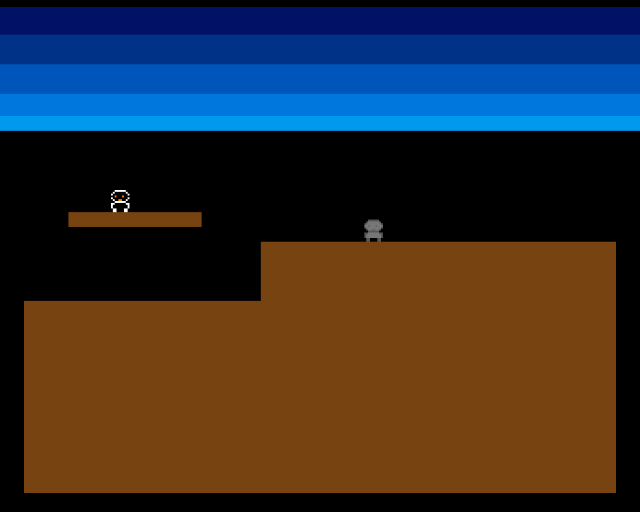
Three creatures on screen: one on the platform, one on the high ground, one on the low ground. They walk, turn, and fall independently. The same update_creature subroutine handles all of them.
The Creature Data Table
Until now, creature variables were standalone labels — creature_x, creature_y, creature_dx. That works for one creature. For multiple creatures, we need a data table — a block of memory where each creature’s data occupies a fixed-size entry:
; Creature data table offsets (bytes per field)
CR_X                equ 0           ; .w x position
CR_Y                equ 2           ; .w y position
CR_DX               equ 4           ; .w direction
CR_STATE            equ 6           ; .w state (0=walk, 1=fall)
CR_STEP             equ 8           ; .w step timer
CR_SIZE             equ 10          ; Total bytes per creature

NUM_CREATURES       equ 3

            ; ...

creatures:
            dcb.b   CR_SIZE*NUM_CREATURES,0
Each creature occupies CR_SIZE (10) bytes. The EQU constants define byte offsets within each entry. To read creature 0’s x position: move.w CR_X(a2),d0 where A2 points to the creature’s entry. To read creature 1’s x position: add CR_SIZE to A2 first.
This is a structure — a block of fields accessed by offset. The 68000’s displacement addressing mode (CR_X(a2)) makes this natural. The register points to the start of the entry, and the offset selects the field.
The Processing Loop
Each frame, a loop walks through the table and calls update_creature for each entry:
            ; --- Process all creatures ---
            lea     creatures,a2
            moveq   #NUM_CREATURES-1,d7

.creature_loop:
            bsr     update_creature
            add.w   #CR_SIZE,a2
            dbra    d7,.creature_loop
A2 starts at the beginning of the table. D7 counts down from NUM_CREATURES-1 (because DBRA counts to -1, not 0). After processing one creature, A2 advances by CR_SIZE bytes to point at the next entry. The same subroutine handles every creature — it doesn’t know or care which one it’s updating.
The Update Subroutine
update_creature is the single-creature logic from previous units, rewritten to read and write through A2 instead of named variables:
;──────────────────────────────────────────────────────────────
; update_creature — Update one creature (A2 = creature data)
;──────────────────────────────────────────────────────────────
update_creature:
            move.w  CR_STATE(a2),d0
            cmp.w   #STATE_FALLING,d0
            beq     .do_fall

            ; --- Walking ---
            move.w  CR_X(a2),d0
            add.w   CR_DX(a2),d0
            add.w   #FOOT_OFFSET_X,d0
            move.w  CR_Y(a2),d1
            add.w   #FOOT_OFFSET_Y,d1
            bsr     check_pixel

            tst.b   d0
            beq.s   .walk_no_floor

            ; Floor ahead — move forward
            move.w  CR_X(a2),d0
            add.w   CR_DX(a2),d0
            move.w  d0,CR_X(a2)

            ; ...floor check and falling logic...
Where Unit 8 had move.w creature_x,d0, we now have move.w CR_X(a2),d0. Where it had move.w d0,creature_x, we now have move.w d0,CR_X(a2). The logic is identical — only the addressing changed.
This is the power of subroutines and data tables together. Write the logic once, call it for each entry. Adding a fourth creature means adding one more entry to the table and incrementing NUM_CREATURES — no code changes needed.
Three Sprites
Each creature needs its own hardware sprite. Sprites 0, 1, and 2 each have their own data block and pointer in the Copper list. After the creature loop updates all positions, a second pass writes each creature’s position into its sprite data:
            lea     creatures,a2
            lea     sprite0_data,a0
            bsr     write_sprite_pos

            lea     creatures+CR_SIZE,a2
            lea     sprite1_data,a0
            bsr     write_sprite_pos

            lea     creatures+CR_SIZE*2,a2
            lea     sprite2_data,a0
            bsr     write_sprite_pos
write_sprite_pos is the same position-packing code from Unit 4, but now it reads from the creature table (A2) and writes to the specified sprite data (A0).
Sprites 0, 1, and 2 all belong to the same sprite group (pairs 0-1), so they share colours 17-19. All three creatures look identical — which is exactly right for a terrain puzzle where they’re all the same type of creature.
Starting Positions
The three creatures start in different places to show the terrain interaction:
            ; Creature 0: on platform
            move.w  #80,CR_X(a0)
            move.w  #92,CR_Y(a0)

            ; Creature 1: on low ground, walking right
            move.w  #16,CR_X+CR_SIZE(a0)
            move.w  #140,CR_Y+CR_SIZE(a0)

            ; Creature 2: on high ground, walking left
            move.w  #280,CR_X+CR_SIZE*2(a0)
            move.w  #108,CR_Y+CR_SIZE*2(a0)
Creature 0 starts on the floating platform (it will fall off the edge). Creature 1 walks along the low ground. Creature 2 starts on the high ground walking left — it will reach the cliff edge and turn around. Different step timer offsets (0, 4, 2) stagger the footstep sounds so they don’t all click at once.
Experiment: Add a Fourth Creature
NUM_CREATURES equ 4Change the count and initialise one more entry. You’ll also need a fourth sprite (SPR3PTH/SPR3PTL at $DFF12C/$DFF12E) and sprite3_data. The Amiga has 8 hardware sprites — that’s the hard limit for this approach.
The Complete Code
;──────────────────────────────────────────────────────────────
; EXODUS - A terrain puzzle for the Commodore Amiga
; Unit 10: Multiple Creatures
;
; Three creatures walk independently using a data table.
; Each has its own position, direction, and state.
; A loop processes all creatures every frame.
;──────────────────────────────────────────────────────────────
;══════════════════════════════════════════════════════════════
; TWEAKABLE VALUES
;══════════════════════════════════════════════════════════════
COLOUR_SKY_DEEP equ $0016
COLOUR_SKY_UPPER equ $0038
COLOUR_SKY_MID equ $005B
COLOUR_SKY_LOWER equ $007D
COLOUR_SKY_HORIZON equ $009E
COLOUR_TERRAIN equ $0741
COLOUR_SPR0_1 equ $0FFF
COLOUR_SPR0_2 equ $0F80
COLOUR_SPR0_3 equ $0000
CREATURE_SPEED equ 1
FALL_SPEED equ 2
FOOT_OFFSET_X equ 8
FOOT_OFFSET_Y equ 12
STEP_PERIOD equ 400
STEP_VOLUME equ 48
NUM_CREATURES equ 3
; Creature data table offsets (bytes per field)
CR_X equ 0 ; .w x position
CR_Y equ 2 ; .w y position
CR_DX equ 4 ; .w direction
CR_STATE equ 6 ; .w state (0=walk, 1=fall)
CR_STEP equ 8 ; .w step timer
CR_SIZE equ 10 ; Total bytes per creature
; Terrain
GROUND_L_X equ 0
GROUND_L_Y equ 152
GROUND_L_W equ 128
GROUND_L_H equ 104
GROUND_R_X equ 128
GROUND_R_Y equ 120
GROUND_R_W equ 192
GROUND_R_H equ 136
PLATFORM_X equ 24
PLATFORM_Y equ 104
PLATFORM_W equ 72
PLATFORM_H equ 8
;══════════════════════════════════════════════════════════════
; DISPLAY CONSTANTS
;══════════════════════════════════════════════════════════════
SCREEN_WIDTH equ 320
SCREEN_HEIGHT equ 256
BYTES_PER_ROW equ SCREEN_WIDTH/8
BITPLANE_SIZE equ BYTES_PER_ROW*SCREEN_HEIGHT
SPRITE_HEIGHT equ 12
STATE_WALKING equ 0
STATE_FALLING equ 1
STEP_INTERVAL equ 8
;══════════════════════════════════════════════════════════════
; HARDWARE REGISTERS
;══════════════════════════════════════════════════════════════
CUSTOM equ $dff000
DMACON equ $096
INTENA equ $09a
INTREQ equ $09c
COP1LC equ $080
COPJMP1 equ $088
BPLCON0 equ $100
BPLCON1 equ $102
BPLCON2 equ $104
BPL1MOD equ $108
DIWSTRT equ $08e
DIWSTOP equ $090
DDFSTRT equ $092
DDFSTOP equ $094
BPL1PTH equ $0e0
BPL1PTL equ $0e2
SPR0PTH equ $120
SPR0PTL equ $122
SPR1PTH equ $124
SPR1PTL equ $126
SPR2PTH equ $128
SPR2PTL equ $12a
COLOR00 equ $180
COLOR01 equ $182
COLOR17 equ $1a2
COLOR18 equ $1a4
COLOR19 equ $1a6
VPOSR equ $004
AUD0LC equ $0a0
AUD0LEN equ $0a4
AUD0PER equ $0a6
AUD0VOL equ $0a8
;══════════════════════════════════════════════════════════════
; CODE (Chip RAM)
;══════════════════════════════════════════════════════════════
section code,code_c
start:
lea CUSTOM,a5
move.w #$7fff,INTENA(a5)
move.w #$7fff,INTREQ(a5)
move.w #$7fff,DMACON(a5)
; --- Initialise creatures ---
lea creatures,a0
; Creature 0: on platform
move.w #80,CR_X(a0)
move.w #92,CR_Y(a0)
move.w #CREATURE_SPEED,CR_DX(a0)
move.w #STATE_WALKING,CR_STATE(a0)
move.w #0,CR_STEP(a0)
; Creature 1: on low ground, walking right
move.w #16,CR_X+CR_SIZE(a0)
move.w #140,CR_Y+CR_SIZE(a0)
move.w #CREATURE_SPEED,CR_DX+CR_SIZE(a0)
move.w #STATE_WALKING,CR_STATE+CR_SIZE(a0)
move.w #4,CR_STEP+CR_SIZE(a0)
; Creature 2: on high ground, walking left
move.w #280,CR_X+CR_SIZE*2(a0)
move.w #108,CR_Y+CR_SIZE*2(a0)
move.w #-CREATURE_SPEED,CR_DX+CR_SIZE*2(a0)
move.w #STATE_WALKING,CR_STATE+CR_SIZE*2(a0)
move.w #2,CR_STEP+CR_SIZE*2(a0)
; --- Draw terrain ---
move.w #GROUND_L_X,d0
move.w #GROUND_L_Y,d1
move.w #GROUND_L_W,d2
move.w #GROUND_L_H,d3
bsr draw_rect
move.w #GROUND_R_X,d0
move.w #GROUND_R_Y,d1
move.w #GROUND_R_W,d2
move.w #GROUND_R_H,d3
bsr draw_rect
move.w #PLATFORM_X,d0
move.w #PLATFORM_Y,d1
move.w #PLATFORM_W,d2
move.w #PLATFORM_H,d3
bsr draw_rect
; --- Patch bitplane pointer ---
lea bitplane,a0
move.l a0,d0
swap d0
lea bpl1pth_val,a1
move.w d0,(a1)
swap d0
lea bpl1ptl_val,a1
move.w d0,(a1)
; --- Patch sprite pointers ---
; Sprite 0
lea sprite0_data,a0
move.l a0,d0
swap d0
lea spr0pth_val,a1
move.w d0,(a1)
swap d0
lea spr0ptl_val,a1
move.w d0,(a1)
; Sprite 1
lea sprite1_data,a0
move.l a0,d0
swap d0
lea spr1pth_val,a1
move.w d0,(a1)
swap d0
lea spr1ptl_val,a1
move.w d0,(a1)
; Sprite 2
lea sprite2_data,a0
move.l a0,d0
swap d0
lea spr2pth_val,a1
move.w d0,(a1)
swap d0
lea spr2ptl_val,a1
move.w d0,(a1)
; --- Install Copper list ---
lea copperlist,a0
move.l a0,COP1LC(a5)
move.w d0,COPJMP1(a5)
; --- Enable DMA ---
move.w #$83a1,DMACON(a5)
; === Main Loop ===
mainloop:
move.l #$1ff00,d1
.vbwait:
move.l VPOSR(a5),d0
and.l d1,d0
bne.s .vbwait
; --- Process all creatures ---
lea creatures,a2
moveq #NUM_CREATURES-1,d7
.creature_loop:
bsr update_creature
add.w #CR_SIZE,a2
dbra d7,.creature_loop
; --- Update all sprites ---
lea creatures,a2
lea sprite0_data,a0
bsr write_sprite_pos
lea creatures+CR_SIZE,a2
lea sprite1_data,a0
bsr write_sprite_pos
lea creatures+CR_SIZE*2,a2
lea sprite2_data,a0
bsr write_sprite_pos
btst #6,$bfe001
bne mainloop
.halt:
bra.s .halt
;──────────────────────────────────────────────────────────────
; update_creature — Update one creature (A2 = creature data)
;──────────────────────────────────────────────────────────────
update_creature:
move.w CR_STATE(a2),d0
cmp.w #STATE_FALLING,d0
beq .do_fall
; --- Walking ---
move.w CR_X(a2),d0
add.w CR_DX(a2),d0
add.w #FOOT_OFFSET_X,d0
move.w CR_Y(a2),d1
add.w #FOOT_OFFSET_Y,d1
bsr check_pixel
tst.b d0
beq.s .walk_no_floor
; Floor ahead — move forward
move.w CR_X(a2),d0
add.w CR_DX(a2),d0
move.w d0,CR_X(a2)
; Footstep sound
move.w CR_STEP(a2),d0
subq.w #1,d0
bgt.s .no_step
bsr play_step
move.w #STEP_INTERVAL,d0
.no_step:
move.w d0,CR_STEP(a2)
; Check floor under current position
move.w CR_X(a2),d0
add.w #FOOT_OFFSET_X,d0
move.w CR_Y(a2),d1
add.w #FOOT_OFFSET_Y,d1
bsr check_pixel
tst.b d0
bne.s .done
move.w #STATE_FALLING,CR_STATE(a2)
bra.s .done
.walk_no_floor:
neg.w CR_DX(a2)
bra.s .done
; --- Falling ---
.do_fall:
move.w CR_Y(a2),d0
add.w #FALL_SPEED,d0
cmp.w #SCREEN_HEIGHT-SPRITE_HEIGHT,d0
blt.s .fall_ok
move.w #SCREEN_HEIGHT-SPRITE_HEIGHT,d0
move.w d0,CR_Y(a2)
move.w #STATE_WALKING,CR_STATE(a2)
bra.s .done
.fall_ok:
move.w d0,CR_Y(a2)
move.w CR_X(a2),d0
add.w #FOOT_OFFSET_X,d0
move.w CR_Y(a2),d1
add.w #FOOT_OFFSET_Y,d1
bsr check_pixel
tst.b d0
beq.s .done
move.w #STATE_WALKING,CR_STATE(a2)
.done:
rts
;──────────────────────────────────────────────────────────────
; write_sprite_pos — Write position from creature data to sprite
; A2 = creature data, A0 = sprite data
;──────────────────────────────────────────────────────────────
write_sprite_pos:
move.w CR_Y(a2),d0
add.w #$2c,d0
move.w d0,d1
add.w #SPRITE_HEIGHT,d1
move.w CR_X(a2),d2
add.w #$80,d2
move.b d0,d3
lsl.w #8,d3
move.w d2,d4
lsr.w #1,d4
or.b d4,d3
move.w d3,(a0)+
move.b d1,d3
lsl.w #8,d3
moveq #0,d4
btst #8,d0
beq.s .no_vs8
bset #2,d4
.no_vs8:
btst #8,d1
beq.s .no_ve8
bset #1,d4
.no_ve8:
btst #0,d2
beq.s .no_h0
bset #0,d4
.no_h0:
or.b d4,d3
move.w d3,(a0)
rts
;──────────────────────────────────────────────────────────────
; play_step — Trigger the footstep sample on Paula channel 0
;──────────────────────────────────────────────────────────────
play_step:
lea CUSTOM,a6
lea step_sample,a0
move.l a0,AUD0LC(a6)
move.w #STEP_SAMPLE_LEN/2,AUD0LEN(a6)
move.w #STEP_PERIOD,AUD0PER(a6)
move.w #STEP_VOLUME,AUD0VOL(a6)
move.w #$8201,DMACON(a6)
rts
;──────────────────────────────────────────────────────────────
; check_pixel — Test a single pixel in the bitplane
;──────────────────────────────────────────────────────────────
check_pixel:
lea bitplane,a0
mulu #BYTES_PER_ROW,d1
add.l d1,a0
move.w d0,d2
lsr.w #3,d2
add.w d2,a0
not.w d0
and.w #7,d0
btst d0,(a0)
sne d0
and.b #1,d0
rts
;──────────────────────────────────────────────────────────────
; draw_rect — Fill a byte-aligned rectangle in the bitplane
;──────────────────────────────────────────────────────────────
draw_rect:
lea bitplane,a0
mulu #BYTES_PER_ROW,d1
add.l d1,a0
lsr.w #3,d0
add.w d0,a0
lsr.w #3,d2
subq.w #1,d3
.row:
move.w d2,d5
subq.w #1,d5
move.l a0,a1
.col:
move.b #$ff,(a1)+
dbra d5,.col
add.w #BYTES_PER_ROW,a0
dbra d3,.row
rts
;══════════════════════════════════════════════════════════════
; COPPER LIST
;══════════════════════════════════════════════════════════════
copperlist:
dc.w DIWSTRT,$2c81
dc.w DIWSTOP,$2cc1
dc.w DDFSTRT,$0038
dc.w DDFSTOP,$00d0
dc.w BPLCON0,$1200
dc.w BPLCON1,$0000
dc.w BPLCON2,$0000
dc.w BPL1MOD,$0000
dc.w BPL1PTH
bpl1pth_val:
dc.w $0000
dc.w BPL1PTL
bpl1ptl_val:
dc.w $0000
dc.w SPR0PTH
spr0pth_val:
dc.w $0000
dc.w SPR0PTL
spr0ptl_val:
dc.w $0000
dc.w SPR1PTH
spr1pth_val:
dc.w $0000
dc.w SPR1PTL
spr1ptl_val:
dc.w $0000
dc.w SPR2PTH
spr2pth_val:
dc.w $0000
dc.w SPR2PTL
spr2ptl_val:
dc.w $0000
dc.w COLOR00,COLOUR_SKY_DEEP
dc.w COLOR01,COLOUR_TERRAIN
dc.w COLOR17,COLOUR_SPR0_1
dc.w COLOR18,COLOUR_SPR0_2
dc.w COLOR19,COLOUR_SPR0_3
dc.w $3401,$fffe
dc.w COLOR00,COLOUR_SKY_UPPER
dc.w $4401,$fffe
dc.w COLOR00,COLOUR_SKY_MID
dc.w $5401,$fffe
dc.w COLOR00,COLOUR_SKY_LOWER
dc.w $6001,$fffe
dc.w COLOR00,COLOUR_SKY_HORIZON
dc.w $6801,$fffe
dc.w COLOR00,$0000
dc.w $ffff,$fffe
;══════════════════════════════════════════════════════════════
; SPRITE DATA — One block per creature
;══════════════════════════════════════════════════════════════
even
sprite0_data:
dc.w $0000,$0000
dc.w %0000011111100000,%0000000000000000
dc.w %0000111111110000,%0000011111100000
dc.w %0001111111111000,%0000111111110000
dc.w %0001101110111000,%0001111111111000
dc.w %0001111111111000,%0000111111110000
dc.w %0000111001110000,%0000011111100000
dc.w %0000011111100000,%0000000000000000
dc.w %0001111111111000,%0000011111100000
dc.w %0001111111111000,%0000111111110000
dc.w %0001111111111000,%0000111111110000
dc.w %0000110000110000,%0000000000000000
dc.w %0000110000110000,%0000000000000000
dc.w $0000,$0000
even
sprite1_data:
dc.w $0000,$0000
dc.w %0000011111100000,%0000000000000000
dc.w %0000111111110000,%0000011111100000
dc.w %0001111111111000,%0000111111110000
dc.w %0001101110111000,%0001111111111000
dc.w %0001111111111000,%0000111111110000
dc.w %0000111001110000,%0000011111100000
dc.w %0000011111100000,%0000000000000000
dc.w %0001111111111000,%0000011111100000
dc.w %0001111111111000,%0000111111110000
dc.w %0001111111111000,%0000111111110000
dc.w %0000110000110000,%0000000000000000
dc.w %0000110000110000,%0000000000000000
dc.w $0000,$0000
even
sprite2_data:
dc.w $0000,$0000
dc.w %0000011111100000,%0000000000000000
dc.w %0000111111110000,%0000011111100000
dc.w %0001111111111000,%0000111111110000
dc.w %0001101110111000,%0001111111111000
dc.w %0001111111111000,%0000111111110000
dc.w %0000111001110000,%0000011111100000
dc.w %0000011111100000,%0000000000000000
dc.w %0001111111111000,%0000011111100000
dc.w %0001111111111000,%0000111111110000
dc.w %0001111111111000,%0000111111110000
dc.w %0000110000110000,%0000000000000000
dc.w %0000110000110000,%0000000000000000
dc.w $0000,$0000
;══════════════════════════════════════════════════════════════
; STEP SAMPLE
;══════════════════════════════════════════════════════════════
even
step_sample:
dc.b $60,$40,$20,$10,$08,$04,$02,$01
dc.b $fe,$fc,$f8,$f0,$e0,$d0,$c0,$b0
dc.b $50,$30,$18,$0c,$06,$03,$01,$00
dc.b $ff,$fd,$fa,$f4,$e8,$d8,$c8,$b8
STEP_SAMPLE_LEN equ *-step_sample
;══════════════════════════════════════════════════════════════
; CREATURE DATA TABLE
;══════════════════════════════════════════════════════════════
even
creatures:
dcb.b CR_SIZE*NUM_CREATURES,0
;══════════════════════════════════════════════════════════════
; BITPLANE DATA
;══════════════════════════════════════════════════════════════
even
bitplane:
dcb.b BITPLANE_SIZE,0
If It Doesn’t Work
- Only one creature visible? Check that all three sprite pointers are patched in the Copper list. Each sprite needs its own
SPRxPTH/SPRxPTLpair. - Creatures overlap strangely? Make sure each creature writes to its own sprite data block, not the same one. The
write_sprite_poscall needs both the creature data (A2) and the correct sprite data (A0). - Creature 2 doesn’t move? Check the initialisation — the offset is
CR_SIZE*2from the base, and the direction should be-CREATURE_SPEED(negative for left). - All creatures move identically? The loop must advance A2 by
CR_SIZEeach iteration. If A2 isn’t incremented, all three calls update creature 0.
What You’ve Learnt
- Data tables — a contiguous block of memory where each entry has the same size and layout. Accessed by base address plus field offset.
- Structure offsets —
EQUconstants define byte offsets within a structure. The 68000’s displacement addressing (field(An)) reads fields naturally. - Processing loops —
DBRAcounts down fromNUM_CREATURES-1. A2 advances byCR_SIZEeach iteration to point at the next entry. - Subroutine reuse — the same
update_creaturecode processes every creature. The logic doesn’t change; only the data pointer changes. - Multiple sprites — each hardware sprite has its own data block and Copper pointer. Up to 8 sprites can be active simultaneously.
What’s Next
The creatures walk and fall, but there’s nowhere to go. In Unit 11, we’ll add an exit zone — a target area that creatures walk towards. When a creature reaches the exit, it’s counted as saved.