Game Over Screen
When all three lives are gone, GAME OVER appears on screen. Letter tiles in CHR-ROM spell the message. A one-shot flag ensures the NMI handler writes it exactly once.
The player loses all three lives and the game freezes. But there’s no visual feedback — just a motionless screen. The player might think the game crashed. This unit adds “GAME OVER” text, written to the nametable when the last life is lost. The player sees exactly what happened.
The key idea: letter shapes are just more tiles in CHR-ROM. The same PPUDATA writes that draw ground tiles and digits can draw letters. “GAME OVER” is nine tile writes to the nametable — no different from writing the score.
Letter Tiles
Six new tiles in CHR-ROM, one for each unique letter in “GAME OVER”. The letter “O” reuses the digit 0 tile (tile 5) — they look the same at 8x8 pixels. Both bit planes are identical, giving colour index 3 (white on background palette 0).
LETTER_G       = 16
LETTER_A       = 17
LETTER_M       = 18
LETTER_E       = 19
LETTER_V       = 20
LETTER_R       = 21
Each tile follows the same 5-pixel-wide design as the digit tiles:
; Tile 16: Letter G (both planes = colour 3)
.byte $70,$88,$80,$80,$98,$88,$70,$00
.byte $70,$88,$80,$80,$98,$88,$70,$00
The pattern: $70 is the curved top and bottom (.###....), $88 is the sides (#...#...), and $98 is the distinctive shelf (#..##...) that makes a G a G rather than a C.
The One-Shot Flag
A new zero-page variable controls when the text is drawn:
game_over_drawn: .res 1At startup, it’s cleared to 0. When the NMI handler writes the “GAME OVER” text, it sets game_over_drawn to 1. On every subsequent frame, the NMI checks this flag and skips the text write. Nine PPUDATA writes happen exactly once — the frame after the last life is lost.
Without this guard, NMI would rewrite the same nine tiles every frame. That wastes VBlank time and is unnecessary — nametable tiles stay put until something overwrites them.
Writing the Text
The NMI handler draws the message after the HUD updates:
    ; --- Draw "GAME OVER" text (one-shot) ---
    lda game_over
    beq @no_go_text
    lda game_over_drawn
    bne @no_go_text

    ; Write "GAME OVER" at row 14, column 12 ($21CC)
    lda #$21
    sta PPUADDR
    lda #$CC
    sta PPUADDR
    lda #LETTER_G
    sta PPUDATA
    lda #LETTER_A
    sta PPUDATA
    lda #LETTER_M
    sta PPUDATA
    lda #LETTER_E
    sta PPUDATA
    lda #0                  ; Space
    sta PPUDATA
    lda #DIGIT_ZERO         ; O reuses the digit 0 tile
    sta PPUDATA
    lda #LETTER_V
    sta PPUDATA
    lda #LETTER_E
    sta PPUDATA
    lda #LETTER_R
    sta PPUDATA

    lda #1
    sta game_over_drawn

@no_go_text:
Two conditions must be true: game_over is set (the player is dead) and game_over_drawn is clear (the text hasn’t been written yet). If either fails, the code skips to @no_go_text.
The text sits at row 14, column 12 — roughly centred on the 32-column nametable. The PPU address is $21CC (nametable base $2000 + 14 rows × 32 columns + 12 = $21CC). Nine consecutive PPUDATA writes fill columns 12–20.
Notice the “O” in “OVER”: lda #DIGIT_ZERO loads tile 5 — the digit 0. Same glyph, different meaning. Tile indices don’t know whether they’re being used as letters or numbers. They’re just shapes.
VBlank Budget
The text write adds 9 tile writes to NMI — but only on one frame. Each LDA immediate + STA PPUDATA costs about 6 cycles. Nine writes = ~54 extra cycles. Combined with OAM DMA (513 cycles), the HUD writes (~40 cycles), and the PPUADDR setup (~16 cycles), the total is about 623 cycles — well within the ~2,273-cycle VBlank window.
After that one frame, the flag ensures the text code is skipped entirely. NMI returns to its normal cost.
The Complete Code
; =============================================================================
; DASH - Unit 14: Game Over Screen
; =============================================================================
; When the player loses all three lives, "GAME OVER" appears on screen. Letter
; tiles in CHR-ROM spell the message. A one-shot flag in NMI ensures the text
; is written exactly once.
; =============================================================================

; -----------------------------------------------------------------------------
; NES Hardware Addresses
; -----------------------------------------------------------------------------
PPUCTRL   = $2000
PPUMASK   = $2001
PPUSTATUS = $2002
OAMADDR   = $2003
PPUSCROLL = $2005
PPUADDR   = $2006
PPUDATA   = $2007
OAMDMA    = $4014
JOYPAD1   = $4016

; -----------------------------------------------------------------------------
; APU Registers
; -----------------------------------------------------------------------------
SQ1_VOL    = $4000
SQ1_SWEEP  = $4001
SQ1_LO     = $4002
SQ1_HI     = $4003
TRI_LINEAR = $4008
TRI_LO     = $400A
TRI_HI     = $400B
APU_STATUS = $4015

; -----------------------------------------------------------------------------
; Button Masks
; -----------------------------------------------------------------------------
BTN_A      = %10000000
BTN_B      = %01000000
BTN_SELECT = %00100000
BTN_START  = %00010000
BTN_UP     = %00001000
BTN_DOWN   = %00000100
BTN_LEFT   = %00000010
BTN_RIGHT  = %00000001

; -----------------------------------------------------------------------------
; Game Constants
; -----------------------------------------------------------------------------
PLAYER_X       = 60
PLAYER_Y       = 200
PLAYER_TILE    = 1
RIGHT_WALL     = 248
FLOOR_Y        = 200
GRAVITY        = 1
JUMP_VEL       = $F6
OBSTACLE_TILE  = 2
OBSTACLE_SPEED = 2
GROUND_TILE    = 3
COIN_TILE      = 4
DIGIT_ZERO     = 5
SPIKE_TILE     = 15
START_LIVES    = 3
LETTER_G       = 16
LETTER_A       = 17
LETTER_M       = 18
LETTER_E       = 19
LETTER_V       = 20
LETTER_R       = 21

; -----------------------------------------------------------------------------
; Memory
; -----------------------------------------------------------------------------
.segment "ZEROPAGE"
player_x:       .res 1
player_y:       .res 1
vel_y:          .res 1
buttons:        .res 1
nmi_flag:       .res 1
on_ground:      .res 1
obstacle_x:     .res 1
tile_ptr:       .res 2
score:          .res 1
lives:          .res 1
game_over:      .res 1
game_over_drawn: .res 1

.segment "OAM"
oam_buffer: .res 256

.segment "BSS"

; =============================================================================
; iNES Header
; =============================================================================
.segment "HEADER"
    .byte "NES", $1A
    .byte 2
    .byte 1
    .byte $01
    .byte $00
    .byte 0,0,0,0,0,0,0,0

; =============================================================================
; Code
; =============================================================================
.segment "CODE"

; --- Reset ---
reset:
    sei
    cld
    ldx #$40
    stx $4017
    ldx #$FF
    txs
    inx
    stx PPUCTRL
    stx PPUMASK
    stx $4010
    stx APU_STATUS

@vblank1:
    bit PPUSTATUS
    bpl @vblank1

    lda #0
@clear_ram:
    sta $0000, x
    sta $0100, x
    sta $0200, x
    sta $0300, x
    sta $0400, x
    sta $0500, x
    sta $0600, x
    sta $0700, x
    inx
    bne @clear_ram

@vblank2:
    bit PPUSTATUS
    bpl @vblank2

    ; --- Load palette ---
    bit PPUSTATUS
    lda #$3F
    sta PPUADDR
    lda #$00
    sta PPUADDR

    ldx #0
@load_palette:
    lda palette_data, x
    sta PPUDATA
    inx
    cpx #32
    bne @load_palette

    ; --- Clear nametable 0 ---
    bit PPUSTATUS
    lda #$20
    sta PPUADDR
    lda #$00
    sta PPUADDR

    lda #0
    ldy #4
    ldx #0
@clear_nt:
    sta PPUDATA
    dex
    bne @clear_nt
    dey
    bne @clear_nt

    ; --- Write ground tiles (rows 26-29) ---
    bit PPUSTATUS
    lda #$23
    sta PPUADDR
    lda #$40
    sta PPUADDR

    lda #GROUND_TILE
    ldx #128
@write_ground:
    sta PPUDATA
    dex
    bne @write_ground

    ; --- Write spike tiles (row 26, columns 10-11) ---
    bit PPUSTATUS
    lda #$23
    sta PPUADDR
    lda #$4A
    sta PPUADDR
    lda #SPIKE_TILE
    sta PPUDATA
    sta PPUDATA

    ; --- Write platform tiles (row 20, columns 12-19) ---
    bit PPUSTATUS
    lda #$22
    sta PPUADDR
    lda #$8C
    sta PPUADDR

    lda #GROUND_TILE
    ldx #8
@write_platform:
    sta PPUDATA
    dex
    bne @write_platform

    ; --- Write wall tiles (rows 24-25, columns 22-23) ---
    bit PPUSTATUS
    lda #$23
    sta PPUADDR
    lda #$16
    sta PPUADDR
    lda #GROUND_TILE
    sta PPUDATA
    sta PPUDATA

    bit PPUSTATUS
    lda #$23
    sta PPUADDR
    lda #$36
    sta PPUADDR
    lda #GROUND_TILE
    sta PPUDATA
    sta PPUDATA

    ; --- Write initial HUD ---
    bit PPUSTATUS
    lda #$20
    sta PPUADDR
    lda #$22
    sta PPUADDR
    lda #DIGIT_ZERO
    sta PPUDATA

    lda #$20
    sta PPUADDR
    lda #$3C
    sta PPUADDR
    lda #(DIGIT_ZERO + START_LIVES)
    sta PPUDATA

    ; --- Set attributes ---
    bit PPUSTATUS
    lda #$23
    sta PPUADDR
    lda #$E8
    sta PPUADDR

    ldx #0
@write_attrs:
    lda attr_data, x
    sta PPUDATA
    inx
    cpx #24
    bne @write_attrs

    ; --- Set up player sprite (OAM entry 0) ---
    lda #PLAYER_Y
    sta oam_buffer+0
    lda #PLAYER_TILE
    sta oam_buffer+1
    lda #0
    sta oam_buffer+2
    lda #PLAYER_X
    sta oam_buffer+3

    ; Set up obstacle sprite (OAM entry 1)
    lda #FLOOR_Y
    sta oam_buffer+4
    lda #OBSTACLE_TILE
    sta oam_buffer+5
    lda #1
    sta oam_buffer+6
    lda #255
    sta oam_buffer+7

    ; Set up collectible sprites (OAM entries 2-4)
    lda #152
    sta oam_buffer+8
    lda #COIN_TILE
    sta oam_buffer+9
    lda #2
    sta oam_buffer+10
    lda #128
    sta oam_buffer+11

    lda #FLOOR_Y
    sta oam_buffer+12
    lda #COIN_TILE
    sta oam_buffer+13
    lda #2
    sta oam_buffer+14
    lda #200
    sta oam_buffer+15

    lda #168
    sta oam_buffer+16
    lda #COIN_TILE
    sta oam_buffer+17
    lda #2
    sta oam_buffer+18
    lda #32
    sta oam_buffer+19

    ; Initialise game state
    lda #PLAYER_X
    sta player_x
    lda #PLAYER_Y
    sta player_y
    lda #0
    sta vel_y
    sta score
    sta game_over
    sta game_over_drawn
    lda #START_LIVES
    sta lives
    lda #1
    sta on_ground
    lda #255
    sta obstacle_x

    ; Hide other sprites (entries 5-63)
    lda #$EF
    ldx #20
@hide_sprites:
    sta oam_buffer, x
    inx
    bne @hide_sprites

    ; Enable APU channels: pulse 1 + triangle
    lda #%00000101
    sta APU_STATUS

    ; Reset scroll position
    bit PPUSTATUS
    lda #0
    sta PPUSCROLL
    sta PPUSCROLL

    ; Enable rendering
    lda #%10000000
    sta PPUCTRL
    lda #%00011110
    sta PPUMASK

; =============================================================================
; Main Loop
; =============================================================================
main_loop:
    lda nmi_flag
    beq main_loop
    lda #0
    sta nmi_flag

    ; --- Game over check ---
    lda game_over
    bne main_loop

    ; --- Read controller ---
    lda #1
    sta JOYPAD1
    lda #0
    sta JOYPAD1

    ldx #8
@read_pad:
    lda JOYPAD1
    lsr a
    rol buttons
    dex
    bne @read_pad

    ; --- Jump check ---
    lda buttons
    and #BTN_A
    beq @no_jump
    lda on_ground
    beq @no_jump
    lda #JUMP_VEL
    sta vel_y
    lda #0
    sta on_ground

    lda #%10111000
    sta SQ1_VOL
    lda #%10111001
    sta SQ1_SWEEP
    lda #$C8
    sta SQ1_LO
    lda #$00
    sta SQ1_HI

@no_jump:

    ; --- Move left (with wall check) ---
    lda buttons
    and #BTN_LEFT
    beq @not_left
    lda player_x
    beq @not_left

    lda player_y
    clc
    adc #4
    lsr
    lsr
    lsr
    tax

    lda level_rows_lo, x
    sta tile_ptr
    lda level_rows_hi, x
    sta tile_ptr+1

    lda player_x
    sec
    sbc #1
    lsr
    lsr
    lsr
    tay

    lda (tile_ptr), y
    bne @not_left

    dec player_x
@not_left:

    ; --- Move right (with wall check) ---
    lda buttons
    and #BTN_RIGHT
    beq @not_right
    lda player_x
    cmp #RIGHT_WALL
    bcs @not_right

    lda player_y
    clc
    adc #4
    lsr
    lsr
    lsr
    tax

    lda level_rows_lo, x
    sta tile_ptr
    lda level_rows_hi, x
    sta tile_ptr+1

    lda player_x
    clc
    adc #8
    lsr
    lsr
    lsr
    tay

    lda (tile_ptr), y
    bne @not_right

    inc player_x
@not_right:

    ; --- Apply gravity ---
    lda vel_y
    clc
    adc #GRAVITY
    sta vel_y

    ; --- Apply velocity to Y position ---
    lda player_y
    clc
    adc vel_y
    sta player_y

    ; --- Tile collision (vertical) ---
    lda vel_y
    bmi @no_floor

    lda player_y
    clc
    adc #8
    lsr
    lsr
    lsr
    tax

    cpx #30
    bcs @on_solid

    lda level_rows_lo, x
    sta tile_ptr
    lda level_rows_hi, x
    sta tile_ptr+1

    lda player_x
    clc
    adc #4
    lsr
    lsr
    lsr
    tay

    lda (tile_ptr), y
    beq @no_floor

@on_solid:
    lda player_y
    clc
    adc #8
    and #%11111000
    sec
    sbc #8
    sta player_y
    lda #0
    sta vel_y
    lda #1
    sta on_ground
    jmp @done_floor

@no_floor:
    lda #0
    sta on_ground

@done_floor:

    ; --- Check collectibles ---
    ldx #8
    jsr check_collect
    ldx #12
    jsr check_collect
    ldx #16
    jsr check_collect

    ; --- Move obstacle ---
    lda obstacle_x
    sec
    sbc #OBSTACLE_SPEED
    sta obstacle_x

    ; --- Collision with obstacle ---
    lda on_ground
    beq @no_collide

    lda player_y
    cmp #(FLOOR_Y - 7)
    bcc @no_collide

    lda obstacle_x
    cmp #240
    bcs @no_collide

    lda player_x
    clc
    adc #8
    cmp obstacle_x
    bcc @no_collide
    beq @no_collide

    lda obstacle_x
    clc
    adc #8
    cmp player_x
    bcc @no_collide
    beq @no_collide

    jsr take_damage

@no_collide:

    ; --- Check for hazard tiles ---
    lda on_ground
    beq @no_hazard

    lda player_y
    clc
    adc #8
    lsr
    lsr
    lsr
    tax

    cpx #30
    bcs @no_hazard

    lda level_rows_lo, x
    sta tile_ptr
    lda level_rows_hi, x
    sta tile_ptr+1

    lda player_x
    clc
    adc #4
    lsr
    lsr
    lsr
    tay

    lda (tile_ptr), y
    cmp #SPIKE_TILE
    bne @no_hazard

    jsr take_damage

@no_hazard:

    ; --- Update sprite positions ---
    lda player_y
    sta oam_buffer+0
    lda player_x
    sta oam_buffer+3

    lda #FLOOR_Y
    sta oam_buffer+4
    lda obstacle_x
    sta oam_buffer+7

    jmp main_loop

; =============================================================================
; Subroutines
; =============================================================================

check_collect:
    lda oam_buffer, x
    cmp #$EF
    beq @done

    lda player_y
    clc
    adc #8
    cmp oam_buffer, x
    bcc @done
    beq @done

    lda oam_buffer, x
    clc
    adc #8
    cmp player_y
    bcc @done
    beq @done

    lda player_x
    clc
    adc #8
    cmp oam_buffer+3, x
    bcc @done
    beq @done

    lda oam_buffer+3, x
    clc
    adc #8
    cmp player_x
    bcc @done
    beq @done

    lda #$EF
    sta oam_buffer, x
    inc score

    lda #%00011000
    sta TRI_LINEAR
    lda #$29
    sta TRI_LO
    lda #$00
    sta TRI_HI

@done:
    rts

; -----------------------------------------------------------------------------
; take_damage: Deduct a life and handle the result
; -----------------------------------------------------------------------------
take_damage:
    lda lives
    beq @done

    dec lives
    bne @still_alive

    ; --- Game over ---
    lda #1
    sta game_over
    lda #$EF
    sta player_y
    rts

@still_alive:
    lda #PLAYER_X
    sta player_x
    lda #PLAYER_Y
    sta player_y
    lda #0
    sta vel_y
    lda #1
    sta on_ground

    lda #%00111100
    sta SQ1_VOL
    lda #%00000000
    sta SQ1_SWEEP
    lda #$80
    sta SQ1_LO
    lda #$01
    sta SQ1_HI

@done:
    rts

; =============================================================================
; NMI Handler
; =============================================================================
nmi:
    pha
    txa
    pha
    tya
    pha

    ; --- OAM DMA ---
    lda #0
    sta OAMADDR
    lda #>oam_buffer
    sta OAMDMA

    ; --- Update score display ---
    bit PPUSTATUS
    lda #$20
    sta PPUADDR
    lda #$22
    sta PPUADDR
    lda score
    clc
    adc #DIGIT_ZERO
    sta PPUDATA

    ; --- Update lives display ---
    lda #$20
    sta PPUADDR
    lda #$3C
    sta PPUADDR
    lda lives
    clc
    adc #DIGIT_ZERO
    sta PPUDATA

    ; --- Draw "GAME OVER" text (one-shot) ---
    lda game_over
    beq @no_go_text
    lda game_over_drawn
    bne @no_go_text

    ; Write "GAME OVER" at row 14, column 12 ($21CC)
    lda #$21
    sta PPUADDR
    lda #$CC
    sta PPUADDR
    lda #LETTER_G
    sta PPUDATA
    lda #LETTER_A
    sta PPUDATA
    lda #LETTER_M
    sta PPUDATA
    lda #LETTER_E
    sta PPUDATA
    lda #0                  ; Space
    sta PPUDATA
    lda #DIGIT_ZERO         ; O reuses the digit 0 tile
    sta PPUDATA
    lda #LETTER_V
    sta PPUDATA
    lda #LETTER_E
    sta PPUDATA
    lda #LETTER_R
    sta PPUDATA

    lda #1
    sta game_over_drawn

@no_go_text:

    ; --- Reset scroll ---
    lda #0
    sta PPUSCROLL
    sta PPUSCROLL

    lda #1
    sta nmi_flag

    pla
    tay
    pla
    tax
    pla
    rti

irq:
    rti

; =============================================================================
; Data
; =============================================================================

palette_data:
    .byte $0F, $00, $10, $20
    .byte $0F, $09, $19, $29
    .byte $0F, $00, $10, $20
    .byte $0F, $00, $10, $20
    .byte $0F, $30, $16, $27
    .byte $0F, $16, $27, $30
    .byte $0F, $28, $38, $30
    .byte $0F, $30, $16, $27

attr_data:
    .byte $00, $00, $00, $05, $05, $00, $00, $00
    .byte $50, $50, $50, $50, $50, $54, $50, $50
    .byte $05, $05, $05, $05, $05, $05, $05, $05

; -----------------------------------------------------------------------------
; Level Data
; -----------------------------------------------------------------------------
level_empty_row:
    .byte 0,0,0,0, 0,0,0,0, 0,0,0,0, 0,0,0,0
    .byte 0,0,0,0, 0,0,0,0, 0,0,0,0, 0,0,0,0

level_platform_row:
    .byte 0,0,0,0, 0,0,0,0, 0,0,0,0, 3,3,3,3
    .byte 3,3,3,3, 0,0,0,0, 0,0,0,0, 0,0,0,0

level_wall_row:
    .byte 0,0,0,0, 0,0,0,0, 0,0,0,0, 0,0,0,0
    .byte 0,0,0,0, 0,0,3,3, 0,0,0,0, 0,0,0,0

level_ground_row:
    .byte 3,3,3,3, 3,3,3,3, 3,3,3,3, 3,3,3,3
    .byte 3,3,3,3, 3,3,3,3, 3,3,3,3, 3,3,3,3

level_ground_spike_row:
    .byte 3,3,3,3, 3,3,3,3, 3,3,15,15, 3,3,3,3
    .byte 3,3,3,3, 3,3,3,3, 3,3,3,3, 3,3,3,3

; Row pointer tables
level_rows_lo:
    .byte <level_empty_row      ; Row 0
    .byte <level_empty_row
    .byte <level_empty_row
    .byte <level_empty_row
    .byte <level_empty_row
    .byte <level_empty_row
    .byte <level_empty_row
    .byte <level_empty_row
    .byte <level_empty_row
    .byte <level_empty_row
    .byte <level_empty_row      ; Row 10
    .byte <level_empty_row
    .byte <level_empty_row
    .byte <level_empty_row
    .byte <level_empty_row
    .byte <level_empty_row
    .byte <level_empty_row
    .byte <level_empty_row
    .byte <level_empty_row
    .byte <level_empty_row
    .byte <level_platform_row   ; Row 20
    .byte <level_empty_row
    .byte <level_empty_row
    .byte <level_empty_row
    .byte <level_wall_row       ; Row 24
    .byte <level_wall_row
    .byte <level_ground_spike_row ; Row 26
    .byte <level_ground_row
    .byte <level_ground_row
    .byte <level_ground_row

level_rows_hi:
    .byte >level_empty_row      ; Row 0
    .byte >level_empty_row
    .byte >level_empty_row
    .byte >level_empty_row
    .byte >level_empty_row
    .byte >level_empty_row
    .byte >level_empty_row
    .byte >level_empty_row
    .byte >level_empty_row
    .byte >level_empty_row
    .byte >level_empty_row      ; Row 10
    .byte >level_empty_row
    .byte >level_empty_row
    .byte >level_empty_row
    .byte >level_empty_row
    .byte >level_empty_row
    .byte >level_empty_row
    .byte >level_empty_row
    .byte >level_empty_row
    .byte >level_empty_row
    .byte >level_platform_row   ; Row 20
    .byte >level_empty_row
    .byte >level_empty_row
    .byte >level_empty_row
    .byte >level_wall_row       ; Row 24
    .byte >level_wall_row
    .byte >level_ground_spike_row ; Row 26
    .byte >level_ground_row
    .byte >level_ground_row
    .byte >level_ground_row

; =============================================================================
; Vectors
; =============================================================================
.segment "VECTORS"
    .word nmi
    .word reset
    .word irq

; =============================================================================
; CHR-ROM
; =============================================================================
.segment "CHARS"

; Tile 0: Empty
.byte $00,$00,$00,$00,$00,$00,$00,$00
.byte $00,$00,$00,$00,$00,$00,$00,$00

; Tile 1: Running figure
.byte %00110000,%00110000,%01111000,%00110000
.byte %00110000,%00101000,%01000100,%01000100
.byte $00,$00,$00,$00,$00,$00,$00,$00

; Tile 2: Diamond obstacle
.byte %00011000,%00111100,%01111110,%11111111
.byte %11111111,%01111110,%00111100,%00011000
.byte $00,$00,$00,$00,$00,$00,$00,$00

; Tile 3: Ground block
.byte $FF,$FF,$FF,$FF,$FF,$FF,$FF,$FF
.byte $FF,$00,$00,$00,$00,$00,$00,$00

; Tile 4: Coin
.byte $3C,$7E,$FF,$FF,$FF,$FF,$7E,$3C
.byte $00,$00,$00,$00,$00,$00,$00,$00

; Tiles 5-14: Digits 0-9 (both planes = colour 3)
.byte $70,$88,$88,$88,$88,$88,$70,$00  ; Tile 5: 0
.byte $70,$88,$88,$88,$88,$88,$70,$00
.byte $20,$60,$20,$20,$20,$20,$70,$00  ; Tile 6: 1
.byte $20,$60,$20,$20,$20,$20,$70,$00
.byte $70,$88,$08,$30,$40,$80,$F8,$00  ; Tile 7: 2
.byte $70,$88,$08,$30,$40,$80,$F8,$00
.byte $70,$88,$08,$30,$08,$88,$70,$00  ; Tile 8: 3
.byte $70,$88,$08,$30,$08,$88,$70,$00
.byte $10,$30,$50,$90,$F8,$10,$10,$00  ; Tile 9: 4
.byte $10,$30,$50,$90,$F8,$10,$10,$00
.byte $F8,$80,$F0,$08,$08,$88,$70,$00  ; Tile 10: 5
.byte $F8,$80,$F0,$08,$08,$88,$70,$00
.byte $30,$40,$80,$F0,$88,$88,$70,$00  ; Tile 11: 6
.byte $30,$40,$80,$F0,$88,$88,$70,$00
.byte $F8,$08,$10,$20,$20,$20,$20,$00  ; Tile 12: 7
.byte $F8,$08,$10,$20,$20,$20,$20,$00
.byte $70,$88,$88,$70,$88,$88,$70,$00  ; Tile 13: 8
.byte $70,$88,$88,$70,$88,$88,$70,$00
.byte $70,$88,$88,$78,$08,$10,$60,$00  ; Tile 14: 9
.byte $70,$88,$88,$78,$08,$10,$60,$00

; Tile 15: Spikes
.byte $18,$18,$3C,$3C,$7E,$7E,$FF,$FF
.byte $18,$18,$3C,$3C,$7E,$7E,$FF,$FF

; Tile 16: Letter G (both planes = colour 3)
.byte $70,$88,$80,$80,$98,$88,$70,$00
.byte $70,$88,$80,$80,$98,$88,$70,$00

; Tile 17: Letter A
.byte $70,$88,$88,$F8,$88,$88,$88,$00
.byte $70,$88,$88,$F8,$88,$88,$88,$00

; Tile 18: Letter M
.byte $88,$D8,$A8,$88,$88,$88,$88,$00
.byte $88,$D8,$A8,$88,$88,$88,$88,$00

; Tile 19: Letter E
.byte $F8,$80,$80,$F0,$80,$80,$F8,$00
.byte $F8,$80,$80,$F0,$80,$80,$F8,$00

; Tile 20: Letter V
.byte $88,$88,$88,$88,$50,$50,$20,$00
.byte $88,$88,$88,$88,$50,$50,$20,$00

; Tile 21: Letter R
.byte $F0,$88,$88,$F0,$A0,$90,$88,$00
.byte $F0,$88,$88,$F0,$A0,$90,$88,$00

.res 8192 - 352, $00
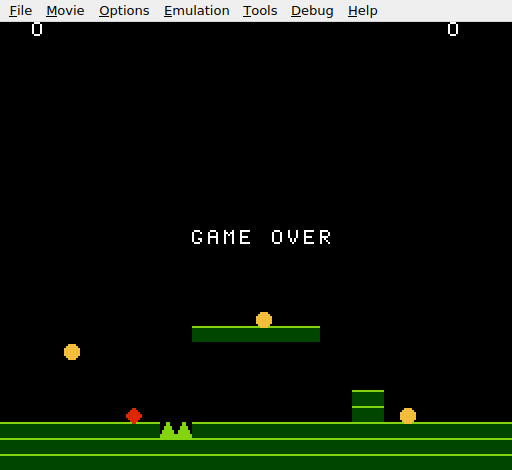
“GAME OVER” in white letters, centred on the screen. The lives counter reads 0. The player sprite is hidden. The level is still visible behind the text — ground, platform, spikes, and the wall remain. The game is frozen but the scene tells the story.
Try This: Centred Vertically
Move the “GAME OVER” text to row 15 instead of row 14 for a slightly lower position. Change the PPUADDR high byte calculation: row 15 × 32 = 480 = $1E0, so the address is $2000 + $1E0 + $0C = $21EC. Two bytes changed, different visual result.
Try This: Flashing Text
Make the “GAME OVER” text flash by toggling it on and off. In NMI, after the text is drawn, use a frame counter. Every 30 frames, overwrite the text with empty tiles (tile 0). Every 30 frames after that, rewrite it. Remove the game_over_drawn flag — the text now rewrites regularly.
Try This: Different Colour
Place the “GAME OVER” text in a nametable region that uses a different attribute palette. Row 14, columns 12–19 fall in attribute table entries that currently use palette 0 (white). Changing those attribute bytes to select palette 1 would render the text in green. Experiment with palette index 2 or 3 for other colours.
If It Doesn’t Work
- No text appears? Check both conditions:
game_overmust be 1 (set by take_damage) andgame_over_drawnmust be 0 (not yet written). If either check is wrong, the code skips the text write. - Text appears in the wrong position? The PPU address
$21CCis row 14, column 12. If the address is wrong, the text appears elsewhere — or overwrites HUD or level tiles. Calculate: row × 32 + column +$2000. - Garbled letters? Check the letter tile constants match the CHR-ROM tile positions.
LETTER_G = 16must correspond to the 17th tile in CHR data (0-indexed). Count tiles from the top of the CHARS segment. - Text writes every frame? The
game_over_drawnflag must be set to 1 after the write. If this line is missing, NMI rewrites the text every frame — wasteful but not visually broken. - Letters are the wrong shape? Both bit planes must be identical for colour 3 (white). If only one plane has the pattern, the letter appears as colour 1 or 2, which may be a different shade or invisible against the black background.
What You’ve Learnt
- Letter tiles — text on the NES is just tiles. Design the glyphs in CHR-ROM, write the tile indices to the nametable. Same mechanism as ground tiles and digits.
- Tile reuse — the letter “O” and the digit “0” are the same tile. Tile indices are just numbers — their meaning comes from context.
- One-shot flags —
game_over_drawnprevents repeated work. Check a flag, do the action, set the flag. A common pattern for events that should happen exactly once. - VBlank budgeting — nine tile writes fit easily in VBlank alongside OAM DMA and HUD updates. The NES gives you ~2,273 cycles; careful counting prevents overruns.
- State communication — the main loop sets
game_over, NMI reads it and responds. The two code paths run at different times (game logic vs. VBlank) but share state through zero-page variables.
What’s Next
“GAME OVER” appears, but the only option is resetting the console. In Unit 15, the game gets a title screen. Press Start to begin. After game over, press Start to return to the title. The game becomes a complete loop: title → play → game over → title.