Title Screen + Restart
A state machine drives the game through three states: title, playing, and game over. Press Start to begin. Die and press Start to return to the title. The game is now a complete loop.
Until now, the game starts playing immediately. There’s no title, no introduction — power on and the player is standing on the ground. After game over, the only option is resetting the console. This unit adds a title screen and a restart. The game becomes a complete loop: title → play → game over → title.
The key change: a game_state variable replaces the old game_over flag. Instead of a boolean (playing or not), the game has three distinct states. Each state has its own update logic. Transitions between states redraw the nametable.
The State Machine
Three constants define the possible states:
STATE_TITLE    = 0
STATE_PLAYING  = 1
STATE_GAMEOVER = 2
A single zero-page variable tracks the current state:
game_state: .res 1The main loop reads the controller once, then dispatches to the appropriate handler:
    ; --- Read controller ---
    jsr read_controller

    ; --- State dispatch ---
    lda game_state
    cmp #STATE_TITLE
    beq title_update
    cmp #STATE_GAMEOVER
    beq gameover_update
    jmp playing_update

; -----------------------------------------------------------------------------
; Title State
; -----------------------------------------------------------------------------
title_update:
    ; Check for Start press (edge: pressed now, not held before)
    lda buttons
    and #BTN_START
    beq @done
    lda prev_buttons
    and #BTN_START
    bne @done

    ; Start pressed — begin game
    jsr init_game_screen
    lda #STATE_PLAYING
    sta game_state

@done:
    lda buttons
    sta prev_buttons
    jmp main_loop

; -----------------------------------------------------------------------------
; Game Over State
; -----------------------------------------------------------------------------
gameover_update:
    ; Check for Start press (edge)
    lda buttons
    and #BTN_START
    beq @done
    lda prev_buttons
    and #BTN_START
    bne @done

    ; Start pressed — return to title
    jsr init_title_screen
    lda #STATE_TITLE
    sta game_state

@done:
    lda buttons
    sta prev_buttons
    jmp main_loop
CMP and BEQ test which state is active. Title and game over branch to their handlers. Playing falls through to playing_update — no branch needed for the most common case.
Each handler ends with jmp main_loop, creating the frame cycle: wait for NMI → read input → update state → repeat.
Button Edge Detection
The title screen and game over screen both wait for the Start button. But they need to detect the press, not the hold. If the player is holding Start when the game over text appears, it shouldn’t immediately restart.
A new variable tracks the previous frame’s button state:
prev_buttons: .res 1Edge detection checks both the current and previous state:
    lda buttons
    and #BTN_START
    beq @done               ; Not pressed now — skip
    lda prev_buttons
    and #BTN_START
    bne @done               ; Was already held — skip
The Start button fires only when it’s pressed now (buttons has the bit) AND it wasn’t pressed last frame (prev_buttons doesn’t). This is the standard “new press” pattern — current AND NOT previous.
At the end of each state handler, prev_buttons is updated:
    lda buttons
    sta prev_buttons
Screen Transitions
When the state changes, the entire nametable is redrawn. This happens with rendering disabled — the PPU is turned off, the nametable is rewritten, then rendering is turned back on:
init_title_screen:
    lda #0
    sta PPUMASK             ; Rendering off — free VRAM access
    ; ... clear nametable, write title text ...
    lda #%00011110
    sta PPUMASK             ; Rendering on
    rts
With PPUMASK bits 3-4 clear, the PPU isn’t rendering. VRAM writes can happen freely — no VBlank restriction. The screen goes black for one frame during the transition. This is how NES games handle screen changes.
Two subroutines handle the transitions:
init_title_screen— clears the nametable, writes “DASH” and “PRESS START”, hides all spritesinit_game_screen— clears the nametable, draws the level (ground, platform, wall, spikes), sets up sprites, initialises game variables
The Title Screen
Five more letter tiles join the CHR-ROM: D, S, H, P, T. Combined with the existing letters (G, A, M, E, V, R) and the reused digit 0 (for “O”), these spell everything the game needs.
“DASH” is written at row 12, column 14 — centred on the 32-column nametable:
    ; "DASH" at row 12, column 14 ($218E)
    bit PPUSTATUS
    lda #$21
    sta PPUADDR
    lda #$8E
    sta PPUADDR
    lda #LETTER_D
    sta PPUDATA
    lda #LETTER_A
    sta PPUDATA
    lda #LETTER_S
    sta PPUDATA
    lda #LETTER_H
    sta PPUDATA
“PRESS START” is written at row 16, column 10 — also centred. Eleven tiles: P, R, E, S, S, space (tile 0), S, T, A, R, T.
The Full Loop
The game now cycles through its three states:
- Title — black screen with “DASH” and “PRESS START”. Sprites hidden. Wait for Start.
- Playing — full game: run, jump, collect coins, avoid hazards. Three lives.
- Game Over — “GAME OVER” text over the level. Sprites hidden. Wait for Start → back to title.
Every transition redraws the nametable from scratch. State is clean — no leftover tiles from the previous screen. init_game_screen resets all game variables (score, lives, position, obstacle), so each play session starts fresh.
The Complete Code
; =============================================================================
; DASH - Unit 15: Title Screen + Restart
; =============================================================================
; A state machine drives the game: title, playing, game over. The title screen
; shows "DASH" and "PRESS START". Start button edge detection transitions
; between states. The nametable is redrawn on each transition.
; =============================================================================

; -----------------------------------------------------------------------------
; NES Hardware Addresses
; -----------------------------------------------------------------------------
PPUCTRL   = $2000
PPUMASK   = $2001
PPUSTATUS = $2002
OAMADDR   = $2003
PPUSCROLL = $2005
PPUADDR   = $2006
PPUDATA   = $2007
OAMDMA    = $4014
JOYPAD1   = $4016

; -----------------------------------------------------------------------------
; APU Registers
; -----------------------------------------------------------------------------
SQ1_VOL    = $4000
SQ1_SWEEP  = $4001
SQ1_LO     = $4002
SQ1_HI     = $4003
TRI_LINEAR = $4008
TRI_LO     = $400A
TRI_HI     = $400B
APU_STATUS = $4015

; -----------------------------------------------------------------------------
; Button Masks
; -----------------------------------------------------------------------------
BTN_A      = %10000000
BTN_B      = %01000000
BTN_SELECT = %00100000
BTN_START  = %00010000
BTN_UP     = %00001000
BTN_DOWN   = %00000100
BTN_LEFT   = %00000010
BTN_RIGHT  = %00000001

; -----------------------------------------------------------------------------
; Game Constants
; -----------------------------------------------------------------------------
PLAYER_X       = 60
PLAYER_Y       = 200
PLAYER_TILE    = 1
RIGHT_WALL     = 248
FLOOR_Y        = 200
GRAVITY        = 1
JUMP_VEL       = $F6
OBSTACLE_TILE  = 2
OBSTACLE_SPEED = 2
GROUND_TILE    = 3
COIN_TILE      = 4
DIGIT_ZERO     = 5
SPIKE_TILE     = 15
START_LIVES    = 3
LETTER_G       = 16
LETTER_A       = 17
LETTER_M       = 18
LETTER_E       = 19
LETTER_V       = 20
LETTER_R       = 21
LETTER_D       = 22
LETTER_S       = 23
LETTER_H       = 24
LETTER_P       = 25
LETTER_T       = 26

STATE_TITLE    = 0
STATE_PLAYING  = 1
STATE_GAMEOVER = 2

; -----------------------------------------------------------------------------
; Memory
; -----------------------------------------------------------------------------
.segment "ZEROPAGE"
player_x:       .res 1
player_y:       .res 1
vel_y:          .res 1
buttons:        .res 1
prev_buttons:   .res 1
nmi_flag:       .res 1
on_ground:      .res 1
obstacle_x:     .res 1
tile_ptr:       .res 2
score:          .res 1
lives:          .res 1
game_state:     .res 1
game_over_drawn: .res 1

.segment "OAM"
oam_buffer: .res 256

.segment "BSS"

; =============================================================================
; iNES Header
; =============================================================================
.segment "HEADER"
    .byte "NES", $1A
    .byte 2
    .byte 1
    .byte $01
    .byte $00
    .byte 0,0,0,0,0,0,0,0

; =============================================================================
; Code
; =============================================================================
.segment "CODE"

; --- Reset ---
reset:
    sei
    cld
    ldx #$40
    stx $4017
    ldx #$FF
    txs
    inx
    stx PPUCTRL
    stx PPUMASK
    stx $4010
    stx APU_STATUS

@vblank1:
    bit PPUSTATUS
    bpl @vblank1

    lda #0
@clear_ram:
    sta $0000, x
    sta $0100, x
    sta $0200, x
    sta $0300, x
    sta $0400, x
    sta $0500, x
    sta $0600, x
    sta $0700, x
    inx
    bne @clear_ram

@vblank2:
    bit PPUSTATUS
    bpl @vblank2

    ; --- Load palette ---
    bit PPUSTATUS
    lda #$3F
    sta PPUADDR
    lda #$00
    sta PPUADDR

    ldx #0
@load_palette:
    lda palette_data, x
    sta PPUDATA
    inx
    cpx #32
    bne @load_palette

    ; Enable APU channels: pulse 1 + triangle
    lda #%00000101
    sta APU_STATUS

    ; Enable NMI
    lda #%10000000
    sta PPUCTRL

    ; Show title screen
    jsr init_title_screen

    lda #STATE_TITLE
    sta game_state

; =============================================================================
; Main Loop
; =============================================================================
main_loop:
    lda nmi_flag
    beq main_loop
    lda #0
    sta nmi_flag

    ; --- Read controller ---
    jsr read_controller

    ; --- State dispatch ---
    lda game_state
    cmp #STATE_TITLE
    beq title_update
    cmp #STATE_GAMEOVER
    beq gameover_update
    jmp playing_update

; -----------------------------------------------------------------------------
; Title State
; -----------------------------------------------------------------------------
title_update:
    ; Check for Start press (edge: pressed now, not held before)
    lda buttons
    and #BTN_START
    beq @done
    lda prev_buttons
    and #BTN_START
    bne @done

    ; Start pressed — begin game
    jsr init_game_screen
    lda #STATE_PLAYING
    sta game_state

@done:
    lda buttons
    sta prev_buttons
    jmp main_loop

; -----------------------------------------------------------------------------
; Game Over State
; -----------------------------------------------------------------------------
gameover_update:
    ; Check for Start press (edge)
    lda buttons
    and #BTN_START
    beq @done
    lda prev_buttons
    and #BTN_START
    bne @done

    ; Start pressed — return to title
    jsr init_title_screen
    lda #STATE_TITLE
    sta game_state

@done:
    lda buttons
    sta prev_buttons
    jmp main_loop

; -----------------------------------------------------------------------------
; Playing State
; -----------------------------------------------------------------------------
playing_update:

    ; --- Jump check ---
    lda buttons
    and #BTN_A
    beq @no_jump
    lda on_ground
    beq @no_jump
    lda #JUMP_VEL
    sta vel_y
    lda #0
    sta on_ground

    lda #%10111000
    sta SQ1_VOL
    lda #%10111001
    sta SQ1_SWEEP
    lda #$C8
    sta SQ1_LO
    lda #$00
    sta SQ1_HI

@no_jump:

    ; --- Move left (with wall check) ---
    lda buttons
    and #BTN_LEFT
    beq @not_left
    lda player_x
    beq @not_left

    lda player_y
    clc
    adc #4
    lsr
    lsr
    lsr
    tax

    lda level_rows_lo, x
    sta tile_ptr
    lda level_rows_hi, x
    sta tile_ptr+1

    lda player_x
    sec
    sbc #1
    lsr
    lsr
    lsr
    tay

    lda (tile_ptr), y
    bne @not_left

    dec player_x
@not_left:

    ; --- Move right (with wall check) ---
    lda buttons
    and #BTN_RIGHT
    beq @not_right
    lda player_x
    cmp #RIGHT_WALL
    bcs @not_right

    lda player_y
    clc
    adc #4
    lsr
    lsr
    lsr
    tax

    lda level_rows_lo, x
    sta tile_ptr
    lda level_rows_hi, x
    sta tile_ptr+1

    lda player_x
    clc
    adc #8
    lsr
    lsr
    lsr
    tay

    lda (tile_ptr), y
    bne @not_right

    inc player_x
@not_right:

    ; --- Apply gravity ---
    lda vel_y
    clc
    adc #GRAVITY
    sta vel_y

    ; --- Apply velocity to Y position ---
    lda player_y
    clc
    adc vel_y
    sta player_y

    ; --- Tile collision (vertical) ---
    lda vel_y
    bmi @no_floor

    lda player_y
    clc
    adc #8
    lsr
    lsr
    lsr
    tax

    cpx #30
    bcs @on_solid

    lda level_rows_lo, x
    sta tile_ptr
    lda level_rows_hi, x
    sta tile_ptr+1

    lda player_x
    clc
    adc #4
    lsr
    lsr
    lsr
    tay

    lda (tile_ptr), y
    beq @no_floor

@on_solid:
    lda player_y
    clc
    adc #8
    and #%11111000
    sec
    sbc #8
    sta player_y
    lda #0
    sta vel_y
    lda #1
    sta on_ground
    jmp @done_floor

@no_floor:
    lda #0
    sta on_ground

@done_floor:

    ; --- Check collectibles ---
    ldx #8
    jsr check_collect
    ldx #12
    jsr check_collect
    ldx #16
    jsr check_collect

    ; --- Move obstacle ---
    lda obstacle_x
    sec
    sbc #OBSTACLE_SPEED
    sta obstacle_x

    ; --- Collision with obstacle ---
    lda on_ground
    beq @no_collide

    lda player_y
    cmp #(FLOOR_Y - 7)
    bcc @no_collide

    lda obstacle_x
    cmp #240
    bcs @no_collide

    lda player_x
    clc
    adc #8
    cmp obstacle_x
    bcc @no_collide
    beq @no_collide

    lda obstacle_x
    clc
    adc #8
    cmp player_x
    bcc @no_collide
    beq @no_collide

    jsr take_damage

@no_collide:

    ; --- Check for hazard tiles ---
    lda on_ground
    beq @no_hazard

    lda player_y
    clc
    adc #8
    lsr
    lsr
    lsr
    tax

    cpx #30
    bcs @no_hazard

    lda level_rows_lo, x
    sta tile_ptr
    lda level_rows_hi, x
    sta tile_ptr+1

    lda player_x
    clc
    adc #4
    lsr
    lsr
    lsr
    tay

    lda (tile_ptr), y
    cmp #SPIKE_TILE
    bne @no_hazard

    jsr take_damage

@no_hazard:

    ; --- Update sprite positions ---
    lda player_y
    sta oam_buffer+0
    lda player_x
    sta oam_buffer+3

    lda #FLOOR_Y
    sta oam_buffer+4
    lda obstacle_x
    sta oam_buffer+7

    lda buttons
    sta prev_buttons
    jmp main_loop

; =============================================================================
; Subroutines
; =============================================================================

; -----------------------------------------------------------------------------
; read_controller: Read the joypad into buttons
; -----------------------------------------------------------------------------
read_controller:
    lda #1
    sta JOYPAD1
    lda #0
    sta JOYPAD1

    ldx #8
@read_pad:
    lda JOYPAD1
    lsr a
    rol buttons
    dex
    bne @read_pad
    rts

; -----------------------------------------------------------------------------
; check_collect: Check if the player overlaps a collectible sprite
; Input:  X = OAM buffer offset (8, 12, or 16)
; -----------------------------------------------------------------------------
check_collect:
    lda oam_buffer, x
    cmp #$EF
    beq @done

    lda player_y
    clc
    adc #8
    cmp oam_buffer, x
    bcc @done
    beq @done

    lda oam_buffer, x
    clc
    adc #8
    cmp player_y
    bcc @done
    beq @done

    lda player_x
    clc
    adc #8
    cmp oam_buffer+3, x
    bcc @done
    beq @done

    lda oam_buffer+3, x
    clc
    adc #8
    cmp player_x
    bcc @done
    beq @done

    lda #$EF
    sta oam_buffer, x
    inc score

    lda #%00011000
    sta TRI_LINEAR
    lda #$29
    sta TRI_LO
    lda #$00
    sta TRI_HI

@done:
    rts

; -----------------------------------------------------------------------------
; take_damage: Deduct a life and handle the result
; -----------------------------------------------------------------------------
take_damage:
    lda lives
    beq @done

    dec lives
    bne @still_alive

    ; --- Game over ---
    lda #STATE_GAMEOVER
    sta game_state
    lda #0
    sta game_over_drawn
    lda #$EF
    sta player_y
    rts

@still_alive:
    lda #PLAYER_X
    sta player_x
    lda #PLAYER_Y
    sta player_y
    lda #0
    sta vel_y
    lda #1
    sta on_ground

    lda #%00111100
    sta SQ1_VOL
    lda #%00000000
    sta SQ1_SWEEP
    lda #$80
    sta SQ1_LO
    lda #$01
    sta SQ1_HI

@done:
    rts

; -----------------------------------------------------------------------------
; init_title_screen: Clear nametable and draw title text
; -----------------------------------------------------------------------------
init_title_screen:
    ; Disable rendering
    lda #0
    sta PPUMASK

    ; Clear nametable
    bit PPUSTATUS
    lda #$20
    sta PPUADDR
    lda #$00
    sta PPUADDR

    lda #0
    ldy #4
    ldx #0
@clear:
    sta PPUDATA
    dex
    bne @clear
    dey
    bne @clear

    ; Write "DASH" at row 12, column 14 ($218E)
    bit PPUSTATUS
    lda #$21
    sta PPUADDR
    lda #$8E
    sta PPUADDR
    lda #LETTER_D
    sta PPUDATA
    lda #LETTER_A
    sta PPUDATA
    lda #LETTER_S
    sta PPUDATA
    lda #LETTER_H
    sta PPUDATA

    ; Write "PRESS START" at row 16, column 10 ($220A)
    lda #$22
    sta PPUADDR
    lda #$0A
    sta PPUADDR
    lda #LETTER_P
    sta PPUDATA
    lda #LETTER_R
    sta PPUDATA
    lda #LETTER_E
    sta PPUDATA
    lda #LETTER_S
    sta PPUDATA
    lda #LETTER_S
    sta PPUDATA
    lda #0              ; Space
    sta PPUDATA
    lda #LETTER_S
    sta PPUDATA
    lda #LETTER_T
    sta PPUDATA
    lda #LETTER_A
    sta PPUDATA
    lda #LETTER_R
    sta PPUDATA
    lda #LETTER_T
    sta PPUDATA

    ; Hide all sprites
    lda #$EF
    ldx #0
@hide:
    sta oam_buffer, x
    inx
    bne @hide

    ; Clear prev_buttons (prevent phantom Start)
    lda #0
    sta prev_buttons

    ; Reset scroll
    bit PPUSTATUS
    lda #0
    sta PPUSCROLL
    sta PPUSCROLL

    ; Enable rendering
    lda #%00011110
    sta PPUMASK

    rts

; -----------------------------------------------------------------------------
; init_game_screen: Clear nametable and draw the level
; -----------------------------------------------------------------------------
init_game_screen:
    ; Disable rendering
    lda #0
    sta PPUMASK

    ; Clear nametable
    bit PPUSTATUS
    lda #$20
    sta PPUADDR
    lda #$00
    sta PPUADDR

    lda #0
    ldy #4
    ldx #0
@clear:
    sta PPUDATA
    dex
    bne @clear
    dey
    bne @clear

    ; Write ground tiles (rows 26-29)
    bit PPUSTATUS
    lda #$23
    sta PPUADDR
    lda #$40
    sta PPUADDR

    lda #GROUND_TILE
    ldx #128
@write_ground:
    sta PPUDATA
    dex
    bne @write_ground

    ; Write spike tiles (row 26, columns 10-11)
    bit PPUSTATUS
    lda #$23
    sta PPUADDR
    lda #$4A
    sta PPUADDR
    lda #SPIKE_TILE
    sta PPUDATA
    sta PPUDATA

    ; Write platform tiles (row 20, columns 12-19)
    bit PPUSTATUS
    lda #$22
    sta PPUADDR
    lda #$8C
    sta PPUADDR

    lda #GROUND_TILE
    ldx #8
@write_platform:
    sta PPUDATA
    dex
    bne @write_platform

    ; Write wall tiles (rows 24-25, columns 22-23)
    bit PPUSTATUS
    lda #$23
    sta PPUADDR
    lda #$16
    sta PPUADDR
    lda #GROUND_TILE
    sta PPUDATA
    sta PPUDATA

    bit PPUSTATUS
    lda #$23
    sta PPUADDR
    lda #$36
    sta PPUADDR
    lda #GROUND_TILE
    sta PPUDATA
    sta PPUDATA

    ; Write initial HUD
    bit PPUSTATUS
    lda #$20
    sta PPUADDR
    lda #$22
    sta PPUADDR
    lda #DIGIT_ZERO
    sta PPUDATA

    lda #$20
    sta PPUADDR
    lda #$3C
    sta PPUADDR
    lda #(DIGIT_ZERO + START_LIVES)
    sta PPUDATA

    ; Write attributes
    bit PPUSTATUS
    lda #$23
    sta PPUADDR
    lda #$E8
    sta PPUADDR

    ldx #0
@write_attrs:
    lda attr_data, x
    sta PPUDATA
    inx
    cpx #24
    bne @write_attrs

    ; Set up player sprite (OAM entry 0)
    lda #PLAYER_Y
    sta oam_buffer+0
    lda #PLAYER_TILE
    sta oam_buffer+1
    lda #0
    sta oam_buffer+2
    lda #PLAYER_X
    sta oam_buffer+3

    ; Set up obstacle sprite (OAM entry 1)
    lda #FLOOR_Y
    sta oam_buffer+4
    lda #OBSTACLE_TILE
    sta oam_buffer+5
    lda #1
    sta oam_buffer+6
    lda #255
    sta oam_buffer+7

    ; Set up collectible sprites (OAM entries 2-4)
    lda #152
    sta oam_buffer+8
    lda #COIN_TILE
    sta oam_buffer+9
    lda #2
    sta oam_buffer+10
    lda #128
    sta oam_buffer+11

    lda #FLOOR_Y
    sta oam_buffer+12
    lda #COIN_TILE
    sta oam_buffer+13
    lda #2
    sta oam_buffer+14
    lda #200
    sta oam_buffer+15

    lda #168
    sta oam_buffer+16
    lda #COIN_TILE
    sta oam_buffer+17
    lda #2
    sta oam_buffer+18
    lda #32
    sta oam_buffer+19

    ; Hide remaining sprites
    lda #$EF
    ldx #20
@hide:
    sta oam_buffer, x
    inx
    bne @hide

    ; Init game variables
    lda #PLAYER_X
    sta player_x
    lda #PLAYER_Y
    sta player_y
    lda #0
    sta vel_y
    sta score
    sta game_over_drawn
    sta prev_buttons
    lda #START_LIVES
    sta lives
    lda #1
    sta on_ground
    lda #255
    sta obstacle_x

    ; Reset scroll
    bit PPUSTATUS
    lda #0
    sta PPUSCROLL
    sta PPUSCROLL

    ; Enable rendering
    lda #%00011110
    sta PPUMASK

    rts

; =============================================================================
; NMI Handler
; =============================================================================
nmi:
    pha
    txa
    pha
    tya
    pha

    ; --- OAM DMA ---
    lda #0
    sta OAMADDR
    lda #>oam_buffer
    sta OAMDMA

    ; --- HUD updates (only during play / game over) ---
    lda game_state
    cmp #STATE_TITLE
    beq @skip_hud

    ; Update score display
    bit PPUSTATUS
    lda #$20
    sta PPUADDR
    lda #$22
    sta PPUADDR
    lda score
    clc
    adc #DIGIT_ZERO
    sta PPUDATA

    ; Update lives display
    lda #$20
    sta PPUADDR
    lda #$3C
    sta PPUADDR
    lda lives
    clc
    adc #DIGIT_ZERO
    sta PPUDATA

    ; Draw "GAME OVER" text (one-shot)
    lda game_state
    cmp #STATE_GAMEOVER
    bne @skip_hud
    lda game_over_drawn
    bne @skip_hud

    lda #$21
    sta PPUADDR
    lda #$CC
    sta PPUADDR
    lda #LETTER_G
    sta PPUDATA
    lda #LETTER_A
    sta PPUDATA
    lda #LETTER_M
    sta PPUDATA
    lda #LETTER_E
    sta PPUDATA
    lda #0
    sta PPUDATA
    lda #DIGIT_ZERO
    sta PPUDATA
    lda #LETTER_V
    sta PPUDATA
    lda #LETTER_E
    sta PPUDATA
    lda #LETTER_R
    sta PPUDATA

    lda #1
    sta game_over_drawn

@skip_hud:

    ; --- Reset scroll ---
    lda #0
    sta PPUSCROLL
    sta PPUSCROLL

    lda #1
    sta nmi_flag

    pla
    tay
    pla
    tax
    pla
    rti

irq:
    rti

; =============================================================================
; Data
; =============================================================================

palette_data:
    .byte $0F, $00, $10, $20
    .byte $0F, $09, $19, $29
    .byte $0F, $00, $10, $20
    .byte $0F, $00, $10, $20
    .byte $0F, $30, $16, $27
    .byte $0F, $16, $27, $30
    .byte $0F, $28, $38, $30
    .byte $0F, $30, $16, $27

attr_data:
    .byte $00, $00, $00, $05, $05, $00, $00, $00
    .byte $50, $50, $50, $50, $50, $54, $50, $50
    .byte $05, $05, $05, $05, $05, $05, $05, $05

; -----------------------------------------------------------------------------
; Level Data
; -----------------------------------------------------------------------------
level_empty_row:
    .byte 0,0,0,0, 0,0,0,0, 0,0,0,0, 0,0,0,0
    .byte 0,0,0,0, 0,0,0,0, 0,0,0,0, 0,0,0,0

level_platform_row:
    .byte 0,0,0,0, 0,0,0,0, 0,0,0,0, 3,3,3,3
    .byte 3,3,3,3, 0,0,0,0, 0,0,0,0, 0,0,0,0

level_wall_row:
    .byte 0,0,0,0, 0,0,0,0, 0,0,0,0, 0,0,0,0
    .byte 0,0,0,0, 0,0,3,3, 0,0,0,0, 0,0,0,0

level_ground_row:
    .byte 3,3,3,3, 3,3,3,3, 3,3,3,3, 3,3,3,3
    .byte 3,3,3,3, 3,3,3,3, 3,3,3,3, 3,3,3,3

level_ground_spike_row:
    .byte 3,3,3,3, 3,3,3,3, 3,3,15,15, 3,3,3,3
    .byte 3,3,3,3, 3,3,3,3, 3,3,3,3, 3,3,3,3

; Row pointer tables
level_rows_lo:
    .byte <level_empty_row      ; Row 0
    .byte <level_empty_row
    .byte <level_empty_row
    .byte <level_empty_row
    .byte <level_empty_row
    .byte <level_empty_row
    .byte <level_empty_row
    .byte <level_empty_row
    .byte <level_empty_row
    .byte <level_empty_row
    .byte <level_empty_row      ; Row 10
    .byte <level_empty_row
    .byte <level_empty_row
    .byte <level_empty_row
    .byte <level_empty_row
    .byte <level_empty_row
    .byte <level_empty_row
    .byte <level_empty_row
    .byte <level_empty_row
    .byte <level_empty_row
    .byte <level_platform_row   ; Row 20
    .byte <level_empty_row
    .byte <level_empty_row
    .byte <level_empty_row
    .byte <level_wall_row       ; Row 24
    .byte <level_wall_row
    .byte <level_ground_spike_row ; Row 26
    .byte <level_ground_row
    .byte <level_ground_row
    .byte <level_ground_row

level_rows_hi:
    .byte >level_empty_row      ; Row 0
    .byte >level_empty_row
    .byte >level_empty_row
    .byte >level_empty_row
    .byte >level_empty_row
    .byte >level_empty_row
    .byte >level_empty_row
    .byte >level_empty_row
    .byte >level_empty_row
    .byte >level_empty_row
    .byte >level_empty_row      ; Row 10
    .byte >level_empty_row
    .byte >level_empty_row
    .byte >level_empty_row
    .byte >level_empty_row
    .byte >level_empty_row
    .byte >level_empty_row
    .byte >level_empty_row
    .byte >level_empty_row
    .byte >level_empty_row
    .byte >level_platform_row   ; Row 20
    .byte >level_empty_row
    .byte >level_empty_row
    .byte >level_empty_row
    .byte >level_wall_row       ; Row 24
    .byte >level_wall_row
    .byte >level_ground_spike_row ; Row 26
    .byte >level_ground_row
    .byte >level_ground_row
    .byte >level_ground_row

; =============================================================================
; Vectors
; =============================================================================
.segment "VECTORS"
    .word nmi
    .word reset
    .word irq

; =============================================================================
; CHR-ROM
; =============================================================================
.segment "CHARS"

; Tile 0: Empty
.byte $00,$00,$00,$00,$00,$00,$00,$00
.byte $00,$00,$00,$00,$00,$00,$00,$00

; Tile 1: Running figure
.byte %00110000,%00110000,%01111000,%00110000
.byte %00110000,%00101000,%01000100,%01000100
.byte $00,$00,$00,$00,$00,$00,$00,$00

; Tile 2: Diamond obstacle
.byte %00011000,%00111100,%01111110,%11111111
.byte %11111111,%01111110,%00111100,%00011000
.byte $00,$00,$00,$00,$00,$00,$00,$00

; Tile 3: Ground block
.byte $FF,$FF,$FF,$FF,$FF,$FF,$FF,$FF
.byte $FF,$00,$00,$00,$00,$00,$00,$00

; Tile 4: Coin
.byte $3C,$7E,$FF,$FF,$FF,$FF,$7E,$3C
.byte $00,$00,$00,$00,$00,$00,$00,$00

; Tiles 5-14: Digits 0-9 (both planes = colour 3)
.byte $70,$88,$88,$88,$88,$88,$70,$00  ; Tile 5: 0
.byte $70,$88,$88,$88,$88,$88,$70,$00
.byte $20,$60,$20,$20,$20,$20,$70,$00  ; Tile 6: 1
.byte $20,$60,$20,$20,$20,$20,$70,$00
.byte $70,$88,$08,$30,$40,$80,$F8,$00  ; Tile 7: 2
.byte $70,$88,$08,$30,$40,$80,$F8,$00
.byte $70,$88,$08,$30,$08,$88,$70,$00  ; Tile 8: 3
.byte $70,$88,$08,$30,$08,$88,$70,$00
.byte $10,$30,$50,$90,$F8,$10,$10,$00  ; Tile 9: 4
.byte $10,$30,$50,$90,$F8,$10,$10,$00
.byte $F8,$80,$F0,$08,$08,$88,$70,$00  ; Tile 10: 5
.byte $F8,$80,$F0,$08,$08,$88,$70,$00
.byte $30,$40,$80,$F0,$88,$88,$70,$00  ; Tile 11: 6
.byte $30,$40,$80,$F0,$88,$88,$70,$00
.byte $F8,$08,$10,$20,$20,$20,$20,$00  ; Tile 12: 7
.byte $F8,$08,$10,$20,$20,$20,$20,$00
.byte $70,$88,$88,$70,$88,$88,$70,$00  ; Tile 13: 8
.byte $70,$88,$88,$70,$88,$88,$70,$00
.byte $70,$88,$88,$78,$08,$10,$60,$00  ; Tile 14: 9
.byte $70,$88,$88,$78,$08,$10,$60,$00

; Tile 15: Spikes
.byte $18,$18,$3C,$3C,$7E,$7E,$FF,$FF
.byte $18,$18,$3C,$3C,$7E,$7E,$FF,$FF

; Tile 16: Letter G (both planes = colour 3)
.byte $70,$88,$80,$80,$98,$88,$70,$00
.byte $70,$88,$80,$80,$98,$88,$70,$00

; Tile 17: Letter A
.byte $70,$88,$88,$F8,$88,$88,$88,$00
.byte $70,$88,$88,$F8,$88,$88,$88,$00

; Tile 18: Letter M
.byte $88,$D8,$A8,$88,$88,$88,$88,$00
.byte $88,$D8,$A8,$88,$88,$88,$88,$00

; Tile 19: Letter E
.byte $F8,$80,$80,$F0,$80,$80,$F8,$00
.byte $F8,$80,$80,$F0,$80,$80,$F8,$00

; Tile 20: Letter V
.byte $88,$88,$88,$88,$50,$50,$20,$00
.byte $88,$88,$88,$88,$50,$50,$20,$00

; Tile 21: Letter R
.byte $F0,$88,$88,$F0,$A0,$90,$88,$00
.byte $F0,$88,$88,$F0,$A0,$90,$88,$00

; Tile 22: Letter D
.byte $E0,$90,$88,$88,$88,$90,$E0,$00
.byte $E0,$90,$88,$88,$88,$90,$E0,$00

; Tile 23: Letter S
.byte $70,$88,$80,$70,$08,$88,$70,$00
.byte $70,$88,$80,$70,$08,$88,$70,$00

; Tile 24: Letter H
.byte $88,$88,$88,$F8,$88,$88,$88,$00
.byte $88,$88,$88,$F8,$88,$88,$88,$00

; Tile 25: Letter P
.byte $F0,$88,$88,$F0,$80,$80,$80,$00
.byte $F0,$88,$88,$F0,$80,$80,$80,$00

; Tile 26: Letter T
.byte $F8,$20,$20,$20,$20,$20,$20,$00
.byte $F8,$20,$20,$20,$20,$20,$20,$00

.res 8192 - 432, $00
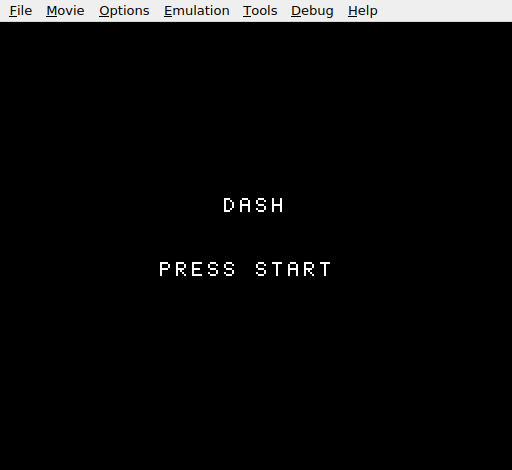
The title screen: “DASH” in white letters on a black background. “PRESS START” below. No sprites, no level — just text. Clean and immediate. Press Start and the level appears, the player is on the ground, the game begins.
Try This: Title Screen Colour
Change the title text to use a different palette. Write attribute table entries for the rows containing “DASH” to select palette 1 (green) or palette 2 (a custom colour you define). The “PRESS START” text could use a different palette from the game title.
Try This: Return to Playing
Change the game over → Start transition to go directly to STATE_PLAYING (calling init_game_screen) instead of returning to the title. This gives instant retry — one fewer button press between dying and playing again. Compare both approaches and decide which feels better.
Try This: Press Start Blink
Make “PRESS START” blink on the title screen. Add a frame counter in title_update. Every 30 frames, overwrite the text with empty tiles. Every 30 frames after that, rewrite it. The blinking draws attention and signals “press a button.”
If It Doesn’t Work
- Game starts playing immediately? The reset handler must call
init_title_screenand setgame_state = STATE_TITLEbefore entering the main loop. Ifgame_statestarts at 0 but the nametable shows the level, the title screen init was skipped. - Start button doesn’t work? Edge detection requires
prev_buttons. Ifprev_buttonsis never updated (missinglda buttons/sta prev_buttons), the edge check sees “was held” every frame. Also check thatprev_buttonsis cleared ininit_title_screen— otherwise a held Start from the game over screen triggers immediately on the title. - Screen is garbled after transition? The nametable clear must cover all 1024 bytes ($2000–$23FF). If the loop only clears 960 bytes (the tile data), attribute bytes from the previous screen remain. Clear 4 pages of 256 bytes.
- Sprites appear on the title screen?
init_title_screenmust hide all 64 sprites by writing$EFto every fourth byte of the OAM buffer (Y position). The simplest approach writes$EFto all 256 bytes. - Game over doesn’t show text?
take_damagenow setsgame_state = STATE_GAMEOVERinstead of the oldgame_overflag. The NMI checksgame_stateagainstSTATE_GAMEOVER, notgame_over.
What You’ve Learnt
- State machines —
game_statewithCMP/BEQdispatches to different handlers. Each state has its own update logic. Transitions set the new state and redraw the screen. - Button edge detection — comparing current and previous button state detects new presses.
current AND maskchecks if pressed;previous AND maskchecks if it was already held. Both must pass. - Full nametable redraws — disable rendering, clear the nametable, write new content, re-enable rendering. Safe outside VBlank when PPUMASK disables the PPU.
- Screen management — each screen (title, game, game over) owns the nametable. Transitions start by clearing everything. No leftover tiles, no visual artifacts.
- The complete loop — title → play → game over → title. Every NES game has this loop. The state machine is the skeleton.
What’s Next
The game loop is complete — but rough around the edges. In Unit 16, the player gets a two-frame running animation, sprites hide cleanly on game over, and boundary checks prevent edge cases. Phase 1 finishes with a polished foundation.