Integration + Polish
A two-frame running animation brings the player to life. Sprites hide cleanly on game over. A boundary check prevents Y wrap-around. Phase 1 is complete.
The game is functionally complete — run, jump, collect, die, restart. But the player sprite is a static tile, the obstacle and coins linger after game over, and there’s no protection against edge cases. This unit adds polish: a running animation, clean sprite management, and a boundary check. Small changes that make the game feel finished.
Two-Frame Animation
A second player tile in CHR-ROM shows a different leg position:
; Tile 1: Running figure (frame 1 — legs apart)
.byte %00110000,%00110000,%01111000,%00110000
.byte %00110000,%00101000,%01000100,%01000100

; Tile 27: Running figure (frame 2 — legs together)
.byte %00110000,%00110000,%01111000,%00110000
.byte %00110000,%00110000,%01010000,%01010000
Frame 1 has legs splayed wide. Frame 2 has legs closer together. The top four rows (head and body) are identical — only the bottom four rows change. Alternating between them at 8 frames per swap creates a simple running cycle.
Three new zero-page variables control the animation:
anim_timer:     .res 1          ; Counts frames between swaps
anim_frame:     .res 1          ; 0 or 1 — which frame is showing
moving:         .res 1          ; Set to 1 when the player moves
The animation runs only when the player is moving. Standing still shows frame 1 (the default pose). The moving flag is cleared at the start of each frame and set by the left/right movement code:
    lda #0
    sta moving

    ; ... (in move left code) ...
    dec player_x
    lda #1
sta moving ; --- Animation ---
lda moving
beq @reset_anim
inc anim_timer
lda anim_timer
cmp #ANIM_SPEED
bcc @anim_done
lda #0
sta anim_timer
lda anim_frame
eor #1 ; Toggle between 0 and 1
sta anim_frame
jmp @anim_done
@reset_anim:
lda #0
sta anim_timer
sta anim_frame
@anim_done:
; --- Update sprite positions ---
lda player_y
sta oam_buffer+0
lda player_x
sta oam_buffer+3
; Set animation tile
lda anim_frame
beq @frame1
lda #PLAYER_TILE_2
jmp @set_tile
@frame1:
lda #PLAYER_TILE_1
@set_tile:
sta oam_buffer+1
Each frame, anim_timer increments. When it reaches ANIM_SPEED (8), it resets to 0 and anim_frame toggles. The toggle uses EOR #1 — exclusive OR flips bit 0 between 0 and 1. No branch needed, no comparison against the current value.
When the player stops moving, both anim_timer and anim_frame reset to 0. The sprite snaps back to the standing pose immediately — no lingering mid-stride frame.
The OAM tile byte is set based on anim_frame:
lda anim_frame
beq @frame1
lda #PLAYER_TILE_2
jmp @set_tile
@frame1:
lda #PLAYER_TILE_1
@set_tile:
sta oam_buffer+1Sprite Hiding on Game Over
Previously, take_damage only hid the player sprite on game over. The obstacle and any remaining coins stayed visible — a diamond sliding across the ground of a frozen game, coins hanging in the air. Now take_damage hides everything:
; --- Game over: hide all game sprites ---
lda #$EF
sta oam_buffer+0 ; Player
sta oam_buffer+4 ; Obstacle
sta oam_buffer+8 ; Coin 1
sta oam_buffer+12 ; Coin 2
sta oam_buffer+16 ; Coin 3Five writes to the Y-position byte of each sprite. $EF is below the visible screen area — the PPU renders the sprite but it’s off the bottom edge. The “GAME OVER” text appears on a clean screen with just the level tiles visible.
Boundary Check
A new check prevents the player’s Y position from wrapping above the screen. When velocity is negative (moving up) and player_y wraps from a small value to a large one (unsigned arithmetic), the player would teleport to the bottom of the screen:
; --- Boundary check: prevent Y wrap above screen ---
lda vel_y
bpl @no_y_wrap ; Only check when moving up
lda player_y
cmp #$F0 ; If Y wrapped to a high value
bcc @no_y_wrap
lda #0 ; Clamp to top of screen
sta player_y
sta vel_y
@no_y_wrap:If vel_y is negative (bit 7 set, so BPL falls through) and player_y is $F0 or above, the position wrapped. Clamping to 0 stops the player at the top of the screen. Velocity resets too — gravity will pull them back down.
This edge case is rare in normal play (the jump velocity doesn’t reach the top of the screen), but it’s the kind of bug that surprises players when they find the right circumstances.
Animation Reset on Damage
When take_damage resets the player (lives remaining), the animation state is also cleared:
lda #0
sta anim_timer
sta anim_frameWithout this, the player could respawn mid-stride — frame 2 showing even though they’re standing still. Resetting to frame 0 gives a clean start after each hit.
The Complete Code
; =============================================================================
; DASH - Unit 16: Integration + Polish
; =============================================================================
; Two-frame player animation. The sprite alternates between running poses when
; moving. Sprites hide on game over. Boundary checks prevent wrap-around.
; Phase 1 complete — a solid foundation for the game.
; =============================================================================
; -----------------------------------------------------------------------------
; NES Hardware Addresses
; -----------------------------------------------------------------------------
PPUCTRL = $2000
PPUMASK = $2001
PPUSTATUS = $2002
OAMADDR = $2003
PPUSCROLL = $2005
PPUADDR = $2006
PPUDATA = $2007
OAMDMA = $4014
JOYPAD1 = $4016
; -----------------------------------------------------------------------------
; APU Registers
; -----------------------------------------------------------------------------
SQ1_VOL = $4000
SQ1_SWEEP = $4001
SQ1_LO = $4002
SQ1_HI = $4003
TRI_LINEAR = $4008
TRI_LO = $400A
TRI_HI = $400B
APU_STATUS = $4015
; -----------------------------------------------------------------------------
; Button Masks
; -----------------------------------------------------------------------------
BTN_A = %10000000
BTN_B = %01000000
BTN_SELECT = %00100000
BTN_START = %00010000
BTN_UP = %00001000
BTN_DOWN = %00000100
BTN_LEFT = %00000010
BTN_RIGHT = %00000001
; -----------------------------------------------------------------------------
; Game Constants
; -----------------------------------------------------------------------------
PLAYER_X = 60
PLAYER_Y = 200
PLAYER_TILE_1 = 1
PLAYER_TILE_2 = 27
RIGHT_WALL = 248
FLOOR_Y = 200
GRAVITY = 1
JUMP_VEL = $F6
OBSTACLE_TILE = 2
OBSTACLE_SPEED = 2
GROUND_TILE = 3
COIN_TILE = 4
DIGIT_ZERO = 5
SPIKE_TILE = 15
START_LIVES = 3
LETTER_G = 16
LETTER_A = 17
LETTER_M = 18
LETTER_E = 19
LETTER_V = 20
LETTER_R = 21
LETTER_D = 22
LETTER_S = 23
LETTER_H = 24
LETTER_P = 25
LETTER_T = 26
ANIM_SPEED = 8
STATE_TITLE = 0
STATE_PLAYING = 1
STATE_GAMEOVER = 2
; -----------------------------------------------------------------------------
; Memory
; -----------------------------------------------------------------------------
.segment "ZEROPAGE"
player_x: .res 1
player_y: .res 1
vel_y: .res 1
buttons: .res 1
prev_buttons: .res 1
nmi_flag: .res 1
on_ground: .res 1
obstacle_x: .res 1
tile_ptr: .res 2
score: .res 1
lives: .res 1
game_state: .res 1
game_over_drawn: .res 1
anim_timer: .res 1
anim_frame: .res 1
moving: .res 1
.segment "OAM"
oam_buffer: .res 256
.segment "BSS"
; =============================================================================
; iNES Header
; =============================================================================
.segment "HEADER"
.byte "NES", $1A
.byte 2
.byte 1
.byte $01
.byte $00
.byte 0,0,0,0,0,0,0,0
; =============================================================================
; Code
; =============================================================================
.segment "CODE"
; --- Reset ---
reset:
sei
cld
ldx #$40
stx $4017
ldx #$FF
txs
inx
stx PPUCTRL
stx PPUMASK
stx $4010
stx APU_STATUS
@vblank1:
bit PPUSTATUS
bpl @vblank1
lda #0
@clear_ram:
sta $0000, x
sta $0100, x
sta $0200, x
sta $0300, x
sta $0400, x
sta $0500, x
sta $0600, x
sta $0700, x
inx
bne @clear_ram
@vblank2:
bit PPUSTATUS
bpl @vblank2
; --- Load palette ---
bit PPUSTATUS
lda #$3F
sta PPUADDR
lda #$00
sta PPUADDR
ldx #0
@load_palette:
lda palette_data, x
sta PPUDATA
inx
cpx #32
bne @load_palette
; Enable APU channels: pulse 1 + triangle
lda #%00000101
sta APU_STATUS
; Enable NMI
lda #%10000000
sta PPUCTRL
; Show title screen
jsr init_title_screen
lda #STATE_TITLE
sta game_state
; =============================================================================
; Main Loop
; =============================================================================
main_loop:
lda nmi_flag
beq main_loop
lda #0
sta nmi_flag
; --- Read controller ---
jsr read_controller
; --- State dispatch ---
lda game_state
cmp #STATE_TITLE
beq title_update
cmp #STATE_GAMEOVER
beq gameover_update
jmp playing_update
; -----------------------------------------------------------------------------
; Title State
; -----------------------------------------------------------------------------
title_update:
lda buttons
and #BTN_START
beq @done
lda prev_buttons
and #BTN_START
bne @done
jsr init_game_screen
lda #STATE_PLAYING
sta game_state
@done:
lda buttons
sta prev_buttons
jmp main_loop
; -----------------------------------------------------------------------------
; Game Over State
; -----------------------------------------------------------------------------
gameover_update:
lda buttons
and #BTN_START
beq @done
lda prev_buttons
and #BTN_START
bne @done
jsr init_title_screen
lda #STATE_TITLE
sta game_state
@done:
lda buttons
sta prev_buttons
jmp main_loop
; -----------------------------------------------------------------------------
; Playing State
; -----------------------------------------------------------------------------
playing_update:
lda #0
sta moving
; --- Jump check ---
lda buttons
and #BTN_A
beq @no_jump
lda on_ground
beq @no_jump
lda #JUMP_VEL
sta vel_y
lda #0
sta on_ground
lda #%10111000
sta SQ1_VOL
lda #%10111001
sta SQ1_SWEEP
lda #$C8
sta SQ1_LO
lda #$00
sta SQ1_HI
@no_jump:
; --- Move left (with wall check) ---
lda buttons
and #BTN_LEFT
beq @not_left
lda player_x
beq @not_left
lda player_y
clc
adc #4
lsr
lsr
lsr
tax
lda level_rows_lo, x
sta tile_ptr
lda level_rows_hi, x
sta tile_ptr+1
lda player_x
sec
sbc #1
lsr
lsr
lsr
tay
lda (tile_ptr), y
bne @not_left
dec player_x
lda #1
sta moving
@not_left:
; --- Move right (with wall check) ---
lda buttons
and #BTN_RIGHT
beq @not_right
lda player_x
cmp #RIGHT_WALL
bcs @not_right
lda player_y
clc
adc #4
lsr
lsr
lsr
tax
lda level_rows_lo, x
sta tile_ptr
lda level_rows_hi, x
sta tile_ptr+1
lda player_x
clc
adc #8
lsr
lsr
lsr
tay
lda (tile_ptr), y
bne @not_right
inc player_x
lda #1
sta moving
@not_right:
; --- Apply gravity ---
lda vel_y
clc
adc #GRAVITY
sta vel_y
; --- Apply velocity to Y position ---
lda player_y
clc
adc vel_y
sta player_y
; --- Boundary check: prevent Y wrap above screen ---
lda vel_y
bpl @no_y_wrap ; Only check when moving up
lda player_y
cmp #$F0 ; If Y wrapped to a high value
bcc @no_y_wrap
lda #0 ; Clamp to top of screen
sta player_y
sta vel_y
@no_y_wrap:
; --- Tile collision (vertical) ---
lda vel_y
bmi @no_floor
lda player_y
clc
adc #8
lsr
lsr
lsr
tax
cpx #30
bcs @on_solid
lda level_rows_lo, x
sta tile_ptr
lda level_rows_hi, x
sta tile_ptr+1
lda player_x
clc
adc #4
lsr
lsr
lsr
tay
lda (tile_ptr), y
beq @no_floor
@on_solid:
lda player_y
clc
adc #8
and #%11111000
sec
sbc #8
sta player_y
lda #0
sta vel_y
lda #1
sta on_ground
jmp @done_floor
@no_floor:
lda #0
sta on_ground
@done_floor:
; --- Check collectibles ---
ldx #8
jsr check_collect
ldx #12
jsr check_collect
ldx #16
jsr check_collect
; --- Move obstacle ---
lda obstacle_x
sec
sbc #OBSTACLE_SPEED
sta obstacle_x
; --- Collision with obstacle ---
lda on_ground
beq @no_collide
lda player_y
cmp #(FLOOR_Y - 7)
bcc @no_collide
lda obstacle_x
cmp #240
bcs @no_collide
lda player_x
clc
adc #8
cmp obstacle_x
bcc @no_collide
beq @no_collide
lda obstacle_x
clc
adc #8
cmp player_x
bcc @no_collide
beq @no_collide
jsr take_damage
@no_collide:
; --- Check for hazard tiles ---
lda on_ground
beq @no_hazard
lda player_y
clc
adc #8
lsr
lsr
lsr
tax
cpx #30
bcs @no_hazard
lda level_rows_lo, x
sta tile_ptr
lda level_rows_hi, x
sta tile_ptr+1
lda player_x
clc
adc #4
lsr
lsr
lsr
tay
lda (tile_ptr), y
cmp #SPIKE_TILE
bne @no_hazard
jsr take_damage
@no_hazard:
    ; --- Animation ---
    lda moving
    beq @reset_anim

    inc anim_timer
    lda anim_timer
    cmp #ANIM_SPEED
    bcc @anim_done
    lda #0
    sta anim_timer
    lda anim_frame
    eor #1                  ; Toggle between 0 and 1
    sta anim_frame
    jmp @anim_done

@reset_anim:
    lda #0
    sta anim_timer
    sta anim_frame

@anim_done:

    ; --- Update sprite positions ---
    lda player_y
    sta oam_buffer+0
    lda player_x
    sta oam_buffer+3

    ; Set animation tile
    lda anim_frame
    beq @frame1
    lda #PLAYER_TILE_2
    jmp @set_tile
@frame1:
    lda #PLAYER_TILE_1
@set_tile:
    sta oam_buffer+1
lda #FLOOR_Y
sta oam_buffer+4
lda obstacle_x
sta oam_buffer+7
lda buttons
sta prev_buttons
jmp main_loop
; =============================================================================
; Subroutines
; =============================================================================
; -----------------------------------------------------------------------------
; read_controller
; -----------------------------------------------------------------------------
read_controller:
lda #1
sta JOYPAD1
lda #0
sta JOYPAD1
ldx #8
@read_pad:
lda JOYPAD1
lsr a
rol buttons
dex
bne @read_pad
rts
; -----------------------------------------------------------------------------
; check_collect
; -----------------------------------------------------------------------------
check_collect:
lda oam_buffer, x
cmp #$EF
beq @done
lda player_y
clc
adc #8
cmp oam_buffer, x
bcc @done
beq @done
lda oam_buffer, x
clc
adc #8
cmp player_y
bcc @done
beq @done
lda player_x
clc
adc #8
cmp oam_buffer+3, x
bcc @done
beq @done
lda oam_buffer+3, x
clc
adc #8
cmp player_x
bcc @done
beq @done
lda #$EF
sta oam_buffer, x
inc score
lda #%00011000
sta TRI_LINEAR
lda #$29
sta TRI_LO
lda #$00
sta TRI_HI
@done:
rts
; -----------------------------------------------------------------------------
; take_damage
; -----------------------------------------------------------------------------
take_damage:
lda lives
beq @done
dec lives
bne @still_alive
; --- Game over: hide all game sprites ---
lda #STATE_GAMEOVER
sta game_state
lda #0
sta game_over_drawn
lda #$EF
sta oam_buffer+0 ; Player
sta oam_buffer+4 ; Obstacle
sta oam_buffer+8 ; Coin 1
sta oam_buffer+12 ; Coin 2
sta oam_buffer+16 ; Coin 3
rts
@still_alive:
lda #PLAYER_X
sta player_x
lda #PLAYER_Y
sta player_y
lda #0
sta vel_y
sta anim_timer
sta anim_frame
lda #1
sta on_ground
lda #%00111100
sta SQ1_VOL
lda #%00000000
sta SQ1_SWEEP
lda #$80
sta SQ1_LO
lda #$01
sta SQ1_HI
@done:
rts
; -----------------------------------------------------------------------------
; init_title_screen
; -----------------------------------------------------------------------------
init_title_screen:
lda #0
sta PPUMASK
bit PPUSTATUS
lda #$20
sta PPUADDR
lda #$00
sta PPUADDR
lda #0
ldy #4
ldx #0
@clear:
sta PPUDATA
dex
bne @clear
dey
bne @clear
; "DASH" at row 12, column 14 ($218E)
bit PPUSTATUS
lda #$21
sta PPUADDR
lda #$8E
sta PPUADDR
lda #LETTER_D
sta PPUDATA
lda #LETTER_A
sta PPUDATA
lda #LETTER_S
sta PPUDATA
lda #LETTER_H
sta PPUDATA
; "PRESS START" at row 16, column 10 ($220A)
lda #$22
sta PPUADDR
lda #$0A
sta PPUADDR
lda #LETTER_P
sta PPUDATA
lda #LETTER_R
sta PPUDATA
lda #LETTER_E
sta PPUDATA
lda #LETTER_S
sta PPUDATA
lda #LETTER_S
sta PPUDATA
lda #0
sta PPUDATA
lda #LETTER_S
sta PPUDATA
lda #LETTER_T
sta PPUDATA
lda #LETTER_A
sta PPUDATA
lda #LETTER_R
sta PPUDATA
lda #LETTER_T
sta PPUDATA
; Hide all sprites
lda #$EF
ldx #0
@hide:
sta oam_buffer, x
inx
bne @hide
lda #0
sta prev_buttons
bit PPUSTATUS
lda #0
sta PPUSCROLL
sta PPUSCROLL
lda #%00011110
sta PPUMASK
rts
; -----------------------------------------------------------------------------
; init_game_screen
; -----------------------------------------------------------------------------
init_game_screen:
lda #0
sta PPUMASK
bit PPUSTATUS
lda #$20
sta PPUADDR
lda #$00
sta PPUADDR
lda #0
ldy #4
ldx #0
@clear:
sta PPUDATA
dex
bne @clear
dey
bne @clear
; Ground tiles (rows 26-29)
bit PPUSTATUS
lda #$23
sta PPUADDR
lda #$40
sta PPUADDR
lda #GROUND_TILE
ldx #128
@write_ground:
sta PPUDATA
dex
bne @write_ground
; Spike tiles
bit PPUSTATUS
lda #$23
sta PPUADDR
lda #$4A
sta PPUADDR
lda #SPIKE_TILE
sta PPUDATA
sta PPUDATA
; Platform tiles
bit PPUSTATUS
lda #$22
sta PPUADDR
lda #$8C
sta PPUADDR
lda #GROUND_TILE
ldx #8
@write_platform:
sta PPUDATA
dex
bne @write_platform
; Wall tiles
bit PPUSTATUS
lda #$23
sta PPUADDR
lda #$16
sta PPUADDR
lda #GROUND_TILE
sta PPUDATA
sta PPUDATA
bit PPUSTATUS
lda #$23
sta PPUADDR
lda #$36
sta PPUADDR
lda #GROUND_TILE
sta PPUDATA
sta PPUDATA
; HUD
bit PPUSTATUS
lda #$20
sta PPUADDR
lda #$22
sta PPUADDR
lda #DIGIT_ZERO
sta PPUDATA
lda #$20
sta PPUADDR
lda #$3C
sta PPUADDR
lda #(DIGIT_ZERO + START_LIVES)
sta PPUDATA
; Attributes
bit PPUSTATUS
lda #$23
sta PPUADDR
lda #$E8
sta PPUADDR
ldx #0
@write_attrs:
lda attr_data, x
sta PPUDATA
inx
cpx #24
bne @write_attrs
; Player sprite
lda #PLAYER_Y
sta oam_buffer+0
lda #PLAYER_TILE_1
sta oam_buffer+1
lda #0
sta oam_buffer+2
lda #PLAYER_X
sta oam_buffer+3
; Obstacle sprite
lda #FLOOR_Y
sta oam_buffer+4
lda #OBSTACLE_TILE
sta oam_buffer+5
lda #1
sta oam_buffer+6
lda #255
sta oam_buffer+7
; Coin sprites
lda #152
sta oam_buffer+8
lda #COIN_TILE
sta oam_buffer+9
lda #2
sta oam_buffer+10
lda #128
sta oam_buffer+11
lda #FLOOR_Y
sta oam_buffer+12
lda #COIN_TILE
sta oam_buffer+13
lda #2
sta oam_buffer+14
lda #200
sta oam_buffer+15
lda #168
sta oam_buffer+16
lda #COIN_TILE
sta oam_buffer+17
lda #2
sta oam_buffer+18
lda #32
sta oam_buffer+19
; Hide remaining sprites
lda #$EF
ldx #20
@hide:
sta oam_buffer, x
inx
bne @hide
; Init game variables
lda #PLAYER_X
sta player_x
lda #PLAYER_Y
sta player_y
lda #0
sta vel_y
sta score
sta game_over_drawn
sta prev_buttons
sta anim_timer
sta anim_frame
sta moving
lda #START_LIVES
sta lives
lda #1
sta on_ground
lda #255
sta obstacle_x
bit PPUSTATUS
lda #0
sta PPUSCROLL
sta PPUSCROLL
lda #%00011110
sta PPUMASK
rts
; =============================================================================
; NMI Handler
; =============================================================================
nmi:
pha
txa
pha
tya
pha
; --- OAM DMA ---
lda #0
sta OAMADDR
lda #>oam_buffer
sta OAMDMA
; --- HUD updates (only during play / game over) ---
lda game_state
cmp #STATE_TITLE
beq @skip_hud
bit PPUSTATUS
lda #$20
sta PPUADDR
lda #$22
sta PPUADDR
lda score
clc
adc #DIGIT_ZERO
sta PPUDATA
lda #$20
sta PPUADDR
lda #$3C
sta PPUADDR
lda lives
clc
adc #DIGIT_ZERO
sta PPUDATA
; "GAME OVER" text (one-shot)
lda game_state
cmp #STATE_GAMEOVER
bne @skip_hud
lda game_over_drawn
bne @skip_hud
lda #$21
sta PPUADDR
lda #$CC
sta PPUADDR
lda #LETTER_G
sta PPUDATA
lda #LETTER_A
sta PPUDATA
lda #LETTER_M
sta PPUDATA
lda #LETTER_E
sta PPUDATA
lda #0
sta PPUDATA
lda #DIGIT_ZERO
sta PPUDATA
lda #LETTER_V
sta PPUDATA
lda #LETTER_E
sta PPUDATA
lda #LETTER_R
sta PPUDATA
lda #1
sta game_over_drawn
@skip_hud:
; --- Reset scroll ---
lda #0
sta PPUSCROLL
sta PPUSCROLL
lda #1
sta nmi_flag
pla
tay
pla
tax
pla
rti
irq:
rti
; =============================================================================
; Data
; =============================================================================
palette_data:
.byte $0F, $00, $10, $20
.byte $0F, $09, $19, $29
.byte $0F, $00, $10, $20
.byte $0F, $00, $10, $20
.byte $0F, $30, $16, $27
.byte $0F, $16, $27, $30
.byte $0F, $28, $38, $30
.byte $0F, $30, $16, $27
attr_data:
.byte $00, $00, $00, $05, $05, $00, $00, $00
.byte $50, $50, $50, $50, $50, $54, $50, $50
.byte $05, $05, $05, $05, $05, $05, $05, $05
; Level Data
level_empty_row:
.byte 0,0,0,0, 0,0,0,0, 0,0,0,0, 0,0,0,0
.byte 0,0,0,0, 0,0,0,0, 0,0,0,0, 0,0,0,0
level_platform_row:
.byte 0,0,0,0, 0,0,0,0, 0,0,0,0, 3,3,3,3
.byte 3,3,3,3, 0,0,0,0, 0,0,0,0, 0,0,0,0
level_wall_row:
.byte 0,0,0,0, 0,0,0,0, 0,0,0,0, 0,0,0,0
.byte 0,0,0,0, 0,0,3,3, 0,0,0,0, 0,0,0,0
level_ground_row:
.byte 3,3,3,3, 3,3,3,3, 3,3,3,3, 3,3,3,3
.byte 3,3,3,3, 3,3,3,3, 3,3,3,3, 3,3,3,3
level_ground_spike_row:
.byte 3,3,3,3, 3,3,3,3, 3,3,15,15, 3,3,3,3
.byte 3,3,3,3, 3,3,3,3, 3,3,3,3, 3,3,3,3
level_rows_lo:
.byte <level_empty_row ; Row 0
.byte <level_empty_row
.byte <level_empty_row
.byte <level_empty_row
.byte <level_empty_row
.byte <level_empty_row
.byte <level_empty_row
.byte <level_empty_row
.byte <level_empty_row
.byte <level_empty_row
.byte <level_empty_row ; Row 10
.byte <level_empty_row
.byte <level_empty_row
.byte <level_empty_row
.byte <level_empty_row
.byte <level_empty_row
.byte <level_empty_row
.byte <level_empty_row
.byte <level_empty_row
.byte <level_empty_row
.byte <level_platform_row ; Row 20
.byte <level_empty_row
.byte <level_empty_row
.byte <level_empty_row
.byte <level_wall_row ; Row 24
.byte <level_wall_row
.byte <level_ground_spike_row ; Row 26
.byte <level_ground_row
.byte <level_ground_row
.byte <level_ground_row
level_rows_hi:
.byte >level_empty_row ; Row 0
.byte >level_empty_row
.byte >level_empty_row
.byte >level_empty_row
.byte >level_empty_row
.byte >level_empty_row
.byte >level_empty_row
.byte >level_empty_row
.byte >level_empty_row
.byte >level_empty_row
.byte >level_empty_row ; Row 10
.byte >level_empty_row
.byte >level_empty_row
.byte >level_empty_row
.byte >level_empty_row
.byte >level_empty_row
.byte >level_empty_row
.byte >level_empty_row
.byte >level_empty_row
.byte >level_empty_row
.byte >level_platform_row ; Row 20
.byte >level_empty_row
.byte >level_empty_row
.byte >level_empty_row
.byte >level_wall_row ; Row 24
.byte >level_wall_row
.byte >level_ground_spike_row ; Row 26
.byte >level_ground_row
.byte >level_ground_row
.byte >level_ground_row
; =============================================================================
; Vectors
; =============================================================================
.segment "VECTORS"
.word nmi
.word reset
.word irq
; =============================================================================
; CHR-ROM
; =============================================================================
.segment "CHARS"
; Tile 0: Empty
.byte $00,$00,$00,$00,$00,$00,$00,$00
.byte $00,$00,$00,$00,$00,$00,$00,$00
; Tile 1: Running figure (frame 1 — legs apart)
.byte %00110000,%00110000,%01111000,%00110000
.byte %00110000,%00101000,%01000100,%01000100
.byte $00,$00,$00,$00,$00,$00,$00,$00
; Tile 2: Diamond obstacle
.byte %00011000,%00111100,%01111110,%11111111
.byte %11111111,%01111110,%00111100,%00011000
.byte $00,$00,$00,$00,$00,$00,$00,$00
; Tile 3: Ground block
.byte $FF,$FF,$FF,$FF,$FF,$FF,$FF,$FF
.byte $FF,$00,$00,$00,$00,$00,$00,$00
; Tile 4: Coin
.byte $3C,$7E,$FF,$FF,$FF,$FF,$7E,$3C
.byte $00,$00,$00,$00,$00,$00,$00,$00
; Tiles 5-14: Digits 0-9 (both planes = colour 3)
.byte $70,$88,$88,$88,$88,$88,$70,$00 ; Tile 5: 0
.byte $70,$88,$88,$88,$88,$88,$70,$00
.byte $20,$60,$20,$20,$20,$20,$70,$00 ; Tile 6: 1
.byte $20,$60,$20,$20,$20,$20,$70,$00
.byte $70,$88,$08,$30,$40,$80,$F8,$00 ; Tile 7: 2
.byte $70,$88,$08,$30,$40,$80,$F8,$00
.byte $70,$88,$08,$30,$08,$88,$70,$00 ; Tile 8: 3
.byte $70,$88,$08,$30,$08,$88,$70,$00
.byte $10,$30,$50,$90,$F8,$10,$10,$00 ; Tile 9: 4
.byte $10,$30,$50,$90,$F8,$10,$10,$00
.byte $F8,$80,$F0,$08,$08,$88,$70,$00 ; Tile 10: 5
.byte $F8,$80,$F0,$08,$08,$88,$70,$00
.byte $30,$40,$80,$F0,$88,$88,$70,$00 ; Tile 11: 6
.byte $30,$40,$80,$F0,$88,$88,$70,$00
.byte $F8,$08,$10,$20,$20,$20,$20,$00 ; Tile 12: 7
.byte $F8,$08,$10,$20,$20,$20,$20,$00
.byte $70,$88,$88,$70,$88,$88,$70,$00 ; Tile 13: 8
.byte $70,$88,$88,$70,$88,$88,$70,$00
.byte $70,$88,$88,$78,$08,$10,$60,$00 ; Tile 14: 9
.byte $70,$88,$88,$78,$08,$10,$60,$00
; Tile 15: Spikes
.byte $18,$18,$3C,$3C,$7E,$7E,$FF,$FF
.byte $18,$18,$3C,$3C,$7E,$7E,$FF,$FF
; Tile 16: Letter G
.byte $70,$88,$80,$80,$98,$88,$70,$00
.byte $70,$88,$80,$80,$98,$88,$70,$00
; Tile 17: Letter A
.byte $70,$88,$88,$F8,$88,$88,$88,$00
.byte $70,$88,$88,$F8,$88,$88,$88,$00
; Tile 18: Letter M
.byte $88,$D8,$A8,$88,$88,$88,$88,$00
.byte $88,$D8,$A8,$88,$88,$88,$88,$00
; Tile 19: Letter E
.byte $F8,$80,$80,$F0,$80,$80,$F8,$00
.byte $F8,$80,$80,$F0,$80,$80,$F8,$00
; Tile 20: Letter V
.byte $88,$88,$88,$88,$50,$50,$20,$00
.byte $88,$88,$88,$88,$50,$50,$20,$00
; Tile 21: Letter R
.byte $F0,$88,$88,$F0,$A0,$90,$88,$00
.byte $F0,$88,$88,$F0,$A0,$90,$88,$00
; Tile 22: Letter D
.byte $E0,$90,$88,$88,$88,$90,$E0,$00
.byte $E0,$90,$88,$88,$88,$90,$E0,$00
; Tile 23: Letter S
.byte $70,$88,$80,$70,$08,$88,$70,$00
.byte $70,$88,$80,$70,$08,$88,$70,$00
; Tile 24: Letter H
.byte $88,$88,$88,$F8,$88,$88,$88,$00
.byte $88,$88,$88,$F8,$88,$88,$88,$00
; Tile 25: Letter P
.byte $F0,$88,$88,$F0,$80,$80,$80,$00
.byte $F0,$88,$88,$F0,$80,$80,$80,$00
; Tile 26: Letter T
.byte $F8,$20,$20,$20,$20,$20,$20,$00
.byte $F8,$20,$20,$20,$20,$20,$20,$00
; Tile 27: Running figure (frame 2 — legs together)
.byte %00110000,%00110000,%01111000,%00110000
.byte %00110000,%00110000,%01010000,%01010000
.byte $00,$00,$00,$00,$00,$00,$00,$00
.res 8192 - 448, $00
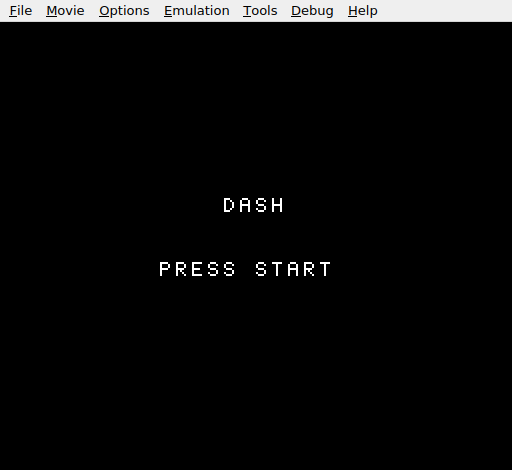
The title screen — the same “DASH” and “PRESS START” from Unit 15. Behind it, the animation system, sprite management, and boundary checks are ready. Press Start and the player runs with a two-frame animation, sprites hide cleanly on game over, and the Y position stays in bounds.
Try This: Faster Animation
Change ANIM_SPEED from 8 to 4. The legs cycle twice as fast. Compare 4, 8, and 16 — each gives a different sense of speed. At 4, the character looks frantic. At 16, they look like they’re wading through mud.
Try This: Jump Tile
Add a third player tile that shows the figure with arms up and legs tucked — a jumping pose. When on_ground is 0, use the jump tile instead of the running frames. This gives visual feedback for the airborne state.
Try This: Idle Animation
When the player stands still for 120 frames (2 seconds), switch to a subtle idle animation — perhaps a slight bounce or a blinking eye. Use a separate idle timer that resets when moving is set.
If It Doesn’t Work
- Animation doesn’t play? Check that
movingis set to 1 in the left/right movement code. Ifmovingis always 0, the animation resets every frame and never advances. - Animation plays while standing still? The
movingflag must be cleared to 0 at the start ofplaying_update. If it’s only cleared in@reset_anim, it retains the previous frame’s value. - Wrong tile shows?
PLAYER_TILE_1 = 1andPLAYER_TILE_2 = 27. Make sure tile 27 exists in CHR-ROM (the 28th tile, counting from 0). If the tile slot is empty, the sprite shows a blank square. - Sprites still visible after game over? The
take_damagegame over branch must write$EFto bytes 0, 4, 8, 12, and 16 of the OAM buffer — the Y position of each sprite entry. Writing to the wrong offsets hides the wrong bytes. - Player wraps to bottom of screen? The boundary check must test
vel_ywithBPLfirst. If it checksplayer_ywithout verifying negative velocity, it could trigger during normal downward movement whenplayer_yis naturally above$F0.
What You’ve Learnt
- Frame animation — two tiles alternating on a timer.
EOR #1toggles between 0 and 1. The animation runs only when a condition is met (moving), and resets when it isn’t. - Animation timers —
anim_timercounts frames,ANIM_SPEEDsets the threshold. Changing one constant changes the animation speed. No code changes needed. - Sprite lifecycle — sprites are created in
init_game_screen, updated each frame during play, and hidden on game over. Each state transition manages the sprites it owns. - Boundary checking — unsigned arithmetic wraps silently. Detecting the wrap (high Y value + negative velocity) and clamping prevents visual glitches.
EORfor toggling — exclusive OR with 1 flips a bit: 0 becomes 1, 1 becomes 0. A single instruction replaces a compare-and-branch pattern.
Phase 1 Complete
Sixteen units. A character that runs, jumps, collects coins, and dodges hazards. Three lives, a score, sound effects, a title screen, and a game over screen. A complete game loop.
The NES framework is solid: iNES header, PPU warmup, NMI handler, OAM DMA, controller reading, nametable writes, attribute tables, CHR tiles, APU channels, state machine. Every NES game builds on this foundation.
Phase 2 begins with the world beyond a single screen.