Room Complete
Two conditions tested in sequence: player on the exit AND all treasures collected. The game has a win condition for the first time — a four-note fanfare and ROOM COMPLETE on screen.
The room has an exit. But walking onto it does nothing. The cyan cell sits there, inert. The game needs a win condition — a moment where the room is complete and the player knows they’ve succeeded.
The rule: collect all three treasures, then walk to the exit. Both conditions must be true. Miss a treasure and the exit ignores you. Stand on the exit without collecting everything and nothing happens. Only when both are satisfied does the game end.
Two Conditions, One at a Time
The Z80 can test one thing per instruction. “Is the player on the exit?” is one test. “Are all treasures collected?” is another. To check both, test them in sequence — and bail out early if the first fails.
; Win condition — two tests in sequence
;
; The Z80 can only test one thing at a time. To check two
; conditions, test the first and skip ahead if it fails.
; Then test the second.

            ; Is the player standing on the exit?
            ld      a, (player_under)
            cp      EXIT                ; Cyan cell?
            jr      nz, .not_on_exit    ; No — skip

            ; Yes — are all treasures collected?
            ld      a, (treasure_count)
            cp      TOTAL_TREASURE
            jr      z, .room_complete   ; Both true — win!

.not_on_exit:
            ; Game continues...
This is how all multi-condition logic works in assembly. There’s no && operator, no boolean AND that combines two expressions. You test the first condition with CP. If it fails, JR NZ skips past the second test entirely. If the first passes, execution falls through to the second CP. If that passes too, execution falls through to the win code.
The order matters for efficiency. Test the condition that fails most often first. The player is rarely on the exit, so that check comes first — most frames skip the second test entirely.
What Triggers “On the Exit”
When the player moves onto a cell, check_collect saves the target attribute to player_under. If the player walked onto the exit, player_under holds $28 (the EXIT constant). The comparison is a single CP:
            ld      a, (player_under)
            cp      EXIT                ; $28 = cyan paper?
This works because player_under stores the exact attribute byte. No masking needed — $28 is a unique value that only appears on exit cells.
The Green Border Means “Door Open”
The green border from Unit 10 now has a purpose. When all treasures are collected, the border turns green — a visual signal that the exit is active. Walk to the cyan door while the border is green and the room is complete.
            ; Border shows progress
            ld      a, (treasure_count)
            cp      TOTAL_TREASURE
            jr      nz, .not_all
            ld      a, 4                ; Green border — door is open
            out     ($fe), a
            jp      .loop
.not_all:
            ld      a, 0                ; Black border
            out     ($fe), a
The same code from Unit 10, but now it has meaning. The border isn’t just a congratulation — it tells the player the exit is ready.
Victory
; Victory sequence — sound, message, halt
;
; The game leaves the main loop permanently. A four-note
; fanfare plays, the score line shows ROOM COMPLETE!, and
; the program enters an infinite halt loop. The game is over.

.room_complete:
            ; Victory fanfare — four ascending notes
            ld      hl, 100
            ld      e, 45               ; Low
            call    beep
            ld      hl, 100
            ld      e, 35               ; Mid
            call    beep
            ld      hl, 100
            ld      e, 25               ; High
            call    beep
            ld      hl, 300
            ld      e, 18               ; Sustained high
            call    beep

            ; Overwrite score line with victory message
            ld      de, SCORE_SCR
            ld      hl, win_text
            call    print_str

            ; Green border — permanent
            ld      a, 4
            out     ($fe), a

            ; Halt forever
.victory:   halt
            jr      .victory
The victory sequence does three things:
- Sound — a four-note ascending fanfare, longer than the collect chirp. The last note sustains (duration 300 vs 100) to signal finality.
- Message — “ROOM COMPLETE!” overwrites the score line.
print_strwrites it at the same screen position, replacing “TREASURE 3/3”. - Halt — an infinite loop of
HALT/JR .victory. The game is over. The CPU sleeps between interrupts, the green border stays, and the message remains on screen.
The Halt Loop
.victory:   halt
            jr      .victory
HALT stops the CPU until the next interrupt (which fires every frame at 50Hz). JR .victory jumps back to halt again. The CPU does almost nothing — it wakes briefly each frame to execute the jump, then sleeps again. This is the standard way to end a Spectrum program cleanly.
The Complete Code
; ============================================================================
; SHADOWKEEP — Unit 14: Room Complete
; ============================================================================
; The room finally has a win condition. Collect all three treasures, walk
; to the cyan exit door, and the room is complete.
;
; Two conditions must be true: player is on the exit AND all treasures
; are collected. The Z80 tests one at a time — check the first, skip
; if false, then check the second.
;
; Victory: a four-note fanfare, "ROOM COMPLETE!" on the score line,
; and the game halts. Shadowkeep has an ending for the first time.
; ============================================================================
org 32768
; Attribute values
WALL equ $09 ; PAPER 1 (blue) + INK 1
FLOOR equ $38 ; PAPER 7 (white) + INK 0
TREASURE equ $70 ; BRIGHT + PAPER 6 (yellow) + INK 0
HAZARD equ $90 ; FLASH + PAPER 2 (red) + INK 0
EXIT equ $28 ; PAPER 5 (cyan) + INK 0
PLAYER equ $3a ; PAPER 7 (white) + INK 2 (red)
; Collision
WALL_INK equ 1 ; INK colour that means "wall"
; Room
ROOM_TOP equ 10
ROOM_LEFT equ 12
ROOM_WIDTH equ 9
ROOM_HEIGHT equ 5
ROW_SKIP equ 23 ; 32 - ROOM_WIDTH
TOTAL_TREASURE equ 3 ; Treasures in the room
; Screen addresses for starting position (row 12, col 13)
START_ROW equ 12
START_COL equ 13
START_SCR equ $488d
START_ATT equ $598d
; Score display position (row 23, col 10)
SCORE_SCR equ $50ea ; Screen bitmap: row 23, col 10
SCORE_ATT equ $5aea ; Attribute: row 23, col 10
SCORE_LEN equ 15 ; Wide enough for "ROOM COMPLETE!"
; Keyboard rows
KEY_ROW_QT equ $fb ; Q, W, E, R, T
KEY_ROW_AG equ $fd ; A, S, D, F, G
KEY_ROW_PY equ $df ; P, O, I, U, Y
; ROM font
FONT_BASE equ $3c00 ; Character set in ROM
; ----------------------------------------------------------------------------
; Entry point
; ----------------------------------------------------------------------------
start:
ld a, 0
out ($fe), a
; Clear screen
ld hl, $4000
ld de, $4001
ld bc, 6911
ld (hl), 0
ldir
; ==================================================================
; Draw room from data table
; ==================================================================
ld hl, $594c ; Attribute address: row 10, col 12
ld de, room_data
ld c, ROOM_HEIGHT
.row: ld b, ROOM_WIDTH
.cell: ld a, (de)
ld (hl), a
inc de
inc hl
djnz .cell
push de
ld de, ROW_SKIP
add hl, de
pop de
dec c
jr nz, .row
; ==================================================================
; Draw the player at starting position
; ==================================================================
ld a, (START_ATT)
ld (player_under), a
ld hl, START_SCR
ld de, player_gfx
ld b, 8
.initdraw: ld a, (de)
ld (hl), a
inc de
inc h
djnz .initdraw
ld a, PLAYER
ld (START_ATT), a
; Set attributes for score line
ld hl, SCORE_ATT
ld a, $47 ; BRIGHT + INK 7 (white on black)
ld b, SCORE_LEN
.sattr: ld (hl), a
inc hl
djnz .sattr
call print_score ; Show initial status
; ==================================================================
; Main loop
; ==================================================================
.loop: halt
; --- Erase player at current position ---
ld hl, (player_scr)
ld b, 8
ld a, 0
.erase: ld (hl), a
inc h
djnz .erase
ld hl, (player_att)
ld a, (player_under)
ld (hl), a
; --- Check Q (up) ---
ld a, KEY_ROW_QT
in a, ($fe)
bit 0, a
jr nz, .not_q
ld hl, (player_att)
ld de, $ffe0 ; -32 (one row up)
add hl, de
ld a, (hl)
and $07
cp WALL_INK
jr z, .not_q
call check_collect
ld (player_att), hl
ld hl, (player_scr)
ld de, $ffe0
add hl, de
ld (player_scr), hl
ld a, (player_row)
dec a
ld (player_row), a
.not_q:
; --- Check A (down) ---
ld a, KEY_ROW_AG
in a, ($fe)
bit 0, a
jr nz, .not_a
ld hl, (player_att)
ld de, 32
add hl, de
ld a, (hl)
and $07
cp WALL_INK
jr z, .not_a
call check_collect
ld (player_att), hl
ld hl, (player_scr)
ld de, 32
add hl, de
ld (player_scr), hl
ld a, (player_row)
inc a
ld (player_row), a
.not_a:
; --- Check O (left) ---
ld a, KEY_ROW_PY
in a, ($fe)
bit 1, a
jr nz, .not_o
ld hl, (player_att)
dec hl
ld a, (hl)
and $07
cp WALL_INK
jr z, .not_o
call check_collect
ld (player_att), hl
ld hl, (player_scr)
dec hl
ld (player_scr), hl
ld a, (player_col)
dec a
ld (player_col), a
.not_o:
; --- Check P (right) ---
ld a, KEY_ROW_PY
in a, ($fe)
bit 0, a
jr nz, .not_p
ld hl, (player_att)
inc hl
ld a, (hl)
and $07
cp WALL_INK
jr z, .not_p
call check_collect
ld (player_att), hl
ld hl, (player_scr)
inc hl
ld (player_scr), hl
ld a, (player_col)
inc a
ld (player_col), a
.not_p:
; --- Draw player at current position ---
ld hl, (player_scr)
ld de, player_gfx
ld b, 8
.draw: ld a, (de)
ld (hl), a
inc de
inc h
djnz .draw
ld hl, (player_att)
ld a, PLAYER
ld (hl), a
; --- Update score display ---
call print_score
; --- Check win condition ---
ld a, (player_under)
cp EXIT ; Standing on the exit?
jr nz, .not_on_exit
ld a, (treasure_count)
cp TOTAL_TREASURE ; All treasures collected?
jr z, .room_complete
.not_on_exit:
; --- Border shows progress ---
ld a, (treasure_count)
cp TOTAL_TREASURE
jr nz, .not_all
ld a, 4 ; Green border — door is open
out ($fe), a
jp .loop
.not_all:
ld a, 0 ; Black border
out ($fe), a
jp .loop
; ==================================================================
; Room complete — victory sequence
; ==================================================================
.room_complete:
; Victory fanfare — four ascending notes
ld hl, 100
ld e, 45 ; Low
call beep
ld hl, 100
ld e, 35 ; Mid
call beep
ld hl, 100
ld e, 25 ; High
call beep
ld hl, 300
ld e, 18 ; Sustained high
call beep
; Overwrite score line with victory message
ld de, SCORE_SCR
ld hl, win_text
call print_str
; Green border — permanent
ld a, 4
out ($fe), a
; Halt forever
.victory: halt
jr .victory
; ============================================================================
; Subroutines
; ============================================================================
; ----------------------------------------------------------------------------
; check_collect — save target cell, check for treasure, collect if found
; Entry: HL = target attribute address
; Exit: HL preserved, player_under updated
; ----------------------------------------------------------------------------
check_collect:
ld a, (hl)
ld (player_under), a
bit 6, a ; BRIGHT = treasure?
ret z ; No — done
res 6, a ; Clear BRIGHT (collected)
ld (player_under), a
push hl
ld hl, treasure_count
inc (hl)
pop hl
; Play collect sound — short rising tone
push hl
push de
ld hl, 80 ; Duration (cycles)
ld e, 40 ; Pitch (delay — lower = higher)
call beep
ld hl, 80
ld e, 30 ; Higher pitch
call beep
ld hl, 80
ld e, 20 ; Highest pitch
call beep
pop de
pop hl
ret
; ----------------------------------------------------------------------------
; beep — generate a tone on the speaker
; Entry: HL = duration (number of wave cycles), E = pitch (delay per half)
; Exit: speaker off, border black
; Destroys: A, B, HL
; ----------------------------------------------------------------------------
beep:
ld a, $10 ; Bit 4 high — speaker on
.on: out ($fe), a ; Push speaker cone out
ld b, e ; Delay counter = pitch
.delay1: djnz .delay1 ; Wait
xor $10 ; Toggle bit 4
out ($fe), a ; Pull speaker cone back
ld b, e ; Same delay
.delay2: djnz .delay2 ; Wait
xor $10 ; Toggle bit 4 back
dec hl ; One cycle done
ld a, h
or l ; HL = 0?
ld a, $10 ; Reload (doesn't affect flags)
jr nz, .on ; More cycles — continue
xor a ; A = 0 — speaker off, border black
out ($fe), a
ret
; ----------------------------------------------------------------------------
; print_score — display "TREASURE n/3" at row 23
; Destroys: A, BC, DE, HL
; ----------------------------------------------------------------------------
print_score:
ld de, SCORE_SCR
ld hl, score_text
call print_str
ld a, (treasure_count)
add a, '0'
call print_char
ld a, '/'
call print_char
ld a, TOTAL_TREASURE
add a, '0'
call print_char
ret
; ----------------------------------------------------------------------------
; print_str — print null-terminated string at screen address DE
; Entry: HL = string address, DE = screen address
; Exit: HL past null terminator, DE advanced past last character
; ----------------------------------------------------------------------------
print_str:
ld a, (hl)
or a
ret z
push hl
call print_char
pop hl
inc hl
jr print_str
; ----------------------------------------------------------------------------
; print_char — draw one character to screen memory using ROM font
; Entry: A = character (32-127), DE = screen address (pixel row 0)
; Exit: DE advanced to next column (E incremented)
; ----------------------------------------------------------------------------
print_char:
push de
ld l, a
ld h, 0
add hl, hl
add hl, hl
add hl, hl
ld bc, FONT_BASE
add hl, bc
ld b, 8
.pchar: ld a, (hl)
ld (de), a
inc hl
inc d
djnz .pchar
pop de
inc e
ret
; ============================================================================
; Room data — one byte per cell
; ============================================================================
;
; W W W W W W W W W
; W . W . . . T . W T = treasure
; W . T . . . W . W H = hazard
; W . . . H . . T W X = exit
; W W W W W X W W W
;
room_data:
db WALL, WALL, WALL, WALL, WALL, WALL, WALL, WALL, WALL
db WALL, FLOOR, WALL, FLOOR, FLOOR, FLOOR, TREASURE, FLOOR, WALL
db WALL, FLOOR, TREASURE, FLOOR, FLOOR, FLOOR, WALL, FLOOR, WALL
db WALL, FLOOR, FLOOR, FLOOR, HAZARD, FLOOR, FLOOR, TREASURE, WALL
db WALL, WALL, WALL, WALL, WALL, EXIT, WALL, WALL, WALL
; ============================================================================
; String data
; ============================================================================
score_text: db "TREASURE ", 0
win_text: db "ROOM COMPLETE!", 0
; ============================================================================
; Player data
; ============================================================================
player_gfx: db $18, $3c, $7e, $ff
db $ff, $7e, $3c, $18
player_row: db START_ROW
player_col: db START_COL
player_scr: dw START_SCR
player_att: dw START_ATT
player_under:
db FLOOR
treasure_count:
db 0
end start
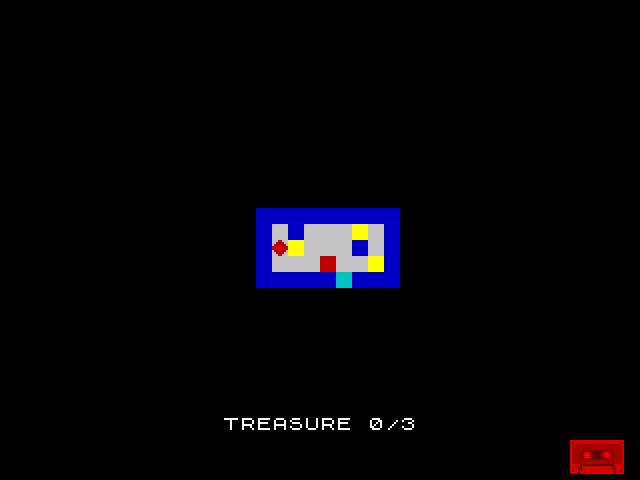
The screenshot shows the starting state — the room with its exit, treasures uncollected. To see the win condition in action: collect all three bright yellow treasures (the border turns green), then walk down to the cyan exit. A four-note fanfare plays and “ROOM COMPLETE!” appears on the score line.
The Game Loop So Far
Each frame now follows this sequence:
- HALT — wait for the next frame
- Erase — clear the player’s bitmap, restore the attribute under them
- Input — read keyboard, check collision, move if allowed, collect treasure
- Draw — write the player’s bitmap and attribute at the new position
- Score — update the treasure display
- Win check — test for exit + all treasures → victory
- Border — green if all collected, black otherwise
Steps 1–5 existed in previous units. Step 6 is new — a test that can break out of the loop permanently. The main loop isn’t just repeating forever any more. It has an exit condition.
Try This: Immediate Exit
Remove the treasure requirement — the exit works immediately:
            ld      a, (player_under)
            cp      EXIT
            jr      z, .room_complete   ; No treasure check — exit always works
Now you can walk straight to the exit. This is useful for testing, but makes the room trivial — no challenge, no reason to explore.
Try This: Door Opens Visually
When all treasures are collected, make the exit BRIGHT (cyan becomes bright cyan):
            ; After confirming all treasures collected:
EXIT_ATT    equ     $59d1           ; Exit cell: row 14, col 17

            ld      a, (treasure_count)
            cp      TOTAL_TREASURE
            jr      nz, .not_all
            ld      hl, EXIT_ATT
            set     6, (hl)             ; Make exit BRIGHT — visually "open"
SET 6, (HL) sets the BRIGHT bit directly in attribute memory. The exit changes from solid cyan to bright cyan — a visible signal that the door has opened. This is SET applied to memory rather than a register, a single instruction that modifies one bit at an address.
Be careful: if the player is standing on the exit when you modify it, you’re changing the PLAYER attribute instead (since the player’s attribute overwrites the cell). The simple workaround: only SET the bit if the player isn’t on the exit.
Try This: Victory Border Stripes
Flash the border through multiple colours before settling on green:
.room_complete:
            ld      c, 8                ; 8 colour changes
            ld      b, 0                ; Starting colour
.flash:     ld      a, b
            out     ($fe), a
            push    bc
            ld      hl, 50
            ld      e, 25
            call    beep                ; Each beep acts as a delay
            pop     bc
            inc     b
            dec     c
            jr      nz, .flash
Each beep takes roughly the same time, creating a rhythmic colour change. The border cycles through all 8 colours while playing ascending tones — a more celebratory victory.
If It Doesn’t Work
- Exit doesn’t trigger? Check that
player_underis being compared toEXIT($28). If you’re comparing to the wrong value, the condition never matches. - Win triggers without all treasures? Make sure the treasure check comes AFTER the exit check. Both
CPinstructions andJRconditions must be correct —JR NZskips when NOT equal,JR Zcontinues when equal. - “ROOM COMPLETE!” text is garbled? Check that
SCORE_LENis at least 15 (14 characters + safety margin). If the attribute area is too narrow, some characters will appear on a black background. - Game doesn’t stop after winning? The
.victorylabel must have bothHALTandJR .victory. Without the jump, execution falls through into whatever code follows. - Fanfare sounds wrong? Check the pitch values descend (45, 35, 25, 18) — lower values mean higher pitch. The last note should be duration 300 for the sustained effect.
What You’ve Learnt
- Multi-condition logic — test one condition, skip if false, test the next. No boolean operators in assembly — just sequential comparisons and branches.
- Test order matters — check the condition that fails most often first. Most frames the player isn’t on the exit, so that test comes first and the second is skipped.
- Game state change — the main loop has an exit condition. The game transitions from “playing” to “complete.” This is the simplest form of a state machine.
- Victory feedback — sound, text, and colour together signal success. Multiple forms of feedback make the moment feel significant.
- HALT loop —
HALT/JRis the standard way to end a Spectrum program. The CPU sleeps between interrupts, consuming minimal power.
What’s Next
The room is completable but has no penalty. In Unit 15, the FLASH attribute finally becomes dangerous — touching a hazard costs a life. Three lives, and the game can end in failure as well as success. Stakes make the navigation matter.