Integration
Phase 1 complete. The game restarts on keypress, shows a title, and resets all state cleanly. A finished single-room game — navigate, collect, survive, escape, play again.
The room works. You can navigate walls, collect treasure, avoid the hazard, reach the exit. Win or lose, the game ends — and then you have to reload the whole thing to play again.
That’s not a game. That’s a demo. A game lets you play again. This unit adds the restart loop, a title, and the “press any key” prompt. When it’s done, Shadowkeep is a complete single-room game. Phase 1 is finished.
Reading All Keyboard Rows
Until now, each key check reads a specific row: LD A, $FB / IN A, ($FE) reads the Q row. But for “press any key,” we need to detect ANY key on ANY row.
The trick: set A to 0 before IN. The high byte of the port address (A8–A15) selects which rows to scan. Each bit selects one row — 0 means “include this row.” A = 0 means all bits are 0, which selects all eight rows at once. The result is the AND of every row — a bit is 0 if ANY key in that column is pressed.
; wait_key — wait for a keypress (with debounce)
;
; XOR A sets A to 0. When used as the port address high byte,
; this selects ALL keyboard rows at once. The result is the
; AND of all rows — a bit is 0 if ANY key in that column is
; pressed across any row.
;
; Keys are active low: $1F (all bits high) means nothing pressed.
; Anything less means at least one key is down.

wait_key:
            ; Wait for all keys to be released first
.release:   halt
            xor     a               ; A = 0 → address $00FE (all rows)
            in      a, ($fe)
            and     $1f             ; Mask to 5 key bits
            cp      $1f             ; $1F = no keys pressed
            jr      nz, .release    ; Key still held — wait

            ; Now wait for any key to be pressed
.press:     halt
            xor     a
            in      a, ($fe)
            and     $1f
            cp      $1f
            jr      z, .press       ; No key — keep waiting
            ret
Active Low, Again
Keys are active low. When no key is pressed, all five key bits (0–4) are 1. That’s $1F. When any key is pressed, at least one bit drops to 0, giving a value less than $1F.
            and     $1f             ; Keep only key bits (ignore bits 5-7)
            cp      $1f             ; All high = nothing pressed
            jr      z, .press       ; No key — keep waiting
AND $1F masks out bits 5–7 (which carry other signals like the ear input). CP $1F checks if all five key bits are high. If they are, no key is pressed.
Release Before Press
The routine waits for release first, then press. Without this, if the player is holding a movement key when the game ends, the restart triggers immediately — the “press any key” prompt flashes past before anyone can read it.
The release loop spins until all keys read $1F. Then the press loop waits for any key to drop below $1F. This two-phase approach is the standard debounce pattern.
Restarting the Game
; Game restart — reset all variables to initial state
;
; The db directives set initial values when the code loads,
; but the game modifies these during play. On restart, every
; variable must be explicitly reset. The clear screen handles
; attribute memory; this handles the game variables.

start:
            ; Reset game state (needed for restart, harmless on first run)
            xor     a
            ld      (treasure_count), a
            out     ($fe), a            ; Border black

            ld      a, START_LIVES
            ld      (lives), a
            ld      a, START_ROW
            ld      (player_row), a
            ld      a, START_COL
            ld      (player_col), a
            ld      hl, START_SCR
            ld      (player_scr), hl
            ld      hl, START_ATT
            ld      (player_att), hl

            ; Clear screen, draw room, init player...
The db directives that define variables (lives: db 3, treasure_count: db 0) set their values once — when the code first loads into memory. After the game modifies them, those initial values are gone. Restarting means explicitly writing every variable back to its starting value.
Seven variables need resetting: treasure_count, lives, player_row, player_col, player_scr, player_att, and the border colour. The clear screen then wipes attribute memory, the room is redrawn from the unchanged room_data (which lives in the code, not in modifiable RAM), and the player is placed at the start.
Why Room Data Survives
When treasure is collected, RES 6 modifies the attribute byte in screen memory ($5800–$5AFF). But room_data is part of the program code — it’s never modified. The clear screen zeros all of attribute memory. Then the room drawing loop copies fresh values from room_data. Collected treasures reappear because the source data was never touched.
This is the advantage of data-driven design. The room definition is read-only. The screen is the mutable copy. Reset the screen and redraw from the definition — the room is pristine.
The Game Title
“SHADOWKEEP” appears at row 1, centred in bright red:
TITLE_SCR   equ     $402b           ; Screen bitmap: row 1, col 11
TITLE_ATT   equ     $582b           ; Attribute: row 1, col 11
TITLE_LEN   equ     10              ; "SHADOWKEEP"
The title uses attribute $42 — BRIGHT on, PAPER 0 (black), INK 2 (red). It’s set during initialisation alongside the score line attributes, and redrawn on every restart (since the clear screen wipes it).
The End-of-Game Flow
Both victory and game over converge on a shared prompt routine:
.end_prompt:
            ; Wait ~3 seconds
            ld      b, 150
.pdelay:    halt
            djnz    .pdelay

            ; Overwrite score line with prompt
            ld      de, SCORE_SCR
            ld      hl, prompt_text     ; "  PRESS ANY KEY  "
            call    print_str

            ; Wait for keypress then restart
            call    wait_key
            jp      start
The 150-frame delay (~3 seconds at 50Hz) gives the player time to read “ROOM COMPLETE!” or “GAME OVER!” before the prompt replaces it. DJNZ with HALT counts down frames — the simplest timer.
After the prompt appears, wait_key blocks until a key is pressed. Then JP start restarts the entire game — variables reset, screen cleared, room redrawn. The game loops forever: play → end → prompt → restart.
The Complete Program Flow
start → reset variables → clear screen → draw room → draw player
  → set up title and score → main loop
    ↓
  main loop: halt → erase → input → draw → score → hazard check → win check → border → loop
    ↓                                         ↓                      ↓
  hazard hit:                              on exit + all treasure:
    erase → lose life                        victory fanfare
    → game over? ──yes──→ game over sound    → "ROOM COMPLETE!"
    → death sound         → "GAME OVER!"     → green border
    → reset to start      → red border       ──────↓
    → continue loop       ──────↓                   ↓
                                ↓              ┌────────────┐
                          ┌────────────┐       │ end_prompt  │
                          │ end_prompt  │       │ wait ~3 sec │
                          │ wait ~3 sec │       │ PRESS ANY   │
                          │ PRESS ANY   │       │ KEY         │
                          │ KEY         │       │ wait_key    │
                          │ wait_key    │       │ JP start ───┘
                          │ JP start ───┘       └────────────┘
                          └────────────┘
Three nested loops: the restart loop (outermost), the main game loop (per-frame), and the wait loops (in wait_key). The game never terminates — it cycles between playing and waiting.
The Complete Code
; ============================================================================
; SHADOWKEEP — Unit 16: Integration
; ============================================================================
; Phase 1 complete. The single room is a finished game: navigate walls,
; collect treasure, avoid the hazard, reach the exit. Win or lose, press
; any key and play again.
;
; This unit adds restart, a title, and the "press any key" prompt.
; The game now loops: play → end → prompt → restart. No reload needed.
;
; wait_key reads all keyboard rows at once by setting A to 0 before IN.
; Keys are active low — $1F means nothing pressed. The routine waits
; for release first (debounce), then waits for a new press.
; ============================================================================
org 32768
; Attribute values
WALL equ $09 ; PAPER 1 (blue) + INK 1
FLOOR equ $38 ; PAPER 7 (white) + INK 0
TREASURE equ $70 ; BRIGHT + PAPER 6 (yellow) + INK 0
HAZARD equ $90 ; FLASH + PAPER 2 (red) + INK 0
EXIT equ $28 ; PAPER 5 (cyan) + INK 0
PLAYER equ $3a ; PAPER 7 (white) + INK 2 (red)
; Collision
WALL_INK equ 1 ; INK colour that means "wall"
; Room
ROOM_TOP equ 10
ROOM_LEFT equ 12
ROOM_WIDTH equ 9
ROOM_HEIGHT equ 5
ROW_SKIP equ 23 ; 32 - ROOM_WIDTH
TOTAL_TREASURE equ 3 ; Treasures in the room
START_LIVES equ 3
; Screen addresses for starting position (row 12, col 13)
START_ROW equ 12
START_COL equ 13
START_SCR equ $488d
START_ATT equ $598d
; Title display (row 1, col 11 — centred)
TITLE_SCR equ $402b ; Screen bitmap: row 1, col 11
TITLE_ATT equ $582b ; Attribute: row 1, col 11
TITLE_LEN equ 10 ; "SHADOWKEEP"
; Score display position (row 23, col 10)
SCORE_SCR equ $50ea ; Screen bitmap: row 23, col 10
SCORE_ATT equ $5aea ; Attribute: row 23, col 10
SCORE_LEN equ 18 ; Wide enough for score and prompt
; Keyboard rows
KEY_ROW_QT equ $fb ; Q, W, E, R, T
KEY_ROW_AG equ $fd ; A, S, D, F, G
KEY_ROW_PY equ $df ; P, O, I, U, Y
; ROM font
FONT_BASE equ $3c00 ; Character set in ROM
; ----------------------------------------------------------------------------
; Entry point — also the restart target
; ----------------------------------------------------------------------------
start:
; Reset game state (needed for restart, harmless on first run)
xor a
ld (treasure_count), a
out ($fe), a ; Border black
ld a, START_LIVES
ld (lives), a
ld a, START_ROW
ld (player_row), a
ld a, START_COL
ld (player_col), a
ld hl, START_SCR
ld (player_scr), hl
ld hl, START_ATT
ld (player_att), hl
; Clear screen
ld hl, $4000
ld de, $4001
ld bc, 6911
ld (hl), 0
ldir
; ==================================================================
; Draw room from data table
; ==================================================================
ld hl, $594c ; Attribute address: row 10, col 12
ld de, room_data
ld c, ROOM_HEIGHT
.row: ld b, ROOM_WIDTH
.cell: ld a, (de)
ld (hl), a
inc de
inc hl
djnz .cell
push de
ld de, ROW_SKIP
add hl, de
pop de
dec c
jr nz, .row
; ==================================================================
; Draw the player at starting position
; ==================================================================
ld a, (START_ATT)
ld (player_under), a
ld hl, START_SCR
ld de, player_gfx
ld b, 8
.initdraw: ld a, (de)
ld (hl), a
inc de
inc h
djnz .initdraw
ld a, PLAYER
ld (START_ATT), a
; ==================================================================
; Set up title
; ==================================================================
ld hl, TITLE_ATT
ld a, $42 ; BRIGHT + INK 2 (red on black)
ld b, TITLE_LEN
.tattr: ld (hl), a
inc hl
djnz .tattr
ld de, TITLE_SCR
ld hl, title_text
call print_str
; ==================================================================
; Set up score line
; ==================================================================
ld hl, SCORE_ATT
ld a, $47 ; BRIGHT + INK 7 (white on black)
ld b, SCORE_LEN
.sattr: ld (hl), a
inc hl
djnz .sattr
call print_score ; Show initial status
; ==================================================================
; Main loop
; ==================================================================
.loop: halt
; --- Erase player at current position ---
ld hl, (player_scr)
ld b, 8
ld a, 0
.erase: ld (hl), a
inc h
djnz .erase
ld hl, (player_att)
ld a, (player_under)
ld (hl), a
; --- Check Q (up) ---
ld a, KEY_ROW_QT
in a, ($fe)
bit 0, a
jr nz, .not_q
ld hl, (player_att)
ld de, $ffe0 ; -32 (one row up)
add hl, de
ld a, (hl)
and $07
cp WALL_INK
jr z, .not_q
call check_collect
ld (player_att), hl
ld hl, (player_scr)
ld de, $ffe0
add hl, de
ld (player_scr), hl
ld a, (player_row)
dec a
ld (player_row), a
.not_q:
; --- Check A (down) ---
ld a, KEY_ROW_AG
in a, ($fe)
bit 0, a
jr nz, .not_a
ld hl, (player_att)
ld de, 32
add hl, de
ld a, (hl)
and $07
cp WALL_INK
jr z, .not_a
call check_collect
ld (player_att), hl
ld hl, (player_scr)
ld de, 32
add hl, de
ld (player_scr), hl
ld a, (player_row)
inc a
ld (player_row), a
.not_a:
; --- Check O (left) ---
ld a, KEY_ROW_PY
in a, ($fe)
bit 1, a
jr nz, .not_o
ld hl, (player_att)
dec hl
ld a, (hl)
and $07
cp WALL_INK
jr z, .not_o
call check_collect
ld (player_att), hl
ld hl, (player_scr)
dec hl
ld (player_scr), hl
ld a, (player_col)
dec a
ld (player_col), a
.not_o:
; --- Check P (right) ---
ld a, KEY_ROW_PY
in a, ($fe)
bit 0, a
jr nz, .not_p
ld hl, (player_att)
inc hl
ld a, (hl)
and $07
cp WALL_INK
jr z, .not_p
call check_collect
ld (player_att), hl
ld hl, (player_scr)
inc hl
ld (player_scr), hl
ld a, (player_col)
inc a
ld (player_col), a
.not_p:
; --- Draw player at current position ---
ld hl, (player_scr)
ld de, player_gfx
ld b, 8
.draw: ld a, (de)
ld (hl), a
inc de
inc h
djnz .draw
ld hl, (player_att)
ld a, PLAYER
ld (hl), a
; --- Update score display ---
call print_score
; --- Check hazard ---
ld a, (player_under)
bit 7, a ; FLASH = hazard?
jr z, .not_hazard
; Erase player from hazard cell
ld hl, (player_scr)
ld b, 8
ld a, 0
.derase: ld (hl), a
inc h
djnz .derase
ld hl, (player_att)
ld a, (player_under)
ld (hl), a ; Restore hazard attribute
; Lose a life
ld hl, lives
dec (hl) ; DEC (HL) sets Z flag!
jp z, .game_over
; Death sound — short descending tone
ld hl, 80
ld e, 20 ; High
call beep
ld hl, 80
ld e, 40 ; Low
call beep
; Reset to start position
ld a, START_ROW
ld (player_row), a
ld a, START_COL
ld (player_col), a
ld hl, START_SCR
ld (player_scr), hl
ld hl, START_ATT
ld (player_att), hl
; Save what's under start position
ld a, (START_ATT)
ld (player_under), a
call print_score ; Show reduced lives
jp .loop
.not_hazard:
; --- Check win condition ---
ld a, (player_under)
cp EXIT ; Standing on the exit?
jr nz, .not_on_exit
ld a, (treasure_count)
cp TOTAL_TREASURE ; All treasures collected?
jp z, .room_complete
.not_on_exit:
; --- Border shows progress ---
ld a, (treasure_count)
cp TOTAL_TREASURE
jr nz, .not_all
ld a, 4 ; Green border — door is open
out ($fe), a
jp .loop
.not_all:
ld a, 0 ; Black border
out ($fe), a
jp .loop
; ==================================================================
; Room complete — victory sequence
; ==================================================================
.room_complete:
; Victory fanfare — four ascending notes
ld hl, 100
ld e, 45 ; Low
call beep
ld hl, 100
ld e, 35 ; Mid
call beep
ld hl, 100
ld e, 25 ; High
call beep
ld hl, 300
ld e, 18 ; Sustained high
call beep
; Overwrite score line with victory message
ld de, SCORE_SCR
ld hl, win_text
call print_str
; Green border — permanent
ld a, 4
out ($fe), a
jp .end_prompt
; ==================================================================
; Game over — death sequence
; ==================================================================
.game_over:
; Game over sound — four descending notes
ld hl, 100
ld e, 18 ; High
call beep
ld hl, 100
ld e, 25 ; Mid-high
call beep
ld hl, 100
ld e, 35 ; Mid-low
call beep
ld hl, 300
ld e, 50 ; Sustained low
call beep
; Overwrite score line with game over message
ld de, SCORE_SCR
ld hl, lose_text
call print_str
; Red border — permanent
ld a, 2
out ($fe), a
; ==================================================================
; End-of-game prompt (shared by victory and game over)
; ==================================================================
.end_prompt:
; Wait ~3 seconds
ld b, 150
.pdelay: halt
djnz .pdelay
; Overwrite with prompt
ld de, SCORE_SCR
ld hl, prompt_text
call print_str
; Wait for keypress then restart
call wait_key
jp start
; ============================================================================
; Subroutines
; ============================================================================
; ----------------------------------------------------------------------------
; check_collect — save target cell, check for treasure, collect if found
; Entry: HL = target attribute address
; Exit: HL preserved, player_under updated
; ----------------------------------------------------------------------------
check_collect:
ld a, (hl)
ld (player_under), a
bit 6, a ; BRIGHT = treasure?
ret z ; No — done
res 6, a ; Clear BRIGHT (collected)
ld (player_under), a
push hl
ld hl, treasure_count
inc (hl)
pop hl
; Play collect sound — short rising tone
push hl
push de
ld hl, 80 ; Duration (cycles)
ld e, 40 ; Pitch (delay — lower = higher)
call beep
ld hl, 80
ld e, 30 ; Higher pitch
call beep
ld hl, 80
ld e, 20 ; Highest pitch
call beep
pop de
pop hl
ret
; ----------------------------------------------------------------------------
; beep — generate a tone on the speaker
; Entry: HL = duration (number of wave cycles), E = pitch (delay per half)
; Exit: speaker off, border black
; Destroys: A, B, HL
; ----------------------------------------------------------------------------
beep:
ld a, $10 ; Bit 4 high — speaker on
.on: out ($fe), a ; Push speaker cone out
ld b, e ; Delay counter = pitch
.delay1: djnz .delay1 ; Wait
xor $10 ; Toggle bit 4
out ($fe), a ; Pull speaker cone back
ld b, e ; Same delay
.delay2: djnz .delay2 ; Wait
xor $10 ; Toggle bit 4 back
dec hl ; One cycle done
ld a, h
or l ; HL = 0?
ld a, $10 ; Reload (doesn't affect flags)
jr nz, .on ; More cycles — continue
xor a ; A = 0 — speaker off, border black
out ($fe), a
ret
; ----------------------------------------------------------------------------
; wait_key — wait for all keys released, then any key pressed
; Destroys: A
; ----------------------------------------------------------------------------
wait_key:
.release: halt
xor a ; A = 0 → address $00FE (all rows)
in a, ($fe)
and $1f ; Mask to 5 key bits
cp $1f ; $1F = no keys pressed
jr nz, .release ; Key still held — wait
.press: halt
xor a
in a, ($fe)
and $1f
cp $1f
jr z, .press ; No key — keep waiting
ret
; ----------------------------------------------------------------------------
; print_score — display "TREASURE n/3 L:n" at row 23
; Destroys: A, BC, DE, HL
; ----------------------------------------------------------------------------
print_score:
ld de, SCORE_SCR
ld hl, score_text
call print_str
ld a, (treasure_count)
add a, '0'
call print_char
ld a, '/'
call print_char
ld a, TOTAL_TREASURE
add a, '0'
call print_char
ld a, ' '
call print_char
ld a, ' '
call print_char
ld hl, lives_text
call print_str
ld a, (lives)
add a, '0'
call print_char
ret
; ----------------------------------------------------------------------------
; print_str — print null-terminated string at screen address DE
; Entry: HL = string address, DE = screen address
; Exit: HL past null terminator, DE advanced past last character
; ----------------------------------------------------------------------------
print_str:
ld a, (hl)
or a
ret z
push hl
call print_char
pop hl
inc hl
jr print_str
; ----------------------------------------------------------------------------
; print_char — draw one character to screen memory using ROM font
; Entry: A = character (32-127), DE = screen address (pixel row 0)
; Exit: DE advanced to next column (E incremented)
; ----------------------------------------------------------------------------
print_char:
push de
ld l, a
ld h, 0
add hl, hl
add hl, hl
add hl, hl
ld bc, FONT_BASE
add hl, bc
ld b, 8
.pchar: ld a, (hl)
ld (de), a
inc hl
inc d
djnz .pchar
pop de
inc e
ret
; ============================================================================
; Room data — one byte per cell
; ============================================================================
;
; W W W W W W W W W
; W . W . . . T . W T = treasure
; W . T . . . W . W H = hazard
; W . . . H . . T W X = exit
; W W W W W X W W W
;
room_data:
db WALL, WALL, WALL, WALL, WALL, WALL, WALL, WALL, WALL
db WALL, FLOOR, WALL, FLOOR, FLOOR, FLOOR, TREASURE, FLOOR, WALL
db WALL, FLOOR, TREASURE, FLOOR, FLOOR, FLOOR, WALL, FLOOR, WALL
db WALL, FLOOR, FLOOR, FLOOR, HAZARD, FLOOR, FLOOR, TREASURE, WALL
db WALL, WALL, WALL, WALL, WALL, EXIT, WALL, WALL, WALL
; ============================================================================
; String data
; ============================================================================
title_text: db "SHADOWKEEP", 0
score_text: db "TREASURE ", 0
lives_text: db "L:", 0
win_text: db "ROOM COMPLETE! ", 0
lose_text: db " GAME OVER! ", 0
prompt_text: db " PRESS ANY KEY ", 0
; ============================================================================
; Player data
; ============================================================================
player_gfx: db $18, $3c, $7e, $ff
db $ff, $7e, $3c, $18
player_row: db START_ROW
player_col: db START_COL
player_scr: dw START_SCR
player_att: dw START_ATT
player_under:
db FLOOR
treasure_count:
db 0
lives: db START_LIVES
end start
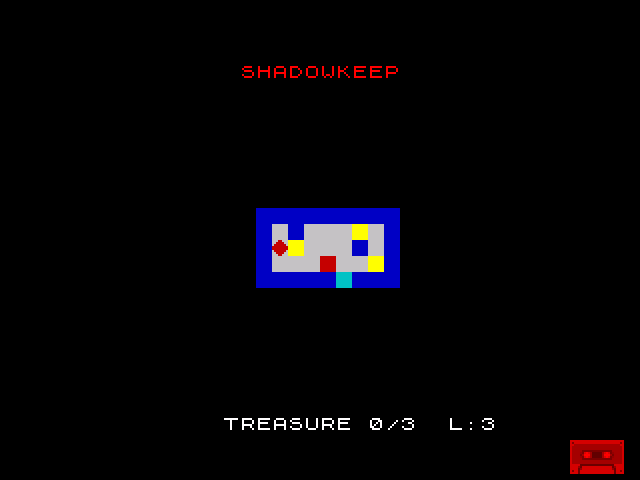
“SHADOWKEEP” in bright red at the top. The room in the centre. “TREASURE 0/3 L:3” at the bottom. Collect the three bright yellow treasures, navigate past the flashing red hazard, and walk onto the cyan exit. Win and you see “ROOM COMPLETE!” with a green border. Lose all three lives and you see “GAME OVER!” with a red border. Either way, “PRESS ANY KEY” appears after three seconds, and the game restarts.
Phase 1 Complete
Sixteen units. From a single coloured block to a playable game. Here’s everything you’ve built:
| Unit | Feature | Key Concept |
|---|---|---|
| 1 | Coloured block | LD and memory addresses |
| 2 | Reading colour | AND/OR for bit fields |
| 3 | Room from loops | DJNZ loop |
| 4 | Keyboard input | IN A, ($FE) and port I/O |
| 5 | Player character | Screen bitmap memory |
| 6 | Movement | INC/DEC and position tracking |
| 7 | Wall collision | Attribute read before move |
| 8 | Room from data | Data-driven design |
| 9 | Treasure items | BIT 6 and save/restore |
| 10 | Collect treasure | RES 6 and INC (HL) |
| 11 | Score display | CALL/RET and ROM font |
| 12 | Beeper sound | XOR toggle, timing loops |
| 13 | Exit door | Colour as design language |
| 14 | Room complete | Multi-condition logic |
| 15 | Hazards and lives | BIT 7, DEC (HL), death/reset |
| 16 | Integration | Restart, key wait, game flow |
The attribute system is proven as a game design tool. One byte per cell. INK for walls, BRIGHT for treasure, FLASH for hazards, PAPER for everything else. Collision detection is a single LD A, (HL). The Spectrum’s most famous limitation — colour clash — turned into the core mechanic.
Try This: Different Room Layouts
Change room_data to create new challenges:
            ; Maze with narrow passages
            db      WALL, WALL, WALL, WALL, WALL, WALL, WALL, WALL, WALL
            db      WALL, FLOOR, FLOOR, FLOOR, WALL, FLOOR, TREASURE, FLOOR, WALL
            db      WALL, WALL, WALL, FLOOR, WALL, FLOOR, WALL, WALL, WALL
            db      WALL, TREASURE, FLOOR, FLOOR, HAZARD, FLOOR, FLOOR, TREASURE, WALL
            db      WALL, WALL, WALL, WALL, WALL, EXIT, WALL, WALL, WALL
The room layout defines the entire challenge. Narrow corridors force the player close to hazards. Treasure placement rewards exploration. The exit position shapes the route. All from changing bytes in a data table.
Try This: Harder Difficulty on Restart
Track how many times the player has won and reduce lives:
            ; At start, before resetting lives:
            ld      a, (wins)
            cp      3                   ; After 3 wins, reduce lives
            jr      c, .normal
            ld      a, 1                ; Only 1 life!
            ld      (lives), a
            jr      .init
.normal:    ld      a, START_LIVES
            ld      (lives), a
.init:
Progressive difficulty — the game gets harder each time you win. A simple variable tracks wins across restarts.
If It Doesn’t Work
- Game restarts immediately? The
wait_keyrelease phase must come first. If the player holds a key when the game ends, the press phase triggers instantly without the release check. - Title doesn’t appear? Check TITLE_SCR (
$402B= row 1, col 11). If the row calculation is wrong, the text appears off-screen or overlapping the room. - Variables don’t reset? Every game variable must be explicitly written in the reset section. If
treasure_countisn’t zeroed, the game starts with leftover treasure from the previous run. - Room still shows collected treasure? The clear screen (
LDIRfrom$4000) must cover all of attribute memory up to$5AFF. If BC is wrong, some attributes survive the clear. - “PRESS ANY KEY” appears too fast? Check the delay loop:
LD B, 150/HALT/DJNZ. B = 150 gives ~3 seconds at 50Hz. A smaller value shows the prompt sooner.
What You’ve Learnt
- All-row keyboard scan —
XOR A/IN A, ($FE)reads every keyboard row at once.AND $1F/CP $1Fdetects any keypress. Active low:$1Fmeans nothing pressed. - Release-then-press — wait for all keys up, then wait for any key down. Two-phase debounce prevents immediate re-triggering.
- Game restart — explicit variable reset, screen clear, room redraw. The
dbinitial values only apply on first load — after that, you must reset manually. - Read-only source data —
room_datain program memory is never modified. The screen is the mutable copy. Clear and redraw restores the original state. - Complete game flow — init → play → end → prompt → restart. Three nested loops. The game never terminates.
What’s Next
Phase 1 is complete. You have a working single-room game built entirely on the Spectrum’s attribute system. Phase 2 adds keys, doors, inventory, and multiple rooms — the core puzzle mechanics that turn Shadowkeep into a real maze explorer.