The Finished Game
Title screen, animated results, ratings, and the complete Colour Flood program.
The game works — growing sequences, input checking, scoring. But it starts abruptly and ends silently. A title screen tells the player what to expect before they start. A results screen with an animated score counter and a rating gives the ending weight. These bookends turn a working program into a finished game.
The Title Screen
   5 BORDER 0: PAPER 0: INK 7: CLS
  10 FOR i=0 TO 31
  12 PRINT AT 0,i; PAPER 1;" "
  14 NEXT i
  16 PRINT AT 0,8; PAPER 1; INK 7; BRIGHT 1;" COLOUR FLOOD "
  20 PRINT AT 3,3; INK 5;"Watch the colours flash."
  22 PRINT AT 4,3; INK 5;"Repeat the sequence."
  24 PRINT AT 7,3; INK 7;"Press 1, 2, 3 or 4:"
  26 FOR i=0 TO 1
  28 PRINT AT 10+i,4; PAPER 1;"  1  "
  30 PRINT AT 10+i,11; PAPER 2;"  2  "
  32 PRINT AT 10+i,18; PAPER 4;"  3  "
  34 PRINT AT 10+i,25; PAPER 6;"  4  "
  36 NEXT i
  38 PRINT AT 14,3; INK 2; BRIGHT 1;"Get one wrong and it is"
  40 PRINT AT 15,3; INK 2; BRIGHT 1;"game over!"
  42 PRINT AT 21,5; INK 7; FLASH 1;"Press any key to start"; FLASH 0
  44 PAUSE 0
Type RUN.
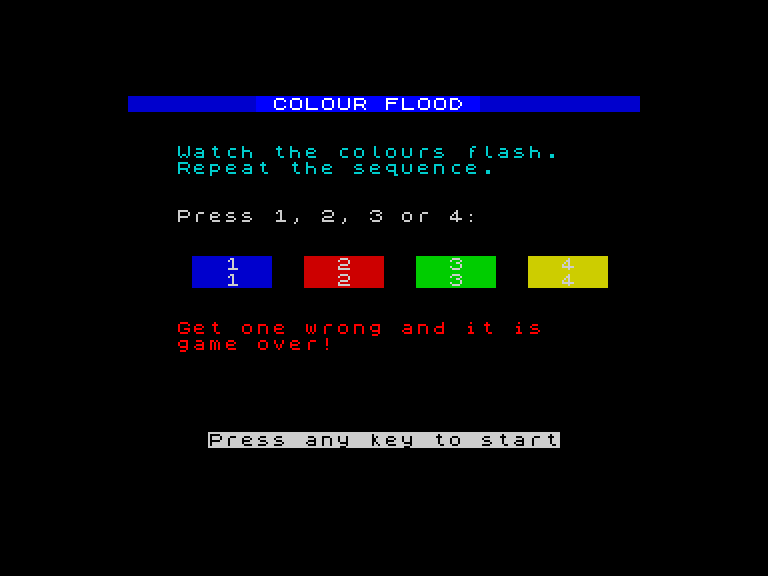
The blue header bar returns. Below it, two lines of cyan text explain the rules: watch the colours flash, repeat the sequence. Four small colour panels show which key maps to which colour — the same four colours from the game board, but in miniature. A red warning reminds the player that one wrong answer ends the game. At the bottom, “Press any key to start” flashes with FLASH 1, drawing the eye.
PAUSE 0 waits indefinitely — the program halts until any key is pressed. No timeout, no rushing. The player starts when they are ready.
The Results Screen
 216 CLS
 218 FOR i=0 TO 31
 220 PRINT AT 0,i; PAPER 1;" "
 222 NEXT i
 224 PRINT AT 0,8; PAPER 1; INK 7; BRIGHT 1;" COLOUR FLOOD "
 226 PRINT AT 4,11; INK 7; BRIGHT 1;"GAME OVER"
 228 FOR i=0 TO sc
 230 PRINT AT 7,8; INK 5;"Sequence: ";i;"    "
 232 IF i<sc THEN BEEP 0.06,10+i*2
 234 NEXT i
 236 BEEP 0.2,24
 238 IF sc>=10 THEN LET m$="Incredible!": INK 4: BRIGHT 1: GO TO 248
 240 IF sc>=6 THEN LET m$="Good memory!": INK 6: BRIGHT 1: GO TO 248
 242 IF sc>=3 THEN LET m$="Not bad!": INK 5: GO TO 248
 244 LET m$="Keep practising!": INK 3
 248 PRINT AT 10,(32-LEN m$)/2;m$
 250 BRIGHT 0
 252 PRINT AT 16,5; INK 7;"Press any key to exit"
 254 PAUSE 0
 256 BORDER 7: PAPER 7: INK 0: CLS
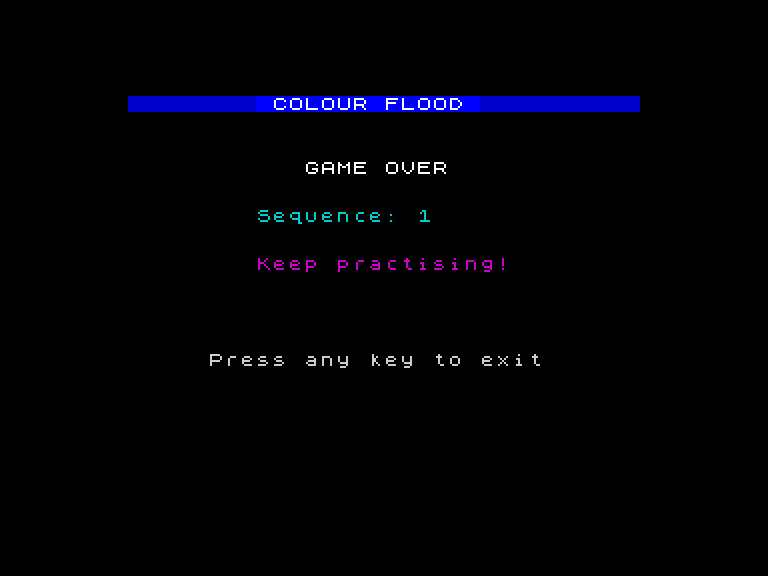
The results screen clears everything and rebuilds the header. “GAME OVER” sits in bright white. Then the score counts up from 0 to the player’s final score — each step overwriting the previous number with a rising BEEP. The counter is a FOR loop from 0 to sc, printing each number with a quick tone. When it reaches the real score, a triumphant high BEEP plays.
Below the score, a rating appears. Four tiers check the score from highest to lowest:
| Score | Rating | Colour |
|---|---|---|
| 10+ | Incredible! | Green (bright) |
| 6-9 | Good memory! | Yellow (bright) |
| 3-5 | Not bad! | Cyan |
| 0-2 | Keep practising! | Magenta |
The IF/THEN checks run from top to bottom. The first one that matches sets the message and jumps to the PRINT. This order matters — if you checked sc>=3 first, a score of 12 would display “Not bad!” instead of “Incredible!”.
The rating text is centred with (32-LEN m$)/2 — subtract the message length from the screen width and divide by two. The same centering formula works for any string on any line.
The Complete Game
   1 REM Colour Flood v3
   5 BORDER 0: PAPER 0: INK 7: CLS
  10 REM === Title screen ===
  12 FOR i=0 TO 31
  14 PRINT AT 0,i; PAPER 1;" "
  16 NEXT i
  18 PRINT AT 0,8; PAPER 1; INK 7; BRIGHT 1;" COLOUR FLOOD "
  20 PRINT AT 3,3; INK 5;"Watch the colours flash."
  22 PRINT AT 4,3; INK 5;"Repeat the sequence."
  24 PRINT AT 7,3; INK 7;"Press 1, 2, 3 or 4:"
  26 REM === Colour panels on title ===
  28 FOR i=0 TO 1
  30 PRINT AT 10+i,4; PAPER 1;"  1  "
  32 PRINT AT 10+i,11; PAPER 2;"  2  "
  34 PRINT AT 10+i,18; PAPER 4;"  3  "
  36 PRINT AT 10+i,25; PAPER 6;"  4  "
  38 NEXT i
  40 PRINT AT 14,3; INK 2; BRIGHT 1;"Get one wrong and it is"
  42 PRINT AT 15,3; INK 2; BRIGHT 1;"game over!"
  44 PRINT AT 21,5; INK 7; FLASH 1;"Press any key to start"; FLASH 0
  46 PAUSE 0
  48 REM === Init ===
  50 LET s$=""
  52 LET sc=0
  54 CLS
  56 REM === Draw game screen ===
  58 FOR i=0 TO 31
  60 PRINT AT 0,i; PAPER 1;" "
  62 NEXT i
  64 PRINT AT 0,8; PAPER 1; INK 7; BRIGHT 1;" COLOUR FLOOD "
  66 PRINT AT 0,26; PAPER 1; INK 6;"Sc: 0"
  68 GO SUB 400
  80 REM === New round ===
  82 LET s$=s$+STR$ (INT (RND*4)+1)
  84 PRINT AT 0,26; PAPER 1; INK 6;"Sc: ";sc
  86 PRINT AT 19,7; INK 5;"Watch the sequence...   "
  88 PAUSE 25
  90 REM === Play sequence ===
  92 FOR i=1 TO LEN s$
  94 LET c=VAL s$(i TO i)
  96 GO SUB 500
  98 PAUSE 12
 100 GO SUB 400
 102 PAUSE 6
 104 NEXT i
 108 REM === Player repeats ===
 110 PRINT AT 19,7; INK 2; BRIGHT 1;"Your turn!              "
 112 FOR i=1 TO LEN s$
 114 IF INKEY$<>"" THEN GO TO 114
 116 IF INKEY$="" THEN GO TO 116
 118 LET k$=INKEY$
 120 IF k$<"1" OR k$>"4" THEN GO TO 114
 122 LET c=VAL k$
 124 LET e=VAL s$(i TO i)
 126 IF c<>e THEN GO TO 200
 128 GO SUB 500
 130 PAUSE 6
 132 GO SUB 400
 134 NEXT i
 138 REM === Round complete ===
 140 LET sc=sc+1
 142 BORDER 4
 144 BEEP 0.08,20: BEEP 0.08,24
 146 PRINT AT 19,7; INK 4; BRIGHT 1;"Correct!                "
 148 PAUSE 20
 150 BORDER 0
 152 GO TO 80
 200 REM === Wrong! ===
 202 FOR x=1 TO 6
 204 BORDER 2: BEEP 0.02,0
 206 BORDER 6: BEEP 0.02,5
 208 NEXT x
 210 BORDER 0
 212 BEEP 0.4,-10
 214 REM === Results ===
 216 CLS
 218 FOR i=0 TO 31
 220 PRINT AT 0,i; PAPER 1;" "
 222 NEXT i
 224 PRINT AT 0,8; PAPER 1; INK 7; BRIGHT 1;" COLOUR FLOOD "
 226 PRINT AT 4,11; INK 7; BRIGHT 1;"GAME OVER"
 228 FOR i=0 TO sc
 230 PRINT AT 7,8; INK 5;"Sequence: ";i;"    "
 232 IF i<sc THEN BEEP 0.06,10+i*2
 234 NEXT i
 236 BEEP 0.2,24
 238 IF sc>=10 THEN LET m$="Incredible!": INK 4: BRIGHT 1: GO TO 248
 240 IF sc>=6 THEN LET m$="Good memory!": INK 6: BRIGHT 1: GO TO 248
 242 IF sc>=3 THEN LET m$="Not bad!": INK 5: GO TO 248
 244 LET m$="Keep practising!": INK 3
 248 PRINT AT 10,(32-LEN m$)/2;m$
 250 BRIGHT 0
 252 PRINT AT 16,5; INK 7;"Press any key to exit"
 254 PAUSE 0
 256 BORDER 7: PAPER 7: INK 0: CLS
 258 STOP
 400 REM === Draw 4 panels (dim) ===
 402 FOR i=0 TO 7
 404 PRINT AT 3+i,1; PAPER 1;"       "
 406 PRINT AT 3+i,9; PAPER 2;"       "
 408 PRINT AT 3+i,17; PAPER 4;"       "
 410 PRINT AT 3+i,25; PAPER 6;"       "
 412 NEXT i
 414 PRINT AT 6,4; INK 7; BRIGHT 1;"1"
 416 PRINT AT 6,12; INK 7; BRIGHT 1;"2"
 418 PRINT AT 6,20; INK 7; BRIGHT 1;"3"
 420 PRINT AT 6,28; INK 7; BRIGHT 1;"4"
 422 BORDER 0
 424 RETURN
 500 REM === Flash panel c bright ===
 502 LET px=1+(c-1)*8
 504 FOR i=0 TO 7
 506 PRINT AT 3+i,px; PAPER c; BRIGHT 1;"       "
 508 NEXT i
 512 BORDER c
 514 IF c=1 THEN BEEP 0.2,5
 516 IF c=2 THEN BEEP 0.2,10
 518 IF c=3 THEN BEEP 0.2,15
 520 IF c=4 THEN BEEP 0.2,20
 522 RETURN
About 120 lines of BASIC. The program flows through five sections:
- Title screen (lines 5-46) — header, rules, colour key, wait for keypress.
- Game screen (lines 48-68) — initialise variables, draw the four panels.
- Round loop (lines 80-104) — append a random colour, play the sequence.
- Player input (lines 108-152) — check keypresses, flash matches, detect errors.
- Results (lines 200-258) — wrong answer alarm, animated score, rating, exit.
Two subroutines handle all the visual work. GO SUB 400 draws the four panels at normal brightness. GO SUB 500 flashes one panel bright with its tone. Every flash in the game — during playback and during input — calls these same two subroutines. Change the BEEP pitches or panel colours in one place and the whole game updates.
The sequence string s$ is the game state. One character per colour, growing by one each round. The game loop runs until the player gets one wrong. No fixed endpoint — the difficulty compounds until memory fails.
Try This
- Play until you fail. What is your best score? Challenge someone else to beat it.
- Add a “play again” option after the results: replace
STOPwith aPAUSE 0andGO TO 5. Now the player can restart without typing RUN.
What You’ve Learnt
- Title screens set expectations — rules, controls, and a prompt to start
- Animated counters — a FOR loop that prints incrementing numbers creates a counting-up effect
- Rating tiers — IF/THEN checked from highest to lowest assigns the correct band
- Centering text —
(32-LEN m$)/2positions a string in the middle of the screen - Program structure — title, init, game loop, input, results; five sections that every game needs
What’s Next
In Game 4, the screen becomes a space you move through. A cursor glides across the grid, the border pulses with temperature, and you hunt for hidden treasure. The game loop — read input, update, draw, repeat — is the pattern behind every action game.