The Number Grid
Pre-calculate neighbour counts for every cell in the grid.
In the last unit, you counted neighbours for a single cell. Now do it for every cell in the grid. After this step, each cell holds either 9 (mine) or a number 0-8 (how many mines surround it).
The Program
10 CLS
20 DIM m(8, 8)
30 REM place 10 mines
40 FOR i = 1 TO 10
50 LET r = INT (RND * 8) + 1
60 LET c = INT (RND * 8) + 1
70 IF m(r, c) = 9 THEN GO TO 50
80 LET m(r, c) = 9
90 NEXT i
100 REM calculate neighbour counts
110 FOR r = 1 TO 8
120 FOR c = 1 TO 8
130 IF m(r, c) = 9 THEN GO TO 220
140 LET n = 0
150 FOR i = r - 1 TO r + 1
160 FOR j = c - 1 TO c + 1
170 IF i < 1 OR i > 8 OR j < 1 OR j > 8 THEN GO TO 190
180 IF m(i, j) = 9 THEN LET n = n + 1
190 NEXT j
200 NEXT i
210 LET m(r, c) = n
220 NEXT c
230 NEXT r
240 REM display
250 PRINT "Mine counts:"
260 FOR r = 1 TO 8
270 FOR c = 1 TO 8
280 IF m(r, c) = 9 THEN PRINT "*";
290 IF m(r, c) <> 9 THEN PRINT m(r, c);
300 NEXT c
310 PRINT
320 NEXT r
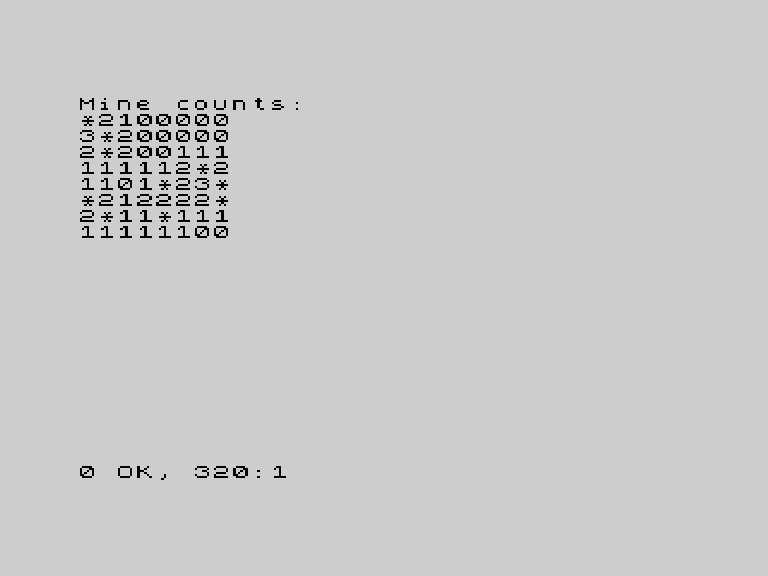
How It Works
Lines 40-90 place 10 mines randomly, just as in unit 4.
Lines 110-230 calculate counts for every cell. The outer loops (r and c) visit each cell. If the cell is a mine, skip it — mines don’t need a count. Otherwise, the inner loops (i and j) check all neighbours and count the mines.
The result overwrites the cell’s value:
210 LET m(r, c) = nBefore this line, m(r,c) was 0 (empty). After it, m(r,c) holds the neighbour count. Mines stay at 9.
Lines 260-320 display the result. Stars for mines, numbers for everything else.
Four Nested Loops
The algorithm uses four loops: r and c for position, i and j for neighbours. That’s 8 * 8 * 3 * 3 = 576 iterations at most. On a Spectrum, this takes a noticeable moment — you’ll see a brief pause before the grid appears.
This is pre-calculation. Rather than counting neighbours every time a cell is revealed (during gameplay), you count them all once at the start. The game will feel faster because the work is done before play begins.
The Grid After Calculation
Every cell now holds one of these values:
| Value | Meaning |
|---|---|
| 0 | No adjacent mines |
| 1-8 | That many adjacent mines |
| 9 | This cell is a mine |
The same array stores both mines and counts. The value 9 serves double duty — it’s both “this is a mine” and a number that can never be a genuine neighbour count.
Try This
Verify by hand. Pick a number on the display, count its mine neighbours manually. They should match.
Zero cells. Cells far from any mine show 0. In a full Minesweeper, revealing a 0 would auto-reveal its neighbours. You’ll add that later if you want — for now, 0 just means “safe, no mines nearby”.
What You’ve Learnt
- Pre-calculation — count all neighbours once, before the game starts
- Overwriting array values —
m(r,c)starts as 0, ends as a count - Skip-on-condition —
IF m(r,c) = 9 THEN GO TOskips mine cells - Dual-purpose values — 9 means mine, 0-8 means neighbour count