Creature Sprite
A hardware sprite appears over the terrain. Sprite data defines a 16-pixel-wide creature. The Copper points the sprite DMA to our data.
The terrain exists but nothing lives on it. This unit adds a creature — a small figure drawn by the hardware sprite system, floating independently of the bitplane.
The Amiga has 8 hardware sprites, each 16 pixels wide and any height. Denise draws them on top of the playfield automatically — no CPU time spent rendering. The sprite data lives in Chip RAM, and the DMA controller reads it every frame. All we do is define the image and tell the hardware where it is.
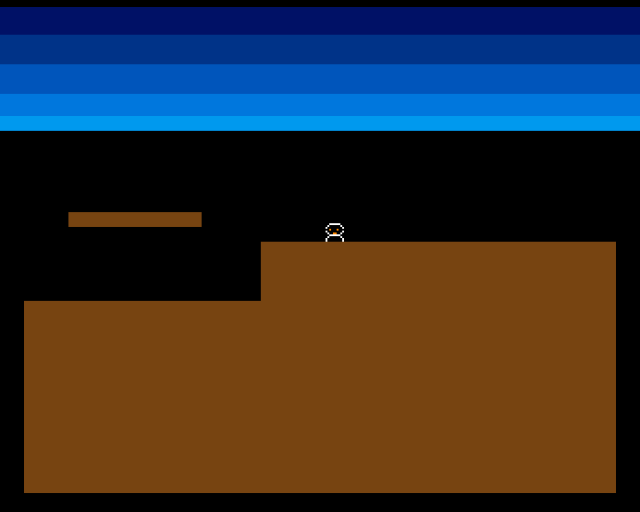
A small creature hovers above the cliff. The sprite overlays the bitplane — it doesn’t modify the terrain bitmap. In later units, this creature will walk, fall, and interact with the terrain below.
Sprite Structure
Each sprite is a block of data in Chip RAM with a specific format:
| Offset | Content |
|---|---|
| Word 0 | Control word 0: vertical start + horizontal position |
| Word 1 | Control word 1: vertical stop + control bits |
| Words 2+ | Image data: 2 words per row (plane A, plane B) |
| Last 2 words | $0000, $0000 (end marker) |
Each row of the sprite is two words (4 bytes). The two words form two bitplanes, giving four possible values per pixel:
| Plane A | Plane B | Result |
|---|---|---|
| 0 | 0 | Transparent |
| 1 | 0 | Colour 1 |
| 0 | 1 | Colour 2 |
| 1 | 1 | Colour 3 |
Sprite 0 uses palette slots 17, 18, and 19 — separate from the playfield colours.
Defining the Creature
            even
sprite_data:
            ; Control words (patched by set_sprite_pos)
            dc.w    $0000,$0000

            ; Image data: 12 lines, 2 words per line (plane A, plane B)
            ; Colour mapping: %00=transparent, %01=colour 1 (white),
            ;                  %10=colour 2 (orange), %11=colour 3 (black)

            ;         PlaneA          PlaneB
            dc.w    %0000011111100000,%0000000000000000  ; Row 0:  head top (white outline)
            dc.w    %0000111111110000,%0000011111100000  ; Row 1:  head (white edge, orange inside)
            dc.w    %0001111111111000,%0000111111110000  ; Row 2:  head wider
            dc.w    %0001101110111000,%0001111111111000  ; Row 3:  eyes (black dots in orange)
            dc.w    %0001111111111000,%0000111111110000  ; Row 4:  face
            dc.w    %0000111001110000,%0000011111100000  ; Row 5:  mouth
            dc.w    %0000011111100000,%0000000000000000  ; Row 6:  neck (white)
            dc.w    %0000111111110000,%0000011111100000  ; Row 7:  body top
            dc.w    %0001111111111000,%0000111111110000  ; Row 8:  body
            dc.w    %0001111111111000,%0000111111110000  ; Row 9:  body
            dc.w    %0000110000110000,%0000000000000000  ; Row 10: legs (white)
            dc.w    %0000110000110000,%0000000000000000  ; Row 11: feet (white)

            ; End of sprite (two zero words)
            dc.w    $0000,$0000
The binary values make the sprite shape visible in the source code. Each % number is a 16-bit pattern where 1s mark active pixels. Reading the two planes together:
- Where both planes have 0: transparent (sky or terrain shows through)
- Plane A only: white outline
- Plane B only: orange fill
- Both planes: black detail (eyes)
The creature is 16 pixels wide and 12 rows tall — a head, body, and legs. The end marker ($0000, $0000) tells the DMA controller to stop reading.
Positioning the Sprite
The control words encode the sprite’s position in a packed format. The hardware needs vertical start/stop lines and a horizontal position, but these aren’t simply x and y — they’re offset by the display window position and packed into specific bit positions:
;──────────────────────────────────────────────────────────────
; set_sprite_pos — Write position into sprite control words
;
; Reads CREATURE_X and CREATURE_Y constants.
; Writes VSTART, HSTART, VSTOP into sprite_data.
;──────────────────────────────────────────────────────────────
set_sprite_pos:
            lea     sprite_data,a0

            ; Convert to display coordinates
            ; Sprite HSTART is in low-res pixels + $80 (display window offset)
            ; Sprite VSTART/VSTOP are in scan lines + $2C (PAL display start)
            move.w  #CREATURE_Y+$2c,d0  ; VSTART (display line)
            move.w  #CREATURE_Y+$2c+SPRITE_HEIGHT,d1  ; VSTOP
            move.w  #CREATURE_X+$80,d2  ; HSTART (display pixel)

            ; Word 0: VSTART[7:0] in high byte, HSTART[8:1] in low byte
            move.b  d0,d3               ; D3 = VSTART low 8 bits
            lsl.w   #8,d3               ; Shift to high byte
            move.w  d2,d4
            lsr.w   #1,d4               ; HSTART >> 1
            or.b    d4,d3               ; Combine
            move.w  d3,(a0)+            ; Write control word 0

            ; Word 1: VSTOP[7:0] in high byte, control bits in low byte
            move.b  d1,d3               ; D3 = VSTOP low 8 bits
            lsl.w   #8,d3               ; Shift to high byte
            ; Low byte: bit 2 = VSTART[8], bit 1 = VSTOP[8], bit 0 = HSTART[0]
            moveq   #0,d4
            btst    #8,d0               ; Test VSTART bit 8
            beq.s   .no_vs8
            bset    #2,d4
.no_vs8:
            btst    #8,d1               ; Test VSTOP bit 8
            beq.s   .no_ve8
            bset    #1,d4
.no_ve8:
            btst    #0,d2               ; Test HSTART bit 0
            beq.s   .no_h0
            bset    #0,d4
.no_h0:
            or.b    d4,d3               ; Combine control bits
            move.w  d3,(a0)             ; Write control word 1

            rts
The offsets $2C (vertical) and $80 (horizontal) align sprite coordinates with the display window. Without them, position (0,0) would be off-screen in the overscan area.
Control word 0 packs VSTART (low 8 bits) into the high byte and HSTART shifted right by 1 into the low byte. Control word 1 packs VSTOP (low 8 bits) into the high byte, with the low byte holding overflow bits: VSTART bit 8, VSTOP bit 8, and HSTART bit 0.
This packed format dates from the original Amiga chipset design. The hardware reads these two words at DMA time to know where to start and stop drawing the sprite on each frame.
Sprite DMA
The Copper list now includes a pointer to the sprite data:
            dc.w    SPR0PTH
spr0pth_val:
            dc.w    $0000
            dc.w    SPR0PTL
spr0ptl_val:
            dc.w    $0000
This works exactly like the bitplane pointer — the CPU patches the address at startup, and the DMA controller reads from that address every frame.
DMA also needs sprite DMA enabled. The DMACON write changed from $8380 to $83a0:
move.w #$83a0,DMACON(a5) ; SET + DMAEN + COPEN + BPLEN + SPRENBit 5 (SPREN) enables sprite DMA. Without it, the sprite data exists in memory but Denise never reads it.
Sprite Colours
Sprite 0 uses palette slots 17-19 (COLOR17 through COLOR19), set in the Copper list:
            dc.w    COLOR17,COLOUR_SPR0_1   ; White (body outline)
            dc.w    COLOR18,COLOUR_SPR0_2   ; Orange (body fill)
            dc.w    COLOR19,COLOUR_SPR0_3   ; Black (eyes/detail)
These are completely independent of the playfield colours (COLOR00 and COLOR01). Each sprite pair (0-1, 2-3, 4-5, 6-7) shares a palette of 3 colours plus transparent.
Experiment: Move the Creature
Change the position constants:
CREATURE_X          equ 160         ; Try 40, 160, 280
CREATURE_Y          equ 110         ; Try 60, 110, 200
The sprite floats over whatever is beneath it — sky, terrain, or the cliff edge. It doesn’t interact with the bitplane at all. That comes later.
Experiment: Change Sprite Colours
COLOUR_SPR0_1       equ $0FFF       ; Try $0F00 (red outline)
COLOUR_SPR0_2       equ $0F80       ; Try $00F0 (green fill)
COLOUR_SPR0_3       equ $0000       ; Try $0FFF (white eyes)
The Complete Code
;──────────────────────────────────────────────────────────────
; EXODUS - A terrain puzzle for the Commodore Amiga
; Unit 4: Creature Sprite
;
; A hardware sprite appears over the terrain.
; Sprite data defines a 16-pixel-wide creature.
; The Copper points the sprite DMA to our data.
;──────────────────────────────────────────────────────────────

;══════════════════════════════════════════════════════════════
; TWEAKABLE VALUES
;══════════════════════════════════════════════════════════════

; Colours ($0RGB)
COLOUR_SKY_DEEP     equ $0016
COLOUR_SKY_UPPER    equ $0038
COLOUR_SKY_MID      equ $005B
COLOUR_SKY_LOWER    equ $007D
COLOUR_SKY_HORIZON  equ $009E

COLOUR_TERRAIN      equ $0741       ; Earth brown

; Sprite colours (palette slots 17-19 for sprite 0)
COLOUR_SPR0_1       equ $0FFF       ; White (body outline)
COLOUR_SPR0_2       equ $0F80       ; Orange (body fill)
COLOUR_SPR0_3       equ $0000       ; Black (eyes/detail)

; Creature start position (display coordinates)
CREATURE_X          equ 160         ; Horizontal pixel position
CREATURE_Y          equ 110         ; Vertical position (above terrain)

; Terrain rectangles (x and width must be multiples of 8)
GROUND_L_X          equ 0
GROUND_L_Y          equ 152
GROUND_L_W          equ 128
GROUND_L_H          equ 104

GROUND_R_X          equ 128
GROUND_R_Y          equ 120
GROUND_R_W          equ 192
GROUND_R_H          equ 136

PLATFORM_X          equ 24
PLATFORM_Y          equ 104
PLATFORM_W          equ 72
PLATFORM_H          equ 8

;══════════════════════════════════════════════════════════════
; DISPLAY CONSTANTS
;══════════════════════════════════════════════════════════════

SCREEN_WIDTH    equ 320
SCREEN_HEIGHT   equ 256
BYTES_PER_ROW   equ SCREEN_WIDTH/8      ; 40
BITPLANE_SIZE   equ BYTES_PER_ROW*SCREEN_HEIGHT  ; 10240

SPRITE_HEIGHT   equ 12

;══════════════════════════════════════════════════════════════
; HARDWARE REGISTERS
;══════════════════════════════════════════════════════════════

CUSTOM      equ $dff000
DMACON      equ $096
INTENA      equ $09a
INTREQ      equ $09c
COP1LC      equ $080
COPJMP1     equ $088
BPLCON0     equ $100
BPLCON1     equ $102
BPLCON2     equ $104
BPL1MOD     equ $108
DIWSTRT     equ $08e
DIWSTOP     equ $090
DDFSTRT     equ $092
DDFSTOP     equ $094
BPL1PTH     equ $0e0
BPL1PTL     equ $0e2
SPR0PTH     equ $120
SPR0PTL     equ $122
COLOR00     equ $180
COLOR01     equ $182
COLOR17     equ $1a2       ; Sprite 0, colour 1
COLOR18     equ $1a4       ; Sprite 0, colour 2
COLOR19     equ $1a6       ; Sprite 0, colour 3
VPOSR       equ $004

;══════════════════════════════════════════════════════════════
; CODE (Chip RAM)
;══════════════════════════════════════════════════════════════

            section code,code_c

start:
            lea     CUSTOM,a5

            ; --- Take over the machine ---
            move.w  #$7fff,INTENA(a5)
            move.w  #$7fff,INTREQ(a5)
            move.w  #$7fff,DMACON(a5)

            ; --- Draw terrain into bitplane ---
            move.w  #GROUND_L_X,d0
            move.w  #GROUND_L_Y,d1
            move.w  #GROUND_L_W,d2
            move.w  #GROUND_L_H,d3
            bsr     draw_rect

            move.w  #GROUND_R_X,d0
            move.w  #GROUND_R_Y,d1
            move.w  #GROUND_R_W,d2
            move.w  #GROUND_R_H,d3
            bsr     draw_rect

            move.w  #PLATFORM_X,d0
            move.w  #PLATFORM_Y,d1
            move.w  #PLATFORM_W,d2
            move.w  #PLATFORM_H,d3
            bsr     draw_rect

            ; --- Set up sprite position ---
            bsr     set_sprite_pos

            ; --- Patch bitplane pointer into Copper list ---
            lea     bitplane,a0
            move.l  a0,d0
            swap    d0
            lea     bpl1pth_val,a1
            move.w  d0,(a1)
            swap    d0
            lea     bpl1ptl_val,a1
            move.w  d0,(a1)

            ; --- Patch sprite pointer into Copper list ---
            lea     sprite_data,a0
            move.l  a0,d0
            swap    d0
            lea     spr0pth_val,a1
            move.w  d0,(a1)
            swap    d0
            lea     spr0ptl_val,a1
            move.w  d0,(a1)

            ; --- Install Copper list ---
            lea     copperlist,a0
            move.l  a0,COP1LC(a5)
            move.w  d0,COPJMP1(a5)

            ; --- Enable DMA ---
            move.w  #$83a0,DMACON(a5)   ; SET + DMAEN + COPEN + BPLEN + SPREN

            ; === Main Loop ===
mainloop:
            move.l  #$1ff00,d1
.vbwait:
            move.l  VPOSR(a5),d0
            and.l   d1,d0
            bne.s   .vbwait

            btst    #6,$bfe001
            bne.s   mainloop

.halt:
            bra.s   .halt

;──────────────────────────────────────────────────────────────
; set_sprite_pos — Write position into sprite control words
;
; Reads CREATURE_X and CREATURE_Y constants.
; Writes VSTART, HSTART, VSTOP into sprite_data.
;──────────────────────────────────────────────────────────────
set_sprite_pos:
            lea     sprite_data,a0

            ; Convert to display coordinates
            ; Sprite HSTART is in low-res pixels + $80 (display window offset)
            ; Sprite VSTART/VSTOP are in scan lines + $2C (PAL display start)
            move.w  #CREATURE_Y+$2c,d0  ; VSTART (display line)
            move.w  #CREATURE_Y+$2c+SPRITE_HEIGHT,d1  ; VSTOP
            move.w  #CREATURE_X+$80,d2  ; HSTART (display pixel)

            ; Word 0: VSTART[7:0] in high byte, HSTART[8:1] in low byte
            move.b  d0,d3               ; D3 = VSTART low 8 bits
            lsl.w   #8,d3               ; Shift to high byte
            move.w  d2,d4
            lsr.w   #1,d4               ; HSTART >> 1
            or.b    d4,d3               ; Combine
            move.w  d3,(a0)+            ; Write control word 0

            ; Word 1: VSTOP[7:0] in high byte, control bits in low byte
            move.b  d1,d3               ; D3 = VSTOP low 8 bits
            lsl.w   #8,d3               ; Shift to high byte
            ; Low byte: bit 2 = VSTART[8], bit 1 = VSTOP[8], bit 0 = HSTART[0]
            moveq   #0,d4
            btst    #8,d0               ; Test VSTART bit 8
            beq.s   .no_vs8
            bset    #2,d4
.no_vs8:
            btst    #8,d1               ; Test VSTOP bit 8
            beq.s   .no_ve8
            bset    #1,d4
.no_ve8:
            btst    #0,d2               ; Test HSTART bit 0
            beq.s   .no_h0
            bset    #0,d4
.no_h0:
            or.b    d4,d3               ; Combine control bits
            move.w  d3,(a0)             ; Write control word 1

            rts

;──────────────────────────────────────────────────────────────
; draw_rect — Fill a byte-aligned rectangle in the bitplane
;
; Input:  D0.W = x position (must be multiple of 8)
;         D1.W = y position
;         D2.W = width in pixels (must be multiple of 8)
;         D3.W = height in pixels
; Destroys: D0-D5, A0-A1
;──────────────────────────────────────────────────────────────
draw_rect:
            lea     bitplane,a0
            mulu    #BYTES_PER_ROW,d1
            add.l   d1,a0
            lsr.w   #3,d0
            add.w   d0,a0
            lsr.w   #3,d2

            subq.w  #1,d3
.row:
            move.w  d2,d5
            subq.w  #1,d5
            move.l  a0,a1
.col:
            move.b  #$ff,(a1)+
            dbra    d5,.col

            add.w   #BYTES_PER_ROW,a0
            dbra    d3,.row
            rts

;══════════════════════════════════════════════════════════════
; COPPER LIST
;══════════════════════════════════════════════════════════════

copperlist:
            ; --- Display window ---
            dc.w    DIWSTRT,$2c81
            dc.w    DIWSTOP,$2cc1
            dc.w    DDFSTRT,$0038
            dc.w    DDFSTOP,$00d0

            ; --- Bitplane configuration ---
            dc.w    BPLCON0,$1200
            dc.w    BPLCON1,$0000
            dc.w    BPLCON2,$0000
            dc.w    BPL1MOD,$0000

            ; --- Bitplane pointer ---
            dc.w    BPL1PTH
bpl1pth_val:
            dc.w    $0000
            dc.w    BPL1PTL
bpl1ptl_val:
            dc.w    $0000

            ; --- Sprite 0 pointer ---
            dc.w    SPR0PTH
spr0pth_val:
            dc.w    $0000
            dc.w    SPR0PTL
spr0ptl_val:
            dc.w    $0000

            ; --- Colours ---
            dc.w    COLOR00,COLOUR_SKY_DEEP
            dc.w    COLOR01,COLOUR_TERRAIN

            ; --- Sprite 0 colours ---
            dc.w    COLOR17,COLOUR_SPR0_1
            dc.w    COLOR18,COLOUR_SPR0_2
            dc.w    COLOR19,COLOUR_SPR0_3

            ; --- SKY GRADIENT ---
            dc.w    $3401,$fffe
            dc.w    COLOR00,COLOUR_SKY_UPPER

            dc.w    $4401,$fffe
            dc.w    COLOR00,COLOUR_SKY_MID

            dc.w    $5401,$fffe
            dc.w    COLOR00,COLOUR_SKY_LOWER

            dc.w    $6001,$fffe
            dc.w    COLOR00,COLOUR_SKY_HORIZON

            dc.w    $6801,$fffe
            dc.w    COLOR00,$0000

            ; --- END ---
            dc.w    $ffff,$fffe

;══════════════════════════════════════════════════════════════
; SPRITE DATA (must be in Chip RAM)
;══════════════════════════════════════════════════════════════

            even
sprite_data:
            ; Control words (patched by set_sprite_pos)
            dc.w    $0000,$0000

            ; Image data: 12 lines, 2 words per line (plane A, plane B)
            ; Colour mapping: %00=transparent, %01=colour 1 (white),
            ;                  %10=colour 2 (orange), %11=colour 3 (black)

            ;         PlaneA          PlaneB
            dc.w    %0000011111100000,%0000000000000000  ; Row 0:  head top (white outline)
            dc.w    %0000111111110000,%0000011111100000  ; Row 1:  head (white edge, orange inside)
            dc.w    %0001111111111000,%0000111111110000  ; Row 2:  head wider
            dc.w    %0001101110111000,%0001111111111000  ; Row 3:  eyes (black dots in orange)
            dc.w    %0001111111111000,%0000111111110000  ; Row 4:  face
            dc.w    %0000111001110000,%0000011111100000  ; Row 5:  mouth
            dc.w    %0000011111100000,%0000000000000000  ; Row 6:  neck (white)
            dc.w    %0000111111110000,%0000011111100000  ; Row 7:  body top
            dc.w    %0001111111111000,%0000111111110000  ; Row 8:  body
            dc.w    %0001111111111000,%0000111111110000  ; Row 9:  body
            dc.w    %0000110000110000,%0000000000000000  ; Row 10: legs (white)
            dc.w    %0000110000110000,%0000000000000000  ; Row 11: feet (white)

            ; End of sprite (two zero words)
            dc.w    $0000,$0000

;══════════════════════════════════════════════════════════════
; BITPLANE DATA (10,240 bytes — all zeros = sky)
;══════════════════════════════════════════════════════════════

            even
bitplane:
            dcb.b   BITPLANE_SIZE,0
If It Doesn’t Work
- No sprite visible? Check DMACON is
$83a0(not$8380). Bit 5 enables sprite DMA. Also check the sprite pointer is patched correctly in the Copper list. - Sprite in wrong position? The display offsets are
$2Cfor vertical and$80for horizontal. Without them, the sprite appears off-screen. Also check that VSTOP = VSTART + SPRITE_HEIGHT. - Sprite is a horizontal line? The control word packing may be wrong. VSTART goes in the high byte of word 0, not the low byte.
- Wrong colours? Sprite 0 uses
COLOR17-COLOR19, notCOLOR01-COLOR03. Check the Copper list has the correct register addresses ($1A2,$1A4,$1A6). - Sprite has gaps or corruption? Each row needs exactly 2 words (plane A then plane B). Missing or extra words shift all subsequent rows.
What You’ve Learnt
- Hardware sprites — the Amiga has 8 sprites, each 16 pixels wide. Denise draws them automatically via DMA, overlaying the playfield at zero CPU cost.
- Sprite data format — two control words (position), then pairs of words per row (two bitplanes giving 4 colours), ending with two zero words.
- Control word packing — positions are encoded in a specific bit layout. VSTART/VSTOP use display line numbers; HSTART uses pixel position. All offset by the display window start.
- Sprite DMA — enabled via DMACON bit 5. The Copper list holds the sprite pointer, patched by the CPU at startup.
- Sprite palette — each sprite pair uses 3 colours from dedicated palette slots, independent of playfield colours.
What’s Next
The creature is frozen in place — a still image at a fixed position. In Unit 5, the position updates every frame to make the creature walk across the screen. Movement means modifying the sprite control words inside the main loop.