Creature Walks
The creature moves right each frame. Variables in RAM track position. The main loop updates sprite control words per frame.
The creature appeared in Unit 4 but stayed frozen in place. Now it walks. Every frame, the x position increases by one pixel. The sprite slides across the terrain from left to right.
This is the first time the main loop does real work. Until now, the loop just waited for vertical blank and checked the mouse button. Now it also updates the creature’s position and writes new values into the sprite control words.
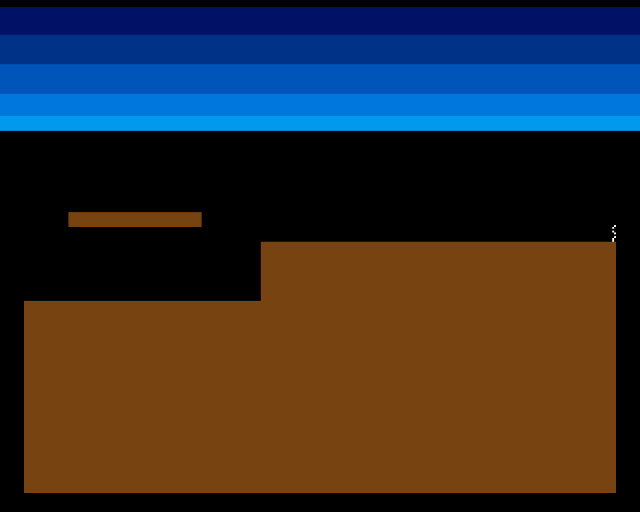
The creature walks right across the landscape. It doesn’t know about the terrain yet — it passes over cliffs and gaps as if they weren’t there. Collision comes later.
Variables in RAM
The creature’s position needs to persist between frames. Constants won’t work — the position changes every frame. Instead, two words in memory hold the current x and y:
;══════════════════════════════════════════════════════════════
; VARIABLES
;══════════════════════════════════════════════════════════════

            even
creature_x: dc.w    0
creature_y: dc.w    0
dc.w 0 defines a word (16-bit) in memory, initialised to zero. The labels creature_x and creature_y give these memory locations names. The even directive ensures word alignment — the 68000 requires word and longword accesses to be on even addresses.
At startup, the program writes the starting position into these variables:
            move.w  #CREATURE_START_X,creature_x
            move.w  #CREATURE_START_Y,creature_y
The Main Loop
            ; === Main Loop ===
mainloop:
            ; Wait for vertical blank
            move.l  #$1ff00,d1
.vbwait:
            move.l  VPOSR(a5),d0
            and.l   d1,d0
            bne.s   .vbwait

            ; --- Update creature position ---
            move.w  creature_x,d0
            add.w   #CREATURE_SPEED,d0
            move.w  d0,creature_x

            ; --- Update sprite control words ---
            bsr     update_sprite

            ; --- Check exit ---
            btst    #6,$bfe001
            bne.s   mainloop
Three things happen every frame:
-
Wait for vertical blank — the same
VPOSRpolling loop as before. This ensures we update once per frame, not as fast as the CPU can run. -
Update position — read
creature_xfrom memory into D0, add the speed, write it back.ADD.W #CREATURE_SPEED,D0adds one pixel per frame. At 50 frames per second (PAL), the creature crosses the 320-pixel screen in about 6 seconds. -
Update sprite —
BSR update_spriterewrites the sprite control words using the new position. The DMA controller reads these words next frame and draws the sprite at the updated position.
The update_sprite subroutine is almost identical to set_sprite_pos from Unit 4, but now it reads from the variables instead of using constants.
Why Variables, Not Registers?
The 68000 has eight data registers (D0-D7) — wouldn’t it be faster to keep the position in a register? It would, but registers get destroyed by subroutine calls. draw_rect destroys D0-D5, and update_sprite uses several registers too. Storing the position in memory means it survives any subroutine call.
Later, when there are multiple creatures, each creature’s position will be a pair of words in a data table. RAM variables are the natural pattern.
Experiment: Change the Speed
CREATURE_SPEED equ 1 ; Try 1, 2, 41— slow walk (6 seconds to cross the screen)2— brisk walk (3 seconds)4— running (1.5 seconds)
The creature still walks off the right edge of the screen. It doesn’t stop or turn around — there’s no boundary check yet. That’s Unit 6.
The Complete Code
;──────────────────────────────────────────────────────────────
; EXODUS - A terrain puzzle for the Commodore Amiga
; Unit 5: Creature Walks
;
; The creature moves right each frame.
; Variables in RAM track position.
; The main loop updates sprite control words per frame.
;──────────────────────────────────────────────────────────────

;══════════════════════════════════════════════════════════════
; TWEAKABLE VALUES
;══════════════════════════════════════════════════════════════

COLOUR_SKY_DEEP     equ $0016
COLOUR_SKY_UPPER    equ $0038
COLOUR_SKY_MID      equ $005B
COLOUR_SKY_LOWER    equ $007D
COLOUR_SKY_HORIZON  equ $009E

COLOUR_TERRAIN      equ $0741

COLOUR_SPR0_1       equ $0FFF
COLOUR_SPR0_2       equ $0F80
COLOUR_SPR0_3       equ $0000

; Creature starting position (bitplane coordinates)
CREATURE_START_X    equ 20
CREATURE_START_Y    equ 110
CREATURE_SPEED      equ 1           ; Pixels per frame

; Terrain
GROUND_L_X          equ 0
GROUND_L_Y          equ 152
GROUND_L_W          equ 128
GROUND_L_H          equ 104

GROUND_R_X          equ 128
GROUND_R_Y          equ 120
GROUND_R_W          equ 192
GROUND_R_H          equ 136

PLATFORM_X          equ 24
PLATFORM_Y          equ 104
PLATFORM_W          equ 72
PLATFORM_H          equ 8

;══════════════════════════════════════════════════════════════
; DISPLAY CONSTANTS
;══════════════════════════════════════════════════════════════

SCREEN_WIDTH    equ 320
SCREEN_HEIGHT   equ 256
BYTES_PER_ROW   equ SCREEN_WIDTH/8
BITPLANE_SIZE   equ BYTES_PER_ROW*SCREEN_HEIGHT

SPRITE_HEIGHT   equ 12

;══════════════════════════════════════════════════════════════
; HARDWARE REGISTERS
;══════════════════════════════════════════════════════════════

CUSTOM      equ $dff000
DMACON      equ $096
INTENA      equ $09a
INTREQ      equ $09c
COP1LC      equ $080
COPJMP1     equ $088
BPLCON0     equ $100
BPLCON1     equ $102
BPLCON2     equ $104
BPL1MOD     equ $108
DIWSTRT     equ $08e
DIWSTOP     equ $090
DDFSTRT     equ $092
DDFSTOP     equ $094
BPL1PTH     equ $0e0
BPL1PTL     equ $0e2
SPR0PTH     equ $120
SPR0PTL     equ $122
COLOR00     equ $180
COLOR01     equ $182
COLOR17     equ $1a2
COLOR18     equ $1a4
COLOR19     equ $1a6
VPOSR       equ $004

;══════════════════════════════════════════════════════════════
; CODE (Chip RAM)
;══════════════════════════════════════════════════════════════

            section code,code_c

start:
            lea     CUSTOM,a5

            ; --- Take over the machine ---
            move.w  #$7fff,INTENA(a5)
            move.w  #$7fff,INTREQ(a5)
            move.w  #$7fff,DMACON(a5)

            ; --- Initialise creature position ---
            move.w  #CREATURE_START_X,creature_x
            move.w  #CREATURE_START_Y,creature_y

            ; --- Draw terrain into bitplane ---
            move.w  #GROUND_L_X,d0
            move.w  #GROUND_L_Y,d1
            move.w  #GROUND_L_W,d2
            move.w  #GROUND_L_H,d3
            bsr     draw_rect

            move.w  #GROUND_R_X,d0
            move.w  #GROUND_R_Y,d1
            move.w  #GROUND_R_W,d2
            move.w  #GROUND_R_H,d3
            bsr     draw_rect

            move.w  #PLATFORM_X,d0
            move.w  #PLATFORM_Y,d1
            move.w  #PLATFORM_W,d2
            move.w  #PLATFORM_H,d3
            bsr     draw_rect

            ; --- Patch bitplane pointer ---
            lea     bitplane,a0
            move.l  a0,d0
            swap    d0
            lea     bpl1pth_val,a1
            move.w  d0,(a1)
            swap    d0
            lea     bpl1ptl_val,a1
            move.w  d0,(a1)

            ; --- Patch sprite pointer ---
            lea     sprite_data,a0
            move.l  a0,d0
            swap    d0
            lea     spr0pth_val,a1
            move.w  d0,(a1)
            swap    d0
            lea     spr0ptl_val,a1
            move.w  d0,(a1)

            ; --- Install Copper list ---
            lea     copperlist,a0
            move.l  a0,COP1LC(a5)
            move.w  d0,COPJMP1(a5)

            ; --- Enable DMA ---
            move.w  #$83a0,DMACON(a5)

            ; === Main Loop ===
mainloop:
            ; Wait for vertical blank
            move.l  #$1ff00,d1
.vbwait:
            move.l  VPOSR(a5),d0
            and.l   d1,d0
            bne.s   .vbwait

            ; --- Update creature position ---
            move.w  creature_x,d0
            add.w   #CREATURE_SPEED,d0
            move.w  d0,creature_x

            ; --- Update sprite control words ---
            bsr     update_sprite

            ; --- Check exit ---
            btst    #6,$bfe001
            bne.s   mainloop

.halt:
            bra.s   .halt

;──────────────────────────────────────────────────────────────
; update_sprite — Write current position into sprite data
;
; Reads creature_x and creature_y variables.
;──────────────────────────────────────────────────────────────
update_sprite:
            lea     sprite_data,a0

            move.w  creature_y,d0
            add.w   #$2c,d0             ; VSTART (display offset)
            move.w  d0,d1
            add.w   #SPRITE_HEIGHT,d1   ; VSTOP

            move.w  creature_x,d2
            add.w   #$80,d2             ; HSTART (display offset)

            ; Word 0: VSTART[7:0] | HSTART[8:1]
            move.b  d0,d3
            lsl.w   #8,d3
            move.w  d2,d4
            lsr.w   #1,d4
            or.b    d4,d3
            move.w  d3,(a0)+

            ; Word 1: VSTOP[7:0] | control bits
            move.b  d1,d3
            lsl.w   #8,d3
            moveq   #0,d4
            btst    #8,d0
            beq.s   .no_vs8
            bset    #2,d4
.no_vs8:
            btst    #8,d1
            beq.s   .no_ve8
            bset    #1,d4
.no_ve8:
            btst    #0,d2
            beq.s   .no_h0
            bset    #0,d4
.no_h0:
            or.b    d4,d3
            move.w  d3,(a0)

            rts

;──────────────────────────────────────────────────────────────
; draw_rect — Fill a byte-aligned rectangle in the bitplane
;──────────────────────────────────────────────────────────────
draw_rect:
            lea     bitplane,a0
            mulu    #BYTES_PER_ROW,d1
            add.l   d1,a0
            lsr.w   #3,d0
            add.w   d0,a0
            lsr.w   #3,d2

            subq.w  #1,d3
.row:
            move.w  d2,d5
            subq.w  #1,d5
            move.l  a0,a1
.col:
            move.b  #$ff,(a1)+
            dbra    d5,.col

            add.w   #BYTES_PER_ROW,a0
            dbra    d3,.row
            rts

;══════════════════════════════════════════════════════════════
; COPPER LIST
;══════════════════════════════════════════════════════════════

copperlist:
            dc.w    DIWSTRT,$2c81
            dc.w    DIWSTOP,$2cc1
            dc.w    DDFSTRT,$0038
            dc.w    DDFSTOP,$00d0

            dc.w    BPLCON0,$1200
            dc.w    BPLCON1,$0000
            dc.w    BPLCON2,$0000
            dc.w    BPL1MOD,$0000

            dc.w    BPL1PTH
bpl1pth_val:
            dc.w    $0000
            dc.w    BPL1PTL
bpl1ptl_val:
            dc.w    $0000

            dc.w    SPR0PTH
spr0pth_val:
            dc.w    $0000
            dc.w    SPR0PTL
spr0ptl_val:
            dc.w    $0000

            dc.w    COLOR00,COLOUR_SKY_DEEP
            dc.w    COLOR01,COLOUR_TERRAIN
            dc.w    COLOR17,COLOUR_SPR0_1
            dc.w    COLOR18,COLOUR_SPR0_2
            dc.w    COLOR19,COLOUR_SPR0_3

            dc.w    $3401,$fffe
            dc.w    COLOR00,COLOUR_SKY_UPPER
            dc.w    $4401,$fffe
            dc.w    COLOR00,COLOUR_SKY_MID
            dc.w    $5401,$fffe
            dc.w    COLOR00,COLOUR_SKY_LOWER
            dc.w    $6001,$fffe
            dc.w    COLOR00,COLOUR_SKY_HORIZON
            dc.w    $6801,$fffe
            dc.w    COLOR00,$0000

            dc.w    $ffff,$fffe

;══════════════════════════════════════════════════════════════
; SPRITE DATA (Chip RAM)
;══════════════════════════════════════════════════════════════

            even
sprite_data:
            dc.w    $0000,$0000         ; Control words (updated per frame)

            dc.w    %0000011111100000,%0000000000000000
            dc.w    %0000111111110000,%0000011111100000
            dc.w    %0001111111111000,%0000111111110000
            dc.w    %0001101110111000,%0001111111111000
            dc.w    %0001111111111000,%0000111111110000
            dc.w    %0000111001110000,%0000011111100000
            dc.w    %0000011111100000,%0000000000000000
            dc.w    %0000111111110000,%0000011111100000
            dc.w    %0001111111111000,%0000111111110000
            dc.w    %0001111111111000,%0000111111110000
            dc.w    %0000110000110000,%0000000000000000
            dc.w    %0000110000110000,%0000000000000000

            dc.w    $0000,$0000         ; End marker

;══════════════════════════════════════════════════════════════
; VARIABLES
;══════════════════════════════════════════════════════════════

            even
creature_x: dc.w    0
creature_y: dc.w    0

;══════════════════════════════════════════════════════════════
; BITPLANE DATA
;══════════════════════════════════════════════════════════════

            even
bitplane:
            dcb.b   BITPLANE_SIZE,0
If It Doesn’t Work
- Creature doesn’t move? Check that the main loop calls
update_spriteafter modifyingcreature_x. If the sprite control words aren’t rewritten, the DMA reads the old position. - Creature moves too fast? The vertical blank wait might not be working. Without it, the loop runs thousands of times per frame, moving the creature off-screen instantly.
- Creature jumps or flickers? Make sure
update_spriteruns after the vertical blank wait, not during active display. Writing sprite data while Denise is reading it causes visual glitches. - Position resets to zero? Check that
creature_xandcreature_yare defined withdc.w, notequ. Constants (equ) are assembler-time values;dc.wallocates actual RAM.
What You’ve Learnt
- RAM variables —
dc.wdefines a word in memory. The label provides a name for reading and writing the value at runtime. - Frame-based movement — adding a fixed amount to the position each frame creates smooth motion. The vertical blank wait ensures exactly one update per frame.
- Main loop structure — wait for blank, update state, update display. This pattern drives every real-time game.
- Register vs memory — registers are fast but temporary. Memory variables persist across subroutine calls and frames.
What’s Next
The creature walks off the right edge and never comes back. In Unit 6, a boundary check detects the screen edge and reverses the direction. The creature bounces back and forth across the terrain.