Creature Turns
The creature reverses direction at screen edges. A direction variable tracks left or right. CMP.W checks boundaries; NEG.W flips the direction.
The creature walked off the right edge and disappeared. Now it turns around. When it hits a screen boundary, the direction reverses and it walks back the other way.
This introduces two new instructions: CMP.W (compare) and NEG.W (negate). Together they create the simplest form of AI — a creature that stays on screen by bouncing between the edges.
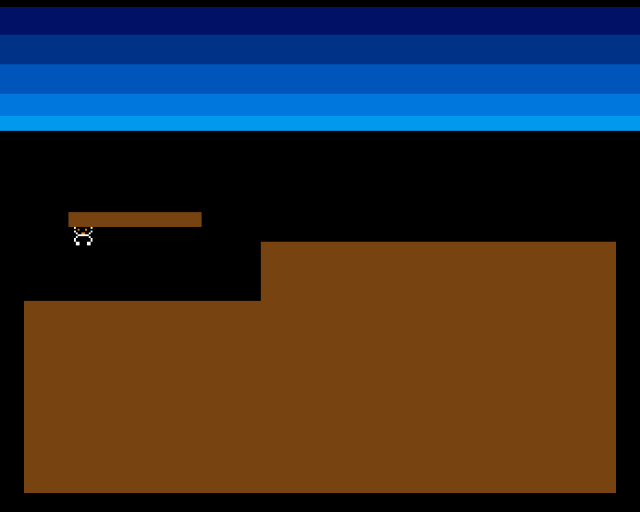
The creature paces back and forth across the terrain. It bounces off both edges of the screen, walking left and right indefinitely.
Direction as a Variable
In Unit 5, speed was a constant — always +1, always right. Now direction needs to change at runtime. A new variable creature_dx holds the horizontal speed with sign:
creature_dx: dc.w 0 ; +speed = right, -speed = leftAt startup, it’s set to +CREATURE_SPEED:
move.w #CREATURE_SPEED,creature_dxThe movement code uses this variable instead of a constant:
add.w creature_dx,d0When creature_dx is positive, the creature moves right. When negative, left. The magnitude stays the same — only the sign changes.
Boundary Checking
            ; --- Move creature ---
            move.w  creature_x,d0
            add.w   creature_dx,d0

            ; --- Check right edge ---
            cmp.w   #RIGHT_EDGE,d0
            blt.s   .not_right
            move.w  #RIGHT_EDGE,d0
            neg.w   creature_dx         ; Reverse direction
.not_right:
            ; --- Check left edge ---
            cmp.w   #LEFT_EDGE,d0
            bge.s   .not_left
            move.w  #LEFT_EDGE,d0
            neg.w   creature_dx         ; Reverse direction
.not_left:
            move.w  d0,creature_x
CMP.W #RIGHT_EDGE,D0 compares the creature’s x position against the right boundary (304 — the screen width minus the sprite width). BLT.S (Branch if Less Than) skips the reversal if the creature hasn’t reached the edge.
If it has, two things happen: the position is clamped to the edge value, and NEG.W creature_dx flips the sign of the direction. If creature_dx was +1, it becomes -1. If it was -1, it becomes +1.
The left edge check works the same way with BGE.S (Branch if Greater or Equal). The creature can’t go below pixel 0.
CMP and Conditional Branches
CMP.W subtracts the source from the destination without storing the result — it only updates the condition codes (flags). The branch instruction that follows reads these flags:
| Instruction | Meaning | Use |
|---|---|---|
BEQ | Branch if Equal | Result was zero |
BNE | Branch if Not Equal | Result was not zero |
BLT | Branch if Less Than | Signed less than |
BGE | Branch if Greater or Equal | Signed greater or equal |
BGT | Branch if Greater Than | Signed greater than |
BLE | Branch if Less or Equal | Signed less or equal |
The .S suffix means “short branch” — the target must be within 128 bytes. It saves one word of code compared to a long branch. The assembler warns if the target is too far away.
NEG: Simple Direction Reversal
NEG.W creature_dx negates the value in memory: it subtracts the value from zero. +1 becomes -1, -1 becomes +1. One instruction reverses the creature’s direction.
This only works because the speed is symmetric — the creature moves at the same pace in both directions. For asymmetric movement, you’d need separate logic for each direction.
Experiment: Change the Boundaries
LEFT_EDGE           equ 40          ; Creature can't reach the left edge
RIGHT_EDGE          equ 200         ; Shorter patrol range
The creature bounces within whatever range you define. In later units, these boundaries will be replaced by terrain collision — the creature turns when it hits a wall, not an arbitrary pixel position.
The Complete Code
;──────────────────────────────────────────────────────────────
; EXODUS - A terrain puzzle for the Commodore Amiga
; Unit 6: Creature Turns
;
; The creature reverses direction at screen edges.
; A direction variable tracks left (-1) or right (+1).
; CMP.W checks boundaries; NEG.W flips the direction.
;──────────────────────────────────────────────────────────────

;══════════════════════════════════════════════════════════════
; TWEAKABLE VALUES
;══════════════════════════════════════════════════════════════

COLOUR_SKY_DEEP     equ $0016
COLOUR_SKY_UPPER    equ $0038
COLOUR_SKY_MID      equ $005B
COLOUR_SKY_LOWER    equ $007D
COLOUR_SKY_HORIZON  equ $009E

COLOUR_TERRAIN      equ $0741

COLOUR_SPR0_1       equ $0FFF
COLOUR_SPR0_2       equ $0F80
COLOUR_SPR0_3       equ $0000

CREATURE_START_X    equ 20
CREATURE_START_Y    equ 110
CREATURE_SPEED      equ 1

LEFT_EDGE           equ 0
RIGHT_EDGE          equ 304         ; 320 - 16 (sprite width)

; Terrain
GROUND_L_X          equ 0
GROUND_L_Y          equ 152
GROUND_L_W          equ 128
GROUND_L_H          equ 104

GROUND_R_X          equ 128
GROUND_R_Y          equ 120
GROUND_R_W          equ 192
GROUND_R_H          equ 136

PLATFORM_X          equ 24
PLATFORM_Y          equ 104
PLATFORM_W          equ 72
PLATFORM_H          equ 8

;══════════════════════════════════════════════════════════════
; DISPLAY CONSTANTS
;══════════════════════════════════════════════════════════════

SCREEN_WIDTH    equ 320
SCREEN_HEIGHT   equ 256
BYTES_PER_ROW   equ SCREEN_WIDTH/8
BITPLANE_SIZE   equ BYTES_PER_ROW*SCREEN_HEIGHT

SPRITE_HEIGHT   equ 12

;══════════════════════════════════════════════════════════════
; HARDWARE REGISTERS
;══════════════════════════════════════════════════════════════

CUSTOM      equ $dff000
DMACON      equ $096
INTENA      equ $09a
INTREQ      equ $09c
COP1LC      equ $080
COPJMP1     equ $088
BPLCON0     equ $100
BPLCON1     equ $102
BPLCON2     equ $104
BPL1MOD     equ $108
DIWSTRT     equ $08e
DIWSTOP     equ $090
DDFSTRT     equ $092
DDFSTOP     equ $094
BPL1PTH     equ $0e0
BPL1PTL     equ $0e2
SPR0PTH     equ $120
SPR0PTL     equ $122
COLOR00     equ $180
COLOR01     equ $182
COLOR17     equ $1a2
COLOR18     equ $1a4
COLOR19     equ $1a6
VPOSR       equ $004

;══════════════════════════════════════════════════════════════
; CODE (Chip RAM)
;══════════════════════════════════════════════════════════════

            section code,code_c

start:
            lea     CUSTOM,a5

            move.w  #$7fff,INTENA(a5)
            move.w  #$7fff,INTREQ(a5)
            move.w  #$7fff,DMACON(a5)

            ; --- Initialise creature ---
            move.w  #CREATURE_START_X,creature_x
            move.w  #CREATURE_START_Y,creature_y
            move.w  #CREATURE_SPEED,creature_dx

            ; --- Draw terrain ---
            move.w  #GROUND_L_X,d0
            move.w  #GROUND_L_Y,d1
            move.w  #GROUND_L_W,d2
            move.w  #GROUND_L_H,d3
            bsr     draw_rect

            move.w  #GROUND_R_X,d0
            move.w  #GROUND_R_Y,d1
            move.w  #GROUND_R_W,d2
            move.w  #GROUND_R_H,d3
            bsr     draw_rect

            move.w  #PLATFORM_X,d0
            move.w  #PLATFORM_Y,d1
            move.w  #PLATFORM_W,d2
            move.w  #PLATFORM_H,d3
            bsr     draw_rect

            ; --- Patch bitplane pointer ---
            lea     bitplane,a0
            move.l  a0,d0
            swap    d0
            lea     bpl1pth_val,a1
            move.w  d0,(a1)
            swap    d0
            lea     bpl1ptl_val,a1
            move.w  d0,(a1)

            ; --- Patch sprite pointer ---
            lea     sprite_data,a0
            move.l  a0,d0
            swap    d0
            lea     spr0pth_val,a1
            move.w  d0,(a1)
            swap    d0
            lea     spr0ptl_val,a1
            move.w  d0,(a1)

            ; --- Install Copper list ---
            lea     copperlist,a0
            move.l  a0,COP1LC(a5)
            move.w  d0,COPJMP1(a5)

            ; --- Enable DMA ---
            move.w  #$83a0,DMACON(a5)

            ; === Main Loop ===
mainloop:
            move.l  #$1ff00,d1
.vbwait:
            move.l  VPOSR(a5),d0
            and.l   d1,d0
            bne.s   .vbwait

            ; --- Move creature ---
            move.w  creature_x,d0
            add.w   creature_dx,d0

            ; --- Check right edge ---
            cmp.w   #RIGHT_EDGE,d0
            blt.s   .not_right
            move.w  #RIGHT_EDGE,d0
            neg.w   creature_dx         ; Reverse direction
.not_right:
            ; --- Check left edge ---
            cmp.w   #LEFT_EDGE,d0
            bge.s   .not_left
            move.w  #LEFT_EDGE,d0
            neg.w   creature_dx         ; Reverse direction
.not_left:
            move.w  d0,creature_x

            ; --- Update sprite ---
            bsr     update_sprite

            btst    #6,$bfe001
            bne.s   mainloop

.halt:
            bra.s   .halt

;──────────────────────────────────────────────────────────────
; update_sprite — Write current position into sprite data
;──────────────────────────────────────────────────────────────
update_sprite:
            lea     sprite_data,a0

            move.w  creature_y,d0
            add.w   #$2c,d0
            move.w  d0,d1
            add.w   #SPRITE_HEIGHT,d1

            move.w  creature_x,d2
            add.w   #$80,d2

            move.b  d0,d3
            lsl.w   #8,d3
            move.w  d2,d4
            lsr.w   #1,d4
            or.b    d4,d3
            move.w  d3,(a0)+

            move.b  d1,d3
            lsl.w   #8,d3
            moveq   #0,d4
            btst    #8,d0
            beq.s   .no_vs8
            bset    #2,d4
.no_vs8:
            btst    #8,d1
            beq.s   .no_ve8
            bset    #1,d4
.no_ve8:
            btst    #0,d2
            beq.s   .no_h0
            bset    #0,d4
.no_h0:
            or.b    d4,d3
            move.w  d3,(a0)

            rts

;──────────────────────────────────────────────────────────────
; draw_rect — Fill a byte-aligned rectangle in the bitplane
;──────────────────────────────────────────────────────────────
draw_rect:
            lea     bitplane,a0
            mulu    #BYTES_PER_ROW,d1
            add.l   d1,a0
            lsr.w   #3,d0
            add.w   d0,a0
            lsr.w   #3,d2

            subq.w  #1,d3
.row:
            move.w  d2,d5
            subq.w  #1,d5
            move.l  a0,a1
.col:
            move.b  #$ff,(a1)+
            dbra    d5,.col

            add.w   #BYTES_PER_ROW,a0
            dbra    d3,.row
            rts

;══════════════════════════════════════════════════════════════
; COPPER LIST
;══════════════════════════════════════════════════════════════

copperlist:
            dc.w    DIWSTRT,$2c81
            dc.w    DIWSTOP,$2cc1
            dc.w    DDFSTRT,$0038
            dc.w    DDFSTOP,$00d0

            dc.w    BPLCON0,$1200
            dc.w    BPLCON1,$0000
            dc.w    BPLCON2,$0000
            dc.w    BPL1MOD,$0000

            dc.w    BPL1PTH
bpl1pth_val:
            dc.w    $0000
            dc.w    BPL1PTL
bpl1ptl_val:
            dc.w    $0000

            dc.w    SPR0PTH
spr0pth_val:
            dc.w    $0000
            dc.w    SPR0PTL
spr0ptl_val:
            dc.w    $0000

            dc.w    COLOR00,COLOUR_SKY_DEEP
            dc.w    COLOR01,COLOUR_TERRAIN
            dc.w    COLOR17,COLOUR_SPR0_1
            dc.w    COLOR18,COLOUR_SPR0_2
            dc.w    COLOR19,COLOUR_SPR0_3

            dc.w    $3401,$fffe
            dc.w    COLOR00,COLOUR_SKY_UPPER
            dc.w    $4401,$fffe
            dc.w    COLOR00,COLOUR_SKY_MID
            dc.w    $5401,$fffe
            dc.w    COLOR00,COLOUR_SKY_LOWER
            dc.w    $6001,$fffe
            dc.w    COLOR00,COLOUR_SKY_HORIZON
            dc.w    $6801,$fffe
            dc.w    COLOR00,$0000

            dc.w    $ffff,$fffe

;══════════════════════════════════════════════════════════════
; SPRITE DATA
;══════════════════════════════════════════════════════════════

            even
sprite_data:
            dc.w    $0000,$0000

            dc.w    %0000011111100000,%0000000000000000
            dc.w    %0000111111110000,%0000011111100000
            dc.w    %0001111111111000,%0000111111110000
            dc.w    %0001101110111000,%0001111111111000
            dc.w    %0001111111111000,%0000111111110000
            dc.w    %0000111001110000,%0000011111100000
            dc.w    %0000011111100000,%0000000000000000
            dc.w    %0000111111110000,%0000011111100000
            dc.w    %0001111111111000,%0000111111110000
            dc.w    %0001111111111000,%0000111111110000
            dc.w    %0000110000110000,%0000000000000000
            dc.w    %0000110000110000,%0000000000000000

            dc.w    $0000,$0000

;══════════════════════════════════════════════════════════════
; VARIABLES
;══════════════════════════════════════════════════════════════

            even
creature_x:  dc.w   0
creature_y:  dc.w   0
creature_dx: dc.w   0               ; Direction: +speed or -speed

;══════════════════════════════════════════════════════════════
; BITPLANE DATA
;══════════════════════════════════════════════════════════════

            even
bitplane:
            dcb.b   BITPLANE_SIZE,0
If It Doesn’t Work
- Creature still walks off-screen? Check that
creature_dxis used (not a constant) in theADD.Winstruction. Also check thatNEG.Woperates oncreature_dxin memory, not a register. - Creature sticks to one edge? The position might not be clamped before the direction reverses. Without
MOVE.W #RIGHT_EDGE,D0, the creature could overshoot the boundary and the next frame’s check could re-reverse the direction. - Creature doesn’t move at all? Check that
creature_dxis initialised toCREATURE_SPEEDat startup, not left at zero.
What You’ve Learnt
- CMP.W — compare two values by subtracting without storing the result. Sets condition codes for subsequent branch instructions.
- Conditional branches —
BLT,BGE,BEQ,BNEread the condition codes set by CMP. The.Ssuffix uses a compact encoding for nearby targets. - NEG.W — negate a value (subtract from zero). Reverses the sign, turning positive into negative and vice versa.
- Signed direction — storing speed with sign (+1 or -1) in a variable allows simple direction reversal with a single NEG instruction.
What’s Next
The creature bounces off invisible walls at the screen edges. In Unit 7, it checks the actual terrain — reading pixels from the bitplane to detect the floor beneath its feet. This is the first real interaction between the sprite and the bitmap.