Terrain Collision
The creature checks the bitplane for floor beneath its feet. BTST reads a single bit from the bitplane. Walking only happens when there's solid ground below.
The creature bounced off invisible walls at the screen edges. Now it reads the actual terrain — checking the bitplane to see if there’s solid ground beneath its feet. When the floor disappears, the creature stops and turns around.
This is the first real interaction between the sprite and the bitmap. The creature’s world is no longer defined by constants — it’s defined by the pixels in memory.
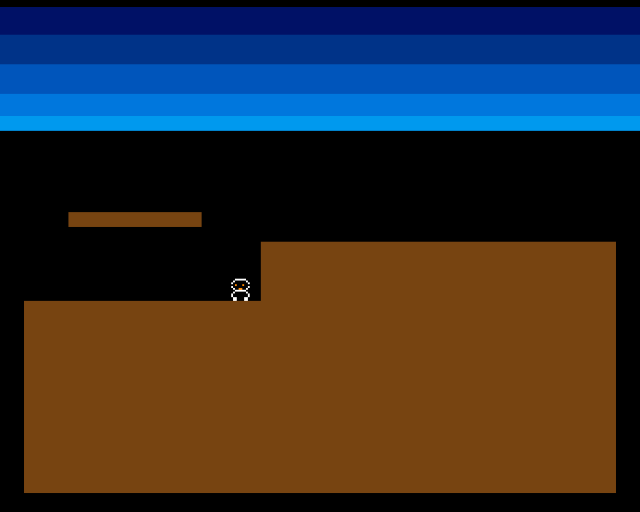
The creature walks along the low ground and stops at the cliff edge. There’s no floor ahead — the next pixel below its feet is empty (sky). It turns around and walks back. The terrain shape drives the creature’s behaviour.
Reading a Pixel from the Bitplane
To check terrain, we need to test whether a specific pixel in the bitplane is 0 or 1. This means finding the right byte, then testing the right bit within that byte:
;──────────────────────────────────────────────────────────────
; check_pixel — Test a single pixel in the bitplane
;
; Input:  D0.W = x position (0-319)
;         D1.W = y position (0-255)
; Output: D0.B = 1 if pixel is set, 0 if clear
; Destroys: D1-D3, A0
;──────────────────────────────────────────────────────────────
check_pixel:
            lea     bitplane,a0

            ; Calculate byte offset: y * 40 + x / 8
            mulu    #BYTES_PER_ROW,d1
            add.l   d1,a0

            move.w  d0,d2
            lsr.w   #3,d2               ; D2 = x / 8 (byte offset)
            add.w   d2,a0               ; A0 = address of the byte

            ; Calculate bit number within the byte
            ; Bit 7 is the leftmost pixel, bit 0 is the rightmost
            not.w   d0                  ; Invert x
            and.w   #7,d0               ; D0 = 7 - (x & 7) = bit number

            btst    d0,(a0)             ; Test the bit
            sne     d0                  ; D0 = $FF if set, $00 if clear
            and.b   #1,d0               ; D0 = 1 or 0

            rts
The address calculation is the same as draw_rect — y × 40 + x ÷ 8 finds the byte. But instead of writing to it, we test a single bit.
Bit numbering is reversed — bit 7 of a byte is the leftmost pixel, bit 0 is the rightmost. To find the bit number from an x coordinate: NOT inverts all bits, then AND #7 keeps only the lowest 3 bits. This gives 7 - (x AND 7), which maps pixel 0 to bit 7, pixel 1 to bit 6, and so on.
BTST D0,(A0) tests bit D0 of the byte at address A0. It sets the zero flag if the bit is clear. SNE D0 (Set if Not Equal) writes $FF to D0 if the zero flag is clear (bit was set), or $00 if the zero flag is set (bit was clear). The final AND.B #1,D0 normalises the result to 0 or 1.
The Floor Check
Before moving, the creature checks whether floor exists at its next position:
            ; --- Check floor ahead ---
            ; Test the pixel below where the creature's feet will be
            move.w  creature_x,d0
            add.w   creature_dx,d0      ; Proposed new x
            add.w   #FOOT_OFFSET_X,d0   ; Centre of sprite
            move.w  creature_y,d1
            add.w   #FOOT_OFFSET_Y,d1   ; Below feet
            bsr     check_pixel

            tst.b   d0                  ; D0 = 1 if solid, 0 if empty
            beq.s   .no_floor

            ; Floor exists — walk forward
            move.w  creature_x,d0
            add.w   creature_dx,d0
            move.w  d0,creature_x
            bra.s   .done_move

.no_floor:
            ; No floor ahead — turn around
            neg.w   creature_dx

.done_move:
The check point is the pixel just below the sprite’s feet at the proposed new x position. FOOT_OFFSET_X (8) centres the check horizontally within the 16-pixel sprite. FOOT_OFFSET_Y (12) places it just below the sprite bottom.
If the pixel is set (terrain exists), the creature moves forward. If it’s clear (empty space), the creature reverses direction with NEG.W — the same technique as Unit 6, but now triggered by actual terrain rather than screen boundaries.
Why Check Ahead?
The check uses creature_x + creature_dx — the next position, not the current one. This prevents the creature from stepping off the edge and then reacting. By checking before moving, the creature stops at the edge with its feet on solid ground.
This “look before you leap” pattern is fundamental to collision detection. If you check after moving, you’d have to move the creature back — which creates visual glitches and edge cases.
Experiment: Move the Check Point
FOOT_OFFSET_X equ 0 ; Check at sprite's left edgeWith the check at the left edge instead of the centre, the creature turns earlier — half a sprite width before the edge. Try 16 to check at the right edge instead.
FOOT_OFFSET_Y equ 14 ; Check 2 pixels below feetA larger offset makes the creature more cautious — it won’t walk over thin ledges.
The Complete Code
;──────────────────────────────────────────────────────────────
; EXODUS - A terrain puzzle for the Commodore Amiga
; Unit 7: Terrain Collision
;
; The creature checks the bitplane for floor beneath its feet.
; BTST reads a single bit from the bitplane.
; Walking only happens when there's solid ground below.
;──────────────────────────────────────────────────────────────

;══════════════════════════════════════════════════════════════
; TWEAKABLE VALUES
;══════════════════════════════════════════════════════════════

COLOUR_SKY_DEEP     equ $0016
COLOUR_SKY_UPPER    equ $0038
COLOUR_SKY_MID      equ $005B
COLOUR_SKY_LOWER    equ $007D
COLOUR_SKY_HORIZON  equ $009E

COLOUR_TERRAIN      equ $0741

COLOUR_SPR0_1       equ $0FFF
COLOUR_SPR0_2       equ $0F80
COLOUR_SPR0_3       equ $0000

CREATURE_START_X    equ 20
CREATURE_START_Y    equ 140         ; Start on the low ground
CREATURE_SPEED      equ 1

; Foot check offset: pixel below the creature's feet
FOOT_OFFSET_X       equ 8           ; Centre of 16-pixel sprite
FOOT_OFFSET_Y       equ 12          ; Just below sprite bottom (SPRITE_HEIGHT)

; Terrain
GROUND_L_X          equ 0
GROUND_L_Y          equ 152
GROUND_L_W          equ 128
GROUND_L_H          equ 104

GROUND_R_X          equ 128
GROUND_R_Y          equ 120
GROUND_R_W          equ 192
GROUND_R_H          equ 136

PLATFORM_X          equ 24
PLATFORM_Y          equ 104
PLATFORM_W          equ 72
PLATFORM_H          equ 8

;══════════════════════════════════════════════════════════════
; DISPLAY CONSTANTS
;══════════════════════════════════════════════════════════════

SCREEN_WIDTH    equ 320
SCREEN_HEIGHT   equ 256
BYTES_PER_ROW   equ SCREEN_WIDTH/8
BITPLANE_SIZE   equ BYTES_PER_ROW*SCREEN_HEIGHT

SPRITE_HEIGHT   equ 12

;══════════════════════════════════════════════════════════════
; HARDWARE REGISTERS
;══════════════════════════════════════════════════════════════

CUSTOM      equ $dff000
DMACON      equ $096
INTENA      equ $09a
INTREQ      equ $09c
COP1LC      equ $080
COPJMP1     equ $088
BPLCON0     equ $100
BPLCON1     equ $102
BPLCON2     equ $104
BPL1MOD     equ $108
DIWSTRT     equ $08e
DIWSTOP     equ $090
DDFSTRT     equ $092
DDFSTOP     equ $094
BPL1PTH     equ $0e0
BPL1PTL     equ $0e2
SPR0PTH     equ $120
SPR0PTL     equ $122
COLOR00     equ $180
COLOR01     equ $182
COLOR17     equ $1a2
COLOR18     equ $1a4
COLOR19     equ $1a6
VPOSR       equ $004

;══════════════════════════════════════════════════════════════
; CODE (Chip RAM)
;══════════════════════════════════════════════════════════════

            section code,code_c

start:
            lea     CUSTOM,a5

            move.w  #$7fff,INTENA(a5)
            move.w  #$7fff,INTREQ(a5)
            move.w  #$7fff,DMACON(a5)

            ; --- Initialise creature ---
            move.w  #CREATURE_START_X,creature_x
            move.w  #CREATURE_START_Y,creature_y
            move.w  #CREATURE_SPEED,creature_dx

            ; --- Draw terrain ---
            move.w  #GROUND_L_X,d0
            move.w  #GROUND_L_Y,d1
            move.w  #GROUND_L_W,d2
            move.w  #GROUND_L_H,d3
            bsr     draw_rect

            move.w  #GROUND_R_X,d0
            move.w  #GROUND_R_Y,d1
            move.w  #GROUND_R_W,d2
            move.w  #GROUND_R_H,d3
            bsr     draw_rect

            move.w  #PLATFORM_X,d0
            move.w  #PLATFORM_Y,d1
            move.w  #PLATFORM_W,d2
            move.w  #PLATFORM_H,d3
            bsr     draw_rect

            ; --- Patch bitplane pointer ---
            lea     bitplane,a0
            move.l  a0,d0
            swap    d0
            lea     bpl1pth_val,a1
            move.w  d0,(a1)
            swap    d0
            lea     bpl1ptl_val,a1
            move.w  d0,(a1)

            ; --- Patch sprite pointer ---
            lea     sprite_data,a0
            move.l  a0,d0
            swap    d0
            lea     spr0pth_val,a1
            move.w  d0,(a1)
            swap    d0
            lea     spr0ptl_val,a1
            move.w  d0,(a1)

            ; --- Install Copper list ---
            lea     copperlist,a0
            move.l  a0,COP1LC(a5)
            move.w  d0,COPJMP1(a5)

            ; --- Enable DMA ---
            move.w  #$83a0,DMACON(a5)

            ; === Main Loop ===
mainloop:
            move.l  #$1ff00,d1
.vbwait:
            move.l  VPOSR(a5),d0
            and.l   d1,d0
            bne.s   .vbwait

            ; --- Check floor ahead ---
            ; Test the pixel below where the creature's feet will be
            move.w  creature_x,d0
            add.w   creature_dx,d0      ; Proposed new x
            add.w   #FOOT_OFFSET_X,d0   ; Centre of sprite
            move.w  creature_y,d1
            add.w   #FOOT_OFFSET_Y,d1   ; Below feet
            bsr     check_pixel

            tst.b   d0                  ; D0 = 1 if solid, 0 if empty
            beq.s   .no_floor

            ; Floor exists — walk forward
            move.w  creature_x,d0
            add.w   creature_dx,d0
            move.w  d0,creature_x
            bra.s   .done_move

.no_floor:
            ; No floor ahead — turn around
            neg.w   creature_dx

.done_move:
            ; --- Update sprite ---
            bsr     update_sprite

            btst    #6,$bfe001
            bne.s   mainloop

.halt:
            bra.s   .halt

;──────────────────────────────────────────────────────────────
; check_pixel — Test a single pixel in the bitplane
;
; Input:  D0.W = x position (0-319)
;         D1.W = y position (0-255)
; Output: D0.B = 1 if pixel is set, 0 if clear
; Destroys: D1-D3, A0
;──────────────────────────────────────────────────────────────
check_pixel:
            lea     bitplane,a0

            ; Calculate byte offset: y * 40 + x / 8
            mulu    #BYTES_PER_ROW,d1
            add.l   d1,a0

            move.w  d0,d2
            lsr.w   #3,d2               ; D2 = x / 8 (byte offset)
            add.w   d2,a0               ; A0 = address of the byte

            ; Calculate bit number within the byte
            ; Bit 7 is the leftmost pixel, bit 0 is the rightmost
            not.w   d0                  ; Invert x
            and.w   #7,d0               ; D0 = 7 - (x & 7) = bit number

            btst    d0,(a0)             ; Test the bit
            sne     d0                  ; D0 = $FF if set, $00 if clear
            and.b   #1,d0               ; D0 = 1 or 0

            rts

;──────────────────────────────────────────────────────────────
; update_sprite — Write current position into sprite data
;──────────────────────────────────────────────────────────────
update_sprite:
            lea     sprite_data,a0

            move.w  creature_y,d0
            add.w   #$2c,d0
            move.w  d0,d1
            add.w   #SPRITE_HEIGHT,d1

            move.w  creature_x,d2
            add.w   #$80,d2

            move.b  d0,d3
            lsl.w   #8,d3
            move.w  d2,d4
            lsr.w   #1,d4
            or.b    d4,d3
            move.w  d3,(a0)+

            move.b  d1,d3
            lsl.w   #8,d3
            moveq   #0,d4
            btst    #8,d0
            beq.s   .no_vs8
            bset    #2,d4
.no_vs8:
            btst    #8,d1
            beq.s   .no_ve8
            bset    #1,d4
.no_ve8:
            btst    #0,d2
            beq.s   .no_h0
            bset    #0,d4
.no_h0:
            or.b    d4,d3
            move.w  d3,(a0)

            rts

;──────────────────────────────────────────────────────────────
; draw_rect — Fill a byte-aligned rectangle in the bitplane
;──────────────────────────────────────────────────────────────
draw_rect:
            lea     bitplane,a0
            mulu    #BYTES_PER_ROW,d1
            add.l   d1,a0
            lsr.w   #3,d0
            add.w   d0,a0
            lsr.w   #3,d2

            subq.w  #1,d3
.row:
            move.w  d2,d5
            subq.w  #1,d5
            move.l  a0,a1
.col:
            move.b  #$ff,(a1)+
            dbra    d5,.col

            add.w   #BYTES_PER_ROW,a0
            dbra    d3,.row
            rts

;══════════════════════════════════════════════════════════════
; COPPER LIST
;══════════════════════════════════════════════════════════════

copperlist:
            dc.w    DIWSTRT,$2c81
            dc.w    DIWSTOP,$2cc1
            dc.w    DDFSTRT,$0038
            dc.w    DDFSTOP,$00d0

            dc.w    BPLCON0,$1200
            dc.w    BPLCON1,$0000
            dc.w    BPLCON2,$0000
            dc.w    BPL1MOD,$0000

            dc.w    BPL1PTH
bpl1pth_val:
            dc.w    $0000
            dc.w    BPL1PTL
bpl1ptl_val:
            dc.w    $0000

            dc.w    SPR0PTH
spr0pth_val:
            dc.w    $0000
            dc.w    SPR0PTL
spr0ptl_val:
            dc.w    $0000

            dc.w    COLOR00,COLOUR_SKY_DEEP
            dc.w    COLOR01,COLOUR_TERRAIN
            dc.w    COLOR17,COLOUR_SPR0_1
            dc.w    COLOR18,COLOUR_SPR0_2
            dc.w    COLOR19,COLOUR_SPR0_3

            dc.w    $3401,$fffe
            dc.w    COLOR00,COLOUR_SKY_UPPER
            dc.w    $4401,$fffe
            dc.w    COLOR00,COLOUR_SKY_MID
            dc.w    $5401,$fffe
            dc.w    COLOR00,COLOUR_SKY_LOWER
            dc.w    $6001,$fffe
            dc.w    COLOR00,COLOUR_SKY_HORIZON
            dc.w    $6801,$fffe
            dc.w    COLOR00,$0000

            dc.w    $ffff,$fffe

;══════════════════════════════════════════════════════════════
; SPRITE DATA
;══════════════════════════════════════════════════════════════

            even
sprite_data:
            dc.w    $0000,$0000

            dc.w    %0000011111100000,%0000000000000000
            dc.w    %0000111111110000,%0000011111100000
            dc.w    %0001111111111000,%0000111111110000
            dc.w    %0001101110111000,%0001111111111000
            dc.w    %0001111111111000,%0000111111110000
            dc.w    %0000111001110000,%0000011111100000
            dc.w    %0000011111100000,%0000000000000000
            dc.w    %0000111111110000,%0000011111100000
            dc.w    %0001111111111000,%0000111111110000
            dc.w    %0001111111111000,%0000111111110000
            dc.w    %0000110000110000,%0000000000000000
            dc.w    %0000110000110000,%0000000000000000

            dc.w    $0000,$0000

;══════════════════════════════════════════════════════════════
; VARIABLES
;══════════════════════════════════════════════════════════════

            even
creature_x:  dc.w   0
creature_y:  dc.w   0
creature_dx: dc.w   0

;══════════════════════════════════════════════════════════════
; BITPLANE DATA
;══════════════════════════════════════════════════════════════

            even
bitplane:
            dcb.b   BITPLANE_SIZE,0
If It Doesn’t Work
- Creature walks off the edge? The foot check position might be wrong. Print the check coordinates (or test with a known terrain layout) to verify the check point is below the sprite’s feet.
- Creature doesn’t move at all? The starting position might be over empty space. Set
CREATURE_START_Yso the creature starts on solid terrain (e.g., 140 for the low ground at y=152). - Creature jitters at the edge? Make sure the check uses the proposed position (
creature_x + creature_dx), not the current position. Checking the current position after moving causes oscillation. - Bit test always returns 0? The bit numbering might be wrong. Bit 7 is the leftmost pixel in a byte, not bit 0. The
NOT+AND #7pattern handles this conversion.
What You’ve Learnt
- BTST — test a single bit in memory. Sets the zero flag without modifying the byte. Used here to read individual pixels from the bitplane.
- Pixel addressing — finding a specific pixel in the bitplane requires byte offset calculation (
y × 40 + x ÷ 8) and bit position mapping (bit 7 is leftmost). - SNE/SEQ — set a register based on condition codes.
SNEwrites$FFif the zero flag is clear,$00if set. Useful for converting flag states to values. - Look-ahead collision — checking the proposed position before moving prevents the creature from entering invalid positions.
- Terrain-driven behaviour — the bitmap IS the world. The creature’s movement is defined by the pixel data, not by constants.
What’s Next
The creature turns at edges but doesn’t fall. In Unit 8, gravity pulls the creature down when there’s no floor directly below. Walk off a ledge and the creature drops until it lands on something solid.