Gravity
The creature falls when there's no floor below. A state machine switches between walking and falling. Each frame checks directly beneath the feet — falling stops when terrain is found.
The creature stops at cliff edges but never falls. It checks ahead for floor and turns around — but what about the gap below? In this unit, the creature gains gravity. Walk off a ledge and it drops until it lands on something solid.
This needs a state machine — the creature is either walking or falling, and the code does different things depending on which state it’s in.
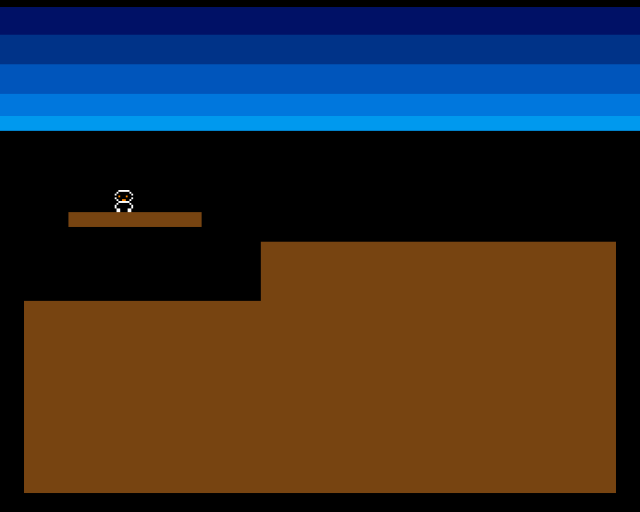
The creature starts on the floating platform. It walks to the edge, steps off, and falls down to the low ground below. Once it lands, it resumes walking. Gravity is working.
Two States
The creature needs two modes of behaviour:
- Walking — move horizontally, check for floor ahead, turn at edges
- Falling — move downward, check for floor below, land when found
A single variable tracks which state the creature is in:
STATE_WALKING   equ 0
STATE_FALLING   equ 1

creature_state: dc.w    0           ; 0=walking, 1=falling
Each frame, the main loop checks creature_state and branches to the right code. This is a state machine — the simplest useful pattern for game objects that behave differently over time.
The Walking State
Walking is more complex than before. The creature still checks ahead for floor and turns if there’s none. But now it also checks under its current position after moving — if it’s walked onto empty space, it starts falling:
            ; --- Check state and update ---
            move.w  creature_state,d0
            cmp.w   #STATE_FALLING,d0
            beq.s   .do_fall

            ; --- Walking: check floor ahead ---
.do_walk:
            move.w  creature_x,d0
            add.w   creature_dx,d0
            add.w   #FOOT_OFFSET_X,d0
            move.w  creature_y,d1
            add.w   #FOOT_OFFSET_Y,d1
            bsr     check_pixel

            tst.b   d0
            beq.s   .walk_no_floor

            ; Floor exists — move forward
            move.w  creature_x,d0
            add.w   creature_dx,d0
            move.w  d0,creature_x

            ; Also check if we're standing on something
            ; (might have walked off a ledge)
            move.w  creature_x,d0
            add.w   #FOOT_OFFSET_X,d0
            move.w  creature_y,d1
            add.w   #FOOT_OFFSET_Y,d1
            bsr     check_pixel

            tst.b   d0
            bne.s   .done_move
            ; No floor under us — start falling
            move.w  #STATE_FALLING,creature_state
            bra.s   .done_move

.walk_no_floor:
            neg.w   creature_dx
            bra.s   .done_move
There are two floor checks per frame when walking. The first checks ahead (the look-ahead from Unit 7). The second checks underneath after the move — this catches the case where the creature walks off the edge of a platform. The look-ahead only checks one pixel ahead, so the creature can step past the edge before the gap is detected below.
When no floor is found underneath, creature_state switches to STATE_FALLING. The creature doesn’t fall this frame — it starts falling next frame.
The Falling State
Falling is simpler. Each frame, add FALL_SPEED to the y position and check if there’s terrain below:
            ; --- Falling: descend until floor found ---
.do_fall:
            move.w  creature_y,d0
            add.w   #FALL_SPEED,d0

            ; Safety: don't fall below screen
            cmp.w   #SCREEN_HEIGHT-SPRITE_HEIGHT,d0
            blt.s   .fall_ok
            move.w  #SCREEN_HEIGHT-SPRITE_HEIGHT,d0
            move.w  d0,creature_y
            move.w  #STATE_WALKING,creature_state
            bra.s   .done_move

.fall_ok:
            move.w  d0,creature_y

            ; Check if we've landed
            move.w  creature_x,d0
            add.w   #FOOT_OFFSET_X,d0
            move.w  creature_y,d1
            add.w   #FOOT_OFFSET_Y,d1
            bsr     check_pixel

            tst.b   d0
            beq.s   .done_move          ; Still falling

            ; Landed — snap to surface and resume walking
            move.w  #STATE_WALKING,creature_state

.done_move:
FALL_SPEED is set to 2 — the creature drops 2 pixels per frame. At 50fps that’s 100 pixels per second, which feels like a brisk fall without being instant.
The safety check prevents the creature from falling below the screen. If y exceeds SCREEN_HEIGHT - SPRITE_HEIGHT, it’s clamped and the creature resumes walking. This handles the edge case where terrain doesn’t cover the entire bottom of the screen.
When the pixel check finds terrain, the state switches back to STATE_WALKING. The creature lands wherever it is — it doesn’t snap to an exact surface position. At 2 pixels per frame, the creature might land 1 pixel into the terrain, but this is invisible at this resolution.
Starting Position
The creature now starts on the floating platform instead of the low ground:
CREATURE_START_X    equ 80
CREATURE_START_Y    equ 92
The platform top is at y=104 and the sprite is 12 pixels tall, so y=92 places the creature’s feet exactly on the platform surface. This lets you see gravity in action — the creature walks right, reaches the platform edge, and falls to the ground below.
Experiment: Change the Fall Speed
FALL_SPEED equ 1 ; Slow, floaty fallAt 1 pixel per frame, the fall feels gentle — almost like the creature is floating. Try 4 for a snappy, heavy drop. The right speed depends on the game’s feel.
FALL_SPEED equ 8 ; Instant plummetAt 8 pixels per frame, the creature practically teleports to the ground. Falls happen so fast you barely see them. Real platformers often start slow and accelerate — that’s for a later unit.
The Complete Code
;──────────────────────────────────────────────────────────────
; EXODUS - A terrain puzzle for the Commodore Amiga
; Unit 8: Gravity
;
; The creature falls when there's no floor below.
; Each frame checks directly beneath the feet.
; Falling stops when terrain is found below.
;──────────────────────────────────────────────────────────────

;══════════════════════════════════════════════════════════════
; TWEAKABLE VALUES
;══════════════════════════════════════════════════════════════

COLOUR_SKY_DEEP     equ $0016
COLOUR_SKY_UPPER    equ $0038
COLOUR_SKY_MID      equ $005B
COLOUR_SKY_LOWER    equ $007D
COLOUR_SKY_HORIZON  equ $009E

COLOUR_TERRAIN      equ $0741

COLOUR_SPR0_1       equ $0FFF
COLOUR_SPR0_2       equ $0F80
COLOUR_SPR0_3       equ $0000

CREATURE_START_X    equ 80          ; Start on the platform
CREATURE_START_Y    equ 92          ; Above platform (y=104, sprite height=12)
CREATURE_SPEED      equ 1
FALL_SPEED          equ 2           ; Pixels per frame when falling

FOOT_OFFSET_X       equ 8
FOOT_OFFSET_Y       equ 12

; Terrain
GROUND_L_X          equ 0
GROUND_L_Y          equ 152
GROUND_L_W          equ 128
GROUND_L_H          equ 104

GROUND_R_X          equ 128
GROUND_R_Y          equ 120
GROUND_R_W          equ 192
GROUND_R_H          equ 136

PLATFORM_X          equ 24
PLATFORM_Y          equ 104
PLATFORM_W          equ 72
PLATFORM_H          equ 8

;══════════════════════════════════════════════════════════════
; DISPLAY CONSTANTS
;══════════════════════════════════════════════════════════════

SCREEN_WIDTH    equ 320
SCREEN_HEIGHT   equ 256
BYTES_PER_ROW   equ SCREEN_WIDTH/8
BITPLANE_SIZE   equ BYTES_PER_ROW*SCREEN_HEIGHT

SPRITE_HEIGHT   equ 12

; Creature states
STATE_WALKING   equ 0
STATE_FALLING   equ 1

;══════════════════════════════════════════════════════════════
; HARDWARE REGISTERS
;══════════════════════════════════════════════════════════════

CUSTOM      equ $dff000
DMACON      equ $096
INTENA      equ $09a
INTREQ      equ $09c
COP1LC      equ $080
COPJMP1     equ $088
BPLCON0     equ $100
BPLCON1     equ $102
BPLCON2     equ $104
BPL1MOD     equ $108
DIWSTRT     equ $08e
DIWSTOP     equ $090
DDFSTRT     equ $092
DDFSTOP     equ $094
BPL1PTH     equ $0e0
BPL1PTL     equ $0e2
SPR0PTH     equ $120
SPR0PTL     equ $122
COLOR00     equ $180
COLOR01     equ $182
COLOR17     equ $1a2
COLOR18     equ $1a4
COLOR19     equ $1a6
VPOSR       equ $004

;══════════════════════════════════════════════════════════════
; CODE (Chip RAM)
;══════════════════════════════════════════════════════════════

            section code,code_c

start:
            lea     CUSTOM,a5

            move.w  #$7fff,INTENA(a5)
            move.w  #$7fff,INTREQ(a5)
            move.w  #$7fff,DMACON(a5)

            ; --- Initialise creature ---
            move.w  #CREATURE_START_X,creature_x
            move.w  #CREATURE_START_Y,creature_y
            move.w  #CREATURE_SPEED,creature_dx
            move.w  #STATE_WALKING,creature_state

            ; --- Draw terrain ---
            move.w  #GROUND_L_X,d0
            move.w  #GROUND_L_Y,d1
            move.w  #GROUND_L_W,d2
            move.w  #GROUND_L_H,d3
            bsr     draw_rect

            move.w  #GROUND_R_X,d0
            move.w  #GROUND_R_Y,d1
            move.w  #GROUND_R_W,d2
            move.w  #GROUND_R_H,d3
            bsr     draw_rect

            move.w  #PLATFORM_X,d0
            move.w  #PLATFORM_Y,d1
            move.w  #PLATFORM_W,d2
            move.w  #PLATFORM_H,d3
            bsr     draw_rect

            ; --- Patch bitplane pointer ---
            lea     bitplane,a0
            move.l  a0,d0
            swap    d0
            lea     bpl1pth_val,a1
            move.w  d0,(a1)
            swap    d0
            lea     bpl1ptl_val,a1
            move.w  d0,(a1)

            ; --- Patch sprite pointer ---
            lea     sprite_data,a0
            move.l  a0,d0
            swap    d0
            lea     spr0pth_val,a1
            move.w  d0,(a1)
            swap    d0
            lea     spr0ptl_val,a1
            move.w  d0,(a1)

            ; --- Install Copper list ---
            lea     copperlist,a0
            move.l  a0,COP1LC(a5)
            move.w  d0,COPJMP1(a5)

            ; --- Enable DMA ---
            move.w  #$83a0,DMACON(a5)

            ; === Main Loop ===
mainloop:
            move.l  #$1ff00,d1
.vbwait:
            move.l  VPOSR(a5),d0
            and.l   d1,d0
            bne.s   .vbwait

            ; --- Check state and update ---
            move.w  creature_state,d0
            cmp.w   #STATE_FALLING,d0
            beq.s   .do_fall

            ; --- Walking: check floor ahead ---
.do_walk:
            move.w  creature_x,d0
            add.w   creature_dx,d0
            add.w   #FOOT_OFFSET_X,d0
            move.w  creature_y,d1
            add.w   #FOOT_OFFSET_Y,d1
            bsr     check_pixel

            tst.b   d0
            beq.s   .walk_no_floor

            ; Floor exists — move forward
            move.w  creature_x,d0
            add.w   creature_dx,d0
            move.w  d0,creature_x

            ; Also check if we're standing on something
            ; (might have walked off a ledge)
            move.w  creature_x,d0
            add.w   #FOOT_OFFSET_X,d0
            move.w  creature_y,d1
            add.w   #FOOT_OFFSET_Y,d1
            bsr     check_pixel

            tst.b   d0
            bne.s   .done_move
            ; No floor under us — start falling
            move.w  #STATE_FALLING,creature_state
            bra.s   .done_move

.walk_no_floor:
            neg.w   creature_dx
            bra.s   .done_move

            ; --- Falling: descend until floor found ---
.do_fall:
            move.w  creature_y,d0
            add.w   #FALL_SPEED,d0

            ; Safety: don't fall below screen
            cmp.w   #SCREEN_HEIGHT-SPRITE_HEIGHT,d0
            blt.s   .fall_ok
            move.w  #SCREEN_HEIGHT-SPRITE_HEIGHT,d0
            move.w  d0,creature_y
            move.w  #STATE_WALKING,creature_state
            bra.s   .done_move

.fall_ok:
            move.w  d0,creature_y

            ; Check if we've landed
            move.w  creature_x,d0
            add.w   #FOOT_OFFSET_X,d0
            move.w  creature_y,d1
            add.w   #FOOT_OFFSET_Y,d1
            bsr     check_pixel

            tst.b   d0
            beq.s   .done_move          ; Still falling

            ; Landed — snap to surface and resume walking
            move.w  #STATE_WALKING,creature_state

.done_move:
            bsr     update_sprite

            btst    #6,$bfe001
            bne     mainloop

.halt:
            bra.s   .halt

;──────────────────────────────────────────────────────────────
; check_pixel — Test a single pixel in the bitplane
;──────────────────────────────────────────────────────────────
check_pixel:
            lea     bitplane,a0
            mulu    #BYTES_PER_ROW,d1
            add.l   d1,a0
            move.w  d0,d2
            lsr.w   #3,d2
            add.w   d2,a0
            not.w   d0
            and.w   #7,d0
            btst    d0,(a0)
            sne     d0
            and.b   #1,d0
            rts

;──────────────────────────────────────────────────────────────
; update_sprite — Write current position into sprite data
;──────────────────────────────────────────────────────────────
update_sprite:
            lea     sprite_data,a0

            move.w  creature_y,d0
            add.w   #$2c,d0
            move.w  d0,d1
            add.w   #SPRITE_HEIGHT,d1

            move.w  creature_x,d2
            add.w   #$80,d2

            move.b  d0,d3
            lsl.w   #8,d3
            move.w  d2,d4
            lsr.w   #1,d4
            or.b    d4,d3
            move.w  d3,(a0)+

            move.b  d1,d3
            lsl.w   #8,d3
            moveq   #0,d4
            btst    #8,d0
            beq.s   .no_vs8
            bset    #2,d4
.no_vs8:
            btst    #8,d1
            beq.s   .no_ve8
            bset    #1,d4
.no_ve8:
            btst    #0,d2
            beq.s   .no_h0
            bset    #0,d4
.no_h0:
            or.b    d4,d3
            move.w  d3,(a0)

            rts

;──────────────────────────────────────────────────────────────
; draw_rect — Fill a byte-aligned rectangle in the bitplane
;──────────────────────────────────────────────────────────────
draw_rect:
            lea     bitplane,a0
            mulu    #BYTES_PER_ROW,d1
            add.l   d1,a0
            lsr.w   #3,d0
            add.w   d0,a0
            lsr.w   #3,d2

            subq.w  #1,d3
.row:
            move.w  d2,d5
            subq.w  #1,d5
            move.l  a0,a1
.col:
            move.b  #$ff,(a1)+
            dbra    d5,.col

            add.w   #BYTES_PER_ROW,a0
            dbra    d3,.row
            rts

;══════════════════════════════════════════════════════════════
; COPPER LIST
;══════════════════════════════════════════════════════════════

copperlist:
            dc.w    DIWSTRT,$2c81
            dc.w    DIWSTOP,$2cc1
            dc.w    DDFSTRT,$0038
            dc.w    DDFSTOP,$00d0

            dc.w    BPLCON0,$1200
            dc.w    BPLCON1,$0000
            dc.w    BPLCON2,$0000
            dc.w    BPL1MOD,$0000

            dc.w    BPL1PTH
bpl1pth_val:
            dc.w    $0000
            dc.w    BPL1PTL
bpl1ptl_val:
            dc.w    $0000

            dc.w    SPR0PTH
spr0pth_val:
            dc.w    $0000
            dc.w    SPR0PTL
spr0ptl_val:
            dc.w    $0000

            dc.w    COLOR00,COLOUR_SKY_DEEP
            dc.w    COLOR01,COLOUR_TERRAIN
            dc.w    COLOR17,COLOUR_SPR0_1
            dc.w    COLOR18,COLOUR_SPR0_2
            dc.w    COLOR19,COLOUR_SPR0_3

            dc.w    $3401,$fffe
            dc.w    COLOR00,COLOUR_SKY_UPPER
            dc.w    $4401,$fffe
            dc.w    COLOR00,COLOUR_SKY_MID
            dc.w    $5401,$fffe
            dc.w    COLOR00,COLOUR_SKY_LOWER
            dc.w    $6001,$fffe
            dc.w    COLOR00,COLOUR_SKY_HORIZON
            dc.w    $6801,$fffe
            dc.w    COLOR00,$0000

            dc.w    $ffff,$fffe

;══════════════════════════════════════════════════════════════
; SPRITE DATA
;══════════════════════════════════════════════════════════════

            even
sprite_data:
            dc.w    $0000,$0000

            dc.w    %0000011111100000,%0000000000000000
            dc.w    %0000111111110000,%0000011111100000
            dc.w    %0001111111111000,%0000111111110000
            dc.w    %0001101110111000,%0001111111111000
            dc.w    %0001111111111000,%0000111111110000
            dc.w    %0000111001110000,%0000011111100000
            dc.w    %0000011111100000,%0000000000000000
            dc.w    %0000111111110000,%0000011111100000
            dc.w    %0001111111111000,%0000111111110000
            dc.w    %0001111111111000,%0000111111110000
            dc.w    %0000110000110000,%0000000000000000
            dc.w    %0000110000110000,%0000000000000000

            dc.w    $0000,$0000

;══════════════════════════════════════════════════════════════
; VARIABLES
;══════════════════════════════════════════════════════════════

            even
creature_x:     dc.w    0
creature_y:     dc.w    0
creature_dx:    dc.w    0
creature_state: dc.w    0           ; 0=walking, 1=falling

;══════════════════════════════════════════════════════════════
; BITPLANE DATA
;══════════════════════════════════════════════════════════════

            even
bitplane:
            dcb.b   BITPLANE_SIZE,0
If It Doesn’t Work
- Creature never falls? Check that the starting position is on the platform (y=92), not on the low ground. If the creature starts on solid ground, it has nowhere to fall.
- Creature falls forever? The landing check might not find terrain. Verify
FALL_SPEEDisn’t so large that the creature skips past the ground entirely (at speed 2, the ground needs to be at least 2 pixels thick). - Creature jitters between walking and falling? The two states might be fighting. Make sure the walking state only transitions to falling when there’s genuinely no floor underneath — not when the look-ahead check fails.
- Build error: branch out of range? The code is now large enough that
BNE.S(short branch, 128-byte range) can’t reachmainloop. UseBNEwithout the.Ssuffix for a long branch.
What You’ve Learnt
- State machines — a variable that tracks what the game object is doing. Different code runs depending on the current state. The simplest useful pattern for game object behaviour.
- Gravity — adding a constant to y each frame. The creature falls at a fixed speed until it hits something.
- Two-check walking — checking ahead before moving (Unit 7’s look-ahead) and checking underneath after moving (detecting walked-off-ledge). Both checks are needed for reliable terrain interaction.
- Safety bounds — clamping position to screen limits prevents the creature from falling into invalid memory.
- Short vs long branches —
.Sbranches have a 128-byte range. As code grows, you’ll need to remove the.Ssuffix for branches that span larger distances.
What’s Next
The creature walks and falls, but the world is silent. In Unit 9, we’ll add a footstep sound — a short sample played through the Amiga’s Paula audio chip every time the creature takes a step.