Obstacle
A diamond-shaped obstacle scrolls across the floor. SEC/SBC moves it left each frame. Bounding box collision detects the hit. Jump or get knocked back.
The player can run and jump — but there’s nothing to jump over. This unit adds a red diamond that scrolls across the floor from right to left. Time the jump wrong and you’re knocked back to the start. Time it right and the diamond passes harmlessly beneath you.
This is the first real gameplay: a challenge, a consequence, and a reason to press A.
A Second Sprite
The NES supports 64 hardware sprites. So far we’ve used one (the player). The obstacle is the second — another 4-byte entry in the OAM buffer.
    ; Set up obstacle sprite (OAM entry 1)
    lda #FLOOR_Y
    sta oam_buffer+4        ; Y position
    lda #OBSTACLE_TILE
    sta oam_buffer+5        ; Tile number
    lda #1                  ; Palette 1 (red)
    sta oam_buffer+6
    lda #255
    sta oam_buffer+7        ; X position (right edge)
OAM entry 0 is bytes 0–3 (the player). Entry 1 is bytes 4–7 (the obstacle). Same format: Y, tile, attributes, X. The attribute byte is 1 — this selects sprite palette 1 instead of palette 0, which makes the obstacle red instead of white.
A Different Palette
In the palette data, sprite palette 0 starts with white as colour 1 (for the player). Sprite palette 1 starts with red:
    .byte $0F, $30, $16, $27   ; Palette 0: white, red, orange (player)
    .byte $0F, $16, $27, $30   ; Palette 1: red, orange, white (obstacle)
Same colours, different order. The obstacle tile uses colour index 1 (the first non-transparent colour), which maps to $16 (red) in palette 1. Two sprites, two palettes, two colours — the player is white, the obstacle is red.
The Diamond Tile
Tile 2 in CHR-ROM is a diamond shape:
; Tile 2: Diamond obstacle
.byte %00011000
.byte %00111100
.byte %01111110
.byte %11111111
.byte %11111111
.byte %01111110
.byte %00111100
.byte %00011000
Wide in the middle, pointed at the top and bottom. The pattern uses only plane 0 (colour index 1), just like the running figure — but the palette makes it red.
Moving the Obstacle
    ; --- Move obstacle ---
    lda obstacle_x
    sec
    sbc #OBSTACLE_SPEED     ; Move left by 2 pixels per frame
    sta obstacle_x
Every frame, SEC / SBC #2 subtracts 2 from the obstacle’s X position. The obstacle moves left at 2 pixels per frame — 120 pixels per second, crossing the screen in about two seconds.
SEC (Set Carry) is the subtraction equivalent of CLC before addition. The 6502’s SBC subtracts the operand AND borrows from the carry flag. Setting carry first means “no borrow” — a clean subtraction. Forget SEC and the result is off by one.
Wrapping
When obstacle_x reaches 0 and subtracts 2, the byte wraps to 254. The sprite jumps from the left edge to the right edge and begins scrolling left again. No reset code needed — unsigned arithmetic does the wrapping for free. The obstacle loops endlessly.
The wrap isn’t perfectly smooth (the sprite teleports from X=0 to X=254), but at 2 pixels per frame the jump is barely visible. The obstacle slides off the left, reappears on the right, and keeps going.
Collision Detection
    ; --- Collision with obstacle ---
    lda on_ground
    beq @no_collide         ; In the air — jumped over it!

    lda obstacle_x
    cmp #240
    bcs @no_collide         ; Obstacle near screen edge — skip

    ; Check X overlap between player and obstacle
    ; Both sprites are 8 pixels wide
    lda player_x
    clc
    adc #8                  ; Player right edge
    cmp obstacle_x          ; Past obstacle left edge?
    bcc @no_collide
    beq @no_collide

    lda obstacle_x
    clc
    adc #8                  ; Obstacle right edge
    cmp player_x            ; Past player left edge?
    bcc @no_collide
    beq @no_collide

    ; Hit! Reset player to starting position
    lda #PLAYER_X
    sta player_x

@no_collide:
This is a bounding box collision check — the standard technique in 2D games. Two rectangles overlap when each one’s right edge is past the other’s left edge.
Step by Step
Guard: airborne? If on_ground is 0, the player is in the air. Skip the collision — they’ve jumped over the obstacle. This single check is why jumping works as a game mechanic. The obstacle can only hurt you on the ground.
Guard: screen edge? When the obstacle wraps through X=240–255, it’s either off-screen or sliding in from the edge. Checking collision during the wrap could give false results (the addition obstacle_x + 8 wraps around too), so we skip it. CMP #240 / BCS handles this — if obstacle_x >= 240, skip.
X overlap, first half: Add 8 to player_x to get the player’s right edge. Compare against obstacle_x (the obstacle’s left edge). If the player’s right edge hasn’t reached the obstacle’s left edge, they don’t overlap. BCC (carry clear = less than) skips out. BEQ skips too — touching edges isn’t overlapping.
X overlap, second half: Same check in reverse. Add 8 to obstacle_x to get the obstacle’s right edge. Compare against player_x (the player’s left edge). If the obstacle’s right edge hasn’t reached the player’s left edge, no overlap.
Hit! Both checks passed — the sprites overlap. Reset player_x to PLAYER_X (the starting position). The player snaps back to the left side of the screen.
Why Two Checks?
One check isn’t enough. “Player’s right edge is past obstacle’s left edge” is true when the player is directly on top of the obstacle — but it’s ALSO true when the player is far to the right (right edge is still numerically past the obstacle’s left edge). The second check eliminates that case. Together, the two checks confirm the sprites actually overlap in X.
Check 1 alone:
Player at X=200, obstacle at X=50
Player right edge = 208 > 50 ✓ (but they're 150 pixels apart!)

Check 1 AND Check 2:
Obstacle right edge = 58 > 200? ✗ — no collision. Correct.
Updating Both Sprites
After all the game logic runs, both sprites get their positions written to the OAM buffer:
    ; --- Update sprite positions ---
    lda player_y
    sta oam_buffer+0
    lda player_x
    sta oam_buffer+3

    lda #FLOOR_Y
    sta oam_buffer+4        ; Obstacle always on the floor
    lda obstacle_x
    sta oam_buffer+7
The obstacle’s Y never changes — it’s always on the floor. Only its X position updates. On the next NMI, the DMA transfer sends both sprites to the PPU and they appear at their new positions.
The Complete Code
; =============================================================================
; DASH - Unit 4: Obstacle
; =============================================================================
; A diamond-shaped obstacle scrolls across the floor. Jump over it or get
; knocked back to the start. The first challenge in Dash.
; =============================================================================

; -----------------------------------------------------------------------------
; NES Hardware Addresses
; -----------------------------------------------------------------------------
PPUCTRL   = $2000
PPUMASK   = $2001
PPUSTATUS = $2002
OAMADDR   = $2003
PPUADDR   = $2006
PPUDATA   = $2007
OAMDMA    = $4014
JOYPAD1   = $4016

; -----------------------------------------------------------------------------
; Button Masks
; -----------------------------------------------------------------------------
BTN_A      = %10000000
BTN_B      = %01000000
BTN_SELECT = %00100000
BTN_START  = %00010000
BTN_UP     = %00001000
BTN_DOWN   = %00000100
BTN_LEFT   = %00000010
BTN_RIGHT  = %00000001

; -----------------------------------------------------------------------------
; Game Constants
; -----------------------------------------------------------------------------
PLAYER_X       = 60            ; Starting X position (left side)
PLAYER_Y       = 206           ; Starting Y position (on the floor)
PLAYER_TILE    = 1             ; Tile number for the player sprite
RIGHT_WALL     = 248           ; Rightmost X position
FLOOR_Y        = 206           ; Y position of the floor
GRAVITY        = 1             ; Added to vel_y each frame
JUMP_VEL       = $F6           ; -10 in two's complement (upward impulse)
OBSTACLE_TILE  = 2             ; Tile number for the obstacle
OBSTACLE_SPEED = 2             ; Pixels per frame (moving left)

; -----------------------------------------------------------------------------
; Memory
; -----------------------------------------------------------------------------
.segment "ZEROPAGE"
player_x:   .res 1          ; Player X position
player_y:   .res 1          ; Player Y position
vel_y:      .res 1          ; Vertical velocity (signed: negative = up)
buttons:    .res 1          ; Current button state
nmi_flag:   .res 1          ; Set by NMI, cleared by main loop
on_ground:  .res 1          ; 1 = on floor, 0 = in air
obstacle_x: .res 1          ; Obstacle X position

.segment "OAM"
oam_buffer: .res 256

.segment "BSS"

; =============================================================================
; iNES Header
; =============================================================================
.segment "HEADER"
    .byte "NES", $1A
    .byte 2
    .byte 1
    .byte $01
    .byte $00
    .byte 0,0,0,0,0,0,0,0

; =============================================================================
; Code
; =============================================================================
.segment "CODE"

; --- Reset ---
reset:
    sei
    cld
    ldx #$40
    stx $4017
    ldx #$FF
    txs
    inx
    stx PPUCTRL
    stx PPUMASK
    stx $4010

@vblank1:
    bit PPUSTATUS
    bpl @vblank1

    lda #0
@clear_ram:
    sta $0000, x
    sta $0100, x
    sta $0200, x
    sta $0300, x
    sta $0400, x
    sta $0500, x
    sta $0600, x
    sta $0700, x
    inx
    bne @clear_ram

@vblank2:
    bit PPUSTATUS
    bpl @vblank2

    ; Load palette
    bit PPUSTATUS
    lda #$3F
    sta PPUADDR
    lda #$00
    sta PPUADDR

    ldx #0
@load_palette:
    lda palette_data, x
    sta PPUDATA
    inx
    cpx #32
    bne @load_palette

    ; Set up player sprite (OAM entry 0)
    lda #PLAYER_Y
    sta oam_buffer+0
    lda #PLAYER_TILE
    sta oam_buffer+1
    lda #0
    sta oam_buffer+2
    lda #PLAYER_X
    sta oam_buffer+3

    ; Set up obstacle sprite (OAM entry 1)
    lda #FLOOR_Y
    sta oam_buffer+4
    lda #OBSTACLE_TILE
    sta oam_buffer+5
    lda #1                  ; Palette 1 (red)
    sta oam_buffer+6
    lda #255
    sta oam_buffer+7

    ; Initialise game state
    lda #PLAYER_X
    sta player_x
    lda #PLAYER_Y
    sta player_y
    lda #0
    sta vel_y
    lda #1
    sta on_ground
    lda #255
    sta obstacle_x          ; Start at right edge

    ; Hide other sprites (entries 2-63)
    lda #$EF
    ldx #8
@hide_sprites:
    sta oam_buffer, x
    inx
    bne @hide_sprites

    ; Enable rendering
    lda #%10000000
    sta PPUCTRL
    lda #%00011110
    sta PPUMASK

; =============================================================================
; Main Loop
; =============================================================================
main_loop:
    lda nmi_flag
    beq main_loop
    lda #0
    sta nmi_flag

    ; --- Read controller ---
    lda #1
    sta JOYPAD1
    lda #0
    sta JOYPAD1

    ldx #8
@read_pad:
    lda JOYPAD1
    lsr a
    rol buttons
    dex
    bne @read_pad

    ; --- Jump check ---
    lda buttons
    and #BTN_A
    beq @no_jump
    lda on_ground
    beq @no_jump
    lda #JUMP_VEL
    sta vel_y
    lda #0
    sta on_ground
@no_jump:

    ; --- Move left/right ---
    lda buttons
    and #BTN_LEFT
    beq @not_left
    lda player_x
    beq @not_left
    dec player_x
@not_left:

    lda buttons
    and #BTN_RIGHT
    beq @not_right
    lda player_x
    cmp #RIGHT_WALL
    bcs @not_right
    inc player_x
@not_right:

    ; --- Apply gravity ---
    lda vel_y
    clc
    adc #GRAVITY
    sta vel_y

    ; --- Apply velocity to Y position ---
    lda player_y
    clc
    adc vel_y
    sta player_y

    ; --- Floor collision ---
    lda player_y
    cmp #FLOOR_Y
    bcc @in_air
    lda #FLOOR_Y
    sta player_y
    lda #0
    sta vel_y
    lda #1
    sta on_ground
@in_air:

    ; --- Move obstacle ---
    lda obstacle_x
    sec
    sbc #OBSTACLE_SPEED
    sta obstacle_x

    ; --- Collision with obstacle ---
    lda on_ground
    beq @no_collide         ; In the air — jumped over it!

    lda obstacle_x
    cmp #240
    bcs @no_collide         ; Obstacle near screen edge — skip

    ; Check X overlap between player and obstacle
    ; Both sprites are 8 pixels wide
    lda player_x
    clc
    adc #8                  ; Player right edge
    cmp obstacle_x          ; Past obstacle left edge?
    bcc @no_collide
    beq @no_collide

    lda obstacle_x
    clc
    adc #8                  ; Obstacle right edge
    cmp player_x            ; Past player left edge?
    bcc @no_collide
    beq @no_collide

    ; Hit! Reset player to starting position
    lda #PLAYER_X
    sta player_x

@no_collide:

    ; --- Update sprite positions ---
    lda player_y
    sta oam_buffer+0
    lda player_x
    sta oam_buffer+3

    lda #FLOOR_Y
    sta oam_buffer+4        ; Obstacle always on the floor
    lda obstacle_x
    sta oam_buffer+7

    jmp main_loop

; =============================================================================
; NMI Handler
; =============================================================================
nmi:
    pha
    txa
    pha
    tya
    pha

    lda #0
    sta OAMADDR
    lda #>oam_buffer
    sta OAMDMA

    lda #1
    sta nmi_flag

    pla
    tay
    pla
    tax
    pla
    rti

irq:
    rti

; =============================================================================
; Data
; =============================================================================

palette_data:
    ; Background palettes
    .byte $0F, $00, $10, $20
    .byte $0F, $00, $10, $20
    .byte $0F, $00, $10, $20
    .byte $0F, $00, $10, $20
    ; Sprite palettes
    .byte $0F, $30, $16, $27   ; Palette 0: white, red, orange (player)
    .byte $0F, $16, $27, $30   ; Palette 1: red, orange, white (obstacle)
    .byte $0F, $30, $16, $27
    .byte $0F, $30, $16, $27

; =============================================================================
; Vectors
; =============================================================================
.segment "VECTORS"
    .word nmi
    .word reset
    .word irq

; =============================================================================
; CHR-ROM
; =============================================================================
.segment "CHARS"

; Tile 0: Empty
.byte $00,$00,$00,$00,$00,$00,$00,$00
.byte $00,$00,$00,$00,$00,$00,$00,$00

; Tile 1: Running figure
.byte %00110000
.byte %00110000
.byte %01111000
.byte %00110000
.byte %00110000
.byte %00101000
.byte %01000100
.byte %01000100
.byte %00000000
.byte %00000000
.byte %00000000
.byte %00000000
.byte %00000000
.byte %00000000
.byte %00000000
.byte %00000000

; Tile 2: Diamond obstacle
.byte %00011000
.byte %00111100
.byte %01111110
.byte %11111111
.byte %11111111
.byte %01111110
.byte %00111100
.byte %00011000
.byte %00000000
.byte %00000000
.byte %00000000
.byte %00000000
.byte %00000000
.byte %00000000
.byte %00000000
.byte %00000000

.res 8192 - 48, $00
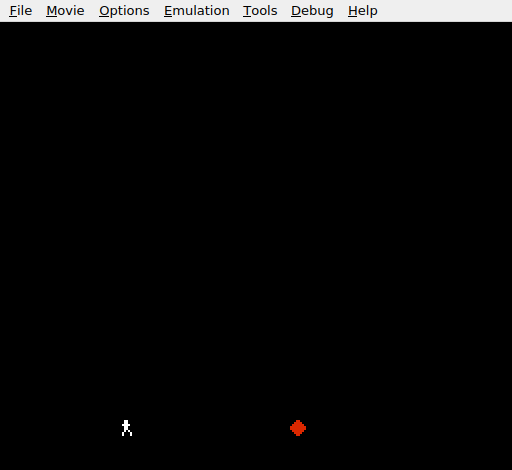
A white running figure on the left, a red diamond on the right. The diamond scrolls left across the floor. Jump over it — if you’re on the ground when it reaches you, you’re knocked back to the start. The diamond wraps around and comes again. And again.
Try This: Change the Speed
OBSTACLE_SPEED = 2 ; Current: moderateSet it to 1 for a slow, predictable obstacle. Set it to 3 or 4 for a real challenge. At speed 4, the diamond crosses the screen in about one second — you need sharp reflexes to jump in time.
Try This: Two Obstacles
Add a third sprite (OAM entry 2, bytes 8–11) and a second variable obstacle2_x. Initialise the second obstacle at X=128 so they’re staggered:
obstacle2_x: .res 1

    ; In init:
    lda #128
    sta obstacle2_x

    ; In main loop (after first obstacle movement):
    lda obstacle2_x
    sec
    sbc #OBSTACLE_SPEED
    sta obstacle2_x
Duplicate the collision check for the second obstacle. Now the player must time jumps to clear both diamonds — and sometimes jump twice in quick succession.
Try This: Upward Knockback
Instead of resetting the player’s X, launch them upward:
    ; On hit:
    lda #JUMP_VEL
    sta vel_y
    lda #0
    sta on_ground
The player bounces off the obstacle like they’ve been hit. It feels more dynamic than a position reset and teaches that the velocity system from Unit 3 can be reused for any vertical movement — not just player-initiated jumps.
If It Doesn’t Work
- No obstacle on screen? Check that
oam_buffer+4is set toFLOOR_Y(not left as $EF from the hide-sprites loop). The obstacle sprite must be initialised BEFORE hiding other sprites, or hidden sprites must start at index 8, not 4. - Obstacle doesn’t move? Make sure the
SEC/SBCcode runs every frame inside the main loop, not in the init section. - Collision triggers when it shouldn’t? Check the screen-edge guard (
CMP #240/BCS). Without it, the wrapping obstacle can trigger false collisions when its X position is near 255. - Collision never triggers? Both range checks must pass. A common mistake is using
BCCwithoutBEQ— when the right edge exactly equals the left edge, carry is set (no borrow), but the sprites are touching, not overlapping. TheBEQcatches this case. - Obstacle is white instead of red? The attribute byte (oam_buffer+6) must be
1to select palette 1. If it’s0, the obstacle uses the same palette as the player. - Player gets hit while jumping? Check that
on_groundis 0 during the jump. The collision guardBEQ @no_collideonly works ifon_groundis cleared when the player leaves the floor. - Forgot SEC?
SBCwithoutSECsubtracts an extra 1 when the carry flag is clear. The obstacle moves at 3 pixels per frame instead of 2 — fast enough to notice.
What You’ve Learnt
- Multiple OAM sprites — each sprite is a 4-byte block in the OAM buffer. Entry 0 is bytes 0–3, entry 1 is bytes 4–7, and so on up to entry 63 at bytes 252–255.
- SEC/SBC subtraction —
SECsets the carry flag beforeSBC, just asCLCclears it beforeADC. ForgettingSECintroduces an off-by-one error. - Unsigned wrapping — subtracting past zero wraps to 255. The obstacle scrolls left, wraps, and reappears from the right with no special reset code.
- Bounding box collision — two rectangles overlap when each one’s right edge is past the other’s left edge. Two comparisons, tested together.
- Guard conditions — the
on_groundcheck and the screen-edge check prevent false collisions. Without guards, the collision triggers when the player is airborne or the obstacle is wrapping. - Sprite palettes — the attribute byte’s low 2 bits select which of the 4 sprite palettes to use. Different palettes let sprites share tiles but appear in different colours.
What’s Next
The jump works, the obstacle scrolls, the collision stings. But the leap is silent — in Unit 5, the APU’s pulse channel gives the jump a voice.