Background Tiles
The nametable fills the screen with tiles from CHR-ROM. Write tile indices via $2006/$2007, set colours with the attribute table. The world becomes visible.
The game has movement, jumping, an obstacle, and sound — but the world is a black void. The player runs on an invisible floor. This unit fills the bottom of the screen with green ground tiles. The level becomes visible.
The NES background is a grid of tiles stored in a region of PPU memory called the nametable. Writing tile indices to the nametable is the same $2006/$2007 protocol we used for palettes in Unit 1 — set an address, write data. The PPU does the rest.
The Nametable
The PPU draws the background from a 32×30 grid of tiles. Each cell holds one byte — a tile index pointing to an 8×8 pattern in CHR-ROM. The grid fills the screen: 32 tiles × 8 pixels = 256 pixels wide, 30 tiles × 8 pixels = 240 pixels tall.
Nametable 0 starts at PPU address $2000

$2000 = row 0,  col 0    (top-left corner)
$2001 = row 0,  col 1
...
$201F = row 0,  col 31   (top-right corner)
$2020 = row 1,  col 0    (second row)
...
$23BF = row 29, col 31   (bottom-right corner)
Each row is 32 bytes. Row N starts at $2000 + (N × 32). The entire nametable is 960 bytes (32 × 30).
When we write tile index 3 to address $2380, the PPU looks up tile 3 in CHR-ROM and draws it at row 28, column 0. The mapping is direct: one byte in the nametable = one tile on screen.
Writing Ground Tiles
    ; --- Write ground tiles (rows 26-29) ---
    bit PPUSTATUS
    lda #$23
    sta PPUADDR
    lda #$40
    sta PPUADDR             ; PPU address $2340 (row 26)

    lda #GROUND_TILE        ; Tile index 3
    ldx #128                ; 4 rows × 32 tiles
@write_ground:
    sta PPUDATA
    dex
    bne @write_ground
The protocol is identical to palette loading. BIT PPUSTATUS resets the address latch. Two writes to $2006 set the PPU address ($2340 = row 26). Then each write to $2007 places one tile index, and the address auto-increments.
GROUND_TILE is 3 — tile index 3 in CHR-ROM. The loop writes it 128 times: 4 rows × 32 tiles per row. After the loop, rows 26 through 29 are filled with ground tiles. Everything above remains tile 0 (empty = black sky).
Why Row 26?
Row 26 starts at scanline 208 (26 × 8). The player sprite at FLOOR_Y = 200 has its bottom pixel at scanline 208 (the NES displays sprites one scanline below their OAM Y value). Feet at scanline 208, ground at scanline 208 — the character stands right on the surface.
The Ground Tile
Tile 3 in CHR-ROM has a light top edge and a solid body:
; Tile 3: Ground block
.byte %11111111              ; Plane 0 (all rows = on)
.byte %11111111
.byte %11111111
.byte %11111111
.byte %11111111
.byte %11111111
.byte %11111111
.byte %11111111
.byte %11111111              ; Plane 1 (row 0 only = on)
.byte %00000000
.byte %00000000
.byte %00000000
.byte %00000000
.byte %00000000
.byte %00000000
.byte %00000000
Row 0 has both planes set → colour index 3 (the brightest colour in the palette). Rows 1–7 have only plane 0 → colour index 1. The result is a solid block with a light highlight along the top — a subtle surface edge that repeats across the ground.
The Attribute Table
The nametable holds tile indices, but not colours. Colour is controlled by the attribute table — 64 bytes that follow the nametable at $23C0. Each byte assigns a palette to a 32×32 pixel (4×4 tile) area of the screen.
    ; --- Set ground palette (attribute table) ---
    bit PPUSTATUS
    lda #$23
    sta PPUADDR
    lda #$F0
    sta PPUADDR             ; PPU address $23F0 (attribute row 6)

    lda #$50                ; Palette 1 for bottom quadrants (rows 26-27)
    ldx #8
@write_attr6:
    sta PPUDATA
    dex
    bne @write_attr6

    lda #$05                ; Palette 1 for top quadrants (rows 28-29)
    ldx #8
@write_attr7:
    sta PPUDATA
    dex
    bne @write_attr7
Each attribute byte is divided into four 2-bit fields, one per quadrant:
Bit:  7 6   5 4   3 2   1 0
      BR    BL    TR    TL

TL = top-left  2×2 tiles     (bits 1-0)
TR = top-right 2×2 tiles     (bits 3-2)
BL = bottom-left 2×2 tiles   (bits 5-4)
BR = bottom-right 2×2 tiles  (bits 7-6)
Each 2-bit field selects one of the four background palettes (0–3).
Attribute row 6 covers tile rows 24–27. The ground starts at row 26, which is in the bottom half. We set the bottom quadrants to palette 1 and leave the top quadrants at palette 0:
$50 = %01010000 — bits 5-4 = %01 (bottom-left = palette 1), bits 7-6 = %01 (bottom-right = palette 1). The top bits stay %00 (palette 0 for the sky above).
Attribute row 7 covers tile rows 28–29. Both halves are ground, so the top quadrants use palette 1:
$05 = %00000101 — bits 1-0 = %01 (top-left = palette 1), bits 3-2 = %01 (top-right = palette 1).
The 16×16 Pixel Limit
The attribute table’s coarsest constraint is that you can only change palettes every 16×16 pixels (2×2 tiles). This is why NES backgrounds often have blocky colour boundaries — the hardware physically cannot assign different palettes to adjacent 8×8 tiles within the same quadrant. Every NES game works within this limitation.
Background Palette 1
The palette data now has a dedicated ground palette:
.byte $0F, $09, $19, $29 ; Palette 1: dark green, green, light greenColour index 1 ($09, dark green) fills the ground body. Colour index 3 ($29, light green) highlights the top edge. The combination creates a simple two-tone ground that reads clearly against the black sky.
Clearing the Nametable
Before writing ground tiles, the code clears the entire nametable to tile 0:
    bit PPUSTATUS
    lda #$20
    sta PPUADDR
    lda #$00
    sta PPUADDR             ; Start at $2000

    lda #0                  ; Tile 0 (empty)
    ldy #4                  ; 4 × 256 = 1024 bytes
    ldx #0
@clear_nt:
    sta PPUDATA
    dex
    bne @clear_nt
    dey
    bne @clear_nt
This writes 1024 zeros — 960 bytes of nametable plus 64 bytes of attribute table. The PPU’s VRAM might contain random values after power-on, so clearing it prevents garbage tiles from appearing on screen.
The nested loop uses X (inner, 256 iterations) and Y (outer, 4 iterations) for 1024 total writes. This is the first time we’ve used the Y register for a counter — it works identically to X with DEY/BNE.
Resetting the Scroll
After writing to the nametable via $2006/$2007, the PPU’s internal address register points somewhere in the middle of VRAM. If rendering starts without resetting it, the background scrolls to a random position.
    bit PPUSTATUS
    lda #0
    sta PPUSCROLL           ; X scroll = 0
    sta PPUSCROLL           ; Y scroll = 0
Two writes to $2005 (PPUSCROLL) set the horizontal and vertical scroll to zero. The background displays from the top-left corner of the nametable — exactly what we want. This goes right before enabling rendering.
The Complete Code
; =============================================================================
; DASH - Unit 6: Background Tiles
; =============================================================================
; The nametable fills the screen with tiles from CHR-ROM. Green ground
; replaces the invisible floor line. The world becomes visible.
; =============================================================================

; -----------------------------------------------------------------------------
; NES Hardware Addresses
; -----------------------------------------------------------------------------
PPUCTRL   = $2000
PPUMASK   = $2001
PPUSTATUS = $2002
OAMADDR   = $2003
PPUSCROLL = $2005
PPUADDR   = $2006
PPUDATA   = $2007
OAMDMA    = $4014
JOYPAD1   = $4016

; -----------------------------------------------------------------------------
; APU Registers
; -----------------------------------------------------------------------------
SQ1_VOL    = $4000
SQ1_SWEEP  = $4001
SQ1_LO     = $4002
SQ1_HI     = $4003
APU_STATUS = $4015

; -----------------------------------------------------------------------------
; Button Masks
; -----------------------------------------------------------------------------
BTN_A      = %10000000
BTN_B      = %01000000
BTN_SELECT = %00100000
BTN_START  = %00010000
BTN_UP     = %00001000
BTN_DOWN   = %00000100
BTN_LEFT   = %00000010
BTN_RIGHT  = %00000001

; -----------------------------------------------------------------------------
; Game Constants
; -----------------------------------------------------------------------------
PLAYER_X       = 60
PLAYER_Y       = 200           ; Adjusted to sit on visible ground
PLAYER_TILE    = 1
RIGHT_WALL     = 248
FLOOR_Y        = 200           ; Aligned with tile row 26 (scanline 208)
GRAVITY        = 1
JUMP_VEL       = $F6
OBSTACLE_TILE  = 2
OBSTACLE_SPEED = 2
GROUND_TILE    = 3

; -----------------------------------------------------------------------------
; Memory
; -----------------------------------------------------------------------------
.segment "ZEROPAGE"
player_x:   .res 1
player_y:   .res 1
vel_y:      .res 1
buttons:    .res 1
nmi_flag:   .res 1
on_ground:  .res 1
obstacle_x: .res 1

.segment "OAM"
oam_buffer: .res 256

.segment "BSS"

; =============================================================================
; iNES Header
; =============================================================================
.segment "HEADER"
    .byte "NES", $1A
    .byte 2
    .byte 1
    .byte $01
    .byte $00
    .byte 0,0,0,0,0,0,0,0

; =============================================================================
; Code
; =============================================================================
.segment "CODE"

; --- Reset ---
reset:
    sei
    cld
    ldx #$40
    stx $4017
    ldx #$FF
    txs
    inx
    stx PPUCTRL
    stx PPUMASK
    stx $4010
    stx APU_STATUS

@vblank1:
    bit PPUSTATUS
    bpl @vblank1

    lda #0
@clear_ram:
    sta $0000, x
    sta $0100, x
    sta $0200, x
    sta $0300, x
    sta $0400, x
    sta $0500, x
    sta $0600, x
    sta $0700, x
    inx
    bne @clear_ram

@vblank2:
    bit PPUSTATUS
    bpl @vblank2

    ; --- Load palette ---
    bit PPUSTATUS
    lda #$3F
    sta PPUADDR
    lda #$00
    sta PPUADDR

    ldx #0
@load_palette:
    lda palette_data, x
    sta PPUDATA
    inx
    cpx #32
    bne @load_palette

    ; --- Clear nametable 0 ---
    bit PPUSTATUS
    lda #$20
    sta PPUADDR
    lda #$00
    sta PPUADDR

    lda #0
    ldy #4                  ; 4 pages of 256 bytes = 1024
    ldx #0
@clear_nt:
    sta PPUDATA
    dex
    bne @clear_nt
    dey
    bne @clear_nt

    ; --- Write ground tiles (rows 26-29) ---
    bit PPUSTATUS
    lda #$23
    sta PPUADDR
    lda #$40
    sta PPUADDR             ; PPU address $2340 (row 26)

    lda #GROUND_TILE
    ldx #128                ; 4 rows × 32 tiles
@write_ground:
    sta PPUDATA
    dex
    bne @write_ground

    ; --- Set ground palette (attribute table) ---
    bit PPUSTATUS
    lda #$23
    sta PPUADDR
    lda #$F0
    sta PPUADDR             ; PPU address $23F0 (attribute row 6)

    lda #$50                ; Palette 1 for bottom quadrants (rows 26-27)
    ldx #8
@write_attr6:
    sta PPUDATA
    dex
    bne @write_attr6

    lda #$05                ; Palette 1 for top quadrants (rows 28-29)
    ldx #8
@write_attr7:
    sta PPUDATA
    dex
    bne @write_attr7

    ; --- Set up player sprite (OAM entry 0) ---
    lda #PLAYER_Y
    sta oam_buffer+0
    lda #PLAYER_TILE
    sta oam_buffer+1
    lda #0
    sta oam_buffer+2
    lda #PLAYER_X
    sta oam_buffer+3

    ; Set up obstacle sprite (OAM entry 1)
    lda #FLOOR_Y
    sta oam_buffer+4
    lda #OBSTACLE_TILE
    sta oam_buffer+5
    lda #1
    sta oam_buffer+6
    lda #255
    sta oam_buffer+7

    ; Initialise game state
    lda #PLAYER_X
    sta player_x
    lda #PLAYER_Y
    sta player_y
    lda #0
    sta vel_y
    lda #1
    sta on_ground
    lda #255
    sta obstacle_x

    ; Hide other sprites (entries 2-63)
    lda #$EF
    ldx #8
@hide_sprites:
    sta oam_buffer, x
    inx
    bne @hide_sprites

    ; Enable APU pulse channel 1
    lda #%00000001
    sta APU_STATUS

    ; Reset scroll position
    bit PPUSTATUS
    lda #0
    sta PPUSCROLL
    sta PPUSCROLL

    ; Enable rendering
    lda #%10000000
    sta PPUCTRL
    lda #%00011110
    sta PPUMASK

; =============================================================================
; Main Loop
; =============================================================================
main_loop:
    lda nmi_flag
    beq main_loop
    lda #0
    sta nmi_flag

    ; --- Read controller ---
    lda #1
    sta JOYPAD1
    lda #0
    sta JOYPAD1

    ldx #8
@read_pad:
    lda JOYPAD1
    lsr a
    rol buttons
    dex
    bne @read_pad

    ; --- Jump check ---
    lda buttons
    and #BTN_A
    beq @no_jump
    lda on_ground
    beq @no_jump
    lda #JUMP_VEL
    sta vel_y
    lda #0
    sta on_ground

    ; Play jump sound
    lda #%10111000
    sta SQ1_VOL
    lda #%10111001
    sta SQ1_SWEEP
    lda #$C8
    sta SQ1_LO
    lda #$00
    sta SQ1_HI

@no_jump:

    ; --- Move left/right ---
    lda buttons
    and #BTN_LEFT
    beq @not_left
    lda player_x
    beq @not_left
    dec player_x
@not_left:

    lda buttons
    and #BTN_RIGHT
    beq @not_right
    lda player_x
    cmp #RIGHT_WALL
    bcs @not_right
    inc player_x
@not_right:

    ; --- Apply gravity ---
    lda vel_y
    clc
    adc #GRAVITY
    sta vel_y

    ; --- Apply velocity to Y position ---
    lda player_y
    clc
    adc vel_y
    sta player_y

    ; --- Floor collision ---
    lda player_y
    cmp #FLOOR_Y
    bcc @in_air
    lda #FLOOR_Y
    sta player_y
    lda #0
    sta vel_y
    lda #1
    sta on_ground
@in_air:

    ; --- Move obstacle ---
    lda obstacle_x
    sec
    sbc #OBSTACLE_SPEED
    sta obstacle_x

    ; --- Collision with obstacle ---
    lda on_ground
    beq @no_collide

    lda obstacle_x
    cmp #240
    bcs @no_collide

    lda player_x
    clc
    adc #8
    cmp obstacle_x
    bcc @no_collide
    beq @no_collide

    lda obstacle_x
    clc
    adc #8
    cmp player_x
    bcc @no_collide
    beq @no_collide

    lda #PLAYER_X
    sta player_x

@no_collide:

    ; --- Update sprite positions ---
    lda player_y
    sta oam_buffer+0
    lda player_x
    sta oam_buffer+3

    lda #FLOOR_Y
    sta oam_buffer+4
    lda obstacle_x
    sta oam_buffer+7

    jmp main_loop

; =============================================================================
; NMI Handler
; =============================================================================
nmi:
    pha
    txa
    pha
    tya
    pha

    lda #0
    sta OAMADDR
    lda #>oam_buffer
    sta OAMDMA

    lda #1
    sta nmi_flag

    pla
    tay
    pla
    tax
    pla
    rti

irq:
    rti

; =============================================================================
; Data
; =============================================================================

palette_data:
    ; Background palettes
    .byte $0F, $00, $10, $20   ; Palette 0: greys (sky)
    .byte $0F, $09, $19, $29   ; Palette 1: greens (ground)
    .byte $0F, $00, $10, $20
    .byte $0F, $00, $10, $20
    ; Sprite palettes
    .byte $0F, $30, $16, $27   ; Palette 0: white (player)
    .byte $0F, $16, $27, $30   ; Palette 1: red (obstacle)
    .byte $0F, $30, $16, $27
    .byte $0F, $30, $16, $27

; =============================================================================
; Vectors
; =============================================================================
.segment "VECTORS"
    .word nmi
    .word reset
    .word irq

; =============================================================================
; CHR-ROM
; =============================================================================
.segment "CHARS"

; Tile 0: Empty
.byte $00,$00,$00,$00,$00,$00,$00,$00
.byte $00,$00,$00,$00,$00,$00,$00,$00

; Tile 1: Running figure
.byte %00110000
.byte %00110000
.byte %01111000
.byte %00110000
.byte %00110000
.byte %00101000
.byte %01000100
.byte %01000100
.byte %00000000
.byte %00000000
.byte %00000000
.byte %00000000
.byte %00000000
.byte %00000000
.byte %00000000
.byte %00000000

; Tile 2: Diamond obstacle
.byte %00011000
.byte %00111100
.byte %01111110
.byte %11111111
.byte %11111111
.byte %01111110
.byte %00111100
.byte %00011000
.byte %00000000
.byte %00000000
.byte %00000000
.byte %00000000
.byte %00000000
.byte %00000000
.byte %00000000
.byte %00000000

; Tile 3: Ground block (light top edge, solid body)
.byte %11111111              ; Plane 0
.byte %11111111
.byte %11111111
.byte %11111111
.byte %11111111
.byte %11111111
.byte %11111111
.byte %11111111
.byte %11111111              ; Plane 1 (row 0: colour 3 = highlight)
.byte %00000000              ; Rows 1-7: colour 1 = ground body
.byte %00000000
.byte %00000000
.byte %00000000
.byte %00000000
.byte %00000000
.byte %00000000

.res 8192 - 64, $00
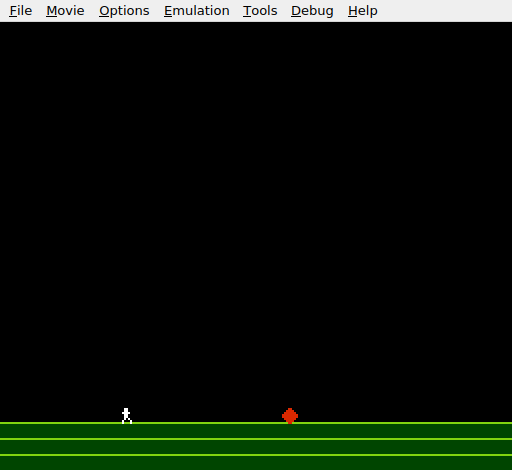
Black sky, green ground with a light top edge. The white figure and red diamond stand on the surface. For the first time, the level is visible — the player can see where the floor is. The game looks like a game.
Try This: Change the Ground Colour
Swap the green palette for earthy browns:
.byte $0F, $07, $17, $27 ; Palette 1: dark brown, brown, light brownOr try blues for an underwater feel ($01, $11, $21). The tile stays the same — only the palette changes. This is the power of the NES colour system: one tile, many looks.
Try This: A Different Ground Pattern
Replace the ground tile with a brick pattern:
; Tile 3: Brick
.byte %11111111              ; Plane 0
.byte %10000000
.byte %11111111
.byte %11111111
.byte %11111111
.byte %00000100
.byte %11111111
.byte %11111111
.byte %00000000              ; Plane 1 (all zeros = colour 1 only)
.byte %00000000
.byte %00000000
.byte %00000000
.byte %00000000
.byte %00000000
.byte %00000000
.byte %00000000
The gaps in plane 0 create mortar lines between bricks. Since colour 0 is the background colour ($0F, black), the mortar shows as dark lines through the ground.
Try This: Add a Platform
Write a few ground tiles to a higher row — say, row 20 (address $2280):
    bit PPUSTATUS
    lda #$22
    sta PPUADDR
    lda #$88                ; $2288 = row 20, column 8
    sta PPUADDR

    lda #GROUND_TILE
    ldx #8                  ; 8 tiles wide
@write_platform:
    sta PPUDATA
    dex
    bne @write_platform
This draws a short platform floating above the ground. The player can’t stand on it yet (tile collision comes in Unit 7), but you can see where the level design is heading.
If It Doesn’t Work
- Ground tiles don’t appear? Check the PPU address.
$2340is row 26. A wrong high byte (e.g.,$20instead of$23) writes to the wrong part of the nametable. - Wrong colours? The attribute table controls the palette. Check that the attribute byte values set the correct quadrants to palette 1.
$50for row 6 (bottom quadrants) and$05for row 7 (top quadrants). Getting the bit positions wrong produces striped or chequered colour patterns. - Garbage on screen? Clear the nametable before writing ground tiles. PPU VRAM has random values after power-on. The clear loop (1024 bytes of zero) prevents stray tiles.
- Background scrolled to wrong position? Reset the scroll with two writes to
$2005after all nametable writes and before enabling rendering. Without this, the PPU’s internal address register holds whatever was last written to$2006, which corrupts the scroll position. - Sprites in the wrong position?
FLOOR_Ychanged from 206 to 200 to align with the tile grid. Make sure both the player and obstacle use the new value.
What You’ve Learnt
- Nametable structure — a 32×30 grid of tile indices at PPU address
$2000. Each byte references an 8×8 tile in CHR-ROM. The PPU renders the grid as the background. - PPU write protocol for nametables — same as palettes:
BIT PPUSTATUS, set address via$2006, write data via$2007. The address auto-increments. - Attribute table — 64 bytes at
$23C0that assign palettes to 32×32 pixel areas. Each byte has four 2-bit fields for four quadrants. The 16×16 pixel granularity is a fundamental NES constraint. - Two-plane tile design — combining plane 0 and plane 1 creates up to 4 colour indices per tile. A highlight row (colour 3) over a solid body (colour 1) makes a simple but effective ground tile.
- Nametable clearing — PPU VRAM may contain random data after power-on. Clearing it to tile 0 prevents visual garbage.
- Scroll reset — two writes to
$2005(PPUSCROLL) after nametable writes prevent the background from displaying at a random offset.
What’s Next
The ground is visible, but the player still lands on an invisible floor line. In Unit 7, the game reads the nametable to detect what tile is below the player’s feet — and platforms become real.