Platform Collision
The game reads the level data to detect what tile is below the player's feet. A floating platform proves the system — platforms become real.
The ground is visible — but the player doesn’t actually know it’s there. The floor collision still uses a hardcoded Y position. If you added a floating platform, the player would fall right through it. The tiles are decoration, not structure.
This unit replaces the invisible floor line with real tile-based collision. The game reads the level data, finds what tile is below the player’s feet, and decides whether to land. A floating platform proves the system works — the player can stand on any solid tile, anywhere on screen.
Pixels to Tiles
The player position is in pixels. The level is in tiles. To check collision, we need to convert between the two. Each tile is 8 pixels wide and 8 pixels tall, so:
tile_column = pixel_x / 8
tile_row    = pixel_y / 8
Division by 8 is three right shifts. The 6502 has LSR (Logical Shift Right), which shifts every bit one position to the right — the same as dividing by 2. Three LSR instructions divide by 8:
    lda player_y
    lsr                     ; / 2
    lsr                     ; / 4
    lsr                     ; / 8
The remainder is discarded. Pixel 161 becomes tile row 20. Pixel 207 becomes tile row 25. The conversion is instant — no multiplication, no lookup table, just three shifts.
Level Data
The tile collision needs to know which tiles are solid. We store this as level data in ROM — three row templates that represent every row on screen:
; Three unique row types — most rows share the same data.

level_empty_row:
    .byte 0,0,0,0, 0,0,0,0, 0,0,0,0, 0,0,0,0
    .byte 0,0,0,0, 0,0,0,0, 0,0,0,0, 0,0,0,0

level_platform_row:
    .byte 0,0,0,0, 0,0,0,0, 0,0,0,0, 3,3,3,3
    .byte 3,3,3,3, 0,0,0,0, 0,0,0,0, 0,0,0,0

level_ground_row:
    .byte 3,3,3,3, 3,3,3,3, 3,3,3,3, 3,3,3,3
    .byte 3,3,3,3, 3,3,3,3, 3,3,3,3, 3,3,3,3

; Row pointer tables (30 entries — one per nametable row)
level_rows_lo:
    .byte <level_empty_row      ; Rows 0-19 (empty sky)
    .byte <level_empty_row
    .byte <level_empty_row
    .byte <level_empty_row
    .byte <level_empty_row
    .byte <level_empty_row
    .byte <level_empty_row
    .byte <level_empty_row
    .byte <level_empty_row
    .byte <level_empty_row
    .byte <level_empty_row
    .byte <level_empty_row
    .byte <level_empty_row
    .byte <level_empty_row
    .byte <level_empty_row
    .byte <level_empty_row
    .byte <level_empty_row
    .byte <level_empty_row
    .byte <level_empty_row
    .byte <level_empty_row
    .byte <level_platform_row   ; Row 20: floating platform
    .byte <level_empty_row      ; Rows 21-25 (empty)
    .byte <level_empty_row
    .byte <level_empty_row
    .byte <level_empty_row
    .byte <level_empty_row
    .byte <level_ground_row     ; Rows 26-29: ground
    .byte <level_ground_row
    .byte <level_ground_row
    .byte <level_ground_row
level_empty_row is 32 zeros — an entire row of empty sky. level_ground_row is 32 threes — a full row of ground tiles. level_platform_row has ground tiles at columns 12–19 and empty space elsewhere — the floating platform.
The pointer tables are the key. Each of the 30 nametable rows gets a two-byte pointer (low byte and high byte stored in separate tables) to its row data. Rows 0–19 point to level_empty_row. Row 20 points to level_platform_row. Rows 26–29 point to level_ground_row.
Most rows share the same data — 20 empty rows all point to the same 32 bytes. The entire level definition is 96 bytes of row data plus 60 bytes of pointers. Compact.
Why Split Tables?
The 6502 is an 8-bit processor. It can’t store a 16-bit address in one byte. Every pointer needs two bytes: a low byte and a high byte. Storing them in separate tables (all the low bytes together, all the high bytes together) lets us use the tile row as a direct index:
    lda level_rows_lo, x       ; Low byte of pointer
    sta tile_ptr
    lda level_rows_hi, x       ; High byte of pointer
    sta tile_ptr+1
X holds the tile row. One indexed load gets the low byte, another gets the high byte. The two bytes form a complete 16-bit address in zero page.
Reading a Tile
With the row pointer in tile_ptr, we need to read the tile at a specific column. This is where indirect indexed addressing comes in — the most important addressing mode for NES development.
lda (tile_ptr), yThis instruction does three things:
- Reads the 16-bit address stored at
tile_ptr(andtile_ptr+1) in zero page - Adds Y to that address
- Loads the byte at the resulting address
Y holds the tile column. The instruction reads: “go to the address stored in tile_ptr, advance Y bytes forward, and load what’s there.” One instruction replaces what would otherwise be complex 16-bit arithmetic.
The Collision Check
    ; --- Tile collision ---
    lda vel_y
    bmi @no_floor           ; Moving upward — skip floor check

    ; Calculate tile row (feet position)
    lda player_y
    clc
    adc #8                  ; Bottom of sprite
    lsr
    lsr
    lsr                     ; / 8 = tile row
    tax

    ; Bounds check: below screen = solid
    cpx #30
    bcs @on_solid

    ; Load row pointer from level data
    lda level_rows_lo, x
    sta tile_ptr
    lda level_rows_hi, x
    sta tile_ptr+1

    ; Calculate tile column (sprite centre)
    lda player_x
    clc
    adc #4                  ; Centre of 8-pixel sprite
    lsr
    lsr
    lsr                     ; / 8 = tile column
    tay

    ; Read tile at (row, col)
    lda (tile_ptr), y       ; Indirect indexed addressing
    beq @no_floor           ; Tile 0 = empty

@on_solid:
    ; Snap player to tile surface
    lda player_y
    clc
    adc #8                  ; Feet Y
    and #%11111000          ; Round down to tile boundary
    sec
    sbc #8                  ; Back to sprite top
    sta player_y
    lda #0
    sta vel_y
    lda #1
    sta on_ground
    jmp @done_floor

@no_floor:
    lda #0
    sta on_ground

@done_floor:
The check runs every frame after applying gravity and velocity. Step by step:
Skip if moving upward. BMI checks the sign bit of vel_y. If the player is moving upward (negative velocity), skip the floor check entirely. This means the player can jump up through platforms from below — a natural behaviour that many NES games use.
Calculate the tile row. Add 8 to player_y to get the feet position (the bottom of the sprite), then shift right three times to divide by 8. The result is the tile row.
Bounds check. If the tile row is 30 or higher, the player is below the screen — treat it as solid ground.
Load the row pointer. Use the tile row as an index into the pointer tables. Store the two-byte address in tile_ptr.
Calculate the tile column. Add 4 to player_x (the centre of the 8-pixel sprite) and shift right three times. Using the centre rather than the left edge means the player falls when their midpoint crosses the platform edge — it feels more natural.
Read the tile. LDA (tile_ptr), Y reads the tile at the calculated row and column. If it’s zero (empty), there’s no floor.
Snap to the surface. If the tile is solid, we align the player to the tile grid. AND #%11111000 clears the bottom three bits of the feet position — rounding down to the nearest multiple of 8 (the top of the tile). Subtract 8 to get the sprite’s top position. The player’s feet sit exactly on the tile surface.
Walking off edges. If no solid tile is found, on_ground is cleared to zero. The player starts falling — gravity takes over. Walk past the edge of a platform and you drop. No special code needed.
AND for Alignment
AND #%11111000 is a bit-masking trick. The binary mask %11111000 keeps the top 5 bits and clears the bottom 3. Since each tile is 8 pixels (2³), clearing the bottom 3 bits rounds down to the tile boundary:
Feet at pixel 163:  %10100011
AND #%11111000:     %10100000 = 160   (tile row 20 starts here)
The result is always the top pixel of the tile — exactly where the player should stand.
The Floating Platform
The nametable init writes 8 ground tiles at row 20, columns 12–19:
    bit PPUSTATUS
    lda #$22
    sta PPUADDR
    lda #$8C
    sta PPUADDR             ; PPU address $228C (row 20, col 12)

    lda #GROUND_TILE
    ldx #8                  ; 8 tiles wide
@write_platform:
    sta PPUDATA
    dex
    bne @write_platform
Row 20 starts at PPU address $2000 + (20 × 32) = $2280. Column 12 adds 12 more: $228C. Eight writes place the platform tiles.
The attribute table also needs updating. The platform attributes go at attribute row 5 ($23E8), which covers tile rows 20–23. The code writes all attribute data from a table:
attr_data:
    ; Attribute row 5 — platform
    .byte $00, $00, $00, $05, $05, $00, $00, $00
    ; Attribute row 6 — ground (bottom quadrants)
    .byte $50, $50, $50, $50, $50, $50, $50, $50
    ; Attribute row 7 — ground (top quadrants)
    .byte $05, $05, $05, $05, $05, $05, $05, $05
$05 at attribute columns 3 and 4 of row 5 sets palette 1 for the top quadrants — exactly where the platform tiles sit. The remaining columns stay at $00 (palette 0, the sky).
Obstacle Height Check
With a floating platform, the player can be on_ground at two different heights — the ground (Y = 200) or the platform (Y = 152). The obstacle still runs along the ground. Without an extra check, the player standing on the high platform would collide with the obstacle passing far below them.
A simple Y comparison fixes it:
    lda player_y
    cmp #(FLOOR_Y - 7)
    bcc @no_collide         ; Player above obstacle — on a platform
If the player’s Y position is less than 193 (more than 7 pixels above the ground-level obstacle), skip the collision. The player on the platform is safe. The player on the ground still collides normally.
The Complete Code
; =============================================================================
; DASH - Unit 7: Platform Collision
; =============================================================================
; Tile-based collision replaces the invisible floor line. A floating platform
; proves the system works — the player can stand on any solid tile.
; =============================================================================

; -----------------------------------------------------------------------------
; NES Hardware Addresses
; -----------------------------------------------------------------------------
PPUCTRL   = $2000
PPUMASK   = $2001
PPUSTATUS = $2002
OAMADDR   = $2003
PPUSCROLL = $2005
PPUADDR   = $2006
PPUDATA   = $2007
OAMDMA    = $4014
JOYPAD1   = $4016

; -----------------------------------------------------------------------------
; APU Registers
; -----------------------------------------------------------------------------
SQ1_VOL    = $4000
SQ1_SWEEP  = $4001
SQ1_LO     = $4002
SQ1_HI     = $4003
APU_STATUS = $4015

; -----------------------------------------------------------------------------
; Button Masks
; -----------------------------------------------------------------------------
BTN_A      = %10000000
BTN_B      = %01000000
BTN_SELECT = %00100000
BTN_START  = %00010000
BTN_UP     = %00001000
BTN_DOWN   = %00000100
BTN_LEFT   = %00000010
BTN_RIGHT  = %00000001

; -----------------------------------------------------------------------------
; Game Constants
; -----------------------------------------------------------------------------
PLAYER_X       = 60
PLAYER_Y       = 200
PLAYER_TILE    = 1
RIGHT_WALL     = 248
FLOOR_Y        = 200           ; Obstacle Y position (ground level)
GRAVITY        = 1
JUMP_VEL       = $F6
OBSTACLE_TILE  = 2
OBSTACLE_SPEED = 2
GROUND_TILE    = 3

; -----------------------------------------------------------------------------
; Memory
; -----------------------------------------------------------------------------
.segment "ZEROPAGE"
player_x:   .res 1
player_y:   .res 1
vel_y:      .res 1
buttons:    .res 1
nmi_flag:   .res 1
on_ground:  .res 1
obstacle_x: .res 1
tile_ptr:   .res 2             ; Pointer for level data lookup

.segment "OAM"
oam_buffer: .res 256

.segment "BSS"

; =============================================================================
; iNES Header
; =============================================================================
.segment "HEADER"
    .byte "NES", $1A
    .byte 2
    .byte 1
    .byte $01
    .byte $00
    .byte 0,0,0,0,0,0,0,0

; =============================================================================
; Code
; =============================================================================
.segment "CODE"

; --- Reset ---
reset:
    sei
    cld
    ldx #$40
    stx $4017
    ldx #$FF
    txs
    inx
    stx PPUCTRL
    stx PPUMASK
    stx $4010
    stx APU_STATUS

@vblank1:
    bit PPUSTATUS
    bpl @vblank1

    lda #0
@clear_ram:
    sta $0000, x
    sta $0100, x
    sta $0200, x
    sta $0300, x
    sta $0400, x
    sta $0500, x
    sta $0600, x
    sta $0700, x
    inx
    bne @clear_ram

@vblank2:
    bit PPUSTATUS
    bpl @vblank2

    ; --- Load palette ---
    bit PPUSTATUS
    lda #$3F
    sta PPUADDR
    lda #$00
    sta PPUADDR

    ldx #0
@load_palette:
    lda palette_data, x
    sta PPUDATA
    inx
    cpx #32
    bne @load_palette

    ; --- Clear nametable 0 ---
    bit PPUSTATUS
    lda #$20
    sta PPUADDR
    lda #$00
    sta PPUADDR

    lda #0
    ldy #4
    ldx #0
@clear_nt:
    sta PPUDATA
    dex
    bne @clear_nt
    dey
    bne @clear_nt

    ; --- Write ground tiles (rows 26-29) ---
    bit PPUSTATUS
    lda #$23
    sta PPUADDR
    lda #$40
    sta PPUADDR             ; PPU address $2340 (row 26)

    lda #GROUND_TILE
    ldx #128                ; 4 rows × 32 tiles
@write_ground:
    sta PPUDATA
    dex
    bne @write_ground

    ; --- Write platform tiles (row 20, columns 12-19) ---
    bit PPUSTATUS
    lda #$22
    sta PPUADDR
    lda #$8C
    sta PPUADDR             ; PPU address $228C (row 20, col 12)

    lda #GROUND_TILE
    ldx #8                  ; 8 tiles wide
@write_platform:
    sta PPUDATA
    dex
    bne @write_platform

    ; --- Set attributes (platform + ground palettes) ---
    bit PPUSTATUS
    lda #$23
    sta PPUADDR
    lda #$E8
    sta PPUADDR             ; PPU address $23E8 (attribute row 5)

    ldx #0
@write_attrs:
    lda attr_data, x
    sta PPUDATA
    inx
    cpx #24
    bne @write_attrs

    ; --- Set up player sprite (OAM entry 0) ---
    lda #PLAYER_Y
    sta oam_buffer+0
    lda #PLAYER_TILE
    sta oam_buffer+1
    lda #0
    sta oam_buffer+2
    lda #PLAYER_X
    sta oam_buffer+3

    ; Set up obstacle sprite (OAM entry 1)
    lda #FLOOR_Y
    sta oam_buffer+4
    lda #OBSTACLE_TILE
    sta oam_buffer+5
    lda #1
    sta oam_buffer+6
    lda #255
    sta oam_buffer+7

    ; Initialise game state
    lda #PLAYER_X
    sta player_x
    lda #PLAYER_Y
    sta player_y
    lda #0
    sta vel_y
    lda #1
    sta on_ground
    lda #255
    sta obstacle_x

    ; Hide other sprites (entries 2-63)
    lda #$EF
    ldx #8
@hide_sprites:
    sta oam_buffer, x
    inx
    bne @hide_sprites

    ; Enable APU pulse channel 1
    lda #%00000001
    sta APU_STATUS

    ; Reset scroll position
    bit PPUSTATUS
    lda #0
    sta PPUSCROLL
    sta PPUSCROLL

    ; Enable rendering
    lda #%10000000
    sta PPUCTRL
    lda #%00011110
    sta PPUMASK

; =============================================================================
; Main Loop
; =============================================================================
main_loop:
    lda nmi_flag
    beq main_loop
    lda #0
    sta nmi_flag

    ; --- Read controller ---
    lda #1
    sta JOYPAD1
    lda #0
    sta JOYPAD1

    ldx #8
@read_pad:
    lda JOYPAD1
    lsr a
    rol buttons
    dex
    bne @read_pad

    ; --- Jump check ---
    lda buttons
    and #BTN_A
    beq @no_jump
    lda on_ground
    beq @no_jump
    lda #JUMP_VEL
    sta vel_y
    lda #0
    sta on_ground

    ; Play jump sound
    lda #%10111000
    sta SQ1_VOL
    lda #%10111001
    sta SQ1_SWEEP
    lda #$C8
    sta SQ1_LO
    lda #$00
    sta SQ1_HI

@no_jump:

    ; --- Move left/right ---
    lda buttons
    and #BTN_LEFT
    beq @not_left
    lda player_x
    beq @not_left
    dec player_x
@not_left:

    lda buttons
    and #BTN_RIGHT
    beq @not_right
    lda player_x
    cmp #RIGHT_WALL
    bcs @not_right
    inc player_x
@not_right:

    ; --- Apply gravity ---
    lda vel_y
    clc
    adc #GRAVITY
    sta vel_y

    ; --- Apply velocity to Y position ---
    lda player_y
    clc
    adc vel_y
    sta player_y

    ; --- Tile collision ---
    lda vel_y
    bmi @no_floor           ; Moving upward — skip floor check

    ; Calculate tile row (feet position)
    lda player_y
    clc
    adc #8                  ; Bottom of sprite
    lsr
    lsr
    lsr                     ; / 8 = tile row
    tax

    ; Bounds check: below screen = solid
    cpx #30
    bcs @on_solid

    ; Load row pointer from level data
    lda level_rows_lo, x
    sta tile_ptr
    lda level_rows_hi, x
    sta tile_ptr+1

    ; Calculate tile column (sprite centre)
    lda player_x
    clc
    adc #4                  ; Centre of 8-pixel sprite
    lsr
    lsr
    lsr                     ; / 8 = tile column
    tay

    ; Read tile at (row, col)
    lda (tile_ptr), y       ; Indirect indexed addressing
    beq @no_floor           ; Tile 0 = empty

@on_solid:
    ; Snap player to tile surface
    lda player_y
    clc
    adc #8                  ; Feet Y
    and #%11111000          ; Round down to tile boundary
    sec
    sbc #8                  ; Back to sprite top
    sta player_y
    lda #0
    sta vel_y
    lda #1
    sta on_ground
    jmp @done_floor

@no_floor:
    lda #0
    sta on_ground

@done_floor:

    ; --- Move obstacle ---
    lda obstacle_x
    sec
    sbc #OBSTACLE_SPEED
    sta obstacle_x

    ; --- Collision with obstacle ---
    lda on_ground
    beq @no_collide

    lda player_y
    cmp #(FLOOR_Y - 7)
    bcc @no_collide         ; Player above obstacle — on a platform

    lda obstacle_x
    cmp #240
    bcs @no_collide

    lda player_x
    clc
    adc #8
    cmp obstacle_x
    bcc @no_collide
    beq @no_collide

    lda obstacle_x
    clc
    adc #8
    cmp player_x
    bcc @no_collide
    beq @no_collide

    lda #PLAYER_X
    sta player_x

@no_collide:

    ; --- Update sprite positions ---
    lda player_y
    sta oam_buffer+0
    lda player_x
    sta oam_buffer+3

    lda #FLOOR_Y
    sta oam_buffer+4
    lda obstacle_x
    sta oam_buffer+7

    jmp main_loop

; =============================================================================
; NMI Handler
; =============================================================================
nmi:
    pha
    txa
    pha
    tya
    pha

    lda #0
    sta OAMADDR
    lda #>oam_buffer
    sta OAMDMA

    lda #1
    sta nmi_flag

    pla
    tay
    pla
    tax
    pla
    rti

irq:
    rti

; =============================================================================
; Data
; =============================================================================

palette_data:
    ; Background palettes
    .byte $0F, $00, $10, $20   ; Palette 0: greys (sky)
    .byte $0F, $09, $19, $29   ; Palette 1: greens (ground)
    .byte $0F, $00, $10, $20
    .byte $0F, $00, $10, $20
    ; Sprite palettes
    .byte $0F, $30, $16, $27   ; Palette 0: white (player)
    .byte $0F, $16, $27, $30   ; Palette 1: red (obstacle)
    .byte $0F, $30, $16, $27
    .byte $0F, $30, $16, $27

attr_data:
    ; Attribute row 5 ($23E8) — platform
    .byte $00, $00, $00, $05, $05, $00, $00, $00
    ; Attribute row 6 ($23F0) — ground (bottom quadrants)
    .byte $50, $50, $50, $50, $50, $50, $50, $50
    ; Attribute row 7 ($23F8) — ground (top quadrants)
    .byte $05, $05, $05, $05, $05, $05, $05, $05

; -----------------------------------------------------------------------------
; Level Data
; -----------------------------------------------------------------------------
; Three unique row types. All 30 nametable rows point to one of these.

level_empty_row:
    .byte 0,0,0,0, 0,0,0,0, 0,0,0,0, 0,0,0,0
    .byte 0,0,0,0, 0,0,0,0, 0,0,0,0, 0,0,0,0

level_platform_row:
    .byte 0,0,0,0, 0,0,0,0, 0,0,0,0, 3,3,3,3
    .byte 3,3,3,3, 0,0,0,0, 0,0,0,0, 0,0,0,0

level_ground_row:
    .byte 3,3,3,3, 3,3,3,3, 3,3,3,3, 3,3,3,3
    .byte 3,3,3,3, 3,3,3,3, 3,3,3,3, 3,3,3,3

; Row pointer tables (30 entries — one per nametable row)
level_rows_lo:
    .byte <level_empty_row      ; Row 0
    .byte <level_empty_row      ; Row 1
    .byte <level_empty_row      ; Row 2
    .byte <level_empty_row      ; Row 3
    .byte <level_empty_row      ; Row 4
    .byte <level_empty_row      ; Row 5
    .byte <level_empty_row      ; Row 6
    .byte <level_empty_row      ; Row 7
    .byte <level_empty_row      ; Row 8
    .byte <level_empty_row      ; Row 9
    .byte <level_empty_row      ; Row 10
    .byte <level_empty_row      ; Row 11
    .byte <level_empty_row      ; Row 12
    .byte <level_empty_row      ; Row 13
    .byte <level_empty_row      ; Row 14
    .byte <level_empty_row      ; Row 15
    .byte <level_empty_row      ; Row 16
    .byte <level_empty_row      ; Row 17
    .byte <level_empty_row      ; Row 18
    .byte <level_empty_row      ; Row 19
    .byte <level_platform_row   ; Row 20: floating platform
    .byte <level_empty_row      ; Row 21
    .byte <level_empty_row      ; Row 22
    .byte <level_empty_row      ; Row 23
    .byte <level_empty_row      ; Row 24
    .byte <level_empty_row      ; Row 25
    .byte <level_ground_row     ; Row 26
    .byte <level_ground_row     ; Row 27
    .byte <level_ground_row     ; Row 28
    .byte <level_ground_row     ; Row 29

level_rows_hi:
    .byte >level_empty_row      ; Row 0
    .byte >level_empty_row      ; Row 1
    .byte >level_empty_row      ; Row 2
    .byte >level_empty_row      ; Row 3
    .byte >level_empty_row      ; Row 4
    .byte >level_empty_row      ; Row 5
    .byte >level_empty_row      ; Row 6
    .byte >level_empty_row      ; Row 7
    .byte >level_empty_row      ; Row 8
    .byte >level_empty_row      ; Row 9
    .byte >level_empty_row      ; Row 10
    .byte >level_empty_row      ; Row 11
    .byte >level_empty_row      ; Row 12
    .byte >level_empty_row      ; Row 13
    .byte >level_empty_row      ; Row 14
    .byte >level_empty_row      ; Row 15
    .byte >level_empty_row      ; Row 16
    .byte >level_empty_row      ; Row 17
    .byte >level_empty_row      ; Row 18
    .byte >level_empty_row      ; Row 19
    .byte >level_platform_row   ; Row 20: floating platform
    .byte >level_empty_row      ; Row 21
    .byte >level_empty_row      ; Row 22
    .byte >level_empty_row      ; Row 23
    .byte >level_empty_row      ; Row 24
    .byte >level_empty_row      ; Row 25
    .byte >level_ground_row     ; Row 26
    .byte >level_ground_row     ; Row 27
    .byte >level_ground_row     ; Row 28
    .byte >level_ground_row     ; Row 29

; =============================================================================
; Vectors
; =============================================================================
.segment "VECTORS"
    .word nmi
    .word reset
    .word irq

; =============================================================================
; CHR-ROM
; =============================================================================
.segment "CHARS"

; Tile 0: Empty
.byte $00,$00,$00,$00,$00,$00,$00,$00
.byte $00,$00,$00,$00,$00,$00,$00,$00

; Tile 1: Running figure
.byte %00110000
.byte %00110000
.byte %01111000
.byte %00110000
.byte %00110000
.byte %00101000
.byte %01000100
.byte %01000100
.byte %00000000
.byte %00000000
.byte %00000000
.byte %00000000
.byte %00000000
.byte %00000000
.byte %00000000
.byte %00000000

; Tile 2: Diamond obstacle
.byte %00011000
.byte %00111100
.byte %01111110
.byte %11111111
.byte %11111111
.byte %01111110
.byte %00111100
.byte %00011000
.byte %00000000
.byte %00000000
.byte %00000000
.byte %00000000
.byte %00000000
.byte %00000000
.byte %00000000
.byte %00000000

; Tile 3: Ground block (light top edge, solid body)
.byte %11111111              ; Plane 0
.byte %11111111
.byte %11111111
.byte %11111111
.byte %11111111
.byte %11111111
.byte %11111111
.byte %11111111
.byte %11111111              ; Plane 1 (row 0: colour 3 = highlight)
.byte %00000000              ; Rows 1-7: colour 1 = ground body
.byte %00000000
.byte %00000000
.byte %00000000
.byte %00000000
.byte %00000000
.byte %00000000

.res 8192 - 64, $00
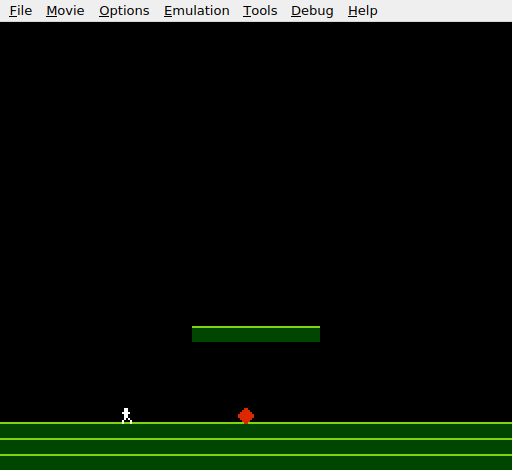
Black sky, a green floating platform in the centre, green ground below. The player stands on the ground with the obstacle. Jump up to the platform and the player lands on it — stands on it, walks across it, falls off the edge. The hardcoded floor line is gone. The tiles are the level.
Try This: Move the Platform
Change the platform position by editing level_platform_row and the nametable write address. Put it at row 16, columns 4–11:
level_platform_row:
    .byte 0,0,0,0, 3,3,3,3, 3,3,3,3, 0,0,0,0
    .byte 0,0,0,0, 0,0,0,0, 0,0,0,0, 0,0,0,0
Update the pointer table: change row 20 back to level_empty_row and point row 16 to level_platform_row instead. Update the nametable write address to $2200 + 4 = $2204. Don’t forget the attribute table — row 16 is in attribute row 4 ($23E0).
Try This: Two Platforms
Add a second row template and pointer entry. Put one platform at row 16 (left side) and another at row 22 (right side). The player can jump between them and the ground — a miniature level.
Try This: Wider Ground Gap
Make the ground row partial — leave a gap in the middle:
level_ground_gap_row:
    .byte 3,3,3,3, 3,3,3,3, 3,3,3,3, 0,0,0,0
    .byte 0,0,0,0, 3,3,3,3, 3,3,3,3, 3,3,3,3
Point rows 26–29 to this instead of level_ground_row. The gap creates a pit — fall in and the player drops below the screen. You’d need a respawn mechanism (coming in later units), but the collision system handles the gap automatically.
If It Doesn’t Work
- Player falls through the platform? Check the pointer tables. The entry for row 20 must point to
level_platform_row, notlevel_empty_row. Both the_loand_hitables need the correct row. - Player gets stuck or jitters? The snap logic may be wrong. The sequence is:
player_y + 8(feet),AND #%11111000(tile top),- 8(sprite top). Each step matters. - Wrong colours on the platform? Check the attribute data.
$05at attribute row 5, columns 3 and 4 sets palette 1 for the platform area. Wrong column or wrong value produces grey tiles. - Player can’t jump through the platform from below? The
BMIcheck onvel_ymust come before the tile lookup. If it’s missing, the player collides with platforms while moving upward. - Collision triggers while on the platform? The Y comparison (
CMP #(FLOOR_Y - 7)) must skip obstacle collision when the player is high up. Without it, standing on the platform triggers a hit from the obstacle below.
What You’ve Learnt
- Pixel-to-tile conversion —
LSRthree times divides by 8, converting pixel coordinates to tile row and column. No multiplication needed. - Level data in ROM — shared row templates keep memory compact. 30 pointer entries map every nametable row to its tile data.
- Pointer tables — split low/high byte tables let the 6502 build 16-bit addresses from an 8-bit index. This pattern appears everywhere in NES code.
- Indirect indexed addressing —
LDA (tile_ptr), Yreads a byte at an address stored in zero page, offset by Y. The most powerful 6502 addressing mode. - Bit masking for alignment —
AND #%11111000rounds a pixel position down to the nearest tile boundary. A single instruction replaces division and multiplication. - One-way platforms — checking
vel_ywithBMIskips collision when the player moves upward. Platforms are solid from above, passable from below.
What’s Next
The player can stand on tiles, but can walk straight through walls. In Unit 8, the game checks tiles to the left and right of the player — and walls become solid.