Wall Collision
Horizontal tile checks prevent the player from walking through solid tiles. A wall on the ground proves the system — the player must jump over it.
The player can stand on tiles — but walks straight through them sideways. The floor collision from Unit 7 only checks downward. Move right into the wall and the player slides through it as if it weren’t there.
This unit adds horizontal tile checks. Before moving left or right, the game reads the tile at the destination. If it’s solid, the movement is blocked. A small wall on the ground proves the system — the player has to jump over it.
Check Before Moving
The key principle: check the tile before changing the player’s position. If we moved first and checked second, the player would already be inside the wall and we’d have to push them back out — messy and error-prone. Checking first means the player never enters a solid tile.
For moving right, we check the tile at the player’s right edge after the proposed move. For moving left, we check the tile one pixel left of the current position. If either tile is solid, the button press is ignored.
The Horizontal Check
    ; --- Move left (with wall check) ---
    lda buttons
    and #BTN_LEFT
    beq @not_left
    lda player_x
    beq @not_left

    ; Check tile to the left of player
    lda player_y
    clc
    adc #4                  ; Vertical centre of sprite
    lsr
    lsr
    lsr                     ; / 8 = tile row
    tax

    lda level_rows_lo, x
    sta tile_ptr
    lda level_rows_hi, x
    sta tile_ptr+1

    lda player_x
    sec
    sbc #1                  ; One pixel left of current position
    lsr
    lsr
    lsr                     ; / 8 = tile column
    tay

    lda (tile_ptr), y
    bne @not_left           ; Solid tile — blocked

    dec player_x
@not_left:

    ; --- Move right (with wall check) ---
    lda buttons
    and #BTN_RIGHT
    beq @not_right
    lda player_x
    cmp #RIGHT_WALL
    bcs @not_right

    ; Check tile to the right of player
    lda player_y
    clc
    adc #4                  ; Vertical centre of sprite
    lsr
    lsr
    lsr                     ; / 8 = tile row
    tax

    lda level_rows_lo, x
    sta tile_ptr
    lda level_rows_hi, x
    sta tile_ptr+1

    lda player_x
    clc
    adc #8                  ; Right edge of sprite
    lsr
    lsr
    lsr                     ; / 8 = tile column
    tay

    lda (tile_ptr), y
    bne @not_right          ; Solid tile — blocked

    inc player_x
@not_right:
Each direction follows the same pattern:
- Read the button — if not pressed, skip everything
- Boundary check — left edge of screen or right wall
- Calculate the tile row — use the sprite’s vertical centre (
player_y + 4), shift right three times - Load the row pointer — same pointer table lookup as floor collision
- Calculate the tile column — the pixel position at the destination edge, shifted right three times
- Read the tile —
LDA (tile_ptr), Y. If non-zero, the tile is solid and the move is blocked
Why the Vertical Centre?
The check needs a Y position to look up the tile row. Using the sprite’s vertical centre (4 pixels down from the top) means the check covers the middle of the player. This catches walls at the player’s body height.
A more robust approach would check at two Y levels — near the top and near the bottom of the sprite — to prevent any overlap with wall tiles. For this lesson, one check point keeps the code simple. The wall is tall enough that the centre check catches it reliably.
Left vs Right Edge
For moving right, the check position is player_x + 8 — the pixel just past the sprite’s right edge. If the player is at X = 168 (right edge at 175, which is the last pixel of column 21), moving right puts the right edge at 176 — the first pixel of column 22. If column 22 is solid, the move is blocked. The player stops flush against the wall.
For moving left, the check position is player_x - 1 — one pixel to the left of the sprite’s current position. If the player is at X = 176 (left edge at 176, first pixel of column 22), the check looks at pixel 175 — the last pixel of column 21. If column 21 is empty, the move is allowed.
The subtraction uses SEC / SBC #1 — the familiar “set carry, subtract” pattern from obstacle movement. One pixel left, three shifts to get the tile column, one (tile_ptr), Y read to check if it’s solid.
The Wall
A 2×2 block of ground tiles sits on the surface at columns 22–23, rows 24–25. It’s 16 pixels wide and 16 pixels tall — too high to walk past, but easy to jump over.
The wall uses the same GROUND_TILE as the ground and platform. No new tile needed — the collision system doesn’t care what a tile looks like, only whether it’s tile 0 (empty) or non-zero (solid).
    ; --- Write wall tiles (rows 24-25, columns 22-23) ---
    bit PPUSTATUS
    lda #$23
    sta PPUADDR
    lda #$16
    sta PPUADDR             ; PPU address $2316 (row 24, col 22)
    lda #GROUND_TILE
    sta PPUDATA
    sta PPUDATA             ; Cols 22-23

    bit PPUSTATUS
    lda #$23
    sta PPUADDR
    lda #$36
    sta PPUADDR             ; PPU address $2336 (row 25, col 22)
    lda #GROUND_TILE
    sta PPUDATA
    sta PPUDATA             ; Cols 22-23
Two PPU address setups, two tiles each. The auto-increment fills both columns in each row. Rows 24–25 aren’t contiguous in PPU memory (they’re 32 bytes apart), so each row needs its own address.
Wall Attributes
The wall at columns 22–23, rows 24–25 falls in attribute row 6, column 5. This attribute byte covers a 4×4 tile area (columns 20–23, rows 24–27). The wall is in the top-right quadrant (rows 24–25, columns 22–23). The ground below is in both bottom quadrants.
    ; Attribute row 6 — wall + ground
    .byte $50, $50, $50, $50, $50, $54, $50, $50
Column 5 changed from $50 to $54. The difference: $54 = %01010100 sets the top-right quadrant to palette 1 (bits 3-2 = %01), while $50 = %01010000 left both top quadrants at palette 0. Without this fix, the wall tiles would appear in grey instead of green.
Level Data
The level data gains a fourth row template:
level_wall_row:
    .byte 0,0,0,0, 0,0,0,0, 0,0,0,0, 0,0,0,0
    .byte 0,0,0,0, 0,0,3,3, 0,0,0,0, 0,0,0,0
Rows 24 and 25 in the pointer tables now point to level_wall_row instead of level_empty_row. The collision system reads the wall tiles automatically — no special wall logic needed. A tile is a tile.
Sprites Pass Through
The red diamond obstacle still slides through the wall. That’s correct — the obstacle is a sprite, and the NES has no hardware collision between sprites and background tiles. The collision check is code we wrote for the player. The obstacle doesn’t run that code, so it ignores the tiles.
This is a fundamental distinction on the NES: background tiles and sprites occupy separate worlds in the PPU. The background is the nametable; sprites are OAM. The PPU draws them both, but they don’t interact unless your code makes them. In a full game, you might give enemies their own tile collision — but for now, the obstacle is a simple sprite that moves without caring about the level.
The Complete Code
; =============================================================================
; DASH - Unit 8: Wall Collision
; =============================================================================
; Horizontal tile checks prevent the player from walking through walls.
; A block on the ground proves the system — the player must jump over it.
; =============================================================================

; -----------------------------------------------------------------------------
; NES Hardware Addresses
; -----------------------------------------------------------------------------
PPUCTRL   = $2000
PPUMASK   = $2001
PPUSTATUS = $2002
OAMADDR   = $2003
PPUSCROLL = $2005
PPUADDR   = $2006
PPUDATA   = $2007
OAMDMA    = $4014
JOYPAD1   = $4016

; -----------------------------------------------------------------------------
; APU Registers
; -----------------------------------------------------------------------------
SQ1_VOL    = $4000
SQ1_SWEEP  = $4001
SQ1_LO     = $4002
SQ1_HI     = $4003
APU_STATUS = $4015

; -----------------------------------------------------------------------------
; Button Masks
; -----------------------------------------------------------------------------
BTN_A      = %10000000
BTN_B      = %01000000
BTN_SELECT = %00100000
BTN_START  = %00010000
BTN_UP     = %00001000
BTN_DOWN   = %00000100
BTN_LEFT   = %00000010
BTN_RIGHT  = %00000001

; -----------------------------------------------------------------------------
; Game Constants
; -----------------------------------------------------------------------------
PLAYER_X       = 60
PLAYER_Y       = 200
PLAYER_TILE    = 1
RIGHT_WALL     = 248
FLOOR_Y        = 200           ; Obstacle Y position (ground level)
GRAVITY        = 1
JUMP_VEL       = $F6
OBSTACLE_TILE  = 2
OBSTACLE_SPEED = 2
GROUND_TILE    = 3

; -----------------------------------------------------------------------------
; Memory
; -----------------------------------------------------------------------------
.segment "ZEROPAGE"
player_x:   .res 1
player_y:   .res 1
vel_y:      .res 1
buttons:    .res 1
nmi_flag:   .res 1
on_ground:  .res 1
obstacle_x: .res 1
tile_ptr:   .res 2             ; Pointer for level data lookup

.segment "OAM"
oam_buffer: .res 256

.segment "BSS"

; =============================================================================
; iNES Header
; =============================================================================
.segment "HEADER"
    .byte "NES", $1A
    .byte 2
    .byte 1
    .byte $01
    .byte $00
    .byte 0,0,0,0,0,0,0,0

; =============================================================================
; Code
; =============================================================================
.segment "CODE"

; --- Reset ---
reset:
    sei
    cld
    ldx #$40
    stx $4017
    ldx #$FF
    txs
    inx
    stx PPUCTRL
    stx PPUMASK
    stx $4010
    stx APU_STATUS

@vblank1:
    bit PPUSTATUS
    bpl @vblank1

    lda #0
@clear_ram:
    sta $0000, x
    sta $0100, x
    sta $0200, x
    sta $0300, x
    sta $0400, x
    sta $0500, x
    sta $0600, x
    sta $0700, x
    inx
    bne @clear_ram

@vblank2:
    bit PPUSTATUS
    bpl @vblank2

    ; --- Load palette ---
    bit PPUSTATUS
    lda #$3F
    sta PPUADDR
    lda #$00
    sta PPUADDR

    ldx #0
@load_palette:
    lda palette_data, x
    sta PPUDATA
    inx
    cpx #32
    bne @load_palette

    ; --- Clear nametable 0 ---
    bit PPUSTATUS
    lda #$20
    sta PPUADDR
    lda #$00
    sta PPUADDR

    lda #0
    ldy #4
    ldx #0
@clear_nt:
    sta PPUDATA
    dex
    bne @clear_nt
    dey
    bne @clear_nt

    ; --- Write ground tiles (rows 26-29) ---
    bit PPUSTATUS
    lda #$23
    sta PPUADDR
    lda #$40
    sta PPUADDR             ; PPU address $2340 (row 26)

    lda #GROUND_TILE
    ldx #128                ; 4 rows × 32 tiles
@write_ground:
    sta PPUDATA
    dex
    bne @write_ground

    ; --- Write platform tiles (row 20, columns 12-19) ---
    bit PPUSTATUS
    lda #$22
    sta PPUADDR
    lda #$8C
    sta PPUADDR             ; PPU address $228C (row 20, col 12)

    lda #GROUND_TILE
    ldx #8                  ; 8 tiles wide
@write_platform:
    sta PPUDATA
    dex
    bne @write_platform

    ; --- Write wall tiles (rows 24-25, columns 22-23) ---
    bit PPUSTATUS
    lda #$23
    sta PPUADDR
    lda #$16
    sta PPUADDR             ; PPU address $2316 (row 24, col 22)
    lda #GROUND_TILE
    sta PPUDATA
    sta PPUDATA             ; Cols 22-23

    bit PPUSTATUS
    lda #$23
    sta PPUADDR
    lda #$36
    sta PPUADDR             ; PPU address $2336 (row 25, col 22)
    lda #GROUND_TILE
    sta PPUDATA
    sta PPUDATA             ; Cols 22-23

    ; --- Set attributes (platform + wall + ground palettes) ---
    bit PPUSTATUS
    lda #$23
    sta PPUADDR
    lda #$E8
    sta PPUADDR             ; PPU address $23E8 (attribute row 5)

    ldx #0
@write_attrs:
    lda attr_data, x
    sta PPUDATA
    inx
    cpx #24
    bne @write_attrs

    ; --- Set up player sprite (OAM entry 0) ---
    lda #PLAYER_Y
    sta oam_buffer+0
    lda #PLAYER_TILE
    sta oam_buffer+1
    lda #0
    sta oam_buffer+2
    lda #PLAYER_X
    sta oam_buffer+3

    ; Set up obstacle sprite (OAM entry 1)
    lda #FLOOR_Y
    sta oam_buffer+4
    lda #OBSTACLE_TILE
    sta oam_buffer+5
    lda #1
    sta oam_buffer+6
    lda #255
    sta oam_buffer+7

    ; Initialise game state
    lda #PLAYER_X
    sta player_x
    lda #PLAYER_Y
    sta player_y
    lda #0
    sta vel_y
    lda #1
    sta on_ground
    lda #255
    sta obstacle_x

    ; Hide other sprites (entries 2-63)
    lda #$EF
    ldx #8
@hide_sprites:
    sta oam_buffer, x
    inx
    bne @hide_sprites

    ; Enable APU pulse channel 1
    lda #%00000001
    sta APU_STATUS

    ; Reset scroll position
    bit PPUSTATUS
    lda #0
    sta PPUSCROLL
    sta PPUSCROLL

    ; Enable rendering
    lda #%10000000
    sta PPUCTRL
    lda #%00011110
    sta PPUMASK

; =============================================================================
; Main Loop
; =============================================================================
main_loop:
    lda nmi_flag
    beq main_loop
    lda #0
    sta nmi_flag

    ; --- Read controller ---
    lda #1
    sta JOYPAD1
    lda #0
    sta JOYPAD1

    ldx #8
@read_pad:
    lda JOYPAD1
    lsr a
    rol buttons
    dex
    bne @read_pad

    ; --- Jump check ---
    lda buttons
    and #BTN_A
    beq @no_jump
    lda on_ground
    beq @no_jump
    lda #JUMP_VEL
    sta vel_y
    lda #0
    sta on_ground

    ; Play jump sound
    lda #%10111000
    sta SQ1_VOL
    lda #%10111001
    sta SQ1_SWEEP
    lda #$C8
    sta SQ1_LO
    lda #$00
    sta SQ1_HI

@no_jump:

    ; --- Move left (with wall check) ---
    lda buttons
    and #BTN_LEFT
    beq @not_left
    lda player_x
    beq @not_left

    ; Check tile to the left of player
    lda player_y
    clc
    adc #4                  ; Vertical centre of sprite
    lsr
    lsr
    lsr                     ; / 8 = tile row
    tax

    lda level_rows_lo, x
    sta tile_ptr
    lda level_rows_hi, x
    sta tile_ptr+1

    lda player_x
    sec
    sbc #1                  ; One pixel left of current position
    lsr
    lsr
    lsr                     ; / 8 = tile column
    tay

    lda (tile_ptr), y
    bne @not_left           ; Solid tile — blocked

    dec player_x
@not_left:

    ; --- Move right (with wall check) ---
    lda buttons
    and #BTN_RIGHT
    beq @not_right
    lda player_x
    cmp #RIGHT_WALL
    bcs @not_right

    ; Check tile to the right of player
    lda player_y
    clc
    adc #4                  ; Vertical centre of sprite
    lsr
    lsr
    lsr                     ; / 8 = tile row
    tax

    lda level_rows_lo, x
    sta tile_ptr
    lda level_rows_hi, x
    sta tile_ptr+1

    lda player_x
    clc
    adc #8                  ; Right edge of sprite
    lsr
    lsr
    lsr                     ; / 8 = tile column
    tay

    lda (tile_ptr), y
    bne @not_right          ; Solid tile — blocked

    inc player_x
@not_right:

    ; --- Apply gravity ---
    lda vel_y
    clc
    adc #GRAVITY
    sta vel_y

    ; --- Apply velocity to Y position ---
    lda player_y
    clc
    adc vel_y
    sta player_y

    ; --- Tile collision (vertical) ---
    lda vel_y
    bmi @no_floor           ; Moving upward — skip floor check

    ; Calculate tile row (feet position)
    lda player_y
    clc
    adc #8                  ; Bottom of sprite
    lsr
    lsr
    lsr                     ; / 8 = tile row
    tax

    ; Bounds check: below screen = solid
    cpx #30
    bcs @on_solid

    ; Load row pointer from level data
    lda level_rows_lo, x
    sta tile_ptr
    lda level_rows_hi, x
    sta tile_ptr+1

    ; Calculate tile column (sprite centre)
    lda player_x
    clc
    adc #4                  ; Centre of 8-pixel sprite
    lsr
    lsr
    lsr                     ; / 8 = tile column
    tay

    ; Read tile at (row, col)
    lda (tile_ptr), y       ; Indirect indexed addressing
    beq @no_floor           ; Tile 0 = empty

@on_solid:
    ; Snap player to tile surface
    lda player_y
    clc
    adc #8                  ; Feet Y
    and #%11111000          ; Round down to tile boundary
    sec
    sbc #8                  ; Back to sprite top
    sta player_y
    lda #0
    sta vel_y
    lda #1
    sta on_ground
    jmp @done_floor

@no_floor:
    lda #0
    sta on_ground

@done_floor:

    ; --- Move obstacle ---
    lda obstacle_x
    sec
    sbc #OBSTACLE_SPEED
    sta obstacle_x

    ; --- Collision with obstacle ---
    lda on_ground
    beq @no_collide

    lda player_y
    cmp #(FLOOR_Y - 7)
    bcc @no_collide         ; Player above obstacle — on a platform

    lda obstacle_x
    cmp #240
    bcs @no_collide

    lda player_x
    clc
    adc #8
    cmp obstacle_x
    bcc @no_collide
    beq @no_collide

    lda obstacle_x
    clc
    adc #8
    cmp player_x
    bcc @no_collide
    beq @no_collide

    lda #PLAYER_X
    sta player_x

@no_collide:

    ; --- Update sprite positions ---
    lda player_y
    sta oam_buffer+0
    lda player_x
    sta oam_buffer+3

    lda #FLOOR_Y
    sta oam_buffer+4
    lda obstacle_x
    sta oam_buffer+7

    jmp main_loop

; =============================================================================
; NMI Handler
; =============================================================================
nmi:
    pha
    txa
    pha
    tya
    pha

    lda #0
    sta OAMADDR
    lda #>oam_buffer
    sta OAMDMA

    lda #1
    sta nmi_flag

    pla
    tay
    pla
    tax
    pla
    rti

irq:
    rti

; =============================================================================
; Data
; =============================================================================

palette_data:
    ; Background palettes
    .byte $0F, $00, $10, $20   ; Palette 0: greys (sky)
    .byte $0F, $09, $19, $29   ; Palette 1: greens (ground)
    .byte $0F, $00, $10, $20
    .byte $0F, $00, $10, $20
    ; Sprite palettes
    .byte $0F, $30, $16, $27   ; Palette 0: white (player)
    .byte $0F, $16, $27, $30   ; Palette 1: red (obstacle)
    .byte $0F, $30, $16, $27
    .byte $0F, $30, $16, $27

attr_data:
    ; Attribute row 5 ($23E8) — platform
    .byte $00, $00, $00, $05, $05, $00, $00, $00
    ; Attribute row 6 ($23F0) — wall + ground
    .byte $50, $50, $50, $50, $50, $54, $50, $50
    ; Attribute row 7 ($23F8) — ground (top quadrants)
    .byte $05, $05, $05, $05, $05, $05, $05, $05

; -----------------------------------------------------------------------------
; Level Data
; -----------------------------------------------------------------------------
; Four unique row types. All 30 nametable rows point to one of these.

level_empty_row:
    .byte 0,0,0,0, 0,0,0,0, 0,0,0,0, 0,0,0,0
    .byte 0,0,0,0, 0,0,0,0, 0,0,0,0, 0,0,0,0

level_platform_row:
    .byte 0,0,0,0, 0,0,0,0, 0,0,0,0, 3,3,3,3
    .byte 3,3,3,3, 0,0,0,0, 0,0,0,0, 0,0,0,0

level_wall_row:
    .byte 0,0,0,0, 0,0,0,0, 0,0,0,0, 0,0,0,0
    .byte 0,0,0,0, 0,0,3,3, 0,0,0,0, 0,0,0,0

level_ground_row:
    .byte 3,3,3,3, 3,3,3,3, 3,3,3,3, 3,3,3,3
    .byte 3,3,3,3, 3,3,3,3, 3,3,3,3, 3,3,3,3

; Row pointer tables (30 entries — one per nametable row)
level_rows_lo:
    .byte <level_empty_row      ; Row 0
    .byte <level_empty_row      ; Row 1
    .byte <level_empty_row      ; Row 2
    .byte <level_empty_row      ; Row 3
    .byte <level_empty_row      ; Row 4
    .byte <level_empty_row      ; Row 5
    .byte <level_empty_row      ; Row 6
    .byte <level_empty_row      ; Row 7
    .byte <level_empty_row      ; Row 8
    .byte <level_empty_row      ; Row 9
    .byte <level_empty_row      ; Row 10
    .byte <level_empty_row      ; Row 11
    .byte <level_empty_row      ; Row 12
    .byte <level_empty_row      ; Row 13
    .byte <level_empty_row      ; Row 14
    .byte <level_empty_row      ; Row 15
    .byte <level_empty_row      ; Row 16
    .byte <level_empty_row      ; Row 17
    .byte <level_empty_row      ; Row 18
    .byte <level_empty_row      ; Row 19
    .byte <level_platform_row   ; Row 20: floating platform
    .byte <level_empty_row      ; Row 21
    .byte <level_empty_row      ; Row 22
    .byte <level_empty_row      ; Row 23
    .byte <level_wall_row       ; Row 24: wall
    .byte <level_wall_row       ; Row 25: wall
    .byte <level_ground_row     ; Row 26
    .byte <level_ground_row     ; Row 27
    .byte <level_ground_row     ; Row 28
    .byte <level_ground_row     ; Row 29

level_rows_hi:
    .byte >level_empty_row      ; Row 0
    .byte >level_empty_row      ; Row 1
    .byte >level_empty_row      ; Row 2
    .byte >level_empty_row      ; Row 3
    .byte >level_empty_row      ; Row 4
    .byte >level_empty_row      ; Row 5
    .byte >level_empty_row      ; Row 6
    .byte >level_empty_row      ; Row 7
    .byte >level_empty_row      ; Row 8
    .byte >level_empty_row      ; Row 9
    .byte >level_empty_row      ; Row 10
    .byte >level_empty_row      ; Row 11
    .byte >level_empty_row      ; Row 12
    .byte >level_empty_row      ; Row 13
    .byte >level_empty_row      ; Row 14
    .byte >level_empty_row      ; Row 15
    .byte >level_empty_row      ; Row 16
    .byte >level_empty_row      ; Row 17
    .byte >level_empty_row      ; Row 18
    .byte >level_empty_row      ; Row 19
    .byte >level_platform_row   ; Row 20: floating platform
    .byte >level_empty_row      ; Row 21
    .byte >level_empty_row      ; Row 22
    .byte >level_empty_row      ; Row 23
    .byte >level_wall_row       ; Row 24: wall
    .byte >level_wall_row       ; Row 25: wall
    .byte >level_ground_row     ; Row 26
    .byte >level_ground_row     ; Row 27
    .byte >level_ground_row     ; Row 28
    .byte >level_ground_row     ; Row 29

; =============================================================================
; Vectors
; =============================================================================
.segment "VECTORS"
    .word nmi
    .word reset
    .word irq

; =============================================================================
; CHR-ROM
; =============================================================================
.segment "CHARS"

; Tile 0: Empty
.byte $00,$00,$00,$00,$00,$00,$00,$00
.byte $00,$00,$00,$00,$00,$00,$00,$00

; Tile 1: Running figure
.byte %00110000
.byte %00110000
.byte %01111000
.byte %00110000
.byte %00110000
.byte %00101000
.byte %01000100
.byte %01000100
.byte %00000000
.byte %00000000
.byte %00000000
.byte %00000000
.byte %00000000
.byte %00000000
.byte %00000000
.byte %00000000

; Tile 2: Diamond obstacle
.byte %00011000
.byte %00111100
.byte %01111110
.byte %11111111
.byte %11111111
.byte %01111110
.byte %00111100
.byte %00011000
.byte %00000000
.byte %00000000
.byte %00000000
.byte %00000000
.byte %00000000
.byte %00000000
.byte %00000000
.byte %00000000

; Tile 3: Ground block (light top edge, solid body)
.byte %11111111              ; Plane 0
.byte %11111111
.byte %11111111
.byte %11111111
.byte %11111111
.byte %11111111
.byte %11111111
.byte %11111111
.byte %11111111              ; Plane 1 (row 0: colour 3 = highlight)
.byte %00000000              ; Rows 1-7: colour 1 = ground body
.byte %00000000
.byte %00000000
.byte %00000000
.byte %00000000
.byte %00000000
.byte %00000000

.res 8192 - 64, $00
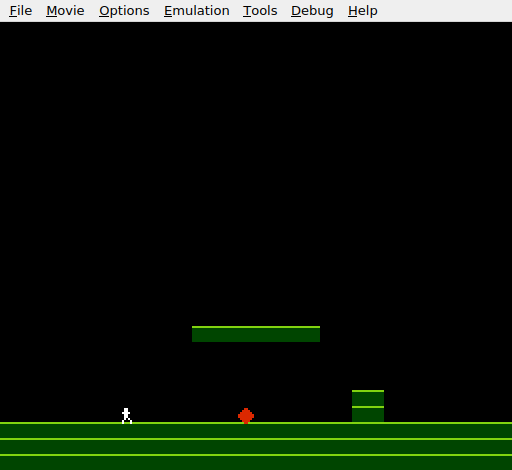
Black sky, green platform above, green ground below with a small wall block on the right. The player stands on the ground to the left. Walk right and the player stops at the wall — can’t pass through. Jump and the player clears it, landing on the other side. The level has structure.
Try This: Build a Corridor
Add walls on both sides of the platform to create a corridor underneath:
; Wall row for left pillar (column 11)
level_left_wall_row:
    .byte 0,0,0,0, 0,0,0,0, 0,0,0,3, 0,0,0,0
    .byte 0,0,0,0, 0,0,0,0, 0,0,0,0, 0,0,0,0
Point rows 21–25 to level_left_wall_row and also add a right wall at column 20. The player must go around or over the walls to reach the other side. This is the beginning of level design.
Try This: A Maze
Fill several rows with wall templates that leave narrow gaps. The player has to navigate through the gaps. With horizontal and vertical collision both working, any arrangement of solid tiles creates walkable (or jumpable) terrain. The collision system handles it all.
Try This: Remove the Wall, Keep the Platform
Delete the wall tiles and pointer entries. The platform still works — the player lands on it, walks across it, falls off the edge. The horizontal collision code runs but finds no solid tiles to the sides (the platform is above, not beside). The two collision systems are independent.
If It Doesn’t Work
- Player walks through the wall? Check the pointer tables. Rows 24 and 25 must point to
level_wall_row, notlevel_empty_row. Check both_loand_hitables. - Player can’t move at all? The horizontal check might be reading the ground tiles below the player. Verify the Y position uses
player_y + 4(vertical centre), notplayer_y + 8(feet). Checking at the feet level would always find the ground, blocking all movement. - Wall appears grey instead of green? The attribute byte at row 6, column 5 must be
$54, not$50. The$54value sets the top-right quadrant to palette 1. - Player gets stuck on the wall edge? If the check position is wrong (off by one pixel), the player can wedge into the tile boundary. For right movement, check at
player_x + 8. For left, check atplayer_x - 1. These positions are the first pixel OUTSIDE the sprite in each direction.
What You’ve Learnt
- Check before moving — read the destination tile before changing the player’s position. This prevents the player from entering solid tiles and eliminates the need to push them back out.
- Horizontal tile collision — the same pointer table and
(tile_ptr), Ypattern from floor collision works for walls. Calculate tile row from Y, tile column from X, read the tile. - Left and right edge detection — moving right checks at
player_x + 8(past the right edge). Moving left checks atplayer_x - 1(past the left edge). Both useLSRto convert to tile columns. - Tile-based level design — walls, floors, and platforms all use the same tile and the same collision system. The level data determines what’s solid. Changing the data changes the level.
- Sprite-background independence — sprites ignore background tiles by default. The NES PPU draws them in separate layers. Collision between them is pure software.
What’s Next
The level has a floor, a platform, and a wall. In Unit 9, the game adds collectible items — sprites the player can pick up for points. The first subroutine appears: JSR and RTS.