Collectible Items
Three coin sprites appear around the level. A subroutine checks whether the player overlaps each one — the first use of JSR and RTS.
The level has ground, a platform, and a wall — but nothing to do except avoid the obstacle. There’s no goal, no reward. This unit adds three collectable coins. Touch one and it disappears. The level has things to find.
The coins introduce two new ideas: managing multiple sprites and using subroutines. The same overlap check runs for each coin — but instead of writing it three times, we write it once and call it with JSR.
Three Coins
Each coin is a sprite: an OAM entry with a position, tile, and palette. The game already has two sprites (player and obstacle). The coins are OAM entries 2, 3, and 4:
    ; Coin 0: on the platform
    lda #152                ; Y = 152 (sits on row 20 platform)
    sta oam_buffer+8
    lda #COIN_TILE
    sta oam_buffer+9
    lda #2                  ; Sprite palette 2 (yellow)
    sta oam_buffer+10
    lda #128                ; X = 128 (centre of platform)
    sta oam_buffer+11
Each OAM entry is 4 bytes: Y position, tile index, attributes, X position. Entry 2 starts at offset 8 in the OAM buffer (2 × 4). The attribute byte selects sprite palette 2.
The three coins are placed to test different skills:
- Coin 0 sits on the floating platform — reach it by jumping up
- Coin 1 is on the ground past the wall — jump over the wall to get it
- Coin 2 floats in the air on the left — jump and catch it mid-flight
The Coin Tile
Tile 4 in CHR-ROM is a filled circle:
; Tile 4: Coin
.byte %00111100              ; Plane 0
.byte %01111110
.byte %11111111
.byte %11111111
.byte %11111111
.byte %11111111
.byte %01111110
.byte %00111100
.byte %00000000              ; Plane 1 (all zero = colour 1 only)
.byte %00000000
.byte %00000000
.byte %00000000
.byte %00000000
.byte %00000000
.byte %00000000
.byte %00000000
Only plane 0 is set, so every visible pixel is colour index 1. With sprite palette 2 ($0F, $28, $38, $30), colour 1 is $28 — yellow. A bright circle against the black sky.
JSR and RTS
The overlap check for one coin takes about 20 instructions. Three coins would mean 60 instructions of nearly identical code — the only difference is the OAM offset. That’s wasteful and error-prone. Change the check logic, and you’d need to update it in three places.
The 6502 has a solution: subroutines.
jsr check_collect ; Jump to SubroutineJSR does two things:
- Pushes the return address onto the stack (the address of the instruction after
JSR, minus one) - Jumps to the specified label
The subroutine runs until it hits RTS (Return from Subroutine), which pulls the return address from the stack and jumps back. Execution continues after the original JSR.
The stack is a region of memory at $0100–$01FF. The stack pointer (S register, set to $FF during reset with TXS) tracks the top. JSR pushes two bytes (the return address); RTS pulls them back. The stack grows downward — each push decrements the pointer.
The check_collect Subroutine
; -----------------------------------------------------------------------------
; check_collect: Check if the player overlaps a collectible sprite
; Input:  X = OAM buffer offset (8, 12, or 16)
; Effect: If overlapping, hides the sprite (sets OAM Y to $EF)
; -----------------------------------------------------------------------------
check_collect:
    ; Skip if already collected
    lda oam_buffer, x       ; Sprite Y position
    cmp #$EF
    beq @done

    ; --- Y overlap ---
    ; Player bottom vs item top
    lda player_y
    clc
    adc #8
    cmp oam_buffer, x
    bcc @done
    beq @done

    ; Item bottom vs player top
    lda oam_buffer, x
    clc
    adc #8
    cmp player_y
    bcc @done
    beq @done

    ; --- X overlap ---
    ; Player right vs item left
    lda player_x
    clc
    adc #8
    cmp oam_buffer+3, x
    bcc @done
    beq @done

    ; Item right vs player left
    lda oam_buffer+3, x
    clc
    adc #8
    cmp player_x
    bcc @done
    beq @done

    ; Collected! Hide the sprite
    lda #$EF
    sta oam_buffer, x

@done:
    rts
The subroutine takes the OAM offset in the X register. X acts as a parameter — it tells the subroutine which sprite to check. The calling code sets X before each JSR:
    ldx #8                  ; OAM entry 2 (coin 0)
    jsr check_collect
    ldx #12                 ; OAM entry 3 (coin 1)
    jsr check_collect
    ldx #16                 ; OAM entry 4 (coin 2)
    jsr check_collect
Three calls, one subroutine. Each call checks a different coin.
How It Works
Already collected? If the sprite’s Y position is $EF (off-screen), it’s been collected. Skip the check.
Y overlap. Two conditions: the player’s bottom (player_y + 8) must be past the item’s top, AND the item’s bottom (oam_y + 8) must be past the player’s top. Both must be true for vertical overlap.
X overlap. Same pattern: the player’s right edge (player_x + 8) past the item’s left, AND the item’s right edge past the player’s left.
Collect. If all four conditions pass, the sprites overlap. Set the OAM Y to $EF — the sprite moves off-screen and disappears.
Indexed OAM Access
The subroutine reads sprite positions with LDA oam_buffer, X (Y position) and LDA oam_buffer+3, X (X position). When X is 8, these read offsets 8 and 11 — the Y and X of OAM entry 2. When X is 12, they read offsets 12 and 15 — entry 3. The same code addresses different sprites.
oam_buffer+3 is resolved at assemble time: ca65 adds 3 to the base address of oam_buffer. At runtime, X is added again. The result is oam_buffer[X + 3] — the X position of whichever entry X points to.
Hiding Sprites
The hide-sprites loop now starts at offset 20 (after 5 sprites) instead of 8 (after 2):
    lda #$EF
    ldx #20
@hide_sprites:
    sta oam_buffer, x
    inx
    bne @hide_sprites
OAM entries 0–4 are the player, obstacle, and three coins. Everything from entry 5 onward is hidden. The Y value $EF (239) places sprites below the visible area — the PPU still processes them but they never appear on screen.
When a coin is collected, its Y is also set to $EF. The coin joins the hidden sprites — invisible, but still occupying its OAM slot. The subroutine checks for $EF and skips the overlap test, so collected coins are never checked again.
The Complete Code
; =============================================================================
; DASH - Unit 9: Collectible Items
; =============================================================================
; Three coin sprites appear around the level. A subroutine checks whether
; the player overlaps each coin — the first use of JSR and RTS.
; =============================================================================

; -----------------------------------------------------------------------------
; NES Hardware Addresses
; -----------------------------------------------------------------------------
PPUCTRL   = $2000
PPUMASK   = $2001
PPUSTATUS = $2002
OAMADDR   = $2003
PPUSCROLL = $2005
PPUADDR   = $2006
PPUDATA   = $2007
OAMDMA    = $4014
JOYPAD1   = $4016

; -----------------------------------------------------------------------------
; APU Registers
; -----------------------------------------------------------------------------
SQ1_VOL    = $4000
SQ1_SWEEP  = $4001
SQ1_LO     = $4002
SQ1_HI     = $4003
APU_STATUS = $4015

; -----------------------------------------------------------------------------
; Button Masks
; -----------------------------------------------------------------------------
BTN_A      = %10000000
BTN_B      = %01000000
BTN_SELECT = %00100000
BTN_START  = %00010000
BTN_UP     = %00001000
BTN_DOWN   = %00000100
BTN_LEFT   = %00000010
BTN_RIGHT  = %00000001

; -----------------------------------------------------------------------------
; Game Constants
; -----------------------------------------------------------------------------
PLAYER_X       = 60
PLAYER_Y       = 200
PLAYER_TILE    = 1
RIGHT_WALL     = 248
FLOOR_Y        = 200           ; Obstacle Y position (ground level)
GRAVITY        = 1
JUMP_VEL       = $F6
OBSTACLE_TILE  = 2
OBSTACLE_SPEED = 2
GROUND_TILE    = 3
COIN_TILE      = 4

; -----------------------------------------------------------------------------
; Memory
; -----------------------------------------------------------------------------
.segment "ZEROPAGE"
player_x:   .res 1
player_y:   .res 1
vel_y:      .res 1
buttons:    .res 1
nmi_flag:   .res 1
on_ground:  .res 1
obstacle_x: .res 1
tile_ptr:   .res 2             ; Pointer for level data lookup

.segment "OAM"
oam_buffer: .res 256

.segment "BSS"

; =============================================================================
; iNES Header
; =============================================================================
.segment "HEADER"
    .byte "NES", $1A
    .byte 2
    .byte 1
    .byte $01
    .byte $00
    .byte 0,0,0,0,0,0,0,0

; =============================================================================
; Code
; =============================================================================
.segment "CODE"

; --- Reset ---
reset:
    sei
    cld
    ldx #$40
    stx $4017
    ldx #$FF
    txs
    inx
    stx PPUCTRL
    stx PPUMASK
    stx $4010
    stx APU_STATUS

@vblank1:
    bit PPUSTATUS
    bpl @vblank1

    lda #0
@clear_ram:
    sta $0000, x
    sta $0100, x
    sta $0200, x
    sta $0300, x
    sta $0400, x
    sta $0500, x
    sta $0600, x
    sta $0700, x
    inx
    bne @clear_ram

@vblank2:
    bit PPUSTATUS
    bpl @vblank2

    ; --- Load palette ---
    bit PPUSTATUS
    lda #$3F
    sta PPUADDR
    lda #$00
    sta PPUADDR

    ldx #0
@load_palette:
    lda palette_data, x
    sta PPUDATA
    inx
    cpx #32
    bne @load_palette

    ; --- Clear nametable 0 ---
    bit PPUSTATUS
    lda #$20
    sta PPUADDR
    lda #$00
    sta PPUADDR

    lda #0
    ldy #4
    ldx #0
@clear_nt:
    sta PPUDATA
    dex
    bne @clear_nt
    dey
    bne @clear_nt

    ; --- Write ground tiles (rows 26-29) ---
    bit PPUSTATUS
    lda #$23
    sta PPUADDR
    lda #$40
    sta PPUADDR             ; PPU address $2340 (row 26)

    lda #GROUND_TILE
    ldx #128                ; 4 rows × 32 tiles
@write_ground:
    sta PPUDATA
    dex
    bne @write_ground

    ; --- Write platform tiles (row 20, columns 12-19) ---
    bit PPUSTATUS
    lda #$22
    sta PPUADDR
    lda #$8C
    sta PPUADDR             ; PPU address $228C (row 20, col 12)

    lda #GROUND_TILE
    ldx #8                  ; 8 tiles wide
@write_platform:
    sta PPUDATA
    dex
    bne @write_platform

    ; --- Write wall tiles (rows 24-25, columns 22-23) ---
    bit PPUSTATUS
    lda #$23
    sta PPUADDR
    lda #$16
    sta PPUADDR             ; PPU address $2316 (row 24, col 22)
    lda #GROUND_TILE
    sta PPUDATA
    sta PPUDATA             ; Cols 22-23

    bit PPUSTATUS
    lda #$23
    sta PPUADDR
    lda #$36
    sta PPUADDR             ; PPU address $2336 (row 25, col 22)
    lda #GROUND_TILE
    sta PPUDATA
    sta PPUDATA             ; Cols 22-23

    ; --- Set attributes (platform + wall + ground palettes) ---
    bit PPUSTATUS
    lda #$23
    sta PPUADDR
    lda #$E8
    sta PPUADDR             ; PPU address $23E8 (attribute row 5)

    ldx #0
@write_attrs:
    lda attr_data, x
    sta PPUDATA
    inx
    cpx #24
    bne @write_attrs

    ; --- Set up player sprite (OAM entry 0) ---
    lda #PLAYER_Y
    sta oam_buffer+0
    lda #PLAYER_TILE
    sta oam_buffer+1
    lda #0
    sta oam_buffer+2
    lda #PLAYER_X
    sta oam_buffer+3

    ; Set up obstacle sprite (OAM entry 1)
    lda #FLOOR_Y
    sta oam_buffer+4
    lda #OBSTACLE_TILE
    sta oam_buffer+5
    lda #1
    sta oam_buffer+6
    lda #255
    sta oam_buffer+7

    ; Set up collectible sprites (OAM entries 2-4)
    ; Coin 0: on the platform
    lda #152                ; Y = 152 (sits on row 20 platform)
    sta oam_buffer+8
    lda #COIN_TILE
    sta oam_buffer+9
    lda #2                  ; Sprite palette 2 (yellow)
    sta oam_buffer+10
    lda #128                ; X = 128 (centre of platform)
    sta oam_buffer+11

    ; Coin 1: past the wall on the ground
    lda #FLOOR_Y
    sta oam_buffer+12
    lda #COIN_TILE
    sta oam_buffer+13
    lda #2
    sta oam_buffer+14
    lda #200                ; X = 200
    sta oam_buffer+15

    ; Coin 2: in the air (jump to collect)
    lda #168                ; Y = 168 (above ground, reachable by jumping)
    sta oam_buffer+16
    lda #COIN_TILE
    sta oam_buffer+17
    lda #2
    sta oam_buffer+18
    lda #32                 ; X = 32 (left side)
    sta oam_buffer+19

    ; Initialise game state
    lda #PLAYER_X
    sta player_x
    lda #PLAYER_Y
    sta player_y
    lda #0
    sta vel_y
    lda #1
    sta on_ground
    lda #255
    sta obstacle_x

    ; Hide other sprites (entries 5-63)
    lda #$EF
    ldx #20
@hide_sprites:
    sta oam_buffer, x
    inx
    bne @hide_sprites

    ; Enable APU pulse channel 1
    lda #%00000001
    sta APU_STATUS

    ; Reset scroll position
    bit PPUSTATUS
    lda #0
    sta PPUSCROLL
    sta PPUSCROLL

    ; Enable rendering
    lda #%10000000
    sta PPUCTRL
    lda #%00011110
    sta PPUMASK

; =============================================================================
; Main Loop
; =============================================================================
main_loop:
    lda nmi_flag
    beq main_loop
    lda #0
    sta nmi_flag

    ; --- Read controller ---
    lda #1
    sta JOYPAD1
    lda #0
    sta JOYPAD1

    ldx #8
@read_pad:
    lda JOYPAD1
    lsr a
    rol buttons
    dex
    bne @read_pad

    ; --- Jump check ---
    lda buttons
    and #BTN_A
    beq @no_jump
    lda on_ground
    beq @no_jump
    lda #JUMP_VEL
    sta vel_y
    lda #0
    sta on_ground

    ; Play jump sound
    lda #%10111000
    sta SQ1_VOL
    lda #%10111001
    sta SQ1_SWEEP
    lda #$C8
    sta SQ1_LO
    lda #$00
    sta SQ1_HI

@no_jump:

    ; --- Move left (with wall check) ---
    lda buttons
    and #BTN_LEFT
    beq @not_left
    lda player_x
    beq @not_left

    lda player_y
    clc
    adc #4
    lsr
    lsr
    lsr
    tax

    lda level_rows_lo, x
    sta tile_ptr
    lda level_rows_hi, x
    sta tile_ptr+1

    lda player_x
    sec
    sbc #1
    lsr
    lsr
    lsr
    tay

    lda (tile_ptr), y
    bne @not_left

    dec player_x
@not_left:

    ; --- Move right (with wall check) ---
    lda buttons
    and #BTN_RIGHT
    beq @not_right
    lda player_x
    cmp #RIGHT_WALL
    bcs @not_right

    lda player_y
    clc
    adc #4
    lsr
    lsr
    lsr
    tax

    lda level_rows_lo, x
    sta tile_ptr
    lda level_rows_hi, x
    sta tile_ptr+1

    lda player_x
    clc
    adc #8
    lsr
    lsr
    lsr
    tay

    lda (tile_ptr), y
    bne @not_right

    inc player_x
@not_right:

    ; --- Apply gravity ---
    lda vel_y
    clc
    adc #GRAVITY
    sta vel_y

    ; --- Apply velocity to Y position ---
    lda player_y
    clc
    adc vel_y
    sta player_y

    ; --- Tile collision (vertical) ---
    lda vel_y
    bmi @no_floor

    lda player_y
    clc
    adc #8
    lsr
    lsr
    lsr
    tax

    cpx #30
    bcs @on_solid

    lda level_rows_lo, x
    sta tile_ptr
    lda level_rows_hi, x
    sta tile_ptr+1

    lda player_x
    clc
    adc #4
    lsr
    lsr
    lsr
    tay

    lda (tile_ptr), y
    beq @no_floor

@on_solid:
    lda player_y
    clc
    adc #8
    and #%11111000
    sec
    sbc #8
    sta player_y
    lda #0
    sta vel_y
    lda #1
    sta on_ground
    jmp @done_floor

@no_floor:
    lda #0
    sta on_ground

@done_floor:

    ; --- Check collectibles ---
    ldx #8                  ; OAM entry 2 (coin 0)
    jsr check_collect
    ldx #12                 ; OAM entry 3 (coin 1)
    jsr check_collect
    ldx #16                 ; OAM entry 4 (coin 2)
    jsr check_collect

    ; --- Move obstacle ---
    lda obstacle_x
    sec
    sbc #OBSTACLE_SPEED
    sta obstacle_x

    ; --- Collision with obstacle ---
    lda on_ground
    beq @no_collide

    lda player_y
    cmp #(FLOOR_Y - 7)
    bcc @no_collide

    lda obstacle_x
    cmp #240
    bcs @no_collide

    lda player_x
    clc
    adc #8
    cmp obstacle_x
    bcc @no_collide
    beq @no_collide

    lda obstacle_x
    clc
    adc #8
    cmp player_x
    bcc @no_collide
    beq @no_collide

    lda #PLAYER_X
    sta player_x

@no_collide:

    ; --- Update sprite positions ---
    lda player_y
    sta oam_buffer+0
    lda player_x
    sta oam_buffer+3

    lda #FLOOR_Y
    sta oam_buffer+4
    lda obstacle_x
    sta oam_buffer+7

    jmp main_loop

; =============================================================================
; Subroutines
; =============================================================================

; -----------------------------------------------------------------------------
; check_collect: Check if the player overlaps a collectible sprite
; Input:  X = OAM buffer offset (8, 12, or 16)
; Effect: If overlapping, hides the sprite (sets OAM Y to $EF)
; -----------------------------------------------------------------------------
check_collect:
    ; Skip if already collected
    lda oam_buffer, x       ; Sprite Y position
    cmp #$EF
    beq @done

    ; --- Y overlap ---
    ; Player bottom vs item top
    lda player_y
    clc
    adc #8
    cmp oam_buffer, x
    bcc @done
    beq @done

    ; Item bottom vs player top
    lda oam_buffer, x
    clc
    adc #8
    cmp player_y
    bcc @done
    beq @done

    ; --- X overlap ---
    ; Player right vs item left
    lda player_x
    clc
    adc #8
    cmp oam_buffer+3, x
    bcc @done
    beq @done

    ; Item right vs player left
    lda oam_buffer+3, x
    clc
    adc #8
    cmp player_x
    bcc @done
    beq @done

    ; Collected! Hide the sprite
    lda #$EF
    sta oam_buffer, x

@done:
    rts

; =============================================================================
; NMI Handler
; =============================================================================
nmi:
    pha
    txa
    pha
    tya
    pha

    lda #0
    sta OAMADDR
    lda #>oam_buffer
    sta OAMDMA

    lda #1
    sta nmi_flag

    pla
    tay
    pla
    tax
    pla
    rti

irq:
    rti

; =============================================================================
; Data
; =============================================================================

palette_data:
    ; Background palettes
    .byte $0F, $00, $10, $20   ; Palette 0: greys (sky)
    .byte $0F, $09, $19, $29   ; Palette 1: greens (ground)
    .byte $0F, $00, $10, $20
    .byte $0F, $00, $10, $20
    ; Sprite palettes
    .byte $0F, $30, $16, $27   ; Palette 0: white (player)
    .byte $0F, $16, $27, $30   ; Palette 1: red (obstacle)
    .byte $0F, $28, $38, $30   ; Palette 2: yellow (coins)
    .byte $0F, $30, $16, $27

attr_data:
    ; Attribute row 5 ($23E8) — platform
    .byte $00, $00, $00, $05, $05, $00, $00, $00
    ; Attribute row 6 ($23F0) — wall + ground
    .byte $50, $50, $50, $50, $50, $54, $50, $50
    ; Attribute row 7 ($23F8) — ground (top quadrants)
    .byte $05, $05, $05, $05, $05, $05, $05, $05

; -----------------------------------------------------------------------------
; Level Data
; -----------------------------------------------------------------------------
level_empty_row:
    .byte 0,0,0,0, 0,0,0,0, 0,0,0,0, 0,0,0,0
    .byte 0,0,0,0, 0,0,0,0, 0,0,0,0, 0,0,0,0

level_platform_row:
    .byte 0,0,0,0, 0,0,0,0, 0,0,0,0, 3,3,3,3
    .byte 3,3,3,3, 0,0,0,0, 0,0,0,0, 0,0,0,0

level_wall_row:
    .byte 0,0,0,0, 0,0,0,0, 0,0,0,0, 0,0,0,0
    .byte 0,0,0,0, 0,0,3,3, 0,0,0,0, 0,0,0,0

level_ground_row:
    .byte 3,3,3,3, 3,3,3,3, 3,3,3,3, 3,3,3,3
    .byte 3,3,3,3, 3,3,3,3, 3,3,3,3, 3,3,3,3

; Row pointer tables (30 entries — one per nametable row)
level_rows_lo:
    .byte <level_empty_row      ; Row 0
    .byte <level_empty_row      ; Row 1
    .byte <level_empty_row      ; Row 2
    .byte <level_empty_row      ; Row 3
    .byte <level_empty_row      ; Row 4
    .byte <level_empty_row      ; Row 5
    .byte <level_empty_row      ; Row 6
    .byte <level_empty_row      ; Row 7
    .byte <level_empty_row      ; Row 8
    .byte <level_empty_row      ; Row 9
    .byte <level_empty_row      ; Row 10
    .byte <level_empty_row      ; Row 11
    .byte <level_empty_row      ; Row 12
    .byte <level_empty_row      ; Row 13
    .byte <level_empty_row      ; Row 14
    .byte <level_empty_row      ; Row 15
    .byte <level_empty_row      ; Row 16
    .byte <level_empty_row      ; Row 17
    .byte <level_empty_row      ; Row 18
    .byte <level_empty_row      ; Row 19
    .byte <level_platform_row   ; Row 20: floating platform
    .byte <level_empty_row      ; Row 21
    .byte <level_empty_row      ; Row 22
    .byte <level_empty_row      ; Row 23
    .byte <level_wall_row       ; Row 24: wall
    .byte <level_wall_row       ; Row 25: wall
    .byte <level_ground_row     ; Row 26
    .byte <level_ground_row     ; Row 27
    .byte <level_ground_row     ; Row 28
    .byte <level_ground_row     ; Row 29

level_rows_hi:
    .byte >level_empty_row      ; Row 0
    .byte >level_empty_row      ; Row 1
    .byte >level_empty_row      ; Row 2
    .byte >level_empty_row      ; Row 3
    .byte >level_empty_row      ; Row 4
    .byte >level_empty_row      ; Row 5
    .byte >level_empty_row      ; Row 6
    .byte >level_empty_row      ; Row 7
    .byte >level_empty_row      ; Row 8
    .byte >level_empty_row      ; Row 9
    .byte >level_empty_row      ; Row 10
    .byte >level_empty_row      ; Row 11
    .byte >level_empty_row      ; Row 12
    .byte >level_empty_row      ; Row 13
    .byte >level_empty_row      ; Row 14
    .byte >level_empty_row      ; Row 15
    .byte >level_empty_row      ; Row 16
    .byte >level_empty_row      ; Row 17
    .byte >level_empty_row      ; Row 18
    .byte >level_empty_row      ; Row 19
    .byte >level_platform_row   ; Row 20: floating platform
    .byte >level_empty_row      ; Row 21
    .byte >level_empty_row      ; Row 22
    .byte >level_empty_row      ; Row 23
    .byte >level_wall_row       ; Row 24: wall
    .byte >level_wall_row       ; Row 25: wall
    .byte >level_ground_row     ; Row 26
    .byte >level_ground_row     ; Row 27
    .byte >level_ground_row     ; Row 28
    .byte >level_ground_row     ; Row 29

; =============================================================================
; Vectors
; =============================================================================
.segment "VECTORS"
    .word nmi
    .word reset
    .word irq

; =============================================================================
; CHR-ROM
; =============================================================================
.segment "CHARS"

; Tile 0: Empty
.byte $00,$00,$00,$00,$00,$00,$00,$00
.byte $00,$00,$00,$00,$00,$00,$00,$00

; Tile 1: Running figure
.byte %00110000
.byte %00110000
.byte %01111000
.byte %00110000
.byte %00110000
.byte %00101000
.byte %01000100
.byte %01000100
.byte %00000000
.byte %00000000
.byte %00000000
.byte %00000000
.byte %00000000
.byte %00000000
.byte %00000000
.byte %00000000

; Tile 2: Diamond obstacle
.byte %00011000
.byte %00111100
.byte %01111110
.byte %11111111
.byte %11111111
.byte %01111110
.byte %00111100
.byte %00011000
.byte %00000000
.byte %00000000
.byte %00000000
.byte %00000000
.byte %00000000
.byte %00000000
.byte %00000000
.byte %00000000

; Tile 3: Ground block (light top edge, solid body)
.byte %11111111              ; Plane 0
.byte %11111111
.byte %11111111
.byte %11111111
.byte %11111111
.byte %11111111
.byte %11111111
.byte %11111111
.byte %11111111              ; Plane 1 (row 0: colour 3 = highlight)
.byte %00000000
.byte %00000000
.byte %00000000
.byte %00000000
.byte %00000000
.byte %00000000
.byte %00000000

; Tile 4: Coin
.byte %00111100              ; Plane 0
.byte %01111110
.byte %11111111
.byte %11111111
.byte %11111111
.byte %11111111
.byte %01111110
.byte %00111100
.byte %00000000              ; Plane 1 (all zero = colour 1 only)
.byte %00000000
.byte %00000000
.byte %00000000
.byte %00000000
.byte %00000000
.byte %00000000
.byte %00000000

.res 8192 - 80, $00
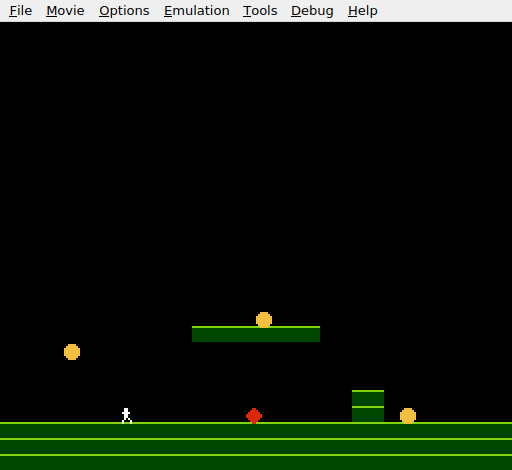
Three yellow coins in the level: one on the platform, one past the wall, one floating in the air. The player starts on the ground to the left. Jump up to the platform for the first coin. Jump over the wall for the second. Jump from the ground to catch the third mid-air. Each coin vanishes on contact.
Try This: More Coins
Add a fourth coin at OAM entry 5 (offset 20). Update the hide-sprites start to 24 and add another JSR check_collect with LDX #20. The subroutine handles any number of coins — just pass the right offset.
Try This: A Coin on the Wall
Place a coin directly on top of the wall (X = 176, Y = 184). The player has to land precisely on the wall’s top to collect it. This tests both platform collision and coin collection in the same move.
Try This: Respawning Coins
After all three coins are collected, reset them. In the main loop, check if all three OAM Y values are $EF. If so, write the original Y positions back:
    lda oam_buffer+8
    cmp #$EF
    bne @coins_remain
    lda oam_buffer+12
    cmp #$EF
    bne @coins_remain
    lda oam_buffer+16
    cmp #$EF
    bne @coins_remain

    ; All collected — respawn
    lda #152
    sta oam_buffer+8
    lda #200
    sta oam_buffer+12
    lda #168
    sta oam_buffer+16

@coins_remain:
The coins reappear and the player can collect them again. This is the beginning of a game loop.
If It Doesn’t Work
- Coins don’t appear? Check the OAM setup. Each coin needs all four bytes: Y position, tile index (4), attributes (2 for palette 2), and X position. A missing tile index shows tile 0 (empty).
- Coins are the wrong colour? The attribute byte must be 2 (sprite palette 2). If it’s 0, the coins appear white (palette 0). Check that palette 2 in the palette data is
$0F, $28, $38, $30. - Coins don’t disappear? The
check_collectsubroutine must be called with the correct OAM offsets: 8, 12, 16. A wrong offset checks the wrong sprite — or worse, overwrites unrelated OAM data. - Game crashes or behaves oddly after JSR? Make sure the subroutine ends with
RTS, notRTI(that’s for interrupts). Also check that nothing else modifies the stack pointer — mismatched pushes and pulls corrupt the return address. - Hide-sprites overwrites coins? The loop must start at offset 20 (after 5 sprites), not 8. Starting at 8 would immediately hide the coins.
What You’ve Learnt
- Subroutines with JSR/RTS —
JSRpushes the return address and jumps;RTSpulls it back and returns. Write the code once, call it many times. - Register parameters — the X register passes the OAM offset to the subroutine. Different values make the same code operate on different data.
- Multiple sprite management — each OAM entry is 4 bytes. Entries are addressed by offset: entry N starts at
oam_buffer + (N × 4). - Bounding box overlap — four comparisons check if two 8×8 sprites overlap: right-of-left and left-of-right in both axes.
- Sprite hiding — setting OAM Y to
$EFmoves a sprite off-screen. The same technique hides collected items and unused sprite slots. - The stack — a hardware-managed region at
$0100–$01FF.JSRandRTSuse it automatically. The stack pointer tracks the top.
What’s Next
The coins disappear — but nothing else happens. In Unit 10, collecting a coin adds to a score displayed on screen. The nametable becomes a HUD.