Score Display
Collecting a coin increments a score variable. The NMI handler writes the digit to the nametable every frame — the first VBlank update.
The coins vanish on contact — but nothing records it. There’s no feedback, no progress. This unit adds a score. Collect a coin and a digit changes on screen. The nametable becomes a HUD.
The score introduces two new techniques: storing game state in zero page (a score variable that persists across frames) and updating the nametable during VBlank (the NMI handler writes the digit every frame).
The Score Variable
One new byte in zero page:
score: .res 1 ; Current score (0-255)It starts at zero. When a coin is collected, the check_collect subroutine increments it:
    ; Collected! Hide the sprite and add to score
    lda #$EF
    sta oam_buffer, x
    inc score
One instruction — INC score — adds 1 to the byte at that address. The score ticks up every time a coin disappears. With three coins, the maximum score is 3.
Digit Tiles
The score needs to appear on screen. Background tiles are the only way to draw fixed text on the NES — sprites flicker and have per-scanline limits. A score display belongs on the nametable.
Each digit 0–9 gets its own tile in CHR-ROM. The digit tiles start at tile index 5 (tiles 0–4 are already used for empty, player, obstacle, ground, and coin):
DIGIT_ZERO = 5 ; First digit tile (0-9 are tiles 5-14)Each tile has both bit planes set identically. When both planes are 1, the colour index is 3. On background palette 0, colour 3 is $20 — white. The digits appear as white pixels on the black sky.
Here’s digit “0” — a 5-pixel-wide oval:
; Tile 5: Digit 0
.byte $70,$88,$88,$88,$88,$88,$70,$00  ; Plane 0
.byte $70,$88,$88,$88,$88,$88,$70,$00  ; Plane 1
$70 is %01110000 — three pixels across the top. $88 is %10001000 — left and right edges. The same bytes in both planes make every lit pixel colour 3. The pattern repeats for all ten digits, each 16 bytes (8 per plane).
VBlank Nametable Updates
During gameplay, the PPU is busy drawing the screen. You can’t write to VRAM while the PPU is rendering — the writes would corrupt the display. The safe window is VBlank: the brief pause between frames when the PPU has finished one frame and hasn’t started the next.
The NMI fires at the start of every VBlank. The NMI handler already runs OAM DMA. Now it also writes the score digit to the nametable:
; =============================================================================
; NMI Handler — with score display update
; =============================================================================
; After OAM DMA, the handler writes the current score digit to the nametable.
; PPUADDR sets the write position; PPUDATA writes the tile. Afterward,
; PPUSCROLL must be reset — any PPUADDR write corrupts the scroll position.
; =============================================================================

nmi:
    pha
    txa
    pha
    tya
    pha

    ; --- OAM DMA (sprites) ---
    lda #0
    sta OAMADDR
    lda #>oam_buffer
    sta OAMDMA

    ; --- Update score display on nametable ---
    bit PPUSTATUS           ; Reset address latch
    lda #$20
    sta PPUADDR
    lda #$22
    sta PPUADDR             ; PPU address $2022 (row 1, col 2)
    lda score
    clc
    adc #DIGIT_ZERO         ; Convert score to tile index
    sta PPUDATA

    ; --- Reset scroll (required after PPUADDR writes) ---
    lda #0
    sta PPUSCROLL
    sta PPUSCROLL

    lda #1
    sta nmi_flag

    pla
    tay
    pla
    tax
    pla
    rti
The sequence: bit PPUSTATUS resets the address latch. Two writes to PPUADDR set the target — $2022 is row 1, column 2 of the nametable. One write to PPUDATA places the tile. The score value plus DIGIT_ZERO converts the number to a tile index: score 0 becomes tile 5 (“0”), score 3 becomes tile 8 (“3”).
PPUSCROLL Reset
Any write to PPUADDR corrupts the scroll position. The PPU uses the same internal register for both the VRAM address and scroll position. After the nametable update, PPUSCROLL must be reset to 0,0 — otherwise the screen shifts to wherever PPUADDR was pointing.
    ; Reset scroll (required after PPUADDR writes)
    lda #0
    sta PPUSCROLL
    sta PPUSCROLL
Two writes: first sets horizontal scroll, second sets vertical scroll. Both zero — no scrolling. This is the pattern you’ll use every time the NMI handler writes to the nametable.
Initial Score Display
During setup (before rendering is enabled), the nametable position is written with the initial “0”:
    ; Write initial score display
    bit PPUSTATUS
    lda #$20
    sta PPUADDR
    lda #$22
    sta PPUADDR             ; PPU address $2022 (row 1, col 2)
    lda #DIGIT_ZERO         ; Tile for "0"
    sta PPUDATA
This ensures the score is visible from the first frame. Without it, the tile at that position would be 0 (empty) until the first NMI fires.
The Complete Code
; =============================================================================
; DASH - Unit 10: Score Display
; =============================================================================
; Collecting a coin increments a score variable. The NMI handler writes the
; digit to the nametable every frame — the first VBlank update.
; =============================================================================

; -----------------------------------------------------------------------------
; NES Hardware Addresses
; -----------------------------------------------------------------------------
PPUCTRL   = $2000
PPUMASK   = $2001
PPUSTATUS = $2002
OAMADDR   = $2003
PPUSCROLL = $2005
PPUADDR   = $2006
PPUDATA   = $2007
OAMDMA    = $4014
JOYPAD1   = $4016

; -----------------------------------------------------------------------------
; APU Registers
; -----------------------------------------------------------------------------
SQ1_VOL    = $4000
SQ1_SWEEP  = $4001
SQ1_LO     = $4002
SQ1_HI     = $4003
APU_STATUS = $4015

; -----------------------------------------------------------------------------
; Button Masks
; -----------------------------------------------------------------------------
BTN_A      = %10000000
BTN_B      = %01000000
BTN_SELECT = %00100000
BTN_START  = %00010000
BTN_UP     = %00001000
BTN_DOWN   = %00000100
BTN_LEFT   = %00000010
BTN_RIGHT  = %00000001

; -----------------------------------------------------------------------------
; Game Constants
; -----------------------------------------------------------------------------
PLAYER_X       = 60
PLAYER_Y       = 200
PLAYER_TILE    = 1
RIGHT_WALL     = 248
FLOOR_Y        = 200           ; Obstacle Y position (ground level)
GRAVITY        = 1
JUMP_VEL       = $F6
OBSTACLE_TILE  = 2
OBSTACLE_SPEED = 2
GROUND_TILE    = 3
COIN_TILE      = 4
DIGIT_ZERO     = 5             ; First digit tile (0-9 are tiles 5-14)

; -----------------------------------------------------------------------------
; Memory
; -----------------------------------------------------------------------------
.segment "ZEROPAGE"
player_x:   .res 1
player_y:   .res 1
vel_y:      .res 1
buttons:    .res 1
nmi_flag:   .res 1
on_ground:  .res 1
obstacle_x: .res 1
tile_ptr:   .res 2             ; Pointer for level data lookup
score:      .res 1             ; Current score (0-255)

.segment "OAM"
oam_buffer: .res 256

.segment "BSS"

; =============================================================================
; iNES Header
; =============================================================================
.segment "HEADER"
    .byte "NES", $1A
    .byte 2
    .byte 1
    .byte $01
    .byte $00
    .byte 0,0,0,0,0,0,0,0

; =============================================================================
; Code
; =============================================================================
.segment "CODE"

; --- Reset ---
reset:
    sei
    cld
    ldx #$40
    stx $4017
    ldx #$FF
    txs
    inx
    stx PPUCTRL
    stx PPUMASK
    stx $4010
    stx APU_STATUS

@vblank1:
    bit PPUSTATUS
    bpl @vblank1

    lda #0
@clear_ram:
    sta $0000, x
    sta $0100, x
    sta $0200, x
    sta $0300, x
    sta $0400, x
    sta $0500, x
    sta $0600, x
    sta $0700, x
    inx
    bne @clear_ram

@vblank2:
    bit PPUSTATUS
    bpl @vblank2

    ; --- Load palette ---
    bit PPUSTATUS
    lda #$3F
    sta PPUADDR
    lda #$00
    sta PPUADDR

    ldx #0
@load_palette:
    lda palette_data, x
    sta PPUDATA
    inx
    cpx #32
    bne @load_palette

    ; --- Clear nametable 0 ---
    bit PPUSTATUS
    lda #$20
    sta PPUADDR
    lda #$00
    sta PPUADDR

    lda #0
    ldy #4
    ldx #0
@clear_nt:
    sta PPUDATA
    dex
    bne @clear_nt
    dey
    bne @clear_nt

    ; --- Write ground tiles (rows 26-29) ---
    bit PPUSTATUS
    lda #$23
    sta PPUADDR
    lda #$40
    sta PPUADDR             ; PPU address $2340 (row 26)

    lda #GROUND_TILE
    ldx #128                ; 4 rows × 32 tiles
@write_ground:
    sta PPUDATA
    dex
    bne @write_ground

    ; --- Write platform tiles (row 20, columns 12-19) ---
    bit PPUSTATUS
    lda #$22
    sta PPUADDR
    lda #$8C
    sta PPUADDR             ; PPU address $228C (row 20, col 12)

    lda #GROUND_TILE
    ldx #8                  ; 8 tiles wide
@write_platform:
    sta PPUDATA
    dex
    bne @write_platform

    ; --- Write wall tiles (rows 24-25, columns 22-23) ---
    bit PPUSTATUS
    lda #$23
    sta PPUADDR
    lda #$16
    sta PPUADDR             ; PPU address $2316 (row 24, col 22)
    lda #GROUND_TILE
    sta PPUDATA
    sta PPUDATA             ; Cols 22-23

    bit PPUSTATUS
    lda #$23
    sta PPUADDR
    lda #$36
    sta PPUADDR             ; PPU address $2336 (row 25, col 22)
    lda #GROUND_TILE
    sta PPUDATA
    sta PPUDATA             ; Cols 22-23

    ; --- Write initial score display ---
    bit PPUSTATUS
    lda #$20
    sta PPUADDR
    lda #$22
    sta PPUADDR             ; PPU address $2022 (row 1, col 2)
    lda #DIGIT_ZERO         ; Tile for "0"
    sta PPUDATA

    ; --- Set attributes (platform + wall + ground palettes) ---
    bit PPUSTATUS
    lda #$23
    sta PPUADDR
    lda #$E8
    sta PPUADDR             ; PPU address $23E8 (attribute row 5)

    ldx #0
@write_attrs:
    lda attr_data, x
    sta PPUDATA
    inx
    cpx #24
    bne @write_attrs

    ; --- Set up player sprite (OAM entry 0) ---
    lda #PLAYER_Y
    sta oam_buffer+0
    lda #PLAYER_TILE
    sta oam_buffer+1
    lda #0
    sta oam_buffer+2
    lda #PLAYER_X
    sta oam_buffer+3

    ; Set up obstacle sprite (OAM entry 1)
    lda #FLOOR_Y
    sta oam_buffer+4
    lda #OBSTACLE_TILE
    sta oam_buffer+5
    lda #1
    sta oam_buffer+6
    lda #255
    sta oam_buffer+7

    ; Set up collectible sprites (OAM entries 2-4)
    ; Coin 0: on the platform
    lda #152                ; Y = 152 (sits on row 20 platform)
    sta oam_buffer+8
    lda #COIN_TILE
    sta oam_buffer+9
    lda #2                  ; Sprite palette 2 (yellow)
    sta oam_buffer+10
    lda #128                ; X = 128 (centre of platform)
    sta oam_buffer+11

    ; Coin 1: past the wall on the ground
    lda #FLOOR_Y
    sta oam_buffer+12
    lda #COIN_TILE
    sta oam_buffer+13
    lda #2
    sta oam_buffer+14
    lda #200                ; X = 200
    sta oam_buffer+15

    ; Coin 2: in the air (jump to collect)
    lda #168                ; Y = 168 (above ground, reachable by jumping)
    sta oam_buffer+16
    lda #COIN_TILE
    sta oam_buffer+17
    lda #2
    sta oam_buffer+18
    lda #32                 ; X = 32 (left side)
    sta oam_buffer+19

    ; Initialise game state
    lda #PLAYER_X
    sta player_x
    lda #PLAYER_Y
    sta player_y
    lda #0
    sta vel_y
    sta score               ; Score starts at 0
    lda #1
    sta on_ground
    lda #255
    sta obstacle_x

    ; Hide other sprites (entries 5-63)
    lda #$EF
    ldx #20
@hide_sprites:
    sta oam_buffer, x
    inx
    bne @hide_sprites

    ; Enable APU pulse channel 1
    lda #%00000001
    sta APU_STATUS

    ; Reset scroll position
    bit PPUSTATUS
    lda #0
    sta PPUSCROLL
    sta PPUSCROLL

    ; Enable rendering
    lda #%10000000
    sta PPUCTRL
    lda #%00011110
    sta PPUMASK

; =============================================================================
; Main Loop
; =============================================================================
main_loop:
    lda nmi_flag
    beq main_loop
    lda #0
    sta nmi_flag

    ; --- Read controller ---
    lda #1
    sta JOYPAD1
    lda #0
    sta JOYPAD1

    ldx #8
@read_pad:
    lda JOYPAD1
    lsr a
    rol buttons
    dex
    bne @read_pad

    ; --- Jump check ---
    lda buttons
    and #BTN_A
    beq @no_jump
    lda on_ground
    beq @no_jump
    lda #JUMP_VEL
    sta vel_y
    lda #0
    sta on_ground

    ; Play jump sound
    lda #%10111000
    sta SQ1_VOL
    lda #%10111001
    sta SQ1_SWEEP
    lda #$C8
    sta SQ1_LO
    lda #$00
    sta SQ1_HI

@no_jump:

    ; --- Move left (with wall check) ---
    lda buttons
    and #BTN_LEFT
    beq @not_left
    lda player_x
    beq @not_left

    lda player_y
    clc
    adc #4
    lsr
    lsr
    lsr
    tax

    lda level_rows_lo, x
    sta tile_ptr
    lda level_rows_hi, x
    sta tile_ptr+1

    lda player_x
    sec
    sbc #1
    lsr
    lsr
    lsr
    tay

    lda (tile_ptr), y
    bne @not_left

    dec player_x
@not_left:

    ; --- Move right (with wall check) ---
    lda buttons
    and #BTN_RIGHT
    beq @not_right
    lda player_x
    cmp #RIGHT_WALL
    bcs @not_right

    lda player_y
    clc
    adc #4
    lsr
    lsr
    lsr
    tax

    lda level_rows_lo, x
    sta tile_ptr
    lda level_rows_hi, x
    sta tile_ptr+1

    lda player_x
    clc
    adc #8
    lsr
    lsr
    lsr
    tay

    lda (tile_ptr), y
    bne @not_right

    inc player_x
@not_right:

    ; --- Apply gravity ---
    lda vel_y
    clc
    adc #GRAVITY
    sta vel_y

    ; --- Apply velocity to Y position ---
    lda player_y
    clc
    adc vel_y
    sta player_y

    ; --- Tile collision (vertical) ---
    lda vel_y
    bmi @no_floor

    lda player_y
    clc
    adc #8
    lsr
    lsr
    lsr
    tax

    cpx #30
    bcs @on_solid

    lda level_rows_lo, x
    sta tile_ptr
    lda level_rows_hi, x
    sta tile_ptr+1

    lda player_x
    clc
    adc #4
    lsr
    lsr
    lsr
    tay

    lda (tile_ptr), y
    beq @no_floor

@on_solid:
    lda player_y
    clc
    adc #8
    and #%11111000
    sec
    sbc #8
    sta player_y
    lda #0
    sta vel_y
    lda #1
    sta on_ground
    jmp @done_floor

@no_floor:
    lda #0
    sta on_ground

@done_floor:

    ; --- Check collectibles ---
    ldx #8                  ; OAM entry 2 (coin 0)
    jsr check_collect
    ldx #12                 ; OAM entry 3 (coin 1)
    jsr check_collect
    ldx #16                 ; OAM entry 4 (coin 2)
    jsr check_collect

    ; --- Move obstacle ---
    lda obstacle_x
    sec
    sbc #OBSTACLE_SPEED
    sta obstacle_x

    ; --- Collision with obstacle ---
    lda on_ground
    beq @no_collide

    lda player_y
    cmp #(FLOOR_Y - 7)
    bcc @no_collide

    lda obstacle_x
    cmp #240
    bcs @no_collide

    lda player_x
    clc
    adc #8
    cmp obstacle_x
    bcc @no_collide
    beq @no_collide

    lda obstacle_x
    clc
    adc #8
    cmp player_x
    bcc @no_collide
    beq @no_collide

    lda #PLAYER_X
    sta player_x

@no_collide:

    ; --- Update sprite positions ---
    lda player_y
    sta oam_buffer+0
    lda player_x
    sta oam_buffer+3

    lda #FLOOR_Y
    sta oam_buffer+4
    lda obstacle_x
    sta oam_buffer+7

    jmp main_loop

; =============================================================================
; Subroutines
; =============================================================================

; -----------------------------------------------------------------------------
; check_collect: Check if the player overlaps a collectible sprite
; Input:  X = OAM buffer offset (8, 12, or 16)
; Effect: If overlapping, hides the sprite and increments score
; -----------------------------------------------------------------------------
check_collect:
    ; Skip if already collected
    lda oam_buffer, x       ; Sprite Y position
    cmp #$EF
    beq @done

    ; --- Y overlap ---
    ; Player bottom vs item top
    lda player_y
    clc
    adc #8
    cmp oam_buffer, x
    bcc @done
    beq @done

    ; Item bottom vs player top
    lda oam_buffer, x
    clc
    adc #8
    cmp player_y
    bcc @done
    beq @done

    ; --- X overlap ---
    ; Player right vs item left
    lda player_x
    clc
    adc #8
    cmp oam_buffer+3, x
    bcc @done
    beq @done

    ; Item right vs player left
    lda oam_buffer+3, x
    clc
    adc #8
    cmp player_x
    bcc @done
    beq @done

    ; Collected! Hide the sprite and add to score
    lda #$EF
    sta oam_buffer, x
    inc score

@done:
    rts

; =============================================================================
; NMI Handler
; =============================================================================
nmi:
    pha
    txa
    pha
    tya
    pha

    ; --- OAM DMA ---
    lda #0
    sta OAMADDR
    lda #>oam_buffer
    sta OAMDMA

    ; --- Update score display on nametable ---
    bit PPUSTATUS           ; Reset address latch
    lda #$20
    sta PPUADDR
    lda #$22
    sta PPUADDR             ; PPU address $2022 (row 1, col 2)
    lda score
    clc
    adc #DIGIT_ZERO         ; Convert score to tile index
    sta PPUDATA

    ; --- Reset scroll (required after PPUADDR writes) ---
    lda #0
    sta PPUSCROLL
    sta PPUSCROLL

    lda #1
    sta nmi_flag

    pla
    tay
    pla
    tax
    pla
    rti

irq:
    rti

; =============================================================================
; Data
; =============================================================================

palette_data:
    ; Background palettes
    .byte $0F, $00, $10, $20   ; Palette 0: greys (sky)
    .byte $0F, $09, $19, $29   ; Palette 1: greens (ground)
    .byte $0F, $00, $10, $20
    .byte $0F, $00, $10, $20
    ; Sprite palettes
    .byte $0F, $30, $16, $27   ; Palette 0: white (player)
    .byte $0F, $16, $27, $30   ; Palette 1: red (obstacle)
    .byte $0F, $28, $38, $30   ; Palette 2: yellow (coins)
    .byte $0F, $30, $16, $27

attr_data:
    ; Attribute row 5 ($23E8) — platform
    .byte $00, $00, $00, $05, $05, $00, $00, $00
    ; Attribute row 6 ($23F0) — wall + ground
    .byte $50, $50, $50, $50, $50, $54, $50, $50
    ; Attribute row 7 ($23F8) — ground (top quadrants)
    .byte $05, $05, $05, $05, $05, $05, $05, $05

; -----------------------------------------------------------------------------
; Level Data
; -----------------------------------------------------------------------------
level_empty_row:
    .byte 0,0,0,0, 0,0,0,0, 0,0,0,0, 0,0,0,0
    .byte 0,0,0,0, 0,0,0,0, 0,0,0,0, 0,0,0,0

level_platform_row:
    .byte 0,0,0,0, 0,0,0,0, 0,0,0,0, 3,3,3,3
    .byte 3,3,3,3, 0,0,0,0, 0,0,0,0, 0,0,0,0

level_wall_row:
    .byte 0,0,0,0, 0,0,0,0, 0,0,0,0, 0,0,0,0
    .byte 0,0,0,0, 0,0,3,3, 0,0,0,0, 0,0,0,0

level_ground_row:
    .byte 3,3,3,3, 3,3,3,3, 3,3,3,3, 3,3,3,3
    .byte 3,3,3,3, 3,3,3,3, 3,3,3,3, 3,3,3,3

; Row pointer tables (30 entries — one per nametable row)
level_rows_lo:
    .byte <level_empty_row      ; Row 0
    .byte <level_empty_row      ; Row 1
    .byte <level_empty_row      ; Row 2
    .byte <level_empty_row      ; Row 3
    .byte <level_empty_row      ; Row 4
    .byte <level_empty_row      ; Row 5
    .byte <level_empty_row      ; Row 6
    .byte <level_empty_row      ; Row 7
    .byte <level_empty_row      ; Row 8
    .byte <level_empty_row      ; Row 9
    .byte <level_empty_row      ; Row 10
    .byte <level_empty_row      ; Row 11
    .byte <level_empty_row      ; Row 12
    .byte <level_empty_row      ; Row 13
    .byte <level_empty_row      ; Row 14
    .byte <level_empty_row      ; Row 15
    .byte <level_empty_row      ; Row 16
    .byte <level_empty_row      ; Row 17
    .byte <level_empty_row      ; Row 18
    .byte <level_empty_row      ; Row 19
    .byte <level_platform_row   ; Row 20: floating platform
    .byte <level_empty_row      ; Row 21
    .byte <level_empty_row      ; Row 22
    .byte <level_empty_row      ; Row 23
    .byte <level_wall_row       ; Row 24: wall
    .byte <level_wall_row       ; Row 25: wall
    .byte <level_ground_row     ; Row 26
    .byte <level_ground_row     ; Row 27
    .byte <level_ground_row     ; Row 28
    .byte <level_ground_row     ; Row 29

level_rows_hi:
    .byte >level_empty_row      ; Row 0
    .byte >level_empty_row      ; Row 1
    .byte >level_empty_row      ; Row 2
    .byte >level_empty_row      ; Row 3
    .byte >level_empty_row      ; Row 4
    .byte >level_empty_row      ; Row 5
    .byte >level_empty_row      ; Row 6
    .byte >level_empty_row      ; Row 7
    .byte >level_empty_row      ; Row 8
    .byte >level_empty_row      ; Row 9
    .byte >level_empty_row      ; Row 10
    .byte >level_empty_row      ; Row 11
    .byte >level_empty_row      ; Row 12
    .byte >level_empty_row      ; Row 13
    .byte >level_empty_row      ; Row 14
    .byte >level_empty_row      ; Row 15
    .byte >level_empty_row      ; Row 16
    .byte >level_empty_row      ; Row 17
    .byte >level_empty_row      ; Row 18
    .byte >level_empty_row      ; Row 19
    .byte >level_platform_row   ; Row 20: floating platform
    .byte >level_empty_row      ; Row 21
    .byte >level_empty_row      ; Row 22
    .byte >level_empty_row      ; Row 23
    .byte >level_wall_row       ; Row 24: wall
    .byte >level_wall_row       ; Row 25: wall
    .byte >level_ground_row     ; Row 26
    .byte >level_ground_row     ; Row 27
    .byte >level_ground_row     ; Row 28
    .byte >level_ground_row     ; Row 29

; =============================================================================
; Vectors
; =============================================================================
.segment "VECTORS"
    .word nmi
    .word reset
    .word irq

; =============================================================================
; CHR-ROM
; =============================================================================
.segment "CHARS"

; Tile 0: Empty
.byte $00,$00,$00,$00,$00,$00,$00,$00
.byte $00,$00,$00,$00,$00,$00,$00,$00

; Tile 1: Running figure
.byte %00110000
.byte %00110000
.byte %01111000
.byte %00110000
.byte %00110000
.byte %00101000
.byte %01000100
.byte %01000100
.byte %00000000
.byte %00000000
.byte %00000000
.byte %00000000
.byte %00000000
.byte %00000000
.byte %00000000
.byte %00000000

; Tile 2: Diamond obstacle
.byte %00011000
.byte %00111100
.byte %01111110
.byte %11111111
.byte %11111111
.byte %01111110
.byte %00111100
.byte %00011000
.byte %00000000
.byte %00000000
.byte %00000000
.byte %00000000
.byte %00000000
.byte %00000000
.byte %00000000
.byte %00000000

; Tile 3: Ground block (light top edge, solid body)
.byte %11111111              ; Plane 0
.byte %11111111
.byte %11111111
.byte %11111111
.byte %11111111
.byte %11111111
.byte %11111111
.byte %11111111
.byte %11111111              ; Plane 1 (row 0: colour 3 = highlight)
.byte %00000000
.byte %00000000
.byte %00000000
.byte %00000000
.byte %00000000
.byte %00000000
.byte %00000000

; Tile 4: Coin
.byte %00111100              ; Plane 0
.byte %01111110
.byte %11111111
.byte %11111111
.byte %11111111
.byte %11111111
.byte %01111110
.byte %00111100
.byte %00000000              ; Plane 1 (all zero = colour 1 only)
.byte %00000000
.byte %00000000
.byte %00000000
.byte %00000000
.byte %00000000
.byte %00000000
.byte %00000000

; Tiles 5-14: Digits 0-9
; Both planes identical = colour 3 (white on BG palette 0)

; Tile 5: Digit 0
.byte $70,$88,$88,$88,$88,$88,$70,$00  ; Plane 0
.byte $70,$88,$88,$88,$88,$88,$70,$00  ; Plane 1

; Tile 6: Digit 1
.byte $20,$60,$20,$20,$20,$20,$70,$00  ; Plane 0
.byte $20,$60,$20,$20,$20,$20,$70,$00  ; Plane 1

; Tile 7: Digit 2
.byte $70,$88,$08,$30,$40,$80,$F8,$00  ; Plane 0
.byte $70,$88,$08,$30,$40,$80,$F8,$00  ; Plane 1

; Tile 8: Digit 3
.byte $70,$88,$08,$30,$08,$88,$70,$00  ; Plane 0
.byte $70,$88,$08,$30,$08,$88,$70,$00  ; Plane 1

; Tile 9: Digit 4
.byte $10,$30,$50,$90,$F8,$10,$10,$00  ; Plane 0
.byte $10,$30,$50,$90,$F8,$10,$10,$00  ; Plane 1

; Tile 10: Digit 5
.byte $F8,$80,$F0,$08,$08,$88,$70,$00  ; Plane 0
.byte $F8,$80,$F0,$08,$08,$88,$70,$00  ; Plane 1

; Tile 11: Digit 6
.byte $30,$40,$80,$F0,$88,$88,$70,$00  ; Plane 0
.byte $30,$40,$80,$F0,$88,$88,$70,$00  ; Plane 1

; Tile 12: Digit 7
.byte $F8,$08,$10,$20,$20,$20,$20,$00  ; Plane 0
.byte $F8,$08,$10,$20,$20,$20,$20,$00  ; Plane 1

; Tile 13: Digit 8
.byte $70,$88,$88,$70,$88,$88,$70,$00  ; Plane 0
.byte $70,$88,$88,$70,$88,$88,$70,$00  ; Plane 1

; Tile 14: Digit 9
.byte $70,$88,$88,$78,$08,$10,$60,$00  ; Plane 0
.byte $70,$88,$88,$78,$08,$10,$60,$00  ; Plane 1

.res 8192 - 240, $00
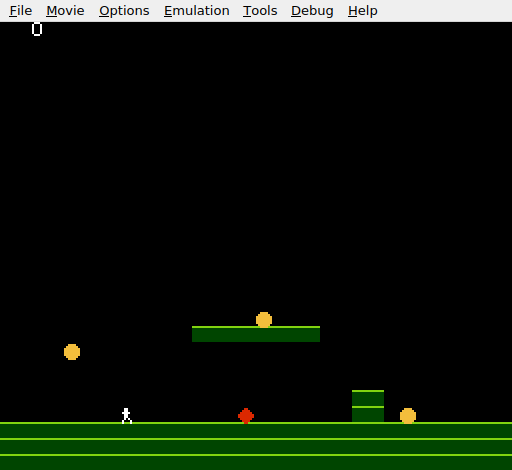
A white “0” appears near the top-left corner of the screen. The level is the same — ground, platform, wall, three coins, the obstacle. Collect a coin and the digit changes: 1, 2, 3. The nametable now serves as a HUD.
Try This: Two-Digit Score
Display the score as two digits. Divide by 10 to get the tens digit, use the remainder as the ones digit. The 6502 has no division instruction, so use repeated subtraction:
    lda score
    ldx #0
@div10:
    cmp #10
    bcc @div_done
    sec
    sbc #10
    inx
    jmp @div10
@div_done:
    ; X = tens digit, A = ones digit
Write both digits to the nametable: the tens at $2022, the ones at $2023. Two PPUDATA writes in sequence — the PPU auto-increments the address after each write.
Try This: High Score
Add a high_score variable. After each collection, compare score with high_score:
    lda score
    cmp high_score
    bcc @not_high
    sta high_score
@not_high:
Display the high score at a different nametable position (e.g. $203C — row 1, column 28, right side). The high score persists until the console is powered off.
Try This: Score at Collection Point
Instead of a fixed HUD position, briefly display the score digit at the coin’s location using a sprite. Set an OAM entry’s tile to the digit tile and position it where the coin was. After 30 frames, hide it. This creates a floating number effect.
If It Doesn’t Work
- No digit appears? Check that the digit tiles exist in CHR-ROM at tiles 5–14. Both planes must be set — if only one plane has data, the colour is 1 or 2 (dark grey or light grey), hard to see against black.
- Score doesn’t change? Make sure
inc scoreis insidecheck_collect, after the line that hides the sprite. If it’s outside the subroutine, it runs every frame regardless of collection. - Screen jumps or shakes? The
PPUSCROLLreset is missing or in the wrong place. It must come after allPPUADDR/PPUDATAwrites in the NMI handler, before the handler returns. - Digit is in the wrong position?
$2022is row 1, column 2. Each row is 32 tiles ($20 bytes). Row 1 starts at$2020. Column 2 is offset$02. To move the digit, adjust the low byte of the PPUADDR write. - Digit shows the wrong character? The tile index must be
score + DIGIT_ZERO. IfDIGIT_ZEROis wrong (not matching where the digit tiles actually start in CHR-ROM), the display shows the wrong tile. - Score keeps going up? The
check_collectsubroutine checks for$EF(already collected) before doing the overlap test. If that check is missing, the subroutine collects the same coin every frame.
What You’ve Learnt
- VBlank nametable updates — the NMI handler is the safe window for writing to VRAM.
PPUADDRsets the position,PPUDATAwrites the tile. - PPUSCROLL reset — any
PPUADDRwrite corrupts the scroll. Always resetPPUSCROLLafter nametable updates in the NMI handler. - Score tracking — a zero-page variable incremented by
INC. Simple, fast, and persistent across frames. - Digit tiles — both CHR-ROM bit planes set identically produce colour index 3. Ten tiles (0–9) starting at a known offset let you convert numbers to tile indices with a single
ADC. - HUD on the nametable — background tiles are the right tool for fixed UI elements. Sprites are for moving objects; tiles are for the interface.
What’s Next
The score changes silently. In Unit 11, collecting a coin plays a sound — a short note on the APU triangle channel. The game starts to feel responsive.