Collect Sound
Collecting a coin plays a short, bright note on the APU triangle channel. Three register writes produce a sound that makes every pickup feel rewarding.
The score ticks up — but silently. The jump has a sound; collecting a coin doesn’t. This unit adds a short, bright note that plays when a coin is picked up. Three register writes to the APU triangle channel, and every collection feels like a reward.
The Triangle Channel
The NES APU has five channels. Unit 5 used pulse channel 1 for the jump sound. The triangle channel is different in one important way: it has no volume control. The pulse channel has a 4-bit volume setting; the triangle is either on or off. When it’s on, it outputs a triangle wave at full volume — a smooth, pure tone.
The triangle channel uses three registers:
| Register | Address | Purpose |
|---|---|---|
| TRI_LINEAR | $4008 | Linear counter (controls duration) |
| TRI_LO | $400A | Timer low byte (controls pitch) |
| TRI_HI | $400B | Timer high + length counter (triggers the note) |
TRI_LINEAR = $4008
TRI_LO     = $400A
TRI_HI     = $400B
Enabling the Channel
The APU status register ($4015) controls which channels are active. Until now, only pulse channel 1 was enabled:
    ; Old: pulse 1 only
    lda #%00000001
    sta APU_STATUS
Bit 2 enables the triangle channel. Set both bits:
    ; New: pulse 1 + triangle
    lda #%00000101
    sta APU_STATUS
Without bit 2 set, writes to the triangle registers are ignored. The channel stays silent no matter what values you write.
Playing the Note
The collect sound triggers inside check_collect, immediately after hiding the sprite and incrementing the score:
    ; Play collect sound (triangle channel)
    lda #%00011000          ; Linear counter: halt=0, reload=24 (~100ms)
    sta TRI_LINEAR
    lda #$29                ; Timer low — bright pitch (~1330 Hz)
    sta TRI_LO
    lda #$00                ; Timer high=0, length counter=0 (10 frames)
    sta TRI_HI
Three writes, one sound. Each register does something different.
TRI_LINEAR ($4008) — Duration
The linear counter controls how long the note plays. Bits 6–0 hold the reload value; bit 7 is the control flag.
With bit 7 clear (0), the counter loads the reload value and counts down. When it reaches zero, the channel goes silent. The counter ticks at 240 Hz (four times per frame). A reload value of 24 produces a note lasting about 100 milliseconds — long enough to hear, short enough to feel snappy.
If bit 7 were set (1), the counter would keep reloading and never reach zero. The note would play indefinitely. That’s useful for music, not for a sound effect.
TRI_LO ($400A) — Pitch
The timer sets the frequency. The triangle channel steps through a 32-step waveform. The output frequency is:
frequency = 1,789,773 / (32 × (timer + 1))A timer value of $29 (41 decimal) gives:
1,789,773 / (32 × 42) = 1,331 HzThat’s close to E6 — a bright, cheerful pitch. Higher timer values produce lower notes; lower values produce higher ones. The timer is 11 bits total: 8 in TRI_LO and 3 in the low bits of TRI_HI.
TRI_HI ($400B) — Trigger
Writing to TRI_HI does two things: it sets the top 3 bits of the timer period, and it triggers the note by reloading the linear counter. The length counter load value (bits 7–3) provides a second duration limit — but for a short sound effect, the linear counter runs out first.
The write to TRI_HI is what starts the sound. Without it, setting the other two registers has no effect.
The Full Subroutine
; =============================================================================
; check_collect — with collect sound
; =============================================================================
; After hiding the sprite and incrementing the score, three writes to the
; triangle channel registers play a short, bright note.
; =============================================================================

check_collect:
    ; Skip if already collected
    lda oam_buffer, x       ; Sprite Y position
    cmp #$EF
    beq @done

    ; --- Y overlap ---
    lda player_y
    clc
    adc #8
    cmp oam_buffer, x
    bcc @done
    beq @done

    lda oam_buffer, x
    clc
    adc #8
    cmp player_y
    bcc @done
    beq @done

    ; --- X overlap ---
    lda player_x
    clc
    adc #8
    cmp oam_buffer+3, x
    bcc @done
    beq @done

    lda oam_buffer+3, x
    clc
    adc #8
    cmp player_x
    bcc @done
    beq @done

    ; Collected! Hide the sprite and add to score
    lda #$EF
    sta oam_buffer, x
    inc score

    ; Play collect sound (triangle channel)
    lda #%00011000          ; Linear counter: halt=0, reload=24 (~100ms)
    sta TRI_LINEAR
    lda #$29                ; Timer low — bright pitch (~1330 Hz)
    sta TRI_LO
    lda #$00                ; Timer high=0, length counter=0 (10 frames)
    sta TRI_HI

@done:
    rts
The sound plays at the moment of collection. The subroutine already checks overlap and hides the sprite — the triangle writes sit naturally after inc score. No new subroutine needed. No new variable needed. Three instructions added to existing code.
Two Channels, Two Sounds
The game now uses two APU channels simultaneously:
- Pulse 1 — jump sound (falling pitch via sweep unit)
- Triangle — collect sound (fixed pitch, short duration)
The channels are independent. A jump and a collection can happen on the same frame and both sounds play. The APU mixes them in hardware — no code needed to combine audio. Each channel has its own registers and its own output.
The Complete Code
; =============================================================================
; DASH - Unit 11: Collect Sound
; =============================================================================
; Collecting a coin plays a short, bright note on the APU triangle channel.
; The triangle has no volume control — just a pitch and a duration.
; =============================================================================

; -----------------------------------------------------------------------------
; NES Hardware Addresses
; -----------------------------------------------------------------------------
PPUCTRL   = $2000
PPUMASK   = $2001
PPUSTATUS = $2002
OAMADDR   = $2003
PPUSCROLL = $2005
PPUADDR   = $2006
PPUDATA   = $2007
OAMDMA    = $4014
JOYPAD1   = $4016

; -----------------------------------------------------------------------------
; APU Registers
; -----------------------------------------------------------------------------
SQ1_VOL    = $4000
SQ1_SWEEP  = $4001
SQ1_LO     = $4002
SQ1_HI     = $4003
TRI_LINEAR = $4008
TRI_LO     = $400A
TRI_HI     = $400B
APU_STATUS = $4015

; -----------------------------------------------------------------------------
; Button Masks
; -----------------------------------------------------------------------------
BTN_A      = %10000000
BTN_B      = %01000000
BTN_SELECT = %00100000
BTN_START  = %00010000
BTN_UP     = %00001000
BTN_DOWN   = %00000100
BTN_LEFT   = %00000010
BTN_RIGHT  = %00000001

; -----------------------------------------------------------------------------
; Game Constants
; -----------------------------------------------------------------------------
PLAYER_X       = 60
PLAYER_Y       = 200
PLAYER_TILE    = 1
RIGHT_WALL     = 248
FLOOR_Y        = 200           ; Obstacle Y position (ground level)
GRAVITY        = 1
JUMP_VEL       = $F6
OBSTACLE_TILE  = 2
OBSTACLE_SPEED = 2
GROUND_TILE    = 3
COIN_TILE      = 4
DIGIT_ZERO     = 5             ; First digit tile (0-9 are tiles 5-14)

; -----------------------------------------------------------------------------
; Memory
; -----------------------------------------------------------------------------
.segment "ZEROPAGE"
player_x:   .res 1
player_y:   .res 1
vel_y:      .res 1
buttons:    .res 1
nmi_flag:   .res 1
on_ground:  .res 1
obstacle_x: .res 1
tile_ptr:   .res 2             ; Pointer for level data lookup
score:      .res 1             ; Current score (0-255)

.segment "OAM"
oam_buffer: .res 256

.segment "BSS"

; =============================================================================
; iNES Header
; =============================================================================
.segment "HEADER"
    .byte "NES", $1A
    .byte 2
    .byte 1
    .byte $01
    .byte $00
    .byte 0,0,0,0,0,0,0,0

; =============================================================================
; Code
; =============================================================================
.segment "CODE"

; --- Reset ---
reset:
    sei
    cld
    ldx #$40
    stx $4017
    ldx #$FF
    txs
    inx
    stx PPUCTRL
    stx PPUMASK
    stx $4010
    stx APU_STATUS

@vblank1:
    bit PPUSTATUS
    bpl @vblank1

    lda #0
@clear_ram:
    sta $0000, x
    sta $0100, x
    sta $0200, x
    sta $0300, x
    sta $0400, x
    sta $0500, x
    sta $0600, x
    sta $0700, x
    inx
    bne @clear_ram

@vblank2:
    bit PPUSTATUS
    bpl @vblank2

    ; --- Load palette ---
    bit PPUSTATUS
    lda #$3F
    sta PPUADDR
    lda #$00
    sta PPUADDR

    ldx #0
@load_palette:
    lda palette_data, x
    sta PPUDATA
    inx
    cpx #32
    bne @load_palette

    ; --- Clear nametable 0 ---
    bit PPUSTATUS
    lda #$20
    sta PPUADDR
    lda #$00
    sta PPUADDR

    lda #0
    ldy #4
    ldx #0
@clear_nt:
    sta PPUDATA
    dex
    bne @clear_nt
    dey
    bne @clear_nt

    ; --- Write ground tiles (rows 26-29) ---
    bit PPUSTATUS
    lda #$23
    sta PPUADDR
    lda #$40
    sta PPUADDR             ; PPU address $2340 (row 26)

    lda #GROUND_TILE
    ldx #128                ; 4 rows × 32 tiles
@write_ground:
    sta PPUDATA
    dex
    bne @write_ground

    ; --- Write platform tiles (row 20, columns 12-19) ---
    bit PPUSTATUS
    lda #$22
    sta PPUADDR
    lda #$8C
    sta PPUADDR             ; PPU address $228C (row 20, col 12)

    lda #GROUND_TILE
    ldx #8                  ; 8 tiles wide
@write_platform:
    sta PPUDATA
    dex
    bne @write_platform

    ; --- Write wall tiles (rows 24-25, columns 22-23) ---
    bit PPUSTATUS
    lda #$23
    sta PPUADDR
    lda #$16
    sta PPUADDR             ; PPU address $2316 (row 24, col 22)
    lda #GROUND_TILE
    sta PPUDATA
    sta PPUDATA             ; Cols 22-23

    bit PPUSTATUS
    lda #$23
    sta PPUADDR
    lda #$36
    sta PPUADDR             ; PPU address $2336 (row 25, col 22)
    lda #GROUND_TILE
    sta PPUDATA
    sta PPUDATA             ; Cols 22-23

    ; --- Write initial score display ---
    bit PPUSTATUS
    lda #$20
    sta PPUADDR
    lda #$22
    sta PPUADDR             ; PPU address $2022 (row 1, col 2)
    lda #DIGIT_ZERO         ; Tile for "0"
    sta PPUDATA

    ; --- Set attributes (platform + wall + ground palettes) ---
    bit PPUSTATUS
    lda #$23
    sta PPUADDR
    lda #$E8
    sta PPUADDR             ; PPU address $23E8 (attribute row 5)

    ldx #0
@write_attrs:
    lda attr_data, x
    sta PPUDATA
    inx
    cpx #24
    bne @write_attrs

    ; --- Set up player sprite (OAM entry 0) ---
    lda #PLAYER_Y
    sta oam_buffer+0
    lda #PLAYER_TILE
    sta oam_buffer+1
    lda #0
    sta oam_buffer+2
    lda #PLAYER_X
    sta oam_buffer+3

    ; Set up obstacle sprite (OAM entry 1)
    lda #FLOOR_Y
    sta oam_buffer+4
    lda #OBSTACLE_TILE
    sta oam_buffer+5
    lda #1
    sta oam_buffer+6
    lda #255
    sta oam_buffer+7

    ; Set up collectible sprites (OAM entries 2-4)
    ; Coin 0: on the platform
    lda #152                ; Y = 152 (sits on row 20 platform)
    sta oam_buffer+8
    lda #COIN_TILE
    sta oam_buffer+9
    lda #2                  ; Sprite palette 2 (yellow)
    sta oam_buffer+10
    lda #128                ; X = 128 (centre of platform)
    sta oam_buffer+11

    ; Coin 1: past the wall on the ground
    lda #FLOOR_Y
    sta oam_buffer+12
    lda #COIN_TILE
    sta oam_buffer+13
    lda #2
    sta oam_buffer+14
    lda #200                ; X = 200
    sta oam_buffer+15

    ; Coin 2: in the air (jump to collect)
    lda #168                ; Y = 168 (above ground, reachable by jumping)
    sta oam_buffer+16
    lda #COIN_TILE
    sta oam_buffer+17
    lda #2
    sta oam_buffer+18
    lda #32                 ; X = 32 (left side)
    sta oam_buffer+19

    ; Initialise game state
    lda #PLAYER_X
    sta player_x
    lda #PLAYER_Y
    sta player_y
    lda #0
    sta vel_y
    sta score               ; Score starts at 0
    lda #1
    sta on_ground
    lda #255
    sta obstacle_x

    ; Hide other sprites (entries 5-63)
    lda #$EF
    ldx #20
@hide_sprites:
    sta oam_buffer, x
    inx
    bne @hide_sprites

    ; Enable APU channels: pulse 1 + triangle
    lda #%00000101
    sta APU_STATUS

    ; Reset scroll position
    bit PPUSTATUS
    lda #0
    sta PPUSCROLL
    sta PPUSCROLL

    ; Enable rendering
    lda #%10000000
    sta PPUCTRL
    lda #%00011110
    sta PPUMASK

; =============================================================================
; Main Loop
; =============================================================================
main_loop:
    lda nmi_flag
    beq main_loop
    lda #0
    sta nmi_flag

    ; --- Read controller ---
    lda #1
    sta JOYPAD1
    lda #0
    sta JOYPAD1

    ldx #8
@read_pad:
    lda JOYPAD1
    lsr a
    rol buttons
    dex
    bne @read_pad

    ; --- Jump check ---
    lda buttons
    and #BTN_A
    beq @no_jump
    lda on_ground
    beq @no_jump
    lda #JUMP_VEL
    sta vel_y
    lda #0
    sta on_ground

    ; Play jump sound (pulse channel)
    lda #%10111000
    sta SQ1_VOL
    lda #%10111001
    sta SQ1_SWEEP
    lda #$C8
    sta SQ1_LO
    lda #$00
    sta SQ1_HI

@no_jump:

    ; --- Move left (with wall check) ---
    lda buttons
    and #BTN_LEFT
    beq @not_left
    lda player_x
    beq @not_left

    lda player_y
    clc
    adc #4
    lsr
    lsr
    lsr
    tax

    lda level_rows_lo, x
    sta tile_ptr
    lda level_rows_hi, x
    sta tile_ptr+1

    lda player_x
    sec
    sbc #1
    lsr
    lsr
    lsr
    tay

    lda (tile_ptr), y
    bne @not_left

    dec player_x
@not_left:

    ; --- Move right (with wall check) ---
    lda buttons
    and #BTN_RIGHT
    beq @not_right
    lda player_x
    cmp #RIGHT_WALL
    bcs @not_right

    lda player_y
    clc
    adc #4
    lsr
    lsr
    lsr
    tax

    lda level_rows_lo, x
    sta tile_ptr
    lda level_rows_hi, x
    sta tile_ptr+1

    lda player_x
    clc
    adc #8
    lsr
    lsr
    lsr
    tay

    lda (tile_ptr), y
    bne @not_right

    inc player_x
@not_right:

    ; --- Apply gravity ---
    lda vel_y
    clc
    adc #GRAVITY
    sta vel_y

    ; --- Apply velocity to Y position ---
    lda player_y
    clc
    adc vel_y
    sta player_y

    ; --- Tile collision (vertical) ---
    lda vel_y
    bmi @no_floor

    lda player_y
    clc
    adc #8
    lsr
    lsr
    lsr
    tax

    cpx #30
    bcs @on_solid

    lda level_rows_lo, x
    sta tile_ptr
    lda level_rows_hi, x
    sta tile_ptr+1

    lda player_x
    clc
    adc #4
    lsr
    lsr
    lsr
    tay

    lda (tile_ptr), y
    beq @no_floor

@on_solid:
    lda player_y
    clc
    adc #8
    and #%11111000
    sec
    sbc #8
    sta player_y
    lda #0
    sta vel_y
    lda #1
    sta on_ground
    jmp @done_floor

@no_floor:
    lda #0
    sta on_ground

@done_floor:

    ; --- Check collectibles ---
    ldx #8                  ; OAM entry 2 (coin 0)
    jsr check_collect
    ldx #12                 ; OAM entry 3 (coin 1)
    jsr check_collect
    ldx #16                 ; OAM entry 4 (coin 2)
    jsr check_collect

    ; --- Move obstacle ---
    lda obstacle_x
    sec
    sbc #OBSTACLE_SPEED
    sta obstacle_x

    ; --- Collision with obstacle ---
    lda on_ground
    beq @no_collide

    lda player_y
    cmp #(FLOOR_Y - 7)
    bcc @no_collide

    lda obstacle_x
    cmp #240
    bcs @no_collide

    lda player_x
    clc
    adc #8
    cmp obstacle_x
    bcc @no_collide
    beq @no_collide

    lda obstacle_x
    clc
    adc #8
    cmp player_x
    bcc @no_collide
    beq @no_collide

    lda #PLAYER_X
    sta player_x

@no_collide:

    ; --- Update sprite positions ---
    lda player_y
    sta oam_buffer+0
    lda player_x
    sta oam_buffer+3

    lda #FLOOR_Y
    sta oam_buffer+4
    lda obstacle_x
    sta oam_buffer+7

    jmp main_loop

; =============================================================================
; Subroutines
; =============================================================================

; -----------------------------------------------------------------------------
; check_collect: Check if the player overlaps a collectible sprite
; Input:  X = OAM buffer offset (8, 12, or 16)
; Effect: If overlapping, hides the sprite, increments score, plays sound
; -----------------------------------------------------------------------------
check_collect:
    ; Skip if already collected
    lda oam_buffer, x       ; Sprite Y position
    cmp #$EF
    beq @done

    ; --- Y overlap ---
    ; Player bottom vs item top
    lda player_y
    clc
    adc #8
    cmp oam_buffer, x
    bcc @done
    beq @done

    ; Item bottom vs player top
    lda oam_buffer, x
    clc
    adc #8
    cmp player_y
    bcc @done
    beq @done

    ; --- X overlap ---
    ; Player right vs item left
    lda player_x
    clc
    adc #8
    cmp oam_buffer+3, x
    bcc @done
    beq @done

    ; Item right vs player left
    lda oam_buffer+3, x
    clc
    adc #8
    cmp player_x
    bcc @done
    beq @done

    ; Collected! Hide the sprite and add to score
    lda #$EF
    sta oam_buffer, x
    inc score

    ; Play collect sound (triangle channel)
    lda #%00011000          ; Linear counter: halt=0, reload=24 (~100ms)
    sta TRI_LINEAR
    lda #$29                ; Timer low — bright pitch (~1330 Hz)
    sta TRI_LO
    lda #$00                ; Timer high=0, length counter=0 (10 frames)
    sta TRI_HI

@done:
    rts

; =============================================================================
; NMI Handler
; =============================================================================
nmi:
    pha
    txa
    pha
    tya
    pha

    ; --- OAM DMA ---
    lda #0
    sta OAMADDR
    lda #>oam_buffer
    sta OAMDMA

    ; --- Update score display on nametable ---
    bit PPUSTATUS           ; Reset address latch
    lda #$20
    sta PPUADDR
    lda #$22
    sta PPUADDR             ; PPU address $2022 (row 1, col 2)
    lda score
    clc
    adc #DIGIT_ZERO         ; Convert score to tile index
    sta PPUDATA

    ; --- Reset scroll (required after PPUADDR writes) ---
    lda #0
    sta PPUSCROLL
    sta PPUSCROLL

    lda #1
    sta nmi_flag

    pla
    tay
    pla
    tax
    pla
    rti

irq:
    rti

; =============================================================================
; Data
; =============================================================================

palette_data:
    ; Background palettes
    .byte $0F, $00, $10, $20   ; Palette 0: greys (sky)
    .byte $0F, $09, $19, $29   ; Palette 1: greens (ground)
    .byte $0F, $00, $10, $20
    .byte $0F, $00, $10, $20
    ; Sprite palettes
    .byte $0F, $30, $16, $27   ; Palette 0: white (player)
    .byte $0F, $16, $27, $30   ; Palette 1: red (obstacle)
    .byte $0F, $28, $38, $30   ; Palette 2: yellow (coins)
    .byte $0F, $30, $16, $27

attr_data:
    ; Attribute row 5 ($23E8) — platform
    .byte $00, $00, $00, $05, $05, $00, $00, $00
    ; Attribute row 6 ($23F0) — wall + ground
    .byte $50, $50, $50, $50, $50, $54, $50, $50
    ; Attribute row 7 ($23F8) — ground (top quadrants)
    .byte $05, $05, $05, $05, $05, $05, $05, $05

; -----------------------------------------------------------------------------
; Level Data
; -----------------------------------------------------------------------------
level_empty_row:
    .byte 0,0,0,0, 0,0,0,0, 0,0,0,0, 0,0,0,0
    .byte 0,0,0,0, 0,0,0,0, 0,0,0,0, 0,0,0,0

level_platform_row:
    .byte 0,0,0,0, 0,0,0,0, 0,0,0,0, 3,3,3,3
    .byte 3,3,3,3, 0,0,0,0, 0,0,0,0, 0,0,0,0

level_wall_row:
    .byte 0,0,0,0, 0,0,0,0, 0,0,0,0, 0,0,0,0
    .byte 0,0,0,0, 0,0,3,3, 0,0,0,0, 0,0,0,0

level_ground_row:
    .byte 3,3,3,3, 3,3,3,3, 3,3,3,3, 3,3,3,3
    .byte 3,3,3,3, 3,3,3,3, 3,3,3,3, 3,3,3,3

; Row pointer tables (30 entries — one per nametable row)
level_rows_lo:
    .byte <level_empty_row      ; Row 0
    .byte <level_empty_row      ; Row 1
    .byte <level_empty_row      ; Row 2
    .byte <level_empty_row      ; Row 3
    .byte <level_empty_row      ; Row 4
    .byte <level_empty_row      ; Row 5
    .byte <level_empty_row      ; Row 6
    .byte <level_empty_row      ; Row 7
    .byte <level_empty_row      ; Row 8
    .byte <level_empty_row      ; Row 9
    .byte <level_empty_row      ; Row 10
    .byte <level_empty_row      ; Row 11
    .byte <level_empty_row      ; Row 12
    .byte <level_empty_row      ; Row 13
    .byte <level_empty_row      ; Row 14
    .byte <level_empty_row      ; Row 15
    .byte <level_empty_row      ; Row 16
    .byte <level_empty_row      ; Row 17
    .byte <level_empty_row      ; Row 18
    .byte <level_empty_row      ; Row 19
    .byte <level_platform_row   ; Row 20: floating platform
    .byte <level_empty_row      ; Row 21
    .byte <level_empty_row      ; Row 22
    .byte <level_empty_row      ; Row 23
    .byte <level_wall_row       ; Row 24: wall
    .byte <level_wall_row       ; Row 25: wall
    .byte <level_ground_row     ; Row 26
    .byte <level_ground_row     ; Row 27
    .byte <level_ground_row     ; Row 28
    .byte <level_ground_row     ; Row 29

level_rows_hi:
    .byte >level_empty_row      ; Row 0
    .byte >level_empty_row      ; Row 1
    .byte >level_empty_row      ; Row 2
    .byte >level_empty_row      ; Row 3
    .byte >level_empty_row      ; Row 4
    .byte >level_empty_row      ; Row 5
    .byte >level_empty_row      ; Row 6
    .byte >level_empty_row      ; Row 7
    .byte >level_empty_row      ; Row 8
    .byte >level_empty_row      ; Row 9
    .byte >level_empty_row      ; Row 10
    .byte >level_empty_row      ; Row 11
    .byte >level_empty_row      ; Row 12
    .byte >level_empty_row      ; Row 13
    .byte >level_empty_row      ; Row 14
    .byte >level_empty_row      ; Row 15
    .byte >level_empty_row      ; Row 16
    .byte >level_empty_row      ; Row 17
    .byte >level_empty_row      ; Row 18
    .byte >level_empty_row      ; Row 19
    .byte >level_platform_row   ; Row 20: floating platform
    .byte >level_empty_row      ; Row 21
    .byte >level_empty_row      ; Row 22
    .byte >level_empty_row      ; Row 23
    .byte >level_wall_row       ; Row 24: wall
    .byte >level_wall_row       ; Row 25: wall
    .byte >level_ground_row     ; Row 26
    .byte >level_ground_row     ; Row 27
    .byte >level_ground_row     ; Row 28
    .byte >level_ground_row     ; Row 29

; =============================================================================
; Vectors
; =============================================================================
.segment "VECTORS"
    .word nmi
    .word reset
    .word irq

; =============================================================================
; CHR-ROM
; =============================================================================
.segment "CHARS"

; Tile 0: Empty
.byte $00,$00,$00,$00,$00,$00,$00,$00
.byte $00,$00,$00,$00,$00,$00,$00,$00

; Tile 1: Running figure
.byte %00110000
.byte %00110000
.byte %01111000
.byte %00110000
.byte %00110000
.byte %00101000
.byte %01000100
.byte %01000100
.byte %00000000
.byte %00000000
.byte %00000000
.byte %00000000
.byte %00000000
.byte %00000000
.byte %00000000
.byte %00000000

; Tile 2: Diamond obstacle
.byte %00011000
.byte %00111100
.byte %01111110
.byte %11111111
.byte %11111111
.byte %01111110
.byte %00111100
.byte %00011000
.byte %00000000
.byte %00000000
.byte %00000000
.byte %00000000
.byte %00000000
.byte %00000000
.byte %00000000
.byte %00000000

; Tile 3: Ground block (light top edge, solid body)
.byte %11111111              ; Plane 0
.byte %11111111
.byte %11111111
.byte %11111111
.byte %11111111
.byte %11111111
.byte %11111111
.byte %11111111
.byte %11111111              ; Plane 1 (row 0: colour 3 = highlight)
.byte %00000000
.byte %00000000
.byte %00000000
.byte %00000000
.byte %00000000
.byte %00000000
.byte %00000000

; Tile 4: Coin
.byte %00111100              ; Plane 0
.byte %01111110
.byte %11111111
.byte %11111111
.byte %11111111
.byte %11111111
.byte %01111110
.byte %00111100
.byte %00000000              ; Plane 1 (all zero = colour 1 only)
.byte %00000000
.byte %00000000
.byte %00000000
.byte %00000000
.byte %00000000
.byte %00000000
.byte %00000000

; Tiles 5-14: Digits 0-9
; Both planes identical = colour 3 (white on BG palette 0)

; Tile 5: Digit 0
.byte $70,$88,$88,$88,$88,$88,$70,$00  ; Plane 0
.byte $70,$88,$88,$88,$88,$88,$70,$00  ; Plane 1

; Tile 6: Digit 1
.byte $20,$60,$20,$20,$20,$20,$70,$00  ; Plane 0
.byte $20,$60,$20,$20,$20,$20,$70,$00  ; Plane 1

; Tile 7: Digit 2
.byte $70,$88,$08,$30,$40,$80,$F8,$00  ; Plane 0
.byte $70,$88,$08,$30,$40,$80,$F8,$00  ; Plane 1

; Tile 8: Digit 3
.byte $70,$88,$08,$30,$08,$88,$70,$00  ; Plane 0
.byte $70,$88,$08,$30,$08,$88,$70,$00  ; Plane 1

; Tile 9: Digit 4
.byte $10,$30,$50,$90,$F8,$10,$10,$00  ; Plane 0
.byte $10,$30,$50,$90,$F8,$10,$10,$00  ; Plane 1

; Tile 10: Digit 5
.byte $F8,$80,$F0,$08,$08,$88,$70,$00  ; Plane 0
.byte $F8,$80,$F0,$08,$08,$88,$70,$00  ; Plane 1

; Tile 11: Digit 6
.byte $30,$40,$80,$F0,$88,$88,$70,$00  ; Plane 0
.byte $30,$40,$80,$F0,$88,$88,$70,$00  ; Plane 1

; Tile 12: Digit 7
.byte $F8,$08,$10,$20,$20,$20,$20,$00  ; Plane 0
.byte $F8,$08,$10,$20,$20,$20,$20,$00  ; Plane 1

; Tile 13: Digit 8
.byte $70,$88,$88,$70,$88,$88,$70,$00  ; Plane 0
.byte $70,$88,$88,$70,$88,$88,$70,$00  ; Plane 1

; Tile 14: Digit 9
.byte $70,$88,$88,$78,$08,$10,$60,$00  ; Plane 0
.byte $70,$88,$88,$78,$08,$10,$60,$00  ; Plane 1

.res 8192 - 240, $00
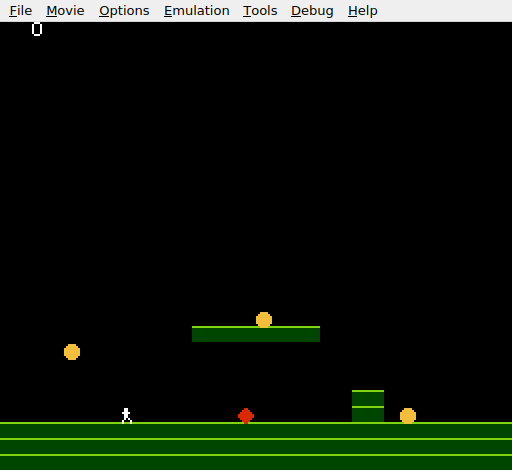
The screen looks the same as Unit 10 — score in the top-left, three coins, the platform, the wall. The difference is audible. Touch a coin and a bright ding plays. The triangle channel’s clean tone cuts through clearly, distinct from the pulse channel’s buzzy jump sound.
Try This: Lower Pitch
Change TRI_LO to $80 (128 decimal). The frequency drops to about 434 Hz — close to A4, a full two octaves lower. The collect sound becomes a warm thud instead of a bright ding. Different timer values give different characters to the same event.
Try This: Longer Note
Change the linear counter reload from 24 to 96:
    lda #%01100000          ; Linear counter: reload=96 (~400ms)
    sta TRI_LINEAR
The note sustains for nearly half a second. It sounds more like a musical tone than a quick effect. For a collect sound, shorter is usually better — but longer notes are useful for power-ups or level-complete jingles.
Try This: Collision Sound
Add a sound when the player hits the obstacle. Use a low triangle note (timer $FF) with a short duration (reload 8) for a deep “bonk”. Place the triangle writes in the obstacle collision section, before resetting the player position.
If It Doesn’t Work
- No collect sound? Check
APU_STATUS. Bit 2 must be set (%00000101). If it’s still%00000001, the triangle channel is disabled. - Sound plays constantly? Bit 7 of
TRI_LINEARmust be clear (0). If set, the linear counter never decrements and the note plays forever until the length counter expires. - Sound plays on every frame? The triangle writes must be inside
check_collect, after the overlap passes and the sprite is hidden. If they’re in the main loop, the sound triggers every frame regardless of collection. - Can’t hear the triangle? The triangle channel has no volume control — it’s always at full output when active. If the note is very short (reload < 4), it might be too brief to hear. Try increasing the reload value.
- Wrong pitch? The timer value in
TRI_LOdirectly sets the frequency.$29is bright;$80is warm;$FFis deep. Check you haven’t swapped TRI_LO and TRI_LINEAR.
What You’ve Learnt
- Triangle channel — the APU’s third channel. No volume control: it’s on or off. Produces a smooth, pure tone distinct from the buzzy pulse channels.
- Linear counter — the triangle’s duration mechanism. A reload value sets how many 240 Hz ticks the note plays. Bit 7 controls whether the counter is one-shot (clear) or continuous (set).
- Timer period — an 11-bit value split across two registers. Determines the output frequency. The formula is
CPU_clock / (32 × (timer + 1)). - Channel independence — each APU channel has its own registers. Multiple sounds play simultaneously with no mixing code required.
- Sound as feedback — a 100ms triangle note transforms a silent event into a satisfying moment. Audio reinforces what the player sees.
What’s Next
The level is safe except for the obstacle. In Unit 12, certain tiles become hazards — touch them and the player takes damage. The nametable gains a new role: not just scenery, but danger.