A Coloured Block
Write to attribute memory to place coloured blocks on the ZX Spectrum screen — the first step toward building a maze.
Black screen. No sound, no movement. Then a block of colour appears — a wall in the darkness.
This is how the ZX Spectrum works. Every colour on screen comes from attribute memory — a grid of 768 bytes starting at address $5800. Write a value there and colour appears. The wall is just a byte. The floor is just a byte. By the end of this unit, you’ll place both on screen — the first stones of Shadowkeep’s maze.
The Empty Program
The simplest Z80 program:
            org     32768
start:
            ret
            end     start
org 32768 places the code at address 32768 ($8000) — a safe area above BASIC’s workspace. ret returns to BASIC immediately. end start tells the assembler where execution begins.
Assemble it:
pasmonext --tapbas shadowkeep.asm shadowkeep.tapLoad the TAP file in Fuse (or your emulator). Type RUN — nothing happens. The program runs and returns to BASIC instantly. That’s correct. Your toolchain works.
Set the Border
Two instructions change the border colour:
; Shadowkeep — Set the border colour

            org     32768

start:
            ld      a, 1            ; 1 = blue
            out     ($fe), a        ; Write to border port

.loop:      halt                    ; Wait for next frame
            jr      .loop           ; Loop forever

            end     start
ld a, 1 loads the value 1 into the A register (the accumulator). In Z80 assembly, bare numbers are always immediate values — no special prefix needed.
out ($fe), a sends that value to port $FE, which controls the border colour. The Spectrum uses ports to communicate with hardware — out writes to a port, in reads from one.
The halt / jr .loop pair keeps the program running forever. Without it, execution returns to BASIC and the border resets. halt waits for the next video frame (1/50th of a second), and jr .loop jumps back.
Assemble and run. The border turns blue.
| Value | Colour |
|---|---|
| 0 | Black |
| 1 | Blue |
| 2 | Red |
| 3 | Magenta |
| 4 | Green |
| 5 | Cyan |
| 6 | Yellow |
| 7 | White |
Try changing the 1 to other values. Each gives a different border colour.
One Coloured Cell
Now for the real thing — writing directly to screen memory:
; Shadowkeep — One coloured cell

            org     32768

start:
            ; Black border
            ld      a, 0            ; 0 = black
            out     ($fe), a        ; Write to border port

            ; Clear screen (bitmap + attributes)
            ; This uses LDIR — we'll learn how it works in Unit 3
            ld      hl, $4000       ; Start of screen memory
            ld      de, $4001       ; Destination = start + 1
            ld      bc, 6911        ; 6912 bytes - 1
            ld      (hl), 0         ; First byte = 0
            ldir                    ; Copy to rest

            ; Write one attribute at row 12, column 16
            ; Address = $5800 + (12 x 32) + 16 = $5990
            ld      a, $30          ; Yellow PAPER, black INK
            ld      ($5990), a

.loop:      halt
            jr      .loop

            end     start
The screen clear at the top uses ldir — an instruction we haven’t learnt yet. It fills screen memory with zeros, giving us a clean black canvas. We’ll explore how it works in Unit 3. For now, trust that it clears the screen.
The important lines are:
            ld      a, $30
            ld      ($5990), a
ld a, $30 loads the hex value $30 (48 decimal) into A. ld ($5990), a stores A at memory address $5990. That address sits inside attribute memory — and the Spectrum immediately shows a yellow block on screen.
No function call. No graphics API. Just a byte written to the right address.
Why $5990?
Attribute memory starts at $5800 and contains 768 bytes — one per character cell in a 32-column, 24-row grid. Each byte controls the colours of an 8×8 pixel area.
To find the address for any cell:
Address = $5800 + (row × 32) + columnOur yellow block sits at row 12, column 16:
$5800 + (12 × 32) + 16 = $5800 + 384 + 16 = $5990Rows run 0–23 (top to bottom). Columns run 0–31 (left to right).
The Attribute Byte
The value $30 encodes both colours for the cell. Here’s the format:
Bit:  7      6       5  4  3     2  1  0
      FLASH  BRIGHT  P  P  P     I  I  I
PAPER INK- FLASH (bit 7) — alternates INK and PAPER colours when set
- BRIGHT (bit 6) — brighter versions of the colours when set
- PAPER (bits 5–3) — background colour (0–7, same table as border)
- INK (bits 2–0) — foreground colour (0–7)
$30 in binary is 00110000:
0  0  1  1  0  0  0  0
F  B  ---P---  ---I---
      1  1  0  0  0  0
         6        0
PAPER = 110 = 6 = yellow. INK = 000 = 0 = black. No FLASH, no BRIGHT.
The cell appears as a solid yellow block because the bitmap beneath is all zeros — so only the PAPER colour shows.
Walls and Floor
One cell proves the concept. Multiple cells start to look like a room:
            ; Wall cells — PAPER 1 (blue)
            ld      a, $09          ; PAPER 1 + INK 1 (solid blue)
            ld      ($594e), a      ; Row 10, col 14
            ld      ($594f), a      ; Row 10, col 15
            ld      ($5950), a      ; Row 10, col 16

            ; Floor cells — PAPER 7 (white)
            ld      a, $38          ; PAPER 7 + INK 0 (white)
            ld      ($596f), a      ; Row 11, col 15
            ld      ($5970), a      ; Row 11, col 16
Wall cells use $09 — PAPER 1 (blue) + INK 1 (blue) — a solid blue block. Floor cells use $38 — PAPER 7 (white) + INK 0 (black) — a white block.
Load A with the wall colour once, then store it to multiple wall addresses. Change A to the floor colour, store to floor addresses. Same two instructions — ld a and ld (addr), a — just different addresses and values.
It’s tedious writing every cell by hand. That’s deliberate — in Unit 3, you’ll learn a loop instruction that fills an entire row in three lines. But first, understand what you’re automating.
Try This: Change the Wall Colour
In the complete program below, find:
WALL equ $09 ; PAPER 1 (blue) + INK 1Change $09 to $11 for red walls (PAPER 2), or $21 for green walls (PAPER 4). Work out the value: shift the colour number left by 3 bits, then add the same number as INK for a solid block.
| PAPER | Colour | Solid value |
|---|---|---|
| 0 | Black | $00 |
| 1 | Blue | $09 |
| 2 | Red | $12 |
| 3 | Magenta | $1b |
| 4 | Green | $24 |
| 5 | Cyan | $2d |
| 6 | Yellow | $36 |
| 7 | White | $3f |
Try This: BRIGHT and FLASH
Find the treasure cell in the complete program:
TREASURE equ $70 ; BRIGHT + PAPER 6 (yellow)That $70 has bit 6 set — BRIGHT. The yellow is noticeably brighter than a regular yellow cell would be. Try changing it to $30 (no BRIGHT) and compare.
Now look at the hazard:
HAZARD equ $90 ; FLASH + PAPER 2 (red)$90 has bit 7 set — FLASH. The cell alternates between its normal colours and their inverse, creating a flashing effect. This will mark danger in Shadowkeep.
Try combining both: $D0 would be FLASH + BRIGHT + PAPER 2. Bright flashing red.
Try This: Calculate an Address
Where would a cell appear at row 5, column 20?
$5800 + (5 × 32) + 20 = $5800 + 160 + 20 = $5800 + 180 = $58B4Add these lines before the .loop in the complete program:
            ld      a, $2d          ; Cyan (PAPER 5 + INK 5)
            ld      ($58b4), a
Reassemble and run. A cyan block appears at row 5, column 20 — separate from the room.
The Complete Code
; ============================================================================
; SHADOWKEEP — Unit 1: A Coloured Block
; ============================================================================
; A maze explorer for the ZX Spectrum
; This unit: place coloured blocks on screen using attribute memory
;
; No keyboard, no movement — just colour on screen.
; ============================================================================

            org     32768

; Attribute values
WALL        equ     $09             ; PAPER 1 (blue) + INK 1 — solid blue block
FLOOR       equ     $38             ; PAPER 7 (white) + INK 0 — white block
TREASURE    equ     $70             ; BRIGHT + PAPER 6 (yellow) — bright yellow
HAZARD      equ     $90             ; FLASH + PAPER 2 (red) — flashing red

; ----------------------------------------------------------------------------
; Entry point
; ----------------------------------------------------------------------------

start:
            ; Black border
            ld      a, 0
            out     ($fe), a

            ; Clear screen (bitmap + attributes)
            ; This fills $4000-$5AFF with zeros — black everywhere
            ld      hl, $4000
            ld      de, $4001
            ld      bc, 6911
            ld      (hl), 0
            ldir

            ; --- Draw the room ---

            ; Walls
            ld      a, WALL

            ; Top wall (row 10, cols 14-18)
            ld      ($594e), a      ; Row 10, col 14
            ld      ($594f), a      ; Row 10, col 15
            ld      ($5950), a      ; Row 10, col 16
            ld      ($5951), a      ; Row 10, col 17
            ld      ($5952), a      ; Row 10, col 18

            ; Side walls (rows 11-13)
            ld      ($596e), a      ; Row 11, col 14 (left)
            ld      ($5972), a      ; Row 11, col 18 (right)
            ld      ($598e), a      ; Row 12, col 14
            ld      ($5992), a      ; Row 12, col 18
            ld      ($59ae), a      ; Row 13, col 14
            ld      ($59b2), a      ; Row 13, col 18

            ; Bottom wall (row 14, cols 14-18)
            ld      ($59ce), a      ; Row 14, col 14
            ld      ($59cf), a      ; Row 14, col 15
            ld      ($59d0), a      ; Row 14, col 16
            ld      ($59d1), a      ; Row 14, col 17
            ld      ($59d2), a      ; Row 14, col 18

            ; Floor
            ld      a, FLOOR

            ; Row 11 floor (cols 15-17)
            ld      ($596f), a      ; Row 11, col 15
            ld      ($5970), a      ; Row 11, col 16
            ld      ($5971), a      ; Row 11, col 17

            ; Row 12 floor (cols 15, 17 — col 16 is treasure)
            ld      ($598f), a      ; Row 12, col 15
            ld      ($5991), a      ; Row 12, col 17

            ; Row 13 floor (cols 15-16 — col 17 is hazard)
            ld      ($59af), a      ; Row 13, col 15
            ld      ($59b0), a      ; Row 13, col 16

            ; Treasure — bright yellow (row 12, col 16)
            ld      a, TREASURE
            ld      ($5990), a

            ; Hazard — flashing red (row 13, col 17)
            ld      a, HAZARD
            ld      ($59b1), a

            ; --- Done ---

.loop:      halt
            jr      .loop

            end     start
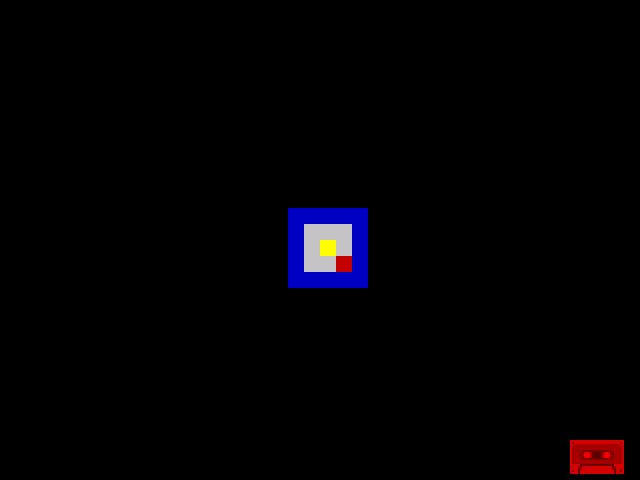
A room takes shape. Blue walls surround white floor. A bright yellow cell marks treasure. A flashing red cell marks danger. All from attribute writes — no graphics routines, no sprites, just bytes at the right addresses.
If It Doesn’t Work
- No colour? Check you’re writing to $5800+ (attributes), not $4000+ (bitmap). The attribute range is $5800–$5AFF.
- Wrong position? Address = $5800 + (row × 32) + column. Rows 0–23, columns 0–31. An address off by 32 means wrong row; off by 1 means wrong column.
- Screen not black? The
ldirclear must cover from $4000. If you only clear attributes ($5800), leftover BASIC text may show through coloured cells. - Assembler error? Check
org 32768is at the top andend startis at the bottom. The labelstart:must match. - Program returns to BASIC? You need the
halt/jr .looppair at the end to keep running.
What You’ve Learnt
- LD A, value — load an immediate value into the accumulator. This is how you prepare data for the hardware.
- LD (address), A — store the accumulator to a memory address. This is how you write to the screen.
- OUT (port), A — write to a hardware port. Port $FE controls the border colour.
- Attribute memory — $5800 to $5AFF, 768 bytes, one per 8×8 cell. Address = $5800 + (row × 32) + column.
- The attribute byte — FBPPPIII: flash, bright, paper colour, ink colour. One byte controls everything about a cell’s colour.
- Attributes as game world — blue means wall, white means floor, bright means treasure, flash means danger. Colour IS gameplay on the Spectrum.
What’s Next
You placed colours on screen by hand — one address per cell. In Unit 2, you’ll pull apart the attribute byte with AND and OR, learning to read and change individual bits. That’s how the game will check what’s at any position: read the attribute, check the colour, and know whether it’s wall, floor, or something else entirely.