Reading Colour
Use AND and OR to extract and modify individual bits of the attribute byte — the foundation of collision detection.
The room from Unit 1 is drawn — blue walls, white floor, yellow treasure, red hazard. But how does the game know what’s at each cell?
It reads the attribute byte. AND extracts the bits you care about. OR sets the bits you want to change. These two instructions are how Shadowkeep will detect walls, collect treasure, and trigger hazards. Every interaction in the game reduces to reading an attribute and checking its bits.
Reading an Attribute
In Unit 1 you wrote attributes with ld (address), a. Reading works in reverse:
ld a, ($596f) ; Read attribute at row 11, col 15After this instruction, A holds the attribute byte at that address. For a floor cell, that’s $38 (white PAPER, black INK). For a wall, it’s $09 (blue). The value is whatever you — or the game — last wrote there.
This is the basis of everything. Want to know if a cell is a wall? Read it. Want to check for treasure? Read it. The screen itself is the game state.
AND — Extracting Bits
The attribute byte packs four pieces of information into eight bits:
Bit:  7      6       5  4  3     2  1  0
      FLASH  BRIGHT  P  P  P     I  I  I
                     PAPER        INK
AND keeps only the bits you specify and zeros everything else. The value you AND with is called a mask.
            ; Read the attribute at row 11, col 15
            ld      a, ($596f)      ; A = attribute byte

            ; Extract the INK colour (bits 0-2)
            and     $07             ; Mask: keep only bits 0-2
                                    ; A now holds just the INK value (0-7)

            ; Is it a wall? (INK 1 = blue = wall)
            cp      1               ; Compare A with 1
            jr      z, its_a_wall   ; Jump if equal — it's a wall
AND $07 is the mask 00000111 — it keeps bits 0, 1, and 2 (the INK colour) and zeros bits 3–7. If the cell was $09 (PAPER 1, INK 1), after AND $07 A holds just 1 — the INK colour.
CP 1 compares A with 1. If they’re equal, the Z80 sets the Zero flag, and JR Z (jump if zero) takes the branch. INK 1 means blue, which means wall. That’s collision detection in three instructions.
Common Masks
| Mask | Binary | Extracts |
|---|---|---|
$07 | 00000111 | INK colour (0–7) |
$38 | 00111000 | PAPER bits (still shifted — value is 0, 8, 16… not 0–7) |
$40 | 01000000 | BRIGHT bit (result is 0 or 64) |
$80 | 10000000 | FLASH bit (result is 0 or 128) |
To check BRIGHT: AND $40 — if the result isn’t zero, BRIGHT is set. To check FLASH: AND $80.
To check PAPER colour, you’d need to shift the result right by 3 bits. We’ll learn shift instructions later. For now, compare against the shifted value directly: AND $38 then CP $08 checks for PAPER 1 (blue).
OR — Setting Bits
OR sets bits to 1 without disturbing the others. It’s the opposite of AND: where AND clears, OR adds.
            ; Read a floor cell
            ld      a, ($596f)      ; Row 11, col 15 — currently $38 (white)

            ; Add BRIGHT
            or      $40             ; Set bit 6 — BRIGHT
                                    ; $38 OR $40 = $78

            ; Write back
            ld      ($596f), a      ; Cell is now bright white
The floor cell was $38 (00111000). OR $40 is 01000000 — it sets bit 6 without touching any other bit:
  00111000   ($38 — white floor)
OR 01000000   ($40 — BRIGHT mask)
= 01111000   ($78 — bright white floor)
The cell becomes visibly brighter. One instruction changed one property without affecting the colour.
AND — Clearing Bits
AND can also clear bits. Use the inverse of the bit you want to remove:
            ld      a, ($59b1)      ; Read hazard cell
            and     $7f             ; Clear FLASH (bit 7)
            ld      ($59b1), a      ; Write back — no longer flashing
$7F is 01111111 — every bit is 1 except bit 7. AND with this keeps everything except FLASH:
  10010000   ($90 — FLASH + red)
AND 01111111   ($7F — all except bit 7)
= 00010000   ($10 — just red, no flash)
The hazard stops flashing. It’s been defused.
Clearing Masks
| Mask | Binary | Clears |
|---|---|---|
$7F | 01111111 | FLASH |
$BF | 10111111 | BRIGHT |
$C7 | 11000111 | PAPER |
$F8 | 11111000 | INK |
$C0 | 11000000 | PAPER + INK (keeps only FLASH and BRIGHT) |
Each mask is the bitwise inverse of the extraction mask. To clear BRIGHT ($40), AND with $BF (NOT $40).
AND + OR — Changing Colours
To change a colour, clear the old bits then set the new ones:
            ; Change a wall from blue to red
            ld      a, ($5951)      ; Read wall (row 10, col 17)
                                    ; Currently $09: PAPER 1 (blue), INK 1

            and     $c0             ; Clear PAPER and INK (keep FLASH, BRIGHT)
                                    ; $09 AND $C0 = $00

            or      $12             ; Set PAPER 2 (red) + INK 2 (red)
                                    ; $00 OR $12 = $12

            ld      ($5951), a      ; Write back — wall is now solid red
Two steps: AND strips the colour away, OR paints the new one on. This pattern — read, mask, set, write — is the fundamental operation for every attribute modification in the game.
Try This: Brighten a Wall
The wall cells are $09 (blue, no BRIGHT). Add BRIGHT:
            ld      a, ($594e)      ; Read wall (row 10, col 14)
            or      $40             ; Set BRIGHT
            ld      ($594e), a      ; Bright blue wall
Add this before the .loop in the complete program. The wall cell becomes noticeably brighter blue. Compare it to the neighbouring walls that are still regular blue.
Try This: Check a Cell
This pattern checks what type of cell is at an address:
            ld      a, ($5990)      ; Read cell
            and     $07             ; Extract INK
            cp      0               ; INK 0 = floor/treasure
            jr      z, not_wall
            cp      1               ; INK 1 = wall
            jr      z, wall_found
This is exactly how Unit 7 will implement wall collision. The game reads the attribute at the player’s target position and decides whether movement is allowed.
Try This: Swap Colours
Change the floor from white to cyan. You need to clear PAPER (AND $C7), then set PAPER 5 (OR $28):
            ld      a, ($596f)      ; Read floor cell
            and     $c7             ; Clear PAPER bits
            or      $28             ; Set PAPER 5 (cyan)
            ld      ($596f), a
$28 = 00101000. Bits 5–3 = 101 = 5 = cyan.
The Complete Code
The program draws the Unit 1 room, then modifies cells to demonstrate each operation:
- OR $40 brightens three floor cells (row 11)
- OR $80 makes the treasure flash (it was only BRIGHT before)
- AND $7F defuses the hazard (removes FLASH, leaving static red)
- AND $C0 + OR $12 changes one wall from blue to red
; ============================================================================
; SHADOWKEEP — Unit 2: Reading Colour
; ============================================================================
; Draws the room from Unit 1, then modifies cells using AND and OR.
;
; AND extracts or clears bits. OR sets bits.
; Together they let you read, check, and change any part of an attribute.
; ============================================================================

            org     32768

; Attribute values
WALL        equ     $09             ; PAPER 1 (blue) + INK 1
FLOOR       equ     $38             ; PAPER 7 (white) + INK 0
TREASURE    equ     $70             ; BRIGHT + PAPER 6 (yellow)
HAZARD      equ     $90             ; FLASH + PAPER 2 (red)

; ----------------------------------------------------------------------------
; Entry point
; ----------------------------------------------------------------------------

start:
            ; Black border
            ld      a, 0
            out     ($fe), a

            ; Clear screen (bitmap + attributes)
            ld      hl, $4000
            ld      de, $4001
            ld      bc, 6911
            ld      (hl), 0
            ldir

            ; ==================================================================
            ; Draw the room (same as Unit 1)
            ; ==================================================================

            ; Walls
            ld      a, WALL

            ; Top wall (row 10, cols 14-18)
            ld      ($594e), a
            ld      ($594f), a
            ld      ($5950), a
            ld      ($5951), a
            ld      ($5952), a

            ; Side walls (rows 11-13)
            ld      ($596e), a
            ld      ($5972), a
            ld      ($598e), a
            ld      ($5992), a
            ld      ($59ae), a
            ld      ($59b2), a

            ; Bottom wall (row 14, cols 14-18)
            ld      ($59ce), a
            ld      ($59cf), a
            ld      ($59d0), a
            ld      ($59d1), a
            ld      ($59d2), a

            ; Floor
            ld      a, FLOOR

            ld      ($596f), a
            ld      ($5970), a
            ld      ($5971), a
            ld      ($598f), a
            ld      ($5991), a
            ld      ($59af), a
            ld      ($59b0), a

            ; Treasure
            ld      a, TREASURE
            ld      ($5990), a

            ; Hazard
            ld      a, HAZARD
            ld      ($59b1), a

            ; ==================================================================
            ; Unit 2: Modify cells with AND and OR
            ; ==================================================================

            ; --- OR to set BRIGHT on floor cells ---
            ; Read each cell, set bit 6, write back

            ld      a, ($596f)      ; Row 11, col 15 (floor)
            or      $40             ; Set BRIGHT
            ld      ($596f), a

            ld      a, ($5970)      ; Row 11, col 16
            or      $40
            ld      ($5970), a

            ld      a, ($5971)      ; Row 11, col 17
            or      $40
            ld      ($5971), a

            ; --- OR to add FLASH to treasure ---
            ; It's already BRIGHT ($70) — adding FLASH makes it $F0

            ld      a, ($5990)      ; Row 12, col 16 (treasure)
            or      $80             ; Set FLASH
            ld      ($5990), a      ; Now BRIGHT + FLASH yellow

            ; --- AND to remove FLASH from hazard ---
            ; It was $90 (FLASH + red) — removing FLASH leaves $10 (static red)

            ld      a, ($59b1)      ; Row 13, col 17 (hazard)
            and     $7f             ; Clear FLASH (bit 7)
            ld      ($59b1), a      ; Now just red — defused

            ; --- AND + OR to change wall colour ---
            ; Change one wall from blue to red (a hidden passage?)

            ld      a, ($5951)      ; Row 10, col 17 (top wall)
            and     $c0             ; Clear PAPER and INK, keep FLASH/BRIGHT
            or      $12             ; PAPER 2 (red) + INK 2 (red)
            ld      ($5951), a      ; Wall is now red

            ; --- Done ---

.loop:      halt
            jr      .loop

            end     start
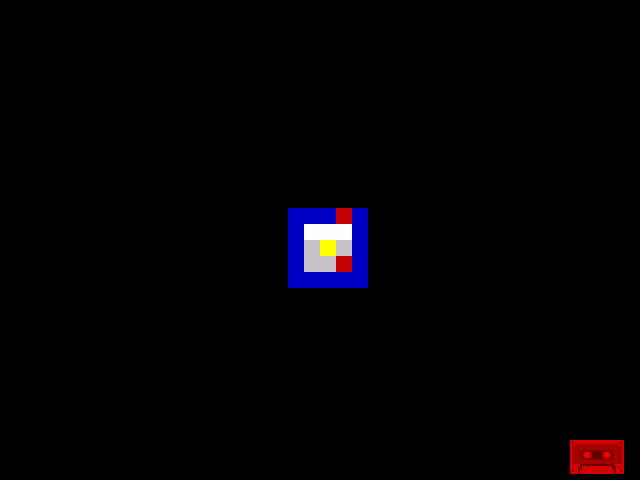
Compare this with Unit 1. The top floor row is brighter. One wall cell in the top row has turned red. The treasure now flashes. The hazard is static. All done by reading attributes and changing their bits.
If It Doesn’t Work
- OR didn’t change anything? Make sure you write the result back with
ld (addr), a. Without the store, the change stays in A and the screen doesn’t update. - AND gave zero? That means the bits you tested aren’t set. A floor cell has INK 0, so
AND $07gives 0 — that’s correct, not an error. - Wrong cell changed? Double-check the address. Off by 1 = wrong column. Off by 32 = wrong row.
- Colour looks wrong? Remember PAPER bits are shifted left by 3. PAPER 2 (red) is $10, not $02. Use the table above.
What You’ve Learnt
- LD A,(address) — read an attribute byte from screen memory. The screen is readable, not just writable.
- AND mask — extract specific bits. AND $07 gives the INK colour. AND $40 checks BRIGHT. AND $80 checks FLASH.
- OR mask — set specific bits. OR $40 adds BRIGHT. OR $80 adds FLASH. Other bits are untouched.
- AND to clear — AND with the inverse mask removes bits. AND $7F clears FLASH. AND $BF clears BRIGHT.
- Read-modify-write — the pattern for changing any attribute: read, AND to clear, OR to set, write back.
- CP and JR Z — compare A with a value and branch if equal. This is how the game will detect walls: read INK, compare, decide.
What’s Next
Writing cells by hand is tedious — 25 cells meant 25 separate writes. In Unit 3, you’ll learn DJNZ, a loop instruction that repeats a block of code. One loop will draw an entire row of walls. Another will fill the floor. The room will be built in a fraction of the code.