Keyboard Input
Read the Spectrum's keyboard matrix with IN A,($FE) — the instruction that connects the player to the game.
The room exists. Walls, floor, treasure, hazard — all drawn with loops. But press a key and nothing happens. The game doesn’t know you’re there.
That changes now. The Spectrum’s keyboard is wired to port $FE — the same port that controls the border. IN A,($FE) reads a row of keys. BIT tests which key is pressed. By the end of this unit, the game responds to your input. Not movement yet — that’s Unit 6 — but the connection between player and machine.
How the Keyboard Works
The Spectrum has 40 keys arranged in 8 rows of 5. Each row is connected to a different address line on the data bus. To read a row, you put the row selector in A, then read port $FE:
            ld      a, $7f          ; Select a keyboard row
            in      a, ($fe)        ; Read it — result goes into A
The IN A,($FE) instruction is the reverse of OUT ($FE),A. Where OUT sends data to hardware, IN reads data from hardware. The value in A selects which row to scan — it goes on the high byte of the address bus, giving a 16-bit port address of $7FFE.
The result comes back in A. Bits 0–4 each represent one key. A bit is 0 when the key is pressed, 1 when released. This is active low — the opposite of what you might expect.
Reading a Single Key
The simplest keyboard program — press Space, the border turns red:
; Shadowkeep — Keyboard: Read the Space bar

            org     32768

start:
            ld      a, 0
            out     ($fe), a        ; Black border

.loop:      halt                    ; Wait for next frame

            ld      a, $7f          ; Select row: Space, Sym, M, N, B
            in      a, ($fe)        ; Read keyboard row into A
            bit     0, a            ; Test bit 0 (Space key)
            jr      z, .pressed     ; 0 = pressed (active low)

            ; Not pressed — black border
            ld      a, 0
            out     ($fe), a
            jr      .loop

.pressed:   ; Space held — red border
            ld      a, 2
            out     ($fe), a
            jr      .loop

            end     start
$7F selects the bottom row of the keyboard: Space, Symbol Shift, M, N, B. After IN A,($FE), bit 0 holds the Space key state.
BIT 0, A tests bit 0 without changing A. If the bit is 0 (key pressed), the Z80 sets the Zero flag and JR Z takes the branch. If the bit is 1 (not pressed), the Zero flag is clear and execution falls through.
Run this program and press Space. The border turns red while you hold it, black when you release. The program checks 50 times per second — once per frame, after each HALT.
Why Active Low?
When no key is pressed, the data line is pulled high by a resistor — it reads 1. Pressing a key connects the line to ground — it reads 0. This is how most 8-bit keyboards work. The hardware is simpler, even if the logic feels backwards.
You’ll get used to it: 0 = pressed, 1 = released. BIT n, A followed by JR Z means “jump if pressed.”
The Keyboard Matrix
Here’s the full matrix. Each row is selected by clearing one bit of the high address byte:
| Row Select | Bit 0 | Bit 1 | Bit 2 | Bit 3 | Bit 4 |
|---|---|---|---|---|---|
$FE | Shift | Z | X | C | V |
$FD | A | S | D | F | G |
$FB | Q | W | E | R | T |
$F7 | 1 | 2 | 3 | 4 | 5 |
$EF | 0 | 9 | 8 | 7 | 6 |
$DF | P | O | I | U | Y |
$BF | Enter | L | K | J | H |
$7F | Space | Sym | M | N | B |
The row select values look odd until you see the pattern: each one has a single bit cleared. $FE = 11111110 (bit 0 clear), $FD = 11111101 (bit 1 clear), $FB = 11111011 (bit 2 clear), and so on. The cleared bit selects which row to scan.
Notice the right half of the keyboard is in reverse order — the number row goes 0, 9, 8, 7, 6, not 6, 7, 8, 9, 0. This matches the physical wiring of the Spectrum’s membrane keyboard.
QAOP — Four Directions
Shadowkeep uses QAOP for movement — a classic Spectrum control scheme:
- Q = up (row
$FB, bit 0) - A = down (row
$FD, bit 0) - O = left (row
$DF, bit 1) - P = right (row
$DF, bit 0)
            ; Check Q (up)
            ld      a, $fb          ; Row: Q, W, E, R, T
            in      a, ($fe)        ; Read keyboard row
            bit     0, a            ; Q = bit 0
            jr      z, .up          ; 0 = pressed

            ; Check A (down)
            ld      a, $fd          ; Row: A, S, D, F, G
            in      a, ($fe)
            bit     0, a            ; A = bit 0
            jr      z, .down

            ; Check O (left)
            ld      a, $df          ; Row: P, O, I, U, Y
            in      a, ($fe)
            bit     1, a            ; O = bit 1
            jr      z, .left

            ; Check P (right)
            ld      a, $df          ; Row: P, O, I, U, Y
            in      a, ($fe)
            bit     0, a            ; P = bit 0
            jr      z, .right
Each key needs its own IN read because Q and A are in different rows. O and P share a row ($DF) but need separate bit tests — O is bit 1, P is bit 0. Since IN A,($FE) overwrites A with the keyboard data, each test starts with a fresh read.
The pattern is always the same: load the row selector, read the port, test the bit. Four keys, four reads.
The Complete Code
The program draws the Unit 3 room and enters a keyboard loop. Each direction key changes the border to a different colour — blue for Q, red for A, green for O, yellow for P. No key held means black border.
; ============================================================================
; SHADOWKEEP — Unit 4: Keyboard Input
; ============================================================================
; Read the keyboard using IN A,($FE) and respond to QAOP keys.
;
; The Spectrum's keyboard is a matrix read through port $FE.
; The high byte of the port address selects which row to scan.
; Each row returns 5 key states in bits 0–4 (0 = pressed).
;
; QAOP mapping:
;   Q (up)    — row $FB, bit 0
;   A (down)  — row $FD, bit 0
;   O (left)  — row $DF, bit 1
;   P (right) — row $DF, bit 0
; ============================================================================

            org     32768

; Attribute values
WALL        equ     $09             ; PAPER 1 (blue) + INK 1
FLOOR       equ     $38             ; PAPER 7 (white) + INK 0
TREASURE    equ     $70             ; BRIGHT + PAPER 6 (yellow)
HAZARD      equ     $90             ; FLASH + PAPER 2 (red)

; Room dimensions
ROOM_TOP    equ     10
ROOM_LEFT   equ     12
ROOM_WIDTH  equ     9
ROOM_INNER  equ     7

; Keyboard rows (active-low — 0 on the address line selects the row)
KEY_ROW_QT  equ     $fb             ; Q, W, E, R, T
KEY_ROW_AG  equ     $fd             ; A, S, D, F, G
KEY_ROW_PY  equ     $df             ; P, O, I, U, Y

; ----------------------------------------------------------------------------
; Entry point
; ----------------------------------------------------------------------------

start:
            ; Black border
            ld      a, 0
            out     ($fe), a

            ; Clear screen
            ld      hl, $4000
            ld      de, $4001
            ld      bc, 6911
            ld      (hl), 0
            ldir

            ; ==================================================================
            ; Draw the room (same as Unit 3)
            ; ==================================================================

            ; --- Top wall ---
            ld      hl, $594c       ; Row 10, col 12
            ld      b, ROOM_WIDTH
            ld      a, WALL
.top:       ld      (hl), a
            inc     hl
            djnz    .top

            ; --- Row 11: wall, floor, wall ---
            ld      hl, $596c
            ld      a, WALL
            ld      (hl), a
            inc     hl
            ld      a, FLOOR
            ld      b, ROOM_INNER
.r11:       ld      (hl), a
            inc     hl
            djnz    .r11
            ld      a, WALL
            ld      (hl), a

            ; --- Row 12: wall, floor, wall ---
            ld      hl, $598c
            ld      a, WALL
            ld      (hl), a
            inc     hl
            ld      a, FLOOR
            ld      b, ROOM_INNER
.r12:       ld      (hl), a
            inc     hl
            djnz    .r12
            ld      a, WALL
            ld      (hl), a

            ; --- Row 13: wall, floor, wall ---
            ld      hl, $59ac
            ld      a, WALL
            ld      (hl), a
            inc     hl
            ld      a, FLOOR
            ld      b, ROOM_INNER
.r13:       ld      (hl), a
            inc     hl
            djnz    .r13
            ld      a, WALL
            ld      (hl), a

            ; --- Bottom wall ---
            ld      hl, $59cc
            ld      b, ROOM_WIDTH
            ld      a, WALL
.bot:       ld      (hl), a
            inc     hl
            djnz    .bot

            ; --- Treasure and hazard ---
            ld      a, TREASURE
            ld      ($5990), a      ; Row 12, col 16
            ld      a, HAZARD
            ld      ($59af), a      ; Row 13, col 15

            ; ==================================================================
            ; Main loop — read keyboard, change border colour
            ; ==================================================================

.loop:      halt                    ; Wait for next frame

            ; Reset border to black (no key held = black)
            ld      a, 0
            out     ($fe), a

            ; --- Check Q (up) ---
            ld      a, KEY_ROW_QT   ; Select row: Q, W, E, R, T
            in      a, ($fe)        ; Read keyboard row
            bit     0, a            ; Test Q (bit 0)
            jr      nz, .not_q      ; 1 = not pressed
            ld      a, 1            ; Q pressed — blue border
            out     ($fe), a
.not_q:

            ; --- Check A (down) ---
            ld      a, KEY_ROW_AG   ; Select row: A, S, D, F, G
            in      a, ($fe)
            bit     0, a            ; Test A (bit 0)
            jr      nz, .not_a
            ld      a, 2            ; A pressed — red border
            out     ($fe), a
.not_a:

            ; --- Check O (left) ---
            ld      a, KEY_ROW_PY   ; Select row: P, O, I, U, Y
            in      a, ($fe)
            bit     1, a            ; Test O (bit 1)
            jr      nz, .not_o
            ld      a, 4            ; O pressed — green border
            out     ($fe), a
.not_o:

            ; --- Check P (right) ---
            ld      a, KEY_ROW_PY   ; Same row as O
            in      a, ($fe)
            bit     0, a            ; Test P (bit 0)
            jr      nz, .not_p
            ld      a, 6            ; P pressed — yellow border
            out     ($fe), a
.not_p:

            jr      .loop

            end     start
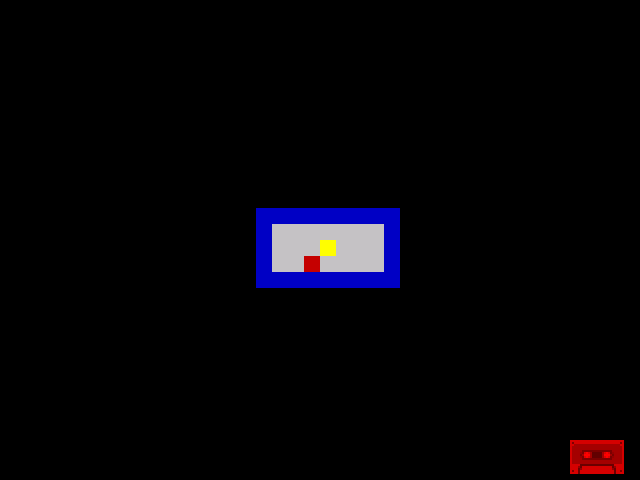
The screenshot shows the idle state — black border, no key pressed. Run it yourself and press the keys. Each direction gives immediate visual feedback. This is the polling loop that will drive all of Shadowkeep’s controls.
The border resets to black at the start of each frame (ld a, 0 / out ($fe), a), then each key check can override it. If multiple keys are held simultaneously, the last one checked wins — P overrides O overrides A overrides Q. That’s fine for now. A more sophisticated approach would combine the results, but for character-cell movement (Unit 6) you only need one direction per frame.
Try This: Different Keys
Change the controls to cursor keys (5, 6, 7, 8 on the Spectrum):
            ; 5 (left) — row $F7, bit 4
            ld      a, $f7
            in      a, ($fe)
            bit     4, a
            jr      z, .left

            ; 8 (right) — row $EF, bit 2
            ld      a, $ef
            in      a, ($fe)
            bit     2, a
            jr      z, .right
Look up the row and bit from the keyboard matrix table. The pattern is identical — only the row selector and bit number change.
Try This: Two Keys at Once
O and P share the same row. You can test both from a single read if you save the result:
            ld      a, $df          ; Row: P, O, I, U, Y
            in      a, ($fe)
            bit     1, a            ; O = bit 1
            jr      z, .left
            bit     0, a            ; P = bit 0
            jr      z, .right
This works because BIT doesn’t change A — it only sets the Zero flag. After testing O, A still holds the full row data and you can test P immediately. No need to read the port again.
This only works when both keys are in the same row. Q and A are in different rows, so they always need separate IN reads.
Try This: Space to Reset
Add a Space bar check that resets the room colours. After the QAOP checks:
            ld      a, $7f          ; Row: Space, Sym, M, N, B
            in      a, ($fe)
            bit     0, a            ; Space = bit 0
            jr      nz, .no_space
            ; Reset the treasure to normal
            ld      a, TREASURE
            ld      ($5990), a
.no_space:
Pressing Space rewrites the treasure cell. Combine this with Unit 2’s bit manipulation to change cells based on key presses — that’s the road toward an interactive game.
If It Doesn’t Work
- Key doesn’t respond? Check the row selector value against the matrix table. Q is
$FB, not$BF. The values are easy to confuse. - Wrong key triggers? Check the bit number. Q is bit 0, W is bit 1, E is bit 2. Within a row, bits count left to right for the left half of the keyboard, but the right half is reversed.
- Border stays black? Make sure
OUT ($FE), Acomes after setting A to a colour. If A still holds the keyboard data, the border gets a random value. - Border flickers? The code resets to black each frame. If the key check happens too slowly, you might see one frame of black. This is normal at 50 Hz.
- Active low confusion? Remember:
BIT n, A/JR Zmeans “jump if key pressed.” Zero flag set = bit was 0 = key is down. It’s the opposite of what “zero” usually means.
What You’ve Learnt
- IN A,($FE) — read a keyboard row. The value in A selects the row (high byte of port address). The result comes back in A with key states in bits 0–4.
- Active low — 0 means pressed, 1 means released. This is a hardware convention, not a software choice.
- BIT n, A — test a single bit without changing A. Sets the Zero flag if the bit is 0. Combined with
JR Z, this is “jump if key pressed.” - The keyboard matrix — 8 rows of 5 keys each, selected by clearing one bit of the row selector. Port $FE is shared between keyboard input and border output.
- Polling loop — check keys every frame after HALT. 50 checks per second gives responsive input.
- EQU for row selectors — named constants like
KEY_ROW_QTmake the code readable and the mapping explicit.
What’s Next
The keyboard reads work, but there’s nothing to move. In Unit 5, you’ll put a character on screen by writing to bitmap memory — not just attributes. The player’s marker will appear inside the room, ready to respond to the keys you’ve just learnt to read.