Beeper Sound
Toggle bit 4 of port $FE in a timed loop to make the speaker vibrate. A rising three-note tone plays when treasure is collected — the game's first sound.
The 48K Spectrum has no sound chip. It has a beeper — a single speaker connected to one bit of an I/O port. Bit 4 of port $FE. Set it high and the speaker cone pushes out. Set it low and it pulls back. Toggle it fast enough and the speaker vibrates. Vibration is sound.
That’s it. One bit. Every sound the 48K Spectrum makes — every explosion, every melody, every loading screech — comes from toggling one bit at the right speed.
How the Beeper Works
Port $FE controls several things. Bits 0–2 set the border colour (you’ve been using these since Unit 4). Bit 4 controls the speaker. The other bits have other purposes.
To make a tone:
- Set bit 4 high —
LD A, $10/OUT ($FE), A - Wait a precise delay
- Set bit 4 low —
XOR $10/OUT ($FE), A - Wait the same delay
- Repeat
The delay controls the pitch. Short delay = fast toggling = high pitch. Long delay = slow toggling = low pitch. The duration (number of repetitions) controls how long the note lasts.
XOR — Toggle a Bit
XOR $10 flips bit 4 without touching any other bits. XOR (exclusive OR) follows this rule: if the mask bit is 1, the result bit flips. If the mask bit is 0, the result bit stays.
  A:        00010000    (bit 4 is 1 — speaker on)
  XOR $10:  00010000    (mask: flip bit 4)
  Result:   00000000    (bit 4 is 0 — speaker off)

  A:        00000000    (bit 4 is 0 — speaker off)
  XOR $10:  00010000    (mask: flip bit 4)
  Result:   00010000    (bit 4 is 1 — speaker on)
Two XORs bring A back to its original value. This is why XOR is used for toggling — it’s its own inverse.
Compare with AND (which clears bits) and OR (which sets bits). XOR is the toggling operator. You’ve now met all three bitwise operations:
| Operation | Effect | Used for |
|---|---|---|
AND | Clear bits to 0 | Extract fields (INK colour) |
OR | Set bits to 1 | Combine flags |
XOR | Flip bits | Toggle (speaker, animation) |
The Beep Subroutine
; Generate a tone on the Spectrum's beeper.
; Bit 4 of port $FE controls the speaker. Toggle it high and low
; in a loop — the delay between toggles sets the pitch.

; Entry: HL = duration (number of cycles), DE = pitch (delay per half-cycle)

beep:
            ld      a, $10              ; Bit 4 high — speaker on
.on:        out     ($fe), a            ; Push speaker cone out
            ld      b, e                ; Delay counter = pitch
.delay1:    djnz    .delay1             ; Wait

            xor     $10                 ; Toggle bit 4 — speaker off
            out     ($fe), a            ; Pull speaker cone back
            ld      b, e                ; Same delay
.delay2:    djnz    .delay2             ; Wait

            xor     $10                 ; Toggle bit 4 — speaker on again
            dec     hl                  ; One cycle done
            ld      a, h
            or      l                   ; HL = 0?
            ld      a, $10              ; Reload speaker-on value
            jr      nz, .on             ; More cycles — continue

            xor     a                   ; A = 0 — speaker off, border black
            out     ($fe), a
            ret
The subroutine takes two parameters:
- HL = duration — how many wave cycles to play
- E = pitch — the DJNZ delay per half-cycle (lower = higher pitch)
Each iteration toggles the speaker twice (on, off) with a delay in between. That’s one complete wave cycle. DEC HL counts down the duration. When HL reaches zero, the tone stops.
Testing HL for Zero
The Z80 has no single instruction to test whether HL is zero. DEC HL doesn’t set flags (unlike DEC A). The idiom is:
            dec     hl
            ld      a, h
            or      l               ; Z set only if both H and L are 0
OR L combines H and L — if both are zero, the result is zero and Z is set. If either has any bits set, the result is non-zero. This three-instruction pattern appears whenever you need to test a 16-bit counter.
Why LD A, $10 After the Zero Test?
The OR L instruction modifies A (it contains H OR L). But the loop needs A to hold $10 for the next OUT. LD A, $10 reloads it — and crucially, LD doesn’t affect flags. The Z flag from OR L survives the reload, so the JR NZ check still works correctly.
A Rising Collect Sound
Three notes, each higher than the last:
            ld      hl, 80              ; Duration
            ld      e, 40               ; Low pitch
            call    beep
            ld      hl, 80
            ld      e, 30               ; Medium pitch
            call    beep
            ld      hl, 80
            ld      e, 20               ; High pitch
            call    beep
The pitch values (40, 30, 20) are DJNZ delay counts. Lower delay means faster toggling and a higher note. The three calls play in sequence — a quick ascending chirp that says “got it.”
The sound plays inside check_collect, after the treasure counter is incremented. The game pauses briefly for the sound (the beeper is synchronous — the CPU does nothing else while generating the tone). For a short chirp this is barely noticeable.
The Complete Code
; ============================================================================
; SHADOWKEEP — Unit 12: Beeper Sound
; ============================================================================
; The Spectrum's beeper is one bit — bit 4 of port $FE. Toggle it high
; and low in a timed loop and the speaker vibrates. The delay between
; toggles controls the pitch. Shorter delay = higher pitch.
;
; XOR $10 flips bit 4 without touching the other bits. Two toggles
; (high then low) make one complete wave cycle. Repeat for duration.
;
; A short rising tone plays when treasure is collected. The game has
; sound for the first time.
; ============================================================================

            org     32768

; Attribute values
WALL        equ     $09             ; PAPER 1 (blue) + INK 1
FLOOR       equ     $38             ; PAPER 7 (white) + INK 0
TREASURE    equ     $70             ; BRIGHT + PAPER 6 (yellow) + INK 0
HAZARD      equ     $90             ; FLASH + PAPER 2 (red) + INK 0
PLAYER      equ     $3a             ; PAPER 7 (white) + INK 2 (red)

; Collision
WALL_INK    equ     1               ; INK colour that means "wall"

; Room
ROOM_TOP    equ     10
ROOM_LEFT   equ     12
ROOM_WIDTH  equ     9
ROOM_HEIGHT equ     5
ROW_SKIP    equ     23              ; 32 - ROOM_WIDTH
TOTAL_TREASURE equ  3               ; Treasures in the room

; Screen addresses for starting position (row 12, col 13)
START_ROW   equ     12
START_COL   equ     13
START_SCR   equ     $488d
START_ATT   equ     $598d

; Score display position (row 23, col 10)
SCORE_SCR   equ     $50ea           ; Screen bitmap: row 23, col 10
SCORE_ATT   equ     $5aea           ; Attribute: row 23, col 10
SCORE_LEN   equ     12              ; "TREASURE n/3" = 12 characters

; Keyboard rows
KEY_ROW_QT  equ     $fb             ; Q, W, E, R, T
KEY_ROW_AG  equ     $fd             ; A, S, D, F, G
KEY_ROW_PY  equ     $df             ; P, O, I, U, Y

; ROM font
FONT_BASE   equ     $3c00           ; Character set in ROM

; ----------------------------------------------------------------------------
; Entry point
; ----------------------------------------------------------------------------

start:
            ld      a, 0
            out     ($fe), a

            ; Clear screen
            ld      hl, $4000
            ld      de, $4001
            ld      bc, 6911
            ld      (hl), 0
            ldir

            ; ==================================================================
            ; Draw room from data table
            ; ==================================================================

            ld      hl, $594c           ; Attribute address: row 10, col 12
            ld      de, room_data
            ld      c, ROOM_HEIGHT

.row:       ld      b, ROOM_WIDTH
.cell:      ld      a, (de)
            ld      (hl), a
            inc     de
            inc     hl
            djnz    .cell

            push    de
            ld      de, ROW_SKIP
            add     hl, de
            pop     de
            dec     c
            jr      nz, .row

            ; ==================================================================
            ; Draw the player at starting position
            ; ==================================================================

            ld      a, (START_ATT)
            ld      (player_under), a

            ld      hl, START_SCR
            ld      de, player_gfx
            ld      b, 8
.initdraw:  ld      a, (de)
            ld      (hl), a
            inc     de
            inc     h
            djnz    .initdraw

            ld      a, PLAYER
            ld      (START_ATT), a

            ; Set attributes for score line
            ld      hl, SCORE_ATT
            ld      a, $47              ; BRIGHT + INK 7 (white on black)
            ld      b, SCORE_LEN
.sattr:     ld      (hl), a
            inc     hl
            djnz    .sattr

            call    print_score         ; Show initial status

            ; ==================================================================
            ; Main loop
            ; ==================================================================

.loop:      halt

            ; --- Erase player at current position ---
            ld      hl, (player_scr)
            ld      b, 8
            ld      a, 0
.erase:     ld      (hl), a
            inc     h
            djnz    .erase

            ld      hl, (player_att)
            ld      a, (player_under)
            ld      (hl), a

            ; --- Check Q (up) ---
            ld      a, KEY_ROW_QT
            in      a, ($fe)
            bit     0, a
            jr      nz, .not_q

            ld      hl, (player_att)
            ld      de, $ffe0           ; -32 (one row up)
            add     hl, de
            ld      a, (hl)
            and     $07
            cp      WALL_INK
            jr      z, .not_q

            call    check_collect

            ld      (player_att), hl

            ld      hl, (player_scr)
            ld      de, $ffe0
            add     hl, de
            ld      (player_scr), hl

            ld      a, (player_row)
            dec     a
            ld      (player_row), a

.not_q:
            ; --- Check A (down) ---
            ld      a, KEY_ROW_AG
            in      a, ($fe)
            bit     0, a
            jr      nz, .not_a

            ld      hl, (player_att)
            ld      de, 32
            add     hl, de
            ld      a, (hl)
            and     $07
            cp      WALL_INK
            jr      z, .not_a

            call    check_collect

            ld      (player_att), hl

            ld      hl, (player_scr)
            ld      de, 32
            add     hl, de
            ld      (player_scr), hl

            ld      a, (player_row)
            inc     a
            ld      (player_row), a

.not_a:
            ; --- Check O (left) ---
            ld      a, KEY_ROW_PY
            in      a, ($fe)
            bit     1, a
            jr      nz, .not_o

            ld      hl, (player_att)
            dec     hl
            ld      a, (hl)
            and     $07
            cp      WALL_INK
            jr      z, .not_o

            call    check_collect

            ld      (player_att), hl

            ld      hl, (player_scr)
            dec     hl
            ld      (player_scr), hl

            ld      a, (player_col)
            dec     a
            ld      (player_col), a

.not_o:
            ; --- Check P (right) ---
            ld      a, KEY_ROW_PY
            in      a, ($fe)
            bit     0, a
            jr      nz, .not_p

            ld      hl, (player_att)
            inc     hl
            ld      a, (hl)
            and     $07
            cp      WALL_INK
            jr      z, .not_p

            call    check_collect

            ld      (player_att), hl

            ld      hl, (player_scr)
            inc     hl
            ld      (player_scr), hl

            ld      a, (player_col)
            inc     a
            ld      (player_col), a

.not_p:
            ; --- Draw player at current position ---
            ld      hl, (player_scr)
            ld      de, player_gfx
            ld      b, 8
.draw:      ld      a, (de)
            ld      (hl), a
            inc     de
            inc     h
            djnz    .draw

            ld      hl, (player_att)
            ld      a, PLAYER
            ld      (hl), a

            ; --- Update score display ---
            call    print_score

            ; --- Border shows completion ---
            ld      a, (treasure_count)
            cp      TOTAL_TREASURE
            jr      nz, .not_all
            ld      a, 4                ; Green border — all collected
            out     ($fe), a
            jp      .loop
.not_all:
            ld      a, 0                ; Black border
            out     ($fe), a

            jp      .loop

; ============================================================================
; Subroutines
; ============================================================================

; ----------------------------------------------------------------------------
; check_collect — save target cell, check for treasure, collect if found
; Entry: HL = target attribute address
; Exit:  HL preserved, player_under updated
; ----------------------------------------------------------------------------
check_collect:
            ld      a, (hl)
            ld      (player_under), a
            bit     6, a                ; BRIGHT = treasure?
            ret     z                   ; No — done
            res     6, a                ; Clear BRIGHT (collected)
            ld      (player_under), a
            push    hl
            ld      hl, treasure_count
            inc     (hl)
            pop     hl

            ; Play collect sound — short rising tone
            push    hl
            push    de
            ld      hl, 80              ; Duration (cycles)
            ld      e, 40               ; Pitch (delay — lower = higher)
            call    beep
            ld      hl, 80
            ld      e, 30               ; Higher pitch
            call    beep
            ld      hl, 80
            ld      e, 20               ; Highest pitch
            call    beep
            pop     de
            pop     hl
            ret

; ----------------------------------------------------------------------------
; beep — generate a tone on the speaker
; Entry: HL = duration (number of wave cycles), E = pitch (delay per half)
; Exit:  speaker off, border black
; Destroys: A, B, HL
; ----------------------------------------------------------------------------
beep:
            ld      a, $10              ; Bit 4 high — speaker on
.on:        out     ($fe), a            ; Push speaker cone out
            ld      b, e                ; Delay counter = pitch
.delay1:    djnz    .delay1             ; Wait

            xor     $10                 ; Toggle bit 4
            out     ($fe), a            ; Pull speaker cone back
            ld      b, e                ; Same delay
.delay2:    djnz    .delay2             ; Wait

            xor     $10                 ; Toggle bit 4 back
            dec     hl                  ; One cycle done
            ld      a, h
            or      l                   ; HL = 0?
            ld      a, $10              ; Reload (doesn't affect flags)
            jr      nz, .on             ; More cycles — continue

            xor     a                   ; A = 0 — speaker off, border black
            out     ($fe), a
            ret

; ----------------------------------------------------------------------------
; print_score — display "TREASURE n/3" at row 23
; Destroys: A, BC, DE, HL
; ----------------------------------------------------------------------------
print_score:
            ld      de, SCORE_SCR

            ld      hl, score_text
            call    print_str

            ld      a, (treasure_count)
            add     a, '0'
            call    print_char

            ld      a, '/'
            call    print_char

            ld      a, TOTAL_TREASURE
            add     a, '0'
            call    print_char

            ret

; ----------------------------------------------------------------------------
; print_str — print null-terminated string at screen address DE
; Entry: HL = string address, DE = screen address
; Exit:  HL past null terminator, DE advanced past last character
; ----------------------------------------------------------------------------
print_str:
            ld      a, (hl)
            or      a
            ret     z
            push    hl
            call    print_char
            pop     hl
            inc     hl
            jr      print_str

; ----------------------------------------------------------------------------
; print_char — draw one character to screen memory using ROM font
; Entry: A = character (32-127), DE = screen address (pixel row 0)
; Exit:  DE advanced to next column (E incremented)
; ----------------------------------------------------------------------------
print_char:
            push    de

            ld      l, a
            ld      h, 0
            add     hl, hl
            add     hl, hl
            add     hl, hl
            ld      bc, FONT_BASE
            add     hl, bc

            ld      b, 8
.pchar:     ld      a, (hl)
            ld      (de), a
            inc     hl
            inc     d
            djnz    .pchar

            pop     de
            inc     e
            ret

; ============================================================================
; Room data — one byte per cell
; ============================================================================

room_data:
            db      WALL, WALL, WALL, WALL, WALL, WALL, WALL, WALL, WALL
            db      WALL, FLOOR, WALL, FLOOR, FLOOR, FLOOR, TREASURE, FLOOR, WALL
            db      WALL, FLOOR, TREASURE, FLOOR, FLOOR, FLOOR, WALL, FLOOR, WALL
            db      WALL, FLOOR, FLOOR, FLOOR, HAZARD, FLOOR, FLOOR, TREASURE, WALL
            db      WALL, WALL, WALL, WALL, WALL, WALL, WALL, WALL, WALL

; ============================================================================
; String data
; ============================================================================

score_text: db      "TREASURE ", 0

; ============================================================================
; Player data
; ============================================================================

player_gfx: db      $18, $3c, $7e, $ff
            db      $ff, $7e, $3c, $18

player_row: db      START_ROW
player_col: db      START_COL

player_scr: dw      START_SCR
player_att: dw      START_ATT

player_under:
            db      FLOOR

treasure_count:
            db      0

            end     start
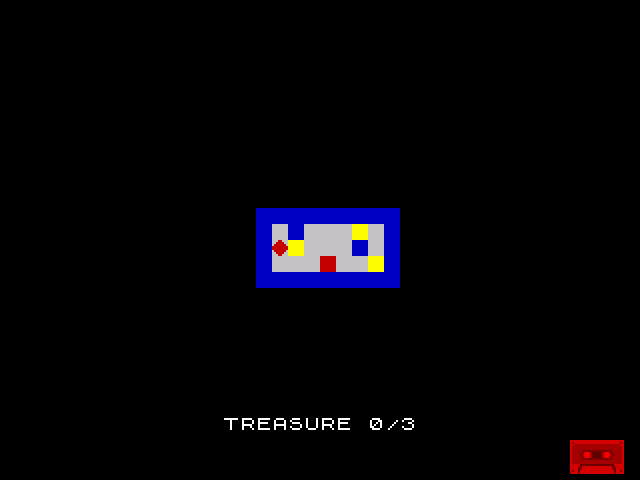
The screen looks the same as Unit 11 — the new feature is audio. Walk onto a bright yellow treasure cell and you’ll hear a rising three-note chirp as the treasure is collected. The border may flash briefly during the sound (the OUT ($FE) also writes to the border bits).
Try This: Different Sounds
Change the pitch and duration for different effects:
            ; Low thud (for hitting a wall)
            ld      hl, 30
            ld      e, 80               ; Low pitch, short
            call    beep

            ; Alarm (for touching a hazard)
            ld      hl, 200
            ld      e, 15               ; High pitch, long
            call    beep
Experiment with values. Pitch below 10 is barely audible (too fast). Pitch above 100 sounds like a low rumble. Duration of 50–100 is a quick blip; 500+ is a sustained tone.
Try This: Simple Melody
Play a sequence of notes with different pitches:
            ld      hl, 150
            ld      e, 48               ; C-ish
            call    beep
            ld      hl, 150
            ld      e, 36               ; E-ish
            call    beep
            ld      hl, 150
            ld      e, 24               ; G-ish
            call    beep
The pitch values don’t correspond to exact musical notes (that requires precise frequency calculation), but relative values produce recognisable intervals. Commercial Spectrum games used lookup tables to map musical notes to exact delay values.
Try This: Border Flash
The border changes colour during sound because OUT ($FE) writes both the speaker (bit 4) and border (bits 0–2). To keep the border black during sound, mask the border bits:
ld a, $10 ; Speaker on, border black (bits 0-2 = 0)To make the border flash with the sound (a visual effect), set the border bits:
ld a, $14 ; Speaker on, border green (bits 0-2 = 4)Many Spectrum games used coloured borders during loading and sound effects as a visual flourish.
If It Doesn’t Work
- No sound? Check that
OUT ($FE), Ais present and that A has bit 4 set ($10). Without the OUT, the speaker doesn’t toggle. - Constant tone that never stops? Check the duration counter.
DEC HLfollowed byLD A, H/OR Ltests for zero. If theJR NZcondition is wrong, the loop runs forever. - Sound is too quiet or too loud? The Spectrum beeper has one volume. If you can’t hear it, check your emulator’s audio settings.
- Game freezes during sound? The beeper is synchronous — the CPU generates the tone in a tight loop. Long durations (thousands of cycles) will pause the game noticeably. Keep collect sounds short (80–150 cycles per note).
- Border flashes during sound? Expected behaviour.
OUT ($FE)writes to both speaker and border. Set bits 0–2 to 0 in the speaker value to keep the border black.
What You’ve Learnt
- Beeper output — bit 4 of port
$FEcontrols the speaker. Toggle it in a timed loop to produce a tone. Delay = pitch, repetitions = duration. - XOR $10 — toggle bit 4 without affecting other bits. XOR flips where the mask is 1, preserves where it’s 0. Two XORs return to the original value.
- Testing HL for zero —
DEC HLdoesn’t set flags. UseLD A, H/OR Lto test if both bytes are zero. A three-instruction idiom. - LD doesn’t affect flags —
LD A, $10afterOR Lpreserves the Z flag. This lets you reload a register without losing a condition. - Synchronous sound — the CPU generates the tone directly. While the beeper is active, nothing else happens. Keep sounds short for responsive gameplay.
What’s Next
The room has no exit — there’s nowhere to go after collecting the treasure. In Unit 13, you’ll add an exit door marked by a specific attribute value. When the player stands on it, the room is complete. This is the first win condition — the goal that makes Shadowkeep a game.