Score Display
Extract repeated code into subroutines with CALL and RET. Print the treasure count to screen memory using the ROM's built-in font — the first HUD element.
Unit 10 has the same ten-line collection check copied four times — once per direction. Change the logic and you update four places. Miss one and you have a bug. This is what subroutines solve.
CALL pushes the return address onto the stack and jumps to a routine. RET pops the address and jumps back. Four copies of the collection code become four CALL check_collect instructions. The code lives in one place.
This unit also adds the first HUD element: “TREASURE 0/3” printed at the bottom of the screen. Characters are drawn by reading the ROM’s built-in font and writing pixel data directly to screen memory — the same technique the player diamond uses, applied to text.
CALL and RET
CALL address does two things:
- Pushes the address of the next instruction onto the stack (the return address)
- Jumps to
address
RET does the reverse:
- Pops an address from the stack
- Jumps to it
The stack keeps track of where to return. This means subroutines can call other subroutines — each CALL pushes a return address, each RET pops one. As long as they’re balanced, execution always returns to the right place.
The check_collect Subroutine
The repeated collection code from Unit 10 becomes a single routine:
; A subroutine: CALL pushes the return address onto the stack,
; then jumps to the routine. RET pops the address and returns.

            call    check_collect   ; Save under player, check treasure
            ; ... execution continues here after RET ...

; ----

check_collect:
            ld      a, (hl)             ; Read attribute at target
            ld      (player_under), a   ; Save it
            bit     6, a                ; BRIGHT = treasure?
            ret     z                   ; No — return immediately
            res     6, a                ; Clear BRIGHT (collected)
            ld      (player_under), a   ; Update saved value
            push    hl
            ld      hl, treasure_count
            inc     (hl)                ; Count it
            pop     hl
            ret                         ; Return to caller
Each direction now calls it with one line:
call check_collectThe routine expects HL to point to the target attribute address (which it already does after the wall check). It saves the attribute, checks for treasure, collects if found, and returns. HL is preserved through PUSH/POP so the caller can use it as the new position.
Early Return with RET Z
RET Z returns immediately if the Z flag is set — meaning the target isn’t treasure. This is a conditional return: RET combined with a flag check. The Z80 also supports RET NZ, RET C, RET NC, and others. Early returns keep subroutines flat — no nested JR jumps needed.
Printing to Screen Memory
The Spectrum ROM contains a complete character set at $3C00 — 96 characters (ASCII 32–127), 8 bytes each. Every character is an 8×8 pixel bitmap, just like the player diamond.
To print character ‘T’ (ASCII 84):
- Calculate the font address:
84 × 8 + $3C00=$3EA0 - Copy 8 bytes from that address to screen memory
- Use
INC Dto step through pixel rows — the same trick as drawing the player
; Print a character to screen memory using the ROM's built-in font.
; The character set lives at $3C00 in ROM — 8 bytes per character.

; Entry: A = character (32-127), DE = screen address (pixel row 0)
; Exit:  DE advanced to next column (E incremented)

print_char:
            push    de              ; Save screen position
            ld      l, a
            ld      h, 0
            add     hl, hl
            add     hl, hl
            add     hl, hl          ; HL = character × 8
            ld      bc, $3c00
            add     hl, bc          ; HL = address in ROM font

            ld      b, 8
.pchar:     ld      a, (hl)         ; Read font pixel row
            ld      (de), a         ; Write to screen
            inc     hl              ; Next font byte
            inc     d               ; Next pixel row (INC D = +256)
            djnz    .pchar

            pop     de              ; Restore original screen address
            inc     e               ; Move to next column
            ret
The font address calculation uses three ADD HL, HL to multiply by 8 (doubling three times: ×2, ×4, ×8). Then ADD HL, BC adds the font base address. This is the standard way to calculate an offset into a table — multiply the index by the entry size and add the base.
Why Not Use ROM Print Routines?
The Spectrum ROM has built-in print routines (RST $10) that handle cursor positioning, scrolling, and control codes. They’re convenient for BASIC programs but depend on system variables being initialised — which doesn’t happen when loading an SNA snapshot directly. Writing to screen memory is more reliable and teaches more about the hardware.
Number to ASCII
Converting a single digit (0–9) to its ASCII character is one instruction:
            ld      a, (treasure_count)
            add     a, '0'              ; 0→$30, 1→$31, ... 9→$39
ASCII digits run from $30 (‘0’) to $39 (‘9’). Adding '0' (which is 48) shifts the number into the character range. The digit 3 becomes $33, which is the ASCII code for ‘3’.
Null-Terminated Strings
The label text is stored as a string ending with a zero byte:
score_text: db "TREASURE ", 0The print_str routine reads bytes until it hits zero, printing each one:
print_str:
            ld      a, (hl)
            or      a                   ; Null terminator?
            ret     z
            push    hl                  ; Save string pointer
            call    print_char
            pop     hl                  ; Restore string pointer
            inc     hl
            jr      print_str
The PUSH HL / POP HL is essential. print_char uses HL internally for the font lookup — without saving and restoring, HL would point into ROM font data instead of the string after the first character. Every CALL that might modify registers you need requires saving them first.
OR A — Testing for Zero
OR A is a common Z80 idiom. It ORs A with itself, which doesn’t change the value but sets the flags — specifically, Z is set if A is zero. It’s shorter than CP 0 (one byte vs two) and does the same job: test whether A is the null terminator.
Screen Address for Row 23
The score line sits at row 23, column 10. The screen address calculation:
- Row 23 is in the bottom third (rows 16–23)
- Third base:
$5000 - Row 23 is row 7 within the third
- Address:
$5000 + (7 × 32) + 10=$5000 + $E0 + $0A=$50EA
The attribute address follows the simpler formula: $5800 + (23 × 32) + 10 = $5AEA. The attributes are set to $47 (BRIGHT + INK 7) during initialisation — bright white text on black.
The Complete Code
; ============================================================================
; SHADOWKEEP — Unit 11: Score Display
; ============================================================================
; The repeated collection code from Unit 10 becomes a subroutine.
; CALL pushes the return address onto the stack, jumps to the routine.
; RET pops the address and returns. Four copies become four CALL lines.
;
; The score line at row 23 shows "TREASURE n/3". Characters are drawn
; by reading the ROM's built-in font at $3C00 and writing the pixel
; data directly to screen memory. Each character is 8 bytes — one per
; pixel row, copied with the familiar INC D trick.
;
; Number-to-ASCII conversion: ADD A, '0'. The digit 3 becomes $33,
; which is the ASCII code for the character "3". One instruction.
; ============================================================================

            org     32768

; Attribute values
WALL        equ     $09             ; PAPER 1 (blue) + INK 1
FLOOR       equ     $38             ; PAPER 7 (white) + INK 0
TREASURE    equ     $70             ; BRIGHT + PAPER 6 (yellow) + INK 0
HAZARD      equ     $90             ; FLASH + PAPER 2 (red) + INK 0
PLAYER      equ     $3a             ; PAPER 7 (white) + INK 2 (red)

; Collision
WALL_INK    equ     1               ; INK colour that means "wall"

; Room
ROOM_TOP    equ     10
ROOM_LEFT   equ     12
ROOM_WIDTH  equ     9
ROOM_HEIGHT equ     5
ROW_SKIP    equ     23              ; 32 - ROOM_WIDTH
TOTAL_TREASURE equ  3               ; Treasures in the room

; Screen addresses for starting position (row 12, col 13)
START_ROW   equ     12
START_COL   equ     13
START_SCR   equ     $488d
START_ATT   equ     $598d

; Score display position (row 23, col 10)
SCORE_SCR   equ     $50ea           ; Screen bitmap: row 23, col 10
SCORE_ATT   equ     $5aea           ; Attribute: row 23, col 10
SCORE_LEN   equ     12              ; "TREASURE n/3" = 12 characters

; Keyboard rows
KEY_ROW_QT  equ     $fb             ; Q, W, E, R, T
KEY_ROW_AG  equ     $fd             ; A, S, D, F, G
KEY_ROW_PY  equ     $df             ; P, O, I, U, Y

; ROM font
FONT_BASE   equ     $3c00           ; Character set in ROM

; ----------------------------------------------------------------------------
; Entry point
; ----------------------------------------------------------------------------

start:
            ld      a, 0
            out     ($fe), a

            ; Clear screen
            ld      hl, $4000
            ld      de, $4001
            ld      bc, 6911
            ld      (hl), 0
            ldir

            ; ==================================================================
            ; Draw room from data table
            ; ==================================================================

            ld      hl, $594c           ; Attribute address: row 10, col 12
            ld      de, room_data
            ld      c, ROOM_HEIGHT

.row:       ld      b, ROOM_WIDTH
.cell:      ld      a, (de)
            ld      (hl), a
            inc     de
            inc     hl
            djnz    .cell

            push    de
            ld      de, ROW_SKIP
            add     hl, de
            pop     de
            dec     c
            jr      nz, .row

            ; ==================================================================
            ; Draw the player at starting position
            ; ==================================================================

            ld      a, (START_ATT)
            ld      (player_under), a

            ld      hl, START_SCR
            ld      de, player_gfx
            ld      b, 8
.initdraw:  ld      a, (de)
            ld      (hl), a
            inc     de
            inc     h
            djnz    .initdraw

            ld      a, PLAYER
            ld      (START_ATT), a

            ; Set attributes for score line
            ld      hl, SCORE_ATT
            ld      a, $47              ; BRIGHT + INK 7 (white on black)
            ld      b, SCORE_LEN
.sattr:     ld      (hl), a
            inc     hl
            djnz    .sattr

            call    print_score         ; Show initial status

            ; ==================================================================
            ; Main loop
            ; ==================================================================

.loop:      halt

            ; --- Erase player at current position ---
            ld      hl, (player_scr)
            ld      b, 8
            ld      a, 0
.erase:     ld      (hl), a
            inc     h
            djnz    .erase

            ld      hl, (player_att)
            ld      a, (player_under)
            ld      (hl), a

            ; --- Check Q (up) ---
            ld      a, KEY_ROW_QT
            in      a, ($fe)
            bit     0, a
            jr      nz, .not_q

            ld      hl, (player_att)
            ld      de, $ffe0           ; -32 (one row up)
            add     hl, de
            ld      a, (hl)
            and     $07
            cp      WALL_INK
            jr      z, .not_q

            call    check_collect

            ld      (player_att), hl

            ld      hl, (player_scr)
            ld      de, $ffe0
            add     hl, de
            ld      (player_scr), hl

            ld      a, (player_row)
            dec     a
            ld      (player_row), a

.not_q:
            ; --- Check A (down) ---
            ld      a, KEY_ROW_AG
            in      a, ($fe)
            bit     0, a
            jr      nz, .not_a

            ld      hl, (player_att)
            ld      de, 32
            add     hl, de
            ld      a, (hl)
            and     $07
            cp      WALL_INK
            jr      z, .not_a

            call    check_collect

            ld      (player_att), hl

            ld      hl, (player_scr)
            ld      de, 32
            add     hl, de
            ld      (player_scr), hl

            ld      a, (player_row)
            inc     a
            ld      (player_row), a

.not_a:
            ; --- Check O (left) ---
            ld      a, KEY_ROW_PY
            in      a, ($fe)
            bit     1, a
            jr      nz, .not_o

            ld      hl, (player_att)
            dec     hl
            ld      a, (hl)
            and     $07
            cp      WALL_INK
            jr      z, .not_o

            call    check_collect

            ld      (player_att), hl

            ld      hl, (player_scr)
            dec     hl
            ld      (player_scr), hl

            ld      a, (player_col)
            dec     a
            ld      (player_col), a

.not_o:
            ; --- Check P (right) ---
            ld      a, KEY_ROW_PY
            in      a, ($fe)
            bit     0, a
            jr      nz, .not_p

            ld      hl, (player_att)
            inc     hl
            ld      a, (hl)
            and     $07
            cp      WALL_INK
            jr      z, .not_p

            call    check_collect

            ld      (player_att), hl

            ld      hl, (player_scr)
            inc     hl
            ld      (player_scr), hl

            ld      a, (player_col)
            inc     a
            ld      (player_col), a

.not_p:
            ; --- Draw player at current position ---
            ld      hl, (player_scr)
            ld      de, player_gfx
            ld      b, 8
.draw:      ld      a, (de)
            ld      (hl), a
            inc     de
            inc     h
            djnz    .draw

            ld      hl, (player_att)
            ld      a, PLAYER
            ld      (hl), a

            ; --- Update score display ---
            call    print_score

            ; --- Border shows completion ---
            ld      a, (treasure_count)
            cp      TOTAL_TREASURE
            jr      nz, .not_all
            ld      a, 4                ; Green border — all collected
            out     ($fe), a
            jp      .loop
.not_all:
            ld      a, 0                ; Black border
            out     ($fe), a

            jp      .loop

; ============================================================================
; Subroutines
; ============================================================================

; ----------------------------------------------------------------------------
; check_collect — save target cell, check for treasure, collect if found
; Entry: HL = target attribute address
; Exit:  HL preserved, player_under updated
; ----------------------------------------------------------------------------
check_collect:
            ld      a, (hl)
            ld      (player_under), a
            bit     6, a                ; BRIGHT = treasure?
            ret     z                   ; No — done
            res     6, a                ; Clear BRIGHT (collected)
            ld      (player_under), a
            push    hl
            ld      hl, treasure_count
            inc     (hl)
            pop     hl
            ret

; ----------------------------------------------------------------------------
; print_score — display "TREASURE n/3" at row 23
; Destroys: A, BC, DE, HL
; ----------------------------------------------------------------------------
print_score:
            ld      de, SCORE_SCR       ; Screen address: row 23, col 10

            ; Print label
            ld      hl, score_text
            call    print_str

            ; Print treasure count as digit
            ld      a, (treasure_count)
            add     a, '0'              ; Convert to ASCII
            call    print_char

            ; Print "/" separator
            ld      a, '/'
            call    print_char

            ; Print total
            ld      a, TOTAL_TREASURE
            add     a, '0'
            call    print_char

            ret

; ----------------------------------------------------------------------------
; print_str — print null-terminated string at screen address DE
; Entry: HL = string address, DE = screen address
; Exit:  HL past null terminator, DE advanced past last character
; ----------------------------------------------------------------------------
print_str:
            ld      a, (hl)
            or      a                   ; Null terminator?
            ret     z
            push    hl                  ; Save string pointer
            call    print_char
            pop     hl                  ; Restore string pointer
            inc     hl
            jr      print_str

; ----------------------------------------------------------------------------
; print_char — draw one character to screen memory using ROM font
; Entry: A = character (32-127), DE = screen address (pixel row 0)
; Exit:  DE advanced to next column (E incremented)
; ----------------------------------------------------------------------------
print_char:
            push    de                  ; Save screen position

            ; Look up character in ROM font
            ld      l, a
            ld      h, 0
            add     hl, hl
            add     hl, hl
            add     hl, hl              ; HL = character × 8
            ld      bc, FONT_BASE
            add     hl, bc              ; HL = font data address

            ; Copy 8 pixel rows to screen
            ld      b, 8
.pchar:     ld      a, (hl)
            ld      (de), a
            inc     hl
            inc     d                   ; Next pixel row (+256 bytes)
            djnz    .pchar

            pop     de                  ; Restore screen address
            inc     e                   ; Next column
            ret

; ============================================================================
; Room data — one byte per cell
; ============================================================================

room_data:
            db      WALL, WALL, WALL, WALL, WALL, WALL, WALL, WALL, WALL
            db      WALL, FLOOR, WALL, FLOOR, FLOOR, FLOOR, TREASURE, FLOOR, WALL
            db      WALL, FLOOR, TREASURE, FLOOR, FLOOR, FLOOR, WALL, FLOOR, WALL
            db      WALL, FLOOR, FLOOR, FLOOR, HAZARD, FLOOR, FLOOR, TREASURE, WALL
            db      WALL, WALL, WALL, WALL, WALL, WALL, WALL, WALL, WALL

; ============================================================================
; String data
; ============================================================================

score_text: db      "TREASURE ", 0

; ============================================================================
; Player data
; ============================================================================

player_gfx: db      $18, $3c, $7e, $ff
            db      $ff, $7e, $3c, $18

player_row: db      START_ROW
player_col: db      START_COL

player_scr: dw      START_SCR
player_att: dw      START_ATT

player_under:
            db      FLOOR

treasure_count:
            db      0

            end     start
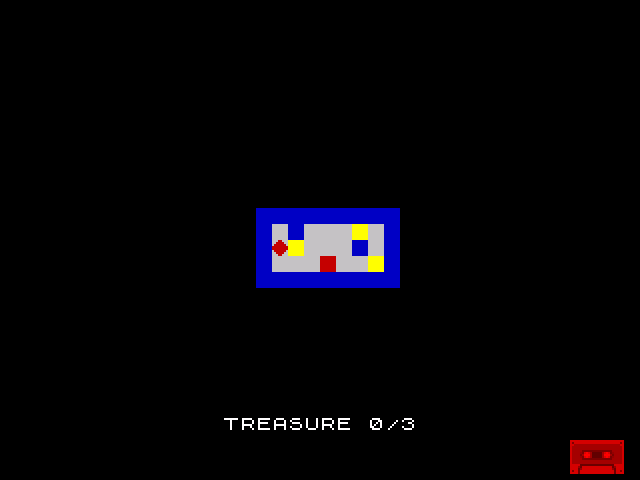
“TREASURE 0/3” sits at the bottom of the screen in bright white. The room and player are unchanged. Collect all three treasures and the counter updates to “3/3” with a green border.
The code is cleaner than Unit 10 — four CALL check_collect lines replace four copies of the collection logic. Three new subroutines (print_score, print_str, print_char) handle all text output. The subroutine pattern will grow from here.
Try This: Print Your Name
Add a title at the top of the screen. The screen address for row 0, column 0 is $4000. Set the attributes at $5800 and print a string:
            ld      hl, $5800
            ld      a, $47
            ld      b, 11               ; Length of your text
.tattr:     ld      (hl), a
            inc     hl
            djnz    .tattr

            ld      de, $4000
            ld      hl, title_text
            call    print_str

title_text: db      "SHADOWKEEP", 0
The same print_str routine works for any text at any screen position. Change the attribute to $46 (BRIGHT + INK 6) for yellow text, or $44 for green.
Try This: Two-Digit Score
If each treasure is worth 10 points, the score reaches 30. That needs two digits:
            ld      a, (score)          ; 0-99
            ld      b, '0' - 1          ; Tens counter
.tens:      inc     b
            sub     10
            jr      nc, .tens           ; Keep subtracting 10
            add     a, 10 + '0'         ; Remainder = units digit
            push    af
            ld      a, b                ; Print tens
            call    print_char
            pop     af                  ; Print units
            call    print_char
Repeated subtraction extracts the tens digit. The remainder is the units digit. No division instruction needed — the Z80 doesn’t have one.
If It Doesn’t Work
- Text is garbled after the first character? Check that
print_strsaves HL withPUSH HLbefore callingprint_charand restores it withPOP HLafter. Without this,print_chardestroys HL during the font lookup. - Characters render in the wrong place? Check the screen address. Row 23, col 10 bitmap =
$50EA. If the row or column is wrong, the text appears elsewhere. - Text is invisible? The attributes for row 23 default to
$00(black on black). Set them to$47(BRIGHT white on black) during initialisation. - Score doesn’t update?
print_scoreis called every frame in the main loop. If you only call it during init, the display is static. - check_collect corrupts the target address? Verify that PUSH HL and POP HL are balanced inside the subroutine. The treasure path pushes HL, modifies it, then pops. The non-treasure path returns early without touching HL. Both paths preserve HL for the caller.
What You’ve Learnt
- CALL and RET —
CALLpushes the return address and jumps.RETpops and returns. Subroutines eliminate duplicated code and make the program modular. - RET Z — conditional return. Skip the rest of the subroutine if a condition is met. Keeps code flat.
- ROM font at $3C00 — the Spectrum ROM contains 96 character bitmaps. Calculate the address with
char × 8 + $3C00, copy 8 bytes to screen memory withINC D. - ADD A, ‘0’ — convert a digit (0–9) to its ASCII character. One instruction, universal.
- PUSH/POP for register preservation — when a subroutine uses registers the caller needs, save them on the stack. Essential for nested calls.
- OR A — test if A is zero without comparing. Sets Z flag, one byte shorter than
CP 0. - Null-terminated strings — store text with a zero byte terminator. A loop reads until zero, printing each character.
What’s Next
The game is silent. In Unit 12, you’ll add beeper sound effects — a short tone when treasure is collected. The Spectrum’s beeper is controlled by bit 4 of port $FE. Toggle it in a timed loop and the speaker clicks. Click fast enough and you get a tone.