Collect Treasure
Check the BRIGHT bit when the player moves onto a cell. If set, clear it with RES 6,A — the treasure dims from bright to dark. A counter tracks collected items.
In Unit 9, treasure reappears when the player walks away. That’s preservation, not collection. The player can walk over every treasure cell and leave them all intact. Nothing is gained, nothing changes.
This unit adds collection. When the player steps onto a cell with the BRIGHT bit set, three things happen:
RES 6, Aclears the BRIGHT bit — the cell dims from bright yellow to dark yellow- The dimmed value replaces
player_under— so the dim cell appears when the player moves away INC (HL)increments a counter — the game knows how many treasures have been collected
Walk onto bright yellow, walk away, see dark yellow. The treasure is gone. Collect all three and the border turns green.
RES — Reset a Bit
RES n, A clears bit n in register A. It’s the complement of SET (which sets a bit) and the destructive version of BIT (which only tests):
| Instruction | Effect | A unchanged? |
|---|---|---|
BIT 6, A | Test bit 6, set Z flag | Yes |
RES 6, A | Clear bit 6 to 0 | No — A is modified |
SET 6, A | Set bit 6 to 1 | No — A is modified |
BIT was introduced in Unit 4 for keyboard reading and Unit 9 for treasure detection. RES is new — it changes the value. Clearing the BRIGHT bit transforms $70 (BRIGHT + PAPER 6) into $30 (PAPER 6 only). Same yellow, less bright. Visually: collected.
The Collection Pattern
After the wall check passes and the target attribute is saved, check for treasure:
; After saving the target attribute, check if it's treasure.
; BRIGHT (bit 6) means collectible. Clear it to "collect" the item —
; the cell dims from bright yellow to regular yellow.

            ld      a, (hl)             ; Read full attribute at target
            ld      (player_under), a   ; Save it

            bit     6, a                ; BRIGHT set?
            jr      z, .not_treasure    ; No — not treasure

            res     6, a                ; Clear BRIGHT — collected
            ld      (player_under), a   ; Update saved value (dimmed)
            ld      hl, treasure_count
            inc     (hl)                ; One more treasure collected

.not_treasure:
The sequence:
- Save —
LD (player_under), Astores the full attribute (same as Unit 9) - Test —
BIT 6, Achecks BRIGHT without changing A - Clear —
RES 6, Aremoves the BRIGHT bit from A - Update —
LD (player_under), Aoverwrites the saved value with the dimmed version - Count —
INC (HL)adds one to the counter in memory
When the player moves away, player_under holds the dimmed attribute ($30 instead of $70). The cell appears as dark yellow — visually distinct from the bright uncollected treasure.
INC (HL) — Increment Memory Directly
INC (HL) reads the byte at address HL, adds one, and writes it back — all in a single instruction. No need to load into A first:
            ld      hl, treasure_count
            inc     (hl)                ; Read, add 1, write back
Compare with the longer version:
            ld      a, (treasure_count)
            inc     a
            ld      (treasure_count), a
Both do the same thing. INC (HL) is shorter and faster. The Z80 can modify memory through HL without touching A — useful when A holds something else you don’t want to lose.
Collection Happens in Each Direction
The same collection check appears after each direction’s wall check — four copies for Q, A, O, and P. This is repetitive but correct. Each direction needs its own check because the save and collection happen at the moment of movement, not as a separate step.
The repetition is a sign that something could be tidied up. In Unit 11, CALL and RET will let us extract the repeated code into a subroutine. For now, four copies work.
All Collected — Green Border
After drawing the player, the code checks whether all treasures have been found:
            ld      a, (treasure_count)
            cp      TOTAL_TREASURE      ; All 3 collected?
            jr      nz, .not_all
            ld      a, 4                ; Green border
            out     ($fe), a
            jp      .loop
.not_all:
            ld      a, 0                ; Black border
            out     ($fe), a
CP TOTAL_TREASURE compares without changing A. If they’re equal, the Z flag is set and the border turns green. This is a simple reward — a visual confirmation that all items are collected. In Unit 14, collecting all treasures will open the exit door.
The Complete Code
; ============================================================================
; SHADOWKEEP — Unit 10: Collect Treasure
; ============================================================================
; When the player moves onto a cell with BRIGHT set (bit 6), it's treasure.
; RES 6,A clears the BRIGHT bit — the cell dims from bright yellow to
; regular yellow. A counter tracks how many items have been collected.
;
; The collection happens at the moment of movement. The saved value in
; player_under is updated to the dimmed attribute, so when the player
; walks away, the collected treasure stays dim. It's gone.
;
; INC (HL) increments a byte in memory directly — no need to load it
; into A first. One instruction, one counter update.
; ============================================================================

            org     32768

; Attribute values
WALL        equ     $09             ; PAPER 1 (blue) + INK 1
FLOOR       equ     $38             ; PAPER 7 (white) + INK 0
TREASURE    equ     $70             ; BRIGHT + PAPER 6 (yellow) + INK 0
HAZARD      equ     $90             ; FLASH + PAPER 2 (red) + INK 0
PLAYER      equ     $3a             ; PAPER 7 (white) + INK 2 (red)

; Collision
WALL_INK    equ     1               ; INK colour that means "wall"

; Room
ROOM_TOP    equ     10
ROOM_LEFT   equ     12
ROOM_WIDTH  equ     9
ROOM_HEIGHT equ     5
ROW_SKIP    equ     23              ; 32 - ROOM_WIDTH
TOTAL_TREASURE equ  3               ; Treasures in the room

; Screen addresses for starting position (row 12, col 13)
START_ROW   equ     12
START_COL   equ     13
START_SCR   equ     $488d
START_ATT   equ     $598d

; Keyboard rows
KEY_ROW_QT  equ     $fb             ; Q, W, E, R, T
KEY_ROW_AG  equ     $fd             ; A, S, D, F, G
KEY_ROW_PY  equ     $df             ; P, O, I, U, Y

; ----------------------------------------------------------------------------
; Entry point
; ----------------------------------------------------------------------------

start:
            ld      a, 0
            out     ($fe), a

            ; Clear screen
            ld      hl, $4000
            ld      de, $4001
            ld      bc, 6911
            ld      (hl), 0
            ldir

            ; ==================================================================
            ; Draw room from data table
            ; ==================================================================

            ld      hl, $594c           ; Attribute address: row 10, col 12
            ld      de, room_data
            ld      c, ROOM_HEIGHT

.row:       ld      b, ROOM_WIDTH
.cell:      ld      a, (de)
            ld      (hl), a
            inc     de
            inc     hl
            djnz    .cell

            push    de
            ld      de, ROW_SKIP
            add     hl, de
            pop     de
            dec     c
            jr      nz, .row

            ; ==================================================================
            ; Draw the player at starting position
            ; ==================================================================

            ld      a, (START_ATT)
            ld      (player_under), a

            ld      hl, START_SCR
            ld      de, player_gfx
            ld      b, 8
.initdraw:  ld      a, (de)
            ld      (hl), a
            inc     de
            inc     h
            djnz    .initdraw

            ld      a, PLAYER
            ld      (START_ATT), a

            ; ==================================================================
            ; Main loop
            ; ==================================================================

.loop:      halt

            ; --- Erase player at current position ---
            ld      hl, (player_scr)
            ld      b, 8
            ld      a, 0
.erase:     ld      (hl), a
            inc     h
            djnz    .erase

            ld      hl, (player_att)
            ld      a, (player_under)
            ld      (hl), a

            ; --- Check Q (up) ---
            ld      a, KEY_ROW_QT
            in      a, ($fe)
            bit     0, a
            jr      nz, .not_q

            ld      hl, (player_att)
            ld      de, $ffe0           ; -32 (one row up)
            add     hl, de
            ld      a, (hl)
            and     $07
            cp      WALL_INK
            jr      z, .not_q

            ; Move valid — save target and check for treasure
            ld      a, (hl)
            ld      (player_under), a
            bit     6, a
            jr      z, .no_tr_q
            res     6, a
            ld      (player_under), a
            push    hl
            ld      hl, treasure_count
            inc     (hl)
            pop     hl
.no_tr_q:
            ld      (player_att), hl

            ld      hl, (player_scr)
            ld      de, $ffe0
            add     hl, de
            ld      (player_scr), hl

            ld      a, (player_row)
            dec     a
            ld      (player_row), a

.not_q:
            ; --- Check A (down) ---
            ld      a, KEY_ROW_AG
            in      a, ($fe)
            bit     0, a
            jr      nz, .not_a

            ld      hl, (player_att)
            ld      de, 32
            add     hl, de
            ld      a, (hl)
            and     $07
            cp      WALL_INK
            jr      z, .not_a

            ld      a, (hl)
            ld      (player_under), a
            bit     6, a
            jr      z, .no_tr_a
            res     6, a
            ld      (player_under), a
            push    hl
            ld      hl, treasure_count
            inc     (hl)
            pop     hl
.no_tr_a:
            ld      (player_att), hl

            ld      hl, (player_scr)
            ld      de, 32
            add     hl, de
            ld      (player_scr), hl

            ld      a, (player_row)
            inc     a
            ld      (player_row), a

.not_a:
            ; --- Check O (left) ---
            ld      a, KEY_ROW_PY
            in      a, ($fe)
            bit     1, a
            jr      nz, .not_o

            ld      hl, (player_att)
            dec     hl
            ld      a, (hl)
            and     $07
            cp      WALL_INK
            jr      z, .not_o

            ld      a, (hl)
            ld      (player_under), a
            bit     6, a
            jr      z, .no_tr_o
            res     6, a
            ld      (player_under), a
            push    hl
            ld      hl, treasure_count
            inc     (hl)
            pop     hl
.no_tr_o:
            ld      (player_att), hl

            ld      hl, (player_scr)
            dec     hl
            ld      (player_scr), hl

            ld      a, (player_col)
            dec     a
            ld      (player_col), a

.not_o:
            ; --- Check P (right) ---
            ld      a, KEY_ROW_PY
            in      a, ($fe)
            bit     0, a
            jr      nz, .not_p

            ld      hl, (player_att)
            inc     hl
            ld      a, (hl)
            and     $07
            cp      WALL_INK
            jr      z, .not_p

            ld      a, (hl)
            ld      (player_under), a
            bit     6, a
            jr      z, .no_tr_p
            res     6, a
            ld      (player_under), a
            push    hl
            ld      hl, treasure_count
            inc     (hl)
            pop     hl
.no_tr_p:
            ld      (player_att), hl

            ld      hl, (player_scr)
            inc     hl
            ld      (player_scr), hl

            ld      a, (player_col)
            inc     a
            ld      (player_col), a

.not_p:
            ; --- Draw player at current position ---
            ld      hl, (player_scr)
            ld      de, player_gfx
            ld      b, 8
.draw:      ld      a, (de)
            ld      (hl), a
            inc     de
            inc     h
            djnz    .draw

            ld      hl, (player_att)
            ld      a, PLAYER
            ld      (hl), a

            ; --- Border shows collection progress ---
            ld      a, (treasure_count)
            cp      TOTAL_TREASURE
            jr      nz, .not_all
            ld      a, 4                ; Green border — all collected
            out     ($fe), a
            jp      .loop
.not_all:
            ld      a, 0                ; Black border
            out     ($fe), a

            jp      .loop

; ============================================================================
; Room data — one byte per cell
; ============================================================================

room_data:
            db      WALL, WALL, WALL, WALL, WALL, WALL, WALL, WALL, WALL
            db      WALL, FLOOR, WALL, FLOOR, FLOOR, FLOOR, TREASURE, FLOOR, WALL
            db      WALL, FLOOR, TREASURE, FLOOR, FLOOR, FLOOR, WALL, FLOOR, WALL
            db      WALL, FLOOR, FLOOR, FLOOR, HAZARD, FLOOR, FLOOR, TREASURE, WALL
            db      WALL, WALL, WALL, WALL, WALL, WALL, WALL, WALL, WALL

; ============================================================================
; Player data
; ============================================================================

player_gfx: db      $18, $3c, $7e, $ff
            db      $ff, $7e, $3c, $18

player_row: db      START_ROW
player_col: db      START_COL

player_scr: dw      START_SCR
player_att: dw      START_ATT

player_under:
            db      FLOOR

treasure_count:
            db      0

            end     start
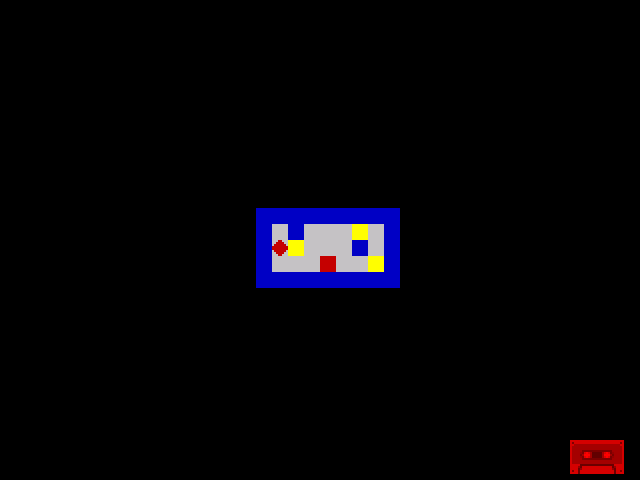
Three bright yellow treasure cells are scattered around the room. Move the player onto one — the diamond covers it. Move away — the cell is now dark yellow. Collected. Find all three and the border turns green. The room has stakes now — there’s something to do, something to find, and a way to win.
Try This: Watch the Dimming
Walk onto the treasure at row 12, col 14 (one step right from the start). Move away. The cell changes from bright yellow to a darker yellow. That colour difference is BRIGHT being cleared — the same cell, the same PAPER colour, but without the brightness boost.
Try This: Count on the Border
Replace the all-or-nothing border check with a progressive one:
            ld      a, (treasure_count)
            out     ($fe), a
The border colour changes with each collection: 0 = black, 1 = blue, 2 = red, 3 = magenta. Not meaningful colours, but a visible counter while there’s no score display.
Try This: Double-Collection Bug
What happens if the player walks onto a collected treasure (dark yellow, BRIGHT cleared)? BIT 6, A tests zero — the JR Z skips the collection. The counter doesn’t increment twice. The pattern is naturally idempotent — clearing a bit that’s already clear does nothing.
Try This: Uncollectable Treasure
What if a treasure cell used INK 1 instead of INK 0?
LOCKED_TREASURE equ $71 ; BRIGHT + PAPER 6 + INK 1INK 1 is the wall colour. The collision check blocks movement before the collection check runs. The treasure is visible but unreachable — a locked item. Changing its INK to 0 later (perhaps when a key is collected) would make it accessible. The attribute system handles access control too.
If It Doesn’t Work
- Treasure doesn’t dim? Check that
RES 6, Ais followed byLD (player_under), A. Without the second save, the dimmed value is lost —player_understill holds the original bright attribute. - Counter increments twice? Make sure the collection check only runs when a move is valid (after the wall check passes). If it runs on blocked moves too, it counts wall cells.
- Border doesn’t turn green? Check
TOTAL_TREASUREmatches the number of treasure cells in the room data. ThreeTREASUREbytes in the data meansTOTAL_TREASUREshould be 3. - Player leaves bright trail? The
RES 6, Amust updateplayer_under, not write directly to screen memory. The screen update happens in the erase step usingplayer_under. - Collecting one treasure dims them all? Each direction has its own collection check with its own
JR Zlabel. If the labels are wrong, one direction’s code might jump into another’s.
What You’ve Learnt
- RES 6, A — clear bit 6 (BRIGHT) to mark treasure as collected. The attribute changes from
$70to$30— same colour, less bright. One instruction transforms an item from uncollected to collected. - INC (HL) — increment a byte in memory without loading it into A. Shorter, faster, and doesn’t disturb whatever A currently holds.
- Collection at the point of movement — check and collect in the same code block as the move. The save, test, clear, and count happen together, keeping the logic self-contained.
- Visual feedback — the dimmed cell is proof of collection. No score display needed yet — the world itself shows what’s been collected.
- TOTAL_TREASURE — a constant that knows how many items exist. Comparing the counter against it detects completion. Simple, but it’s the foundation of win conditions.
What’s Next
The counter tracks treasure, but nobody can see it. In Unit 11, you’ll display the score on a status line using CALL to invoke a ROM routine — the Spectrum’s built-in number printing. This also introduces subroutines: CALL pushes the return address, RET pops it back. The repeated collection code becomes a candidate for extraction.