Treasure Items
BRIGHT marks collectible treasure. Save what's under the player so items reappear when the player moves away — the foundation for collection in Unit 10.
Walk the player onto the yellow treasure cell in Unit 8 and then walk away. The treasure vanishes. The erase step blindly restores FLOOR regardless of what was there. A treasure cell, a hazard cell — anything the player touches is destroyed.
This unit fixes that. Before the player moves onto a cell, save its attribute. When the player moves away, put the saved value back. Treasure reappears. Hazards reappear. The world is no longer destructible.
The technique also reveals what makes treasure special: the BRIGHT bit. Bit 6 of the attribute byte. Every treasure cell has it set. Every wall and floor cell doesn’t. One bit test separates treasure from everything else.
BRIGHT as a Game Marker
The attribute byte has eight bits:
  Bit 7    Bit 6    Bits 5-3    Bits 2-0
  FLASH    BRIGHT   PAPER       INK
Walls use INK 1 for collision. Now treasure uses BRIGHT for identification. The attribute byte is becoming a game language — each bit or field means something different:
| Attribute Feature | Game Meaning | Test |
|---|---|---|
| INK = 1 | Wall (impassable) | AND $07 / CP 1 |
| BRIGHT = 1 | Treasure (collectible) | BIT 6, A |
| FLASH = 1 | Hazard (dangerous) | BIT 7, A |
Three different game concepts, three different bits, all packed into a single byte. No separate collision map. No item list. The screen is the game data.
Detecting BRIGHT
BIT 6, A tests bit 6 without changing A. If the bit is set, the Z flag is cleared (NZ). If the bit is clear, the Z flag is set (Z):
; Detect treasure by testing the BRIGHT bit (bit 6) of an attribute byte.
; BRIGHT marks collectible items — yellow shining cells in the room.

            ld      a, (hl)         ; Read attribute at target cell
            bit     6, a            ; BRIGHT bit set?
            jr      nz, .treasure   ; Yes — this cell has treasure
This is the same BIT instruction used for keyboard input in Unit 4. There, BIT 0, A tested whether a key was pressed. Here, BIT 6, A tests whether a cell contains treasure. Same instruction, different context — the Z80 doesn’t care whether you’re reading a keyboard port or a screen attribute.
Save and Restore
The pattern is straightforward: one variable, player_under, tracks what was at the player’s current position before they stood on it.
; Save the attribute at the destination before the player covers it.
; Restore it when the player moves away, so treasure reappears.

            ; When moving to a new cell:
            ld      a, (hl)             ; Read full attribute at target
            ld      (player_under), a   ; Remember it

            ; When erasing the player:
            ld      hl, (player_att)
            ld      a, (player_under)   ; What was here before?
            ld      (hl), a             ; Put it back
When moving to a new cell:
- Read the full attribute at the destination
- Store it in
player_under
When erasing the player:
- Read
player_under - Write it back to the player’s attribute address
This replaces the old LD A, FLOOR / LD (HL), A in the erase section. Instead of always restoring floor, we restore whatever was actually there.
How It Fits into Movement
Each direction check already reads the target attribute for collision detection. After the wall check passes, HL still points to the target cell. One extra read saves the full attribute:
            ld      hl, (player_att)
            ld      de, $ffe0           ; -32 (one row up)
            add     hl, de
            ld      a, (hl)             ; Read target attribute
            and     $07                 ; Extract INK
            cp      WALL_INK
            jr      z, .not_q           ; Wall — blocked

            ; Move valid — save what's at target
            ld      a, (hl)             ; Re-read full attribute
            ld      (player_under), a   ; Remember it
Why re-read? The AND $07 destroyed the original value — it kept only the INK bits. LD A, (HL) reads the full byte again. HL hasn’t changed, so it still points to the target cell.
The Room
Three treasure cells are scattered around the room — behind a wall, in the corridor, and in the lower-right corner:
  W W W W W W W W W
  W . W . . . T . W     T = treasure (BRIGHT yellow)
  W . T . . . W . W     H = hazard (FLASH red)
  W . . . H . . T W     . = floor (white)
  W W W W W W W W W     W = wall (blue)
Each treasure cell has attribute $70: BRIGHT + PAPER 6 (yellow) + INK 0. The BRIGHT bit makes them visually brighter than regular yellow — they shine on screen, unmistakable against the white floor.
The Complete Code
; ============================================================================
; SHADOWKEEP — Unit 9: Treasure Items
; ============================================================================
; Treasure cells have the BRIGHT bit set (bit 6 of the attribute byte).
; They shine yellow on screen — unmistakable against the white floor.
;
; The player can walk on treasure. When they move away, the treasure
; reappears. This is the save/restore pattern: before overwriting a cell
; with the player attribute, save what was there. When erasing the player,
; put back the saved value instead of always restoring FLOOR.
;
; BIT 6,A tests the BRIGHT bit — the same BIT instruction used for
; keyboard input, now applied to game logic.
; ============================================================================

            org     32768

; Attribute values
WALL        equ     $09             ; PAPER 1 (blue) + INK 1
FLOOR       equ     $38             ; PAPER 7 (white) + INK 0
TREASURE    equ     $70             ; BRIGHT + PAPER 6 (yellow) + INK 0
HAZARD      equ     $90             ; FLASH + PAPER 2 (red) + INK 0
PLAYER      equ     $3a             ; PAPER 7 (white) + INK 2 (red)

; Collision
WALL_INK    equ     1               ; INK colour that means "wall"

; Room dimensions
ROOM_TOP    equ     10
ROOM_LEFT   equ     12
ROOM_WIDTH  equ     9
ROOM_HEIGHT equ     5
ROW_SKIP    equ     23              ; 32 - ROOM_WIDTH

; Screen addresses for starting position (row 12, col 13)
START_ROW   equ     12
START_COL   equ     13
START_SCR   equ     $488d
START_ATT   equ     $598d

; Keyboard rows
KEY_ROW_QT  equ     $fb             ; Q, W, E, R, T
KEY_ROW_AG  equ     $fd             ; A, S, D, F, G
KEY_ROW_PY  equ     $df             ; P, O, I, U, Y

; ----------------------------------------------------------------------------
; Entry point
; ----------------------------------------------------------------------------

start:
            ld      a, 0
            out     ($fe), a

            ; Clear screen
            ld      hl, $4000
            ld      de, $4001
            ld      bc, 6911
            ld      (hl), 0
            ldir

            ; ==================================================================
            ; Draw room from data table
            ; ==================================================================

            ld      hl, $594c           ; Attribute address: row 10, col 12
            ld      de, room_data
            ld      c, ROOM_HEIGHT

.row:       ld      b, ROOM_WIDTH
.cell:      ld      a, (de)
            ld      (hl), a
            inc     de
            inc     hl
            djnz    .cell

            push    de
            ld      de, ROW_SKIP
            add     hl, de
            pop     de
            dec     c
            jr      nz, .row

            ; ==================================================================
            ; Draw the player at starting position
            ; ==================================================================

            ; Save what's at the starting cell
            ld      a, (START_ATT)
            ld      (player_under), a

            ld      hl, START_SCR
            ld      de, player_gfx
            ld      b, 8
.initdraw:  ld      a, (de)
            ld      (hl), a
            inc     de
            inc     h
            djnz    .initdraw

            ld      a, PLAYER
            ld      (START_ATT), a

            ; ==================================================================
            ; Main loop
            ; ==================================================================

.loop:      halt

            ; --- Erase player at current position ---
            ld      hl, (player_scr)
            ld      b, 8
            ld      a, 0
.erase:     ld      (hl), a
            inc     h
            djnz    .erase

            ; Restore what was under the player
            ld      hl, (player_att)
            ld      a, (player_under)
            ld      (hl), a

            ; --- Check Q (up) ---
            ld      a, KEY_ROW_QT
            in      a, ($fe)
            bit     0, a
            jr      nz, .not_q

            ld      hl, (player_att)
            ld      de, $ffe0           ; -32 (one row up)
            add     hl, de
            ld      a, (hl)
            and     $07
            cp      WALL_INK
            jr      z, .not_q

            ; Move valid — save what's at target
            ld      a, (hl)
            ld      (player_under), a

            ld      (player_att), hl

            ld      hl, (player_scr)
            ld      de, $ffe0
            add     hl, de
            ld      (player_scr), hl

            ld      a, (player_row)
            dec     a
            ld      (player_row), a

.not_q:
            ; --- Check A (down) ---
            ld      a, KEY_ROW_AG
            in      a, ($fe)
            bit     0, a
            jr      nz, .not_a

            ld      hl, (player_att)
            ld      de, 32
            add     hl, de
            ld      a, (hl)
            and     $07
            cp      WALL_INK
            jr      z, .not_a

            ld      a, (hl)
            ld      (player_under), a

            ld      (player_att), hl

            ld      hl, (player_scr)
            ld      de, 32
            add     hl, de
            ld      (player_scr), hl

            ld      a, (player_row)
            inc     a
            ld      (player_row), a

.not_a:
            ; --- Check O (left) ---
            ld      a, KEY_ROW_PY
            in      a, ($fe)
            bit     1, a
            jr      nz, .not_o

            ld      hl, (player_att)
            dec     hl
            ld      a, (hl)
            and     $07
            cp      WALL_INK
            jr      z, .not_o

            ld      a, (hl)
            ld      (player_under), a

            ld      (player_att), hl

            ld      hl, (player_scr)
            dec     hl
            ld      (player_scr), hl

            ld      a, (player_col)
            dec     a
            ld      (player_col), a

.not_o:
            ; --- Check P (right) ---
            ld      a, KEY_ROW_PY
            in      a, ($fe)
            bit     0, a
            jr      nz, .not_p

            ld      hl, (player_att)
            inc     hl
            ld      a, (hl)
            and     $07
            cp      WALL_INK
            jr      z, .not_p

            ld      a, (hl)
            ld      (player_under), a

            ld      (player_att), hl

            ld      hl, (player_scr)
            inc     hl
            ld      (player_scr), hl

            ld      a, (player_col)
            inc     a
            ld      (player_col), a

.not_p:
            ; --- Draw player at current position ---
            ld      hl, (player_scr)
            ld      de, player_gfx
            ld      b, 8
.draw:      ld      a, (de)
            ld      (hl), a
            inc     de
            inc     h
            djnz    .draw

            ld      hl, (player_att)
            ld      a, PLAYER
            ld      (hl), a

            jp      .loop

; ============================================================================
; Room data — one byte per cell
; ============================================================================
; Three treasure cells (BRIGHT yellow) placed around the room.
; The player can walk on them without destroying them.

room_data:
            db      WALL, WALL, WALL, WALL, WALL, WALL, WALL, WALL, WALL
            db      WALL, FLOOR, WALL, FLOOR, FLOOR, FLOOR, TREASURE, FLOOR, WALL
            db      WALL, FLOOR, TREASURE, FLOOR, FLOOR, FLOOR, WALL, FLOOR, WALL
            db      WALL, FLOOR, FLOOR, FLOOR, HAZARD, FLOOR, FLOOR, TREASURE, WALL
            db      WALL, WALL, WALL, WALL, WALL, WALL, WALL, WALL, WALL

; ============================================================================
; Player data
; ============================================================================

; Player character — diamond shape
player_gfx: db      $18, $3c, $7e, $ff
            db      $ff, $7e, $3c, $18

; Position tracking
player_row: db      START_ROW
player_col: db      START_COL

; Screen addresses
player_scr: dw      START_SCR
player_att: dw      START_ATT

; What was under the player before they stood there
player_under:
            db      FLOOR

            end     start
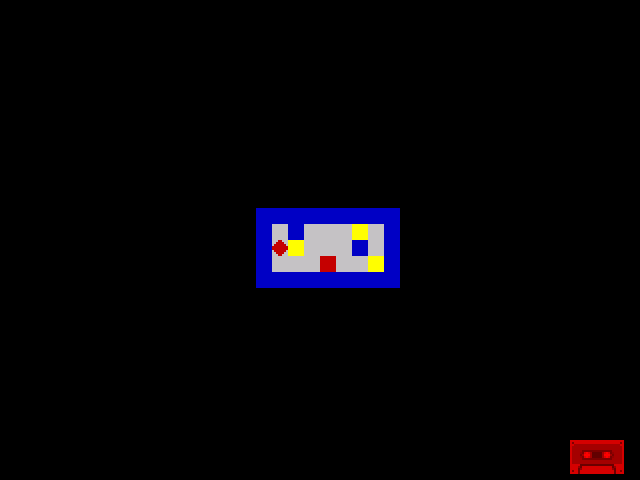
Three bright yellow treasure cells shine against the room. Move the player onto one — the diamond covers it. Move away — the treasure reappears. Walk over the hazard — same thing, it comes back. The room is no longer destructible.
Try This: Walk Over Everything
Navigate the player through the entire room. Walk onto each treasure cell, then move away. Walk onto the hazard. Every cell restores correctly. In Unit 8, walking onto treasure destroyed it. Now it persists.
Try This: Check BRIGHT in the Loop
Add a border colour change when the player stands on treasure. After the draw section:
            ld      a, (player_under)
            bit     6, a            ; BRIGHT set?
            jr      z, .no_treasure
            ld      a, 6            ; Yellow border
            out     ($fe), a
            jr      .loop
.no_treasure:
            ld      a, 0            ; Black border
            out     ($fe), a
The border flashes yellow whenever the player stands on a treasure cell. This is visual confirmation that BIT 6 correctly detects BRIGHT items. In Unit 10, this detection becomes collection.
Try This: More Treasure
Add treasure to additional cells in the room data. Change a FLOOR byte to TREASURE:
room_data:
            db      WALL, WALL, WALL, WALL, WALL, WALL, WALL, WALL, WALL
            db      WALL, TREASURE, WALL, FLOOR, TREASURE, FLOOR, TREASURE, FLOOR, WALL
            db      WALL, FLOOR, TREASURE, FLOOR, FLOOR, FLOOR, WALL, FLOOR, WALL
            db      WALL, FLOOR, FLOOR, TREASURE, HAZARD, TREASURE, FLOOR, TREASURE, WALL
            db      WALL, WALL, WALL, WALL, WALL, WALL, WALL, WALL, WALL
Every treasure cell shines, every one is walkable, every one reappears. The save/restore pattern handles any number of items — it doesn’t count them or track positions. It just remembers what was at one cell: the one the player is standing on.
If It Doesn’t Work
- Treasure still disappears? Check the erase section. It should read
player_underand write it back, notLD A, FLOOR. - Garbage appears when player moves? Make sure
player_underis initialised. TheDB FLOORat the end sets its starting value. Also check that the save (LD (player_under), A) happens after the wall check, not before — otherwise a failed move overwrites the saved value. - Player leaves trail of wrong colours? The re-read (
LD A, (HL)) must happen after the collision check. TheAND $07destroys the full byte. If you save the ANDed value, you’ll restore just the INK bits — PAPER, BRIGHT, and FLASH will be lost. - Hazard doesn’t reappear? Same fix as treasure. The save/restore pattern works for any attribute value, not just TREASURE. As long as you save before overwriting and restore before moving, everything is preserved.
What You’ve Learnt
- BRIGHT as a game marker — bit 6 of the attribute byte marks treasure.
BIT 6, Adetects it without changing A. One bit separates collectibles from walls and floor. - Save/restore pattern — store the attribute under the player in
player_under. Restore it when the player moves away. This preserves treasure, hazards, and any other cell content. - Re-reading after AND —
AND $07extracts INK but destroys the rest of the byte. Re-read withLD A, (HL)to get the full attribute back. HL hasn’t changed, so the re-read costs one instruction. - Attribute byte as game language — INK = material (wall vs floor), BRIGHT = treasure, FLASH = hazard. The eight bits of one byte encode both appearance and behaviour.
What’s Next
The player can walk on treasure and it reappears — but nothing is collected. In Unit 10, you’ll check the BRIGHT bit when the player moves onto a cell. If it’s set, increment a counter, clear the BRIGHT bit with RES 6, A, and write the dimmed attribute back. The treasure fades from bright to normal — collected.