Room from Data Table
Define the room as a byte array — one attribute value per cell. A nested loop reads the table and draws the room. Change the data, change the room.
Every wall in Units 3–7 was placed by hand — one LD HL and LD (HL), A per cell. For a simple rectangle, that works. But imagine a room with twisting corridors, alcoves, and dead ends. Fifty hand-coded wall statements. Sixty. A hundred. Impossible to maintain, impossible to read.
The solution: put the room in a table. One byte per cell, arranged as a grid. A loop reads the table and writes each byte to attribute memory. The drawing code is generic — it doesn’t know or care what the room looks like. Want a different room? Change the table. The code stays the same.
This is the foundation of every tile-based game. The room layout is data. The game engine reads it.
Room Data as a Byte Array
The room is 9 columns by 5 rows = 45 bytes. Each byte is an attribute value — WALL, FLOOR, TREASURE, or HAZARD:
; Room data — one byte per cell, read left to right, top to bottom.
; The drawing loop reads this table and writes each byte to attribute memory.

room_data:
            db      WALL, WALL, WALL, WALL, WALL, WALL, WALL, WALL, WALL
            db      WALL, FLOOR, WALL, FLOOR, FLOOR, FLOOR, TREASURE, FLOOR, WALL
            db      WALL, FLOOR, FLOOR, FLOOR, FLOOR, FLOOR, WALL, FLOOR, WALL
            db      WALL, FLOOR, FLOOR, FLOOR, HAZARD, FLOOR, FLOOR, FLOOR, WALL
            db      WALL, WALL, WALL, WALL, WALL, WALL, WALL, WALL, WALL
Read it like a map. The top and bottom rows are solid wall. Row 11 has an internal wall at column 14 that creates two corridors — one leading to treasure, one open. Row 12 has a wall at column 18 that blocks the right side. Row 13 has a hazard guarding the lower path.
All of this from data. No drawing logic knows about corridors or item placement. Each byte is just an attribute value that gets written to screen memory.
The Drawing Loop
A nested loop reads the table and writes it to attribute memory:
            ; Draw room from data table
            ld      hl, $594c           ; Attribute address: row 10, col 12
            ld      de, room_data       ; Pointer to room bytes
            ld      c, ROOM_HEIGHT      ; Row counter

.row:       ld      b, ROOM_WIDTH       ; Column counter
.cell:      ld      a, (de)             ; Read one cell from table
            ld      (hl), a             ; Write to attribute memory
            inc     de                  ; Next data byte
            inc     hl                  ; Next screen column
            djnz    .cell               ; Repeat for row width

            ; Skip to next row: add (32 - ROOM_WIDTH) to HL
            push    de                  ; Save data pointer
            ld      de, ROW_SKIP        ; 32 - 9 = 23
            add     hl, de
            pop     de                  ; Restore data pointer
            dec     c
            jr      nz, .row
The inner loop (DJNZ .cell) handles one row — reading ROOM_WIDTH bytes from the table and writing them to consecutive attribute addresses. The outer loop (DEC C / JR NZ, .row) repeats for each row.
The Row Skip
This is the detail that makes the loop work. Attribute memory has 32 columns per row, but the room is only 9 columns wide. After drawing one row, HL points to column 21 (12 + 9). The next row starts at column 12. That’s 23 addresses ahead — the remaining columns of the current row, plus 12 columns at the start of the next.
ROW_SKIP is 32 - ROOM_WIDTH = 23. After each row, ADD HL, DE skips HL forward to the correct starting column of the next row.
Why C for the Outer Loop?
DJNZ uses B for its counter. The inner loop needs B for the column count. So the outer loop uses C instead, with DEC C and JR NZ. Two counters, two registers — the Z80 has enough to go around.
Why PUSH/POP DE?
DE holds the pointer to room data. But ADD HL, DE needs DE for the row skip value. So we save DE with PUSH DE, load the skip value, do the addition, then restore DE with POP DE. The data pointer picks up exactly where it left off.
PUSH and POP use the stack — a memory area that grows downward from the top of RAM. PUSH DE saves D and E onto the stack. POP DE retrieves them. Think of it as a temporary shelf: put something down, do other work, pick it back up.
What Changed from Unit 7
The drawing section shrank from 40+ instructions to a generic loop. The loop is 15 instructions. It draws any room of any shape, as long as the data table has the right number of bytes.
The room itself is more interesting — internal walls create corridors, treasure is tucked behind a wall, and a hazard guards the lower path. None of this required any new drawing code. The data table is the room design tool.
The player start position moved to row 12, col 13 — the middle of the left corridor where there’s space to move. The starting addresses updated to match: START_SCR = $488D, START_ATT = $598D.
The Complete Code
; ============================================================================
; SHADOWKEEP — Unit 8: Room from Data Table
; ============================================================================
; The room layout is now a byte array — one attribute value per cell.
; A nested loop reads the table and writes each byte to attribute memory.
; Change the data, change the room. No drawing code changes needed.
;
; The room is more complex than before: internal walls create corridors,
; treasure is tucked behind a wall, and a hazard guards the lower path.
; All of this from data alone — the drawing code doesn't know or care
; what shape the room is.
; ============================================================================

            org     32768

; Attribute values
WALL        equ     $09             ; PAPER 1 (blue) + INK 1
FLOOR       equ     $38             ; PAPER 7 (white) + INK 0
TREASURE    equ     $70             ; BRIGHT + PAPER 6 (yellow)
HAZARD      equ     $90             ; FLASH + PAPER 2 (red)
PLAYER      equ     $3a             ; PAPER 7 (white) + INK 2 (red)

; Collision
WALL_INK    equ     1               ; INK colour that means "wall"

; Room dimensions
ROOM_TOP    equ     10
ROOM_LEFT   equ     12
ROOM_WIDTH  equ     9
ROOM_HEIGHT equ     5
ROW_SKIP    equ     23              ; 32 - ROOM_WIDTH

; Screen addresses for starting position (row 12, col 13)
START_ROW   equ     12
START_COL   equ     13
START_SCR   equ     $488d
START_ATT   equ     $598d

; Keyboard rows
KEY_ROW_QT  equ     $fb             ; Q, W, E, R, T
KEY_ROW_AG  equ     $fd             ; A, S, D, F, G
KEY_ROW_PY  equ     $df             ; P, O, I, U, Y

; ----------------------------------------------------------------------------
; Entry point
; ----------------------------------------------------------------------------

start:
            ld      a, 0
            out     ($fe), a

            ; Clear screen
            ld      hl, $4000
            ld      de, $4001
            ld      bc, 6911
            ld      (hl), 0
            ldir

            ; ==================================================================
            ; Draw room from data table
            ; ==================================================================

            ld      hl, $594c           ; Attribute address: row 10, col 12
            ld      de, room_data       ; Pointer to room bytes
            ld      c, ROOM_HEIGHT      ; Row counter

.row:       ld      b, ROOM_WIDTH       ; Column counter
.cell:      ld      a, (de)             ; Read one cell from table
            ld      (hl), a             ; Write to attribute memory
            inc     de                  ; Next data byte
            inc     hl                  ; Next screen column
            djnz    .cell               ; Repeat for row width

            ; Skip to next row: add (32 - ROOM_WIDTH) to HL
            push    de                  ; Save data pointer
            ld      de, ROW_SKIP
            add     hl, de
            pop     de                  ; Restore data pointer
            dec     c
            jr      nz, .row

            ; ==================================================================
            ; Draw the player at starting position
            ; ==================================================================

            ld      hl, START_SCR
            ld      de, player_gfx
            ld      b, 8
.initdraw:  ld      a, (de)
            ld      (hl), a
            inc     de
            inc     h
            djnz    .initdraw

            ld      a, PLAYER
            ld      (START_ATT), a

            ; ==================================================================
            ; Main loop
            ; ==================================================================

.loop:      halt

            ; --- Erase player at current position ---
            ld      hl, (player_scr)
            ld      b, 8
            ld      a, 0
.erase:     ld      (hl), a
            inc     h
            djnz    .erase

            ld      hl, (player_att)
            ld      a, FLOOR
            ld      (hl), a

            ; --- Check Q (up) ---
            ld      a, KEY_ROW_QT
            in      a, ($fe)
            bit     0, a
            jr      nz, .not_q

            ld      hl, (player_att)
            ld      de, $ffe0           ; -32 (one row up)
            add     hl, de
            ld      a, (hl)
            and     $07
            cp      WALL_INK
            jr      z, .not_q

            ld      hl, (player_att)
            ld      de, $ffe0
            add     hl, de
            ld      (player_att), hl

            ld      hl, (player_scr)
            ld      de, $ffe0
            add     hl, de
            ld      (player_scr), hl

            ld      a, (player_row)
            dec     a
            ld      (player_row), a

.not_q:
            ; --- Check A (down) ---
            ld      a, KEY_ROW_AG
            in      a, ($fe)
            bit     0, a
            jr      nz, .not_a

            ld      hl, (player_att)
            ld      de, 32
            add     hl, de
            ld      a, (hl)
            and     $07
            cp      WALL_INK
            jr      z, .not_a

            ld      hl, (player_att)
            ld      de, 32
            add     hl, de
            ld      (player_att), hl

            ld      hl, (player_scr)
            ld      de, 32
            add     hl, de
            ld      (player_scr), hl

            ld      a, (player_row)
            inc     a
            ld      (player_row), a

.not_a:
            ; --- Check O (left) ---
            ld      a, KEY_ROW_PY
            in      a, ($fe)
            bit     1, a
            jr      nz, .not_o

            ld      hl, (player_att)
            dec     hl
            ld      a, (hl)
            and     $07
            cp      WALL_INK
            jr      z, .not_o

            ld      hl, (player_att)
            dec     hl
            ld      (player_att), hl

            ld      hl, (player_scr)
            dec     hl
            ld      (player_scr), hl

            ld      a, (player_col)
            dec     a
            ld      (player_col), a

.not_o:
            ; --- Check P (right) ---
            ld      a, KEY_ROW_PY
            in      a, ($fe)
            bit     0, a
            jr      nz, .not_p

            ld      hl, (player_att)
            inc     hl
            ld      a, (hl)
            and     $07
            cp      WALL_INK
            jr      z, .not_p

            ld      hl, (player_att)
            inc     hl
            ld      (player_att), hl

            ld      hl, (player_scr)
            inc     hl
            ld      (player_scr), hl

            ld      a, (player_col)
            inc     a
            ld      (player_col), a

.not_p:
            ; --- Draw player at current position ---
            ld      hl, (player_scr)
            ld      de, player_gfx
            ld      b, 8
.draw:      ld      a, (de)
            ld      (hl), a
            inc     de
            inc     h
            djnz    .draw

            ld      hl, (player_att)
            ld      a, PLAYER
            ld      (hl), a

            jp      .loop

; ============================================================================
; Room data — one byte per cell
; ============================================================================
; 9 columns × 5 rows = 45 bytes.
; Change this table to change the room. The drawing code stays the same.

room_data:
            db      WALL, WALL, WALL, WALL, WALL, WALL, WALL, WALL, WALL
            db      WALL, FLOOR, WALL, FLOOR, FLOOR, FLOOR, TREASURE, FLOOR, WALL
            db      WALL, FLOOR, FLOOR, FLOOR, FLOOR, FLOOR, WALL, FLOOR, WALL
            db      WALL, FLOOR, FLOOR, FLOOR, HAZARD, FLOOR, FLOOR, FLOOR, WALL
            db      WALL, WALL, WALL, WALL, WALL, WALL, WALL, WALL, WALL

; ============================================================================
; Player data
; ============================================================================

; Player character — diamond shape
player_gfx: db      $18, $3c, $7e, $ff
            db      $ff, $7e, $3c, $18

; Position tracking
player_row: db      START_ROW
player_col: db      START_COL

; Screen addresses
player_scr: dw      START_SCR
player_att: dw      START_ATT

            end     start
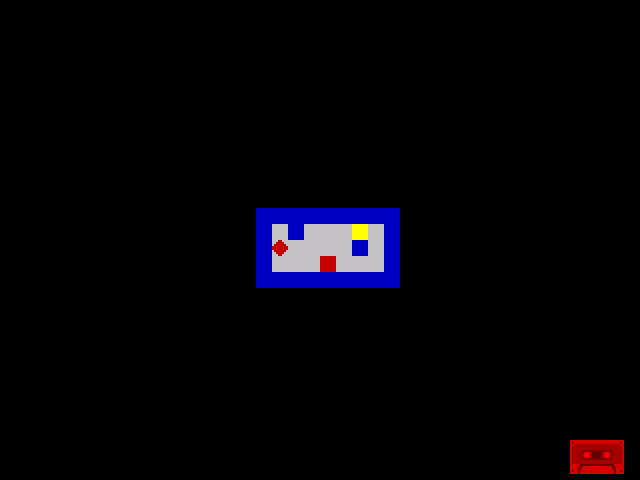
The room has two corridors separated by internal walls. Treasure (yellow) sits in the upper-right alcove — you have to navigate around the wall to reach it. A hazard (flashing red) guards the lower path. Move around with QAOP and explore the layout. Every wall blocks movement, every open cell is passable.
The entire room came from 45 bytes of data.
Try This: Redesign the Room
Change the room data to create a different layout. Here’s a maze:
room_data:
            db      WALL, WALL, WALL, WALL, WALL, WALL, WALL, WALL, WALL
            db      WALL, FLOOR, FLOOR, FLOOR, WALL, FLOOR, FLOOR, FLOOR, WALL
            db      WALL, WALL, WALL, FLOOR, WALL, FLOOR, WALL, FLOOR, WALL
            db      WALL, FLOOR, FLOOR, FLOOR, FLOOR, FLOOR, WALL, FLOOR, WALL
            db      WALL, WALL, WALL, WALL, WALL, WALL, WALL, WALL, WALL
No code changes. Assemble and run — the maze appears. The collision system handles the new walls automatically.
Try This: Bigger Room
Change the constants to make a wider room:
ROOM_WIDTH  equ     15
ROW_SKIP    equ     17              ; 32 - 15
You’ll need to update the room data to have 15 columns per row, and adjust the starting attribute address. The drawing loop handles the rest. This is the power of data-driven design — the engine is generic, the content is data.
Try This: Second Room
Define a second room table after the first:
room_data_2:
            db      WALL, WALL, WALL, WALL, WALL, WALL, WALL, WALL, WALL
            db      WALL, TREASURE, FLOOR, FLOOR, FLOOR, FLOOR, FLOOR, TREASURE, WALL
            db      WALL, FLOOR, FLOOR, WALL, WALL, WALL, FLOOR, FLOOR, WALL
            db      WALL, TREASURE, FLOOR, FLOOR, FLOOR, FLOOR, FLOOR, TREASURE, WALL
            db      WALL, WALL, WALL, WALL, WALL, WALL, WALL, WALL, WALL
Change LD DE, room_data to LD DE, room_data_2 and the drawing loop draws a completely different room. In later units, the game will switch between rooms by changing which table DE points to.
If It Doesn’t Work
- Room draws in the wrong place? Check the starting attribute address. Row 10, col 12 =
$5800 + (10 × 32) + 12=$594C. - Room is garbled or offset? Check ROW_SKIP. It must be
32 - ROOM_WIDTH. If the room is 9 wide, the skip is 23. Wrong skip means rows overlap or leave gaps. - Missing cells at end of rows? DJNZ counts down from B. Make sure B is loaded with ROOM_WIDTH at the start of each row, not once before the loop.
- Data pointer gets corrupted? Check the PUSH/POP DE around the row skip. Without it, the ADD HL,DE overwrites the data pointer with the skip value, and the next row reads garbage.
- Player starts inside a wall? The starting position moved to row 12, col 13 (a floor cell in the new layout). Update START_ROW, START_COL, START_SCR, and START_ATT to match.
What You’ve Learnt
- Data tables — a byte array defines the room layout. One byte per cell, read sequentially by a loop. The room is data, not code.
- Nested loops — DJNZ for the inner (columns), DEC C / JR NZ for the outer (rows). Two counters, two registers.
- Row skip — attribute memory has 32 columns per row, but the room is narrower. After each row, skip forward by
32 - ROOM_WIDTHaddresses. - PUSH / POP — save a register pair to the stack, do other work, restore it. Essential when you need a register for two purposes.
- Data-driven design — the drawing code is generic. Change the table, change the room. This is the foundation of tile-based game engines.
What’s Next
The room has treasure and a hazard, but the player can walk through them and nothing happens. In Unit 9, you’ll make treasure items shine with the BRIGHT bit and detect them with a single attribute read — the same technique as wall collision, applied to collection.