Wall Collision
Read the attribute at the target cell before moving — if INK colour is blue, the cell is a wall. One memory read replaces all boundary checks.
In Unit 6, the player stopped at the room edges because of hard-coded boundary checks — constants that said “row 11 is the top, row 13 is the bottom.” That works for a rectangle, but what about a room with pillars? Or an L-shaped corridor? Or a maze with twisting walls?
The answer has been there since Unit 1. The walls are blue. Blue means INK 1. Before moving, read the attribute at the target cell. If the INK colour is 1, it’s a wall — don’t move. If it’s anything else, the cell is passable.
One memory read. One AND. One comparison. That’s collision detection on the Spectrum.
The Attribute as Collision Map
This is the payoff of the attribute system. Every cell on screen already contains all the information the game needs:
| INK Colour | Meaning | Passable? |
|---|---|---|
| 0 (black) | Floor, treasure, hazard | Yes |
| 1 (blue) | Wall | No |
| 2 (red) | Player | — |
The screen itself is the game world. No separate collision map. No hitbox data. No sprite overlap tests. The Spectrum’s “limitation” — one attribute byte per cell — is exactly what makes this work. The display and the game logic are the same data.
Checking a Target Cell
Before moving in any direction, read the attribute at the destination:
            ; Check if the cell above the player is a wall
            ;
            ; 1. Take the current attribute address
            ; 2. Subtract 32 to get the cell one row up
            ; 3. Read the attribute byte at that address
            ; 4. Extract the INK colour (bits 0–2)
            ; 5. Compare with wall INK (1 = blue)

            ld      hl, (player_att)  ; Current attribute address
            ld      de, $ffe0         ; -32 = one row up
            add     hl, de            ; HL = target cell address

            ld      a, (hl)           ; Read attribute at target
            and     $07               ; Keep INK bits only
            cp      WALL_INK          ; INK 1 = wall?
            jr      z, .blocked       ; Yes — don't move

            ; Not a wall — safe to move
            ld      (player_att), hl  ; Store new attribute address
            ; ... update bitmap address and row variable ...

.blocked:
The pattern is identical to Unit 2’s attribute reading, now applied to gameplay:
- Calculate the target address: current position ± offset (32 for rows, 1 for columns)
LD A, (HL)— read the attribute byteAND $07— extract the INK colour (bits 0–2)CP WALL_INK— compare with wall colour (1 = blue)JR Z— if equal, the cell is a wall — block the move
If the target isn’t a wall, the code falls through to the movement logic. The target address in HL is already the new position, so it can be stored directly as the updated attribute address.
Why INK, Not the Full Byte?
Walls have attribute $09 (PAPER 1, INK 1). But what if a wall cell also has BRIGHT or FLASH set? Checking the full byte with CP $09 would miss $49 (BRIGHT wall) or $89 (FLASH wall). By extracting just the INK with AND $07, the check works regardless of PAPER, BRIGHT, or FLASH. Any cell with INK 1 is a wall, whatever else it has.
Internal Walls
This unit adds a pillar inside the room — a wall cell at row 12, column 15:
            ld      a, WALL
            ld      ($598f), a      ; Row 12, col 15 — pillar
With boundary checks, this pillar would be invisible to the collision system — the player would walk straight through it. With attribute-based collision, the pillar blocks movement automatically. No extra code needed. The collision system reads what’s on screen, and the pillar is a wall.
This is why attribute-based collision is powerful. Add walls anywhere — the game handles them. Remove walls — the game adapts. The room layout is entirely data-driven, and the collision code never changes.
How Each Direction Works
The four direction checks follow the same structure. Only the address offset differs:
| Direction | Offset | Address Change |
|---|---|---|
| Up | −32 ($FFE0) | Previous row |
| Down | +32 | Next row |
| Left | −1 | Previous column |
| Right | +1 | Next column |
For up and down, ADD HL, DE applies the 32-byte row offset. For left and right, DEC HL or INC HL shifts by one column. After the collision check passes, the same offset updates both the attribute and bitmap addresses.
The Complete Code
; ============================================================================
; SHADOWKEEP — Unit 7: Wall Collision
; ============================================================================
; Before moving, read the attribute at the target cell. If its INK colour
; is 1 (blue = wall), the move is blocked. Any other INK colour is passable.
;
; This replaces the hard-coded boundary checks from Unit 6. The walls
; themselves are the collision map — no separate boundary data needed.
; The attribute system that seemed like a colour trick in Unit 1 is now
; the entire collision detection system.
; ============================================================================

            org     32768

; Attribute values
WALL        equ     $09             ; PAPER 1 (blue) + INK 1
FLOOR       equ     $38             ; PAPER 7 (white) + INK 0
TREASURE    equ     $70             ; BRIGHT + PAPER 6 (yellow)
HAZARD      equ     $90             ; FLASH + PAPER 2 (red)
PLAYER      equ     $3a             ; PAPER 7 (white) + INK 2 (red)

; Collision
WALL_INK    equ     1               ; INK colour that means "wall"

; Room dimensions
ROOM_TOP    equ     10
ROOM_LEFT   equ     12
ROOM_WIDTH  equ     9
ROOM_INNER  equ     7

; Screen addresses for starting position (row 11, col 13)
START_ROW   equ     11
START_COL   equ     13
START_SCR   equ     $486d
START_ATT   equ     $596d

; Keyboard rows
KEY_ROW_QT  equ     $fb             ; Q, W, E, R, T
KEY_ROW_AG  equ     $fd             ; A, S, D, F, G
KEY_ROW_PY  equ     $df             ; P, O, I, U, Y

; ----------------------------------------------------------------------------
; Entry point
; ----------------------------------------------------------------------------

start:
            ld      a, 0
            out     ($fe), a

            ; Clear screen
            ld      hl, $4000
            ld      de, $4001
            ld      bc, 6911
            ld      (hl), 0
            ldir

            ; ==================================================================
            ; Draw the room
            ; ==================================================================

            ; --- Top wall ---
            ld      hl, $594c       ; Row 10, col 12
            ld      b, ROOM_WIDTH
            ld      a, WALL
.top:       ld      (hl), a
            inc     hl
            djnz    .top

            ; --- Row 11: wall, floor, wall ---
            ld      hl, $596c
            ld      a, WALL
            ld      (hl), a
            inc     hl
            ld      a, FLOOR
            ld      b, ROOM_INNER
.r11:       ld      (hl), a
            inc     hl
            djnz    .r11
            ld      a, WALL
            ld      (hl), a

            ; --- Row 12: wall, floor, wall ---
            ld      hl, $598c
            ld      a, WALL
            ld      (hl), a
            inc     hl
            ld      a, FLOOR
            ld      b, ROOM_INNER
.r12:       ld      (hl), a
            inc     hl
            djnz    .r12
            ld      a, WALL
            ld      (hl), a

            ; --- Row 13: wall, floor, wall ---
            ld      hl, $59ac
            ld      a, WALL
            ld      (hl), a
            inc     hl
            ld      a, FLOOR
            ld      b, ROOM_INNER
.r13:       ld      (hl), a
            inc     hl
            djnz    .r13
            ld      a, WALL
            ld      (hl), a

            ; --- Bottom wall ---
            ld      hl, $59cc
            ld      b, ROOM_WIDTH
            ld      a, WALL
.bot:       ld      (hl), a
            inc     hl
            djnz    .bot

            ; --- Treasure, hazard, and internal wall ---
            ld      a, TREASURE
            ld      ($5990), a      ; Row 12, col 16
            ld      a, HAZARD
            ld      ($59af), a      ; Row 13, col 15
            ld      a, WALL
            ld      ($598f), a      ; Row 12, col 15 — pillar

            ; ==================================================================
            ; Draw the player at starting position
            ; ==================================================================

            ld      hl, START_SCR
            ld      de, player_gfx
            ld      b, 8
.initdraw:  ld      a, (de)
            ld      (hl), a
            inc     de
            inc     h
            djnz    .initdraw

            ld      a, PLAYER
            ld      (START_ATT), a

            ; ==================================================================
            ; Main loop
            ; ==================================================================

.loop:      halt

            ; --- Erase player at current position ---
            ld      hl, (player_scr)
            ld      b, 8
            ld      a, 0
.erase:     ld      (hl), a
            inc     h
            djnz    .erase

            ld      hl, (player_att)
            ld      a, FLOOR
            ld      (hl), a

            ; --- Check Q (up) ---
            ld      a, KEY_ROW_QT
            in      a, ($fe)
            bit     0, a
            jr      nz, .not_q

            ld      hl, (player_att)
            ld      de, $ffe0       ; -32 (one row up)
            add     hl, de
            ld      a, (hl)         ; Read target attribute
            and     $07             ; Extract INK
            cp      WALL_INK
            jr      z, .not_q       ; Wall — blocked

            ; Move up
            ld      hl, (player_att)
            ld      de, $ffe0
            add     hl, de
            ld      (player_att), hl

            ld      hl, (player_scr)
            ld      de, $ffe0
            add     hl, de
            ld      (player_scr), hl

            ld      a, (player_row)
            dec     a
            ld      (player_row), a

.not_q:
            ; --- Check A (down) ---
            ld      a, KEY_ROW_AG
            in      a, ($fe)
            bit     0, a
            jr      nz, .not_a

            ld      hl, (player_att)
            ld      de, 32          ; +32 (one row down)
            add     hl, de
            ld      a, (hl)
            and     $07
            cp      WALL_INK
            jr      z, .not_a

            ld      hl, (player_att)
            ld      de, 32
            add     hl, de
            ld      (player_att), hl

            ld      hl, (player_scr)
            ld      de, 32
            add     hl, de
            ld      (player_scr), hl

            ld      a, (player_row)
            inc     a
            ld      (player_row), a

.not_a:
            ; --- Check O (left) ---
            ld      a, KEY_ROW_PY
            in      a, ($fe)
            bit     1, a
            jr      nz, .not_o

            ld      hl, (player_att)
            dec     hl              ; -1 (one column left)
            ld      a, (hl)
            and     $07
            cp      WALL_INK
            jr      z, .not_o

            ld      hl, (player_att)
            dec     hl
            ld      (player_att), hl

            ld      hl, (player_scr)
            dec     hl
            ld      (player_scr), hl

            ld      a, (player_col)
            dec     a
            ld      (player_col), a

.not_o:
            ; --- Check P (right) ---
            ld      a, KEY_ROW_PY
            in      a, ($fe)
            bit     0, a
            jr      nz, .not_p

            ld      hl, (player_att)
            inc     hl              ; +1 (one column right)
            ld      a, (hl)
            and     $07
            cp      WALL_INK
            jr      z, .not_p

            ld      hl, (player_att)
            inc     hl
            ld      (player_att), hl

            ld      hl, (player_scr)
            inc     hl
            ld      (player_scr), hl

            ld      a, (player_col)
            inc     a
            ld      (player_col), a

.not_p:
            ; --- Draw player at current position ---
            ld      hl, (player_scr)
            ld      de, player_gfx
            ld      b, 8
.draw:      ld      a, (de)
            ld      (hl), a
            inc     de
            inc     h
            djnz    .draw

            ld      hl, (player_att)
            ld      a, PLAYER
            ld      (hl), a

            jp      .loop

; ============================================================================
; Data
; ============================================================================

; Player character — diamond shape
player_gfx: db      $18, $3c, $7e, $ff
            db      $ff, $7e, $3c, $18

; Position tracking
player_row: db      START_ROW
player_col: db      START_COL

; Screen addresses
player_scr: dw      START_SCR
player_att: dw      START_ATT

            end     start
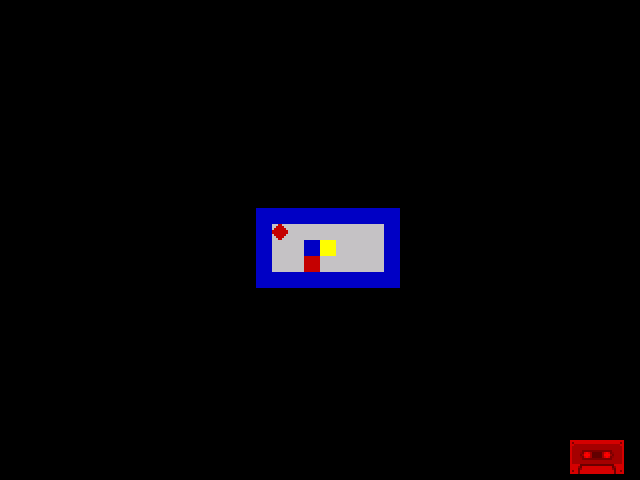
The room now has an internal wall — a blue pillar at row 12, column 15. Move the player around and try to walk through it. The diamond stops. Try walking into the outer walls. Same result. Every blue cell blocks movement, whether it’s an edge wall or a pillar in the middle.
Notice that the FLOOR_TOP, FLOOR_BOT, FLOOR_LEFT, and FLOOR_RIGHT constants from Unit 6 are gone. The boundary checks are gone. The attribute system handles everything.
Try This: Add More Walls
Build a maze inside the room. Add wall cells at specific positions:
            ld      a, WALL
            ld      ($596e), a      ; Row 11, col 14
            ld      ($5970), a      ; Row 11, col 16
            ld      ($59b0), a      ; Row 13, col 16
Each wall cell automatically blocks movement. No collision code changes needed — just place walls and the game adapts.
Try This: Breakable Walls
What if some walls could be destroyed? Use a different INK for breakable walls:
WEAK_WALL equ $1b ; PAPER 3 (magenta) + INK 3A magenta wall. The collision check only blocks INK 1 (blue), so INK 3 is passable — the player walks through it. To make it block movement but be destroyable, you’d check for both INK 1 and INK 3, then change the weak wall to floor on contact. That’s a future enhancement, but the attribute system makes it straightforward.
Try This: Walk Onto Treasure
Navigate the diamond onto the yellow treasure cell (row 12, column 16). It works — treasure has INK 0, not INK 1, so it’s passable. But when you leave, the treasure disappears. The erase step restores FLOOR regardless of what was there. Fixing this properly requires tracking the original cell contents — that comes in Unit 10 when treasure collection is implemented.
If It Doesn’t Work
- Player walks through walls? Check
AND $07is present. Without it, you’re comparing the full attribute byte, which won’t match WALL_INK (1) because the full wall byte is $09. - Player can’t move at all? Check the target address calculation. For “up,” the offset is −32 ($FFE0), not −1. For “left,” it’s −1, not −32.
- Pillar doesn’t block? Verify the pillar’s attribute is $09 (WALL). If it has a different INK, the collision check won’t catch it. Check the address: row 12, col 15 = $598F.
- Player stops one cell too early? The collision check reads the target cell, not the current cell. Make sure you add the offset before reading, not after.
- Diagonal movement through corners? If you hold Q and P simultaneously, the player moves up and then right in the same frame. It’s possible to slip past a corner where two walls meet diagonally. This is a known characteristic of checking directions independently.
What You’ve Learnt
- Attribute-based collision — read the attribute at the target position, check the INK colour. INK 1 = wall = blocked. Everything else is passable. One memory read replaces all boundary checks.
- AND $07 — extract the INK colour from an attribute byte. This ignores PAPER, BRIGHT, and FLASH, making the check work for any wall variant.
- WALL_INK constant — naming the collision colour makes the code self-documenting. Changing what “wall” means is a single constant change.
- Data-driven collision — adding walls to the room automatically adds collision. No code changes needed. The collision system reads the screen, and the screen defines the world.
- The attribute system as game engine — colour is collision. The same byte that controls how a cell looks also controls how it behaves. This is the Spectrum’s design philosophy in action.
What’s Next
The room is drawn by hand — every wall and floor cell placed individually. In Unit 8, you’ll define the room as a data table — a grid of bytes where each byte represents one cell. A loop reads the table and draws the room. Change the data, change the room. This is the foundation for multiple rooms and a real maze.