Character-Cell Movement
Connect the keyboard to the player character — erase, move, redraw — and use CP to stay inside the room.
Everything is in place. The room is drawn. The player character sits on the floor. The keyboard responds to QAOP. All that’s left is to connect them — press a key, the diamond moves.
Movement on the Spectrum works in character cells: 8 pixels at a time, snapping to the attribute grid. Each frame, the game erases the player, checks the keyboard, updates the position, and redraws. It happens 50 times per second — fast enough to feel instant.
The Erase-Move-Draw Cycle
Every frame follows the same three steps:
- Erase — clear the character’s pixels and restore the floor attribute
- Move — read the keyboard, check boundaries, update position
- Draw — write the character’s pixels and set the player attribute
            ; Erase player at current position
            ;
            ; Clear all 8 pixel rows in the bitmap, then
            ; restore the floor attribute.

            ld      hl, (player_scr)  ; Load bitmap address
            ld      b, 8
            ld      a, 0
.erase:     ld      (hl), a           ; Clear pixel row
            inc     h                 ; Next pixel row (+256)
            djnz    .erase

            ld      hl, (player_att)  ; Load attribute address
            ld      a, FLOOR
            ld      (hl), a           ; Restore floor colour

            ; ... (check keys, update position) ...

            ; Draw player at new position
            ;
            ; Write 8 bytes of character data to the bitmap,
            ; then set the player attribute.

            ld      hl, (player_scr)  ; Bitmap address (updated)
            ld      de, player_gfx    ; Character data
            ld      b, 8
.draw:      ld      a, (de)           ; Pattern byte
            ld      (hl), a           ; Write to screen
            inc     de
            inc     h
            djnz    .draw

            ld      hl, (player_att)  ; Attribute address (updated)
            ld      a, PLAYER
            ld      (hl), a           ; Set player colour
The erase loop writes 0 to all 8 pixel rows (clearing the bitmap) and restores the attribute to FLOOR. The draw loop is identical to Unit 5 — write 8 bytes of character data and set the player attribute.
Between erase and draw, the movement code updates the position. If no key is pressed, the player is redrawn in the same place. If a key is pressed, the addresses change and the player appears at the new position.
Why Erase First?
If you draw without erasing, the old character stays on screen — you get a trail of diamonds. Erasing first clears the old position, and drawing fills the new one. At 50 frames per second, the gap between erase and draw is invisible.
Storing Screen Addresses
In Unit 5, the screen addresses were constants. Now they need to change as the player moves. Two 16-bit variables track the current position:
player_scr: dw      START_SCR       ; Bitmap address
player_att: dw      START_ATT       ; Attribute address
DW (Define Word) stores a 16-bit value — two bytes in little-endian order. LD HL, (player_scr) loads that 16-bit value into HL, and LD (player_scr), HL stores HL back.
When the player moves right, both addresses increase by 1 (next column). When the player moves down, both increase by 32 (next row). Left is −1, up is −32. The attribute and bitmap grids have the same column-and-row layout, so the same offset works for both.
Movement with Boundary Checks
Each direction follows the same pattern: read the key, check the boundary, update the position.
            ; Move right — check boundary, then update position
            ;
            ; 1. Read the keyboard row containing P
            ; 2. If P not pressed, skip
            ; 3. Compare column against the right edge
            ; 4. If already at the edge, skip
            ; 5. Increment column and advance screen addresses by 1

            ld      a, KEY_ROW_PY     ; Row: P, O, I, U, Y
            in      a, ($fe)
            bit     0, a              ; P = bit 0
            jr      nz, .not_right    ; Not pressed — skip

            ; Boundary check
            ld      a, (player_col)
            cp      FLOOR_RIGHT       ; At rightmost floor column?
            jr      z, .not_right     ; Yes — can't move further

            ; Update column
            inc     a                 ; col + 1
            ld      (player_col), a

            ; Update screen addresses (+1 for next column)
            ld      hl, (player_scr)
            inc     hl
            ld      (player_scr), hl

            ld      hl, (player_att)
            inc     hl
            ld      (player_att), hl

.not_right:
CP FLOOR_RIGHT compares A (the current column) against the right edge of the floor. If they’re equal, the Zero flag is set and JR Z skips the movement — the player is already at the edge.
CP (ComPare) subtracts without storing the result. It only sets flags. JR Z jumps if the Zero flag is set (values were equal). Together, they form a guard: “if already at the limit, don’t move.”
The Four Directions
Each direction uses the same structure with different values:
| Key | Boundary Check | Position Update | Address Change |
|---|---|---|---|
| Q (up) | cp FLOOR_TOP | dec a (row − 1) | −32 |
| A (down) | cp FLOOR_BOT | inc a (row + 1) | +32 |
| O (left) | cp FLOOR_LEFT | dec a (col − 1) | −1 |
| P (right) | cp FLOOR_RIGHT | inc a (col + 1) | +1 |
For column changes, INC HL and DEC HL adjust the addresses by 1. For row changes, ADD HL, DE adds 32 (or $FFE0 for −32):
            ld      hl, (player_scr)
            ld      de, 32          ; One row down
            add     hl, de
            ld      (player_scr), hl
ADD HL, DE is a 16-bit addition — it adds DE to HL and stores the result in HL. For moving up, DE holds $FFE0 (65504), which is −32 in two’s complement. The addition wraps around correctly, subtracting 32 from the address.
Diagonal Movement
The code checks all four keys independently. If Q and P are both held, the player moves up and right in the same frame — diagonal movement. This happens naturally because each direction check updates the position separately. No special code needed.
The Complete Code
; ============================================================================
; SHADOWKEEP — Unit 6: Character-Cell Movement
; ============================================================================
; Move the player around the room using QAOP keys.
;
; Each frame:
;   1. Erase the player (clear bitmap, restore floor attribute)
;   2. Read keyboard and update position with boundary checks
;   3. Draw the player at the new position
;
; The player moves on an 8-pixel grid — one character cell per key press.
; Boundary checks prevent walking outside the floor area.
; (Wall collision via attribute reading comes in Unit 7.)
; ============================================================================

            org     32768

; Attribute values
WALL        equ     $09             ; PAPER 1 (blue) + INK 1
FLOOR       equ     $38             ; PAPER 7 (white) + INK 0
TREASURE    equ     $70             ; BRIGHT + PAPER 6 (yellow)
HAZARD      equ     $90             ; FLASH + PAPER 2 (red)
PLAYER      equ     $3a             ; PAPER 7 (white) + INK 2 (red)

; Room dimensions
ROOM_TOP    equ     10
ROOM_LEFT   equ     12
ROOM_WIDTH  equ     9
ROOM_INNER  equ     7

; Floor boundaries (where the player can walk)
FLOOR_TOP   equ     ROOM_TOP + 1    ; Row 11
FLOOR_BOT   equ     ROOM_TOP + 3    ; Row 13
FLOOR_LEFT  equ     ROOM_LEFT + 1   ; Col 13
FLOOR_RIGHT equ     ROOM_LEFT + ROOM_INNER ; Col 19

; Screen addresses for starting position (row 11, col 13)
; Bitmap:    $4800 + ((11-8) * 32) + 13 = $486D
; Attribute: $5800 + (11 * 32) + 13     = $596D
START_ROW   equ     11
START_COL   equ     13
START_SCR   equ     $486d
START_ATT   equ     $596d

; Keyboard rows
KEY_ROW_QT  equ     $fb             ; Q, W, E, R, T
KEY_ROW_AG  equ     $fd             ; A, S, D, F, G
KEY_ROW_PY  equ     $df             ; P, O, I, U, Y

; ----------------------------------------------------------------------------
; Entry point
; ----------------------------------------------------------------------------

start:
            ld      a, 0
            out     ($fe), a

            ; Clear screen
            ld      hl, $4000
            ld      de, $4001
            ld      bc, 6911
            ld      (hl), 0
            ldir

            ; ==================================================================
            ; Draw the room
            ; ==================================================================

            ; --- Top wall ---
            ld      hl, $594c       ; Row 10, col 12
            ld      b, ROOM_WIDTH
            ld      a, WALL
.top:       ld      (hl), a
            inc     hl
            djnz    .top

            ; --- Row 11: wall, floor, wall ---
            ld      hl, $596c
            ld      a, WALL
            ld      (hl), a
            inc     hl
            ld      a, FLOOR
            ld      b, ROOM_INNER
.r11:       ld      (hl), a
            inc     hl
            djnz    .r11
            ld      a, WALL
            ld      (hl), a

            ; --- Row 12: wall, floor, wall ---
            ld      hl, $598c
            ld      a, WALL
            ld      (hl), a
            inc     hl
            ld      a, FLOOR
            ld      b, ROOM_INNER
.r12:       ld      (hl), a
            inc     hl
            djnz    .r12
            ld      a, WALL
            ld      (hl), a

            ; --- Row 13: wall, floor, wall ---
            ld      hl, $59ac
            ld      a, WALL
            ld      (hl), a
            inc     hl
            ld      a, FLOOR
            ld      b, ROOM_INNER
.r13:       ld      (hl), a
            inc     hl
            djnz    .r13
            ld      a, WALL
            ld      (hl), a

            ; --- Bottom wall ---
            ld      hl, $59cc
            ld      b, ROOM_WIDTH
            ld      a, WALL
.bot:       ld      (hl), a
            inc     hl
            djnz    .bot

            ; --- Treasure and hazard ---
            ld      a, TREASURE
            ld      ($5990), a      ; Row 12, col 16
            ld      a, HAZARD
            ld      ($59af), a      ; Row 13, col 15

            ; ==================================================================
            ; Draw the player at starting position
            ; ==================================================================

            ld      hl, START_SCR
            ld      de, player_gfx
            ld      b, 8
.initdraw:  ld      a, (de)
            ld      (hl), a
            inc     de
            inc     h
            djnz    .initdraw

            ld      a, PLAYER
            ld      (START_ATT), a

            ; ==================================================================
            ; Main loop
            ; ==================================================================

.loop:      halt

            ; --- Erase player at current position ---
            ld      hl, (player_scr)
            ld      b, 8
            ld      a, 0
.erase:     ld      (hl), a
            inc     h
            djnz    .erase

            ld      hl, (player_att)
            ld      a, FLOOR
            ld      (hl), a

            ; --- Check Q (up) ---
            ld      a, KEY_ROW_QT
            in      a, ($fe)
            bit     0, a
            jr      nz, .not_q

            ld      a, (player_row)
            cp      FLOOR_TOP       ; Already at top edge?
            jr      z, .not_q

            dec     a               ; row - 1
            ld      (player_row), a

            ld      hl, (player_scr)
            ld      de, $ffe0       ; -32
            add     hl, de
            ld      (player_scr), hl

            ld      hl, (player_att)
            ld      de, $ffe0       ; -32
            add     hl, de
            ld      (player_att), hl

.not_q:
            ; --- Check A (down) ---
            ld      a, KEY_ROW_AG
            in      a, ($fe)
            bit     0, a
            jr      nz, .not_a

            ld      a, (player_row)
            cp      FLOOR_BOT       ; Already at bottom edge?
            jr      z, .not_a

            inc     a               ; row + 1
            ld      (player_row), a

            ld      hl, (player_scr)
            ld      de, 32
            add     hl, de
            ld      (player_scr), hl

            ld      hl, (player_att)
            ld      de, 32
            add     hl, de
            ld      (player_att), hl

.not_a:
            ; --- Check O (left) ---
            ld      a, KEY_ROW_PY
            in      a, ($fe)
            bit     1, a
            jr      nz, .not_o

            ld      a, (player_col)
            cp      FLOOR_LEFT      ; Already at left edge?
            jr      z, .not_o

            dec     a               ; col - 1
            ld      (player_col), a

            ld      hl, (player_scr)
            dec     hl
            ld      (player_scr), hl

            ld      hl, (player_att)
            dec     hl
            ld      (player_att), hl

.not_o:
            ; --- Check P (right) ---
            ld      a, KEY_ROW_PY
            in      a, ($fe)
            bit     0, a
            jr      nz, .not_p

            ld      a, (player_col)
            cp      FLOOR_RIGHT     ; Already at right edge?
            jr      z, .not_p

            inc     a               ; col + 1
            ld      (player_col), a

            ld      hl, (player_scr)
            inc     hl
            ld      (player_scr), hl

            ld      hl, (player_att)
            inc     hl
            ld      (player_att), hl

.not_p:
            ; --- Draw player at new position ---
            ld      hl, (player_scr)
            ld      de, player_gfx
            ld      b, 8
.draw:      ld      a, (de)
            ld      (hl), a
            inc     de
            inc     h
            djnz    .draw

            ld      hl, (player_att)
            ld      a, PLAYER
            ld      (hl), a

            jp      .loop

; ============================================================================
; Data
; ============================================================================

; Player character — diamond shape
player_gfx: db      $18, $3c, $7e, $ff
            db      $ff, $7e, $3c, $18

; Position tracking
player_row: db      START_ROW
player_col: db      START_COL

; Screen addresses (updated each frame)
player_scr: dw      START_SCR       ; Bitmap address
player_att: dw      START_ATT       ; Attribute address

            end     start
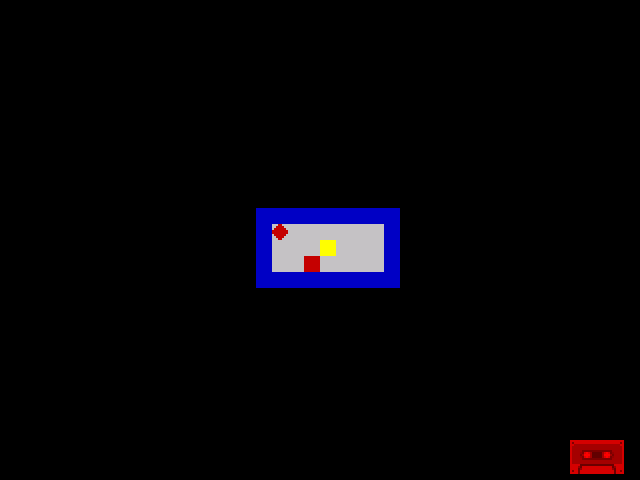
Run this and press QAOP. The diamond moves around the room, stopping at the edges. This is character-cell movement — each press moves exactly one cell (8 pixels). The boundary checks keep the player on the floor.
Note: the main loop uses JP .loop instead of JR .loop. The code has grown long enough that a relative jump can’t reach back to the start. JP is an absolute jump — it can reach any address. It takes one extra byte and a few more T-states, but works at any distance.
Try This: Move Over Treasure
Navigate the diamond onto the yellow treasure cell (row 12, column 16) and then move away. The treasure disappears — replaced by plain floor. That’s because the erase step always restores FLOOR, regardless of what was there before. In Unit 7, wall collision will prevent walking through walls. Later units will handle treasure and hazard interactions properly.
Try This: Speed Control
The player moves one cell per frame — 50 cells per second. That’s fast. To slow it down, add a counter:
            ; At the start of the main loop, before keyboard checks:
            ld      a, (move_timer)
            dec     a
            ld      (move_timer), a
            jr      nz, .draw       ; Skip keyboard until timer reaches 0
            ld      a, 5            ; Reset: move every 5 frames (10 cells/sec)
            ld      (move_timer), a
Add move_timer: db 1 to the data section. Now the player moves every 5th frame instead of every frame. Try different values — 3 feels responsive, 8 feels deliberate.
Try This: Wrap Around
Remove the boundary checks and let the player walk off the edge. What happens? The address keeps incrementing or decrementing. Moving right past column 31 wraps to column 0 of the next row. Moving down past row 23 wraps into attribute memory. The results are unpredictable but fascinating — this is what boundary checks prevent.
If It Doesn’t Work
- Player doesn’t move? Check the erase-draw cycle runs every frame. If the erase is missing, the old character stays and the new one overlaps.
- Player leaves a trail? The erase loop must write 0 to all 8 pixel rows using
INC H. If you useINC HLinstead, it clears bytes in the wrong addresses. - Player walks through the edge? Check the
CPvalue matches the boundary.FLOOR_RIGHTis 19, not 20 (column 20 is the right wall). - Player jumps to wrong position? Check
ADD HL, DEuses the right offset. Down is +32, up is −32 ($FFE0). Swapping them reverses vertical movement. - Assembler says “relative jump out of range”? Change
JR .looptoJP .loop. The code is too long for a relative jump (±127 bytes). JP has no range limit. - Attribute doesn’t restore? Make sure
LD HL, (player_att)loads the stored address, not a constant. The parentheses mean “load the value at this address”, not “load this number.”
What You’ve Learnt
- Erase-move-draw — the fundamental game loop pattern. Every frame: clear the old position, update state, draw the new position.
- DW — define a 16-bit word. Used for screen address variables that change during gameplay.
- LD HL, (addr) — load a 16-bit value from memory into HL. The reverse,
LD (addr), HL, stores HL back. - INC A / DEC A — increment or decrement the accumulator by 1. Used to update row and column positions.
- CP n — compare A with an immediate value. Sets the Zero flag if equal. Doesn’t change A.
- ADD HL, DE — 16-bit addition. Adds DE to HL. Used for ±32 row movement. Negative values work through two’s complement.
- JP vs JR — JP is an absolute jump (any distance). JR is relative (±127 bytes). Use JP when the code grows too large for JR.
- Boundary checking — compare the position against known limits before allowing movement. Simple but effective.
What’s Next
The boundary checks use hard-coded edge values — they know where the walls are because we defined them as constants. But what if the room changes shape? In Unit 7, the player will read the attribute at the target position before moving. If it’s a wall, the move is blocked. This is collision detection — and it works for any room layout, not just rectangles.