The Finished Game
Add a title screen, animated results with rating tiers, explosion effects, and final cleanup — the complete game.
Five bombs work. The countdown ticks, the fuse burns, the wires wait. But the game starts abruptly and ends silently. A finished game needs a title screen that sets the scene, a results screen that rewards the player, and explosion effects that sell the drama. This unit adds all three.
The Title Screen
   5 BORDER 0: PAPER 0: INK 7: CLS
  10 FOR i=0 TO 31
  12 PRINT AT 0,i; PAPER 2;" "
  14 NEXT i
  16 PRINT AT 0,8; PAPER 2; INK 7; BRIGHT 1;" BOMB DEFUSAL "
  20 PRINT AT 4,4; INK 5;"A bomb is ticking."
  22 PRINT AT 5,4; INK 5;"Cut the right wire before"
  24 PRINT AT 6,4; INK 5;"time runs out."
  26 PRINT AT 9,4; INK 7;"Press 1, 2, 3 or 4"
  28 PRINT AT 10,4; INK 7;"to cut a wire."
  30 PRINT AT 13,4; INK 2; BRIGHT 1;"5 bombs. Each one faster."
  32 PRINT AT 21,5; INK 7; FLASH 1;"Press any key to start"; FLASH 0
  34 PAUSE 0
Type RUN.
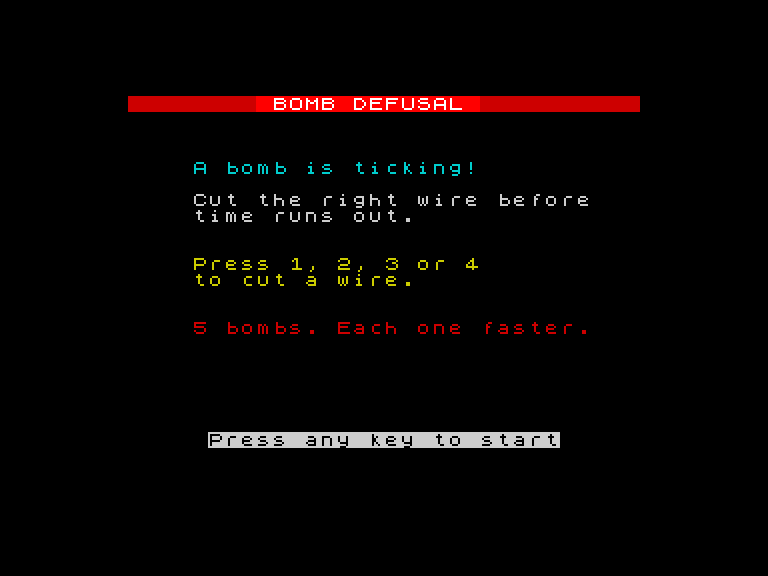
The red header bar returns. Below it, cyan text explains the game: “A bomb is ticking. Cut the right wire before time runs out.” White text tells the player the controls. A red warning — “5 bombs. Each one faster.” — sits below. A flashing prompt waits for a keypress.
The title screen uses everything from Unit 1: CLS, BORDER, PAPER, INK, PRINT AT. No new concepts — just layout. The colours are deliberate: cyan for calm instructions, white for controls, red for the warning. The FLASH 1 on line 32 makes the prompt blink, catching the player’s eye.
PAUSE 0 on line 34 waits forever. The game doesn’t start until the player is ready.
The Results Screen
After five bombs, the player sees their score:
 262 CLS
 264 FOR i=0 TO 31
 266 PRINT AT 0,i; PAPER 2;" "
 268 NEXT i
 270 PRINT AT 0,8; PAPER 2; INK 7; BRIGHT 1;" BOMB DEFUSAL "
 272 PRINT AT 4,11; INK 7; BRIGHT 1;"RESULTS"
 276 FOR i=0 TO sc
 278 PRINT AT 7,9; INK 5;"Defused: ";i;" of 5  "
 280 IF i<sc THEN BEEP 0.08,10+i*4
 282 NEXT i
 284 BEEP 0.2,24
 286 IF sc=5 THEN LET m$="Bomb expert!": INK 4: BRIGHT 1: GO TO 296
 288 IF sc>=3 THEN LET m$="Steady hands!": INK 6: BRIGHT 1: GO TO 296
 290 IF sc>=1 THEN LET m$="Needs practice!": INK 5: GO TO 296
 292 LET m$="Boom boom boom!": INK 2
 296 PRINT AT 10,(32-LEN m$)/2;m$
 298 BRIGHT 0
 300 PRINT AT 16,5; INK 7;"Press any key to exit"
 302 PAUSE 0
 304 BORDER 7: PAPER 7: INK 0: CLS
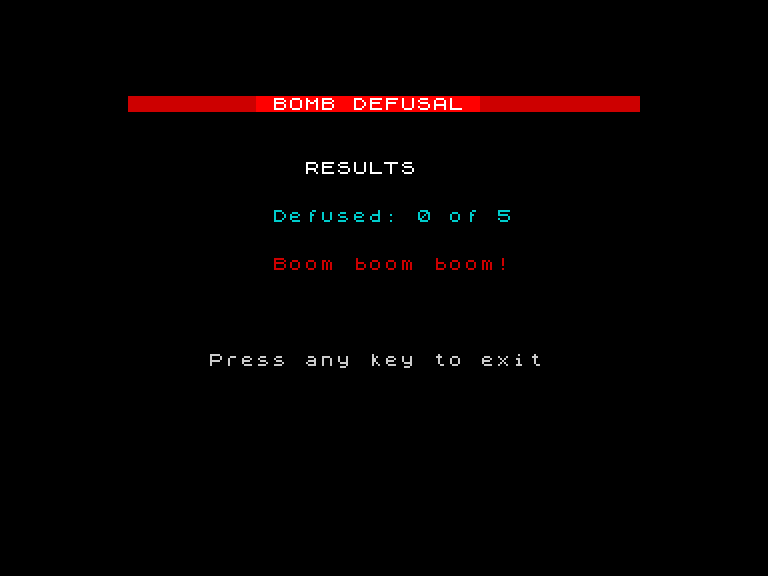
The results screen clears everything and redraws the header bar. “RESULTS” appears in bright white. Then the score counts up — 0, 1, 2, 3 — with a rising tone on each step. The count-up pauses at the final score and plays a confirmation tone.
The Animated Count-Up
Lines 276-282 are the count-up loop: FOR i=0 TO sc. Each pass prints “Defused: N of 5” with the current value of i, then plays a short beep. The number climbs from 0 to the player’s actual score. The final value stays on screen.
This is a small touch that makes the results feel earned. A static “You defused 3” is information. A counting “0… 1… 2… 3” is a moment. The rising pitch — 10+i*4 — adds to the sense of climbing.
Rating Tiers
Lines 286-292 check the score and assign a rating:
- 5 out of 5 — “Bomb expert!” in bright green
- 3 or 4 — “Steady hands!” in bright yellow
- 1 or 2 — “Needs practice!” in cyan
- 0 — “Boom boom boom!” in red
The IF/THEN chain runs top to bottom. Line 286 checks for a perfect score first. If true, it sets m$ and jumps to line 296 (which prints the rating centred on screen). If not, the next line checks, and so on. The last line (292) has no condition — it’s the default.
Line 296 centres the rating: PRINT AT 10,(32-LEN m$)/2;m$. The formula (32-LEN m$)/2 calculates the column that centres a string on a 32-column screen. LEN m$ is the length of the rating text. Subtract from 32, divide by 2, and you get the starting column.
The Explosion Strobe
In the full game, when a bomb explodes, the border strobes red and yellow with alternating beeps:
 156 FOR x=1 TO 8
 158 BORDER 2: BEEP 0.02,0
 160 BORDER 6: BEEP 0.02,5
 162 NEXT x
 164 BORDER 0
Eight rapid alternations. Red-yellow-red-yellow. Each with a quick beep — low on red, higher on yellow. The effect lasts about half a second. Then the border returns to black, a deep BEEP 0.5,-10 plays, and “BOOM!” appears in bright red.
It’s a FOR loop doing exactly what FOR loops do — repeating something a fixed number of times. The something just happens to be a border colour change with a sound effect.
The Complete Game
Here’s the full program — title screen, five bombs, results, and cleanup:
   1 REM Bomb Defusal v3
   5 BORDER 0: PAPER 0: INK 7: CLS
  10 REM === Title screen ===
  12 FOR i=0 TO 31
  14 PRINT AT 0,i; PAPER 2;" "
  16 NEXT i
  18 PRINT AT 0,8; PAPER 2; INK 7; BRIGHT 1;" BOMB DEFUSAL "
  20 PRINT AT 4,4; INK 5;"A bomb is ticking."
  22 PRINT AT 5,4; INK 5;"Cut the right wire before"
  24 PRINT AT 6,4; INK 5;"time runs out."
  26 PRINT AT 9,4; INK 7;"Press 1, 2, 3 or 4"
  28 PRINT AT 10,4; INK 7;"to cut a wire."
  30 PRINT AT 13,4; INK 2; BRIGHT 1;"5 bombs. Each one faster."
  32 PRINT AT 21,5; INK 7; FLASH 1;"Press any key to start"; FLASH 0
  34 PAUSE 0
  36 LET sc=0
  38 FOR b=1 TO 5
  40 REM === Set up bomb ===
  42 LET w=INT (RND*4)+1
  44 LET t=11-b*2
  46 IF t<3 THEN LET t=3
  48 CLS
  50 FOR i=0 TO 31
  52 PRINT AT 0,i; PAPER 2;" "
  54 NEXT i
  56 PRINT AT 0,1; PAPER 2; INK 7;"Bomb ";b;" of 5"
  58 PRINT AT 0,22; PAPER 2; INK 6;"Score: ";sc
  60 REM === Draw wires (2 rows each) ===
  62 FOR i=0 TO 1
  64 PRINT AT 13+i,5; PAPER 1;"            "
  66 PRINT AT 15+i,5; PAPER 2;"            "
  68 PRINT AT 17+i,5; PAPER 4;"            "
  70 PRINT AT 19+i,5; PAPER 6;"            "
  72 NEXT i
  74 PRINT AT 13,2; INK 1; BRIGHT 1;"1"
  76 PRINT AT 15,2; INK 2; BRIGHT 1;"2"
  78 PRINT AT 17,2; INK 4; BRIGHT 1;"3"
  80 PRINT AT 19,2; INK 6; BRIGHT 1;"4"
  82 REM === Fuse ===
  84 FOR i=0 TO 1
  86 PRINT AT 10+i,5; PAPER 6; INK 0;"                "
  88 NEXT i
  90 LET z$="x+x-"
  92 REM === Countdown ===
  94 FOR c=t TO 0 STEP -1
  96 REM === Big digit ===
  98 IF c>5 THEN LET pc=7
 100 IF c<=5 AND c>2 THEN LET pc=6
 102 IF c<=2 THEN LET pc=2
 104 LET dr=3: LET v=c: GO SUB 8200
 106 REM === Fuse shortens ===
 108 LET fl=INT (16*c/t)
 110 IF fl<1 THEN LET fl=1
 112 FOR i=0 TO 1
 114 PRINT AT 10+i,5; PAPER 0;"                "
 116 NEXT i
 118 FOR i=0 TO 1
 120 PRINT AT 10+i,5; PAPER 6; INK 0;
 122 FOR j=1 TO fl: PRINT " ";: NEXT j
 124 NEXT i
 126 LET si=(c-INT (c/4)*4)+1
 128 PRINT AT 10,5+fl; INK 2; BRIGHT 1;z$(si TO si)
 128 REM === Border colour ===
 130 IF c>5 THEN BORDER 0
 132 IF c<=5 AND c>2 THEN BORDER 6
 134 IF c<=2 THEN BORDER 2
 136 REM === Tick ===
 138 BEEP 0.06,5+((t-c)*3)
 140 REM === Check for keypress ===
 142 FOR f=1 TO 6
 144 LET k$=INKEY$
 146 IF k$="1" OR k$="2" OR k$="3" OR k$="4" THEN GO TO 180
 148 PAUSE 1
 150 NEXT f
 152 NEXT c
 154 REM === Time ran out ===
 156 FOR x=1 TO 8
 158 BORDER 2: BEEP 0.02,0
 160 BORDER 6: BEEP 0.02,5
 162 NEXT x
 164 BORDER 0
 166 LET pc=2: LET dr=3: LET v=0: GO SUB 8200
 168 PRINT AT 12,11; INK 2; BRIGHT 1;"BOOM!"
 170 BEEP 0.5,-10
 172 PAUSE 50
 174 GO TO 250
 180 REM === Wire cut ===
 182 LET g=VAL k$
 184 IF g=w THEN GO TO 220
 186 REM === Wrong wire ===
 188 FOR x=1 TO 8
 190 BORDER 2: BEEP 0.02,0
 192 BORDER 6: BEEP 0.02,5
 194 NEXT x
 196 BORDER 0
 198 LET y=11+g*2
 200 PRINT AT y,3; INK 2; BRIGHT 1;"X"
 202 PRINT AT y+1,3; INK 2; BRIGHT 1;"X"
 204 REM === Flash correct wire ===
 206 LET y=11+w*2
 208 PRINT AT y,3; INK 4; BRIGHT 1; FLASH 1;CHR$ 143
 210 PRINT AT y+1,3; INK 4; BRIGHT 1; FLASH 1;CHR$ 143
 212 PRINT AT 12,11; INK 2; BRIGHT 1;"BOOM!"
 214 BEEP 0.5,-10
 216 PAUSE 50
 218 GO TO 250
 220 REM === Defused! ===
 222 LET sc=sc+1
 224 BORDER 4
 226 LET y=11+g*2
 228 PRINT AT y,3; INK 4; BRIGHT 1;CHR$ 143
 230 PRINT AT y+1,3; INK 4; BRIGHT 1;CHR$ 143
 232 BEEP 0.1,12: BEEP 0.1,16: BEEP 0.2,19
 234 PRINT AT 12,10; INK 4; BRIGHT 1;"DEFUSED!"
 236 PAUSE 50
 238 BORDER 0
 250 REM === Next bomb ===
 252 NEXT b
 260 REM === Results ===
 262 CLS
 264 FOR i=0 TO 31
 266 PRINT AT 0,i; PAPER 2;" "
 268 NEXT i
 270 PRINT AT 0,8; PAPER 2; INK 7; BRIGHT 1;" BOMB DEFUSAL "
 272 PRINT AT 4,11; INK 7; BRIGHT 1;"RESULTS"
 274 REM === Animated score ===
 276 FOR i=0 TO sc
 278 PRINT AT 7,9; INK 5;"Defused: ";i;" of 5  "
 280 IF i<sc THEN BEEP 0.08,10+i*4
 282 NEXT i
 284 BEEP 0.2,24
 286 IF sc=5 THEN LET m$="Bomb expert!": INK 4: BRIGHT 1: GO TO 296
 288 IF sc>=3 THEN LET m$="Steady hands!": INK 6: BRIGHT 1: GO TO 296
 290 IF sc>=1 THEN LET m$="Needs practice!": INK 5: GO TO 296
 292 LET m$="Boom boom boom!": INK 2
 296 PRINT AT 10,(32-LEN m$)/2;m$
 298 BRIGHT 0
 300 PRINT AT 16,5; INK 7;"Press any key to exit"
 302 PAUSE 0
 304 BORDER 7: PAPER 7: INK 0: CLS
 306 STOP
5100 REM === Digit 0 ===
5101 DATA "1111"
5102 DATA "1..1"
5103 DATA "1..1"
5104 DATA "1..1"
5105 DATA "1111"
5110 REM === Digit 1 ===
5111 DATA ".11."
5112 DATA "..1."
5113 DATA "..1."
5114 DATA "..1."
5115 DATA ".11."
5120 REM === Digit 2 ===
5121 DATA "1111"
5122 DATA "...1"
5123 DATA "1111"
5124 DATA "1..."
5125 DATA "1111"
5130 REM === Digit 3 ===
5131 DATA "1111"
5132 DATA "...1"
5133 DATA ".111"
5134 DATA "...1"
5135 DATA "1111"
5140 REM === Digit 4 ===
5141 DATA "1..1"
5142 DATA "1..1"
5143 DATA "1111"
5144 DATA "...1"
5145 DATA "...1"
5150 REM === Digit 5 ===
5151 DATA "1111"
5152 DATA "1..."
5153 DATA "1111"
5154 DATA "...1"
5155 DATA "1111"
5160 REM === Digit 6 ===
5161 DATA "1111"
5162 DATA "1..."
5163 DATA "1111"
5164 DATA "1..1"
5165 DATA "1111"
5170 REM === Digit 7 ===
5171 DATA "1111"
5172 DATA "...1"
5173 DATA "..1."
5174 DATA ".1.."
5175 DATA ".1.."
5180 REM === Digit 8 ===
5181 DATA "1111"
5182 DATA "1..1"
5183 DATA "1111"
5184 DATA "1..1"
5185 DATA "1111"
5190 REM === Digit 9 ===
5191 DATA "1111"
5192 DATA "1..1"
5193 DATA "1111"
5194 DATA "...1"
5195 DATA "1111"
8000 REM === Draw digit f at dr,dc ===
8010 RESTORE 5100+f*10
8020 FOR r=0 TO 4
8030 READ a$
8040 FOR q=1 TO LEN a$
8050 IF a$(q TO q)="1" THEN PRINT AT dr+r,dc+q-1; PAPER pc;" "
8060 NEXT q
8070 NEXT r
8080 RETURN
8200 REM === Draw single digit centred ===
8210 FOR r=dr TO dr+4
8220 PRINT AT r,12;"        "
8230 NEXT r
8240 LET dc=14: LET f=v: GO SUB 8000
8250 RETURN
About 120 lines including the digit renderer and DATA. The structure is clear:
- Lines 5-34 — Title screen
- Lines 36-46 — Score init, bomb loop setup
- Lines 48-90 — Game screen, wires, fuse for each bomb
- Lines 92-152 — Countdown loop with digit, fuse, border, tick, input
- Lines 154-174 — Time ran out (explosion)
- Lines 180-218 — Wire cut (wrong wire or defused)
- Lines 250-252 — Next bomb
- Lines 260-306 — Results screen and cleanup
- Lines 5100-5195 — Digit DATA
- Lines 8000-8250 — Digit renderer subroutines
Line 304 restores the Spectrum to normal: BORDER 7: PAPER 7: INK 0: CLS. White border, white background, black text. The screen looks like a fresh Spectrum. Good manners — a game should clean up after itself.
Try This
- Change the rating tiers. Add a tier for exactly 4 defusals with its own message. The IF/THEN chain is easy to extend — insert a new line between 286 and 288.
- Change the count-up sound. Try
BEEP 0.04,20+i*2for a brighter, tighter ascending scale. OrBEEP 0.15,5+i*3for a slower, more dramatic reveal.
What You’ve Learnt
- Title screens — set the scene with instructions, controls, and a waiting prompt before the game starts
- Animated results — a FOR loop counting up with rising tones turns a score into a moment
- Rating tiers — IF/THEN chains check the score from best to worst, jumping past remaining checks
- Centring text —
(32-LEN m$)/2calculates the column that centres a string on screen - Explosion effects — rapid border colour changes with short BEEPs create visual and audio impact
- Cleanup — restoring BORDER, PAPER, INK, and CLS leaves the Spectrum in a clean state
What’s Next
In Game 3, FOR/NEXT takes centre stage. You’ll use it to play colour sequences, check player input, and build a memory game where the challenge grows with every correct answer.