The Colour Palette
Cycle PAPER through every colour and double the palette with BRIGHT — the Spectrum's 16 shades.
Colour Flood is built on colour. Four panels light up, each a different shade, and the player has to remember which flashed in what order. Before you can build those panels, you need to know what the Spectrum gives you to work with. This unit puts FOR/NEXT to visual use — cycling through every colour the machine can display.
Eight Colours
Type NEW, then:
  10 CLS
  20 FOR c=0 TO 7
  30 PAPER c
  40 PRINT "  Colour ";c;"  "
  50 NEXT c
  60 PAPER 0
Type RUN. Eight coloured bands stack down the screen, each labelled with its number — black (0) at the top, white (7) at the bottom. Every band uses PAPER c to set the background colour for that line.
The loop runs from 0 to 7 — all eight colours the Spectrum knows. Each has a number:
| Number | Colour |
|---|---|
| 0 | Black |
| 1 | Blue |
| 2 | Red |
| 3 | Magenta |
| 4 | Green |
| 5 | Cyan |
| 6 | Yellow |
| 7 | White |
Line 60 resets PAPER 0 after the loop so the rest of the screen stays black. Without it, everything printed after the loop would use whatever PAPER was set last (white).
BRIGHT Doubles the Palette
  10 CLS
  20 FOR c=1 TO 7
  30 PAPER c
  40 PRINT "  Normal ";c;"  "
  50 BRIGHT 1
  60 PRINT "  Bright ";c;"  "
  70 BRIGHT 0
  80 NEXT c
  90 PAPER 0
Type RUN.
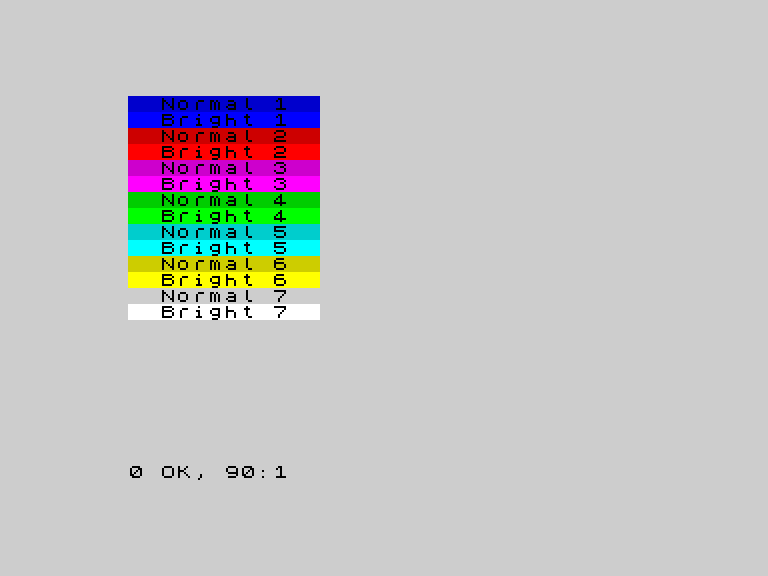
Fourteen bands now — each colour appears twice, once normal and once bright. BRIGHT 1 makes the colour more vivid. BRIGHT 0 returns to normal. Some colours change dramatically (green becomes lime, red becomes scarlet). Others shift only slightly (blue stays mostly blue).
Combined with the 8 base colours, BRIGHT gives you 16 distinct shades. The game uses this difference to show which panel is flashing — a panel lit BRIGHT stands out from its normal neighbours.
PAPER per Character
Every character cell on the Spectrum has its own PAPER colour. When you write PRINT AT r,c; PAPER 4;" ", only that one cell turns green. The rest of the screen stays unchanged. This is how Colour Flood draws four separate coloured panels on the same screen — each panel is a block of character cells with the same PAPER value.
Try This
- Change the loop in the first program to
FOR c=1 TO 7. Skip black — it is invisible on a black background. - Try
BRIGHT 1on its own without PAPER. It affects the current INK and PAPER colours, making both brighter.
What You’ve Learnt
- PAPER sets the background colour for printed characters (0-7)
- BRIGHT toggles between normal (0) and vivid (1) for any colour
- 16 shades — 8 colours times 2 brightness levels
- PAPER per cell — each character position has its own background colour