Four Panels
Draw four big coloured panels with FOR, PRINT AT, and PAPER — the game board takes shape.
The game needs four big coloured rectangles on screen — one blue, one red, one green, one yellow. Each panel is 7 columns wide and 8 rows tall, numbered 1 to 4 so the player knows which key to press. This unit builds the game board that every other unit builds on top of.
Drawing the Panels
Type NEW, then:
   5 BORDER 0: PAPER 0: INK 7: CLS
  10 FOR i=0 TO 31
  12 PRINT AT 0,i; PAPER 1;" "
  14 NEXT i
  16 PRINT AT 0,8; PAPER 1; INK 7; BRIGHT 1;" COLOUR FLOOD "
  20 FOR i=0 TO 7
  22 PRINT AT 3+i,1; PAPER 1;"       "
  24 PRINT AT 3+i,9; PAPER 2;"       "
  26 PRINT AT 3+i,17; PAPER 4;"       "
  28 PRINT AT 3+i,25; PAPER 6;"       "
  30 NEXT i
  32 PRINT AT 6,4; INK 7; BRIGHT 1;"1"
  34 PRINT AT 6,12; INK 7; BRIGHT 1;"2"
  36 PRINT AT 6,20; INK 7; BRIGHT 1;"3"
  38 PRINT AT 6,28; INK 7; BRIGHT 1;"4"
Type RUN.
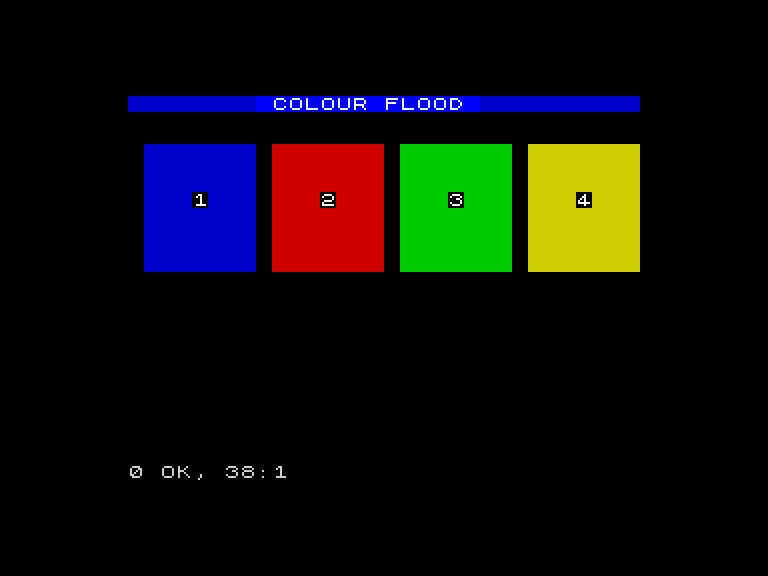
A blue header bar stretches across the top with “COLOUR FLOOD” in bright white. Below it, four coloured panels fill the screen — blue on the left, then red, green, and yellow. Each panel has its number printed in the centre: 1, 2, 3, 4.
How It Works
The header bar (lines 10-16) uses the same technique from Countdown — a FOR loop prints spaces with PAPER 1 across all 32 columns, then the title overwrites the middle section.
The four panels share a single FOR loop (lines 20-30). On each pass, i counts from 0 to 7 (eight rows). Inside the loop, four PRINT AT statements draw one row of each panel. PAPER 1 for blue, PAPER 2 for red, PAPER 4 for green, PAPER 6 for yellow. Seven spaces make each panel 7 characters wide.
The number labels (lines 32-38) print after the loop finishes. Each label sits at row 6 (roughly the vertical centre of the 8-row panel) and is positioned in the middle column of its panel. BRIGHT 1 makes the white numbers stand out against the coloured backgrounds.
Why These Four Colours?
Blue (1), red (2), green (4), and yellow (6) are the four most visually distinct colours on the Spectrum. They are easy to tell apart even on a fuzzy television. Magenta, cyan, and white are skipped — they are too close to other colours under real-world viewing conditions. Four colours also means four keys (1-4), which keeps the controls simple.
Try This
- Change
PAPER 4toPAPER 5(cyan instead of green). Does it still look distinct from the blue panel next to it? - Add a fifth row to each panel by changing
FOR i=0 TO 7toFOR i=0 TO 8. The panels grow taller.
What You’ve Learnt
- Block drawing — a FOR loop with PRINT AT and PAPER fills rectangular areas with colour
- Layout with coordinates — PRINT AT positions each panel at exact row and column
- Multiple panels in one loop — four PRINT AT statements inside one FOR loop draw all four panels simultaneously
- Colour choices matter — picking visually distinct colours makes the game playable