Results
Add a results screen with rating tiers, a title screen with colour legend, and finish the game.
The game works across five rounds with a running total. But it starts abruptly — the player is dropped onto a grid with no explanation — and ends silently after the fifth treasure. A proper game has a beginning and an end. This unit adds both: a title screen that explains the rules and shows the colour legend, and a results screen that rates the player’s performance.
The Title Screen
The title screen needs to do two things: explain how to play and show the colour code. The player should understand the game before they press a key.
Lines 20-180 build the instructions page. The colour legend (lines 100-150) is the key feature — it prints each temperature label in its matching ink colour: “Freezing” in black (barely visible against the dark background — which is the point), “Cold” in blue, “Cool” in magenta, “Warm” in red, “Hot” in yellow, “On fire!” in white. The player reads the legend, internalises the colour scale, and presses any key to start.
The INKEY$ loop on line 180 waits for that keypress.
The Results Screen
 120 REM === Results ===
 122 CLS
 124 FOR i=0 TO 31
 126 PRINT AT 0,i; PAPER 3;" "
 128 NEXT i
 130 PRINT AT 0,10; PAPER 3; INK 7; BRIGHT 1;" HOT AND COLD "
 132 PRINT AT 4,11; INK 7; BRIGHT 1;"RESULTS"
 134 PRINT AT 7,7; INK 5;"Total moves: ";tm
 136 IF tm<=40 THEN PRINT AT 10,8; INK 4; BRIGHT 1;"Treasure hunter!"
 138 IF tm>40 AND tm<=70 THEN PRINT AT 10,8; INK 6;"Good instincts!"
 140 IF tm>70 AND tm<=100 THEN PRINT AT 10,8; INK 5;"Getting warmer!"
 142 IF tm>100 THEN PRINT AT 10,8; INK 3;"Keep searching!"
 144 PRINT AT 14,6; INK 7;"Press any key to exit"
 146 IF INKEY$="" THEN GO TO 146
 148 BORDER 7: PAPER 7: INK 0: CLS
 150 PRINT "Thanks for playing!": STOP
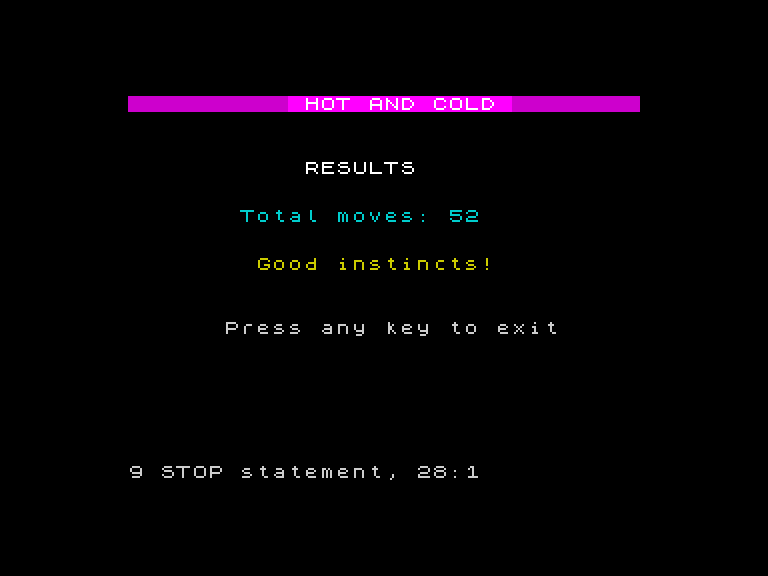
After five rounds, the game clears the screen and delivers the verdict. The total move count appears in white, followed by a coloured rating:
| Total moves | Rating | Colour |
|---|---|---|
| 40 or fewer | Treasure hunter! | Green (4) |
| 41-70 | Good instincts! | Yellow (6) |
| 71-100 | Getting warmer! | Cyan (5) |
| Over 100 | Keep searching! | Magenta (3) |
The rating uses the same chained IF pattern you’ve used throughout every game — separate statements checking non-overlapping ranges. The colour of the rating matches the mood: green for excellent, yellow for good, cyan for decent, magenta for “try again.”
Cleanup
Line 148 resets the border, paper, and ink to defaults before the final message. This is good manners — without it, the Spectrum would keep whatever colours the game was using, and the BASIC command prompt would be invisible against a black background with black ink. Always reset your colours when the program ends.
The Complete Program
Here’s the full game — title screen, five rounds, and results:
10 REM Hot and Cold
20 BORDER 7
30 PAPER 7
40 INK 0
50 CLS
60 PRINT AT 0, 10; "Hot and Cold"
70 PRINT AT 4, 2; "Find the hidden treasure!"
80 PRINT AT 6, 2; "Move with Q A O P"
90 PRINT AT 8, 2; "Watch the border colour:"
100 PRINT AT 10, 4; INK 0; "Black   = freezing"
110 PRINT AT 11, 4; INK 1; "Blue    = cold"
120 PRINT AT 12, 4; INK 3; "Magenta = cool"
130 PRINT AT 13, 4; INK 2; "Red     = warm"
140 PRINT AT 14, 4; INK 6; "Yellow  = hot"
150 PRINT AT 15, 4; INK 7; PAPER 0; " White   = on fire! "; PAPER 7
160 PRINT AT 18, 4; INK 0; "5 rounds, fewest moves wins"
170 PRINT AT 21, 6; "Press any key to start"
180 IF INKEY$ = "" THEN GO TO 180
190 LET s = 0
200 FOR g = 1 TO 5
210 CLS
220 PRINT AT 0, 0; "Round "; g; " of 5"
230 LET tr = INT (RND * 20) + 1
240 LET tc = INT (RND * 32)
250 LET r = 10
260 LET c = 15
270 LET m = 0
280 REM === game loop ===
290 BRIGHT 1
300 PRINT AT r, c; "+"
310 BRIGHT 0
320 LET d = ABS (r - tr) + ABS (c - tc)
330 IF d = 0 THEN GO TO 470
340 IF d <= 3 THEN BORDER 6
350 IF d > 3 AND d <= 7 THEN BORDER 2
360 IF d > 7 AND d <= 14 THEN BORDER 3
370 IF d > 14 AND d <= 24 THEN BORDER 1
380 IF d > 24 THEN BORDER 0
390 LET k$ = INKEY$
400 IF k$ = "" THEN GO TO 390
410 PRINT AT r, c; " "
420 IF k$ = "q" AND r > 1 THEN LET r = r - 1
430 IF k$ = "a" AND r < 21 THEN LET r = r + 1
440 IF k$ = "o" AND c > 0 THEN LET c = c - 1
450 IF k$ = "p" AND c < 31 THEN LET c = c + 1
460 LET m = m + 1
465 GO TO 290
470 REM === found it ===
480 BEEP 0.2, 12
490 BEEP 0.2, 16
500 BEEP 0.4, 19
510 PRINT AT r, c; "*"
520 BORDER 7
530 LET s = s + m
540 PRINT AT 23, 0; "Found in "; m; " moves!"
550 PAUSE 100
560 NEXT g
570 BORDER 7
580 PAPER 7
590 INK 0
600 CLS
610 PRINT AT 0, 10; "Hot and Cold"
620 PRINT
630 PRINT "Game over!"
640 PRINT
650 PRINT "Total moves: "; s
660 PRINT
670 IF s < 50 THEN PRINT "Amazing! You have a gift!"
680 IF s >= 50 AND s < 100 THEN PRINT "Well done!"
690 IF s >= 100 AND s < 200 THEN PRINT "Not bad, keep practising!"
700 IF s >= 200 THEN PRINT "The treasure was well hidden!"
The structure is clean:
- Title screen (lines 20-180) — instructions, colour legend, wait for key
- Round loop (lines 190-250) — five rounds with
FOR n = 1 TO 5 - Game loop (lines 30-80) — draw cursor, calculate distance, set border, read input, move
- Victory (lines 100-112) — ascending beeps, flashing star, show moves
- Results (lines 130-160) — total moves, rating tier, cleanup
That’s the complete arc of a game: teach the player, play the game, judge the result. About 80 lines of BASIC, and every one of them is yours. You built this from scratch — the cursor movement, the boundary checking, the distance calculation, the colour mapping, the multi-round structure, the scoring, and the bookends.
Play it. Find all five treasures. Then challenge someone to beat your total.
Try This
Difficulty levels. Add a menu after the title screen: Easy (wide distance bands), Normal (as is), Hard (narrow bands). Adjust the IF thresholds in the border colour section based on the player’s choice.
High score. Track the best total across multiple plays with LET hi = 999 at the start. After the results screen, IF tm < hi THEN LET hi = tm. Ask “Play again? (Y/N)” and loop back to line 190 if they say yes.
Add a timer. The Spectrum has a built-in frame counter: LET t = PEEK 23672 + 256 * PEEK 23673 reads it. Capture the value at the start and end of each round, divide the difference by 50 for seconds. Show the elapsed time alongside the move count.
What You’ve Learnt
- Title screens — instructions, colour legend, and
INKEY$to wait for a key - Results screens — display the final score with rating tiers
- Rating tiers — chained IF statements mapping a score to coloured messages
- Program structure — title, round loop, game loop, victory, results, cleanup
- Cleanup — always reset colours when the program ends
What’s Next
You’ve built four games — and this one taught you the most important pattern in game programming: the game loop. Read input, update state, draw, repeat. Every game from here on follows that shape. You also learnt to track a position with variables, check boundaries, calculate distance, and map numbers to colours. In Game 5, you’ll push strings further — slicing, joining, and shuffling letters to build a word puzzle.