Words in Variables
Store text in string variables, compare them, and build the game screen for Word Scramble.
Over the next eight units you’ll build Word Scramble — a game where jumbled letters appear on blue tiles and you type the correct word. But first, the Spectrum needs to learn how to hold text.
String Variables
Numbers go in variables like n and sc. Text goes in string variables — their names end with a dollar sign: w$, g$, name$.
  10 LET w$="cat"
  20 PRINT "The word is: ";w$
  30 LET g$="dog"
  40 PRINT "Your guess: ";g$
  50 IF g$=w$ THEN PRINT "Match!"
  60 IF g$<>w$ THEN PRINT "No match"
LET w$ = "cat" stores the word “cat” in w$. The quotes mark where the string starts and ends — they aren’t part of the value. You can print strings, store them, and compare them just like numbers.
Comparing Strings
  10 LET w$="cat"
  20 INPUT "Your guess? ";g$
  30 IF g$=w$ THEN PRINT "Correct!": STOP
  40 PRINT "Wrong! It was ";w$
IF g$ = w$ compares two strings character by character. They must match exactly — “cat” is not equal to “Cat” because the Spectrum treats uppercase and lowercase as different characters.
INPUT works with strings just as it does with numbers. The player types text and presses ENTER.
The Game Screen
Everything so far prints from the top down, one line after another. Word Scramble needs a proper screen: a coloured header bar, a prompt, and the word in a specific position.
   5 BORDER 0: PAPER 0: INK 7: CLS
  10 FOR i=0 TO 31
  12 PRINT AT 0,i; PAPER 2;" "
  14 NEXT i
  16 PRINT AT 0,8; PAPER 2; INK 7; BRIGHT 1;" WORD SCRAMBLE "
  20 PRINT AT 4,10; INK 5;"Unscramble:"
  30 LET w$="cat"
  40 PRINT AT 8,14; INK 6; BRIGHT 1;w$
  50 INPUT "Your guess? ";g$
  60 IF g$=w$ THEN PRINT AT 12,12; INK 4; BRIGHT 1;"Correct!": STOP
  70 PRINT AT 12,13; INK 2; BRIGHT 1;"Wrong!"
  80 PRINT AT 14,8; INK 7;"The word was: ";w$
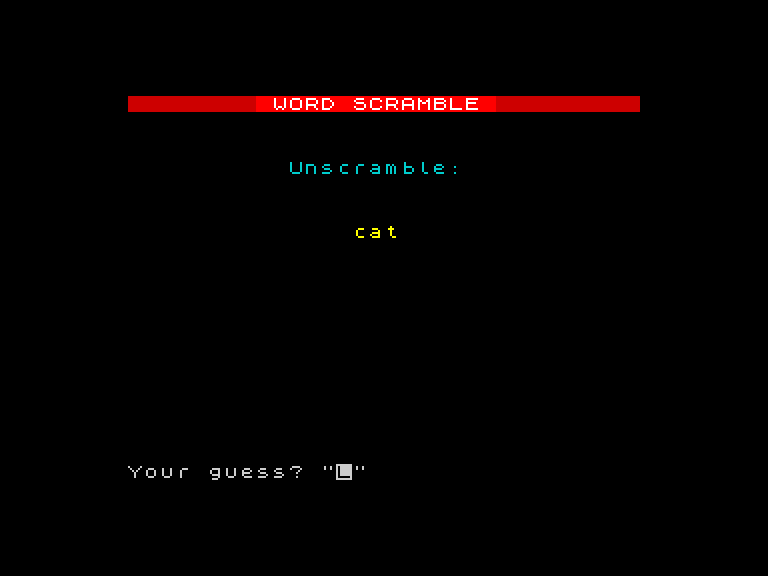
The red header bar stretches across row 0, built by a FOR loop printing coloured spaces — the same technique from earlier games. Below it, “Unscramble:” in cyan and the word “cat” in bright yellow. The INPUT prompt waits at the bottom. It looks like a game from the first run.
Try This
Change the word. Replace “cat” on line 30 with any word you like. Run it again and try to guess your own word. It sounds easy, but it proves the comparison works.
Wrong message. Add a line after 70 that shows the correct answer: 80 PRINT AT 14, 8; INK 7; "The word was: "; w$. The player should always know what they missed.
What You’ve Learnt
- String variables — names ending in
$hold text:LET w$ = "cat" - String comparison —
=checks for an exact match,<>checks for a mismatch - INPUT with strings —
INPUT "prompt"; g$reads text from the player - Game screen layout — header bar, positioned text, and colour create a game feel from unit 1