Guess and Check
Add INPUT, compare the guess, and give colour-coded feedback with tile colour changes and border flash.
The scrambled word appears on tiles. Now the player needs to guess — and the game needs to react. A correct guess should feel like a victory. A wrong guess should reveal the answer so the player learns the word.
INPUT for Strings
  10 LET w$="trumpet"
  20 INPUT "Your guess? ";g$
  30 IF g$=w$ THEN PRINT "Correct!": STOP
  40 PRINT "Wrong! It was ";w$
INPUT "Your guess? "; g$ works like numeric INPUT but stores text. The player types their answer and presses ENTER. The comparison IF g$ = w$ checks every character — “trumpet” matches “trumpet” but not “Trumpet” or “trumpe”.
Two Paths
The game needs to do completely different things depending on the answer. Correct and wrong shouldn’t just print different text — they should look and sound completely different.
   5 BORDER 0: PAPER 0: INK 7: CLS
  10 FOR i=0 TO 31
  12 PRINT AT 0,i; PAPER 2;" "
  14 NEXT i
  16 PRINT AT 0,8; PAPER 2; INK 7; BRIGHT 1;" WORD SCRAMBLE "
  20 PRINT AT 4,10; INK 5;"Unscramble:"
  30 LET w$="trumpet"
  32 LET t$=w$
  34 LET s$=""
  36 IF LEN t$=0 THEN GO TO 44
  38 LET p=INT (RND*LEN t$)+1
  40 LET s$=s$+t$(p TO p)
  42 LET t$=t$(1 TO p-1)+t$(p+1 TO LEN t$)
  43 GO TO 36
  44 IF s$=w$ THEN GO TO 32
  50 LET c=(32-LEN s$*2)/2
  52 FOR i=1 TO LEN s$
  54 PRINT AT 8,c+i*2-2; PAPER 1;" "
  56 PRINT AT 9,c+i*2-2; PAPER 1;" "
  58 NEXT i
  60 FOR i=1 TO LEN s$
  62 PRINT AT 8,c+i*2-2; PAPER 1; INK 6; BRIGHT 1;s$(i TO i)
  64 BEEP 0.05,5+i*2
  66 NEXT i
  70 INPUT "Your guess? ";g$
  72 IF g$=w$ THEN GO TO 100
  74 REM === Wrong ===
  76 BORDER 2
  78 LET m$="Wrong!"
  80 PRINT AT 12,(32-LEN m$)/2; INK 2; BRIGHT 1;m$
  82 BEEP 0.3,-5
  84 BORDER 0
  86 PAUSE 15
  88 FOR i=1 TO LEN w$
  90 PRINT AT 8,c+i*2-2; PAPER 1; INK 2; BRIGHT 1;w$(i TO i)
  92 BEEP 0.08,i*2
  94 NEXT i
  96 STOP
 100 REM === Correct ===
 102 BORDER 4
 104 LET m$="Correct!"
 106 PRINT AT 12,(32-LEN m$)/2; INK 4; BRIGHT 1;m$
 108 FOR i=1 TO LEN w$
 110 PRINT AT 8,c+i*2-2; PAPER 4; INK 7; BRIGHT 1;w$(i TO i)
 112 BEEP 0.06,10+i*2
 114 NEXT i
 116 BEEP 0.1,24
 118 BORDER 0
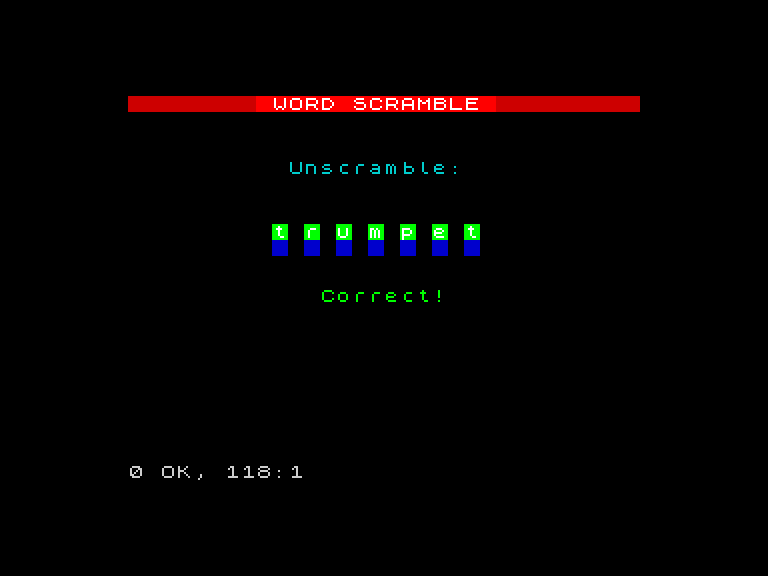
When correct (lines 100-118):
- The score increments
- The border flashes green (
BORDER 4) - “Correct!” appears centred in bright green
- The tiles change from blue to green (
PAPER 4) as each letter of the answer is revealed with an ascending jingle - A final high note (
BEEP 0.1, 24) punctuates the win
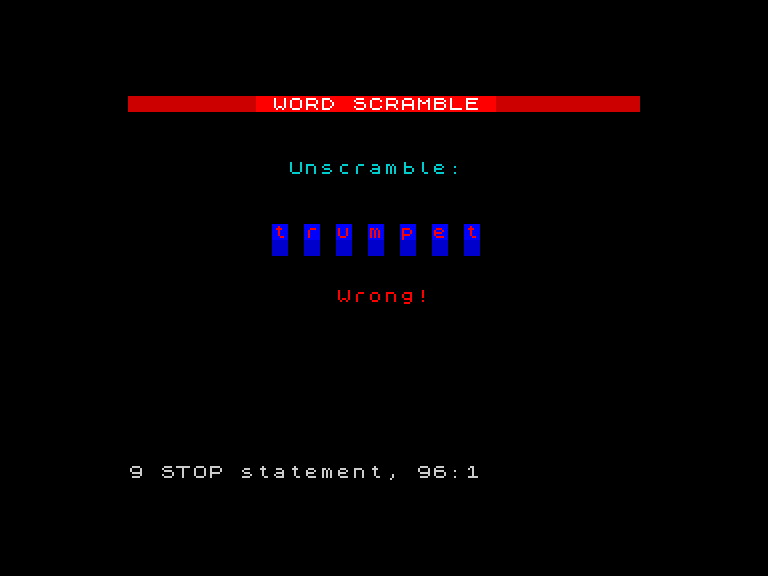
When wrong (lines 74-94):
- The border flashes red (
BORDER 2) - “Wrong!” appears centred in bright red
- A low buzz sounds (
BEEP 0.3, -5) - The correct answer is revealed on the tiles letter by letter in bright red, with ascending pitch — so the player sees what they missed
The GO TO on line 72 skips the wrong path when the answer is correct. This is the same branching pattern used in every game so far.
Centring Messages
Both “Correct!” and “Wrong!” are centred using the same formula: (32 - LEN m$) / 2. The message is stored in m$ first, then its length determines the column. This works for any message without counting characters by hand.
Try This
Different victory sound. Replace the three-note jingle with your own melody. Try BEEP 0.1, 0: BEEP 0.1, 4: BEEP 0.1, 7: BEEP 0.2, 12 for a major chord arpeggio.
Show the guess. After a wrong answer, print the player’s guess alongside the correct word so they can compare: PRINT AT 14, 4; "You said: "; g$.
What You’ve Learnt
- INPUT for strings —
INPUT "prompt"; g$reads text from the player - Branching paths —
GO TOsends correct and wrong answers down different routes - Border as feedback —
BORDER 4(green) andBORDER 2(red) create instant colour cues - Tile colour changes —
PAPER 4turns tiles green, showing the answer in place - Centring formula —
(32 - LEN m$) / 2works for any message