The Finished Game
Add a title screen with instructions, a results screen with animated score and ratings, and finish the game.
The game plays through ten rounds with colour-coded feedback. But it starts abruptly and ends with a bare score. A proper game has a beginning and an end — a title screen that sets expectations, and a results screen that delivers a verdict.
The Title Screen
   5 BORDER 0: PAPER 0: INK 7: CLS
  10 FOR i=0 TO 31
  12 PRINT AT 0,i; PAPER 2;" "
  14 NEXT i
  16 PRINT AT 0,8; PAPER 2; INK 7; BRIGHT 1;" WORD SCRAMBLE "
  20 PRINT AT 4,4; INK 5;"Unscramble the letters to"
  22 PRINT AT 5,4; INK 5;"find the hidden word!"
  24 PRINT AT 8,4; INK 6;"10 rounds. Words get longer."
  26 PRINT AT 10,4; INK 7;"Type your answer and press"
  28 PRINT AT 11,4; INK 7;"ENTER to guess."
  30 PRINT AT 15,4; INK 3;"Short words are easy..."
  32 PRINT AT 16,4; INK 2;"Long words are not."
  34 PRINT AT 21,6; INK 7; FLASH 1;"Press any key to start"; FLASH 0
  36 PAUSE 0
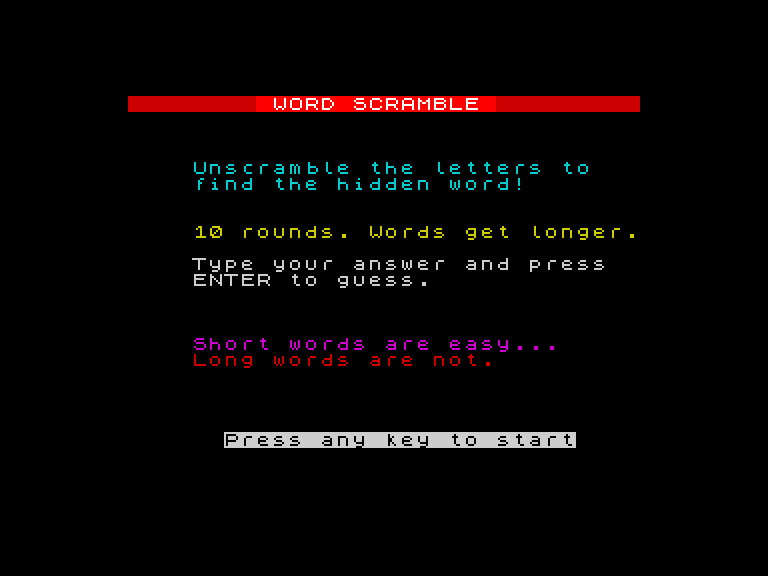
The title screen uses colour to communicate before the player reads a word. Cyan explains the game. Yellow states the format. White gives the controls. Then a colour gradient — magenta “Short words are easy…” followed by red “Long words are not.” — hints at the difficulty curve.
FLASH 1 makes “Press any key to start” blink, drawing the eye. PAUSE 0 waits for any key press — simpler than an INKEY$ loop and does the same job.
The Results Screen
 182 CLS
 184 FOR i=0 TO 31
 186 PRINT AT 0,i; PAPER 2;" "
 188 NEXT i
 190 PRINT AT 0,8; PAPER 2; INK 7; BRIGHT 1;" WORD SCRAMBLE "
 192 PRINT AT 5,11; INK 7; BRIGHT 1;"GAME OVER"
 196 FOR i=0 TO sc
 198 PRINT AT 8,10; INK 5;"Score: ";i;" out of 10  "
 200 IF i<sc THEN BEEP 0.06,10+i*2
 202 NEXT i
 204 BEEP 0.2,24
 206 IF sc=10 THEN LET m$="Perfect!": INK 4: BRIGHT 1: GO TO 216
 208 IF sc>=7 THEN LET m$="Word wizard!": INK 6: BRIGHT 1: GO TO 216
 210 IF sc>=4 THEN LET m$="Not bad!": INK 5: GO TO 216
 212 LET m$="Keep practising!": INK 3
 216 PRINT AT 11,(32-LEN m$)/2;m$
 218 BRIGHT 0
 220 PRINT AT 15,5; INK 7;"Press any key to exit"
 222 PAUSE 0
 224 BORDER 7: PAPER 7: INK 0: CLS
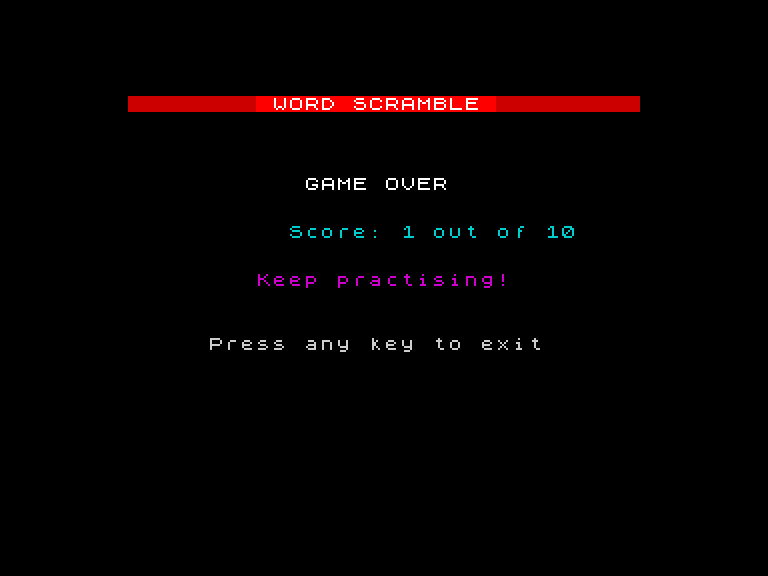
The animated score count-up (lines 196-202) ticks from 0 to the final score, each number accompanied by a rising tone. With a high score, the counting builds anticipation. With a low score, it’s mercifully quick.
Four rating tiers give the player something to aim for:
| Score | Message | Colour |
|---|---|---|
| 10 | Perfect! | Green (4) |
| 7-9 | Word wizard! | Yellow (6) |
| 4-6 | Not bad! | Cyan (5) |
| 0-3 | Keep practising! | Magenta (3) |
Line 224 resets colours to defaults before exiting. Without this, the Spectrum’s command prompt would be invisible against the black background.
Accepting Uppercase
Lines 101-102 convert the player’s guess to lowercase before comparing. CODE gives the character’s number (65 for “A”, 97 for “a”). If the character is uppercase (65-90), adding 32 shifts it to lowercase. CHR$ converts the number back to a character. This means typing “CAT”, “Cat”, or “cat” all match — the player doesn’t need to worry about case.
The Complete Program
   1 REM Word Scramble
   5 BORDER 0: PAPER 0: INK 7: CLS
  10 REM === Title screen ===
  12 FOR i=0 TO 31
  14 PRINT AT 0,i; PAPER 2;" "
  16 NEXT i
  18 PRINT AT 0,8; PAPER 2; INK 7; BRIGHT 1;" WORD SCRAMBLE "
  20 PRINT AT 4,4; INK 5;"Unscramble the letters to"
  22 PRINT AT 5,4; INK 5;"find the hidden word!"
  24 PRINT AT 8,4; INK 6;"10 rounds. Words get longer."
  26 PRINT AT 10,4; INK 7;"Type your answer and press"
  28 PRINT AT 11,4; INK 7;"ENTER to guess."
  30 PRINT AT 15,4; INK 3;"Short words are easy..."
  32 PRINT AT 16,4; INK 2;"Long words are not."
  34 PRINT AT 21,6; INK 7; FLASH 1;"Press any key to start"; FLASH 0
  36 PAUSE 0
  38 LET sc=0
  40 FOR n=1 TO 10
  42 READ w$
  44 REM === Scramble ===
  46 LET t$=w$
  48 LET s$=""
  50 IF LEN t$=0 THEN GO TO 58
  52 LET p=INT (RND*LEN t$)+1
  54 LET s$=s$+t$(p TO p)
  56 LET t$=t$(1 TO p-1)+t$(p+1 TO LEN t$)
  57 GO TO 50
  58 IF s$=w$ THEN GO TO 46
  60 REM === Display round ===
  62 CLS
  64 FOR i=0 TO 31
  66 PRINT AT 0,i; PAPER 2;" "
  68 NEXT i
  70 PRINT AT 0,1; PAPER 2; INK 7;"Round ";n
  72 PRINT AT 0,22; PAPER 2; INK 6;"Score: ";sc
  74 PRINT AT 4,10; INK 5;"Unscramble:"
  76 REM === Draw letter tiles ===
  78 LET c=(32-LEN s$*2)/2
  80 FOR i=1 TO LEN s$
  82 PRINT AT 8,c+i*2-2; PAPER 1;" "
  84 PRINT AT 9,c+i*2-2; PAPER 1;" "
  86 NEXT i
  88 REM === Animated letter reveal ===
  90 FOR i=1 TO LEN s$
  92 PRINT AT 8,c+i*2-2; PAPER 1; INK 6; BRIGHT 1;s$(i TO i)
  94 BEEP 0.05,5+i*2
  96 NEXT i
 100 INPUT "Your guess? ";g$
 101 LET l$="": FOR j=1 TO LEN g$: LET v=CODE g$(j TO j): IF v>=65 AND v<=90 THEN LET v=v+32
 102 LET l$=l$+CHR$ v: NEXT j: LET g$=l$
 103 IF g$=w$ THEN GO TO 140
 104 REM === Wrong ===
 106 BORDER 2
 108 LET m$="Wrong!"
 110 PRINT AT 12,(32-LEN m$)/2; INK 2; BRIGHT 1;m$
 112 BEEP 0.3,-5
 114 BORDER 0
 116 PAUSE 15
 118 REM === Reveal correct answer ===
 120 FOR i=1 TO LEN w$
 122 PRINT AT 8,c+i*2-2; PAPER 1; INK 2; BRIGHT 1;w$(i TO i)
 124 BEEP 0.08,i*2
 126 NEXT i
 128 PAUSE 60
 130 GO TO 170
 140 REM === Correct ===
 142 LET sc=sc+1
 144 BORDER 4
 146 LET m$="Correct!"
 148 PRINT AT 12,(32-LEN m$)/2; INK 4; BRIGHT 1;m$
 150 REM === Victory reveal ===
 152 FOR i=1 TO LEN w$
 154 PRINT AT 8,c+i*2-2; PAPER 4; INK 7; BRIGHT 1;w$(i TO i)
 156 BEEP 0.06,10+i*2
 158 NEXT i
 160 BEEP 0.1,24
 162 PAUSE 40
 164 BORDER 0
 170 REM === Next round ===
 172 NEXT n
 180 REM === Results ===
 182 CLS
 184 FOR i=0 TO 31
 186 PRINT AT 0,i; PAPER 2;" "
 188 NEXT i
 190 PRINT AT 0,8; PAPER 2; INK 7; BRIGHT 1;" WORD SCRAMBLE "
 192 PRINT AT 5,11; INK 7; BRIGHT 1;"GAME OVER"
 194 REM === Animated score reveal ===
 196 FOR i=0 TO sc
 198 PRINT AT 8,10; INK 5;"Score: ";i;" out of 10  "
 200 IF i<sc THEN BEEP 0.06,10+i*2
 202 NEXT i
 204 BEEP 0.2,24
 206 IF sc=10 THEN LET m$="Perfect!": INK 4: BRIGHT 1: GO TO 216
 208 IF sc>=7 THEN LET m$="Word wizard!": INK 6: BRIGHT 1: GO TO 216
 210 IF sc>=4 THEN LET m$="Not bad!": INK 5: GO TO 216
 212 LET m$="Keep practising!": INK 3
 216 PRINT AT 11,(32-LEN m$)/2;m$
 218 BRIGHT 0
 220 PRINT AT 15,5; INK 7;"Press any key to exit"
 222 PAUSE 0
 224 BORDER 7: PAPER 7: INK 0: CLS
 226 PRINT "Thanks for playing!"
 228 STOP
 900 DATA "cat","sun","bird","fish","lemon"
 910 DATA "planet","castle","trumpet","dinosaur","adventure"
The structure is clean:
- Title screen (lines 5-36) — instructions, colour hints, wait for key
- Round loop (lines 40-172) — ten rounds of read, scramble, display, guess, check
- Wrong path (lines 104-130) — red border flash, centred message, answer revealed in red
- Correct path (lines 140-164) — green border, green tiles, ascending jingle
- Results (lines 180-228) — animated count-up, colour-coded rating, cleanup
That’s the complete arc of a game: teach the player, play the game, judge the result. About 80 lines of BASIC, and every one is yours. You built it from a single string variable in unit 1 — through slicing, concatenation, the scramble algorithm, DATA, and visual feedback — to a polished game with blue tiles, animated reveals, and green victory celebrations.
Play it. Beat all ten words. Then open line 900, change the words, and challenge someone else.
Try This
Play again. After the results screen, add INPUT "Play again? (y/n) "; a$. If a$ = "y", use RESTORE to reset the DATA pointer and GO TO 38 to restart. RESTORE is a preview — you’ll use it properly in Game 6.
Difficulty levels. Add a menu before the game starts: Easy (5 rounds, short words only) or Hard (10 rounds, all words). Use a variable to control the FOR loop limit.
High score. Track the best score with LET hi = 0 at the very start. After the results screen, IF sc > hi THEN LET hi = sc. Show the high score on the title screen.
What You’ve Learnt
- Title screens — colour, FLASH, and PAUSE 0 create a polished opening
- Animated score — a FOR loop counting up with BEEP builds anticipation
- Rating tiers — chained IF statements map scores to coloured messages
- Program structure — title, game loop, results, cleanup
- Cleanup — always reset colours when the program ends
What’s Next
You’ve built a complete word game. You can slice, join, and rearrange strings, store content in DATA, and give the player colour-coded feedback with animated reveals. In Game 6, you’ll use GO SUB and RESTORE to build a quiz with structured screens and reusable drawing routines.