The Finished Quiz
Add a title screen, results with animated score and ratings, RESTORE for replay, and finish the game.
The quiz plays eight questions with categories, colour feedback, and scored arrays. Now give it a proper beginning and end — a title screen that previews the categories, and a results screen that delivers the verdict.
The Title Screen
   5 BORDER 0: PAPER 0: INK 7: CLS
  10 FOR i=0 TO 31
  12 PRINT AT 0,i; PAPER 2;" "
  14 NEXT i
  16 PRINT AT 0,9; PAPER 2; INK 7; BRIGHT 1;" QUIZ MASTER "
  20 PRINT AT 4,3; INK 5;"Answer questions from four"
  22 PRINT AT 5,3; INK 5;"categories."
  24 PRINT AT 7,3; INK 7;"Press A, B, C or D to answer."
  26 PRINT AT 10,6; INK 6;"Science"
  28 PRINT AT 10,18; INK 3;"History"
  30 PRINT AT 12,6; INK 4;"Geography"
  32 PRINT AT 12,18; INK 5;"Entertainment"
  34 PRINT AT 16,3; INK 7;"8 questions. How many can"
  35 PRINT AT 17,3; INK 7;"you get right?"
  36 PRINT AT 21,5; INK 7; FLASH 1;"Press any key to start"; FLASH 0
  38 PAUSE 0
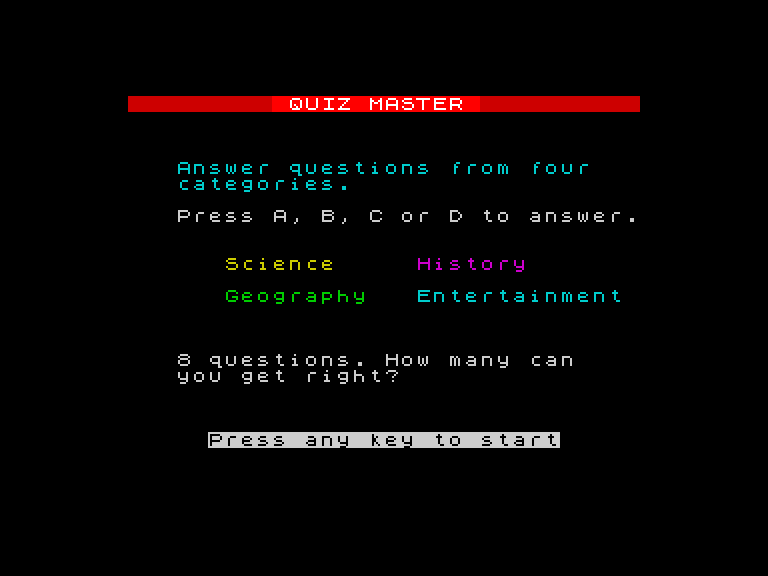
The four categories appear in a 2x2 grid, each in its own colour — yellow Science, magenta History, green Geography, cyan Entertainment. The player knows what to expect before the first question. Instructions explain the controls. PAUSE 0 waits for any key.
The Results Screen
 152 CLS
 154 FOR i=0 TO 31
 156 PRINT AT 0,i; PAPER 2;" "
 158 NEXT i
 160 PRINT AT 0,9; PAPER 2; INK 7; BRIGHT 1;" QUIZ MASTER "
 162 PRINT AT 3,11; INK 7; BRIGHT 1;"RESULTS"
 166 FOR i=0 TO sc
 168 PRINT AT 5,10; INK 5;"Score: ";i;" out of 8  "
 170 IF i<sc THEN BEEP 0.06,10+i*2
 172 NEXT i
 174 BEEP 0.2,24
 178 PRINT AT 8,6; INK 6;"Science:        ";s(1)
 180 PRINT AT 9,6; INK 3;"History:        ";s(2)
 182 PRINT AT 10,6; INK 4;"Geography:      ";s(3)
 184 PRINT AT 11,6; INK 5;"Entertainment:  ";s(4)
 188 IF sc=8 THEN LET m$="Genius!": INK 4: BRIGHT 1: GO TO 198
 190 IF sc>=6 THEN LET m$="Well done!": INK 6: BRIGHT 1: GO TO 198
 192 IF sc>=4 THEN LET m$="Not bad!": INK 5: GO TO 198
 194 LET m$="Keep studying!": INK 3
 198 PRINT AT 14,(32-LEN m$)/2;m$
 200 BRIGHT 0
 202 PRINT AT 18,5; INK 7;"Press any key to exit"
 204 PAUSE 0
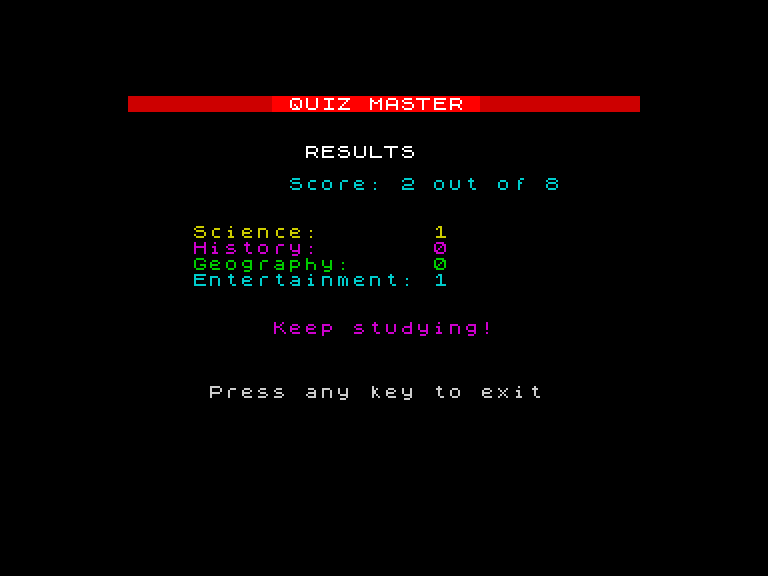
The animated score count-up ticks from 0 to the final total, each step with a rising tone. Then the category breakdown shows where the points came from — colour-coded to match the question headers.
Four rating tiers:
| Score | Message | Colour |
|---|---|---|
| 8 | Genius! | Green (4) |
| 6-7 | Well done! | Yellow (6) |
| 4-5 | Not bad! | Cyan (5) |
| 0-3 | Keep studying! | Magenta (3) |
RESTORE — Playing Again
RESTORE rewinds the DATA pointer to the first DATA statement. Without it, trying to READ after the quiz ends gives an “Out of DATA” error — the pointer has passed the last item. After RESTORE, the next READ starts from the beginning.
For a replay loop:
INPUT "Play again? (y/n) "; a$
IF a$ = "y" THEN RESTORE: LET sc = 0: FOR i = 1 TO 4: LET s(i) = 0: NEXT i: GO TO 44
RESTORE rewinds the questions. The score and category array are reset manually — arrays keep their values unless you clear them.
Accepting Uppercase
Line 53 handles case: IF k$ >= "A" AND k$ <= "Z" THEN LET k$ = CHR$ (CODE k$ + 32). If the player presses Shift+A (uppercase “A”), the code converts it to lowercase “a” before checking. The game accepts both — no silent failures.
The Complete Program
   1 REM Quiz Master v2
   5 BORDER 0: PAPER 0: INK 7: CLS
  10 REM === Title screen ===
  12 FOR i=0 TO 31
  14 PRINT AT 0,i; PAPER 2;" "
  16 NEXT i
  18 PRINT AT 0,9; PAPER 2; INK 7; BRIGHT 1;" QUIZ MASTER "
  20 PRINT AT 4,3; INK 5;"Answer questions from four"
  22 PRINT AT 5,3; INK 5;"categories."
  24 PRINT AT 7,3; INK 7;"Press A, B, C or D to answer."
  26 PRINT AT 10,6; INK 6;"Science"
  28 PRINT AT 10,18; INK 3;"History"
  30 PRINT AT 12,6; INK 4;"Geography"
  32 PRINT AT 12,18; INK 5;"Entertainment"
  34 PRINT AT 16,3; INK 7;"8 questions. How many can"
  35 PRINT AT 17,3; INK 7;"you get right?"
  36 PRINT AT 21,5; INK 7; FLASH 1;"Press any key to start"; FLASH 0
  38 PAUSE 0
  40 DIM s(4)
  42 LET sc=0
  44 FOR n=1 TO 8
  46 READ p,q$,a$,b$,c$,d$,r$
  48 GO SUB 300
  50 REM === Wait for A/B/C/D ===
  52 LET k$=INKEY$
  53 IF k$>="A" AND k$<="Z" THEN LET k$=CHR$ (CODE k$+32)
  54 IF k$<>"a" AND k$<>"b" AND k$<>"c" AND k$<>"d" THEN GO TO 52
  56 IF k$=r$ THEN GO TO 100
  58 REM === Wrong ===
  60 BORDER 2
  62 GO SUB 250
  64 PRINT AT y,4; INK 2; BRIGHT 1;">"
  66 REM === Show correct in green ===
  68 LET k$=r$
  70 GO SUB 250
  72 PRINT AT y,4; INK 4; BRIGHT 1;">"
  74 BEEP 0.3,-5
  76 BORDER 0
  78 PAUSE 75
  80 GO TO 140
 100 REM === Correct ===
 102 LET sc=sc+1
 104 LET s(p)=s(p)+1
 106 BORDER 4
 108 GO SUB 250
 110 PRINT AT y,4; INK 4; BRIGHT 1;">"
 112 BEEP 0.1,12: BEEP 0.1,16: BEEP 0.15,19
 114 BORDER 0
 116 PAUSE 50
 140 NEXT n
 150 REM === Results ===
 152 CLS
 154 FOR i=0 TO 31
 156 PRINT AT 0,i; PAPER 2;" "
 158 NEXT i
 160 PRINT AT 0,9; PAPER 2; INK 7; BRIGHT 1;" QUIZ MASTER "
 162 PRINT AT 3,11; INK 7; BRIGHT 1;"RESULTS"
 164 REM === Animated score ===
 166 FOR i=0 TO sc
 168 PRINT AT 5,10; INK 5;"Score: ";i;" out of 8  "
 170 IF i<sc THEN BEEP 0.06,10+i*2
 172 NEXT i
 174 BEEP 0.2,24
 176 REM === Category breakdown ===
 178 PRINT AT 8,6; INK 6;"Science:        ";s(1)
 180 PRINT AT 9,6; INK 3;"History:        ";s(2)
 182 PRINT AT 10,6; INK 4;"Geography:      ";s(3)
 184 PRINT AT 11,6; INK 5;"Entertainment:  ";s(4)
 186 REM === Rating ===
 188 IF sc=8 THEN LET m$="Genius!": INK 4: BRIGHT 1: GO TO 198
 190 IF sc>=6 THEN LET m$="Well done!": INK 6: BRIGHT 1: GO TO 198
 192 IF sc>=4 THEN LET m$="Not bad!": INK 5: GO TO 198
 194 LET m$="Keep studying!": INK 3
 198 PRINT AT 14,(32-LEN m$)/2;m$
 200 BRIGHT 0
 202 PRINT AT 18,5; INK 7;"Press any key to exit"
 204 PAUSE 0
 206 BORDER 7: PAPER 7: INK 0: CLS
 208 STOP
 250 REM === Map k$ to row ===
 252 IF k$="a" THEN LET y=10
 254 IF k$="b" THEN LET y=12
 256 IF k$="c" THEN LET y=14
 258 IF k$="d" THEN LET y=16
 260 RETURN
 300 REM === Draw question card ===
 302 CLS
 304 FOR i=0 TO 31
 306 PRINT AT 0,i; PAPER 2;" "
 308 NEXT i
 310 PRINT AT 0,1; PAPER 2; INK 7;"Q";n;" of 8"
 312 PRINT AT 0,22; PAPER 2; INK 6;"Score: ";sc
 314 REM === Category label ===
 316 LET ci=6
 318 IF p=1 THEN LET m$="Science"
 320 IF p=2 THEN LET m$="History": LET ci=3
 322 IF p=3 THEN LET m$="Geography": LET ci=4
 324 IF p=4 THEN LET m$="Entertainment": LET ci=5
 326 PRINT AT 3,(32-LEN m$)/2; INK ci; BRIGHT 1;m$
 328 REM === Question ===
 330 PRINT AT 5,4; INK 7;q$
 332 REM === Options ===
 334 PRINT AT 10,6; INK 7;"A: ";a$
 336 PRINT AT 12,6; INK 7;"B: ";b$
 338 PRINT AT 14,6; INK 7;"C: ";c$
 340 PRINT AT 16,6; INK 7;"D: ";d$
 342 PRINT AT 20,4; INK 5;"Press A, B, C or D"
 344 RETURN
 500 DATA 1,"Closest planet to the Sun?","Mercury","Venus","Earth","Mars","a"
 510 DATA 3,"Longest river in the world?","Amazon","Thames","Nile","Danube","c"
 520 DATA 2,"Who built the pyramids?","Romans","Egyptians","Vikings","Greeks","b"
 530 DATA 4,"Instrument with 88 keys?","Guitar","Drums","Violin","Piano","d"
 540 DATA 1,"How many legs has a spider?","Six","Eight","Ten","Four","b"
 550 DATA 3,"Capital of France?","London","Berlin","Madrid","Paris","d"
 560 DATA 2,"When did World War 2 end?","1918","1939","1945","1960","c"
 570 DATA 4,"Who painted the Mona Lisa?","Picasso","Da Vinci","Van Gogh","Monet","b"
The structure is the most organised program you’ve written:
- Title screen (lines 5-38) — categories, instructions, wait for key
- Initialisation (lines 40-42) — DIM array, reset score
- Game loop (lines 44-140) — READ, GO SUB to draw, INKEY$ input, feedback
- Subroutines (lines 250-344) — key mapping, question card drawing
- Results (lines 150-208) — animated count-up, category breakdown, rating, cleanup
- DATA (lines 500-570) — eight questions from four categories
That’s 90 lines of BASIC — and the most polished Foundations game. The code is structured with subroutines, the data is separate from the logic, and the visual presentation uses everything you’ve learnt: colour, sound, screen layout, and animation.
Write Your Own Questions
The best thing about this game is that changing the content doesn’t require changing any code. Edit lines 500-570 with your own questions. Keep them under 28 characters. Make sure the category index (1-4) matches the category you want. Change the correct answer letter. Run it. You’ve made a custom quiz.
Try This
More questions. Add lines 580-590 with two more questions and change the loop to FOR n = 1 TO 10. The results screen already handles any score.
Difficulty levels. Store easy questions at lines 500-570 and hard questions at lines 600-670. Ask the player to choose, then RESTORE 500 or RESTORE 600.
Timed answers. Replace the INKEY$ loop with a countdown: FOR t = 1 TO 200: LET k$ = INKEY$: IF k$ = "a" OR k$ = "b" OR k$ = "c" OR k$ = "d" THEN GO TO 56: NEXT t. If the loop ends without a valid key, count it as wrong.
What You’ve Learnt
- Title screens — category grid, instructions, PAUSE 0
- RESTORE — rewinds the DATA pointer for replay
- Animated score — FOR loop counting up with BEEP
- Rating tiers — chained IF statements with colour-coded messages
- Program structure — title, init, game loop, subroutines, results, data
What’s Next
You’ve completed six games and learnt the full Sinclair BASIC toolkit: variables, strings, arrays, loops, decisions, input, colour, sound, data, subroutines, and RESTORE. Your programs look like real Spectrum software.
In Game 7, everything changes. The Skills phase begins — and with it, real-time games. PEEK timing for smooth movement. ATTR collision for reading the screen as data. CHR$ for the full character set. The games get bigger, faster, and more complex. You’re ready.