Understanding ATTR
Learn how the Spectrum stores colour information and how to read it.
ATTR is the key to collision detection in Spectrum BASIC. Before using it properly, you need to understand what it returns and why.
The Program
10 CLS
20 PRINT "ATTR reads the colour of a cell"
30 PRINT
40 INK 2: PRINT AT 5, 5; "RED": INK 0
50 INK 4: PRINT AT 5, 15; "GREEN": INK 0
60 INK 6: PRINT AT 5, 25; "YELLOW": INK 0
70 PRINT
80 PRINT AT 8, 0; "ATTR(5,5) = "; ATTR (5, 5)
90 PRINT AT 9, 0; "ATTR(5,15) = "; ATTR (5, 15)
100 PRINT AT 10, 0; "ATTR(5,25) = "; ATTR (5, 25)
110 PRINT AT 11, 0; "ATTR(5,10) = "; ATTR (5, 10)
120 PRINT
130 PRINT AT 14, 0; "INK + 8*PAPER + 64*BRIGHT"
140 PRINT AT 15, 0; "Red = 2+8*7 = 58"
150 PRINT AT 16, 0; "Green = 4+8*7 = 60"
160 PRINT AT 17, 0; "Yellow = 6+8*7 = 62"
170 PRINT AT 18, 0; "White on white = 7+8*7 = 63"
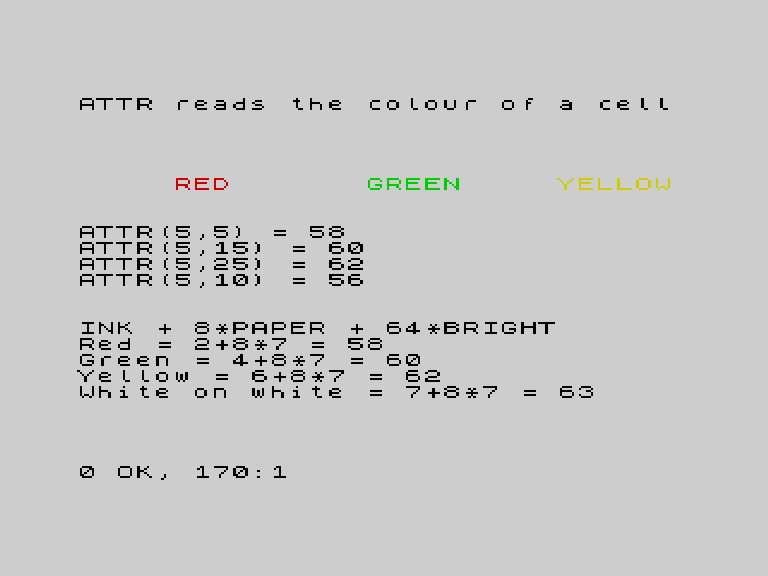
The Formula
Every character cell on the Spectrum has a colour attribute stored as a single number:
ATTR = INK + 8 * PAPER + 64 * BRIGHTWith the default white paper (PAPER 7) and no bright:
| Colour | INK value | ATTR value |
|---|---|---|
| Black on white | 0 | 0 + 56 = 56 |
| Red on white | 2 | 2 + 56 = 58 |
| Green on white | 4 | 4 + 56 = 60 |
| Yellow on white | 6 | 6 + 56 = 62 |
| White on white | 7 | 7 + 56 = 63 |
An empty cell (white paper, no ink used) has ATTR 63 — white on white.
Why This Matters
When you place a yellow coin with INK 6: PRINT AT y, x; "*", that cell’s ATTR becomes 62 (yellow ink on white paper). When the player moves onto that cell, ATTR(r, c) returns 62 — and you know it’s a coin.
Different colours mean different things:
- Yellow (62) — coin
- Red (58) — hazard
- Cyan (61) — wall
The screen becomes your game map. No arrays needed.
ATTR on Empty Cells
ATTR(5, 10) in the demo returns 56 — that’s an empty cell where nothing was printed. The paper is white (7), ink is black (0): 0 + 8*7 = 56. Not 0, not 63 — the value depends on whatever PAPER and INK were set when the cell was last written (or the defaults).
Try This
BRIGHT test. Add BRIGHT 1: INK 2: PRINT AT 7, 5; "BRIGHT RED" and check its ATTR. It should be 2 + 56 + 64 = 122.
Your own colours. Print text in all 8 ink colours and check each ATTR value.
What You’ve Learnt
- ATTR formula —
INK + 8 * PAPER + 64 * BRIGHT - Default values — empty cells have ATTR based on current PAPER/INK
- Colour as data — each colour represents a different game object