Moving Hazard
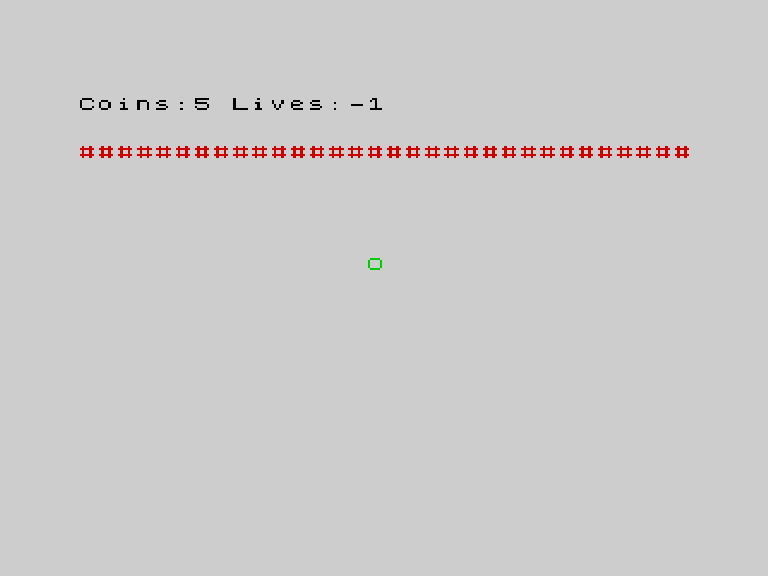
Add a hazard bar that moves up and down the screen automatically.
Static hazards are predictable — you learn where they are and avoid them. A moving hazard keeps the player on their toes.
The Program
10 CLS
20 LET r = 10
30 LET c = 15
40 LET n = 0
50 LET v = 3
60 REM hazard position and direction
70 LET b = 5
80 LET d = 1
90 REM place coins
100 FOR i = 1 TO 5
110 LET y = INT (RND * 19) + 2
120 LET x = INT (RND * 32)
130 INK 6: PRINT AT y, x; "*": INK 0
140 NEXT i
150 LET f = 5
160 GO SUB 700
170 REM game loop
180 GO SUB 800
190 REM move hazard
200 PRINT AT b, 0; "                                "
210 LET b = b + d
220 IF b > 20 OR b < 2 THEN LET d = -d: LET b = b + d
230 INK 2: PRINT AT b, 0; "################################": INK 0
240 REM check hazard collision
250 IF r = b THEN GO SUB 900
260 LET k$ = INKEY$
270 IF k$ = "" THEN GO TO 310
280 PRINT AT r, c; " "
290 IF k$ = "q" AND r > 1 THEN LET r = r - 1
295 IF k$ = "a" AND r < 20 THEN LET r = r + 1
300 IF k$ = "o" AND c > 0 THEN LET c = c - 1
305 IF k$ = "p" AND c < 31 THEN LET c = c + 1
310 IF ATTR (r, c) = 49 THEN LET n = n + 1: LET f = f - 1: BEEP 0.05, 20: GO SUB 700
320 IF r = b THEN GO SUB 900
330 GO SUB 800
340 IF v = 0 THEN GO TO 400
350 GO TO 170
400 CLS
410 PRINT AT 10, 10; "GAME OVER"
420 PRINT AT 12, 8; "Coins: "; n
430 BEEP 0.5, -10
440 STOP
700 REM === draw HUD ===
710 PRINT AT 0, 0; "Coins:"; f; " Lives:"; v; "  "
720 RETURN
800 REM === draw player ===
810 INK 4: PRINT AT r, c; "O": INK 0
820 RETURN
900 REM === lose life ===
910 LET v = v - 1
920 BEEP 0.2, -5
930 GO SUB 700
940 LET r = 10: LET c = 15
950 RETURN
How It Moves
Variable b is the hazard’s row. Variable d is its direction: 1 means down, -1 means up.
On each loop iteration:
- Erase — print spaces across the old row (line 200)
- Move —
LET b = b + dshifts the row by the direction (line 210) - Bounce — if it hits the top or bottom edge, reverse direction (line 220)
- Draw — print red
#characters across the new row (line 230)
This is the same erase-move-draw pattern the player uses, scaled to a full row.
Collision Check
250 IF r = b THEN GO SUB 900If the player’s row matches the hazard’s row, they lose a life. This check happens on every frame, so the hazard is always dangerous — not just when the player moves.
A second check at line 320 catches the case where the hazard moves onto the player (rather than the player moving onto the hazard).
Direction as a Number
Using 1 and -1 for direction is elegant. Adding the direction to the position moves it in the right direction automatically. Reversing direction is just LET d = -d. No IF statements needed for movement — only for bouncing.
Try This
Faster hazard. Move the hazard 2 rows per frame: LET b = b + d * 2. It zooms across the screen.
Partial bar. Instead of filling the whole row, print only 10 characters: PRINT AT b, 10; "##########". The player can dodge around the ends.
What You’ve Learnt
- Animated objects — erase, move, draw on each loop iteration
- Direction variable — 1/-1 for up/down or left/right
- Bouncing — reverse direction at boundaries
- Two-way collision — check when the player moves AND when the hazard moves