Colour Lives Somewhere Else
Every character cell has a second byte that nobody mentioned yet: its colour, stored in a separate block of memory at 55296. Set the border and background too, and the screen finally has the colours you choose.
Last unit you wrote characters straight into screen memory at 1024, and they all came out the same light blue. That colour wasn’t a property of the character — it lived in a separate block of memory. The C64 keeps the shape of each cell at 1024 and its colour at a different address entirely: 55296. Two bytes describe one cell, in two different places. This unit writes to the colour block, and to the two registers that set the border and the background — the three pokes behind every coloured C64 screen.
Milestone 1 — the border and the background
The screen’s outer frame and its backdrop are each controlled by a single memory address:
the border is 53280, the background is 53281. Poke a colour number (0–15) into
each:
10 PRINT CHR$(147)
20 POKE 53280,2
30 POKE 53281,0
Line 10 clears the screen, line 20 sets the border to 2 (red), line 30 sets the
background to 0 (black). RUN it:

Those two numbers — 53280 and 53281 — are worth remembering. Almost every C64 program
sets them in its first few lines to choose the screen it runs on.
Milestone 2 — the colour cell behind a character
Each cell at 1024 has a matching colour cell at 55296, in the same order: the colour of
cell 1024 is at 55296, of 1024+1 at 55296+1, and so on. To place a visible
character you write two bytes — the screen code into screen memory, the colour into colour
memory:
10 PRINT CHR$(147)
20 POKE 53281,0
30 POKE 1024,1
40 POKE 55296,7
Line 30 pokes screen code 1 (the letter A) into the top-left cell; line 40 pokes colour
7 (yellow) into the matching colour cell. RUN it:

This is why a character sometimes came out invisible last unit: if its colour cell happens to match the background, the shape is there but you cannot see it. Set the colour and it appears.
Milestone 3 — all sixteen, side by side
Colour memory runs cell-for-cell alongside screen memory, so a loop can walk both at once —
the same +I reaches cell I in each block. Here we lay a solid block (screen code 160)
into the first sixteen cells and give each one a different colour, 0 through 15:
10 PRINT CHR$(147)
20 POKE 53281,0
30 FOR I=0 TO 15
40 POKE 1024+I,160
50 POKE 55296+I,I
60 NEXT I
POKE 1024+I, 160 fills the cell with a solid block; POKE 55296+I, I colours it with the
loop counter. RUN it to see the C64’s whole palette in a row:
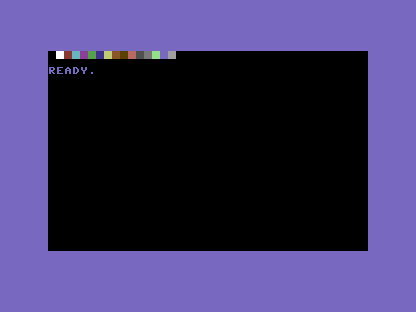
Sixteen is all you get: colour numbers run 0–15, and 0 is black. That first block
is there — it’s black on black, so it disappears. A reminder that on the C64 a colour is
only ever as visible as the background lets it be.
When it doesn’t work
- The character is there but invisible. Its colour cell matches the background. Poke a
contrasting colour into
55296 + (same offset). - You poked colour into screen memory by mistake. A colour number in screen memory shows as a character (a low screen code), not a colour. Colour goes to 55296, shape goes to 1024 — keep the two blocks straight.
?ILLEGAL QUANTITY ERROR. Colours are0–15only;16and up are rejected. The border and background registers take0–15too.- The whole screen flickered a colour and went back. You poked the border or background
inside a loop with no
NEXTvalue change, or pressedRUN/STOP— re-RUNit.
Before and after
You began with characters that were all one colour you didn’t choose, and finished setting the border, the background, and the colour of any individual cell. The idea underneath: the C64 stores a cell’s colour separately from its shape — shape at 1024, colour at 55296, frame and backdrop at 53280 and 53281. To draw in colour you write to two places.
Try this
- A two-colour name. Place your initials with screen codes at 1024, then give each a different colour at 55296.
- A coloured border line. Loop
Cfrom 0 to 39, poke screen code160along row 0, and poke a single colour into the matching colour cells. - Match the mood. Try a dark-blue background (
6) with a light-blue border (14) — the C64’s own default scheme — then a black-on-black screen and see everything vanish.
What you’ve learnt
- The border is at
53280, the background at53281— one colour byte each. - A cell’s colour lives separately from its shape, at 55296, in the same cell order.
- To show a character you write two bytes: the screen code at 1024, the colour at 55296.
- Colours are numbered 0–15;
0is black, and any cell that matches the background is invisible.
What’s next
The screen can now hold any shape in any colour — but it just sits there. In Unit 11 we
reach the SID chip at 54272 and make the C64 do the other thing it’s famous for: sound.