Mood in Colour
The Oracle should look like it feels something. Give each answer a mood — yes, no, maybe — and shift the colour to match before it prints. The player reads the feeling before the words.
A wise Oracle has moods. A gentle yes shouldn’t look the same as a flat no. So before the answer prints, sort it into a mood — yes, maybe, or no — and dress it in a colour to match.
10 PRINT CHR$(147)
20 DIM A$(8)
30 A$(1)="IT IS CERTAIN"
40 A$(2)="THE SIGNS POINT TO YES"
50 A$(3)="WITHOUT DOUBT"
60 A$(4)="ASK AGAIN LATER"
70 A$(5)="CANNOT FORESEE IT NOW"
80 A$(6)="DO NOT COUNT ON IT"
90 A$(7)="MY REPLY IS NO"
100 A$(8)="OUTLOOK NOT SO GOOD"
110 POKE 54296,15
120 INPUT "SPEAK, MORTAL";Q$
130 R=INT(RND(1)*8)+1
140 PRINT
150 GOSUB 300
160 CO=5
170 IF R>=4 AND R<=5 THEN CO=7
180 IF R>=6 THEN CO=2
190 POKE 53280,CO:POKE 646,CO
200 PRINT A$(R)
210 END
300 POKE 54273,20:POKE 54272,0
310 POKE 54277,0:POKE 54278,240
320 POKE 54276,17
330 FOR T=1 TO 800:NEXT T
340 POKE 54276,16
350 RETURN
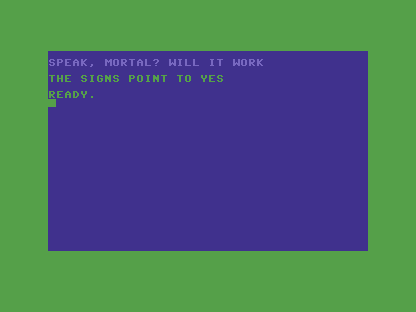
Lines 160–190 do the sorting. The answers are ordered by feeling — the first three are
yeses, the next two maybes, the rest noes — so the index R already tells you the mood.
CO=5 (green) is the default; IF R>=4 AND R<=5 THEN CO=7 makes the maybes yellow; IF R>=6 THEN CO=2 makes the noes red. Then POKE 53280,CO tints the border and POKE 646,CO sets the text colour for what prints next.
POKE 646 is the one to remember: it holds the colour the cursor writes in, so setting it
just before a PRINT colours that text. The player sees green or red before reading a
word — colour carrying meaning, not decoration. Make sure the colour and the words agree: a
cheerful green under a grim answer breaks the spell.
Try this
- Find the noes. Ask until you draw a red one (the answers from slot 6 on) and watch the whole screen turn cold.
- Your own palette. Swap green 5 for cyan 3, or red 2 for the angrier light-red 10. The mood is yours to set.
What’s next
The Oracle thinks, answers, and shows its mood — but it runs once and stops. In Unit 6 a loop turns it into something you consult: ask, answer, ask again, all in one sitting.