Place the Rover
Before the rover can move, it has to exist. Hold its position in two variables and draw it with two POKEs — a bright block in screen memory, its colour alongside. The whole game starts from this: the rover is just two numbers and two pokes.
Before a rover can be driven, it has to be somewhere. And on the C64, “somewhere on screen” is just a row and a column — two numbers. So start by holding the rover’s position in two variables and drawing it where they point.
10 POKE 53281,0
20 PRINT CHR$(147)
30 R=12:C=20
40 POKE 1024+R*40+C,160
50 POKE 55296+R*40+C,7
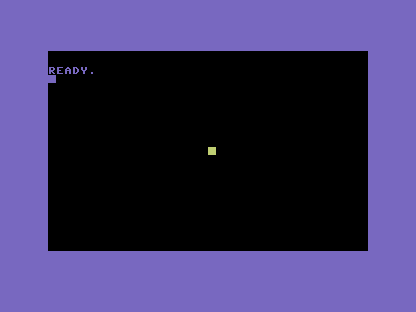
Two variables hold the rover: R for its row, C for its column, set on line 30 to the middle
of the screen. Line 40 draws it — POKE 1024 + R*40 + C, 160 puts a solid block into screen RAM
at that row and column, using the 1024 + R*40 + C address you met in the primer and used all
through Skyline and Tally. Line 50 sets its colour with the matching 55296 + R*40 + C in colour
RAM — yellow (7), bright against the black.
That’s the whole idea, and it’s worth pausing on: the rover is two numbers and two pokes. To
move it, you’ll change R or C and draw again. Everything in Rover — the driving, the walls,
the collisions — is built on this one foundation: a position you can change, and a block you can
redraw wherever it lands.
Try this
- Move it by hand. Change
RandCon line 30 to different values and run again. The rover appears wherever you point it — proof the position is just data. - Pick its look. Try colour
1(white) or2(red) on line 50, or a different character code than160on line 40. Choose a rover that reads instantly against black.
What’s next
The rover sits still because nothing changes R and C. In Unit 2 the joystick changes them
on every pass of a loop, and the rover drives wherever you push the stick.