Busy Lanes
The cart and the Land Rover join the tractor — three speeds, two directions, one data-driven mover, and a collision mask that watches every lane at once.
Now it’s a road.
A hay cart plods leftward along the bottom lane. The farmer’s Land Rover tears through the middle, also leftward, three times the cart’s speed. The tractor keeps its steady rightward row up top. Three vehicles, three rhythms, two directions — and suddenly crossing isn’t time one gap, it’s read three moving systems and find the moment they align. This is the skill the whole game advertised on its tin.
The engineering lesson is how little code that took.
The Display
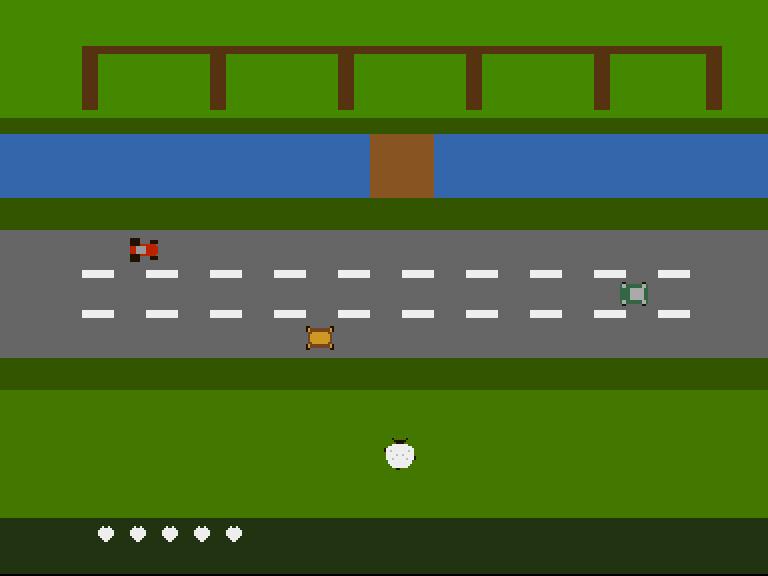
The full cast: tractor up top, Land Rover mid-lane, the hay cart trailing golden across the bottom. Five in hand. She hasn’t moved yet — and for the first time, you can feel why she’s hesitating.
Casting the Channels
Adding two vehicles forces the decision Unit 6 told you to sketch: which sprite number does each cast member get? The answer is shaped entirely by the collision hardware. CLXDAT’s sprite bits see four groups — 0/1, 2/3, 4/5, 6/7 — so each hazard takes the even sprite of its own pair:
- Tractor → sprite 2 (group 1: bit 9 against the sheep)
- Hay cart → sprite 4 (group 2: bit 10)
- Land Rover → sprite 6 (group 3: bit 11)
Two things fall out for free. Each vehicle gets its own palette (pairs share colours: 21–23 the tractor’s reds, 25–27 the cart’s wood-and-hay, 29–31 the Rover’s green) — no repaints, no sharing. And the sheep-versus-anything test becomes one mask instead of three branches:
            move.w  CLXDAT(a5),d0       ; Read once — this clears it
            and.w   #$0e00,d0           ; Bits 9/10/11: the sheep against
            beq.s   .safe               ;   ANY of the three vehicle groups
Whichever lane wins, the same squash path runs. (The capture proved the middle bit the honest way: a sheep parked in the Rover’s lane came home an icon lighter.)
One Mover, Three Vehicles
Unit 5’s drivetractor was a routine about the tractor. Multiply the traffic and you don’t multiply the routine — you turn the differences into data:
drivelanes:
            lea     vehtab,a2
            moveq   #3-1,d6             ; Three vehicles
.veh:
            move.l  (a2)+,a0            ; A0 = where this one's x lives
            move.w  (a2)+,d1            ; D1 = its speed (signed)
            move.w  (a0),d0
            add.w   d1,d0
            tst.w   d1
            bmi.s   .leftward
            cmp.w   #320,d0             ; Rightward: clear of the right edge?
            blt.s   .store
            move.w  #-16,d0             ; Re-enter from the left
            bra.s   .store
.leftward:
            cmp.w   #-16,d0             ; Leftward: clear of the left edge?
            bgt.s   .store
            move.w  #320,d0             ; Re-enter from the right
.store:
            move.w  d0,(a0)
            dbf     d6,.veh
            rts

vehtab:     dc.l    tractx
            dc.w    TRACTOR_SPEED
            dc.l    cartx
            dc.w    CART_SPEED
            dc.l    roverx
            dc.w    ROVER_SPEED
vehtab is the entire traffic system: each row says where this vehicle’s x lives and how fast it moves, with the sign carrying the direction. The loop adds, wraps off whichever edge the speed points at, stores. Adding a fourth vehicle to the game is now one table row, one updsprite line, one sprite poke — no new logic anywhere.
This is the same promotion the Copper bands and the flock strip already made: behaviour stays in one routine, identity moves into data. It’s the single most reusable habit in this whole track.
Designing a Road
The three rhythms aren’t arbitrary — each lane asks a different question:
- The cart (bottom, slow, leftward) is the gentle gatekeeper: the first lane she crosses, slow enough to read on your first try, but wide enough to punish standing still.
- The Rover (middle, fast, leftward) is the heart-rate: too quick to react to, so you must plan — note where it is before you commit to the cart.
- The tractor (top, steady, rightward) runs against the others, which quietly defeats the strategy of scanning one direction once.
Alternating directions and staggering speeds is the whole craft of crosser lane design — Frogger’s five lanes are exactly this idea, tuned. And it all stays deterministic: three loops, fixed speeds, learnable to the frame.
Experiment: Be the Traffic Engineer
- Swap the cart and Rover lanes — fast lane first. Count how many sheep your own design costs you.
CART_SPEED equ -2— the gentle gatekeeper stops being gentle. How slow can the slowest lane be before the game gets boring instead of kind?- Send all three the same way: every speed positive. Feel how much easier scanning becomes — and why real crossers almost never do it.
- Add a fourth vehicle yourself: another cart in the top lane, offset from the tractor (
dc.l cart2x+ speed invehtab, an x variable, a row inupdsprite, a sprite-3 poke — it can share the cart’s data and palette as the odd sprite of pair 2/3… or can it? Check which collision bit it would fire, and whether you mind).
The Complete Code
;──────────────────────────────────────────────────────────────
; FLOCK - A sheep-crossing arcade game for the Commodore Amiga
; Unit 8: Busy Lanes
;
; The lane fills up. A hay cart plods leftward along the
; bottom, the farmer's Land Rover tears through the middle,
; the tractor keeps its row up top — three speeds, two
; directions, one mover: each vehicle is a row in a table,
; and the lanes become something you READ.
;──────────────────────────────────────────────────────────────
;══════════════════════════════════════════════════════════════
; TWEAKABLE VALUES — Change these and see what happens!
;══════════════════════════════════════════════════════════════
; Colours are $0RGB (4 bits per component, values 0-F)
COLOUR_FOLD_GRASS equ $0480 ; The fold's pasture
COLOUR_HEDGE equ $0350 ; Hedgerow between fold and stream
COLOUR_WATER equ $036A ; The stream
COLOUR_BANK equ $0350 ; Grassy bank below the stream
COLOUR_LANE equ $0666 ; The lane's tarmac
COLOUR_VERGE equ $0350 ; Verge below the lane
COLOUR_FIELD equ $0470 ; The field where the flock waits
COLOUR_FENCE equ $0531 ; Pen walls (bitplane, fold band)
COLOUR_WOOD equ $0852 ; The footbridge (bitplane, stream band)
COLOUR_DASH equ $0EEE ; Lane markings (bitplane, lane band)
COLOUR_TUFT equ $0360 ; Spare (bitplane, grass bands)
COLOUR_WOOL equ $0EEE ; The sheep's fleece (sprite colour 1)
COLOUR_FACE equ $0210 ; Her face, ears and tail (sprite colour 2)
COLOUR_SHADE equ $0BBB ; Fleece shading (sprite colour 3)
COLOUR_TRACTOR equ $0B20 ; The tractor's bodywork (sprite colour 1)
COLOUR_TYRE equ $0210 ; Wheels and trim (sprite colour 2)
COLOUR_CAB equ $0999 ; The cab roof (sprite colour 3)
COLOUR_WOODWORK equ $0742 ; The hay cart's bed (sprites 4-5)
COLOUR_HAY equ $0C92 ; Its heaped load
COLOUR_ROVER equ $0364 ; The Land Rover's paint (sprites 6-7)
COLOUR_ROOF equ $0AAA ; Its roof panel
; Where each band begins (screen row 0-255, top to bottom)
ROW_HEDGE equ 40
ROW_STREAM equ 48
ROW_BANK equ 80
ROW_LANE equ 96
ROW_VERGE equ 160
ROW_FIELD equ 176
; Where the sheep starts, and how she moves
SHEEP_X equ 152
SHEEP_Y equ 200
STEP equ 8 ; Pixels per hop
COOLDOWN equ 6 ; Frames between hops
; The traffic: three lanes, three rhythms
TRACTOR_Y equ 98 ; Top lane
TRACTOR_SPEED equ 2 ; Steady, rightward
ROVER_Y equ 120 ; Middle lane
ROVER_SPEED equ -3 ; Fast, leftward
CART_Y equ 142 ; Bottom lane — crossed first
CART_SPEED equ -1 ; Plodding, leftward
; How long the world stops when a sheep is lost
SQUASH_BEAT equ 25 ; Frames of stillness
; The flock
FLOCK_SIZE equ 5 ; Sheep in hand at the start
; The HUD strip at the foot of the screen
ROW_HUD equ 240
COLOUR_HUD equ $0231 ; The strip itself
COLOUR_ICON equ $0EEE ; Sheep icons (bitplane, HUD band)
;══════════════════════════════════════════════════════════════
; HARDWARE REGISTERS
;══════════════════════════════════════════════════════════════
CUSTOM equ $dff000
DMACON equ $096 ; DMA control (write)
INTENA equ $09a ; Interrupt enable (write)
INTREQ equ $09c ; Interrupt request (write)
COP1LC equ $080 ; Copper list pointer
COPJMP1 equ $088 ; Copper restart strobe
VPOSR equ $004 ; Beam position
JOY1DAT equ $00c ; Joystick, control port 2
CLXDAT equ $00e ; Collision data (read clears it!)
CLXCON equ $098 ; Collision control
BPLCON0 equ $100 ; Bitplane control
BPLCON1 equ $102 ; Scroll
BPLCON2 equ $104 ; Priority
BPL1MOD equ $108 ; Odd plane modulo
DDFSTRT equ $092 ; Display data fetch start
DDFSTOP equ $094 ; Display data fetch stop
DIWSTRT equ $08e ; Display window start
DIWSTOP equ $090 ; Display window stop
BPL1PTH equ $0e0 ; Bitplane 1 pointer (high)
BPL1PTL equ $0e2 ; Bitplane 1 pointer (low)
SPR0PTH equ $120 ; Sprite 0 pointer (high)
COLOR00 equ $180 ; Background colour
COLOR01 equ $182 ; Bitplane colour 1
COLOR17 equ $1a2 ; Sprite 0/1 colour 1
COLOR18 equ $1a4 ; Sprite 0/1 colour 2
COLOR19 equ $1a6 ; Sprite 0/1 colour 3
COLOR21 equ $1aa ; Sprite 2/3 colour 1
COLOR22 equ $1ac ; Sprite 2/3 colour 2
COLOR23 equ $1ae ; Sprite 2/3 colour 3
COLOR25 equ $1b2 ; Sprite 4/5 colour 1
COLOR26 equ $1b4 ; Sprite 4/5 colour 2
COLOR27 equ $1b6 ; Sprite 4/5 colour 3
COLOR29 equ $1ba ; Sprite 6/7 colour 1
COLOR30 equ $1bc ; Sprite 6/7 colour 2
COLOR31 equ $1be ; Sprite 6/7 colour 3
ROW_BYTES equ 40 ; 320 pixels / 8
;══════════════════════════════════════════════════════════════
; CODE (Chip RAM — the Copper, planes and sprites live here)
;══════════════════════════════════════════════════════════════
section code,code_c
start:
lea CUSTOM,a5 ; A5 = custom chip base ($DFF000)
; --- Take over the machine ---
move.w #$7fff,INTENA(a5) ; Disable all interrupts
move.w #$7fff,INTREQ(a5) ; Clear pending interrupts
move.w #$7fff,DMACON(a5) ; Disable all DMA
; --- Point the Copper's bitplane MOVEs at our plane ---
lea plane,a0
move.l a0,d0
lea copbpl,a1
move.w d0,6(a1) ; Low word into the BPL1PTL move
swap d0
move.w d0,2(a1) ; High word into the BPL1PTH move
; --- Point sprite 0 at the sheep, the rest at nothing ---
lea copsprites,a1 ; Eight pointer pairs in the list
lea sheep0,a0
move.l a0,d0
move.w d0,6(a1) ; Sprite 0 low word
swap d0
move.w d0,2(a1) ; Sprite 0 high word
lea nullspr,a0 ; Sprites 1-7: an empty sprite
move.l a0,d0
moveq #7-1,d6
.nulls:
lea 8(a1),a1 ; Next pointer pair in the list
move.w d0,6(a1)
swap d0
move.w d0,2(a1)
swap d0
dbf d6,.nulls
; --- ...except the traffic: sprites 2, 4 and 6.
; Each vehicle gets the EVEN sprite of its own pair, so
; each lives in its own collision group: tractor in 2/3
; (bit 9 against the sheep), cart in 4/5 (bit 10),
; Land Rover in 6/7 (bit 11) — and its own palette.
lea copsprites+16,a1 ; Sprite 2: the tractor
lea tractor,a0
move.l a0,d0
move.w d0,6(a1)
swap d0
move.w d0,2(a1)
lea copsprites+32,a1 ; Sprite 4: the hay cart
lea cart,a0
move.l a0,d0
move.w d0,6(a1)
swap d0
move.w d0,2(a1)
lea copsprites+48,a1 ; Sprite 6: the Land Rover
lea rover,a0
move.l a0,d0
move.w d0,6(a1)
swap d0
move.w d0,2(a1)
; --- Arm collision detection ---
move.w #$0000,CLXCON(a5) ; Even sprites always take part;
; we need nothing extra for 0-vs-2
move.w CLXDAT(a5),d0 ; Prime: reading clears the latches
; --- Draw the farmyard's detail into the bitplane ---
bsr drawfarmyard
bsr drawflock ; The flock in hand, bottom-left
; --- Place the sheep at her starting spot ---
bsr updsprite
; --- Install Copper list ---
lea copperlist,a0
move.l a0,COP1LC(a5)
move.w d0,COPJMP1(a5) ; Strobe: restart Copper from COP1LC
; --- Enable DMA ---
move.w #$83a0,DMACON(a5) ; SET + DMAEN + BPLEN + COPEN + SPREN
; === Main Loop ===
mainloop:
; Wait for vertical blank — in two phases. If we only
; waited FOR line 0, a fast loop body could finish while
; the beam is still ON line 0 and run again in the same
; frame. Wait to leave line 0 first, then to reach it.
move.l #$1ff00,d1 ; Mask: bits 8-16 of beam position
.vbleave:
move.l VPOSR(a5),d0 ; Read beam position
and.l d1,d0 ; Isolate line number
beq.s .vbleave ; Loop while still on line 0
.vbwait:
move.l VPOSR(a5),d0 ; Read beam position
and.l d1,d0 ; Isolate line number
bne.s .vbwait ; Loop until line 0 again
bsr steer ; Read the stick, maybe hop
bsr drivelanes ; All the traffic, one mover
bsr checksquash ; Did the lane win?
bsr updsprite ; Position is data: rewrite POS/CTL
bsr showframe ; Point sprite 0 at this step's image
; Check left mouse button (active low at CIAA)
btst #6,$bfe001 ; CIAA Port A, bit 6
bne.s mainloop ; Not pressed — keep going
; Button pressed — halt
.halt:
bra.s .halt
;══════════════════════════════════════════════════════════════
; STEER — read the joystick, hop the sheep
;
; JOY1DAT is control port 2. The decode is famously sideways:
; right = bit 1 left = bit 9
; down = bit 0 XOR bit 1 up = bit 8 XOR bit 9
; One XOR of the register with itself-shifted turns the two
; awkward pairs into plain testable bits.
;
; A hop is STEP pixels; COOLDOWN frames must pass between hops
; — that's what makes her *step* like a sheep rather than glide
; like a cursor.
;══════════════════════════════════════════════════════════════
steer:
tst.w gameover ; No flock, no shepherd
bne.s .frozen
tst.w squashtimer ; Mid squash-beat? She can't move
beq.s .alive
.frozen: rts
.alive:
tst.w cooldown
beq.s .ready
subq.w #1,cooldown ; Still mid-hop rhythm — wait
rts
.ready:
move.w JOY1DAT(a5),d0 ; Read the stick
move.w d0,d1
lsr.w #1,d1
eor.w d0,d1 ; Now: bit 0 = down, bit 8 = up
btst #8,d1 ; Up?
beq.s .notup
sub.w #STEP,sheepy
bra.s .stepped
.notup:
btst #0,d1 ; Down?
beq.s .notdown
add.w #STEP,sheepy
bra.s .stepped
.notdown:
btst #9,d0 ; Left?
beq.s .notleft
sub.w #STEP,sheepx
bra.s .stepped
.notleft:
btst #1,d0 ; Right?
beq.s .done ; Stick centred — no hop
add.w #STEP,sheepx
.stepped:
move.w #COOLDOWN,cooldown ; Set the hop rhythm
eori.w #1,curframe ; The other feet, next picture
; --- Hold her inside the farm ---
tst.w sheepx
bge.s .xlow
clr.w sheepx
.xlow: cmp.w #320-16,sheepx
ble.s .xhigh
move.w #320-16,sheepx
.xhigh: tst.w sheepy
bge.s .ylow
clr.w sheepy
.ylow: cmp.w #ROW_HUD-16,sheepy ; The HUD strip is not a pasture
ble.s .done
move.w #ROW_HUD-16,sheepy
.done:
rts
;══════════════════════════════════════════════════════════════
; DRIVELANES — advance all the traffic
;
; Unit 5's mover, made data. Each vehicle is a row in vehtab —
; WHERE its x lives, and how fast it moves (signed: negative
; drives leftward). One loop walks the table: add the speed,
; wrap off whichever edge the speed points at, store. Adding a
; vehicle to the game is adding a row to the table.
;══════════════════════════════════════════════════════════════
drivelanes:
lea vehtab,a2
moveq #3-1,d6 ; Three vehicles
.veh:
move.l (a2)+,a0 ; A0 = where this one's x lives
move.w (a2)+,d1 ; D1 = its speed (signed)
move.w (a0),d0
add.w d1,d0
tst.w d1
bmi.s .leftward
cmp.w #320,d0 ; Rightward: clear of the right edge?
blt.s .store
move.w #-16,d0 ; Re-enter from the left
bra.s .store
.leftward:
cmp.w #-16,d0 ; Leftward: clear of the left edge?
bgt.s .store
move.w #320,d0 ; Re-enter from the right
.store:
move.w d0,(a0)
dbf d6,.veh
rts
vehtab: dc.l tractx
dc.w TRACTOR_SPEED
dc.l cartx
dc.w CART_SPEED
dc.l roverx
dc.w ROVER_SPEED
;══════════════════════════════════════════════════════════════
; CHECKSQUASH — read the collision latches, judge the lane
;
; CLXDAT accumulates collisions as Denise draws, and READING
; IT CLEARS IT — so read it exactly once per frame and keep
; the copy. Bit 9 means "sprite 0 or 1 touched sprite 2 or 3":
; our sheep met our tractor, pixel against pixel. The hardware
; compared every overlapping pixel pair for us, for free.
;══════════════════════════════════════════════════════════════
checksquash:
tst.w squashtimer ; Already mid-beat?
beq.s .watch
subq.w #1,squashtimer ; Count the stillness down
bne.s .out
move.w CLXDAT(a5),d0 ; Beat over: flush the contact
.out: rts ; that accumulated during it
.watch:
tst.w gameover ; Nothing left to lose?
bne.s .safe
move.w CLXDAT(a5),d0 ; Read once — this clears it
and.w #$0e00,d0 ; Bits 9/10/11: the sheep against
beq.s .safe ; ANY of the three vehicle groups
; --- Squashed. One fewer in hand. ---
subq.w #1,lives
bsr drawflock ; Redraw the strip
tst.w lives
bgt.s .next ; Sheep remain — send the next one
move.w #1,gameover ; The field is empty
rts
.next:
move.w #SHEEP_X,sheepx ; The next sheep steps up
move.w #SHEEP_Y,sheepy
move.w #SQUASH_BEAT,squashtimer
.safe:
rts
;══════════════════════════════════════════════════════════════
; SETPOS — pack screen (x, y) into one sprite's POS/CTL
; a0 = sprite structure d0 = x d1 = y
;
; Unit 3's packing, generalised: any sprite, any position. Beam
; coordinates: VSTART = y + $2C, HSTART = x + $80 — and the
; ninth bits ride in CTL's low flags.
;══════════════════════════════════════════════════════════════
setpos:
add.w #$2c,d1 ; D1 = VSTART (beam line)
move.w d1,d2
add.w #16,d2 ; D2 = VSTOP (16 rows tall)
add.w #$80,d0 ; D0 = HSTART (beam position)
; POS = VSTART[7:0] << 8 | HSTART[8:1]
move.w d1,d3
lsl.w #8,d3
move.w d0,d4
lsr.w #1,d4
and.w #$ff,d4
or.w d4,d3
move.w d3,(a0) ; Write POS
; CTL = VSTOP[7:0] << 8 | V8START<<2 | V8STOP<<1 | H0START
move.w d2,d3
and.w #$ff,d3
lsl.w #8,d3
btst #8,d1 ; VSTART's ninth bit
beq.s .nv8s
or.w #%100,d3
.nv8s: btst #8,d2 ; VSTOP's ninth bit
beq.s .nv8e
or.w #%010,d3
.nv8e: btst #0,d0 ; HSTART's odd-pixel bit
beq.s .nh0
or.w #%001,d3
.nh0: move.w d3,2(a0) ; Write CTL
rts
;══════════════════════════════════════════════════════════════
; UPDSPRITE — place every sprite for this frame
;
; One routine owns every position write: the sheep (both step
; images, so whichever showframe picks she stands in the same
; place) and the tractor.
;══════════════════════════════════════════════════════════════
updsprite:
lea sheep0,a0
move.w sheepx,d0
move.w sheepy,d1
bsr setpos
lea sheep1,a0
move.w sheepx,d0
move.w sheepy,d1
bsr setpos
lea tractor,a0
move.w tractx,d0
move.w #TRACTOR_Y,d1
bsr setpos
lea cart,a0
move.w cartx,d0
move.w #CART_Y,d1
bsr setpos
lea rover,a0
move.w roverx,d0
move.w #ROVER_Y,d1
bsr setpos
rts
;══════════════════════════════════════════════════════════════
; SHOWFRAME — point sprite 0 at this step's image
;
; Animation is nothing but choosing which data the channel
; fetches. The Copper list's sprite 0 pointer words are
; rewritten with whichever picture curframe names — the same
; poke the startup code did, now done every frame.
;══════════════════════════════════════════════════════════════
showframe:
lea nullspr,a0 ; Game over: the field is empty
tst.w gameover
bne.s .picked
lea sheep0,a0
tst.w curframe
beq.s .picked
lea sheep1,a0
.picked:
move.l a0,d0
lea copsprites,a1
move.w d0,6(a1) ; Sprite 0 low word
swap d0
move.w d0,2(a1) ; Sprite 0 high word
rts
;══════════════════════════════════════════════════════════════
; DRAW THE FARMYARD (unchanged from Unit 1)
;══════════════════════════════════════════════════════════════
drawfarmyard:
; --- The fold's pens (rows 4-35) ---
moveq #0,d0 ; x = byte 0
moveq #4,d1 ; row 4
moveq #ROW_BYTES,d2 ; full width
moveq #4,d3 ; 4 rows thick
bsr rectfill
lea penposts,a2 ; Post positions (byte columns)
moveq #6-1,d6 ; Six posts
.posts:
moveq #0,d0
move.b (a2)+,d0 ; x = next post column
moveq #8,d1 ; rows 8-35
moveq #1,d2 ; one byte wide
moveq #28,d3
bsr rectfill
dbf d6,.posts
; --- The footbridge (rows 48-79, mid-stream) ---
moveq #18,d0 ; byte 18 = pixel 144
moveq #ROW_STREAM,d1
moveq #4,d2 ; 32 pixels wide
moveq #32,d3 ; the stream's full height
bsr rectfill
; --- Lane markings: two dashed lines (rows 116, 136) ---
moveq #116,d1
bsr dashline
move.w #136,d1
; falls through
;──────────────────────────────────────────────────────────────
; dashline — a row of dashes across the lane
; d1 = starting row. 2 bytes on, 2 bytes off, 4 rows thick.
;──────────────────────────────────────────────────────────────
dashline:
moveq #0,d0 ; x = byte 0
.dash:
move.w d1,-(sp) ; rectfill trashes d1
move.w d0,-(sp) ; ...and d0
moveq #2,d2 ; 2 bytes of dash
moveq #4,d3 ; 4 rows thick
bsr rectfill
move.w (sp)+,d0
move.w (sp)+,d1
addq.w #4,d0 ; next dash 4 bytes along
cmp.w #ROW_BYTES,d0
blt.s .dash
rts
;──────────────────────────────────────────────────────────────
; rectfill — set a byte-aligned rectangle of pixels
; d0 = x (bytes) d1 = row d2 = width (bytes) d3 = height
; Trashes d1, d4, d5, a0, a1.
;──────────────────────────────────────────────────────────────
rectfill:
lea plane,a0
move.w d1,d4
mulu #ROW_BYTES,d4 ; row * 40
add.w d0,d4 ; + x
adda.w d4,a0 ; A0 = first byte of the rectangle
move.w d3,d4 ; D4 = rows to go
.row:
movea.l a0,a1
move.w d2,d5 ; D5 = bytes to go
.col:
move.b #$ff,(a1)+ ; 8 pixels on
subq.w #1,d5
bne.s .col
lea ROW_BYTES(a0),a0 ; down one row
subq.w #1,d4
bne.s .row
rts
penposts: dc.b 0,8,16,24,32,39 ; Byte columns of the six posts
even
;══════════════════════════════════════════════════════════════
; DRAWFLOCK — the sheep in hand, as icons on the HUD strip
;
; One 8x8 glyph per sheep still in hand, drawn at the bottom
; left; the strip is cleared first so a lost sheep disappears.
; The icons are bitplane pixels — the HUD band's COLOR01 makes
; them white, the same per-band trick as the fence and dashes.
;══════════════════════════════════════════════════════════════
drawflock:
; Clear the icon area (a row of byte-rectangles)
moveq #1,d0 ; From byte 1
move.w #ROW_HUD+4,d1
moveq #12,d2 ; Room for the whole flock
moveq #8,d3
bsr rectclear
; One glyph per sheep in hand
move.w lives,d7
ble.s .none ; Empty hand, empty strip
moveq #1,d6 ; First icon at byte 1
.icons:
move.w d6,d0
move.w #ROW_HUD+4,d1
lea sheepicon,a2
bsr drawglyph
addq.w #2,d6 ; Two bytes along for the next
subq.w #1,d7
bne.s .icons
.none:
rts
;──────────────────────────────────────────────────────────────
; drawglyph — copy an 8-row, 1-byte-wide glyph into the plane
; d0 = x (bytes) d1 = row a2 = glyph (8 bytes)
; Trashes d1, d4, a0.
;──────────────────────────────────────────────────────────────
drawglyph:
lea plane,a0
move.w d1,d4
mulu #ROW_BYTES,d4
add.w d0,d4
adda.w d4,a0
moveq #8-1,d4
.row:
move.b (a2)+,(a0)
lea ROW_BYTES(a0),a0
dbf d4,.row
rts
;──────────────────────────────────────────────────────────────
; rectclear — rectfill's opposite: clear a byte-aligned block
; d0 = x (bytes) d1 = row d2 = width (bytes) d3 = height
; Trashes d1, d4, d5, a0, a1.
;──────────────────────────────────────────────────────────────
rectclear:
lea plane,a0
move.w d1,d4
mulu #ROW_BYTES,d4
add.w d0,d4
adda.w d4,a0
move.w d3,d4
.row:
movea.l a0,a1
move.w d2,d5
.col:
clr.b (a1)+
subq.w #1,d5
bne.s .col
lea ROW_BYTES(a0),a0
subq.w #1,d4
bne.s .row
rts
sheepicon: dc.b %00100100 ; A sheep, in eight bytes:
dc.b %01111110 ; ears up top,
dc.b %11111111 ; a fat woolly middle,
dc.b %11111111
dc.b %11111111
dc.b %01111110
dc.b %00111100 ; tapering to
dc.b %00011000 ; a little tail
even
;══════════════════════════════════════════════════════════════
; COPPER LIST — the farmyard, plus eight sprite pointers
;══════════════════════════════════════════════════════════════
copperlist:
; --- Display setup ---
dc.w DIWSTRT,$2c81 ; Window: top-left
dc.w DIWSTOP,$2cc1 ; Window: bottom-right
dc.w DDFSTRT,$0038 ; Fetch start (lores)
dc.w DDFSTOP,$00d0 ; Fetch stop
dc.w BPLCON0,$1200 ; 1 bitplane, colour burst on
dc.w BPLCON1,$0000 ; No scroll
dc.w BPLCON2,$0024 ; Sprites in front of playfield
dc.w BPL1MOD,$0000 ; No modulo — rows pack tight
copbpl:
dc.w BPL1PTH,$0000 ; Plane address, poked in
dc.w BPL1PTL,$0000 ; by the CPU at startup
copsprites:
dc.w SPR0PTH+0,$0000 ; Sprite 0: the sheep (poked in)
dc.w SPR0PTH+2,$0000
dc.w SPR0PTH+4,$0000 ; Sprites 1-7: the null sprite
dc.w SPR0PTH+6,$0000
dc.w SPR0PTH+8,$0000
dc.w SPR0PTH+10,$0000
dc.w SPR0PTH+12,$0000
dc.w SPR0PTH+14,$0000
dc.w SPR0PTH+16,$0000
dc.w SPR0PTH+18,$0000
dc.w SPR0PTH+20,$0000
dc.w SPR0PTH+22,$0000
dc.w SPR0PTH+24,$0000
dc.w SPR0PTH+26,$0000
dc.w SPR0PTH+28,$0000
dc.w SPR0PTH+30,$0000
; --- The sheep's colours (sprites 0-1 share 17-19) ---
dc.w COLOR17,COLOUR_WOOL
dc.w COLOR18,COLOUR_FACE
dc.w COLOR19,COLOUR_SHADE
; --- The tractor's colours (sprites 2-3 share 21-23) ---
dc.w COLOR21,COLOUR_TRACTOR
dc.w COLOR22,COLOUR_TYRE
dc.w COLOR23,COLOUR_CAB
; --- The hay cart's (sprites 4-5 share 25-27) ---
dc.w COLOR25,COLOUR_WOODWORK
dc.w COLOR26,COLOUR_TYRE
dc.w COLOR27,COLOUR_HAY
; --- The Land Rover's (sprites 6-7 share 29-31) ---
dc.w COLOR29,COLOUR_ROVER
dc.w COLOR30,COLOUR_TYRE
dc.w COLOR31,COLOUR_ROOF
; --- THE FOLD (from the top of the frame) ---
dc.w COLOR00,COLOUR_FOLD_GRASS
dc.w COLOR01,COLOUR_FENCE ; Pixels here are fence
; --- HEDGEROW (row 40) ---
dc.w $5401,$fffe ; Wait: line $2C+40 = $54
dc.w COLOR00,COLOUR_HEDGE
dc.w COLOR01,COLOUR_TUFT
; --- THE STREAM (row 48) ---
dc.w $5c01,$fffe ; Wait: line $2C+48 = $5C
dc.w COLOR00,COLOUR_WATER
dc.w COLOR01,COLOUR_WOOD ; Pixels here are bridge
; --- THE BANK (row 80) ---
dc.w $7c01,$fffe ; Wait: line $2C+80 = $7C
dc.w COLOR00,COLOUR_BANK
dc.w COLOR01,COLOUR_TUFT
; --- THE LANE (row 96) ---
dc.w $8c01,$fffe ; Wait: line $2C+96 = $8C
dc.w COLOR00,COLOUR_LANE
dc.w COLOR01,COLOUR_DASH ; Pixels here are markings
; --- THE VERGE (row 160) ---
dc.w $cc01,$fffe ; Wait: line $2C+160 = $CC
dc.w COLOR00,COLOUR_VERGE
dc.w COLOR01,COLOUR_TUFT
; --- THE FIELD (row 176, down to row 239) ---
dc.w $dc01,$fffe ; Wait: line $2C+176
dc.w COLOR00,COLOUR_FIELD
dc.w COLOR01,COLOUR_TUFT
; --- THE HUD STRIP (row 240) ---
; Row 240 is beam line $11C — past 255, which the Copper's
; 8-bit comparator can't name directly. The classic trick:
; wait for the very end of line 255, THEN wait for the low
; byte. The first wait carries you across the boundary.
dc.w $ffdf,$fffe ; To the end of line 255
dc.w $1c01,$fffe ; Then line $11C & $FF = $1C
dc.w COLOR00,COLOUR_HUD
dc.w COLOR01,COLOUR_ICON
; --- END OF COPPER LIST ---
dc.w $ffff,$fffe ; Wait for impossible position
;══════════════════════════════════════════════════════════════
; THE SHEEP — sprite 0, two step images
;
; Same sheep, two pictures. Step image 0: front-left and
; back-right feet planted. Step image 1: the other diagonal,
; tail swung the other way. Alternate them as she hops and
; she waddles. The control words are written by updsprite.
;══════════════════════════════════════════════════════════════
section data,data_c
sheep0:
dc.w 0 ; POS — written by updsprite
dc.w 0 ; CTL — written by updsprite
; plane A (fleece) plane B (face/shade/feet)
dc.w %0000000000000000,%0000100000010000 ; ..ears..
dc.w %0000000000000000,%0000011111100000 ; ..head..
dc.w %0000000000000000,%0000001111000000 ; ..face..
dc.w %0000111111110000,%0000000000000000 ; fleece ruff
dc.w %0011111111111100,%0000000000000000 ; shoulders
dc.w %0111111111111110,%1000000000000000 ; < front foot
dc.w %0111111111111110,%1001000000001000 ; < + flecks
dc.w %0111111111111110,%0000000000000000
dc.w %0111111111111110,%0000001001000000 ; shade flecks
dc.w %0111111111111110,%0000000000000001 ; back foot >
dc.w %0111111111111110,%0000100000010001 ; + flecks >
dc.w %0011111111111100,%0000000000000000 ; haunches
dc.w %0011111111111100,%0000000000000000
dc.w %0001111111111000,%0000000000000000
dc.w %0000111111110000,%0000000000000000 ; rump
dc.w %0000000000000000,%0000001100000000 ; tail, left
dc.w 0,0 ; End of sprite
sheep1:
dc.w 0 ; POS — written by updsprite
dc.w 0 ; CTL — written by updsprite
; plane A (fleece) plane B (face/shade/feet)
dc.w %0000000000000000,%0000100000010000 ; ..ears..
dc.w %0000000000000000,%0000011111100000 ; ..head..
dc.w %0000000000000000,%0000001111000000 ; ..face..
dc.w %0000111111110000,%0000000000000000 ; fleece ruff
dc.w %0011111111111100,%0000000000000000 ; shoulders
dc.w %0111111111111110,%0000000000000001 ; front foot >
dc.w %0111111111111110,%0001000000001001 ; + flecks >
dc.w %0111111111111110,%0000000000000000
dc.w %0111111111111110,%0000001001000000 ; shade flecks
dc.w %0111111111111110,%1000000000000000 ; < back foot
dc.w %0111111111111110,%1000100000010000 ; < + flecks
dc.w %0011111111111100,%0000000000000000 ; haunches
dc.w %0011111111111100,%0000000000000000
dc.w %0001111111111000,%0000000000000000
dc.w %0000111111110000,%0000000000000000 ; rump
dc.w %0000000000000000,%0000000011000000 ; tail, right
dc.w 0,0 ; End of sprite
;══════════════════════════════════════════════════════════════
; THE TRACTOR — sprite 2
;
; Big rear wheels on the left, small front wheels and the
; bonnet pointing right — the way it drives. Red bodywork,
; dark tyres, a grey cab roof. Its own palette: sprites 2-3
; share colours 21-23.
;══════════════════════════════════════════════════════════════
tractor:
dc.w 0 ; POS — written by updsprite
dc.w 0 ; CTL — written by updsprite
; plane A (body/cab) plane B (tyres/cab)
dc.w %0000000000000000,%0000000000000000
dc.w %0000000000000000,%0000000000000000
dc.w %0000000000000000,%0111110000000000 ; rear wheel
dc.w %0000000000000000,%0111110000011110 ; + front wheel
dc.w %0000000000000000,%0111110000011110
dc.w %0000001111111100,%0111110000000000 ; chassis
dc.w %0111111111111110,%0000111110000000 ; body + cab
dc.w %0111111111111110,%0000111110000000
dc.w %0111111111111110,%0000111110000000
dc.w %0111111111111110,%0000111110000000
dc.w %0000001111111100,%0111110000000000 ; chassis
dc.w %0000000000000000,%0111110000011110
dc.w %0000000000000000,%0111110000011110 ; + front wheel
dc.w %0000000000000000,%0111110000000000 ; rear wheel
dc.w %0000000000000000,%0000000000000000
dc.w %0000000000000000,%0000000000000000
dc.w 0,0 ; End of sprite
nullspr: dc.w 0,0 ; A sprite that displays nothing
dc.w 0,0
; --- The sheep's state ---
sheepx: dc.w SHEEP_X ; Screen x (0-304)
sheepy: dc.w SHEEP_Y ; Screen y (0-240)
cooldown: dc.w 0 ; Frames until the next hop
curframe: dc.w 0 ; Which step image: 0 or 1
;══════════════════════════════════════════════════════════════
; THE HAY CART — sprite 4
;
; Plods leftward: a wooden bed, a heaped load of hay, and
; wheels at the corners. Wood and hay get their own palette
; (sprites 4-5 share colours 25-27).
;══════════════════════════════════════════════════════════════
cart:
dc.w 0 ; POS — written by updsprite
dc.w 0 ; CTL — written by updsprite
; plane A (wood/hay) plane B (wheels/hay)
dc.w %0000000000000000,%0000000000000000
dc.w %0000000000000000,%0000000000000000
dc.w %0000000000000000,%0110000000000110 ; wheels
dc.w %0011111111111100,%0110000000000110
dc.w %0011111111111100,%0110000000000110
dc.w %0011111111111100,%0000111111110000 ; hay rises
dc.w %0011111111111100,%0001111111111000
dc.w %0011111111111100,%0001111111111000
dc.w %0011111111111100,%0001111111111000
dc.w %0011111111111100,%0001111111111000
dc.w %0011111111111100,%0000111111110000 ; hay falls
dc.w %0011111111111100,%0110000000000110
dc.w %0011111111111100,%0110000000000110 ; wheels
dc.w %0000000000000000,%0110000000000110
dc.w %0000000000000000,%0000000000000000
dc.w %0000000000000000,%0000000000000000
dc.w 0,0 ; End of sprite
;══════════════════════════════════════════════════════════════
; THE LAND ROVER — sprite 6
;
; The farmer's in a hurry. Boxy paintwork, a roof panel set
; back from the bonnet (it drives leftward, so the bonnet is
; the left end), wheels at the corners. Sprites 6-7 share
; colours 29-31.
;══════════════════════════════════════════════════════════════
rover:
dc.w 0 ; POS — written by updsprite
dc.w 0 ; CTL — written by updsprite
; plane A (paint/roof) plane B (wheels/roof)
dc.w %0000000000000000,%0000000000000000
dc.w %0000000000000000,%0000000000000000
dc.w %0000000000000000,%0011000000001100 ; wheels
dc.w %0111111111111110,%0011000000001100
dc.w %0111111111111110,%0011000000001100
dc.w %0111111111111110,%0000001111111000 ; roof panel,
dc.w %0111111111111110,%0000001111111000 ; set back
dc.w %0111111111111110,%0000001111111000 ; from the
dc.w %0111111111111110,%0000001111111000 ; bonnet
dc.w %0111111111111110,%0000001111111000
dc.w %0111111111111110,%0000001111111000
dc.w %0111111111111110,%0011000000001100
dc.w %0111111111111110,%0011000000001100 ; wheels
dc.w %0000000000000000,%0011000000001100
dc.w %0000000000000000,%0000000000000000
dc.w %0000000000000000,%0000000000000000
dc.w 0,0 ; End of sprite
; --- The traffic's state ---
tractx: dc.w -16 ; The tractor enters from the left
cartx: dc.w 300 ; The cart from the right
roverx: dc.w 160 ; The Rover mid-lane, flat out
; --- The squash beat ---
squashtimer: dc.w 0 ; Frames of stillness remaining
; --- The flock ---
lives: dc.w FLOCK_SIZE ; Sheep in hand
gameover: dc.w 0 ; 1 = the field is empty
;══════════════════════════════════════════════════════════════
; THE BITPLANE (Chip RAM)
;══════════════════════════════════════════════════════════════
plane: ds.b ROW_BYTES*256 ; One plane, 320 x 256
If It Doesn’t Work
- A vehicle is invisible? Its even-sprite pointer poke must come after the null loop parks 1–7, and its palette MOVEs must be in the Copper list — an unpoked sprite shows nothing; an unpainted one shows the wrong pair’s colours.
- One lane never kills? The mask:
$0E00covers bits 9, 10 and 11. If you cast a hazard on an odd sprite, it joined an existing group — its collisions land on that group’s bit, not a new one. - Leftward traffic teleports? The wrap test is direction-sensitive: leftward wraps at
-16back to320. One comparison the wrong way round and the cart pops instead of cruising. - Everything moves but at the wrong speeds?
vehtabrows aredc.l(pointer) thendc.w(speed) — misalign one row and every row after it reads garbage. Keep the table tight.
Try This
- Convoys. Give the bottom lane two carts half a screen apart (they can share sprite data — two table rows, two x variables, but think about the sprite budget and the collision group before you wire it).
- Rush hour. Make the Rover’s speed climb by 1 every time the flock loses a sheep (
checksquashalready knows). Difficulty that reacts — is it fairer or crueller than difficulty that escalates by level? - Count the budget. Sheep, tractor, cart, Rover — four sprites of eight, four groups of four. The stream’s bales and the duck are still to come. Sketch the Arc 2 casting now and find the squeeze. (The plan’s level tables exist for exactly this reason.)
What You’ve Learnt
- Casting by collision group — sprite numbers are a design decision: even sprites of separate pairs give each hazard its own collision bit and its own palette.
- The collision mask —
and.w #$0E00watches three lanes in one test; group bits compose. - Data-driven movers —
vehtabturns N vehicles into one routine plus N rows. Behaviour in code, identity in data. - Lane design — speeds, directions and order are the difficulty curve; alternation defeats one-glance scanning; determinism keeps it fair.
What’s Next
She can cross — with nerve and a plan — but there’s nowhere to arrive. In Unit 9 the fold opens: reach a pen and she’s safe for good, the next sheep steps up, and filling all five wins the level. The goal, at last.