The Blitter Moves It
Everything so far has been the 68000 alone. The Blitter is a chip built for one job — shifting blocks of graphics through memory far faster than the CPU can. You point it at a source, a destination, and a size, and it moves the block while the CPU does something else.
This is where the Amiga stops being a fast 68000 and starts being an Amiga. Until now every pixel was moved by the CPU, one instruction at a time. The custom chips change that — and the first of them is the Blitter.
The Blitter (block image transferrer) does one thing: it shifts rectangular blocks of memory from one place to another, at speed, on its own. Moving a 32×24 graphic with the CPU is hundreds of instructions; the Blitter does it with a handful of register writes and then runs while the 68000 is free to do other work. Every smooth-moving Amiga game leans on it — drawing, erasing, scrolling, all blitter work.
You set up a blit by filling in registers: where the source is, where the destination is, how the chip steps between rows, and — last — the size, which starts the blit. This unit copies one block to a second spot, on the one-bitplane display from Unit 6.
What you’ll see by the end
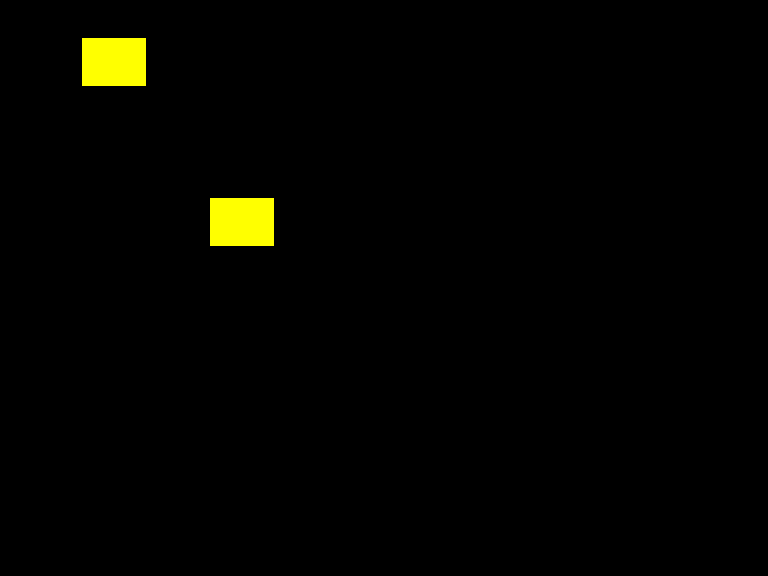
Two yellow blocks on black. The CPU drew exactly one — top-left, the same way as Unit 6. The second, lower and to the right, is that block copied by the Blitter in a single operation.
Set it up, then start it
;──────────────────────────────────────────────────────────────
; Meet the Machine (Amiga) - Unit 16: The Blitter Moves It
;
; The Blitter is a chip that shifts blocks of memory - graphics - far faster
; than the CPU. Here the CPU draws one block; the Blitter copies it somewhere
; else in a single operation. Two blocks appear; the CPU only ever drew one.
; (Display set-up is the same one-bitplane harness from Unit 6.)
;──────────────────────────────────────────────────────────────

CUSTOM      equ $dff000
DMACONR     equ $002            ; DMA status (read) - bit 14 = Blitter busy
DMACON      equ $096
INTENA      equ $09a
INTREQ      equ $09c
COP1LC      equ $080
COPJMP1     equ $088
DIWSTRT     equ $08e
DIWSTOP     equ $090
DDFSTRT     equ $092
DDFSTOP     equ $094
BLTCON0     equ $040
BLTCON1     equ $042
BLTAFWM     equ $044
BLTALWM     equ $046
BLTAPTH     equ $050
BLTDPTH     equ $054
BLTAMOD     equ $064
BLTDMOD     equ $066
BLTSIZE     equ $058
BPLCON0     equ $100
BPL1MOD     equ $108
BPL1PTH     equ $0e0
BPL1PTL     equ $0e2
COLOR00     equ $180
COLOR01     equ $182

ROWBYTES    equ 40                  ; 320 pixels / 8 = 40 bytes per row
BPHEIGHT    equ 256
BPSIZE      equ ROWBYTES*BPHEIGHT
BLTW        equ 2                   ; blit width in words (32 pixels)
BLTH        equ 24                  ; blit height in rows
DESTOFF     equ 80*ROWBYTES+8       ; dest: 80 rows down, 64 pixels across

            section code,code_c

start:
            lea     CUSTOM,a5
            move.w  #$7fff,INTENA(a5)
            move.w  #$7fff,INTREQ(a5)
            move.w  #$7fff,DMACON(a5)

            ; --- clear the bitplane to all 0 ---
            lea     bitplane,a0
            move.w  #(BPSIZE/4)-1,d0
.clr:       clr.l   (a0)+
            dbra    d0,.clr

            ; --- CPU draws ONE block, top-left: 32 wide, 24 rows ---
            lea     bitplane,a0
            move.w  #BLTH-1,d1
.row:       move.l  #$ffffffff,(a0)
            lea     ROWBYTES(a0),a0
            dbra    d1,.row

            ; --- point the display at the bitplane (patch the Copper) ---
            lea     bitplane,a0
            move.l  a0,d0
            swap    d0
            move.w  d0,bplhi
            swap    d0
            move.w  d0,bpllo

            lea     copperlist,a0
            move.l  a0,COP1LC(a5)
            move.w  d0,COPJMP1(a5)
            move.w  #$83c0,DMACON(a5)   ; DMA on: master + bitplane + Copper + Blitter

            ; ----------------------------------------------- YOUR CODE START
            ; --- the Blitter copies the block to a new spot ---
.waitblit:  btst    #6,DMACONR(a5)      ; wait until the Blitter is idle
            bne.s   .waitblit

            move.w  #$ffff,BLTAFWM(a5)  ; no masking of the first/last word
            move.w  #$ffff,BLTALWM(a5)
            move.w  #$09f0,BLTCON0(a5)  ; use A and D; D = A (a straight copy)
            move.w  #$0000,BLTCON1(a5)
            move.w  #ROWBYTES-BLTW*2,BLTAMOD(a5)   ; skip the rest of each source row
            move.w  #ROWBYTES-BLTW*2,BLTDMOD(a5)   ; ...and each dest row

            lea     bitplane,a0
            move.l  a0,BLTAPTH(a5)      ; source = the block the CPU drew
            lea     bitplane+DESTOFF,a0
            move.l  a0,BLTDPTH(a5)      ; dest = down and across

            move.w  #(BLTH<<6)!BLTW,BLTSIZE(a5)    ; height + width - this starts the blit
            ; ------------------------------------------------- YOUR CODE END

forever:
            bra.s   forever

;──────────────────────────────────────────────────────────────
; Copper list: one-bitplane 320x256 display.
;──────────────────────────────────────────────────────────────
copperlist:
            dc.w    DIWSTRT,$2c81
            dc.w    DIWSTOP,$2cc1
            dc.w    DDFSTRT,$0038
            dc.w    DDFSTOP,$00d0
            dc.w    BPLCON0,$1200
            dc.w    BPL1MOD,$0000
            dc.w    BPL1PTH
bplhi:      dc.w    $0000
            dc.w    BPL1PTL
bpllo:      dc.w    $0000
            dc.w    COLOR00,$0000       ; background black
            dc.w    COLOR01,$0ff0       ; lit pixels yellow
            dc.w    $ffff,$fffe

            section bss,bss_c
bitplane:   ds.b    BPSIZE
The copy is the block inside YOUR CODE:
.waitblit:  btst    #6,DMACONR(a5)      ; wait until the Blitter is idle
            bne.s   .waitblit

            move.w  #$ffff,BLTAFWM(a5)  ; no masking of the first/last word
            move.w  #$ffff,BLTALWM(a5)
            move.w  #$09f0,BLTCON0(a5)  ; use A and D; D = A (a straight copy)
            move.w  #$0000,BLTCON1(a5)
            move.w  #ROWBYTES-BLTW*2,BLTAMOD(a5)   ; skip the rest of each row
            move.w  #ROWBYTES-BLTW*2,BLTDMOD(a5)

            lea     bitplane,a0
            move.l  a0,BLTAPTH(a5)      ; source = the block the CPU drew
            lea     bitplane+DESTOFF,a0
            move.l  a0,BLTDPTH(a5)      ; dest = down and across

            move.w  #(BLTH<<6)!BLTW,BLTSIZE(a5)    ; this starts the blit
Read it as filling in a form. First wait for the Blitter to be free — btst #6,DMACONR tests the busy bit, and you never start a blit on top of a running one. Then the settings: BLTCON0 = $09f0 says “read channel A, write channel D, and make D a straight copy of A.” The modulo registers (BLTAMOD, BLTDMOD) tell the chip how many bytes to skip at the end of each row, so a 32-pixel-wide block steps correctly down a 320-pixel-wide screen. BLTAPT and BLTDPT are the source and destination addresses.
The last write does the work. BLTSIZE packs the height and width together, and writing it is what starts the blit. The chip then copies all 24 rows by itself; the CPU has already moved on to the forever loop. You described a move; the Blitter performed it.
Assemble, master, and run
makeTwo yellow blocks — one drawn, one blitted.
Try this: move the copy
DESTOFF decides where the copy lands — 80*ROWBYTES+8 means 80 rows down and 8 bytes (64 pixels) across. Change it: 40*ROWBYTES puts the copy straight below the original; +20 shifts it further right. The source never moves; only where the Blitter writes does.
Try this: many copies
Wrap the blit in a loop (Unit 12’s DBRA), bumping BLTDPT each pass so each copy lands in a new spot — remembering to wait for the Blitter between blits. One drawn block becomes a field of them, and the CPU barely lifts a finger. That is how a game paints a screen full of bricks or stars.
If it doesn’t work
- Only one block shows. The blit didn’t start —
BLTSIZEmust be the last Blitter register you write, because writing it is the trigger. - The copy is smeared or skewed. The modulo is wrong.
BLTAMOD/BLTDMODmust be the row width minus the blit width in bytes, so the chip lines up each row under the last. - The machine locks up. A blit was started while another was running. Always
btst #6,DMACONRand wait before setting up the next one.
What you’ve learnt
The Blitter moves rectangular blocks of graphics through memory far faster than the CPU. You fill in registers — BLTCON0 for the operation, the modulo registers for the row stride, BLTAPT/BLTDPT for source and destination — and writing BLTSIZE starts the blit. It runs on its own while the CPU works, and you wait on the busy bit before starting another. This is the engine behind Amiga graphics.
What’s next
The Blitter draws into the bitplane. The next chip puts an object on screen that isn’t in the bitplane at all — it floats over the top, moved by setting two numbers. Next — A Sprite of Your Own — the hardware sprite.